容器编排大王Kubernetes——helm包管理工具(8)
介绍helm是kubernetes集群中chart包的管理工具,相当于rpm包的管理工具为yum/install,而helm管理的是k8s部署业务的yaml文件一键安装部署可以做到,适用于打包给开发人员一键部署
·
一 helm简介
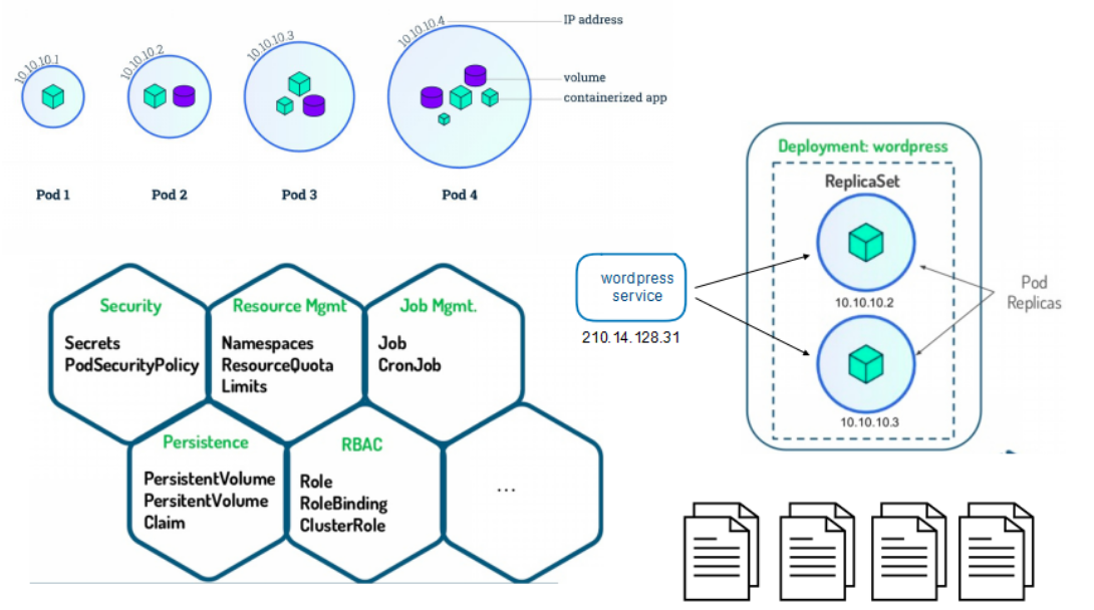
- Helm是Kubernetes 应用的包管理工具,主要用来管理 Charts,类似Linux系统的yum/dnf,charts就是rpm。
- Helm Chart是用来封装Kubernetes原生应用程序的一系列YAML文件。可以在你部署应用的时候自定义应用程序的一些 Metadata,以便于应用程序的分发。
- 对于应用发布者而言
- 通过Helm打包应用、管理应用依赖关系、管理应用版本并发布应用到软件仓库。
- 对于使用者而言
- 使用Helm后可以以简单的方式在Kubernetes上查找、安装、升级、回滚、卸载应用程序
二 部署helm
官网与资源
官网: https://helm.sh/zh/docs/intro/quickstart/
软件资源: https://github.com/helm/helm/releases
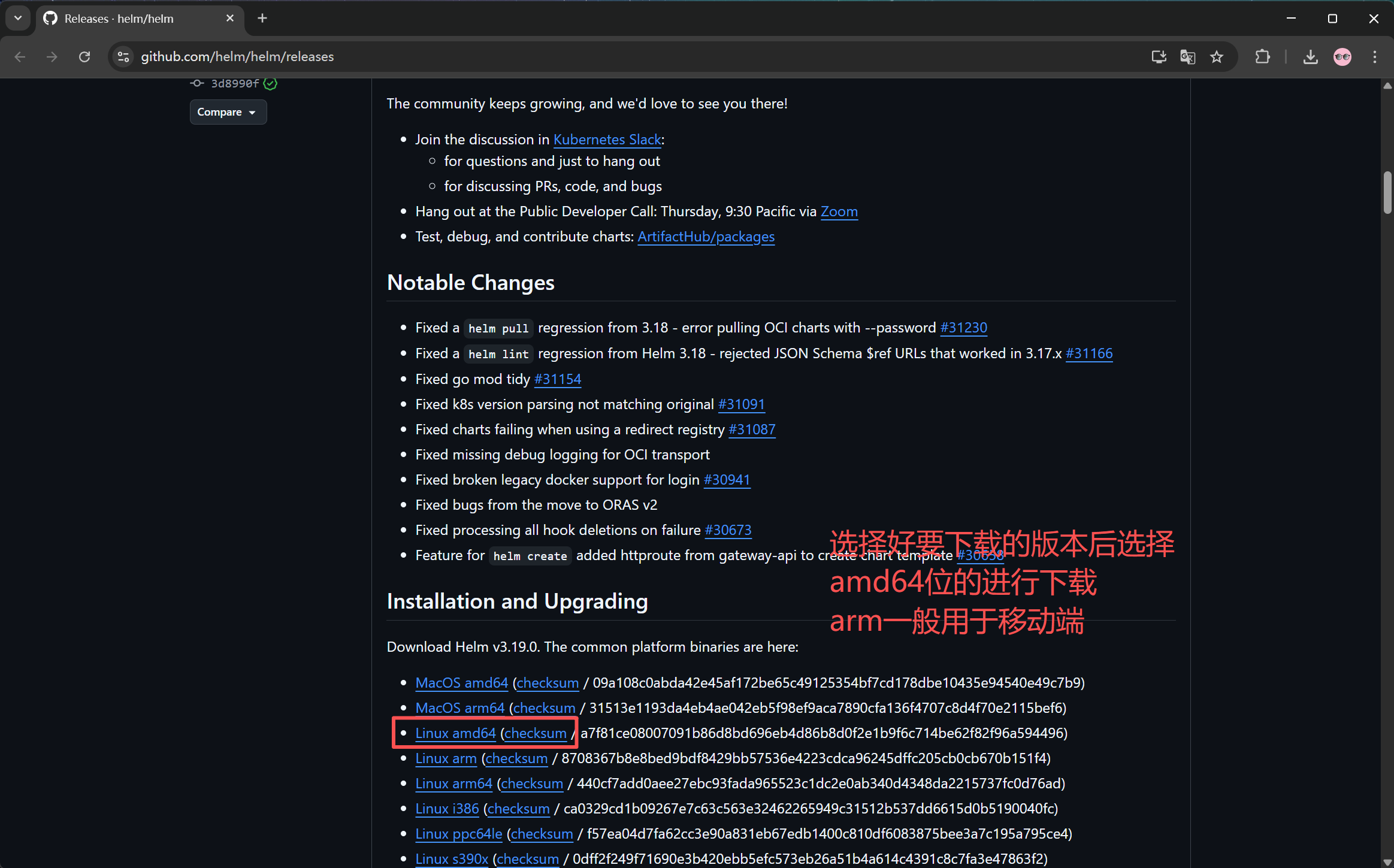
1.安装helm
[root@master mnt]# tar zxf helm-v3.19.0-linux-amd64.tar.gz
[root@master mnt]# ls
helm-v3.19.0-linux-amd64.tar.gz
[root@master helm]# cd  linux-amd64/
[root@master linux-amd64]# ls
helm  LICENSE  README.md
[root@master linux-amd64]# cp -p helm  /usr/local/bin/
2.配置helm命令补齐
[root@master linux-amd64]# echo "source <(helm completion bash)" >> ~/.bashrc
root@master linux-amd64]# source ~/.bashrc
[root@master linux-amd64]# helm version
version.BuildInfo{Version:"v3.19.0", GitCommit:"3d8990f0836691f0229297773f3524598f46bda6", GitTreeState:"clean", GoVersion:"go1.24.7"}
三 helm常用操作
3.1 常用命令
| 命令 | 描述 |
|---|---|
| create | 创建一个 chart 并指定名字 |
| dependency | 管理 chart 依赖 |
| get | 下载一个 release。可用子命令:all、hooks、manifest、notes、values |
| history | 获取 release 历史 |
| install | 安装一个 chart |
| list | 列出 release |
| package | 将 chart 目录打包到 chart 存档文件中 |
| pull | 从远程仓库中下载 chart 并解压到本地 # helm pull stable/mysql – untar |
| repo | 添加,列出,移除,更新和索引 chart 仓库。可用子命令:add、index、 list、remove、update |
| rollback | 从之前版本回滚 |
| search | 根据关键字搜索 chart。可用子命令:hub、repo |
| show | 查看 chart 详细信息。可用子命令:all、chart、readme、values |
| status | 显示已命名版本的状态 |
| template | 本地呈现模板 |
| uninstall | 卸载一个 release |
| upgrade | 更新一个 release |
| version | 查看 helm 客户端版本 |
3.2 helm仓库的管理
以下为常用的仓库源
- 阿里云仓库:https://kubernetes.oss-cn-hangzhou.aliyuncs.com/charts
- bitnami仓库: https://charts.bitnami.com/bitnami
- 微软仓库:http://mirror.azure.cn/kubernetes/charts/
- 官方仓库: https://hub.kubeapps.com/charts/incubator
[root@k8s-master helm]# helm search  hub nginx		#在官方仓库中搜索
[root@k8s-master helm]# helm  search  repo  nginx	#在本地仓库中搜索
添加第三方repo源
#添加阿里云仓库
[root@master helm]# helm repo  add aliyun https://kubernetes.oss-cn-hangzhou.aliyuncs.com/charts
"aliyun" has been added to your repositories

#添加bitnami仓库
[root@master helm]# helm repo add bitnami https://charts.bitnami.com/bitnami
"bitnami" has been added to your repositories

#添加微软仓库
[root@master helm]# helm repo add azure http://mirror.azure.cn/kubernetes/charts/
"azure" has been added to your repositories

#查看仓库信息
[root@master helm]# helm repo list
NAME    URL
aliyun  https://kubernetes.oss-cn-hangzhou.aliyuncs.com/charts
azure   http://mirror.azure.cn/kubernetes/charts/
bitnami https://charts.bitnami.com/bitnami

#查询某个源的包并过滤nginx的包
[root@master helm]# helm search repo aliyun | grep nginx

#删除第三方源
[root@master helm]# helm repo remove azure
[root@master helm]# helm repo list
NAME    URL
aliyun  https://kubernetes.oss-cn-hangzhou.aliyuncs.com/charts
bitnami https://charts.bitnami.com/bitnami


#查看仓库存储helm清单
[root@k8s-master helm]# helm search repo  aliyun
NAME                            CHART VERSION   APP VERSION     DESCRIPTION         #应用名称						  封装版本			软件版本          软件描述
aliyun/acs-engine-autoscaler    2.1.3           2.1.1           Scales worker nodes within agent pools
aliyun/aerospike                0.1.7           v3.14.1.2       A Helm chart for Aerospike in Kubernetes
......
3.3 helm的使用方法
1.查找chart包
#repo为从添加的第三方源中查找,hub为从官方源查找
[root@master helm]# helm search repo mysql
NAME                            CHART VERSION   APP VERSION     DESCRIPTION
aliyun/mysql                    0.3.5                           Fast, reliable, scalable, and easy to use open-...
azure/mysql                     1.6.9           5.7.30          DEPRECATED - Fast, reliable, scalable, and easy...
azure/mysqldump                 2.6.2           2.4.1           DEPRECATED! - A Helm chart to help backup MySQL...
azure/prometheus-mysql-exporter 0.7.1           v0.11.0         DEPRECATED A Helm chart for prometheus mysql ex...
bitnami/mysql                   14.0.3          9.4.0           MySQL is a fast, reliable, scalable, and easy t...
aliyun/percona                  0.3.0                           free, fully compatible, enhanced, open source d...
......
2.查看chart包信息
#查找出来后进行信息的查看
[root@master helm]# helm show chart azure/mariadb
apiVersion: v1
appVersion: 10.3.22
deprecated: true
description: DEPRECATED Fast, reliable, scalable, and easy to use open-source relational
  database system. MariaDB Server is intended for mission-critical, heavy-load production
  systems as well as for embedding into mass-deployed software. Highly available MariaDB
  cluster.
home: https://mariadb.org
icon: https://bitnami.com/assets/stacks/mariadb/img/mariadb-stack-220x234.png
keywords:
- mariadb
- mysql
- database
- sql
- prometheus
name: mariadb
sources:
- https://github.com/bitnami/bitnami-docker-mariadb
- https://github.com/prometheus/mysqld_exporter
version: 7.3.14
3 安装chart包
[root@master helm]# helm install mariadb azure/mariadb
[root@master helm]# helm list
NAME            NAMESPACE       REVISION        UPDATED                                 STATUS          CHART           APP VERSION
mariadb         default         1               2025-10-26 02:02:28.625840433 +0800 CST deployed        mariadb-7.3.14  10.3.22

[root@master helm]# kubectl get pods
NAME                               READY   STATUS    RESTARTS   AGE
mariadb-master-0                   0/1     Pending   0          119s
mariadb-slave-0                    0/1     Pending   0          119s

#查看项目的发布状态
[root@master helm]# helm status mariadb
NAME: mariadb
LAST DEPLOYED: Sun Oct 26 02:02:28 2025
NAMESPACE: default
STATUS: deployed
REVISION: 1
NOTES:
This Helm chart is deprecated
......

#卸载项目
[root@master helm]# helm uninstall mariadb
release "mariadb" uninstalled

[root@master nginx]# kubectl get pods
No resources found in default namespace.

[root@master nginx]# helm list
NAME    NAMESPACE       REVISION        UPDATED STATUS  CHART   APP VERSION
3.4 安装项目前预定义项目选项
1.拉取要自定义的helm包
#拉取helm项目包
[root@master helm]#  helm pull bitnami/nginx
[root@master helm]# ls
nginx-18.1.11.tgz
[root@master helm]# tar zxf nginx-18.1.11.tgz
[root@master helm]# ls
nginx  nginx-18.1.11.tgz

#导入要自定义的镜像包
[root@master helm]# docker load -i nginx-1.27.1-debian-12-r2.tar
[root@master nginx]# docker tag bitnami/nginx:1.27.1-debian-12-r2 reg.fy.org/bitnami/nginx:1.27.1-debian-12-r2
[root@master nginx]# docker push reg.fy.org/bitnami/nginx:1.27.1-debian-12-r2
2.自定义helm项目包
[root@master helm]# cd nginx/
[root@master nginx]# ls
Chart.lock  charts  Chart.yaml  README.md  templates  values.schema.json  values.yaml

[root@k8s-master nginx]# vim values.yaml			#项目变量文件
  13   imageRegistry: "reg.fy.org"					#更改镜像获取仓库
3.开始安装项目
[root@master nginx]# helm install webserver /root/helm/nginx
NAME: webserver
LAST DEPLOYED: Sun Oct 26 02:53:03 2025
NAMESPACE: default
STATUS: deployed
REVISION: 1
TEST SUITE: None
NOTES:
CHART NAME: nginx
CHART VERSION: 18.1.11
APP VERSION: 1.27.1

#安装完成后查看运行清空
[root@master nginx]# kubectl get pods
NAME                               READY   STATUS    RESTARTS   AGE
webserver-nginx-6df89bb88d-bvqvr   1/1     Running   0          61s
[root@master nginx]# kubectl get svc
NAME              TYPE           CLUSTER-IP       EXTERNAL-IP     PORT(S)                      AGE
kubernetes        ClusterIP      10.96.0.1        <none>          443/TCP                      13d
webserver-nginx   LoadBalancer   10.103.164.234   172.25.254.51   80:32076/TCP,443:30219/TCP   64s

#测试可以访问
[root@master nginx]# curl 172.25.254.51
<!DOCTYPE html>
<html>
<head>
<title>Welcome to nginx!</title>
<style>
html { color-scheme: light dark; }
body { width: 35em; margin: 0 auto;
font-family: Tahoma, Verdana, Arial, sans-serif; }
</style>
</head>
<body>
<h1>Welcome to nginx!</h1>
<p>If you see this page, the nginx web server is successfully installed and
working. Further configuration is required.</p>

<p>For online documentation and support please refer to
<a href="http://nginx.org/">nginx.org</a>.<br/>
Commercial support is available at
<a href="http://nginx.com/">nginx.com</a>.</p>

<p><em>Thank you for using nginx.</em></p>
</body>
</html>
4.更新项目与查看历史
[root@master nginx]# vim values.yaml			#更新变量文件
624   type: ClusterIP
751   enabled: true
763   hostname: www.fjwyyy.org					#要做本地解析
783   ingressClassName: "nginx"

[root@master nginx]# helm upgrade webserver .
Release "webserver" has been upgraded. Happy Helming!
NAME: webserver
LAST DEPLOYED: Sun Oct 26 02:56:54 2025
NAMESPACE: default
STATUS: deployed
REVISION: 2
TEST SUITE: None
NOTES:
CHART NAME: nginx
CHART VERSION: 18.1.11
APP VERSION: 1.27.1

#检查更新后的运行情况
#loadbalancer改为了custerip
[root@master nginx]# kubectl get svc
NAME              TYPE        CLUSTER-IP       EXTERNAL-IP   PORT(S)          AGE
kubernetes        ClusterIP   10.96.0.1        <none>        443/TCP          13d
webserver-nginx   ClusterIP   10.103.164.234   <none>        80/TCP,443/TCP   9m50s

#添加了ingress-nginx
[root@master nginx]# kubectl get ingress
NAME              CLASS   HOSTS            ADDRESS         PORTS   AGE
webserver-nginx   nginx   www.fjwyyy.org   172.25.254.20   80      6m7s

#查看ingress的ip要做本地解析
[root@master nginx]# kubectl -n ingress-nginx get svc
NAME                                 TYPE           CLUSTER-IP      EXTERNAL-IP     PORT(S)                      AGE
ingress-nginx-controller             LoadBalancer   10.96.142.186   172.25.254.50   80:31430/TCP,443:32252/TCP   98m
ingress-nginx-controller-admission   ClusterIP      10.100.45.36    <none>          443/TCP                      98m

[root@master nginx]# curl www.fjwyyy.org
<!DOCTYPE html>
<html>
<head>
<title>Welcome to nginx!</title>
<style>
html { color-scheme: light dark; }
body { width: 35em; margin: 0 auto;
font-family: Tahoma, Verdana, Arial, sans-serif; }
</style>
</head>
<body>
<h1>Welcome to nginx!</h1>
<p>If you see this page, the nginx web server is successfully installed and
working. Further configuration is required.</p>

<p>For online documentation and support please refer to
<a href="http://nginx.org/">nginx.org</a>.<br/>
Commercial support is available at
<a href="http://nginx.com/">nginx.com</a>.</p>

<p><em>Thank you for using nginx.</em></p>
</body>
</html>

#查看历史
[root@master nginx]# helm history webserver
REVISION        UPDATED                         STATUS          CHART           APP VERSION     DESCRIPTION
1               Sun Oct 26 02:53:03 2025        superseded      nginx-18.1.11   1.27.1          Install complete
2               Sun Oct 26 02:56:54 2025        deployed        nginx-18.1.11   1.27.1          Upgrade complete

#删除项目
[root@master nginx]# helm uninstall webserver
release "webserver" uninstalled
[root@master nginx]# helm list
NAME    NAMESPACE       REVISION        UPDATED STATUS  CHART   APP VERSION

四 构建helm中的chart包
4.1 Helm Chart目录结构
#建立chart项目
[root@master helm]# helm create fjwyyy
Creating fjwyyy

[root@master helm]# tree fjwyyy/
fjwyyy/
├── charts								#目录里存放这个chart依赖的所有子chart。
├── Chart.yaml							#用于描述这个 Chart 的基本信息,包括名字、描述信息以及版本等。
├── templates							#目录里面存放所有 yaml 模板文件。
│   ├── deployment.yaml
│   ├── _helpers.tpl					#放置模板助手的地方,可以在整个 chart 中重复使用
│   ├── hpa.yaml
│   ├── httproute.yaml
│   ├── ingress.yaml
│   ├── NOTES.txt
│   ├── serviceaccount.yaml
│   ├── service.yaml
│   └── tests
│       └── test-connection.yaml
└── values.yaml							#用于存储 templates 目录中模板文件中用到变量的值。
4.2 构建方法
编写chart文件
[root@master fjwyyy]# vim Chart.yaml
apiVersion: v2
name: fjwyyy
description: A Helm chart for Kubernetes
type: application
version: 0.1.0				#构建的第一个项目版本
appVersion: "v1"			#使用镜像版本


[root@master fjwyyy]# vim values.yaml
replicaCount: 2						#运行pod的数量
image:
  repository: myapp					#运行的镜像
  pullPolicy: IfNotPresent
  tag: "v1"
ingress:
  enabled: true						#使用ingress暴露端口
  className: "nginx"
  annotations: {}
    # kubernetes.io/ingress.class: nginx
    # kubernetes.io/tls-acme: "true"
  hosts:
    - host: www.fjwyyy.org
      paths:
        - path: /
          pathType: ImplementationSpecific

#语法检测
[root@master fjwyyy]# helm lint .
==> Linting .
[INFO] Chart.yaml: icon is recommended

1 chart(s) linted, 0 chart(s) failed

#运行项目
[root@master helm]# helm install myapp fjwyyy
NAME: myapp
LAST DEPLOYED: Fri Oct 24 23:31:15 2025
NAMESPACE: default
STATUS: deployed
REVISION: 1
NOTES:
1. Get the application URL by running these commands:
  http://www.fjwyyy.org/

[root@master helm]# kubectl get pods
NAME                          READY   STATUS    RESTARTS   AGE
myapp-fjwyyy-9fd96499-tvhb9   1/1     Running   0          31s
myapp-fjwyyy-9fd96499-xgx4c   1/1     Running   0          31s

#删除项目
[root@master helm]# helm uninstall myapp
release "myapp" uninstalled
项目打包并运行
#项目打包
[root@master helm]# helm package fjwyyy/
Successfully packaged chart and saved it to: /root/helm/fjwyyy-0.1.0.tgz
[root@master helm]# ls
fjwyyy  fjwyyy-0.1.0.tgz

#项目可以通过各种分享方式发方为任何人后部署即可
[root@master helm]# helm install testhelm fjwyyy-0.1.0.tgz
NAME: testhelm
LAST DEPLOYED: Fri Oct 24 23:36:47 2025
NAMESPACE: default
STATUS: deployed
REVISION: 1
NOTES:
1. Get the application URL by running these commands:
  http://www.fjwyyy.org/
[root@master helm]# kubectl get pods
NAME                               READY   STATUS    RESTARTS   AGE
testhelm-fjwyyy-86dfcf84f4-6vkm2   1/1     Running   0          5s
testhelm-fjwyyy-86dfcf84f4-pw2xr   1/1     Running   0          5s
[root@master helm]# kubectl get ingress
NAME              CLASS   HOSTS            ADDRESS   PORTS   AGE
testhelm-fjwyyy   nginx   www.fjwyyy.org             80      8s

#注意要访问域名要在本地做解析
[root@master fjwyyy]# cat /etc/hosts
......
172.25.254.50 www.fjwyyy.org

[root@master fjwyyy]# curl http://www.fjwyyy.org/
Hello MyApp | Version: v1 | <a href="hostname.html">Pod Name</a>
五 构建helm仓库
可以使用harbor仓库作为helm包的仓库
- v2.0+,v2.8+ 默认使用oci模式
- v2.7 及更早使用ChartMuseum 模式
5.1 OCI 模式
先在harbor创建一个项目用来存储推送上来的helm包
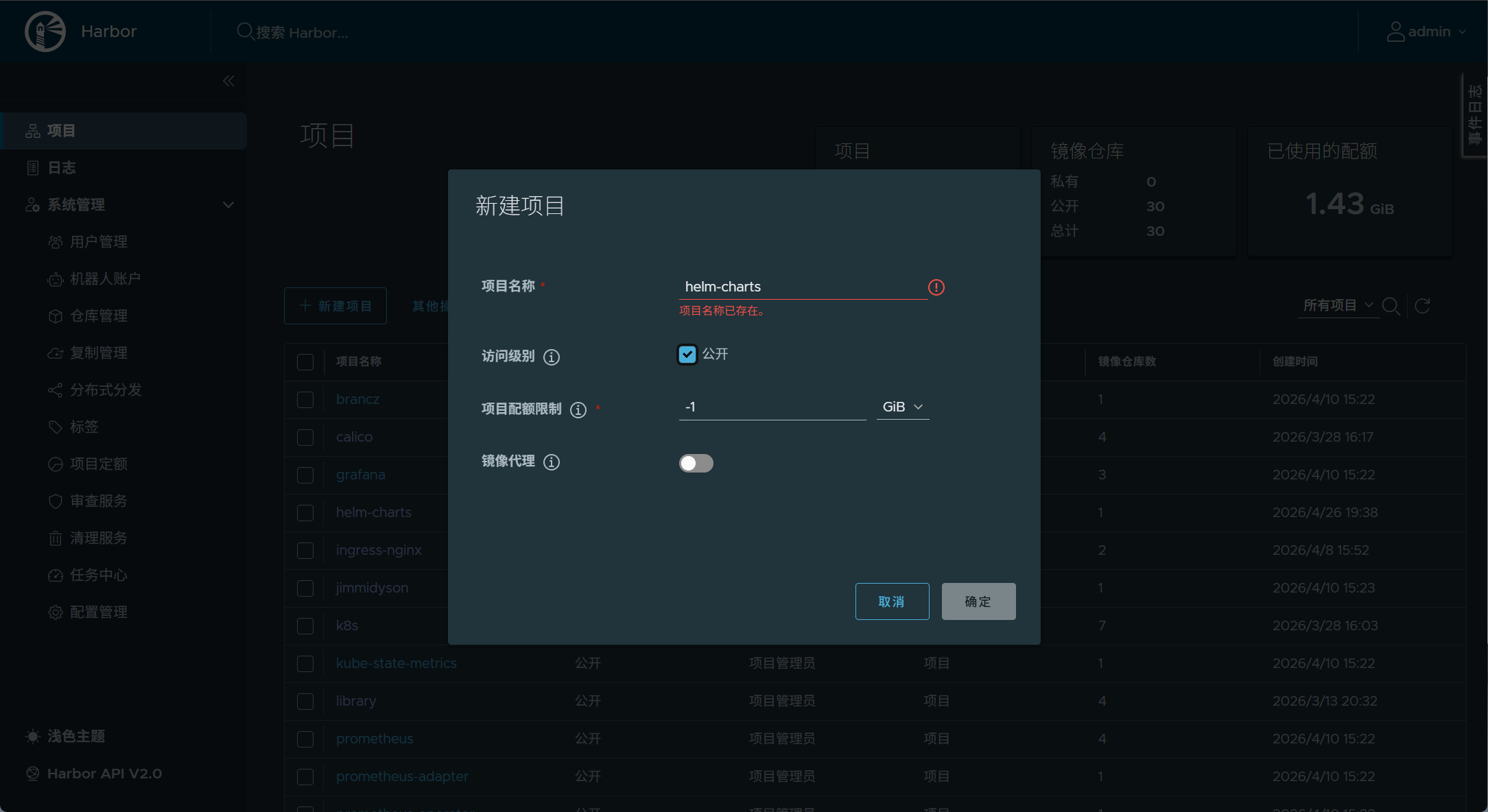
#登录仓库
[root@master ~]# helm registry login reg.harbor.org --username admin --password yyy --ca-file /etc/docker/certs.d/reg.harbor.org/ca.crt
level=WARN msg="using --password via the CLI is insecure. Use --password-stdin"
Login Succeeded

#添加认证
[root@master ~]# cp /etc/docker/certs.d/reg.harbor.org/ca.crt  /etc/pki/ca-trust/source/anchors/
[root@master ~]# update-ca-trust

[root@master ~]# helm push  fjwyyy-1.0.0.tgz oci://reg.harbor.org/helm-charts

[root@master ~]# helm push  fjwyyy-1.0.0.tgz oci://reg.harbor.org/helm-charts

[root@master ~]# helm install fjwyyy oci://reg.harbor.org/helm-charts/fjwyyy --version 1.0.0
5.2 ChartMuseum 模式
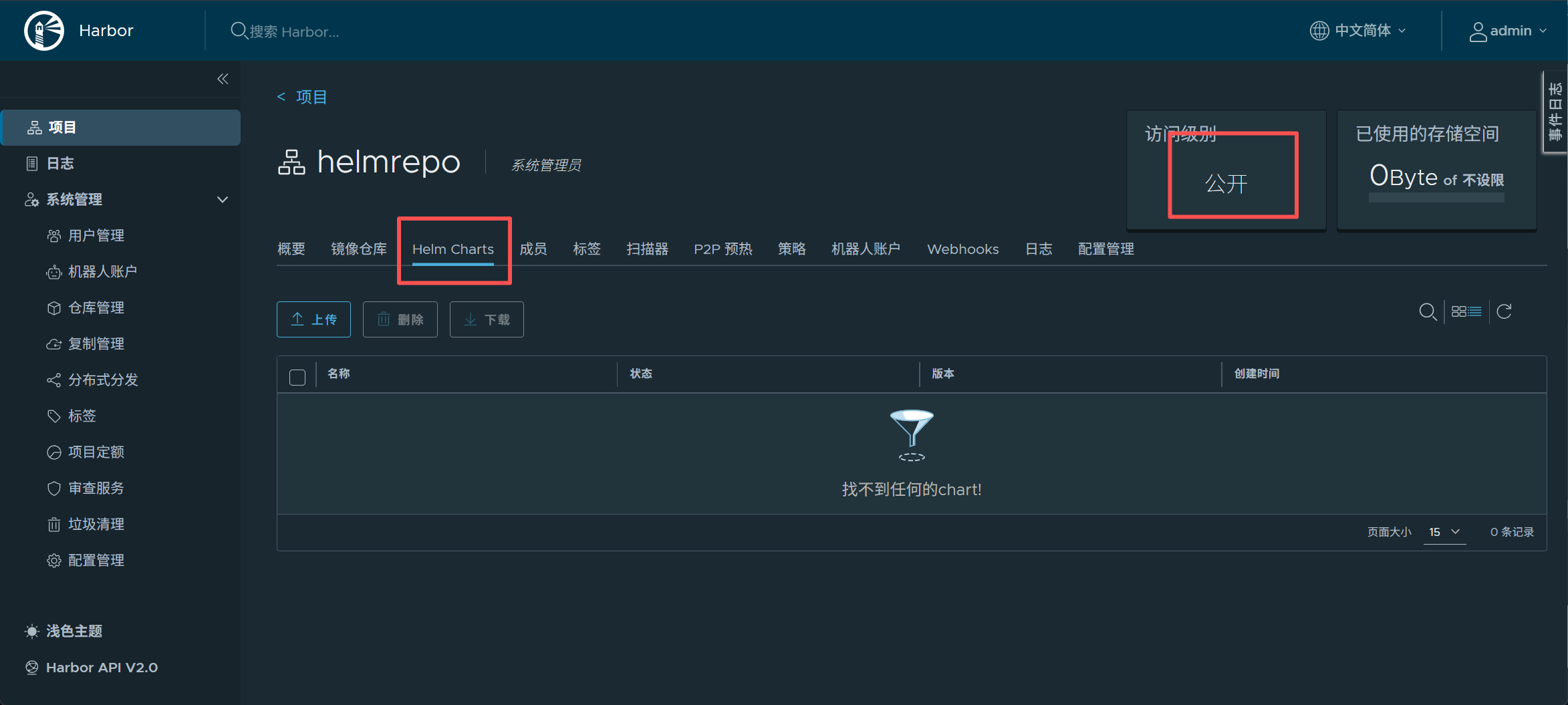
5.2.1 先在harbor仓库构建一个公开的项目
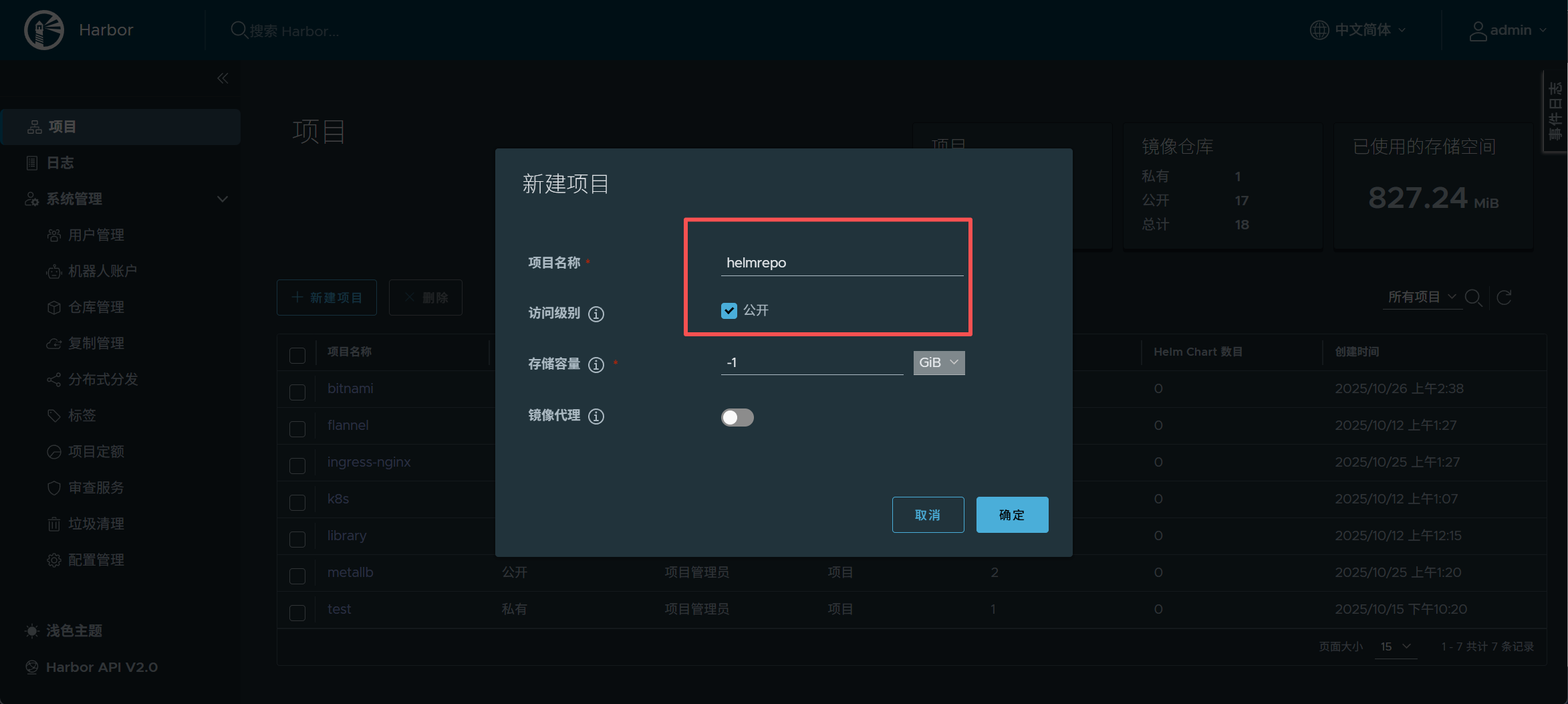
5.2.2 安装helm-push插件
插件官方网址:https://github.com/chartmuseum/helm-push
5.2.2.1 在线安装
适用于网络情况好的情况
[root@master helm]# dnf install git -y
[root@master helm]# helm plugin install https://github.com/chartmuseum/helm-push --verify=false
5.2.2.2 离线安装
#创建helm plugin的默认存放目录
[root@k8s-master helm]# mkdir  ~/.local/share/helm/plugins/helm-push -p

#解压push插件包到指定目录
[root@master helm]# tar zxf helm-push_0.10.4_linux_amd64.tar.gz -C ~/.local/share/helm/plugins/helm-push
[root@master helm]# ls ~/.local/share/helm/plugins/helm-push
bin  LICENSE  plugin.yaml

#查看helm调用命令是否成功
[root@master helm]# helm cm-push --help
Helm plugin to push chart package to ChartMuseum

Examples:

  $ helm cm-push mychart-0.1.0.tgz chartmuseum       # push .tgz from "helm package"
  $ helm cm-push . chartmuseum                       # package and push chart directory
  $ helm cm-push . --version="1.2.3" chartmuseum     # override version in Chart.yaml
  $ helm cm-push . https://my.chart.repo.com         # push directly to chart repo URL
5.2.3 上传项目到仓库
5.2.3.1 添加仓库
[root@master helm]# helm repo  add helmrepo https://reg.fy.org/chartrepo/helmrepo

#添加仓库时报错,因为我们harbor仓库用的是加密访问
Error: looks like "https://reg.fy.org/chartrepo/helmrepo" is not a valid chart repository or cannot be reached: Get "https://reg.fy.org/chartrepo/helmrepo/index.yaml": tls: failed to verify certificate: x509: certificate signed by unknown authority

#为helm添加证书
[root@master helm]# cp /etc/docker/certs.d/reg.fy.org/ca.crt /etc/pki/ca-trust/source/anchors/

#更新本地ca认证库
[root@master helm]# update-ca-trust

#再次添加仓库
[root@master helm]# helm repo  add helmrepo https://reg.timinglee.org/chartrepo/helmrepo
"helmrepo" has been added to your repositories

[root@master mnt]# helm repo list
NAME            URL
aliyun          https://kubernetes.oss-cn-hangzhou.aliyuncs.com/charts
bitnami         https://charts.bitnami.com/bitnami
azure           http://mirror.azure.cn/kubernetes/charts/
helmrepo        https://reg.fy.org/chartrepo/helmrepo
5.2.3.2 上传本地项目
#命令执行格式
helm cm-push <项目名称> <仓库名称> -u admin -p lee
[root@master helm]# helm cm-push fjwyyy-0.1.0.tgz helmrepo -u admin -p yyy
Pushing fjwyyy-0.1.0.tgz to helmrepo...
Done.

#查看项目上传情况
[root@master helm]# helm search  repo helmrepo
No results found

#更新仓库
[root@master helm]# helm repo update helmrepo
Hang tight while we grab the latest from your chart repositories...
...Successfully got an update from the "helmrepo" chart repository
Update Complete. ⎈Happy Helming!⎈
#再次查看
[root@master helm]# helm search  repo helmrepo
NAME            CHART VERSION   APP VERSION     DESCRIPTION
helmrepo/fjwyyy 0.1.0           v1              A Helm chart for Kubernetes

#安装项目
[root@master helm]# helm install helmrepo helmrepo/fjwyyy
NAME: helmrepo
LAST DEPLOYED: Sun Oct 26 13:54:25 2025
NAMESPACE: default
STATUS: deployed
REVISION: 1
NOTES:
1. Get the application URL by running these commands:
  http://www.fjwyyy.org/
[root@master helm]# curl http://www.fjwyyy.org/
Hello MyApp | Version: v1 | <a href="hostname.html">Pod Name</a>
六 helm的版本迭代
6.1 重新构建新版本项目
使用‘四 中构建的项目包’来进行版本迭代
#更改项目包版本
[root@master helm]# vim fjwyyy/Chart.yaml
version: 0.2.0
appVersion: "v2"	#这个改values里的tag其实是不用改的

#更改使用镜像的版本
[root@master helm]# vim fjwyyy/values.yaml
......
replicaCount: 1
image:
  repository: myapp
  pullPolicy: IfNotPresent
  tag: "v2"
......
6.2 上传项目包到仓库
#打包更新后的项目
[root@master helm]# helm package fjwyyy
Successfully packaged chart and saved it to: /root/helm/fjwyyy-0.2.0.tgz

#推送上helm仓库
[root@master helm]# helm cm-push fjwyyy-0.2.0.tgz helmrepo -u admin -p yyy
Pushing fjwyyy-0.2.0.tgz to helmrepo...
Done.

[root@master helm]# helm search repo helmrepo
NAME            CHART VERSION   APP VERSION     DESCRIPTION
helmrepo/fjwyyy 0.1.0           v1              A Helm chart for Kubernetes

[root@master helm]# helm repo update helmrepo
Hang tight while we grab the latest from your chart repositories...
...Successfully got an update from the "helmrepo" chart repository
Update Complete. ⎈Happy Helming!⎈

#默认只显示最新的版本
[root@master helm]# helm search repo helmrepo
NAME            CHART VERSION   APP VERSION     DESCRIPTION
helmrepo/fjwyyy 0.2.0           v2              A Helm chart for Kubernetes

#-l 列出全部的版本
[root@master helm]# helm search repo helmrepo -l
NAME            CHART VERSION   APP VERSION     DESCRIPTION
helmrepo/fjwyyy 0.2.0           v2              A Helm chart for Kubernetes
helmrepo/fjwyyy 0.1.0           v1              A Helm chart for Kubernetes
6.1 更新应用
#先运行一个未更新前的v1版本
[root@master helm]# helm install fjw fjwyyy-0.1.0.tgz
NAME: fjw
LAST DEPLOYED: Sun Oct 26 14:51:28 2025
NAMESPACE: default
STATUS: deployed
REVISION: 1
NOTES:
1. Get the application URL by running these commands:
  http://www.fjwyyy.org/

[root@master helm]# curl http://www.fjwyyy.org/
Hello MyApp | Version: v1 | <a href="hostname.html">Pod Name</a>

#使用上传到仓库的v2版本进行更新
[root@master helm]# helm upgrade fjw helmrepo/fjwyyy
Release "fjw" has been upgraded. Happy Helming!
NAME: fjw
LAST DEPLOYED: Sun Oct 26 14:52:32 2025
NAMESPACE: default
STATUS: deployed
REVISION: 2
NOTES:
1. Get the application URL by running these commands:
  http://www.fjwyyy.org/

[root@master helm]# curl http://www.fjwyyy.org/
Hello MyApp | Version: v2 | <a href="hostname.html">Pod Name</a>
显示项目版本
[root@master helm]# helm history fjw
REVISION        UPDATED                         STATUS          CHART           APP VERSION     DESCRIPTION
1               Sun Oct 26 14:51:28 2025        superseded      fjwyyy-0.1.0    v1              Install complete
2               Sun Oct 26 14:52:32 2025        deployed        fjwyyy-0.2.0    v2              Upgrade complete
应用回滚
#回滚到上一个版本
[root@master helm]# helm rollback fjw
Rollback was a success! Happy Helming!
[root@master helm]# helm history fjw
REVISION        UPDATED                         STATUS          CHART           APP VERSION     DESCRIPTION
1               Sun Oct 26 14:51:28 2025        superseded      fjwyyy-0.1.0    v1              Install complete
2               Sun Oct 26 14:52:32 2025        superseded      fjwyyy-0.2.0    v2              Upgrade complete
3               Sun Oct 26 14:56:45 2025        deployed        fjwyyy-0.1.0    v1              Rollback to 1
[root@master helm]# curl http://www.fjwyyy.org/
Hello MyApp | Version: v1 | <a href="hostname.html">Pod Name</a>


#查看项目版本后,回滚想要回去的版本号
[root@master helm]# helm rollback fjw 2
Rollback was a success! Happy Helming!
[root@master helm]# curl http://www.fjwyyy.org/
Hello MyApp | Version: v2 | <a href="hostname.html">Pod Name</a>
[root@master helm]# helm history fjw
REVISION        UPDATED                         STATUS          CHART           APP VERSION     DESCRIPTION
1               Sun Oct 26 14:51:28 2025        superseded      fjwyyy-0.1.0    v1              Install complete
2               Sun Oct 26 14:52:32 2025        superseded      fjwyyy-0.2.0    v2              Upgrade complete
3               Sun Oct 26 14:56:45 2025        superseded      fjwyyy-0.1.0    v1              Rollback to 1
4               Sun Oct 26 14:58:22 2025        deployed        fjwyyy-0.2.0    v2              Rollback to 2


开源鸿蒙跨平台开发社区汇聚开发者与厂商,共建“一次开发,多端部署”的开源生态,致力于降低跨端开发门槛,推动万物智联创新。
更多推荐
 68
68 0
0- 0


 已为社区贡献2条内容

所有评论(0)