威科夫高频因子三(复现努力有果/无果高频因子)
return ‘中性’# 高成交量(分位数 > 0.8)# 价格上涨有果(高成交量 + 高正收益)return '上涨有果'# 价格下跌有果(高成交量 + 高负收益)return '下跌有果'# 努力无果(高成交量但价格变动不大)return '努力无果(上涨乏力)'return '努力无果(下跌乏力)'return '中性'
威科夫的重要的法则就是努力有果则趋势可能延续;努力无果可能价格就要停滞或者反转;所以本文把价量合起来考虑;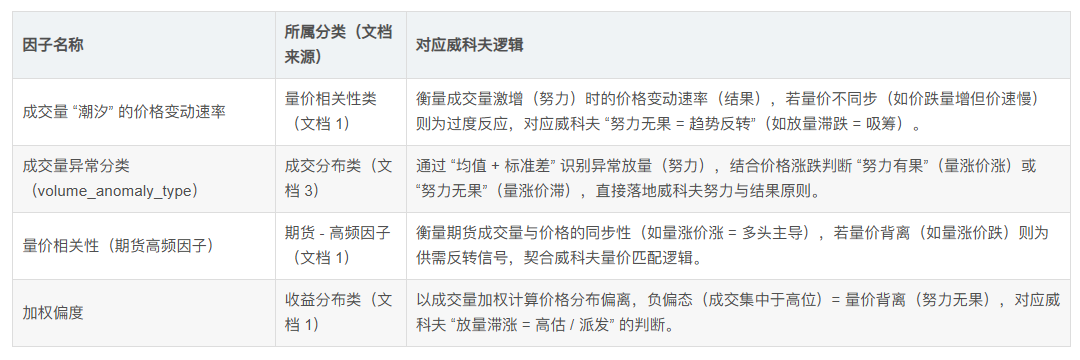
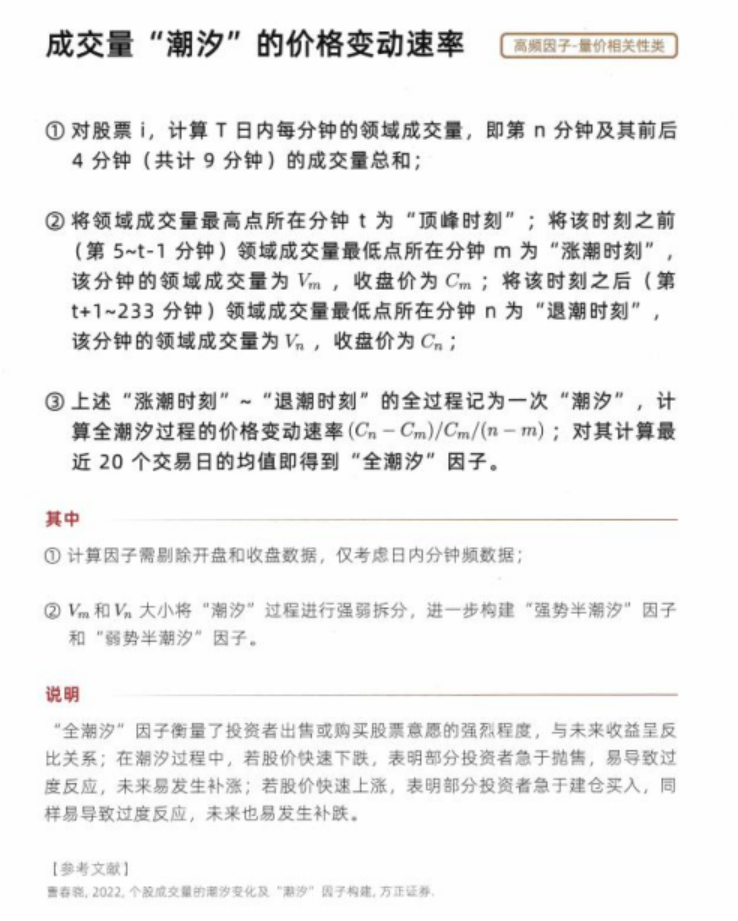
为了将“成交量潮汐”因子与威科夫的“努力与结果”概念结合,并进行状态分类(努力有果、努力无果),我们需要对每个交易日的潮汐事件计算“努力”(成交量)和“结果”(价格变动),然后基于历史百分位进行分类。以下是实现步骤和代码示例。
步骤概述
数据准备:需要分钟级别的数据,包括每分钟的收盘价和成交量。
计算领域成交量:对于每个分钟,计算其前后4分钟(共9分钟)的成交量总和。
找到潮汐时刻:识别顶峰时刻t、涨潮时刻m和退潮时刻n。
计算努力和结果:
努力(E):从m到n的总成交量。
结果(R):从m到n的价格变动百分比,即(C_n - C_m) / C_m。
计算历史百分位:对于每个交易日的E和R,计算过去N天(例如60天)的百分位。
状态分类:
努力无果:E的百分位 > 0.7 且 R的百分位 < 0.3
努力有果:E的百分位 > 0.7 且 R的百分位 > 0.7
中性:其他情况
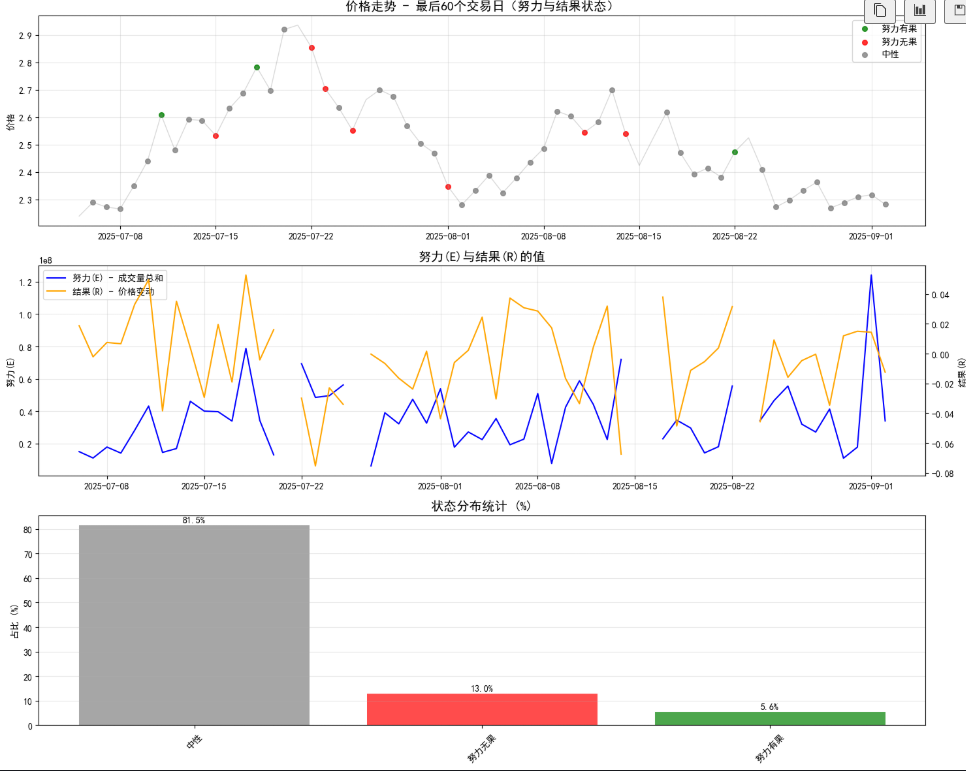
这个是按照每天来进行计算的,不是高频的模式,我们需要调整到每天有多个潮汐。
import pandas as pd
import numpy as np
import matplotlib.pyplot as plt
from matplotlib.font_manager import FontProperties
设置中文字体
plt.rcParams[‘font.sans-serif’] = [‘SimHei’, ‘Microsoft YaHei’]
plt.rcParams[‘axes.unicode_minus’] = False
chinese_font = FontProperties(fname=r’C:\Windows\Fonts\simhei.ttf’)
确保数据已按时间排序
df = df.sort_index()
计算收益率(价格变动)
df[‘returns’] = df[‘close’].pct_change()
计算滚动分位数(288根K线,即一天的数据)
df[‘volume_percentile’] = df[‘volume’].rolling(window=288).apply(
lambda x: pd.Series(x).rank(pct=True).iloc[-1], raw=False
)
df[‘returns_percentile’] = df[‘returns’].rolling(window=288).apply(
lambda x: pd.Series(x).rank(pct=True).iloc[-1], raw=False
)
定义状态分类函数
def classify_state(row):
if pd.isna(row[‘volume_percentile’]) or pd.isna(row[‘returns_percentile’]):
return ‘中性’
# 高成交量(分位数 > 0.8)
if row['volume_percentile'] > 0.8:
    # 价格上涨有果(高成交量 + 高正收益)
    if row['returns_percentile'] > 0.8 and row['returns'] > 0:
        return '上涨有果'
    # 价格下跌有果(高成交量 + 高负收益)
    elif row['returns_percentile'] < 0.2 and row['returns'] < 0:
        return '下跌有果'
    # 努力无果(高成交量但价格变动不大)
    elif row['returns_percentile'] < 0.2 and row['returns'] > 0:
        return '努力无果(上涨乏力)'
    elif row['returns_percentile'] > 0.8 and row['returns'] < 0:
        return '努力无果(下跌乏力)'

return '中性'
应用状态分类
df[‘state’] = df.apply(classify_state, axis=1)
获取最后288根K线(一天的数据)
last_288 = df.tail(288).copy()
状态到颜色映射
state_colors = {
‘上涨有果’: ‘green’,
‘下跌有果’: ‘red’,
‘努力无果(上涨乏力)’: ‘orange’,
‘努力无果(下跌乏力)’: ‘purple’,
‘中性’: ‘gray’
}
创建图形
fig, (ax1, ax2, ax3) = plt.subplots(3, 1, figsize=(16, 12))
第一个子图:价格走势(根据状态着色)
for state, color in state_colors.items():
mask = last_288[‘state’] == state
if mask.any():
ax1.scatter(last_288.index[mask], last_288[‘close’][mask],
color=color, s=30, alpha=0.8, label=state)
连接价格线(灰色背景线)
ax1.plot(last_288.index, last_288[‘close’], color=‘gray’, alpha=0.3, linewidth=1)
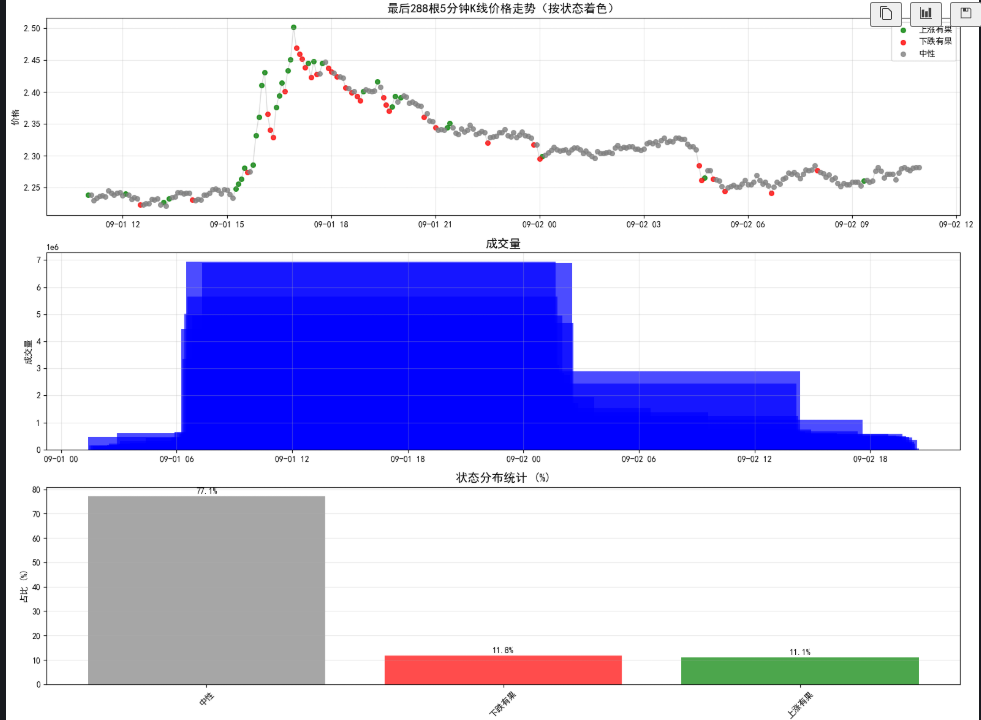
ax1.set_title(‘最后288根5分钟K线价格走势(按状态着色)’, fontproperties=chinese_font, fontsize=14)
ax1.set_ylabel(‘价格’, fontproperties=chinese_font)
ax1.grid(True, alpha=0.3)
ax1.legend()
第二个子图:成交量
ax2.bar(last_288.index, last_288[‘volume’], color=‘blue’, alpha=0.7)
ax2.set_title(‘成交量’, fontproperties=chinese_font, fontsize=14)
ax2.set_ylabel(‘成交量’, fontproperties=chinese_font)
ax2.grid(True, alpha=0.3)
第三个子图:状态分布统计
state_counts = last_288[‘state’].value_counts()
state_percentages = state_counts / state_counts.sum() * 100
colors = [state_colors.get(state, ‘gray’) for state in state_percentages.index]
bars = ax3.bar(state_percentages.index, state_percentages.values, color=colors, alpha=0.7)
ax3.set_title(‘状态分布统计 (%)’, fontproperties=chinese_font, fontsize=14)
ax3.set_ylabel(‘占比 (%)’, fontproperties=chinese_font)
ax3.tick_params(axis=‘x’, rotation=45)
在柱状图上添加数值标签
for bar, percentage in zip(bars, state_percentages.values):
height = bar.get_height()
ax3.text(bar.get_x() + bar.get_width()/2., height + 0.5,
f’{percentage:.1f}%', ha=‘center’, va=‘bottom’)
ax3.grid(True, alpha=0.3, axis=‘y’)
plt.tight_layout()
plt.show()
输出统计信息
print(“最后288根K线(一天)的状态统计:”)
print(“=” * 50)
for state, count in state_counts.items():
percentage = (count / len(last_288)) * 100
print(f"{state}: {count}次 | {percentage:.1f}%")
print(f"\n最近10个状态变化:“)
print(”=" * 50)
recent_data = last_288[[‘close’, ‘volume’, ‘returns’, ‘volume_percentile’, ‘returns_percentile’, ‘state’]].tail(10)
print(recent_data)
收录到《AI驱动下的高频因子挖掘》之大威天龙操盘法。

开源鸿蒙跨平台开发社区汇聚开发者与厂商,共建“一次开发,多端部署”的开源生态,致力于降低跨端开发门槛,推动万物智联创新。
更多推荐
 21
21 0
0- 0


 已为社区贡献2条内容

所有评论(0)