Flutter for OpenHarmony三方库适配实战:package_info_plus 应用信息获取
应用信息获取是移动应用开发的基础需求,用于版本检查、应用信息展示、统计分析等场景。在 Flutter for OpenHarmony 应用开发中,是一个功能完善的应用信息查询插件,提供了跨平台的应用信息获取能力。package_info_plus 是 Flutter for OpenHarmony 开发中获取应用信息的重要工具。核心功能:了解 package_info_plus 提供的应用信息获取
欢迎加入开源鸿蒙跨平台社区:https://openharmonycrossplatform.csdn.net
本文基于flutter3.27.5开发
一、package_info_plus 库概述
应用信息获取是移动应用开发的基础需求,用于版本检查、应用信息展示、统计分析等场景。在 Flutter for OpenHarmony 应用开发中,package_info_plus 是一个功能完善的应用信息查询插件,提供了跨平台的应用信息获取能力。
package_info_plus 库特点
package_info_plus 库基于 Flutter 平台接口实现,提供了以下核心特性:
全面信息:支持获取应用名称、包名、版本号、构建号、构建签名等完整应用信息。
跨平台一致:提供统一的 API 接口,在不同平台上获取信息的方式保持一致。
简单易用:只需一行代码即可获取所有应用信息,无需复杂配置。
轻量级:不依赖其他库,体积小巧,对应用性能影响极小。
异步获取:使用 Future 异步获取信息,不阻塞主线程。
缓存机制:获取的信息会被缓存,避免重复查询。
功能支持对比
| 功能 | Android | iOS | OpenHarmony |
|---|---|---|---|
| 应用名称 | ✅ | ✅ | ✅ |
| 包名 | ✅ | ✅ | ✅ |
| 版本号 | ✅ | ✅ | ✅ |
| 构建号 | ✅ | ✅ | ✅ |
| 构建签名 | ✅ | ✅ | ✅ |
| 安装商店信息 | ✅ | ✅ | ❌ |
使用场景:版本检查、应用信息展示、统计分析、错误上报、应用内反馈、关于页面等。
二、安装与配置
2.1 添加依赖
在项目的 pubspec.yaml 文件中添加 package_info_plus 依赖:
dependencies:
  package_info_plus:
    git:
      url: https://gitcode.com/openharmony-sig/flutter_plus_plugins.git
      path: packages/package_info_plus/package_info_plus
然后执行以下命令获取依赖:
flutter pub get
2.2 权限配置
package_info_plus 不需要任何特殊权限配置,可以直接使用。
三、核心 API 详解
3.1 PackageInfo 类
PackageInfo 是应用信息的核心类,包含应用的所有基本信息。
class PackageInfo {
  final String appName;          // 应用名称
  final String packageName;      // 包名
  final String version;          // 版本号 (versionName)
  final String buildNumber;      // 构建号 (versionCode)
  final String buildSignature;   // 构建签名
  final String? installerStore;  // 安装商店信息

  static Future<PackageInfo> fromPlatform();

  Map<String, dynamic> get data;
}
3.2 fromPlatform 方法
fromPlatform 方法用于从平台获取应用信息,是最主要的 API。
static Future<PackageInfo> fromPlatform()
返回值说明:
返回一个 PackageInfo 对象,包含应用的所有信息。
使用示例:
PackageInfo packageInfo = await PackageInfo.fromPlatform();

print('应用名称: ${packageInfo.appName}');
print('包名: ${packageInfo.packageName}');
print('版本号: ${packageInfo.version}');
print('构建号: ${packageInfo.buildNumber}');
print('构建签名: ${packageInfo.buildSignature}');
print('安装商店: ${packageInfo.installerStore}');
3.3 data 属性
data 属性将应用信息转换为 Map 格式,方便批量处理。
Map<String, dynamic> get data
返回值说明:
返回一个包含所有应用信息的 Map 对象。
使用示例:
PackageInfo packageInfo = await PackageInfo.fromPlatform();
Map<String, dynamic> infoMap = packageInfo.data;

infoMap.forEach((key, value) {
  print('$key: $value');
});
3.4 appName 属性
appName 属性返回应用的显示名称。
final String appName
平台差异:
- Android:从
PackageManager.getApplicationLabel()获取 - iOS:从
CFBundleDisplayName获取 - OpenHarmony:从
appInfo.labelId对应的资源文件获取
使用示例:
PackageInfo packageInfo = await PackageInfo.fromPlatform();
String appName = packageInfo.appName;
print('应用名称: $appName');
3.5 packageName 属性
packageName 属性返回应用的包名。
final String packageName
平台差异:
- Android:从
PackageManager.getPackageName()获取 - iOS:从
CFBundleIdentifier获取 - OpenHarmony:从
bundleManager.name获取
使用示例:
PackageInfo packageInfo = await PackageInfo.fromPlatform();
String packageName = packageInfo.packageName;
print('包名: $packageName');
3.6 version 属性
version 属性返回应用的版本号。
final String version
平台差异:
- Android:从
PackageInfo.versionName获取 - iOS:从
CFBundleShortVersionString获取 - OpenHarmony:从
bundleManager.versionName获取
使用示例:
PackageInfo packageInfo = await PackageInfo.fromPlatform();
String version = packageInfo.version;
print('版本号: $version');
3.7 buildNumber 属性
buildNumber 属性返回应用的构建号。
final String buildNumber
平台差异:
- Android:从
PackageInfo.versionCode获取 - iOS:从
CFBundleVersion获取 - OpenHarmony:从
bundleManager.versionCode获取
使用示例:
PackageInfo packageInfo = await PackageInfo.fromPlatform();
String buildNumber = packageInfo.buildNumber;
print('构建号: $buildNumber');
3.8 buildSignature 属性
buildSignature 属性返回应用的构建签名。
final String buildSignature
平台差异:
- Android:从签名证书的 SHA-256 指纹获取
- iOS:从签名证书获取
- OpenHarmony:从
bundleManager.signatureInfo.fingerprint获取
使用示例:
PackageInfo packageInfo = await PackageInfo.fromPlatform();
String buildSignature = packageInfo.buildSignature;
print('构建签名: $buildSignature');
3.9 installerStore 属性
installerStore 属性返回应用的安装商店信息。
final String? installerStore
平台差异:
- Android:返回安装商店名称(如 “com.android.vending”)
- iOS:返回安装来源
- OpenHarmony:不支持,始终返回
null
使用示例:
PackageInfo packageInfo = await PackageInfo.fromPlatform();
String? installerStore = packageInfo.installerStore;
if (installerStore != null) {
  print('安装商店: $installerStore');
} else {
  print('无法获取安装商店信息');
}
四、实战案例:应用信息展示页面
下面是一个完整的应用信息展示页面示例,展示如何使用 package_info_plus 获取并展示应用信息。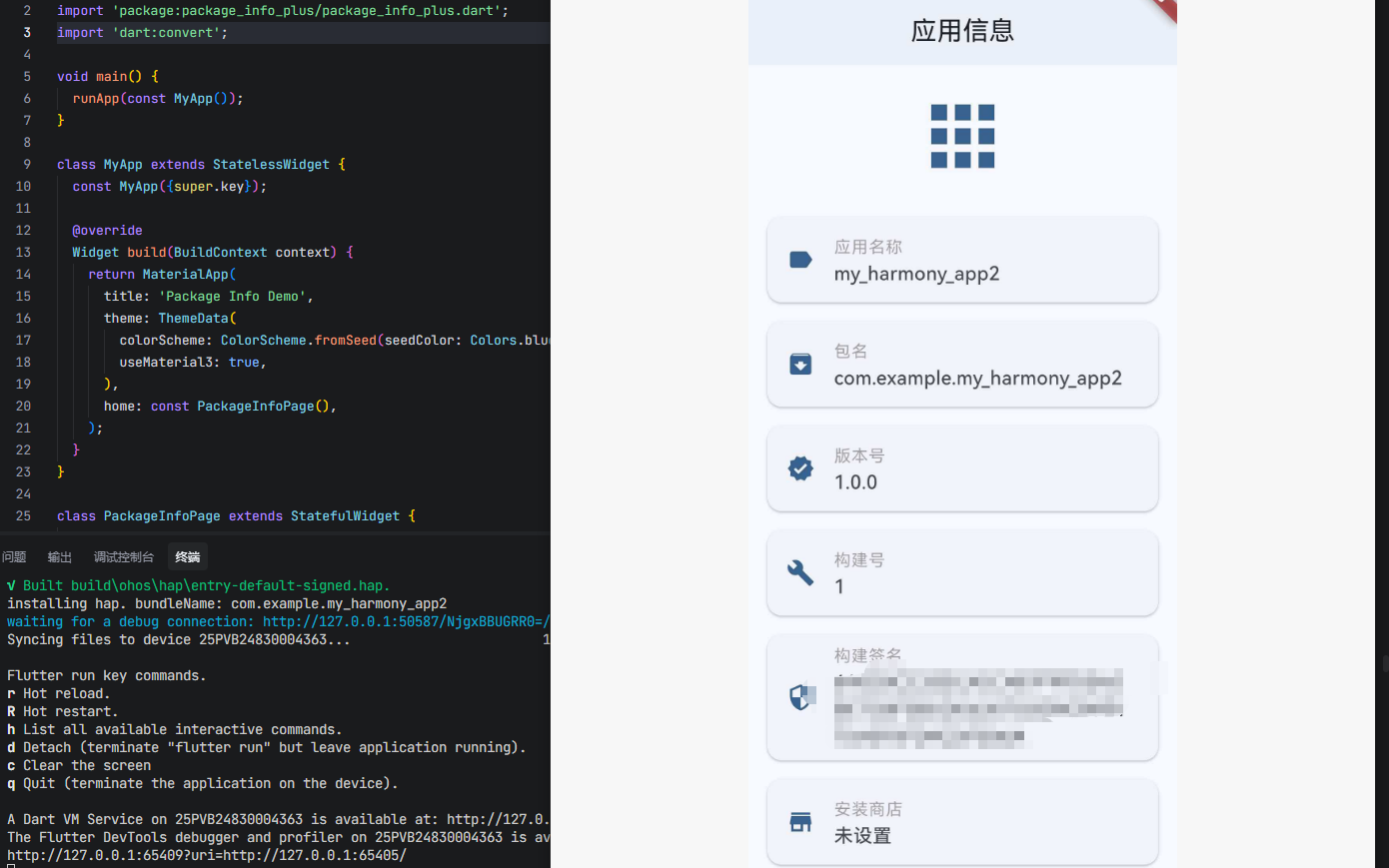
4.1 完整代码示例
import 'package:flutter/material.dart';
import 'package:package_info_plus/package_info_plus.dart';
void main() {
runApp(const MyApp());
}
class MyApp extends StatelessWidget {
const MyApp({super.key});
Widget build(BuildContext context) {
return MaterialApp(
title: 'Package Info Demo',
theme: ThemeData(
colorScheme: ColorScheme.fromSeed(seedColor: Colors.blue),
useMaterial3: true,
),
home: const PackageInfoPage(),
);
}
}
class PackageInfoPage extends StatefulWidget {
const PackageInfoPage({super.key});
State<PackageInfoPage> createState() => _PackageInfoPageState();
}
class _PackageInfoPageState extends State<PackageInfoPage> {
PackageInfo? _packageInfo;
bool _isLoading = true;
String? _errorMessage;
void initState() {
super.initState();
_loadPackageInfo();
}
Future<void> _loadPackageInfo() async {
try {
final info = await PackageInfo.fromPlatform();
setState(() {
_packageInfo = info;
_isLoading = false;
});
} catch (e) {
setState(() {
_errorMessage = '获取应用信息失败: $e';
_isLoading = false;
});
}
}
Widget _buildInfoTile(String title, String value, IconData icon) {
return Card(
margin: const EdgeInsets.symmetric(horizontal: 16, vertical: 8),
child: ListTile(
leading: Icon(icon, color: Theme.of(context).colorScheme.primary),
title: Text(
title,
style: const TextStyle(
fontSize: 14,
color: Colors.grey,
),
),
subtitle: Text(
value.isEmpty ? '未设置' : value,
style: const TextStyle(
fontSize: 16,
fontWeight: FontWeight.w500,
),
),
),
);
}
Widget build(BuildContext context) {
return Scaffold(
appBar: AppBar(
title: const Text('应用信息'),
centerTitle: true,
elevation: 2,
),
body: _buildBody(),
);
}
Widget _buildBody() {
if (_isLoading) {
return const Center(
child: CircularProgressIndicator(),
);
}
if (_errorMessage != null) {
return Center(
child: Column(
mainAxisAlignment: MainAxisAlignment.center,
children: [
const Icon(
Icons.error_outline,
size: 64,
color: Colors.red,
),
const SizedBox(height: 16),
Text(
_errorMessage!,
style: const TextStyle(color: Colors.red),
textAlign: TextAlign.center,
),
const SizedBox(height: 16),
ElevatedButton(
onPressed: () {
setState(() {
_isLoading = true;
_errorMessage = null;
});
_loadPackageInfo();
},
child: const Text('重试'),
),
],
),
);
}
if (_packageInfo == null) {
return const Center(
child: Text('无法获取应用信息'),
);
}
return RefreshIndicator(
onRefresh: () async {
await _loadPackageInfo();
},
child: ListView(
children: [
const SizedBox(height: 20),
Center(
child: Icon(
Icons.apps,
size: 80,
color: Theme.of(context).colorScheme.primary,
),
),
const SizedBox(height: 20),
_buildInfoTile(
'应用名称',
_packageInfo!.appName,
Icons.label,
),
_buildInfoTile(
'包名',
_packageInfo!.packageName,
Icons.archive,
),
_buildInfoTile(
'版本号',
_packageInfo!.version,
Icons.verified,
),
_buildInfoTile(
'构建号',
_packageInfo!.buildNumber,
Icons.build,
),
_buildInfoTile(
'构建签名',
_packageInfo!.buildSignature,
Icons.security,
),
_buildInfoTile(
'安装商店',
_packageInfo!.installerStore ?? '不支持',
Icons.store,
),
const SizedBox(height: 20),
Padding(
padding: const EdgeInsets.all(16),
child: Card(
color: Colors.blue.shade50,
child: Padding(
padding: const EdgeInsets.all(16),
child: Column(
crossAxisAlignment: CrossAxisAlignment.start,
children: [
const Text(
'完整信息 (JSON)',
style: TextStyle(
fontSize: 16,
fontWeight: FontWeight.bold,
),
),
const SizedBox(height: 8),
Text(
JsonEncoder.withIndent(' ').convert(_packageInfo!.data),
style: const TextStyle(
fontSize: 12,
fontFamily: 'monospace',
),
),
],
),
),
),
),
const SizedBox(height: 20),
],
),
);
}
}
4.2 代码说明
信息加载:
- 使用
PackageInfo.fromPlatform()异步获取应用信息 - 在
initState中自动加载信息 - 提供下拉刷新功能,可以重新加载信息
错误处理:
- 使用 try-catch 捕获可能的异常
- 显示友好的错误提示界面
- 提供重试按钮,允许用户重新尝试
UI 展示:
- 使用 Card 和 ListTile 组合展示每项信息
- 为每项信息添加图标,提升视觉效果
- 使用不同颜色区分标题和内容
- 提供 JSON 格式的完整信息展示
用户体验:
- 加载时显示进度指示器
- 支持下拉刷新
- 信息为空时显示"未设置"提示
五、最佳实践
5.1 版本检查功能
使用 package_info_plus 实现应用版本检查功能。
class VersionChecker {
  static Future<bool> needUpdate(String latestVersion) async {
    try {
      PackageInfo packageInfo = await PackageInfo.fromPlatform();
      String currentVersion = packageInfo.version;

      List<int> current = currentVersion.split('.').map(int.parse).toList();
      List<int> latest = latestVersion.split('.').map(int.parse).toList();

      for (int i = 0; i < latest.length; i++) {
        if (i >= current.length) return true;
        if (latest[i] > current[i]) return true;
        if (latest[i] < current[i]) return false;
      }

      return false;
    } catch (e) {
      print('版本检查失败: $e');
      return false;
    }
  }
}

// 使用示例
void checkForUpdate() async {
  String latestVersion = '2.0.0';
  bool needUpdate = await VersionChecker.needUpdate(latestVersion);

  if (needUpdate) {
    print('需要更新到最新版本 $latestVersion');
  } else {
    print('当前已是最新版本');
  }
}
5.2 应用信息缓存
将应用信息缓存到内存中,避免重复查询。
class AppInfoCache {
  static PackageInfo? _cachedInfo;

  static Future<PackageInfo> getPackageInfo() async {
    if (_cachedInfo != null) {
      return _cachedInfo!;
    }

    _cachedInfo = await PackageInfo.fromPlatform();
    return _cachedInfo!;
  }

  static void clearCache() {
    _cachedInfo = null;
  }
}

// 使用示例
void showAppInfo() async {
  PackageInfo info = await AppInfoCache.getPackageInfo();
  print('应用名称: ${info.appName}');
}
5.3 错误上报集成
将应用信息集成到错误上报系统中。
class ErrorReporter {
  static Future<void> reportError(dynamic error, StackTrace stackTrace) async {
    try {
      PackageInfo packageInfo = await PackageInfo.fromPlatform();

      Map<String, dynamic> errorReport = {
        'appName': packageInfo.appName,
        'version': packageInfo.version,
        'buildNumber': packageInfo.buildNumber,
        'packageName': packageInfo.packageName,
        'error': error.toString(),
        'stackTrace': stackTrace.toString(),
        'timestamp': DateTime.now().toIso8601String(),
      };

      // 发送错误报告到服务器
      print('错误报告: $errorReport');
    } catch (e) {
      print('生成错误报告失败: $e');
    }
  }
}
5.4 关于页面实现
使用 package_info_plus 实现标准的关于页面。
class AboutPage extends StatelessWidget {
const AboutPage({super.key});
Widget build(BuildContext context) {
return Scaffold(
appBar: AppBar(
title: const Text('关于'),
),
body: FutureBuilder<PackageInfo>(
future: PackageInfo.fromPlatform(),
builder: (context, snapshot) {
if (snapshot.connectionState == ConnectionState.waiting) {
return const Center(child: CircularProgressIndicator());
}
if (snapshot.hasError) {
return Center(child: Text('错误: ${snapshot.error}'));
}
final info = snapshot.data!;
return ListView(
children: [
const SizedBox(height: 40),
Center(
child: Column(
children: [
const Icon(Icons.apps, size: 80),
const SizedBox(height: 16),
Text(
info.appName,
style: const TextStyle(
fontSize: 24,
fontWeight: FontWeight.bold,
),
),
const SizedBox(height: 8),
Text(
'版本 ${info.version} (${info.buildNumber})',
style: const TextStyle(
fontSize: 16,
color: Colors.grey,
),
),
],
),
),
const SizedBox(height: 40),
ListTile(
title: const Text('版本号'),
subtitle: Text(info.version),
),
ListTile(
title: const Text('构建号'),
subtitle: Text(info.buildNumber),
),
ListTile(
title: const Text('包名'),
subtitle: Text(info.packageName),
),
const Divider(),
ListTile(
title: const Text('检查更新'),
trailing: const Icon(Icons.chevron_right),
onTap: () {
// 检查更新逻辑
},
),
ListTile(
title: const Text('用户协议'),
trailing: const Icon(Icons.chevron_right),
onTap: () {
// 显示用户协议
},
),
ListTile(
title: const Text('隐私政策'),
trailing: const Icon(Icons.chevron_right),
onTap: () {
// 显示隐私政策
},
),
],
);
},
),
);
}
}
六、常见问题
6.1 应用名称显示不正确
问题描述:在 OpenHarmony 上获取的应用名称显示为包名或其他不正确的值。
解决方案:
确保在 ohos/entry/src/main/resources/base/element/string.json 中正确配置了应用名称:
{
  "string": [
    {
      "name": "entry_MainAbility",
      "value": "我的应用"
    }
  ]
}
并在 ohos/entry/src/main/module.json5 中正确引用:
{
  "module": {
    "abilities": [
      {
        "name": "EntryAbility",
        "label": "$string:entry_MainAbility"
      }
    ]
  }
}
6.2 构建签名获取失败
问题描述:在某些情况下,buildSignature 返回空字符串或 null。
解决方案:
确保应用已正确签名。在 OpenHarmony 上,构建签名从 bundleManager.signatureInfo.fingerprint 获取,如果应用未签名,该值可能为空。
检查签名配置:
// ohos/entry/build-profile.json5
{
  "app": {
    "signingConfigs": [
      {
        "name": "default",
        "type": "HarmonyOS",
        "material": {
          "certpath": "path/to/cert.cer",
          "storePassword": "password",
          "keyAlias": "alias",
          "keyPassword": "password",
          "profile": "path/to/profile.p7b",
          "signAlg": "SHA256withECDSA",
          "verify": true,
          "storeFile": "path/to/keystore.p12"
        }
      }
    ]
  }
}
6.3 installerStore 始终为 null
问题描述:在 OpenHarmony 上,installerStore 始终返回 null。
解决方案:
这是正常现象。OpenHarmony 平台目前不支持获取安装商店信息,installerStore 属性在 OpenHarmony 上始终返回 null。如果需要判断安装来源,可以使用其他方式,如通过 Intent 参数传递。
6.4 版本号格式不一致
问题描述:不同平台的版本号格式可能不一致,导致版本比较困难。
解决方案:
使用统一的版本号格式(如 major.minor.patch),并实现版本比较函数:
class VersionUtils {
  static int compareVersions(String version1, String version2) {
    List<int> v1 = version1.split('.').map(int.parse).toList();
    List<int> v2 = version2.split('.').map(int.parse).toList();

    int maxLength = v1.length > v2.length ? v1.length : v2.length;

    for (int i = 0; i < maxLength; i++) {
      int num1 = i < v1.length ? v1[i] : 0;
      int num2 = i < v2.length ? v2[i] : 0;

      if (num1 > num2) return 1;
      if (num1 < num2) return -1;
    }

    return 0;
  }
}

// 使用示例
void compareVersions() {
  String version1 = '1.2.3';
  String version2 = '1.2.4';

  int result = VersionUtils.compareVersions(version1, version2);

  if (result < 0) {
    print('$version1 < $version2');
  } else if (result > 0) {
    print('$version1 > $version2');
  } else {
    print('$version1 == $version2');
  }
}
6.5 异步调用阻塞 UI
问题描述:在大量使用 PackageInfo.fromPlatform() 时,可能导致 UI 卡顿。
解决方案:
使用缓存机制,避免重复调用:
class PackageInfoService {
  static final PackageInfoService _instance = PackageInfoService._internal();
  factory PackageInfoService() => _instance;
  PackageInfoService._internal();

  PackageInfo? _cachedInfo;

  Future<PackageInfo> getPackageInfo() async {
    if (_cachedInfo != null) {
      return _cachedInfo!;
    }

    _cachedInfo = await PackageInfo.fromPlatform();
    return _cachedInfo!;
  }

  void refresh() {
    _cachedInfo = null;
  }
}
6.6 多语言环境下的应用名称
问题描述:应用支持多语言时,获取的应用名称可能不符合预期。
解决方案:
OpenHarmony 会根据系统语言自动选择对应的应用名称。确保在多语言资源文件中正确配置:
ohos/entry/src/main/resources/
  ├── base/
  │   └── element/
  │       └── string.json          # 默认语言
  ├── en_US/
  │   └── element/
  │       └── string.json          # 英文
  └── zh_CN/
      └── element/
          └── string.json          # 中文
6.7 在测试环境中的 Mock
问题描述:在单元测试中无法获取真实的 PackageInfo。
解决方案:
使用依赖注入和 Mock 对象:
class PackageInfoProvider {
Future<PackageInfo> getPackageInfo() {
return PackageInfo.fromPlatform();
}
}
class MockPackageInfoProvider extends PackageInfoProvider {
Future<PackageInfo> getPackageInfo() {
return Future.value(PackageInfo(
appName: 'Test App',
packageName: 'com.test.app',
version: '1.0.0',
buildNumber: '1',
buildSignature: 'test_signature',
));
}
}
// 在测试中使用
void testAppInfo() async {
PackageInfoProvider provider = MockPackageInfoProvider();
PackageInfo info = await provider.getPackageInfo();
assert(info.appName == 'Test App');
assert(info.version == '1.0.0');
}
七、总结
package_info_plus 是 Flutter for OpenHarmony 开发中获取应用信息的重要工具。通过本文的学习,您应该掌握了:
- 核心功能:了解 package_info_plus 提供的应用信息获取能力
- API 使用:掌握
PackageInfo.fromPlatform()等核心 API 的使用方法 - 平台差异:理解不同平台在应用信息获取上的差异
- 实战应用:学会在实际项目中应用 package_info_plus
- 最佳实践:掌握版本检查、信息缓存、错误上报等最佳实践
- 问题解决:了解常见问题的解决方案
package_info_plus 的简单易用和跨平台一致性,使其成为 Flutter 应用开发中不可或缺的基础库。在 OpenHarmony 平台上,它提供了与 Android、iOS 平台一致的使用体验,帮助开发者快速获取应用信息,实现版本检查、错误上报等功能。
参考资料

开源鸿蒙跨平台开发社区汇聚开发者与厂商,共建“一次开发,多端部署”的开源生态,致力于降低跨端开发门槛,推动万物智联创新。
更多推荐

 8
8 0
0- 0


 已为社区贡献98条内容

所有评论(0)