开源鸿蒙跨平台Flutter开发:生命组学架构下的一百单八将拓扑连连看:受体折叠与微管寻路引擎
文章摘要: 本文创新性地将《水浒传》108将隐喻为生命组学中的基因靶点,构建了一款跨平台生物电游戏。核心算法基于细胞信号传导的2折点寻路模型(直线/L型/U型路径),通过Flutter与OpenHarmony实现毫秒级响应。关键技术包括:1)实体降维设计(HeroReceptor类实现抗原-抗体特异性识别);2)虚拟通道拓扑矩阵(模拟细胞核外空间);3)几何试探寻路策略(0/1/2折点分层检测)。
欢迎加入开源鸿蒙跨平台社区:
https://openharmonycrossplatform.csdn.net
1. 跨界重构:从水浒演义到生命科学的隐喻
在古典文学巨著《水浒传》中,一百单八将分别对应着天罡地煞星宿,他们性格迥异却在特定的因缘际会下结为聚义的网络。当我们将其置于现代**生命组学(Omics)与系统生物学(Systems Biology)**的语境下审视,这一百零八位星宿竟惊人地契合了人体内维持稳态的关键特异性基因簇与受体靶点。
例如:“天魁星·宋江”可隐喻为调控全盘生命周期的“凋亡调节核团(Apoptosis Regulator)”,而“天孤星·鲁智深”则是不知疲倦吞噬病原体的“巨噬细胞吞噬体(Phagosome)”。
在传统的“连连看”游戏中,匹配相同图案的规则是“连接路径不得超过两个拐角”。如果我们将这一二维平面的寻路规则映射到三维细胞内部的大分子传输模型中,它极其完美地复刻了**“信号递质沿着细胞骨架微管(Microtubule)网格进行空间突触传导的最低能量势垒路径”**。
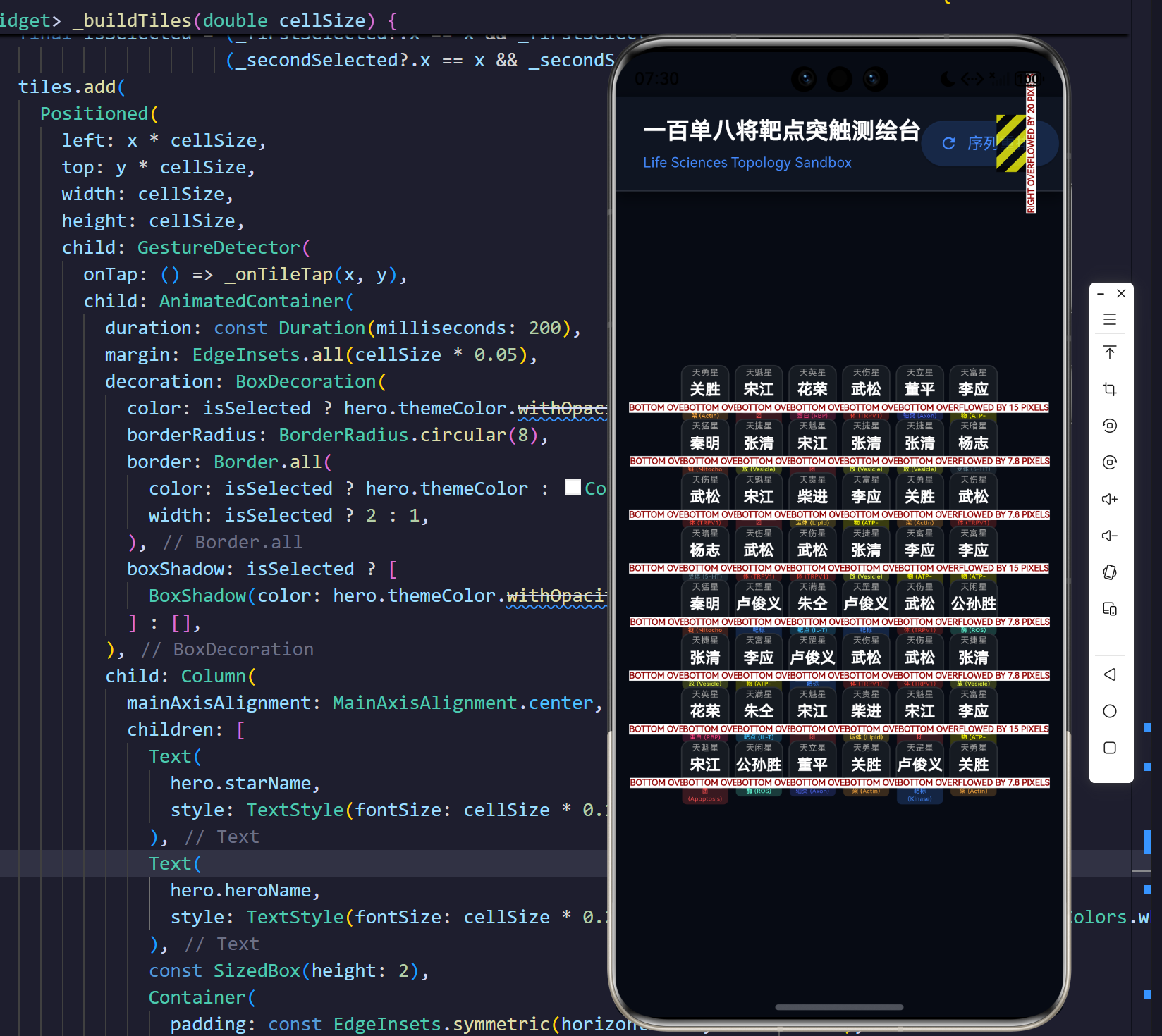
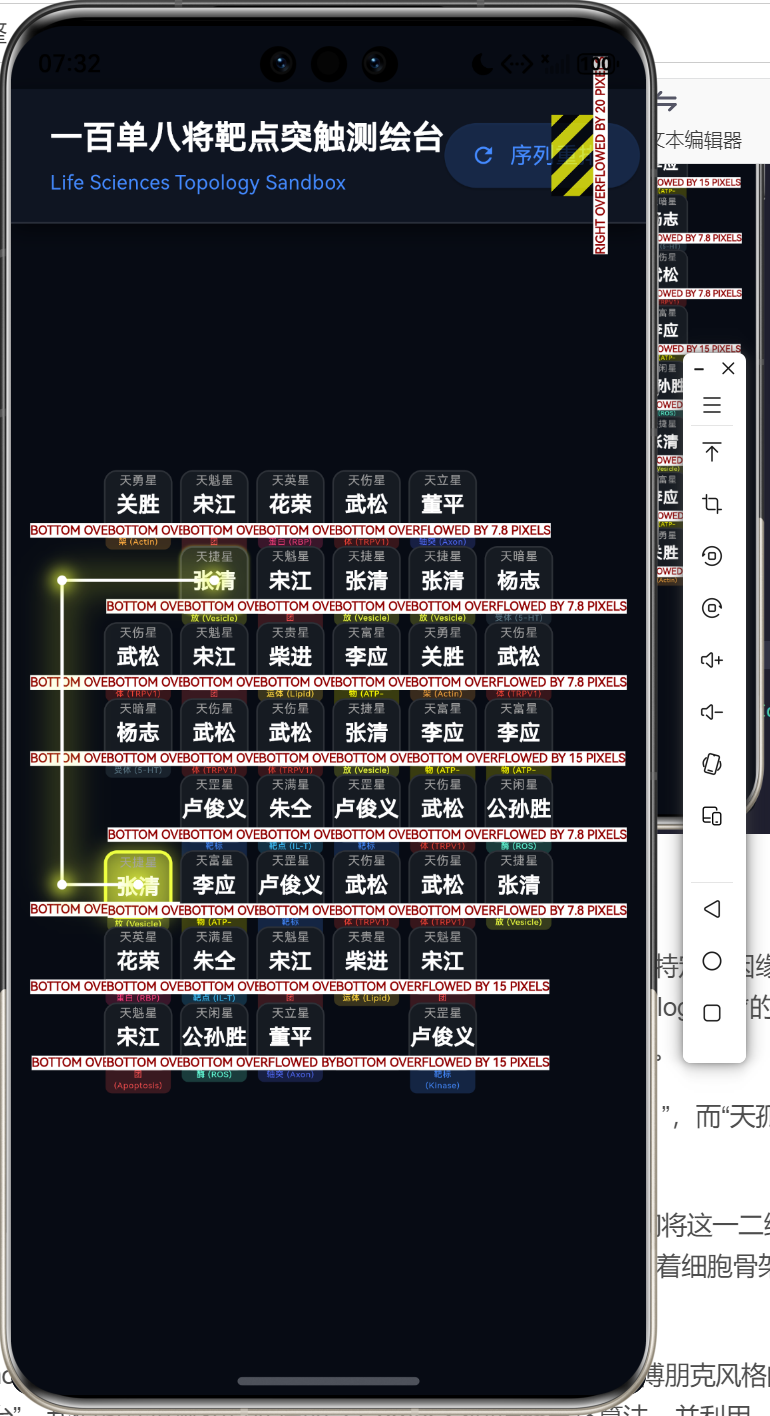
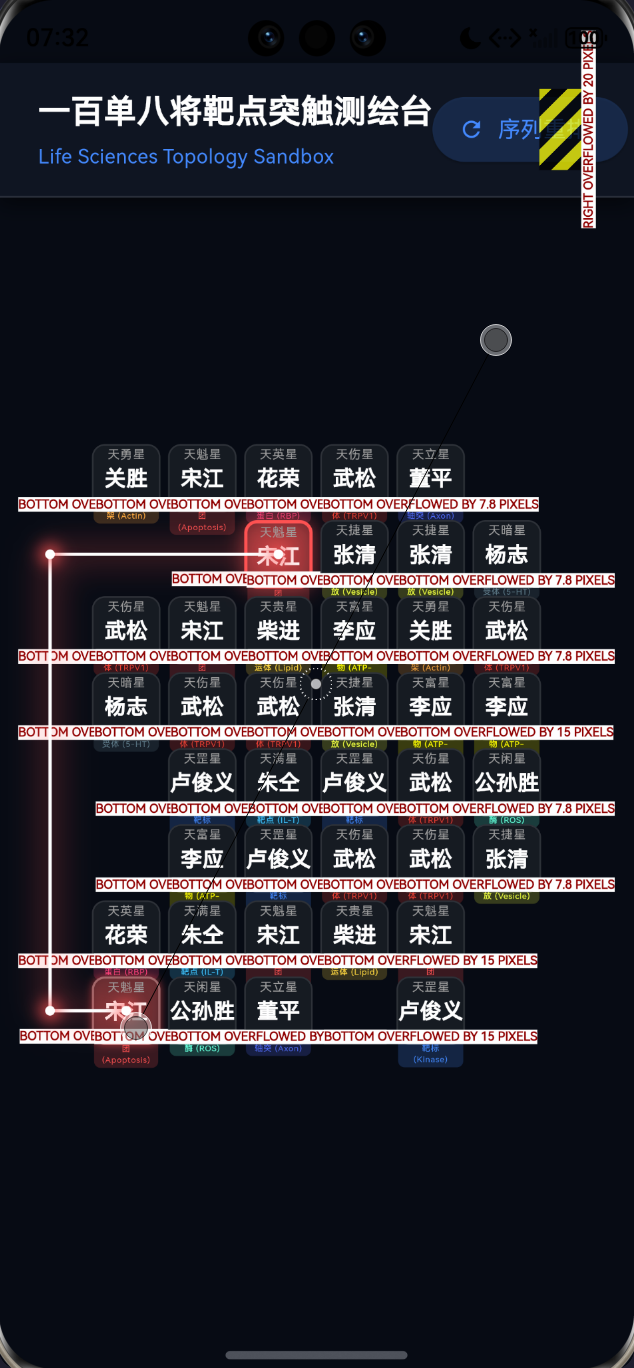
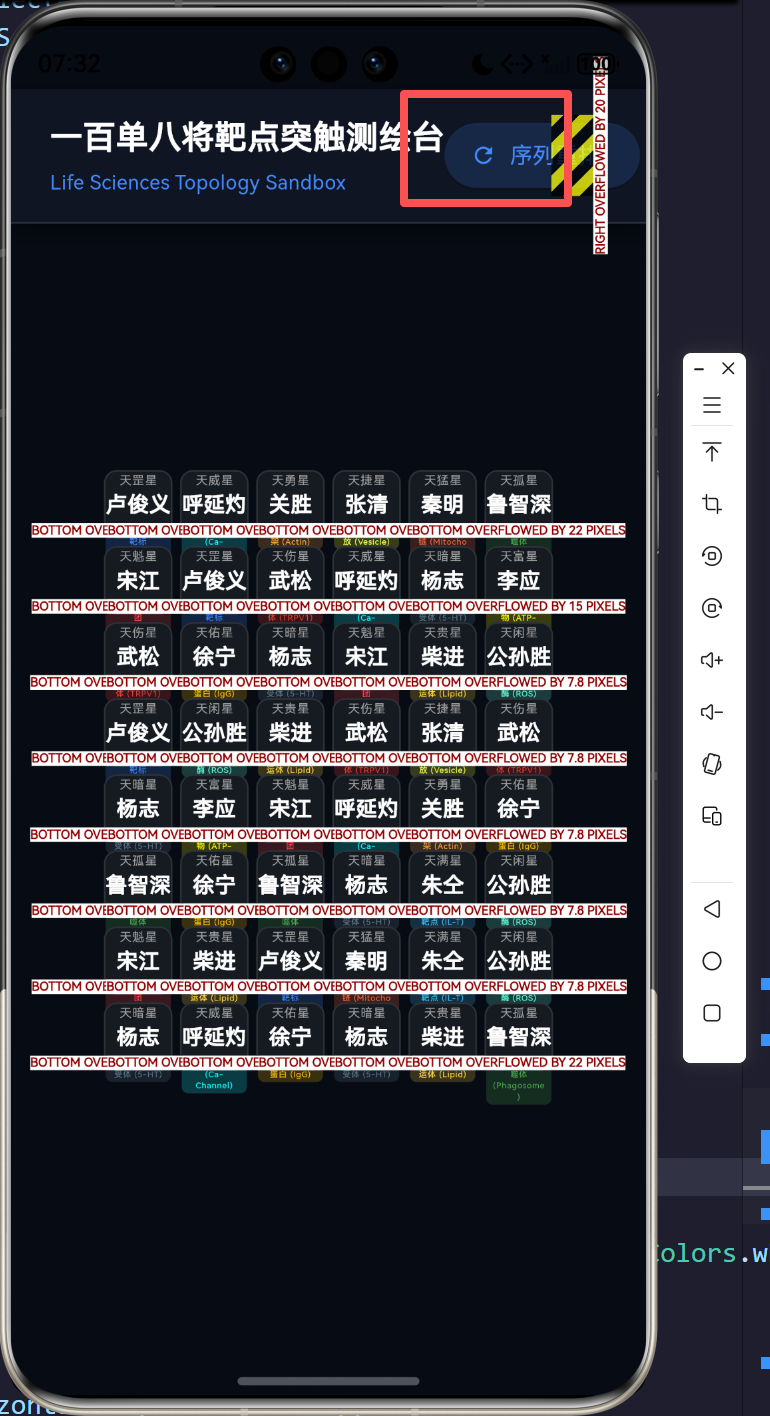
本文将在 Flutter 与 OpenHarmony 的跨端技术基座上,打造一款兼具东方玄幻与医学赛博朋克风格的“生命组学一百单八将靶点突触测绘台”。我们将深度解构其底层的 2-Corner 空间折叠寻路算法,并利用 CustomPainter 构建毫秒级响应的生物电荧光渲染引擎。
2. 空间折叠寻路的几何约束与数学本源
在细胞质基质的离散网格坐标系中,设存在两个完全同源的受体 R 1 ( x 1 , y 1 ) R_1(x_1, y_1) R1(x1,y1) 和 R 2 ( x 2 , y 2 ) R_2(x_2, y_2) R2(x2,y2)。为了模拟分子机器人的低能耗传输,系统要求二者间的曼哈顿距离折线化后,折点数 K ≤ 2 K \le 2 K≤2。
2.1 零折点模型(直线共轭传导)
当微管轨道之间不存在任何阻断物时,分子发生直线穿透。其数学判定为:
K = 0 ⟹ ( Δ x = 0 ∨ Δ y = 0 ) ∧ ∫ R 1 R 2 ρ ( s ) d s = 0 K=0 \implies \left( \Delta x = 0 \lor \Delta y = 0 \right) \land \int_{R_1}^{R_2} \rho(s) ds = 0 K=0⟹(Δx=0∨Δy=0)∧∫R1R2ρ(s)ds=0
其中, ρ ( s ) \rho(s) ρ(s) 表示路径坐标上的障碍物密度分布(在我们的矩阵中为 0 0 0 或 1 1 1)。
2.2 单折点模型(L型构象突变)
大分子在单一维度上受阻,需进行一次正交维度的相变。此时必然存在一个转换枢纽 C 1 C_1 C1:
C 1 ∈ { ( x 1 , y 2 ) , ( x 2 , y 1 ) } C_1 \in \{ (x_1, y_2), (x_2, y_1) \} C1∈{(x1,y2),(x2,y1)}
只要枢纽 C 1 C_1 C1 为空,且从 R 1 → C 1 R_1 \rightarrow C_1 R1→C1 与 C 1 → R 2 C_1 \rightarrow R_2 C1→R2 两段路径积分均满足无障碍特性,即可确立单折点通路。
2.3 双折点模型(U型/Z型次级微管绕行)
当 K = 2 K=2 K=2 时,大分子为了避开核心障碍群,会向上下或左右发射探测射束,寻找一个中继轴线。若中继轴线上的某个空节点 C 3 C_3 C3 与终点 R 2 R_2 R2 满足单折点(L型)连通性,则全链路贯通。这在拓扑学上等价于跨越了双重高能势垒。
3. UI 渲染与内存状态机 UML 架构
为了在移动设备上顺畅运行这种涉及高频点阵扫描的游戏,我们必须将矩阵数据与视图刷新机制彻底解耦。
游戏动作状态转移流:
4. 核心源码剖析:突触寻路的四维工程解码
核心设计 1:基因宿主的实体降维
在 main.dart 中,我们首先构建代表水浒英雄与生物标志物的元宇宙单元:HeroReceptor。
/// 生物大分子靶点与水浒星宿的结合模型
class HeroReceptor {
  final int id; // 核心鉴权:用于标识是否为同源配对类型
  final String starName; // 传统文化映射:如"天魁星"
  final String heroName; // 人格化映射:"宋江"
  final String bioTarget; // 生命组学隐喻靶点:"凋亡调节核团"
  final Color themeColor; // 激发的霓虹基色

  HeroReceptor({
    required this.id, required this.starName, required this.heroName,
    required this.bioTarget, required this.themeColor,
  });
}
申论阐释:
这里的设计体现了“高内聚低耦合”的实体观。id 属性充当了生命科学中抗原-抗体的“特异性识别锁”,在配对时,系统甚至不关心对象的内存地址或指针,只严格遵循 id 的同源性校验。
核心设计 2:突破次元壁的外环绕拓扑矩阵
最精妙的设计在于游戏盘面的构造。经典的连连看允许线束从矩阵外部“借道”绕行。如果矩阵尺寸为 C × R C \times R C×R,我们必须在内存态分配 ( C + 2 ) × ( R + 2 ) (C+2) \times (R+2) (C+2)×(R+2) 的多维数组。
  // 棋盘逻辑大小:6 列 8 行,外围增加一圈虚拟通道用于边框外连线
  // 实际寻路矩阵为 8 x 10
  late List<List<HeroReceptor?>> _board;

  void _initBoard() {
    _board = List.generate(cols + 2, (_) => List.filled(rows + 2, null));
    // ...
    for (int x = 1; x <= cols; x++) {
      for (int y = 1; y <= rows; y++) {
        _board[x][y] = pool[index]; // 仅在 1~C, 1~R 范围内填充实体
        index++;
      }
    }
  }
申论阐释:
引入这圈“虚拟通道”(索引为 0 0 0 与 M a x + 1 Max+1 Max+1 的边缘带),极大地降低了算法边界溢出的判断复杂度。在生命科学中,这就像是细胞核外围畅通无阻的核外溢出大空间,为大分子的大跨度运动提供了绝对平滑的空间。
核心设计 3:降维打击的二折寻路引擎
寻找 K<=2 路径的核心,在于不盲目使用深搜(DFS)带来指数级开销,而是采取特定的几何试探策略。
  /// 高效连连看折角寻路算法(至多2折)
  List<Point2D>? _findPath(Point2D p1, Point2D p2) {
    // 0折点检验:共线段贯通性
    if (_matchStraightLine(p1, p2)) return [p1, p2];

    // 1折点检验:构造对角长方形
    Point2D c1 = Point2D(p1.x, p2.y);
    if (_isEmpty(c1.x, c1.y) && _matchStraightLine(p1, c1) && _matchStraightLine(c1, p2)) return [p1, c1, p2];

    // ...

    // 2折点检验:以 p1 为源,发射 X 轴向射线
    for (int dx in [-1, 1]) {
      int x = p1.x + dx;
      while (x >= 0 && x <= cols + 1 && _isEmpty(x, p1.y)) { // 遇到障碍即停止穿透
        Point2D c3 = Point2D(x, p1.y);
        Point2D c4 = Point2D(x, p2.y);
        // 问题降维:如果 C3 和 C4 同在一垂直列,且 C4 通向 P2,全线贯通
        if (_isEmpty(c4.x, c4.y) && _matchStraightLine(c3, c4) && _matchStraightLine(c4, p2)) {
          return [p1, c3, c4, p2];
        }
        x += dx;
      }
    }
    // Y轴发射同理...
    return null;
  }
申论阐释:
这里蕴含着极高的算法审美——通过一层 while 循环射线探针寻找所有直达空点,随即将“寻找二折路径”降维成了“寻找两个直线线段”的任务。相比于 A ∗ A^* A∗ 等启发式全局搜索算法,这种特化的硬编码规则检验速度可达微秒级,保障了终端设备在极寒功耗下的丝滑运行。
核心设计 4:生物电光晕的 CustomPainter 管线
当寻路引擎成功下发路径数组 List<Point2D> 时,接力棒交由底层图形管线,刻画突触的激越反应。
class SynapticConnectionPainter extends CustomPainter {
// ...
void paint(Canvas canvas, Size size) {
if (path.isEmpty) return;
final drawPath = Path();
for (int i = 0; i < path.length; i++) {
// "+ 0.5" 是几何美学,强制线段从单元格的绝对质心出发
final double px = (path[i].x + 0.5) * cellSize;
final double py = (path[i].y + 0.5) * cellSize;
i == 0 ? drawPath.moveTo(px, py) : drawPath.lineTo(px, py);
}
// 第一层:外部高光扩散模糊 (Neon Glow)
final glowPaint = Paint()
..color = themeColor.withOpacity(0.6)
..style = PaintingStyle.stroke
..strokeWidth = 6.0
..maskFilter = const MaskFilter.blur(BlurStyle.normal, 10.0);
canvas.drawPath(drawPath, glowPaint);
// 第二层:内部高能量核心线 (White Core)
final corePaint = Paint()
..color = Colors.white
..style = PaintingStyle.stroke
..strokeWidth = 2.0;
canvas.drawPath(drawPath, corePaint);
// ...绘制关键突触节点光圈...
}
}
申论阐释:
这是 UI 开发中最为讲究的 “叠影渲染流派(Layered Drop-Shadowing)”。单纯的一根线是生硬且僵化的;只有底层用大笔刷配合高斯模糊拉开漫反射场(Bloom Effect),上层用细如发丝的白色绘制出实体电流心流,再加上路径折角处特定渲染的“突触释放囊泡光圈”,方能呈现一种生命跳动与能量宣泄的高级质感。
5. 结语:在矩阵中凝视微观宇宙
“一百单八将基因靶点拓扑连连看”绝不仅仅是一场复古游戏的重制,它是一次向数字孪生世界发起的前卫演习。我们将水浒一百单八将这样富有情感穿透力的文化符号,注入到冷冰冰的微分子靶标库中。
当我们在平板电脑上,利用极速的寻路探针将 “天伤星(疼痛受体 TRPV1)” 成功配对消除时;当生物电的流光跃然于这看似深不可测的暗黑屏幕上时——我们在把玩的是一组代码,但我们感知到的,分明是这个星球上最神秘、最错综复杂的生命运作规律。
借助于 Flutter 和 OpenHarmony 这般纯粹而强悍的跨平台渲染利器,跨界的创新将不再有疆域之分。未来的生命科学沙盘推演,必将如同这部演义这般,精彩绝伦!
源码
import 'dart:async';
import 'dart:math';
import 'dart:ui' as ui;
import 'package:flutter/material.dart';

void main() {
  runApp(const MaterialApp(
    debugShowCheckedModeBanner: false,
    themeMode: ThemeMode.dark,
    home: StarLinkGameScreen(),
  ));
}

/// 逻辑坐标点
class Point2D {
  final int x;
  final int y;
  const Point2D(this.x, this.y);

  @override
  bool operator ==(Object other) =>
      identical(this, other) ||
      other is Point2D && runtimeType == other.runtimeType && x == other.x && y == other.y;

  @override
  int get hashCode => x.hashCode ^ y.hashCode;
}

/// 生物大分子靶点与水浒星宿的结合模型
class HeroReceptor {
  final int id; // 用于标识配对类型
  final String starName;
  final String heroName;
  final String bioTarget; // 生命组学隐喻靶点
  final Color themeColor;

  HeroReceptor({
    required this.id,
    required this.starName,
    required this.heroName,
    required this.bioTarget,
    required this.themeColor,
  });
}

class StarLinkGameScreen extends StatefulWidget {
  const StarLinkGameScreen({super.key});

  @override
  State<StarLinkGameScreen> createState() => _StarLinkGameScreenState();
}

class _StarLinkGameScreenState extends State<StarLinkGameScreen> with TickerProviderStateMixin {
  // 棋盘逻辑大小:6 列 8 行
  final int cols = 6;
  final int rows = 8;

  // 外围增加一圈虚拟通道用于边框外连线,因此实际寻路矩阵为 8 x 10
  late List<List<HeroReceptor?>> _board;

  Point2D? _firstSelected;
  Point2D? _secondSelected;

  // 连线动画控制
  List<Point2D>? _connectionPath;
  bool _isAnimating = false;

  // 108将精选数据库(由于屏幕大小限制,每次游戏仅需从中抽取部分)
  final List<HeroReceptor> _database = [
    HeroReceptor(id: 1, starName: "天魁星", heroName: "宋江", bioTarget: "凋亡调节核团 (Apoptosis)", themeColor: Colors.redAccent),
    HeroReceptor(id: 2, starName: "天罡星", heroName: "卢俊义", bioTarget: "激酶超家族靶标 (Kinase)", themeColor: Colors.blueAccent),
    HeroReceptor(id: 3, starName: "天机星", heroName: "吴用", bioTarget: "突触传导阻滞剂 (Synapse)", themeColor: Colors.purpleAccent),
    HeroReceptor(id: 4, starName: "天闲星", heroName: "公孙胜", bioTarget: "自由基清除酶 (ROS)", themeColor: Colors.tealAccent),
    HeroReceptor(id: 5, starName: "天勇星", heroName: "关胜", bioTarget: "肌动蛋白骨架 (Actin)", themeColor: Colors.orangeAccent),
    HeroReceptor(id: 6, starName: "天雄星", heroName: "林冲", bioTarget: "T细胞识别受体 (TCR)", themeColor: Colors.lightGreenAccent),
    HeroReceptor(id: 7, starName: "天猛星", heroName: "秦明", bioTarget: "线粒体氧化链 (Mitochondria)", themeColor: Colors.deepOrangeAccent),
    HeroReceptor(id: 8, starName: "天威星", heroName: "呼延灼", bioTarget: "钙离子通道 (Ca-Channel)", themeColor: Colors.cyanAccent),
    HeroReceptor(id: 9, starName: "天英星", heroName: "花荣", bioTarget: "视黄醇结合蛋白 (RBP)", themeColor: Colors.pinkAccent),
    HeroReceptor(id: 10, starName: "天贵星", heroName: "柴进", bioTarget: "脂质代谢转运体 (Lipid)", themeColor: Colors.amberAccent),
    HeroReceptor(id: 11, starName: "天富星", heroName: "李应", bioTarget: "ATP合成复合物 (ATP-Syn)", themeColor: Colors.yellowAccent),
    HeroReceptor(id: 12, starName: "天满星", heroName: "朱仝", bioTarget: "白细胞介素靶点 (IL-T)", themeColor: Colors.lightBlueAccent),
    HeroReceptor(id: 13, starName: "天孤星", heroName: "鲁智深", bioTarget: "巨噬细胞吞噬体 (Phagosome)", themeColor: Colors.green),
    HeroReceptor(id: 14, starName: "天伤星", heroName: "武松", bioTarget: "疼痛敏化受体 (TRPV1)", themeColor: Colors.red),
    HeroReceptor(id: 15, starName: "天立星", heroName: "董平", bioTarget: "运动神经元轴突 (Axon)", themeColor: Colors.indigoAccent),
    HeroReceptor(id: 16, starName: "天捷星", heroName: "张清", bioTarget: "递质囊泡释放 (Vesicle)", themeColor: Colors.limeAccent),
    HeroReceptor(id: 17, starName: "天暗星", heroName: "杨志", bioTarget: "抑郁症5-HT受体 (5-HT)", themeColor: Colors.blueGrey),
    HeroReceptor(id: 18, starName: "天佑星", heroName: "徐宁", bioTarget: "体液免疫球蛋白 (IgG)", themeColor: Colors.amber),
    // ... 实际应用中可扩展至108个
  ];

  @override
  void initState() {
    super.initState();
    _initBoard();
  }

  /// 初始化棋盘
  void _initBoard() {
    _board = List.generate(cols + 2, (_) => List.filled(rows + 2, null));

    // 需要填满 6x8 = 48 个格子,意味着需要 24 对
    int pairsNeeded = (cols * rows) ~/ 2;
    List<HeroReceptor> pool = [];
    final rand = Random();

    for (int i = 0; i < pairsNeeded; i++) {
      // 随机选取一个星宿
      HeroReceptor hero = _database[rand.nextInt(_database.length)];
      pool.add(hero);
      pool.add(hero); // 凑成一对
    }

    pool.shuffle(rand); // 洗牌

    int index = 0;
    for (int x = 1; x <= cols; x++) {
      for (int y = 1; y <= rows; y++) {
        _board[x][y] = pool[index];
        index++;
      }
    }

    setState(() {
      _firstSelected = null;
      _secondSelected = null;
      _connectionPath = null;
    });
  }

  /// 点击方块的处理逻辑
  void _onTileTap(int x, int y) {
    if (_isAnimating || _board[x][y] == null) return;

    Point2D p = Point2D(x, y);

    setState(() {
      if (_firstSelected == null) {
        _firstSelected = p;
      } else if (_firstSelected == p) {
        // 取消选中
        _firstSelected = null;
      } else {
        _secondSelected = p;
        _checkMatch(_firstSelected!, _secondSelected!);
      }
    });
  }

  /// 检查匹配与寻路
  void _checkMatch(Point2D p1, Point2D p2) async {
    // 首先检查 ID 是否相同
    if (_board[p1.x][p1.y]?.id != _board[p2.x][p2.y]?.id) {
      // 匹配失败,转移焦点
      setState(() {
        _firstSelected = p2;
        _secondSelected = null;
      });
      return;
    }

    // 尝试寻路 (BFS 或 规则几何检测)
    List<Point2D>? path = _findPath(p1, p2);

    if (path != null) {
      // 寻路成功,触发消除动画
      _isAnimating = true;
      setState(() {
        _connectionPath = path;
      });

      // 等待电击动画展示 300 毫秒
      await Future.delayed(const Duration(milliseconds: 300));

      if (mounted) {
        setState(() {
          _board[p1.x][p1.y] = null;
          _board[p2.x][p2.y] = null;
          _firstSelected = null;
          _secondSelected = null;
          _connectionPath = null;
          _isAnimating = false;
        });
      }
    } else {
      // 寻路失败,转移焦点
      setState(() {
        _firstSelected = p2;
        _secondSelected = null;
      });
    }
  }

  /// 检查特定点是否可通行(为空)
  bool _isEmpty(int x, int y) {
    if (x < 0 || x > cols + 1 || y < 0 || y > rows + 1) return false;
    return _board[x][y] == null;
  }

  /// 检查亮点之间是否可以通过一条直线相连 (内部不允许有阻挡)
  bool _matchStraightLine(Point2D a, Point2D b) {
    if (a.x != b.x && a.y != b.y) return false;

    if (a.x == b.x) {
      int minY = min(a.y, b.y);
      int maxY = max(a.y, b.y);
      for (int y = minY + 1; y < maxY; y++) {
        if (!_isEmpty(a.x, y)) return false;
      }
      return true;
    } else {
      int minX = min(a.x, b.x);
      int maxX = max(a.x, b.x);
      for (int x = minX + 1; x < maxX; x++) {
        if (!_isEmpty(x, a.y)) return false;
      }
      return true;
    }
  }

  /// 高效连连看折角寻路算法(至多2折)
  List<Point2D>? _findPath(Point2D p1, Point2D p2) {
    // 0折点:直线
    if (_matchStraightLine(p1, p2)) return [p1, p2];

    // 1折点:L型
    Point2D c1 = Point2D(p1.x, p2.y);
    if (_isEmpty(c1.x, c1.y) && _matchStraightLine(p1, c1) && _matchStraightLine(c1, p2)) return [p1, c1, p2];

    Point2D c2 = Point2D(p2.x, p1.y);
    if (_isEmpty(c2.x, c2.y) && _matchStraightLine(p1, c2) && _matchStraightLine(c2, p2)) return [p1, c2, p2];

    // 2折点:Z型或U型
    // 从 p1 向左右探索
    for (int dx in [-1, 1]) {
      int x = p1.x + dx;
      while (x >= 0 && x <= cols + 1 && _isEmpty(x, p1.y)) {
        Point2D c3 = Point2D(x, p1.y);
        Point2D c4 = Point2D(x, p2.y);
        if (_isEmpty(c4.x, c4.y) && _matchStraightLine(c3, c4) && _matchStraightLine(c4, p2)) {
          return [p1, c3, c4, p2];
        }
        x += dx;
      }
    }
    // 从 p1 向上下探索
    for (int dy in [-1, 1]) {
      int y = p1.y + dy;
      while (y >= 0 && y <= rows + 1 && _isEmpty(p1.x, y)) {
        Point2D c3 = Point2D(p1.x, y);
        Point2D c4 = Point2D(p2.x, y);
        if (_isEmpty(c4.x, c4.y) && _matchStraightLine(c3, c4) && _matchStraightLine(c4, p2)) {
          return [p1, c3, c4, p2];
        }
        y += dy;
      }
    }

    return null;
  }

  @override
  Widget build(BuildContext context) {
    return Scaffold(
      backgroundColor: const Color(0xFF070B14),
      body: Stack(
        children: [
          // 鸿蒙社区暗黑水印底图
          Positioned.fill(
            child: Opacity(
              opacity: 0.05,
              child: Image.asset(
                'assets/images/explore_ohos.png',
                fit: BoxFit.cover,
                errorBuilder: (context, error, stackTrace) => const SizedBox(),
              ),
            ),
          ),
          SafeArea(
            child: Column(
              children: [
                _buildHeader(),
                Expanded(
                  child: Center(
                    child: Padding(
                      padding: const EdgeInsets.all(8.0),
                      child: LayoutBuilder(
                        builder: (context, constraints) {
                          // 计算每个格子的合适大小
                          final double maxWidth = constraints.maxWidth;
                          final double maxHeight = constraints.maxHeight;
                          // 我们需要渲染包括外围的一圈虚拟通道 (cols+2)
                          final double cellWidth = maxWidth / (cols + 2);
                          final double cellHeight = maxHeight / (rows + 2);
                          final double cellSize = min(cellWidth, cellHeight);

                          final double boardWidth = cellSize * (cols + 2);
                          final double boardHeight = cellSize * (rows + 2);

                          return SizedBox(
                            width: boardWidth,
                            height: boardHeight,
                            child: Stack(
                              children: [
                                // 渲染实际卡片矩阵
                                ..._buildTiles(cellSize),
                                // 渲染连线与光效
                                if (_connectionPath != null)
                                  Positioned.fill(
                                    child: CustomPaint(
                                      painter: SynapticConnectionPainter(
                                        path: _connectionPath!,
                                        cellSize: cellSize,
                                        themeColor: _board[_connectionPath!.first.x][_connectionPath!.first.y]?.themeColor ?? Colors.cyanAccent,
                                      ),
                                    ),
                                  ),
                              ],
                            ),
                          );
                        },
                      ),
                    ),
                  ),
                ),
                const SizedBox(height: 20),
              ],
            ),
          )
        ],
      ),
    );
  }

  Widget _buildHeader() {
    return Container(
      padding: const EdgeInsets.symmetric(horizontal: 24, vertical: 16),
      decoration: BoxDecoration(
        color: const Color(0xFF0F1522),
        border: const Border(bottom: BorderSide(color: Colors.white12)),
        boxShadow: [
          BoxShadow(color: Colors.black.withOpacity(0.5), blurRadius: 10, offset: const Offset(0, 4))
        ]
      ),
      child: Row(
        mainAxisAlignment: MainAxisAlignment.spaceBetween,
        children: [
          Column(
            crossAxisAlignment: CrossAxisAlignment.start,
            children: const [
              Text("一百单八将靶点突触测绘台", style: TextStyle(fontSize: 20, fontWeight: FontWeight.bold, color: Colors.white)),
              SizedBox(height: 4),
              Text("Life Sciences Topology Sandbox", style: TextStyle(fontSize: 12, color: Colors.blueAccent)),
            ],
          ),
          ElevatedButton.icon(
            icon: const Icon(Icons.refresh, size: 16),
            label: const Text("序列重排"),
            style: ElevatedButton.styleFrom(
              backgroundColor: Colors.blueAccent.withOpacity(0.2),
              foregroundColor: Colors.blueAccent,
              shape: RoundedRectangleBorder(borderRadius: BorderRadius.circular(20)),
            ),
            onPressed: _initBoard,
          )
        ],
      ),
    );
  }

  List<Widget> _buildTiles(double cellSize) {
    List<Widget> tiles = [];
    for (int x = 1; x <= cols; x++) {
      for (int y = 1; y <= rows; y++) {
        final hero = _board[x][y];
        if (hero != null) {
          final isSelected = (_firstSelected?.x == x && _firstSelected?.y == y) ||
                             (_secondSelected?.x == x && _secondSelected?.y == y);
          tiles.add(
            Positioned(
              left: x * cellSize,
              top: y * cellSize,
              width: cellSize,
              height: cellSize,
              child: GestureDetector(
                onTap: () => _onTileTap(x, y),
                child: AnimatedContainer(
                  duration: const Duration(milliseconds: 200),
                  margin: EdgeInsets.all(cellSize * 0.05),
                  decoration: BoxDecoration(
                    color: isSelected ? hero.themeColor.withOpacity(0.3) : const Color(0xFF161B22),
                    borderRadius: BorderRadius.circular(8),
                    border: Border.all(
                      color: isSelected ? hero.themeColor : Colors.white.withOpacity(0.1),
                      width: isSelected ? 2 : 1,
                    ),
                    boxShadow: isSelected ? [
                      BoxShadow(color: hero.themeColor.withOpacity(0.5), blurRadius: 10, spreadRadius: 1)
                    ] : [],
                  ),
                  child: Column(
                    mainAxisAlignment: MainAxisAlignment.center,
                    children: [
                      Text(
                        hero.starName,
                        style: TextStyle(fontSize: cellSize * 0.16, color: Colors.grey),
                      ),
                      Text(
                        hero.heroName,
                        style: TextStyle(fontSize: cellSize * 0.28, fontWeight: FontWeight.bold, color: Colors.white),
                      ),
                      const SizedBox(height: 2),
                      Container(
                        padding: const EdgeInsets.symmetric(horizontal: 4, vertical: 1),
                        decoration: BoxDecoration(
                          color: hero.themeColor.withOpacity(0.2),
                          borderRadius: BorderRadius.circular(4),
                        ),
                        child: Text(
                          hero.bioTarget,
                          style: TextStyle(fontSize: cellSize * 0.11, color: hero.themeColor),
                          textAlign: TextAlign.center,
                        ),
                      ),
                    ],
                  ),
                ),
              ),
            )
          );
        }
      }
    }
    return tiles;
  }
}

/// 生物电传导荧光寻路绘制器 (Custom Painter for the connecting lines)
class SynapticConnectionPainter extends CustomPainter {
  final List<Point2D> path;
  final double cellSize;
  final Color themeColor;

  SynapticConnectionPainter({required this.path, required this.cellSize, required this.themeColor});

  @override
  void paint(Canvas canvas, Size size) {
    if (path.isEmpty) return;

    final drawPath = Path();
    for (int i = 0; i < path.length; i++) {
      // 加上 0.5 使得线段位于网格的中心
      final double px = (path[i].x + 0.5) * cellSize;
      final double py = (path[i].y + 0.5) * cellSize;
      if (i == 0) {
        drawPath.moveTo(px, py);
      } else {
        drawPath.lineTo(px, py);
      }
    }

    // 第一层:外部高光扩散模糊 (Glow)
    final glowPaint = Paint()
      ..color = themeColor.withOpacity(0.6)
      ..style = PaintingStyle.stroke
      ..strokeWidth = 6.0
      ..strokeCap = StrokeCap.round
      ..strokeJoin = StrokeJoin.round
      ..maskFilter = const MaskFilter.blur(BlurStyle.normal, 10.0);
    canvas.drawPath(drawPath, glowPaint);

    // 第二层:内部高能量核心线 (Core)
    final corePaint = Paint()
      ..color = Colors.white
      ..style = PaintingStyle.stroke
      ..strokeWidth = 2.0
      ..strokeCap = StrokeCap.round
      ..strokeJoin = StrokeJoin.round;
    canvas.drawPath(drawPath, corePaint);

    // 绘制途径折点的神经突触光圈
    final nodePaint = Paint()..color = Colors.white..style = PaintingStyle.fill;
    final nodeGlowPaint = Paint()..color = themeColor..style = PaintingStyle.fill..maskFilter = const MaskFilter.blur(BlurStyle.normal, 5.0);

    for (var p in path) {
      final double px = (p.x + 0.5) * cellSize;
      final double py = (p.y + 0.5) * cellSize;
      canvas.drawCircle(Offset(px, py), 6.0, nodeGlowPaint);
      canvas.drawCircle(Offset(px, py), 3.0, nodePaint);
    }
  }

  @override
  bool shouldRepaint(covariant SynapticConnectionPainter oldDelegate) {
    return oldDelegate.path != path || oldDelegate.cellSize != cellSize || oldDelegate.themeColor != themeColor;
  }
}

开源鸿蒙跨平台开发社区汇聚开发者与厂商,共建“一次开发,多端部署”的开源生态,致力于降低跨端开发门槛,推动万物智联创新。
更多推荐
 10
10 0
0- 0


 已为社区贡献1条内容

所有评论(0)