Flutter for OpenHarmony三方库适配实战:flutter_downloader 文件下载器
文件下载是移动应用开发中的核心功能,应用需要下载视频、音频、文档等各类文件。在 Flutter for OpenHarmony 应用开发中,是一个功能强大的文件下载插件,提供了完整的下载管理能力。flutter_downloader 是一个功能强大的文件下载插件,为 OpenHarmony 应用提供了完整的下载管理能力。
欢迎加入开源鸿蒙跨平台社区:https://openharmonycrossplatform.csdn.net
本文基于flutter3.27.5开发
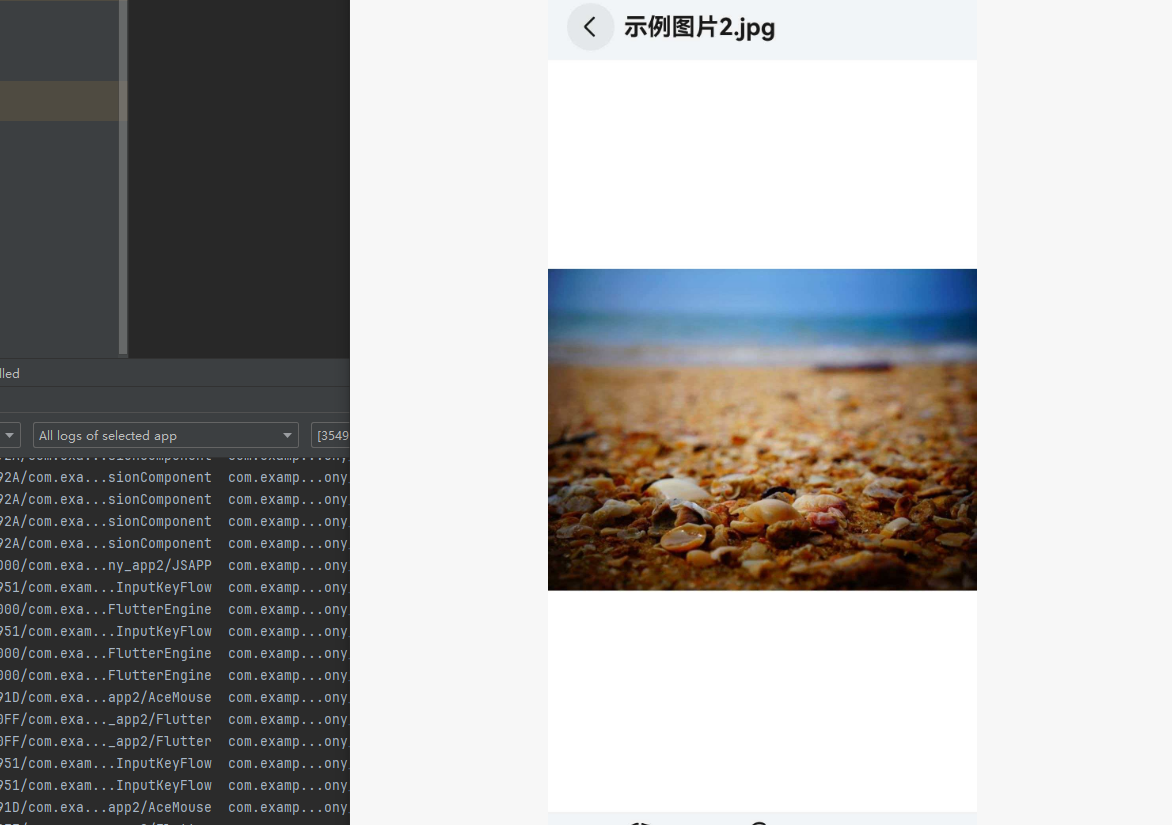
一、flutter_downloader 库概述 📥
文件下载是移动应用开发中的核心功能,应用需要下载视频、音频、文档等各类文件。在 Flutter for OpenHarmony 应用开发中,flutter_downloader 是一个功能强大的文件下载插件,提供了完整的下载管理能力。
flutter_downloader 库特点
flutter_downloader 库基于 Flutter 平台接口实现,提供了以下核心特性:
后台下载:支持应用在后台时继续下载任务,不阻塞用户操作。
断点续传:暂停后可恢复下载,避免网络波动导致的重复下载。
下载队列管理:支持同时管理多个下载任务,实时监控下载状态。
进度监听:实时监听下载进度,提供友好的用户界面反馈。
任务持久化:下载任务信息存储在 SQLite 数据库中,应用重启后可恢复。
通知栏显示:支持在系统通知栏显示下载进度。
功能支持对比
| 功能 | Android | iOS | OpenHarmony |
|---|---|---|---|
| 后台下载 | ✅ | ✅ | ✅ |
| 断点续传 | ✅ | ✅ | ✅ |
| 下载进度监听 | ✅ | ✅ | ✅ |
| 任务管理 | ✅ | ✅ | ✅ |
| 通知栏显示 | ✅ | ✅ | ✅ (必须) |
| 打开下载文件 | ✅ | ✅ | ✅ |
注意:OpenHarmony 平台要求
showNotification参数必须设置为true,否则下载会失败。
使用场景:视频下载、音乐下载、文档下载、应用商店下载、社交应用媒体下载等。
二、安装与配置 📦
2.1 添加依赖
在项目的 pubspec.yaml 文件中添加 flutter_downloader 依赖:
dependencies:
  flutter_downloader:
    git:
      url: https://atomgit.com/openharmony-sig/fluttertpc_flutter_downloader.git
然后执行以下命令获取依赖:
flutter pub get
2.2 权限配置
flutter_downloader 需要网络权限和存储权限。在 module.json5 中添加:
{
  "module": {
    "requestPermissions": [
      {
        "name": "ohos.permission.INTERNET"
      },
      {
        "name": "ohos.permission.READ_MEDIA",
        "reason": "$string:read_media_reason",
        "usedScene": {
          "abilities": ["EntryAbility"],
          "when": "inuse"
        }
      },
      {
        "name": "ohos.permission.WRITE_MEDIA",
        "reason": "$string:write_media_reason",
        "usedScene": {
          "abilities": ["EntryAbility"],
          "when": "inuse"
        }
      }
    ]
  }
}
在 string.json 中添加权限说明:
{
  "string": [
    {
      "name": "read_media_reason",
      "value": "用于读取下载的文件"
    },
    {
      "name": "write_media_reason",
      "value": "用于保存下载的文件"
    }
  ]
}
2.3 初始化插件
在 main() 函数中初始化插件:
void main() async {
  WidgetsFlutterBinding.ensureInitialized();

  await FlutterDownloader.initialize(
    debug: true,
    ignoreSsl: false,
  );

  runApp(const MyApp());
}
三、API 详解 📚
3.1 FlutterDownloader 类
FlutterDownloader 是主要的下载管理类,提供以下核心方法:
class FlutterDownloader {
  // 初始化插件
  static Future<void> initialize({
    bool debug = false,
    bool ignoreSsl = false,
  });

  // 创建下载任务
  static Future<String?> enqueue({
    required String url,
    required String savedDir,
    String? fileName,
    Map<String, String> headers = const {},
    bool showNotification = true,
    bool openFileFromNotification = true,
    bool requiresStorageNotLow = true,
    bool saveInPublicStorage = false,
    bool allowCellular = true,
    int timeout = 15000,
  });

  // 加载所有下载任务
  static Future<List<DownloadTask>?> loadTasks();

  // 取消下载任务
  static Future<void> cancel({required String taskId});

  // 取消所有任务
  static Future<void> cancelAll();

  // 暂停下载任务
  static Future<void> pause({required String taskId});

  // 恢复下载任务
  static Future<String?> resume({required String taskId});

  // 重试失败的下载
  static Future<String?> retry({required String taskId});

  // 删除任务
  static Future<void> remove({
    required String taskId,
    bool shouldDeleteContent = false,
  });

  // 打开下载的文件
  static Future<bool> open({required String taskId});

  // 注册下载状态回调
  static Future<void> registerCallback(
    DownloadCallback callback, {
    int step = 10,
  });
}
3.2 DownloadTask 类
DownloadTask 包含下载任务的详细信息:
class DownloadTask {
  // 任务唯一标识符
  final String taskId;

  // 任务状态
  final DownloadTaskStatus status;

  // 下载进度 (0-100)
  final int progress;

  // 下载地址
  final String url;

  // 文件名
  final String? filename;

  // 保存目录
  final String savedDir;

  // 创建时间
  final int timeCreated;

  // 是否允许蜂窝网络
  final bool allowCellular;
}
3.3 DownloadTaskStatus 枚举
enum DownloadTaskStatus {
  undefined,    // 未知或已损坏
  enqueued,     // 已排队
  running,      // 正在下载
  complete,     // 已完成
  failed,       // 下载失败
  canceled,     // 已取消
  paused,       // 已暂停
}
四、实现原理 🔬
4.1 平台通道通信
flutter_downloader 使用 MethodChannel 与原生平台通信:
Flutter 层:
static const MethodChannel _channel = MethodChannel('flutter_downloader');

static Future<String?> enqueue({
  required String url,
  required String savedDir,
  // ...
}) async {
  return await _channel.invokeMethod('enqueue', {
    'url': url,
    'saved_dir': savedDir,
    // ...
  });
}
OpenHarmony 原生层:
methodChannel.setMethodCallHandler((call) => {
  switch (call.method) {
    case 'enqueue':
      return enqueueDownload(call.arguments);
    case 'pause':
      return pauseDownload(call.arguments);
    case 'resume':
      return resumeDownload(call.arguments);
    // ...
  }
});
4.2 OpenHarmony 下载实现
OpenHarmony 使用 @ohos.request 模块实现下载:
import request from '@ohos.request';

// 创建下载任务
const downloadConfig = {
  url: url,
  filePath: savedDir + '/' + fileName,
  enableMetered: true,
  enableRoaming: true,
  description: 'Downloading...',
  networkType: request.NETWORK_MOBILE | request.NETWORK_WIFI,
  title: fileName,
};

request.downloadFile(context, downloadConfig, (err, downloadTask) => {
  if (err) {
    // 处理错误
    return;
  }
  // 监听下载进度
  downloadTask.on('progress', (receivedSize, totalSize) => {
    const progress = (receivedSize / totalSize) * 100;
    // 更新进度
  });
});
4.3 任务持久化
flutter_downloader 使用 SQLite 数据库存储任务信息:
// 创建数据库表
const createTableSQL = `
  CREATE TABLE IF NOT EXISTS task (
    task_id TEXT PRIMARY KEY,
    url TEXT,
    status INTEGER,
    progress INTEGER,
    file_name TEXT,
    saved_dir TEXT,
    time_created INTEGER,
    allow_cellular INTEGER
  )
`;
五、实战案例 💡
5.1 基础用法:简单文件下载
import 'package:flutter_downloader/flutter_downloader.dart';

Future<void> downloadFile(String url) async {
  await FlutterDownloader.enqueue(
    url: url,
    savedDir: 'Image',
    showNotification: true,
    openFileFromNotification: true,
  );
}
5.2 带进度监听的下载
import 'dart:isolate';
import 'dart:ui';
class DownloadPage extends StatefulWidget {
const DownloadPage({super.key});
State<DownloadPage> createState() => _DownloadPageState();
}
class _DownloadPageState extends State<DownloadPage> {
final ReceivePort _port = ReceivePort();
String? _taskId;
int _progress = 0;
DownloadTaskStatus _status = DownloadTaskStatus.undefined;
void initState() {
super.initState();
_bindBackgroundIsolate();
FlutterDownloader.registerCallback(downloadCallback, step: 1);
}
void _bindBackgroundIsolate() {
IsolateNameServer.registerPortWithName(
_port.sendPort,
'downloader_send_port',
);
_port.listen((dynamic data) {
setState(() {
_taskId = data[0];
_status = DownloadTaskStatus(data[1]);
_progress = data[2];
});
});
}
('vm:entry-point')
static void downloadCallback(String id, int status, int progress) {
IsolateNameServer.lookupPortByName('downloader_send_port')
?.send([id, status, progress]);
}
Future<void> _startDownload() async {
_taskId = await FlutterDownloader.enqueue(
url: 'https://example.com/file.zip',
savedDir: 'Image',
showNotification: true,
);
}
void dispose() {
IsolateNameServer.removePortNameMapping('downloader_send_port');
super.dispose();
}
Widget build(BuildContext context) {
return Scaffold(
appBar: AppBar(title: const Text('文件下载')),
body: Center(
child: Column(
mainAxisAlignment: MainAxisAlignment.center,
children: [
Text('状态: ${_status.name}'),
Text('进度: $_progress%'),
const SizedBox(height: 20),
ElevatedButton(
onPressed: _startDownload,
child: const Text('开始下载'),
),
],
),
),
);
}
}
5.3 下载任务管理
class DownloadManager {
  static Future<List<DownloadTask>> loadAllTasks() async {
    final tasks = await FlutterDownloader.loadTasks();
    return tasks ?? [];
  }

  static Future<void> pauseTask(String taskId) async {
    await FlutterDownloader.pause(taskId: taskId);
  }

  static Future<void> resumeTask(String taskId) async {
    await FlutterDownloader.resume(taskId: taskId);
  }

  static Future<void> cancelTask(String taskId) async {
    await FlutterDownloader.cancel(taskId: taskId);
  }

  static Future<void> deleteTask(String taskId, {bool deleteFile = false}) async {
    await FlutterDownloader.remove(
      taskId: taskId,
      shouldDeleteContent: deleteFile,
    );
  }

  static Future<void> retryTask(String taskId) async {
    await FlutterDownloader.retry(taskId: taskId);
  }
}
5.4 下载列表页面
class DownloadListPage extends StatefulWidget {
const DownloadListPage({super.key});
State<DownloadListPage> createState() => _DownloadListPageState();
}
class _DownloadListPageState extends State<DownloadListPage> {
List<DownloadTask> _tasks = [];
void initState() {
super.initState();
_loadTasks();
}
Future<void> _loadTasks() async {
final tasks = await FlutterDownloader.loadTasks();
setState(() {
_tasks = tasks ?? [];
});
}
Widget build(BuildContext context) {
return Scaffold(
appBar: AppBar(title: const Text('下载列表')),
body: ListView.builder(
itemCount: _tasks.length,
itemBuilder: (context, index) {
final task = _tasks[index];
return ListTile(
title: Text(task.filename ?? 'Unknown'),
subtitle: Text('状态: ${task.status.name} | 进度: ${task.progress}%'),
trailing: _buildActionButton(task),
);
},
),
);
}
Widget _buildActionButton(DownloadTask task) {
switch (task.status) {
case DownloadTaskStatus.running:
return IconButton(
icon: const Icon(Icons.pause),
onPressed: () => FlutterDownloader.pause(taskId: task.taskId),
);
case DownloadTaskStatus.paused:
return IconButton(
icon: const Icon(Icons.play_arrow),
onPressed: () => FlutterDownloader.resume(taskId: task.taskId),
);
case DownloadTaskStatus.failed:
return IconButton(
icon: const Icon(Icons.refresh),
onPressed: () => FlutterDownloader.retry(taskId: task.taskId),
);
case DownloadTaskStatus.complete:
return IconButton(
icon: const Icon(Icons.open_in_new),
onPressed: () => FlutterDownloader.open(taskId: task.taskId),
);
default:
return const SizedBox.shrink();
}
}
}
六、最佳实践 ⚡
6.1 OpenHarmony 平台特殊注意事项
文件选择器:每次调用 enqueue 时,系统会弹出文件选择器对话框,用户需要选择保存位置。
通知必须开启:showNotification 参数必须设置为 true,否则下载会失败。
任务清理:下载完成后,系统会自动删除下载任务,但保留已下载的文件。
await FlutterDownloader.enqueue(
  url: url,
  savedDir: 'Image',
  showNotification: true,  // 必须为 true
);
6.2 错误处理
Future<void> downloadWithErrorHandling(String url) async {
  try {
    final taskId = await FlutterDownloader.enqueue(
      url: url,
      savedDir: 'Image',
      showNotification: true,
    );

    if (taskId == null) {
      throw Exception('创建下载任务失败');
    }

    debugPrint('下载任务已创建: $taskId');
  } catch (e) {
    debugPrint('下载失败: $e');
    // 显示错误提示
  }
}
6.3 进度更新优化
// 设置合理的进度更新步长
FlutterDownloader.registerCallback(
  downloadCallback,
  step: 5,  // 每 5% 更新一次,减少 UI 刷新频率
);
6.4 任务状态管理
class TaskManager {
  final Map<String, DownloadTask> _tasks = {};

  void updateTask(DownloadTask task) {
    _tasks[task.taskId] = task;
  }

  DownloadTask? getTask(String taskId) {
    return _tasks[taskId];
  }

  List<DownloadTask> getRunningTasks() {
    return _tasks.values
        .where((t) => t.status == DownloadTaskStatus.running)
        .toList();
  }

  List<DownloadTask> getCompletedTasks() {
    return _tasks.values
        .where((t) => t.status == DownloadTaskStatus.complete)
        .toList();
  }
}
七、常见问题 ❓
7.1 为什么下载失败?
原因:
showNotification设置为false- 网络权限未配置
- 存储权限未配置
- URL 无效
解决方案:
// 确保 showNotification 为 true
await FlutterDownloader.enqueue(
  url: url,
  savedDir: 'Image',
  showNotification: true,  // 必须为 true
);
7.2 如何获取下载文件路径?
final tasks = await FlutterDownloader.loadTasks();
final task = tasks?.firstWhere((t) => t.taskId == taskId);
if (task != null) {
  final filePath = '${task.savedDir}/${task.filename}';
  debugPrint('文件路径: $filePath');
}
7.3 如何实现批量下载?
Future<void> downloadMultiple(List<String> urls) async {
  for (final url in urls) {
    await FlutterDownloader.enqueue(
      url: url,
      savedDir: 'Image',
      showNotification: true,
    );
    // 添加延迟避免同时创建过多任务
    await Future.delayed(const Duration(milliseconds: 500));
  }
}
7.4 OpenHarmony 与 Android/iOS 的区别
| 特性 | Android/iOS | OpenHarmony |
|---|---|---|
| 保存位置 | 自动保存 | 用户选择保存位置 |
| 通知显示 | 可选 | 必须显示 |
| 后台下载 | 支持 | 支持 |
| 断点续传 | 支持 | 支持 |
八、总结 📝
flutter_downloader 是一个功能强大的文件下载插件,为 OpenHarmony 应用提供了完整的下载管理能力。
优点
- 后台下载:支持应用在后台时继续下载
- 断点续传:暂停后可恢复下载
- 任务管理:完整的任务生命周期管理
- 进度监听:实时监听下载进度
适用场景
- 视频下载
- 音乐下载
- 文档下载
- 应用商店下载
最佳实践
- OpenHarmony 平台必须设置
showNotification: true - 使用合理的进度更新步长
- 做好错误处理
- 及时清理已完成的任务
九、完整代码示例 🚀
以下是一个完整的可运行示例,展示了 flutter_downloader 库的核心功能:
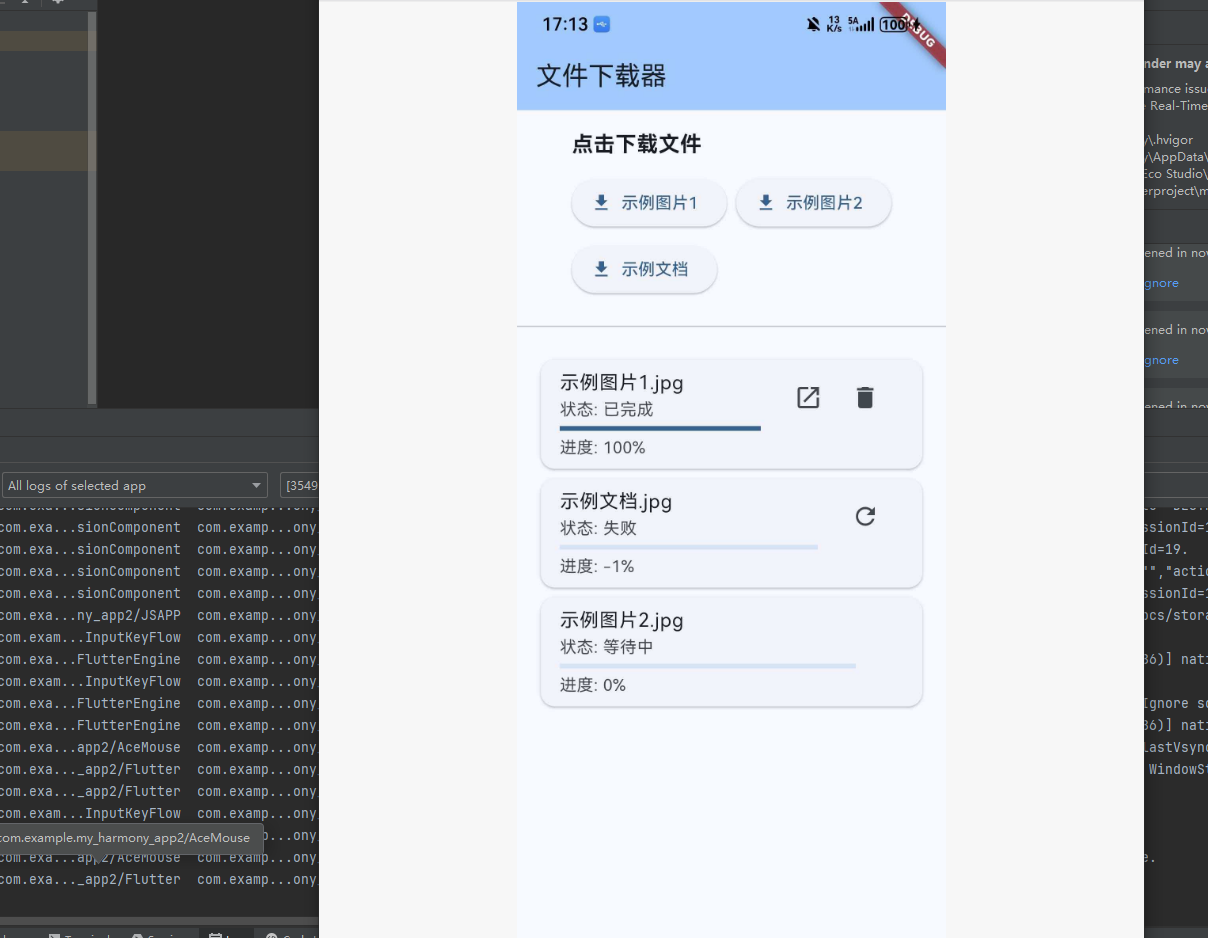
main.dart
import 'dart:isolate';
import 'dart:ui';
import 'package:flutter/material.dart';
import 'package:flutter_downloader/flutter_downloader.dart';
void main() async {
WidgetsFlutterBinding.ensureInitialized();
await FlutterDownloader.initialize(debug: true, ignoreSsl: true);
runApp(const MyApp());
}
class MyApp extends StatelessWidget {
const MyApp({super.key});
Widget build(BuildContext context) {
return MaterialApp(
title: 'Flutter Downloader Demo',
theme: ThemeData(
colorScheme: ColorScheme.fromSeed(seedColor: Colors.blue),
useMaterial3: true,
),
home: const HomePage(),
);
}
}
class HomePage extends StatefulWidget {
const HomePage({super.key});
State<HomePage> createState() => _HomePageState();
}
class _HomePageState extends State<HomePage> {
final ReceivePort _port = ReceivePort();
List<DownloadTask> _tasks = [];
bool _isLoading = true;
final List<DownloadItem> _downloadItems = [
DownloadItem(
name: '示例图片1',
url: 'https://picsum.photos/800/600',
),
DownloadItem(
name: '示例图片2',
url: 'https://picsum.photos/1024/768',
),
DownloadItem(
name: '示例文档',
url: 'https://www.w3.org/WAI/WCAG21/Techniques/pdf/img/table-word.pdf',
),
];
void initState() {
super.initState();
_bindBackgroundIsolate();
FlutterDownloader.registerCallback(downloadCallback, step: 1);
_loadTasks();
}
void _bindBackgroundIsolate() {
final isSuccess = IsolateNameServer.registerPortWithName(
_port.sendPort,
'downloader_send_port',
);
if (!isSuccess) {
IsolateNameServer.removePortNameMapping('downloader_send_port');
IsolateNameServer.registerPortWithName(
_port.sendPort,
'downloader_send_port',
);
}
_port.listen((dynamic data) {
final taskId = data[0] as String;
final status = DownloadTaskStatus(data[1] as int);
final progress = data[2] as int;
final taskIndex = _tasks.indexWhere((t) => t.taskId == taskId);
if (taskIndex != -1) {
setState(() {
_tasks[taskIndex] = _tasks[taskIndex].copyWith(
status: status,
progress: progress,
);
});
}
});
}
('vm:entry-point')
static void downloadCallback(String id, int status, int progress) {
IsolateNameServer.lookupPortByName('downloader_send_port')
?.send([id, status, progress]);
}
Future<void> _loadTasks() async {
final tasks = await FlutterDownloader.loadTasks();
setState(() {
_tasks = tasks ?? [];
_isLoading = false;
});
}
Future<void> _startDownload(DownloadItem item) async {
await FlutterDownloader.enqueue(
url: item.url,
savedDir: 'Image',
fileName: '${item.name}.jpg',
showNotification: true,
openFileFromNotification: true,
);
await _loadTasks();
}
Future<void> _pauseDownload(String taskId) async {
await FlutterDownloader.pause(taskId: taskId);
await _loadTasks();
}
Future<void> _resumeDownload(String taskId) async {
await FlutterDownloader.resume(taskId: taskId);
await _loadTasks();
}
Future<void> _cancelDownload(String taskId) async {
await FlutterDownloader.cancel(taskId: taskId);
await _loadTasks();
}
Future<void> _deleteTask(String taskId) async {
await FlutterDownloader.remove(
taskId: taskId,
shouldDeleteContent: true,
);
await _loadTasks();
}
Future<void> _openFile(String taskId) async {
await FlutterDownloader.open(taskId: taskId);
}
void dispose() {
IsolateNameServer.removePortNameMapping('downloader_send_port');
super.dispose();
}
Widget build(BuildContext context) {
return Scaffold(
appBar: AppBar(
title: const Text('文件下载器'),
backgroundColor: Theme.of(context).colorScheme.inversePrimary,
),
body: _isLoading
? const Center(child: CircularProgressIndicator())
: Column(
children: [
_buildDownloadButtons(),
const Divider(),
Expanded(child: _buildTaskList()),
],
),
);
}
Widget _buildDownloadButtons() {
return Padding(
padding: const EdgeInsets.all(16),
child: Column(
crossAxisAlignment: CrossAxisAlignment.start,
children: [
const Text(
'点击下载文件',
style: TextStyle(fontSize: 18, fontWeight: FontWeight.bold),
),
const SizedBox(height: 12),
Wrap(
spacing: 8,
runSpacing: 8,
children: _downloadItems.map((item) {
return ElevatedButton.icon(
onPressed: () => _startDownload(item),
icon: const Icon(Icons.download),
label: Text(item.name),
);
}).toList(),
),
],
),
);
}
Widget _buildTaskList() {
if (_tasks.isEmpty) {
return const Center(
child: Text('暂无下载任务', style: TextStyle(color: Colors.grey)),
);
}
return ListView.builder(
padding: const EdgeInsets.all(16),
itemCount: _tasks.length,
itemBuilder: (context, index) {
final task = _tasks[index];
return Card(
child: ListTile(
title: Text(task.filename ?? '未知文件'),
subtitle: Column(
crossAxisAlignment: CrossAxisAlignment.start,
children: [
Text('状态: ${_getStatusText(task.status)}'),
const SizedBox(height: 4),
LinearProgressIndicator(value: task.progress / 100),
const SizedBox(height: 4),
Text('进度: ${task.progress}%'),
],
),
trailing: _buildActionButton(task),
isThreeLine: true,
),
);
},
);
}
String _getStatusText(DownloadTaskStatus status) {
switch (status) {
case DownloadTaskStatus.undefined:
return '未知';
case DownloadTaskStatus.enqueued:
return '等待中';
case DownloadTaskStatus.running:
return '下载中';
case DownloadTaskStatus.complete:
return '已完成';
case DownloadTaskStatus.failed:
return '失败';
case DownloadTaskStatus.canceled:
return '已取消';
case DownloadTaskStatus.paused:
return '已暂停';
}
return '未知';
}
Widget _buildActionButton(DownloadTask task) {
switch (task.status) {
case DownloadTaskStatus.running:
return IconButton(
icon: const Icon(Icons.pause),
onPressed: () => _pauseDownload(task.taskId),
tooltip: '暂停',
);
case DownloadTaskStatus.paused:
return IconButton(
icon: const Icon(Icons.play_arrow),
onPressed: () => _resumeDownload(task.taskId),
tooltip: '继续',
);
case DownloadTaskStatus.failed:
return IconButton(
icon: const Icon(Icons.refresh),
onPressed: () => _resumeDownload(task.taskId),
tooltip: '重试',
);
case DownloadTaskStatus.complete:
return Row(
mainAxisSize: MainAxisSize.min,
children: [
IconButton(
icon: const Icon(Icons.open_in_new),
onPressed: () => _openFile(task.taskId),
tooltip: '打开',
),
IconButton(
icon: const Icon(Icons.delete),
onPressed: () => _deleteTask(task.taskId),
tooltip: '删除',
),
],
);
case DownloadTaskStatus.canceled:
return IconButton(
icon: const Icon(Icons.delete),
onPressed: () => _deleteTask(task.taskId),
tooltip: '删除',
);
default:
return const SizedBox.shrink();
}
}
}
class DownloadItem {
final String name;
final String url;
DownloadItem({required this.name, required this.url});
}
extension on DownloadTask {
DownloadTask copyWith({
String? taskId,
DownloadTaskStatus? status,
int? progress,
String? url,
String? filename,
String? savedDir,
int? timeCreated,
bool? allowCellular,
}) {
return DownloadTask(
taskId: taskId ?? this.taskId,
status: status ?? this.status,
progress: progress ?? this.progress,
url: url ?? this.url,
filename: filename ?? this.filename,
savedDir: savedDir ?? this.savedDir,
timeCreated: timeCreated ?? this.timeCreated,
allowCellular: allowCellular ?? this.allowCellular,
);
}
}
十、参考资料 📖

开源鸿蒙跨平台开发社区汇聚开发者与厂商,共建“一次开发,多端部署”的开源生态,致力于降低跨端开发门槛,推动万物智联创新。
更多推荐

 2
2 0
0- 0


 已为社区贡献61条内容

所有评论(0)