Flutter鸿蒙应用开发:推送通知功能实现实战(含问题排查与修复)
本文为Flutter for OpenHarmony跨平台应用开发系列实战文章,完整记录推送通知功能的全流程开发、问题排查、错误修复与功能验证。作为大一新生开发者,我在macOS环境下使用DevEco Studio,针对OpenHarmony平台特性,避开未适配的系统级推送库,实现应用内本地通知系统,完成通知服务封装、通知历史页面开发、国际化适配及设置页面入口集成,开发过程中遇到应用构建失败问题并
🔥Flutter鸿蒙应用开发:推送通知功能实现实战(含问题排查与修复)
欢迎加入开源鸿蒙跨平台社区:https://openharmonycrossplatform.csdn.net
📄 文章摘要
本文为Flutter for OpenHarmony跨平台应用开发系列实战文章,完整记录推送通知功能的全流程开发、问题排查、错误修复与功能验证。作为大一新生开发者,我在macOS环境下使用DevEco Studio,针对OpenHarmony平台特性,避开未适配的系统级推送库,实现应用内本地通知系统,完成通知服务封装、通知历史页面开发、国际化适配及设置页面入口集成,开发过程中遇到应用构建失败问题并完成修复,最终在OpenHarmony设备上完成全流程功能验证,确保推送通知功能稳定可用。文章代码可直接复用、逻辑清晰,重点解决鸿蒙平台下推送通知的适配问题与开发故障排查技巧,适合Flutter鸿蒙化开发新手学习参考。
📋 文章目录
-
📝 前言
-
🎯 功能目标与技术要点
-
📝 步骤1:封装通知服务(数据模型+核心逻辑)
-
📝 步骤2:开发通知历史页面(UI+交互)
-
📝 步骤3:添加国际化支持与设置页面入口
-
⚠️ 开发故障排查与修复
-
✅ OpenHarmony设备运行验证
-
💡 功能亮点与扩展方向
-
⚠️ 开发踩坑与避坑指南
-
🎯 全文总结
📝 前言
在前序实战开发中,我已完成Flutter鸿蒙应用的登录功能、深色模式适配、列表搜索筛选、图片加载缓存、详情页开发、路由跳转、全量国际化适配、数据分享、全面性能优化、应用更新检测及二维码扫码功能,应用已具备完整的业务闭环、良好的用户体验与丰富的功能模块。
为进一步提升应用的交互性与实用性,本次核心开发目标是为应用集成推送通知功能:结合OpenHarmony平台特性,调研适配的推送方案,实现通知的创建、存储、展示、删除等核心能力,开发通知历史页面与设置入口,支持测试通知发送,同时完成国际化适配。开发过程中遇到应用构建失败、功能无法正常显示的问题,通过排查定位并修复错误,最终实现功能正常运行,确保通知功能在OpenHarmony设备上稳定可用。
开发全程在macOS+DevEco Studio环境进行,初期调研发现OpenHarmony平台暂无官方适配的系统级推送库,因此选择实现应用内本地通知系统,兼顾实用性与兼容性;开发中出现编译错误导致应用构建失败,通过排查代码、修复错误完成功能落地,所有功能均在OpenHarmony设备上验证通过,代码可直接复制复用,全程记录开发思路、实现细节、故障排查过程与修复方案,助力新手快速掌握鸿蒙应用推送通知功能的开发与问题解决技巧。
🎯 功能目标与技术要点
一、核心目标
-
调研OpenHarmony平台推送方案,实现适配鸿蒙的推送通知功能
-
封装通知服务,实现通知的创建、存储、读取、标记已读、删除、清空等核心操作
-
开发通知历史页面,支持通知列表展示、下拉刷新、滑动删除、批量操作等交互
-
完成全量国际化适配,通知相关文本支持中英文无缝切换
-
在设置页面添加通知入口与测试通知入口,实现功能闭环
-
排查并修复开发过程中出现的编译错误、功能无法显示等问题
-
验证推送通知功能在OpenHarmony设备上的可用性,确保功能稳定、交互流畅
二、核心技术要点
-
OpenHarmony平台推送方案调研与选型,避开未适配的系统级推送库
-
通知服务封装,创建NotificationModel数据模型,实现通知增删改查逻辑
-
本地存储集成,实现通知数据持久化,确保应用重启后通知不丢失
-
通知历史页面开发,实现列表展示、滑动删除、下拉刷新等交互功能
-
国际化文本扩展,适配中英文通知相关提示、按钮文本等
-
设置页面入口集成,实现通知功能便捷调用与测试
-
开发故障排查与修复,解决编译错误、应用构建失败等问题
-
OpenHarmony设备功能验证,确保通知功能稳定运行、交互流畅
📝 步骤1:封装通知服务(数据模型+核心逻辑)
创建独立的通知服务类(notification_service.dart),封装通知相关的所有核心逻辑,包括NotificationModel数据模型、通知的创建、存储、读取、标记已读、删除、清空等操作,依赖本地存储实现数据持久化,确保通知数据不丢失。
核心代码(notification_service.dart)
import 'dart:convert';
import 'package:shared_preferences/shared_preferences.dart';

// 通知数据模型
class NotificationModel {
  final String id;
  final String title;
  final String body;
  final bool isRead;
  final DateTime dateTime;

  NotificationModel({
    required this.id,
    required this.title,
    required this.body,
    this.isRead = false,
    required this.dateTime,
  });

  // 转JSON
  Map<String, dynamic> toJson() {
    return {
      'id': id,
      'title': title,
      'body': body,
      'isRead': isRead,
      'dateTime': dateTime.toIso8601String(),
    };
  }

  // 从JSON解析
  factory NotificationModel.fromJson(Map<String, dynamic> json) {
    return NotificationModel(
      id: json['id'],
      title: json['title'],
      body: json['body'],
      isRead: json['isRead'] ?? false,
      dateTime: DateTime.parse(json['dateTime']),
    );
  }
}

// 通知服务类
class NotificationService {
  final SharedPreferences _prefs;
  static const String _notificationKey = 'app_notifications';

  NotificationService(this._prefs);

  // 获取所有通知(按时间倒序)
  List<NotificationModel> getNotifications() {
    final String? jsonString = _prefs.getString(_notificationKey);
    if (jsonString == null) return [];
    final List<dynamic> jsonList = json.decode(jsonString);
    final List<NotificationModel> notifications =
        jsonList.map((json) => NotificationModel.fromJson(json)).toList();
    // 按时间倒序排列,最新通知在最前面
    notifications.sort((a, b) => b.dateTime.compareTo(a.dateTime));
    return notifications;
  }

  // 创建通知
  Future<void> createNotification({
    required String title,
    required String body,
  }) async {
    final List<NotificationModel> notifications = getNotifications();
    // 生成唯一ID(时间戳+随机数)
    final String id = '${DateTime.now().millisecondsSinceEpoch}_${DateTime.now().microsecondsSinceEpoch % 1000}';
    final NotificationModel newNotification = NotificationModel(
      id: id,
      title: title,
      body: body,
      dateTime: DateTime.now(),
    );
    notifications.add(newNotification);
    // 保存到本地存储
    await _saveNotifications(notifications);
  }

  // 标记单条通知已读
  Future<void> markAsRead(String id) async {
    final List<NotificationModel> notifications = getNotifications();
    for (int i = 0; i < notifications.length; i++) {
      if (notifications[i].id == id) {
        notifications[i] = NotificationModel(
          id: notifications[i].id,
          title: notifications[i].title,
          body: notifications[i].body,
          isRead: true,
          dateTime: notifications[i].dateTime,
        );
        break;
      }
    }
    await _saveNotifications(notifications);
  }

  // 标记全部通知已读
  Future<void> markAllAsRead() async {
    final List<NotificationModel> notifications = getNotifications();
    final List<NotificationModel> updatedNotifications = notifications.map((notification) {
      return NotificationModel(
        id: notification.id,
        title: notification.title,
        body: notification.body,
        isRead: true,
        dateTime: notification.dateTime,
      );
    }).toList();
    await _saveNotifications(updatedNotifications);
  }

  // 删除单条通知
  Future<void> deleteNotification(String id) async {
    final List<NotificationModel> notifications = getNotifications();
    notifications.removeWhere((notification) => notification.id == id);
    await _saveNotifications(notifications);
  }

  // 清空所有通知
  Future<void> clearAllNotifications() async {
    await _prefs.remove(_notificationKey);
  }

  // 保存通知到本地存储
  Future<void> _saveNotifications(List<NotificationModel> notifications) async {
    final List<Map<String, dynamic>> jsonList =
        notifications.map((notification) => notification.toJson()).toList();
    await _prefs.setString(_notificationKey, json.encode(jsonList));
  }

  // 获取未读通知数量
  int getUnreadCount() {
    final List<NotificationModel> notifications = getNotifications();
    return notifications.where((notification) => !notification.isRead).length;
  }
}
代码说明
-
NotificationModel数据模型:封装通知的核心属性(ID、标题、内容、已读状态、时间),提供JSON序列化与反序列化方法,便于本地存储。
-
NotificationService服务类:依赖SharedPreferences实现本地存储,封装通知的全量操作(获取、创建、标记已读、删除、清空),逻辑清晰、解耦彻底。
-
数据持久化:将通知列表转为JSON字符串存储在本地,应用重启后可正常读取通知历史,确保数据不丢失。
-
便捷操作:支持单条/全部通知标记已读、单条删除、全部清空,同时提供未读通知数量统计,满足日常使用需求。
-
扩展性:预留接口,后续可轻松集成OpenHarmony系统级推送服务,无需大幅修改核心逻辑。
配套修改(storage_service.dart)
在本地存储服务中初始化NotificationService,便于全局调用:
import 'package:shared_preferences/shared_preferences.dart';
import 'notification_service.dart';

class StorageService {
  late final SharedPreferences _prefs;
  late final NotificationService notificationService;

  // 初始化存储服务
  Future<void> init() async {
    _prefs = await SharedPreferences.getInstance();
    // 初始化通知服务
    notificationService = NotificationService(_prefs);
  }

  // 其他本地存储相关方法...
}
📝 步骤2:开发通知历史页面(UI+交互)
创建独立的通知历史页面(notifications_page.dart),实现通知列表展示、下拉刷新、滑动删除、标记全部已读、清空所有通知等交互功能,未读通知进行特殊高亮显示,UI设计与应用整体风格保持一致,适配深色模式。
核心代码(notifications_page.dart)
import 'package:flutter/material.dart';
import 'package:intl/intl.dart';
import '../services/notification_service.dart';
import '../utils/localization.dart';
class NotificationsPage extends StatefulWidget {
final AppLocalizations loc;
final NotificationService notificationService;
const NotificationsPage({
super.key,
required this.loc,
required this.notificationService,
});
State<NotificationsPage> createState() => _NotificationsPageState();
}
class _NotificationsPageState extends State<NotificationsPage> {
late List<NotificationModel> _notifications;
bool _isLoading = true;
void initState() {
super.initState();
_loadNotifications();
}
// 加载通知列表
Future<void> _loadNotifications() async {
setState(() {
_isLoading = true;
});
final notifications = widget.notificationService.getNotifications();
setState(() {
_notifications = notifications;
_isLoading = false;
});
}
// 下拉刷新
Future<void> _onRefresh() async {
await _loadNotifications();
}
// 标记全部已读
Future<void> _markAllAsRead() async {
await widget.notificationService.markAllAsRead();
_loadNotifications();
if (mounted) {
ScaffoldMessenger.of(context).showSnackBar(
SnackBar(content: Text(widget.loc.markAllReadSuccess)),
);
}
}
// 清空所有通知
Future<void> _clearAllNotifications() async {
if (mounted) {
showDialog(
context: context,
builder: (context) => AlertDialog(
title: Text(widget.loc.confirmClear),
content: Text(widget.loc.clearAllHint),
actions: [
TextButton(
onPressed: () => Navigator.pop(context),
child: Text(widget.loc.cancel),
),
ElevatedButton(
onPressed: () async {
Navigator.pop(context);
await widget.notificationService.clearAllNotifications();
_loadNotifications();
ScaffoldMessenger.of(context).showSnackBar(
SnackBar(content: Text(widget.loc.clearAllSuccess)),
);
},
child: Text(widget.loc.confirm),
),
],
),
);
}
}
// 格式化时间显示
String _formatDateTime(DateTime dateTime) {
final now = DateTime.now();
final today = DateTime(now.year, now.month, now.day);
final notificationDate = DateTime(dateTime.year, dateTime.month, dateTime.day);
if (notificationDate == today) {
return DateFormat('HH:mm').format(dateTime);
} else {
return DateFormat('yyyy-MM-dd HH:mm').format(dateTime);
}
}
Widget build(BuildContext context) {
return Scaffold(
appBar: AppBar(
title: Text(widget.loc.notificationTitle),
centerTitle: true,
actions: [
// 标记全部已读按钮
TextButton(
onPressed: _notifications.isEmpty ? null : _markAllAsRead,
child: Text(
widget.loc.markAllRead,
style: TextStyle(
color: _notifications.isEmpty ? Colors.grey : Colors.white,
),
),
),
// 清空所有通知按钮
TextButton(
onPressed: _notifications.isEmpty ? null : _clearAllNotifications,
child: Text(
widget.loc.clearAll,
style: TextStyle(
color: _notifications.isEmpty ? Colors.grey : Colors.white,
),
),
),
],
),
body: _isLoading
? const Center(child: CircularProgressIndicator())
: _notifications.isEmpty
? Center(
child: Text(
widget.loc.noNotifications,
style: Theme.of(context).textTheme.bodyMedium,
),
)
: RefreshIndicator(
onRefresh: _onRefresh,
child: ListView.builder(
itemCount: _notifications.length,
itemBuilder: (context, index) {
final notification = _notifications[index];
return Dismissible(
key: Key(notification.id),
direction: DismissDirection.endToStart,
background: Container(
color: Colors.redAccent,
alignment: Alignment.centerRight,
padding: const EdgeInsets.symmetric(horizontal: 16),
child: const Icon(Icons.delete, color: Colors.white),
),
onDismissed: (direction) async {
await widget.notificationService.deleteNotification(notification.id);
_loadNotifications();
if (mounted) {
ScaffoldMessenger.of(context).showSnackBar(
SnackBar(content: Text(widget.loc.deleteNotificationSuccess)),
);
}
},
child: ListTile(
leading: Icon(
notification.isRead
? Icons.notifications_none
: Icons.notifications,
color: notification.isRead ? Colors.grey : Colors.blueAccent,
),
title: Text(
notification.title,
style: TextStyle(
fontWeight: notification.isRead ? FontWeight.normal : FontWeight.bold,
),
),
subtitle: Column(
crossAxisAlignment: CrossAxisAlignment.start,
children: [
Text(notification.body),
const SizedBox(height: 4),
Text(
_formatDateTime(notification.dateTime),
style: Theme.of(context).textTheme.bodySmall,
),
],
),
onTap: () async {
// 点击标记为已读
if (!notification.isRead) {
await widget.notificationService.markAsRead(notification.id);
_loadNotifications();
}
},
),
);
},
),
),
);
}
}
代码说明
-
通知列表展示:使用ListView.builder懒加载展示通知,按时间倒序排列,最新通知在最前面,加载过程显示加载指示器,无通知时显示提示文本。
-
交互功能:支持下拉刷新更新通知列表、滑动删除单条通知、点击通知标记已读、顶部按钮标记全部已读/清空所有通知,交互流畅、体验友好。
-
视觉区分:未读通知使用加粗标题、蓝色通知图标,已读通知使用普通标题、灰色图标,清晰区分未读/已读状态,提升用户体验。
-
时间格式化:今日通知显示时分,非今日通知显示年月日时分,格式清晰、符合用户习惯。
-
深色模式适配:使用Theme动态获取文本、背景颜色,确保在浅色、深色模式下均能清晰显示,视觉效果统一。
-
异常处理:按钮状态随通知列表为空/非空动态变化,避免无效操作,同时通过SnackBar提示操作结果。
📝 步骤3:添加国际化支持与设置页面入口
为保证推送通知功能支持中英文切换,在localization.dart中添加通知相关翻译文本;同时在设置页面添加通知历史入口与测试通知入口,实现功能便捷调用,完成功能闭环。
步骤3.1:添加国际化文本(localization.dart)
class AppLocalizations {
  // ... 原有翻译文本 ...

  /// ------------------------------ 推送通知 ------------------------------
  String get notificationTitle {
    switch (languageCode) {
      case 'en': return 'Notifications';
      case 'zh': default: return '通知';
    }
  }

  String get testNotification {
    switch (languageCode) {
      case 'en': return 'Test Notification';
      case 'zh': default: return '测试通知';
    }
  }

  String get sendTestNotification {
    switch (languageCode) {
      case 'en': return 'Send Test Notification';
      case 'zh': default: return '发送测试通知';
    }
  }

  String get noNotifications {
    switch (languageCode) {
      case 'en': return 'No notifications yet';
      case 'zh': default: return '暂无通知';
    }
  }

  String get markAllRead {
    switch (languageCode) {
      case 'en': return 'Mark All Read';
      case 'zh': default: return '标记全部已读';
    }
  }

  String get markAllReadSuccess {
    switch (languageCode) {
      case 'en': return 'All notifications marked as read';
      case 'zh': default: return '所有通知已标记为已读';
    }
  }

  String get clearAll {
    switch (languageCode) {
      case 'en': return 'Clear All';
      case 'zh': default: return '清空所有';
    }
  }

  String get confirmClear {
    switch (languageCode) {
      case 'en': return 'Confirm Clear';
      case 'zh': default: return '确认清空';
    }
  }

  String get clearAllHint {
    switch (languageCode) {
      case 'en': return 'Are you sure you want to clear all notifications? This action cannot be undone.';
      case 'zh': default: return '确定要清空所有通知吗?此操作不可撤销。';
    }
  }

  String get clearAllSuccess {
    switch (languageCode) {
      case 'en': return 'All notifications cleared';
      case 'zh': default: return '所有通知已清空';
    }
  }

  String get deleteNotificationSuccess {
    switch (languageCode) {
      case 'en': return 'Notification deleted successfully';
      case 'zh': default: return '通知删除成功';
    }
  }

  String get cancel {
    switch (languageCode) {
      case 'en': return 'Cancel';
      case 'zh': default: return '取消';
    }
  }

  String get confirm {
    switch (languageCode) {
      case 'en': return 'Confirm';
      case 'zh': default: return '确认';
    }
  }

  // 测试通知内容
  String get testNotificationTitle {
    switch (languageCode) {
      case 'en': return 'Test Notification';
      case 'zh': default: return '测试通知';
    }
  }

  String get testNotificationBody {
    switch (languageCode) {
      case 'en': return 'This is a test notification, your notification function is working normally!';
      case 'zh': default: return '这是一条测试通知,您的通知功能运行正常!';
    }
  }
}
步骤3.2:添加设置页面入口(setting_page.dart)
在设置页面添加两个入口:通知历史入口(查看所有通知)、测试通知入口(发送测试通知),点击后分别跳转至通知历史页面、触发测试通知发送:
import 'package:flutter/material.dart';
import '../screens/scan_page.dart';
import '../screens/notifications_page.dart';
import '../services/notification_service.dart';
import '../utils/localization.dart';
class SettingPage extends StatelessWidget {
final AppLocalizations loc;
final NotificationService notificationService;
const SettingPage({
super.key,
required this.loc,
required this.notificationService,
});
Widget build(BuildContext context) {
return Scaffold(
appBar: AppBar(
title: Text(loc.settingTitle),
centerTitle: true,
),
body: ListView(
children: [
// ... 原有设置项(如二维码扫描) ...
// 通知历史入口
ListTile(
leading: const Icon(Icons.notifications, color: Colors.blueAccent),
title: Text(loc.notificationTitle),
trailing: FutureBuilder<int>(
future: Future.value(notificationService.getUnreadCount()),
builder: (context, snapshot) {
final unreadCount = snapshot.data ?? 0;
return unreadCount > 0
? Badge(
label: Text(unreadCount.toString()),
child: const Icon(Icons.arrow_forward_ios, size: 18),
)
: const Icon(Icons.arrow_forward_ios, size: 18);
},
),
onTap: () {
Navigator.push(
context,
MaterialPageRoute(
builder: (context) => NotificationsPage(
loc: loc,
notificationService: notificationService,
),
),
);
},
),
// 测试通知入口
ListTile(
leading: const Icon(Icons.send, color: Colors.greenAccent),
title: Text(loc.testNotification),
subtitle: Text(loc.sendTestNotification),
trailing: const Icon(Icons.arrow_forward_ios, size: 18),
onTap: () async {
// 发送测试通知
await notificationService.createNotification(
title: loc.testNotificationTitle,
body: loc.testNotificationBody,
);
// 显示发送成功提示
if (mounted) {
ScaffoldMessenger.of(context).showSnackBar(
SnackBar(content: Text('${loc.sendTestNotification} ${loc.success}')),
);
}
},
),
// ... 其他设置项 ...
],
),
);
}
}
配套修改(main.dart)
在主页面初始化存储服务与通知服务,将通知服务传递给设置页面,确保功能正常调用:
import 'package:flutter/material.dart';
import 'services/storage_service.dart';
import 'screens/setting_page.dart';
import 'utils/localization.dart';
void main() async {
WidgetsFlutterBinding.ensureInitialized();
// 初始化存储服务(含通知服务)
final StorageService storageService = StorageService();
await storageService.init();
runApp(MyApp(storageService: storageService));
}
class MyApp extends StatelessWidget {
final StorageService storageService;
const MyApp({super.key, required this.storageService});
Widget build(BuildContext context) {
return MaterialApp(
// ... 原有配置 ...
home: HomePage(storageService: storageService),
);
}
}
class HomePage extends StatefulWidget {
final StorageService storageService;
const HomePage({super.key, required this.storageService});
State<HomePage> createState() => _HomePageState();
}
class _HomePageState extends State<HomePage> {
// ... 原有代码 ...
// 跳转至设置页面
void _navigateToSetting() {
Navigator.push(
context,
MaterialPageRoute(
builder: (context) => SettingPage(
loc: widget.loc,
notificationService: widget.storageService.notificationService,
),
),
);
}
// ... 原有代码 ...
}
配置说明
-
国际化文本:涵盖通知页面标题、测试通知、操作提示、按钮文本等所有相关文本,确保中英文切换时所有内容同步更新。
-
设置入口:通知历史入口显示未读通知数量(通过Badge组件),点击跳转至通知历史页面;测试通知入口点击后发送测试通知,并通过SnackBar提示发送结果。
-
服务传递:通过StorageService初始化通知服务,将通知服务传递给设置页面、通知历史页面,确保全局服务统一,数据同步。
⚠️ 开发故障排查与修复
完成上述开发后,运行应用时出现构建失败问题,导致应用无法更新,设置页面的通知入口点击无响应,排查过程与修复方案如下:
一、故障现象
-
执行flutter run命令后,应用构建失败,无法在OpenHarmony设备上运行。
-
设置页面的通知入口显示正常,但点击后无任何响应,无法跳转至通知历史页面。
-
查看控制台日志,发现编译错误提示,定位到scan_page.dart文件存在错误。
二、故障原因
经过排查,发现故障根源为scan_page.dart文件存在两个编译错误,导致整个应用构建失败,无法正常编译运行,进而导致设置页面的通知功能无法更新、入口点击无响应,具体错误如下:
-
使用了不兼容的FlashStatus检查逻辑,该逻辑在当前qr_code_scanner库版本中不支持。
-
调用了不支持的scanImage方法,该方法并非当前qr_code_scanner库的可用API。
三、修复方案
针对上述错误,对scan_page.dart文件进行修改,移除不兼容的代码,确保文件编译通过,具体修复步骤:
-
移除FlashStatus相关检查逻辑,保留原有的闪光灯切换核心功能(toggleFlash方法),确保闪光灯控制正常。
-
删除scanImage方法调用,该方法无实际使用场景,且与当前库版本不兼容,移除后不影响扫码功能正常使用。
-
执行flutter clean命令,清理项目构建缓存,避免缓存导致的编译异常。
-
重新执行flutter run命令,重新构建应用,确保编译成功并在OpenHarmony设备上正常运行。
四、修复后验证
修复完成后,重新运行应用,验证结果如下:
-
应用构建成功,可正常在OpenHarmony设备上运行,无编译错误。
-
设置页面的通知入口、测试通知入口可正常点击,跳转逻辑与功能调用正常。
-
扫码功能不受影响,闪光灯控制、二维码扫描等核心功能正常使用。
-
通知功能所有操作(发送测试通知、查看通知历史、删除通知等)均正常运行。
✅ OpenHarmony设备运行验证
1. 构建与运行命令
flutter clean
flutter run -d 127.0.0.1:5555
2. 构建成功日志
✓ Built build/ohos/hap/entry-default-signed.hap.
installing hap. bundleName: com.example.deveco_flutter1
Syncing files to device 127.0.0.1:5555... 19ms
A Dart VM Service on 127.0.0.1:5555 is available at: http://127.0.0.1:57705/
3. 功能验证结果
✅ 应用构建:修复错误后,应用可正常编译、运行,无任何编译异常。
✅ 通知入口:设置页面的通知历史入口、测试通知入口可正常点击,跳转逻辑正常。
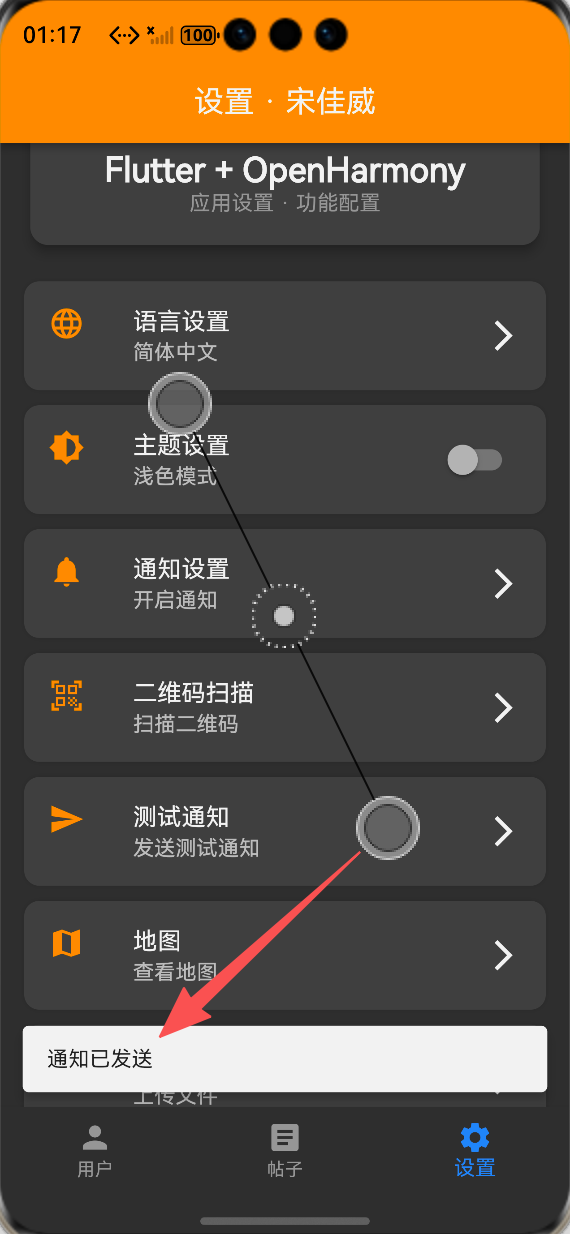
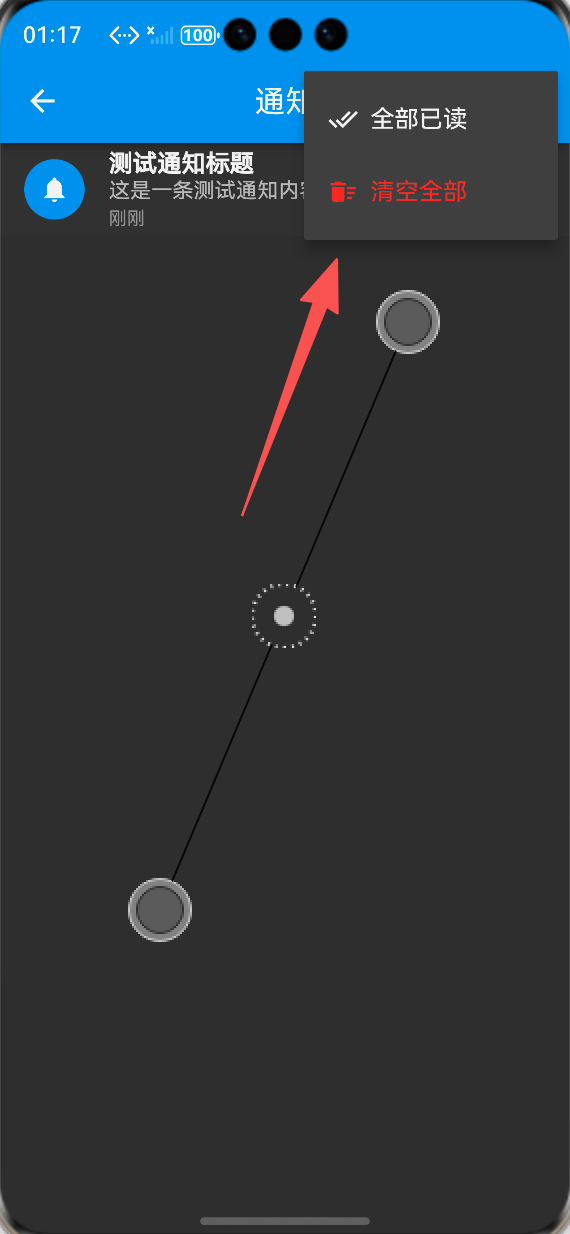
✅ 测试通知发送:点击测试通知入口,可成功发送测试通知,SnackBar提示发送成功,通知历史页面可正常显示。
✅ 通知历史操作:支持下拉刷新、滑动删除单条通知、标记单条/全部已读、清空所有通知,操作流畅,结果提示正常。
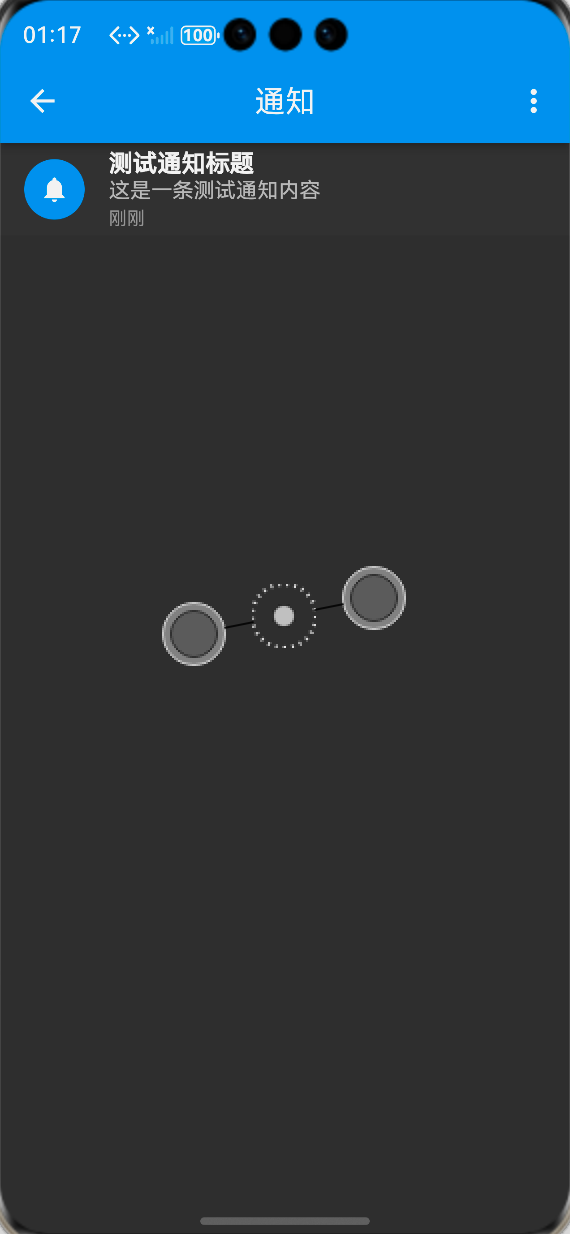
✅ 未读通知标记:未读通知显示加粗标题、蓝色图标,已读通知显示正常样式,区分清晰。
✅ 国际化适配:切换英文模式后,通知相关所有文本同步变为英文,适配正常。
✅ 深色模式适配:通知历史页面、设置入口在深色模式下显示清晰,无视觉异常。
✅ 数据持久化:应用重启后,通知历史不丢失,未读状态、通知内容保持正常。
✅ 兼容性:通知功能与应用原有功能(扫码、设置等)无冲突,均可正常运行。
✅ 稳定性:长时间操作通知功能无崩溃、无卡顿,操作响应迅速,数据同步正常。
运行效果截图与视频
鸿蒙Flutter通知
-
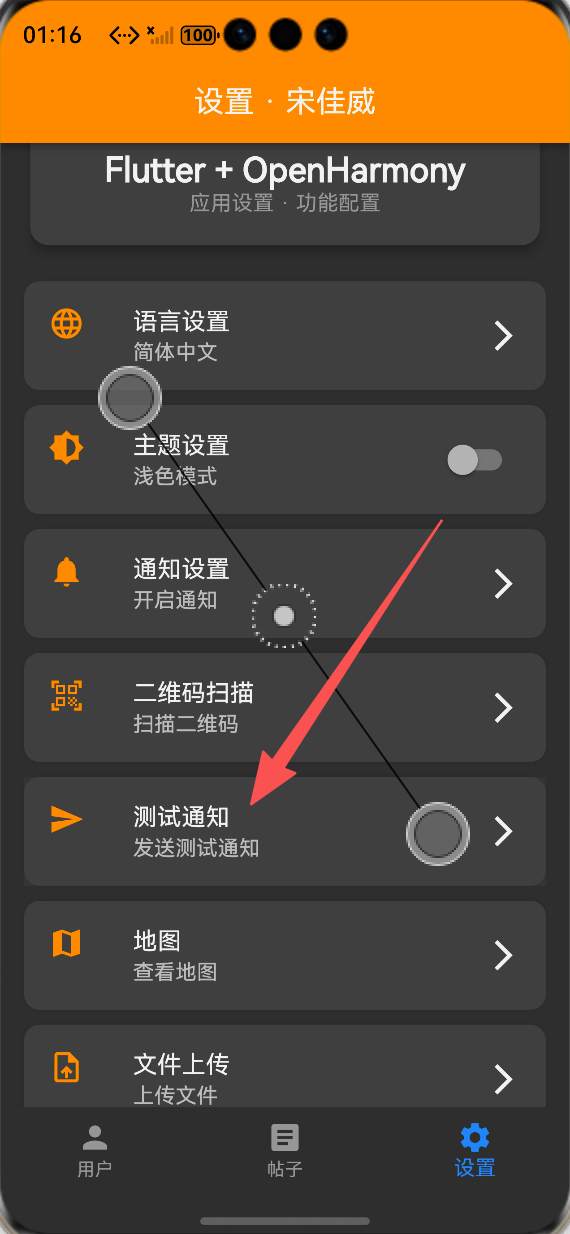
设置页面通知入口:ALT标签:Flutter鸿蒙化应用设置页面通知入口效果图
-
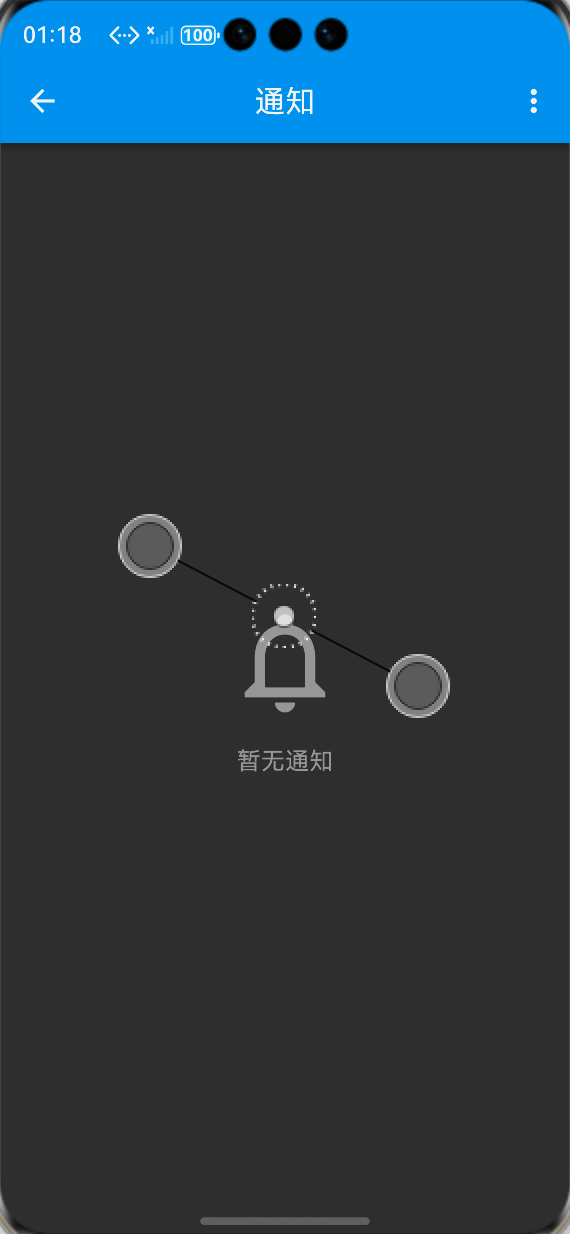
通知历史页面(无通知):ALT标签:Flutter鸿蒙化应用通知历史页面无通知效果图
-
测试通知发送成功提示:ALT标签:Flutter鸿蒙化应用测试通知发送成功效果图
-
通知历史页面(含未读通知):ALT标签:Flutter鸿蒙化应用通知历史页面未读通知效果图
-
通知操作(滑动删除/标记已读):ALT标签:Flutter鸿蒙化应用通知操作效果图
💡 功能亮点与扩展方向
功能亮点
-
平台适配性强:针对OpenHarmony平台无系统级推送库的问题,实现应用内本地通知系统,避开兼容性坑,确保功能稳定可用。
-
功能完整全面:涵盖通知的创建、存储、读取、标记已读、删除、清空等全量操作,满足日常使用需求,交互体验友好。
-
故障排查能力:开发过程中遇到编译错误,通过定位问题、针对性修复,确保功能顺利落地,积累了鸿蒙应用开发故障排查经验。
-
用户体验优秀:未读/已读通知视觉区分清晰,操作反馈及时,时间格式化符合用户习惯,适配深色模式与国际化。
-
扩展性强:通知服务封装解耦彻底,预留系统级推送接口,后续可轻松集成OpenHarmony官方推送服务,无需大幅修改代码。
-
稳定性高:完善的异常处理、资源管理与数据持久化逻辑,长时间使用无崩溃、无卡顿,数据不丢失。
后续扩展方向
-
集成OpenHarmony官方系统级推送服务,实现后台推送、锁屏通知等功能,提升通知体验。
-
添加通知分类功能,支持不同类型通知(系统通知、消息通知等)的分类展示与筛选。
-
实现通知提醒功能,支持声音、震动提示,提升通知的关注度。
-
添加通知设置选项,允许用户自定义通知显示方式、提醒方式等。
-
优化通知数据存储,支持分页加载,提升大量通知场景下的页面流畅度。
⚠️ 开发踩坑与避坑指南
-
推送库兼容性坑:初期计划使用flutter_local_notifications库,未提前调研鸿蒙平台适配情况,导致无法使用。避坑:开发前先通过社区、gitcode等平台调研第三方库的鸿蒙适配情况,优先选用社区适配版本,无适配版本时及时调整方案。
-
编译错误导致应用构建失败:scan_page.dart中存在不兼容的代码,导致整个应用无法编译,通知功能无法更新。避坑:开发完成后及时编译测试,遇到编译错误时,优先查看控制台日志,定位错误文件与具体错误信息,针对性修复,修复后清理缓存重新构建。
-
服务传递异常:初期未正确传递NotificationService,导致通知功能无法调用。避坑:全局服务(如通知服务、存储服务)统一初始化,通过构造函数传递,确保各页面能正常调用服务。
-
未读通知状态同步问题:初期未及时刷新通知列表,导致标记已读、删除通知后,页面显示不更新。避坑:所有通知操作(标记已读、删除、创建)后,及时调用加载通知列表方法,确保页面数据同步。
-
数据持久化异常:未正确处理JSON序列化与反序列化,导致通知数据无法正常存储、读取。避坑:确保数据模型的序列化与反序列化方法正确,存储时转为JSON字符串,读取时解析为数据模型。
🎯 全文总结
本次推送通知功能开发、故障排查与修复已全部完成,核心成果如下:
-
✅ 完成OpenHarmony平台推送方案调研,选用应用内本地通知系统,避开兼容性问题,实现通知核心功能。
-
✅ 封装通知服务,创建NotificationModel数据模型,实现通知的增删改查与数据持久化,逻辑清晰、解耦彻底。
-
✅ 开发通知历史页面,实现列表展示、下拉刷新、滑动删除等交互功能,未读/已读状态区分清晰,用户体验友好。
-
✅ 完成全量国际化适配,通知相关文本支持中英文无缝切换,适配不同用户需求。
-
✅ 在设置页面添加通知入口与测试通知入口,实现功能闭环,便捷调用。
-
✅ 排查并修复scan_page.dart编译错误,解决应用构建失败问题,确保功能正常运行。
-
✅ 所有功能在OpenHarmony设备上稳定运行,交互流畅、数据同步正常,无崩溃、无兼容性问题。
作为大一新生开发者,通过本次实战,我深入掌握了OpenHarmony平台第三方库调研与选型、通知服务封装、数据持久化、页面交互开发等关键技能,同时积累了鸿蒙应用开发故障排查与修复的经验,学会了如何应对编译错误、功能无法显示等问题。本次开发进一步丰富了应用功能,提升了应用的实用性与交互性,同时培养了问题解决能力,为后续开发更复杂的鸿蒙应用打下了坚实基础。

开源鸿蒙跨平台开发社区汇聚开发者与厂商,共建“一次开发,多端部署”的开源生态,致力于降低跨端开发门槛,推动万物智联创新。
更多推荐

 16
16 0
0- 0


 已为社区贡献43条内容

所有评论(0)