Flutter for OpenHarmony三方库适配实战:geolocator 地理定位
地理定位是移动应用开发中的核心功能之一,广泛应用于地图导航、位置服务、社交应用等场景。在 Flutter for OpenHarmony 应用开发中,geolocator是一个功能强大的地理定位插件,提供了完整的跨平台定位能力。geolocator 库为 Flutter for OpenHarmony 开发提供了完整的地理定位能力。通过丰富的 API,开发者可以实现位置获取、实时追踪、距离计算等功
欢迎加入开源鸿蒙跨平台社区:https://openharmonycrossplatform.csdn.net
本文基于flutter3.27.5开发
一、geolocator 库概述
地理定位是移动应用开发中的核心功能之一,广泛应用于地图导航、位置服务、社交应用等场景。在 Flutter for OpenHarmony 应用开发中,geolocator 是一个功能强大的地理定位插件,提供了完整的跨平台定位能力。
geolocator 库特点
geolocator 库基于 Flutter 平台接口实现,提供了以下核心特性:
精确定位:支持获取设备当前地理位置,包括经纬度、海拔、速度、方向等详细信息。
位置流监听:提供 Stream 接口,实时监听位置变化,适用于导航、运动追踪等场景。
权限管理:完整的定位权限检查和请求机制,支持前台和后台定位权限。
定位精度控制:支持多种定位精度级别,可根据应用需求平衡精度和功耗。
距离计算:提供两点间距离和方位角计算功能,无需额外依赖。
功能支持对比
| 功能 | Android | iOS | OpenHarmony |
|---|---|---|---|
| 获取当前位置 | ✅ | ✅ | ✅ |
| 获取缓存位置 | ✅ | ✅ | ✅ |
| 位置流监听 | ✅ | ✅ | ✅ |
| 权限检查 | ✅ | ✅ | ✅ |
| 权限请求 | ✅ | ✅ | ✅ |
| 定位服务状态 | ✅ | ✅ | ✅ |
| 打开设置页面 | ✅ | ✅ | ✅ |
| 距离计算 | ✅ | ✅ | ✅ |
| 方位角计算 | ✅ | ✅ | ✅ |
使用场景:地图导航、位置签到、运动追踪、附近搜索、地理围栏等。
二、安装与配置
2.1 添加依赖
在项目的 pubspec.yaml 文件中添加 geolocator 依赖:
dependencies:
  geolocator:
    git:
      url: https://atomgit.com/openharmony-sig/fluttertpc_geolocator.git
      path: geolocator
然后执行以下命令获取依赖:
flutter pub get
2.2 权限配置
在 OpenHarmony 项目的 module.json5 文件中添加定位权限:
{
  "module": {
    "requestPermissions": [
      {
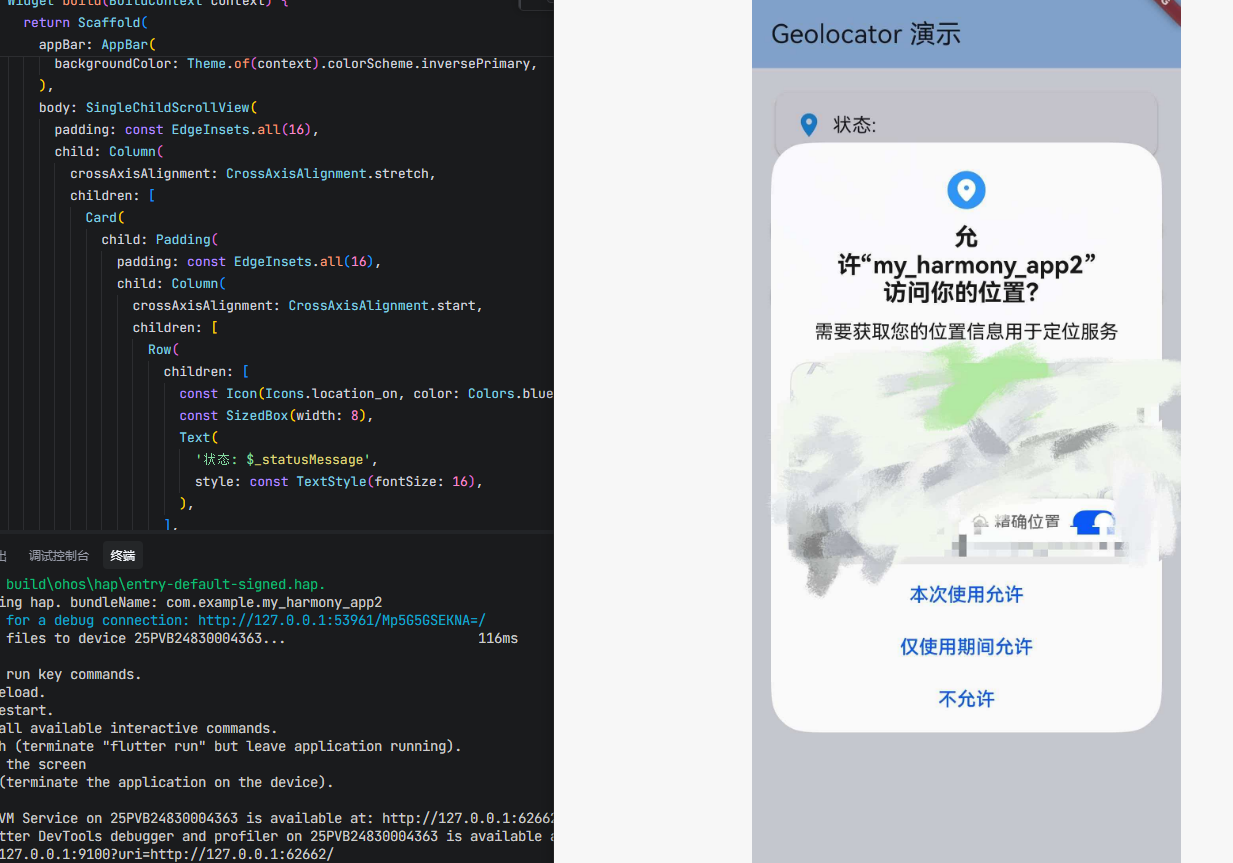
        "name": "ohos.permission.APPROXIMATELY_LOCATION",
        "reason": "$string:location_reason",
        "usedScene": {
          "abilities": ["EntryAbility"],
          "when": "inuse"
        }
      },
      {
        "name": "ohos.permission.LOCATION",
        "reason": "$string:location_reason",
        "usedScene": {
          "abilities": ["EntryAbility"],
          "when": "inuse"
        }
      }
    ]
  }
}
同时在 resources/base/element/string.json 文件中添加权限说明字符串:
{
  "string": [
    {
      "name": "location_reason",
      "value": "需要获取您的位置信息用于定位服务"
    }
  ]
}
权限说明:
| 权限 | 说明 |
|---|---|
| ohos.permission.APPROXIMATELY_LOCATION | 大致位置权限 |
| ohos.permission.LOCATION | 精确位置权限 |
三、核心 API 详解
3.1 Geolocator 类
Geolocator 是 geolocator 库的核心类,提供所有静态方法进行定位操作。
class Geolocator {
  static Future<LocationPermission> checkPermission();
  static Future<LocationPermission> requestPermission();
  static Future<bool> isLocationServiceEnabled();
  static Future<Position?> getLastKnownPosition();
  static Future<Position> getCurrentPosition();
  static Stream<Position> getPositionStream();
  // ...
}
3.2 checkPermission 方法
checkPermission 方法用于检查当前定位权限状态。
static Future<LocationPermission> checkPermission()
返回值:返回 LocationPermission 枚举值。
使用示例:
final permission = await Geolocator.checkPermission();
if (permission == LocationPermission.denied) {
  // 权限被拒绝
}
3.3 requestPermission 方法
requestPermission 方法用于请求定位权限。
static Future<LocationPermission> requestPermission()
返回值:返回用户授权后的 LocationPermission 状态。
使用示例:
final permission = await Geolocator.requestPermission();
if (permission == LocationPermission.whileInUse ||
    permission == LocationPermission.always) {
  // 权限已授予
}
3.4 isLocationServiceEnabled 方法
isLocationServiceEnabled 方法用于检查定位服务是否开启。
static Future<bool> isLocationServiceEnabled()
返回值:返回布尔值,true 表示定位服务已开启。
使用示例:
final isEnabled = await Geolocator.isLocationServiceEnabled();
if (!isEnabled) {
  // 定位服务未开启
}
3.5 getCurrentPosition 方法
getCurrentPosition 方法用于获取当前位置。
static Future<Position> getCurrentPosition({
  LocationAccuracy desiredAccuracy = LocationAccuracy.best,
  bool forceAndroidLocationManager = false,
  Duration? timeLimit,
})
参数说明:
desiredAccuracy 参数指定定位精度,默认为 LocationAccuracy.best。
forceAndroidLocationManager 参数仅 Android 有效,强制使用旧版 LocationManager。
timeLimit 参数指定超时时间。
返回值:返回 Position 对象,包含位置信息。
使用示例:
Position position = await Geolocator.getCurrentPosition(
  desiredAccuracy: LocationAccuracy.high,
);
print('纬度: ${position.latitude}, 经度: ${position.longitude}');
3.6 getLastKnownPosition 方法
getLastKnownPosition 方法用于获取上次缓存的位置。
static Future<Position?> getLastKnownPosition({
  bool forceAndroidLocationManager = false,
})
返回值:返回缓存的 Position 对象,可能为 null。
使用示例:
Position? position = await Geolocator.getLastKnownPosition();
if (position != null) {
  print('缓存位置: ${position.latitude}, ${position.longitude}');
}
3.7 getPositionStream 方法
getPositionStream 方法用于监听位置变化流。
static Stream<Position> getPositionStream({
  LocationSettings? locationSettings,
})
参数说明:
locationSettings 参数用于配置定位设置,包括精度、距离过滤等。
返回值:返回 Position 的 Stream。
使用示例:
StreamSubscription<Position> subscription = Geolocator.getPositionStream(
  locationSettings: LocationSettings(
    accuracy: LocationAccuracy.high,
    distanceFilter: 10,
  ),
).listen((Position position) {
  print('位置更新: ${position.latitude}, ${position.longitude}');
});
3.8 distanceBetween 方法
distanceBetween 方法用于计算两点间的距离。
static double distanceBetween(
  double startLatitude,
  double startLongitude,
  double endLatitude,
  double endLongitude,
)
返回值:返回两点间的距离,单位为米。
使用示例:
double distance = Geolocator.distanceBetween(
  39.9042, 116.4074,  // 北京
  31.2304, 121.4737,  // 上海
);
print('距离: ${distance / 1000} 公里');
3.9 bearingBetween 方法
bearingBetween 方法用于计算两点间的方位角。
static double bearingBetween(
  double startLatitude,
  double startLongitude,
  double endLatitude,
  double endLongitude,
)
返回值:返回方位角,单位为度(0-360)。
使用示例:
double bearing = Geolocator.bearingBetween(
  39.9042, 116.4074,
  31.2304, 121.4737,
);
print('方位角: $bearing 度');
3.10 openAppSettings 方法
openAppSettings 方法用于打开应用设置页面。
static Future<bool> openAppSettings()
返回值:返回布尔值,表示是否成功打开设置页面。
3.11 openLocationSettings 方法
openLocationSettings 方法用于打开系统定位设置页面。
static Future<bool> openLocationSettings()
返回值:返回布尔值,表示是否成功打开设置页面。
四、数据模型详解
4.1 Position 类
Position 类包含详细的位置信息。
class Position {
  final double latitude;          // 纬度
  final double longitude;         // 经度
  final DateTime? timestamp;      // 时间戳
  final double accuracy;          // 水平精度(米)
  final double altitude;          // 海拔(米)
  final double altitudeAccuracy;  // 海拔精度(米)
  final double heading;           // 方向(度)
  final double headingAccuracy;   // 方向精度(度)
  final double speed;             // 速度(米/秒)
  final double speedAccuracy;     // 速度精度(米/秒)
  final int? floor;               // 楼层(仅iOS)
  final bool isMocked;            // 是否为模拟位置
}
4.2 LocationPermission 枚举
LocationPermission 枚举定义了权限状态。
enum LocationPermission {
  denied,          // 权限被拒绝
  deniedForever,   // 权限永久拒绝
  whileInUse,      // 仅使用时允许
  always,          // 始终允许
  unableToDetermine, // 无法确定(仅Web)
}
4.3 LocationAccuracy 枚举
LocationAccuracy 枚举定义了定位精度级别。
enum LocationAccuracy {
  lowest,           // 最低精度(约3000米)
  low,              // 低精度(约1000米)
  medium,           // 中等精度(约100米)
  high,             // 高精度(约10米)
  best,             // 最佳精度(约0米)
  bestForNavigation, // 导航最佳精度
  reduced,          // 降低精度(iOS 14+)
}
4.4 LocationSettings 类
LocationSettings 类用于配置定位参数。
class LocationSettings {
  final LocationAccuracy accuracy;    // 定位精度
  final int distanceFilter;           // 距离过滤(米)
  final Duration? timeLimit;          // 超时时间
}
五、OpenHarmony 平台实现原理
5.1 原生 API 映射
geolocator 在 OpenHarmony 平台上使用 @kit.LocationKit 模块实现:
| Flutter API | OpenHarmony API |
|---|---|
| getCurrentPosition | geoLocationManager.getCurrentLocation |
| getLastKnownPosition | geoLocationManager.getLastLocation |
| getPositionStream | geoLocationManager.on(‘locationChange’) |
| isLocationServiceEnabled | geoLocationManager.isLocationEnabled |
5.2 定位请求配置
OpenHarmony 平台使用 CurrentLocationRequest 和 ContinuousLocationRequest 进行定位请求:
let requestInfo: geoLocationManager.CurrentLocationRequest = {
  'priority': geoLocationManager.LocationRequestPriority.FIRST_FIX,
  'scenario': geoLocationManager.LocationRequestScenario.UNSET,
  'maxAccuracy': maxAccuracy,
  'timeoutMs': timeoutMs
};
5.3 位置流监听实现
OpenHarmony 平台通过事件监听实现位置流:
const locationChangeListener = (location: geoLocationManager.Location): void => {
  let position = locationToMap(location);
  if (eventSink != null) {
    eventSink.success(position);
  }
}

geoLocationManager.on('locationChange', requestInfo, locationChangeListener);
六、实战案例
6.1 完整的权限检查流程
Future<bool> checkAndRequestPermission() async {
  bool serviceEnabled = await Geolocator.isLocationServiceEnabled();
  if (!serviceEnabled) {
    return false;
  }

  LocationPermission permission = await Geolocator.checkPermission();
  if (permission == LocationPermission.denied) {
    permission = await Geolocator.requestPermission();
    if (permission == LocationPermission.denied) {
      return false;
    }
  }

  if (permission == LocationPermission.deniedForever) {
    await Geolocator.openAppSettings();
    return false;
  }

  return true;
}
6.2 获取当前位置
Future<Position?> getCurrentLocation() async {
  final hasPermission = await checkAndRequestPermission();
  if (!hasPermission) {
    return null;
  }

  try {
    Position position = await Geolocator.getCurrentPosition(
      desiredAccuracy: LocationAccuracy.high,
      timeLimit: Duration(seconds: 15),
    );
    return position;
  } catch (e) {
    print('获取位置失败: $e');
    return null;
  }
}
6.3 实时位置追踪
StreamSubscription<Position>? _positionSubscription;

void startLocationTracking() {
  _positionSubscription = Geolocator.getPositionStream(
    locationSettings: LocationSettings(
      accuracy: LocationAccuracy.high,
      distanceFilter: 10,
    ),
  ).listen((Position position) {
    print('位置更新: ${position.latitude}, ${position.longitude}');
    print('速度: ${position.speed} m/s');
    print('方向: ${position.heading}°');
  });
}

void stopLocationTracking() {
  _positionSubscription?.cancel();
  _positionSubscription = null;
}
6.4 计算两点距离
void calculateDistance() {
  double distance = Geolocator.distanceBetween(
    39.9042, 116.4074,  // 北京天安门
    31.2304, 121.4737,  // 上海
  );

  print('北京到上海的距离: ${(distance / 1000).toStringAsFixed(2)} 公里');

  double bearing = Geolocator.bearingBetween(
    39.9042, 116.4074,
    31.2304, 121.4737,
  );

  print('方位角: ${bearing.toStringAsFixed(2)}°');
}
6.5 地理围栏示例
class GeoFence {
  final double latitude;
  final double longitude;
  final double radius;

  GeoFence({
    required this.latitude,
    required this.longitude,
    required this.radius,
  });

  bool isInside(Position position) {
    double distance = Geolocator.distanceBetween(
      position.latitude, position.longitude,
      latitude, longitude,
    );
    return distance <= radius;
  }
}

void monitorGeoFence() {
  final fence = GeoFence(
    latitude: 39.9042,
    longitude: 116.4074,
    radius: 100,
  );

  Geolocator.getPositionStream().listen((position) {
    if (fence.isInside(position)) {
      print('进入围栏区域');
    } else {
      print('离开围栏区域');
    }
  });
}
七、最佳实践
7.1 权限处理最佳实践
Future<void> handleLocationPermission() async {
  LocationPermission permission = await Geolocator.checkPermission();

  if (permission == LocationPermission.denied) {
    permission = await Geolocator.requestPermission();
  }

  switch (permission) {
    case LocationPermission.denied:
      print('权限被拒绝');
      break;
    case LocationPermission.deniedForever:
      print('权限永久拒绝,引导用户去设置');
      await Geolocator.openAppSettings();
      break;
    case LocationPermission.whileInUse:
    case LocationPermission.always:
      print('权限已授予');
      break;
    case LocationPermission.unableToDetermine:
      print('无法确定权限状态');
      break;
  }
}
7.2 定位精度选择
根据应用场景选择合适的定位精度:
LocationAccuracy getAccuracyForScenario(String scenario) {
  switch (scenario) {
    case 'navigation':
      return LocationAccuracy.bestForNavigation;
    case 'tracking':
      return LocationAccuracy.high;
    case 'nearby':
      return LocationAccuracy.medium;
    case 'city':
      return LocationAccuracy.low;
    default:
      return LocationAccuracy.medium;
  }
}
7.3 错误处理
Future<Position?> safeGetPosition() async {
  try {
    return await Geolocator.getCurrentPosition();
  } on TimeoutException {
    print('定位超时');
  } on LocationServiceDisabledException {
    print('定位服务未开启');
  } catch (e) {
    print('定位错误: $e');
  }
  return null;
}
7.4 资源释放
class LocationTracker {
  StreamSubscription<Position>? _subscription;

  void start() {
    _subscription = Geolocator.getPositionStream().listen((_) {});
  }

  void stop() {
    _subscription?.cancel();
    _subscription = null;
  }

  void dispose() {
    stop();
  }
}
八、常见问题
Q1:定位精度不准确怎么办?
确保使用高精度定位,并检查设备 GPS 是否正常工作。室内环境可能影响 GPS 信号。
Q2:如何处理权限永久拒绝?
引导用户打开应用设置页面手动授权:
if (permission == LocationPermission.deniedForever) {
  await Geolocator.openAppSettings();
}
Q3:定位超时如何处理?
设置合理的超时时间,并实现重试机制:
try {
  position = await Geolocator.getCurrentPosition(
    timeLimit: Duration(seconds: 15),
  );
} on TimeoutException {
  // 重试或使用缓存位置
}
Q4:如何减少定位功耗?
使用适当的定位精度和距离过滤:
Geolocator.getPositionStream(
  locationSettings: LocationSettings(
    accuracy: LocationAccuracy.medium,
    distanceFilter: 50,  // 移动50米才更新
  ),
);
Q5:OpenHarmony 上定位不工作?
检查以下几点:
- 确保在
module.json5中配置了定位权限 - 确保设备定位服务已开启
- 确保应用已获得定位权限
九、总结
geolocator 库为 Flutter for OpenHarmony 开发提供了完整的地理定位能力。通过丰富的 API,开发者可以实现位置获取、实时追踪、距离计算等功能。该库在鸿蒙平台上已经完成了完整的适配,支持所有核心功能,开发者可以放心使用。
十、完整代码示例
以下是一个完整的可运行示例,展示了 geolocator 库的核心功能:
main.dart
import 'dart:async';
import 'package:flutter/material.dart';
import 'package:geolocator/geolocator.dart';
void main() {
runApp(const MyApp());
}
class MyApp extends StatelessWidget {
const MyApp({super.key});
Widget build(BuildContext context) {
return MaterialApp(
title: 'Geolocator Demo',
theme: ThemeData(
colorScheme: ColorScheme.fromSeed(seedColor: Colors.blue),
useMaterial3: true,
),
home: const HomePage(),
);
}
}
class HomePage extends StatefulWidget {
const HomePage({super.key});
State<HomePage> createState() => _HomePageState();
}
class _HomePageState extends State<HomePage> {
Position? _currentPosition;
StreamSubscription<Position>? _positionSubscription;
List<Position> _positionHistory = [];
bool _isTracking = false;
String _statusMessage = '';
void initState() {
super.initState();
_checkPermission();
}
Future<void> _checkPermission() async {
bool serviceEnabled = await Geolocator.isLocationServiceEnabled();
if (!serviceEnabled) {
setState(() {
_statusMessage = '定位服务未开启';
});
return;
}
LocationPermission permission = await Geolocator.checkPermission();
if (permission == LocationPermission.denied) {
permission = await Geolocator.requestPermission();
}
setState(() {
switch (permission) {
case LocationPermission.denied:
_statusMessage = '权限被拒绝';
break;
case LocationPermission.deniedForever:
_statusMessage = '权限永久拒绝';
break;
case LocationPermission.whileInUse:
case LocationPermission.always:
_statusMessage = '权限已授予';
break;
case LocationPermission.unableToDetermine:
_statusMessage = '无法确定权限状态';
break;
}
});
}
Future<void> _getCurrentPosition() async {
try {
Position position = await Geolocator.getCurrentPosition(
desiredAccuracy: LocationAccuracy.high,
timeLimit: const Duration(seconds: 15),
);
setState(() {
_currentPosition = position;
});
} on TimeoutException {
_showMessage('定位超时');
} on LocationServiceDisabledException {
_showMessage('定位服务未开启');
} catch (e) {
_showMessage('定位失败: $e');
}
}
void _startTracking() {
setState(() {
_isTracking = true;
_positionHistory.clear();
});
_positionSubscription = Geolocator.getPositionStream(
locationSettings: const LocationSettings(
accuracy: LocationAccuracy.high,
distanceFilter: 10,
),
).listen((Position position) {
setState(() {
_currentPosition = position;
_positionHistory.add(position);
if (_positionHistory.length > 20) {
_positionHistory.removeAt(0);
}
});
});
}
void _stopTracking() {
_positionSubscription?.cancel();
_positionSubscription = null;
setState(() {
_isTracking = false;
});
}
Future<void> _openSettings() async {
await Geolocator.openLocationSettings();
}
void _showMessage(String message) {
ScaffoldMessenger.of(context).showSnackBar(
SnackBar(content: Text(message)),
);
}
void dispose() {
_positionSubscription?.cancel();
super.dispose();
}
Widget build(BuildContext context) {
return Scaffold(
appBar: AppBar(
title: const Text('Geolocator 演示'),
backgroundColor: Theme.of(context).colorScheme.inversePrimary,
),
body: SingleChildScrollView(
padding: const EdgeInsets.all(16),
child: Column(
crossAxisAlignment: CrossAxisAlignment.stretch,
children: [
Card(
child: Padding(
padding: const EdgeInsets.all(16),
child: Column(
crossAxisAlignment: CrossAxisAlignment.start,
children: [
Row(
children: [
const Icon(Icons.location_on, color: Colors.blue),
const SizedBox(width: 8),
Text(
'状态: $_statusMessage',
style: const TextStyle(fontSize: 16),
),
],
),
],
),
),
),
const SizedBox(height: 16),
if (_currentPosition != null)
Card(
child: Padding(
padding: const EdgeInsets.all(16),
child: Column(
crossAxisAlignment: CrossAxisAlignment.start,
children: [
const Text(
'当前位置',
style: TextStyle(fontSize: 18, fontWeight: FontWeight.bold),
),
const Divider(),
_buildInfoRow('纬度', '${_currentPosition!.latitude.toStringAsFixed(6)}°'),
_buildInfoRow('经度', '${_currentPosition!.longitude.toStringAsFixed(6)}°'),
_buildInfoRow('海拔', '${_currentPosition!.altitude.toStringAsFixed(2)} m'),
_buildInfoRow('精度', '${_currentPosition!.accuracy.toStringAsFixed(2)} m'),
_buildInfoRow('速度', '${_currentPosition!.speed.toStringAsFixed(2)} m/s'),
_buildInfoRow('方向', '${_currentPosition!.heading.toStringAsFixed(2)}°'),
],
),
),
),
const SizedBox(height: 16),
Row(
children: [
Expanded(
child: ElevatedButton.icon(
onPressed: _getCurrentPosition,
icon: const Icon(Icons.my_location),
label: const Text('获取位置'),
),
),
const SizedBox(width: 8),
Expanded(
child: ElevatedButton.icon(
onPressed: _isTracking ? _stopTracking : _startTracking,
icon: Icon(_isTracking ? Icons.stop : Icons.play_arrow),
label: Text(_isTracking ? '停止追踪' : '开始追踪'),
style: ElevatedButton.styleFrom(
backgroundColor: _isTracking ? Colors.red : null,
),
),
),
],
),
const SizedBox(height: 8),
ElevatedButton.icon(
onPressed: _openSettings,
icon: const Icon(Icons.settings),
label: const Text('打开定位设置'),
),
const SizedBox(height: 16),
if (_positionHistory.isNotEmpty)
Card(
child: Padding(
padding: const EdgeInsets.all(16),
child: Column(
crossAxisAlignment: CrossAxisAlignment.start,
children: [
Text(
'位置历史 (${_positionHistory.length} 条)',
style: const TextStyle(fontSize: 16, fontWeight: FontWeight.bold),
),
const Divider(),
SizedBox(
height: 200,
child: ListView.builder(
itemCount: _positionHistory.length,
itemBuilder: (context, index) {
final pos = _positionHistory[index];
return ListTile(
dense: true,
leading: CircleAvatar(
child: Text('${index + 1}'),
),
title: Text(
'${pos.latitude.toStringAsFixed(4)}, ${pos.longitude.toStringAsFixed(4)}',
),
subtitle: Text(
'速度: ${pos.speed.toStringAsFixed(2)} m/s',
),
);
},
),
),
],
),
),
),
const SizedBox(height: 16),
Card(
child: Padding(
padding: const EdgeInsets.all(16),
child: Column(
crossAxisAlignment: CrossAxisAlignment.start,
children: [
const Text(
'距离计算示例',
style: TextStyle(fontSize: 16, fontWeight: FontWeight.bold),
),
const Divider(),
_buildDistanceInfo(),
],
),
),
),
],
),
),
);
}
Widget _buildInfoRow(String label, String value) {
return Padding(
padding: const EdgeInsets.symmetric(vertical: 4),
child: Row(
mainAxisAlignment: MainAxisAlignment.spaceBetween,
children: [
Text(label, style: const TextStyle(color: Colors.grey)),
Text(value, style: const TextStyle(fontWeight: FontWeight.bold)),
],
),
);
}
Widget _buildDistanceInfo() {
double distance = Geolocator.distanceBetween(
39.9042, 116.4074,
31.2304, 121.4737,
);
double bearing = Geolocator.bearingBetween(
39.9042, 116.4074,
31.2304, 121.4737,
);
return Column(
crossAxisAlignment: CrossAxisAlignment.start,
children: [
const Text('北京 → 上海'),
_buildInfoRow('距离', '${(distance / 1000).toStringAsFixed(2)} 公里'),
_buildInfoRow('方位角', '${bearing.toStringAsFixed(2)}°'),
],
);
}
}
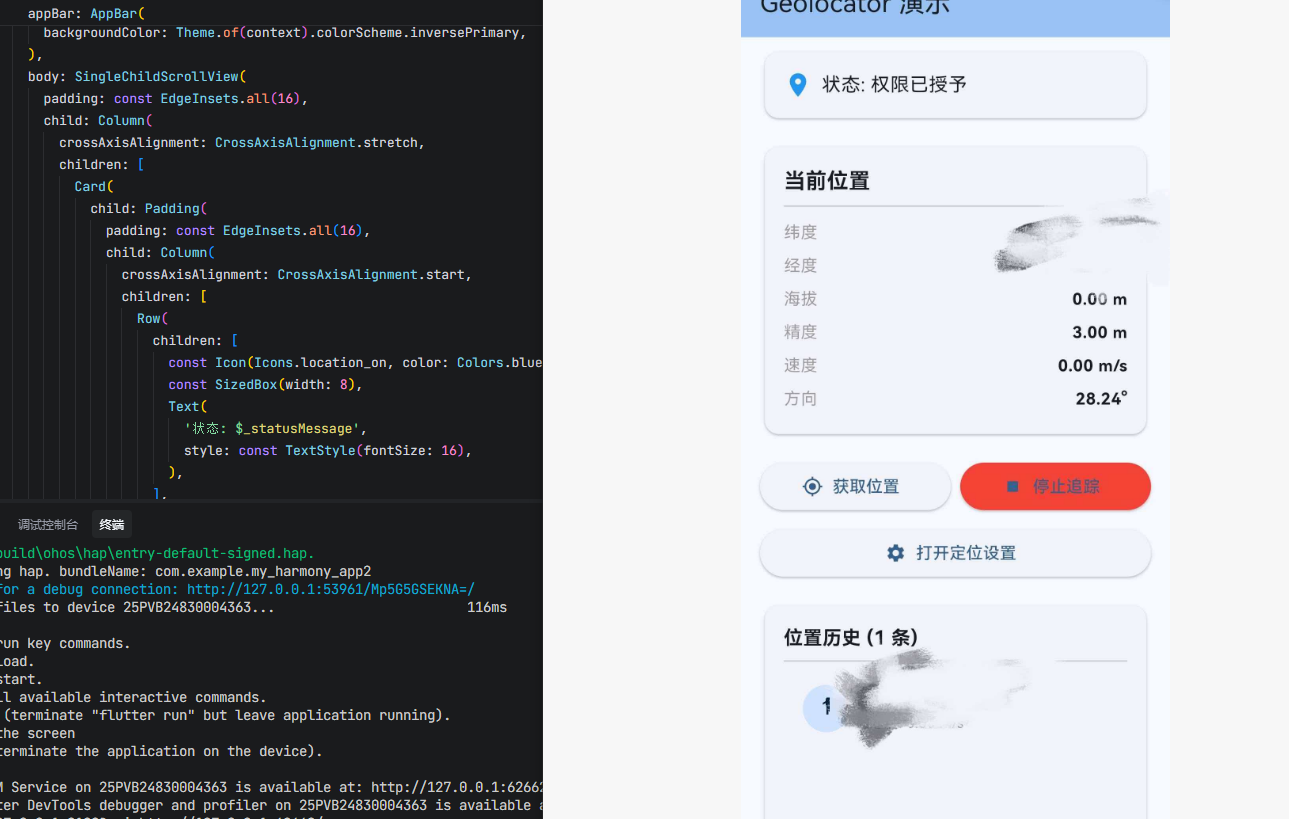
运行此示例后,您将看到一个完整的地理定位演示界面,包含权限状态、当前位置信息、位置追踪、位置历史记录以及距离计算等功能。点击"获取位置"按钮可获取当前位置,点击"开始追踪"按钮可实时监听位置变化。

开源鸿蒙跨平台开发社区汇聚开发者与厂商,共建“一次开发,多端部署”的开源生态,致力于降低跨端开发门槛,推动万物智联创新。
更多推荐
 0
0 0
0- 0


 已为社区贡献100条内容

所有评论(0)