Flutter for OpenHarmony三方库适配实战:url_launcher URL启动器
URL 启动器是移动应用开发中不可或缺的功能,无论是打开网页、拨打电话、发送邮件、还是跳转到其他应用,都需要用到 URL 启动功能。在 Flutter for OpenHarmony 应用开发中,是一个功能强大的 URL 启动插件,提供了完整的 URL 解析和应用跳转能力。url_launcher 库为 Flutter for OpenHarmony 开发提供了完整的 URL 启动功能。通过统一的
欢迎加入开源鸿蒙跨平台社区:https://openharmonycrossplatform.csdn.net
本文基于flutter3.27.5开发
一、url_launcher 库概述
URL 启动器是移动应用开发中不可或缺的功能,无论是打开网页、拨打电话、发送邮件、还是跳转到其他应用,都需要用到 URL 启动功能。在 Flutter for OpenHarmony 应用开发中,url_launcher 是一个功能强大的 URL 启动插件,提供了完整的 URL 解析和应用跳转能力。
url_launcher 库特点
url_launcher 库基于 Flutter 平台接口实现,提供了以下核心特性:
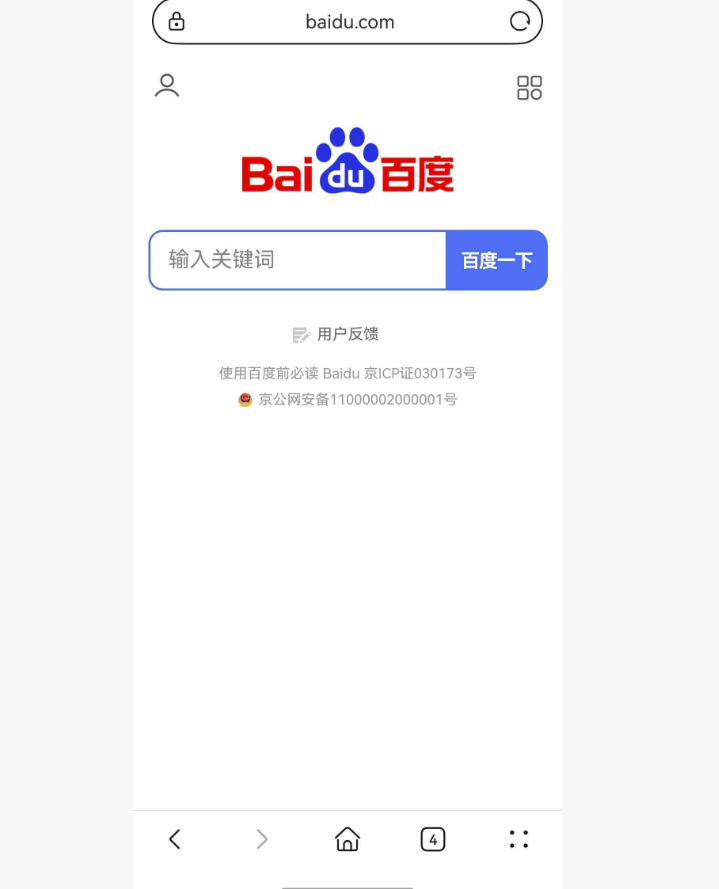
多协议支持:支持 http/https、tel、mailto、sms 等多种 URL 协议,可以打开网页、拨打电话、发送邮件、发送短信等。
多种启动模式:支持在外部浏览器打开、在应用内 WebView 打开、在非浏览器应用打开等多种模式,满足不同业务场景需求。
能力检测:提供 canLaunchUrl 方法检测设备是否支持特定 URL 协议,避免因不支持导致的崩溃或异常。
WebView 配置:支持配置 JavaScript 启用、DOM 存储启用、自定义请求头等 WebView 选项。
支持平台对比
| 平台 | 支持情况 | 说明 |
|---|---|---|
| Android | ✅ 完全支持 | 支持 Android SDK 19+ |
| iOS | ✅ 完全支持 | 支持 iOS 11+ |
| Web | ✅ 完全支持 | 支持新窗口打开 |
| Windows | ✅ 完全支持 | 支持默认浏览器 |
| macOS | ✅ 完全支持 | 支持默认浏览器 |
| Linux | ✅ 完全支持 | 支持默认浏览器 |
| OpenHarmony | ✅ 完全支持 | 专门适配,支持 API 12+ |
功能支持对比
| 功能 | Android | iOS | Web | OpenHarmony |
|---|---|---|---|---|
| 打开网页 | ✅ | ✅ | ✅ | ✅ |
| 拨打电话 | ✅ | ✅ | ❌ | ✅ |
| 发送邮件 | ✅ | ✅ | ✅ | ✅ |
| 发送短信 | ✅ | ✅ | ✅ | ✅ |
| 应用内 WebView | ✅ | ✅ | ❌ | ✅ |
| 能力检测 | ✅ | ✅ | ✅ | ✅ |
使用场景:打开外部网页、拨打电话、发送邮件、发送短信、跳转第三方应用等。
二、安装与配置
2.1 添加依赖
在项目的 pubspec.yaml 文件中添加 url_launcher 依赖:
dependencies:
  url_launcher:
    git:
      url: https://atomgit.com/openharmony-tpc/flutter_packages.git
      path: packages/url_launcher/url_launcher
然后执行以下命令获取依赖:
flutter pub get
2.2 兼容性信息
| 项目 | 版本要求 |
|---|---|
| Flutter SDK | 3.7.12-ohos-1.0.6 |
| OpenHarmony SDK | 5.0.0 (API 12) |
| DevEco Studio | 5.0.13.200 |
| ROM | 5.1.0.120 SP3 |
2.3 权限配置
url_launcher 在 OpenHarmony 平台上需要配置网络权限才能打开网页:
在 entry 目录下的 module.json5 中添加权限
打开 ohos/entry/src/main/module.json5,在 requestPermissions 数组中添加:
"requestPermissions": [
  {
    "name": "ohos.permission.INTERNET",
    "reason": "$string:network_reason",
    "usedScene": {
      "abilities": [
        "EntryAbility"
      ],
      "when": "inuse"
    }
  }
]
在 entry 目录下添加申请权限的原因
打开 ohos/entry/src/main/resources/base/element/string.json,在 string 数组中添加:
{
  "string": [
    {
      "name": "network_reason",
      "value": "使用网络访问文件资源"
    }
  ]
}
三、核心 API 详解
3.1 launchUrl 方法
launchUrl 是 url_launcher 的核心方法,用于打开指定的 URL。
Future<bool> launchUrl(
  Uri url, {
  LaunchMode mode = LaunchMode.platformDefault,
  WebViewConfiguration webViewConfiguration = const WebViewConfiguration(),
  String? webOnlyWindowName,
})
参数说明:
url 参数是要打开的 URL,类型为 Uri。必须包含完整的协议(如 https://)。
mode 参数指定 URL 的打开模式,默认为 LaunchMode.platformDefault。
webViewConfiguration 参数用于配置应用内 WebView 的选项,仅在 LaunchMode.inAppWebView 模式下生效。
webOnlyWindowName 参数仅在 Web 平台使用,指定打开窗口的名称。
返回值:返回 Future<bool>,表示 URL 是否成功打开。
使用示例:
Future<void> openWebPage() async {
  final Uri url = Uri.parse('https://flutter.dev');
  if (await canLaunchUrl(url)) {
    await launchUrl(url);
  } else {
    print('无法打开 $url');
  }
}
3.2 canLaunchUrl 方法
canLaunchUrl 方法用于检测设备是否支持打开指定的 URL。
Future<bool> canLaunchUrl(Uri url)
参数说明:
url 参数是要检测的 URL,类型为 Uri。
返回值:返回 Future<bool>,true 表示设备支持打开该 URL。
使用示例:
Future<void> checkPhoneSupport() async {
  final Uri telUrl = Uri(scheme: 'tel', path: '10086');
  final bool canLaunch = await canLaunchUrl(telUrl);
  if (canLaunch) {
    print('设备支持拨打电话');
  } else {
    print('设备不支持拨打电话');
  }
}
3.3 closeInAppWebView 方法
closeInAppWebView 方法用于关闭应用内打开的 WebView。
Future<void> closeInAppWebView()
使用示例:
Future<void> openAndCloseWebView() async {
  final Uri url = Uri.parse('https://flutter.dev');
  await launchUrl(url, mode: LaunchMode.inAppWebView);

  await Future.delayed(const Duration(seconds: 5));
  await closeInAppWebView();
}
3.4 LaunchMode 枚举
LaunchMode 枚举定义了 URL 的打开模式。
LaunchMode.platformDefault 表示使用平台默认行为。在 OpenHarmony 上,网页 URL 会使用外部浏览器打开,其他 URL 会调用对应的应用处理。
LaunchMode.inAppWebView 表示在应用内的 WebView 中打开 URL。仅支持 http 和 https 协议。
LaunchMode.externalApplication 表示将 URL 传递给系统,由其他应用处理。适用于需要使用外部浏览器的场景。
LaunchMode.externalNonBrowserApplication 表示将 URL 传递给非浏览器应用处理。
3.5 WebViewConfiguration 类
WebViewConfiguration 类用于配置应用内 WebView 的选项。
const WebViewConfiguration({
  this.enableJavaScript = true,
  this.enableDomStorage = true,
  this.headers = const <String, String>{},
});
属性说明:
enableJavaScript 属性控制是否启用 JavaScript,默认为 true。
enableDomStorage 属性控制是否启用 DOM 存储,默认为 true。
headers 属性用于设置额外的 HTTP 请求头。
使用示例:
Future<void> openWithCustomHeaders() async {
  final Uri url = Uri.parse('https://flutter.dev');
  await launchUrl(
    url,
    mode: LaunchMode.inAppWebView,
    webViewConfiguration: const WebViewConfiguration(
      enableJavaScript: true,
      enableDomStorage: true,
      headers: {'Authorization': 'Bearer token123'},
    ),
  );
}
四、实战案例
4.1 打开网页
Future<void> openWebPage() async {
  final Uri url = Uri.parse('https://flutter.dev');
  if (!await launchUrl(url, mode: LaunchMode.externalApplication)) {
    throw Exception('无法打开网页: $url');
  }
}
4.2 拨打电话
Future<void> makePhoneCall(String phoneNumber) async {
  final Uri telUrl = Uri(scheme: 'tel', path: phoneNumber);
  if (await canLaunchUrl(telUrl)) {
    await launchUrl(telUrl);
  } else {
    print('设备不支持拨打电话');
  }
}
4.3 发送邮件
Future<void> sendEmail(String email, {String? subject, String? body}) async {
  final Uri mailUrl = Uri(
    scheme: 'mailto',
    path: email,
    queryParameters: {
      if (subject != null) 'subject': subject,
      if (body != null) 'body': body,
    },
  );
  if (await canLaunchUrl(mailUrl)) {
    await launchUrl(mailUrl);
  }
}
4.4 发送短信
Future<void> sendSms(String phoneNumber, {String? message}) async {
  final Uri smsUrl = Uri(
    scheme: 'sms',
    path: phoneNumber,
    queryParameters: {
      if (message != null) 'body': message,
    },
  );
  if (await canLaunchUrl(smsUrl)) {
    await launchUrl(smsUrl);
  }
}
4.5 应用内 WebView
Future<void> openInAppWebView() async {
  final Uri url = Uri.parse('https://flutter.dev');
  await launchUrl(
    url,
    mode: LaunchMode.inAppWebView,
    webViewConfiguration: const WebViewConfiguration(
      enableJavaScript: true,
      enableDomStorage: true,
    ),
  );
}
五、最佳实践
5.1 始终检查能力
在调用 launchUrl 之前,建议先使用 canLaunchUrl 检查设备是否支持:
Future<void> safeLaunch(Uri url) async {
  if (await canLaunchUrl(url)) {
    await launchUrl(url);
  } else {
    print('设备不支持打开: $url');
  }
}
5.2 错误处理
对所有 URL 操作进行错误处理:
Future<void> launchWithErrorHandling(Uri url) async {
  try {
    if (await canLaunchUrl(url)) {
      await launchUrl(url);
    }
  } on PlatformException catch (e) {
    print('打开 URL 失败: ${e.message}');
  } catch (e) {
    print('发生未知错误: $e');
  }
}
5.3 URL 编码
对于包含特殊字符的 URL,需要进行编码:
String encodeUrl(String url) {
  return Uri.encodeFull(url);
}
六、常见问题
Q1:如何判断 URL 是否有效?
使用 Uri.tryParse 方法:
bool isValidUrl(String url) {
  final Uri? uri = Uri.tryParse(url);
  return uri != null && uri.hasScheme;
}
Q2:如何打开应用商店?
Future<void> openAppStore() async {
  final Uri storeUrl = Uri.parse('market://details?id=com.example.app');
  if (await canLaunchUrl(storeUrl)) {
    await launchUrl(storeUrl);
  }
}
Q3:如何在 WebView 中获取 Cookie?
url_launcher 的 WebView 不支持直接获取 Cookie,如需此功能请使用 webview_flutter 插件。
Q4:OpenHarmony 平台支持哪些 URL 协议?
OpenHarmony 平台支持 http、https、tel、mailto、sms 等常用协议,具体支持情况取决于设备安装的应用。
七、总结
url_launcher 库为 Flutter for OpenHarmony 开发提供了完整的 URL 启动功能。通过统一的 API 接口,开发者可以轻松实现打开网页、拨打电话、发送邮件、发送短信等功能。该库在鸿蒙平台上已经完成了完整的适配,支持所有核心功能,开发者可以放心使用。
八、完整代码示例
以下是一个完整的可运行示例,展示了 url_launcher 库的核心功能: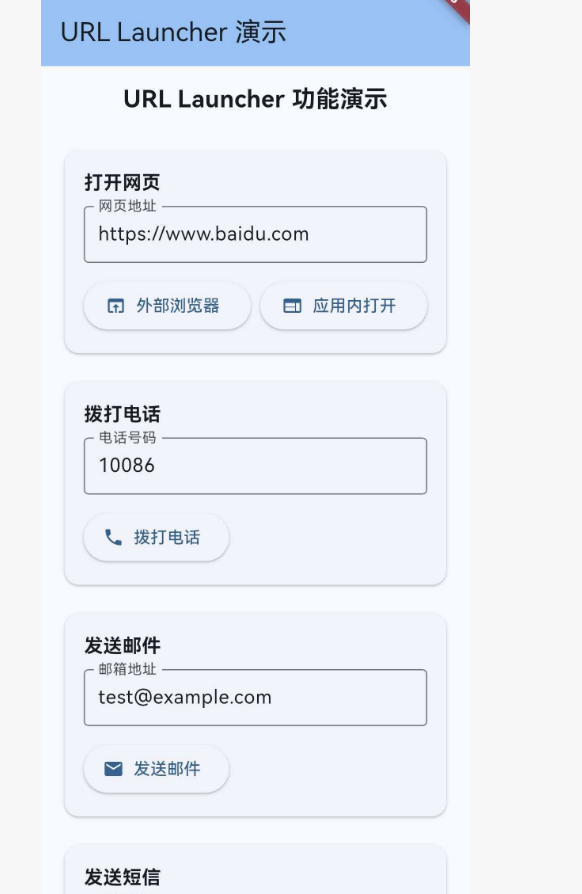
pubspec.yaml
name: url_launcher_demo
description: Flutter for OpenHarmony url_launcher 演示项目
publish_to: 'none'
version: 1.0.0+1

environment:
  sdk: '>=3.0.0 <4.0.0'

dependencies:
  flutter:
    sdk: flutter
  url_launcher:
    git:
      url: https://atomgit.com/openharmony-tpc/flutter_packages.git
      path: packages/url_launcher/url_launcher

flutter:
  uses-material-design: true
main.dart
import 'package:flutter/material.dart';
import 'package:url_launcher/url_launcher.dart';
void main() {
runApp(const MyApp());
}
class MyApp extends StatelessWidget {
const MyApp({super.key});
Widget build(BuildContext context) {
return MaterialApp(
title: 'URL Launcher Demo',
theme: ThemeData(
colorScheme: ColorScheme.fromSeed(seedColor: Colors.blue),
useMaterial3: true,
),
home: const HomePage(),
);
}
}
class HomePage extends StatefulWidget {
const HomePage({super.key});
State<HomePage> createState() => _HomePageState();
}
class _HomePageState extends State<HomePage> {
bool _hasCallSupport = false;
String _phoneNumber = '10086';
String _email = 'test@example.com';
String _smsNumber = '10086';
String _webUrl = 'https://flutter.dev';
String _resultMessage = '';
void initState() {
super.initState();
_checkCallSupport();
}
Future<void> _checkCallSupport() async {
final bool canCall = await canLaunchUrl(Uri(scheme: 'tel', path: '123'));
setState(() {
_hasCallSupport = canCall;
});
}
Future<void> _launchUrl(Uri url, {LaunchMode mode = LaunchMode.platformDefault}) async {
try {
if (await canLaunchUrl(url)) {
final bool success = await launchUrl(url, mode: mode);
setState(() {
_resultMessage = success ? '成功打开: $url' : '打开失败: $url';
});
} else {
setState(() {
_resultMessage = '设备不支持: $url';
});
}
} catch (e) {
setState(() {
_resultMessage = '错误: $e';
});
}
}
Future<void> _openWebPage() async {
await _launchUrl(
Uri.parse(_webUrl),
mode: LaunchMode.externalApplication,
);
}
Future<void> _openInAppWebView() async {
await _launchUrl(
Uri.parse(_webUrl),
mode: LaunchMode.inAppWebView,
);
}
Future<void> _makePhoneCall() async {
await _launchUrl(Uri(scheme: 'tel', path: _phoneNumber));
}
Future<void> _sendEmail() async {
await _launchUrl(Uri(
scheme: 'mailto',
path: _email,
queryParameters: {'subject': '测试邮件', 'body': '这是测试邮件内容'},
));
}
Future<void> _sendSms() async {
await _launchUrl(Uri(
scheme: 'sms',
path: _smsNumber,
queryParameters: {'body': '测试短信内容'},
));
}
Widget build(BuildContext context) {
return Scaffold(
appBar: AppBar(
title: const Text('URL Launcher 演示'),
backgroundColor: Theme.of(context).colorScheme.inversePrimary,
),
body: SingleChildScrollView(
padding: const EdgeInsets.all(16),
child: Column(
crossAxisAlignment: CrossAxisAlignment.stretch,
children: [
const Text(
'URL Launcher 功能演示',
style: TextStyle(fontSize: 20, fontWeight: FontWeight.bold),
textAlign: TextAlign.center,
),
const SizedBox(height: 24),
Card(
child: Padding(
padding: const EdgeInsets.all(16),
child: Column(
crossAxisAlignment: CrossAxisAlignment.start,
children: [
const Text('打开网页', style: TextStyle(fontWeight: FontWeight.bold, fontSize: 16)),
const SizedBox(height: 8),
TextField(
decoration: const InputDecoration(
labelText: '网页地址',
border: OutlineInputBorder(),
isDense: true,
),
onChanged: (value) => _webUrl = value,
controller: TextEditingController(text: _webUrl),
),
const SizedBox(height: 12),
Row(
children: [
Expanded(
child: ElevatedButton.icon(
onPressed: _openWebPage,
icon: const Icon(Icons.open_in_browser),
label: const Text('外部浏览器'),
),
),
const SizedBox(width: 8),
Expanded(
child: ElevatedButton.icon(
onPressed: _openInAppWebView,
icon: const Icon(Icons.web),
label: const Text('应用内打开'),
),
),
],
),
],
),
),
),
const SizedBox(height: 16),
Card(
child: Padding(
padding: const EdgeInsets.all(16),
child: Column(
crossAxisAlignment: CrossAxisAlignment.start,
children: [
const Text('拨打电话', style: TextStyle(fontWeight: FontWeight.bold, fontSize: 16)),
const SizedBox(height: 8),
TextField(
decoration: const InputDecoration(
labelText: '电话号码',
border: OutlineInputBorder(),
isDense: true,
),
onChanged: (value) => _phoneNumber = value,
controller: TextEditingController(text: _phoneNumber),
keyboardType: TextInputType.phone,
),
const SizedBox(height: 12),
ElevatedButton.icon(
onPressed: _hasCallSupport ? _makePhoneCall : null,
icon: const Icon(Icons.phone),
label: Text(_hasCallSupport ? '拨打电话' : '不支持拨号'),
),
],
),
),
),
const SizedBox(height: 16),
Card(
child: Padding(
padding: const EdgeInsets.all(16),
child: Column(
crossAxisAlignment: CrossAxisAlignment.start,
children: [
const Text('发送邮件', style: TextStyle(fontWeight: FontWeight.bold, fontSize: 16)),
const SizedBox(height: 8),
TextField(
decoration: const InputDecoration(
labelText: '邮箱地址',
border: OutlineInputBorder(),
isDense: true,
),
onChanged: (value) => _email = value,
controller: TextEditingController(text: _email),
keyboardType: TextInputType.emailAddress,
),
const SizedBox(height: 12),
ElevatedButton.icon(
onPressed: _sendEmail,
icon: const Icon(Icons.email),
label: const Text('发送邮件'),
),
],
),
),
),
const SizedBox(height: 16),
Card(
child: Padding(
padding: const EdgeInsets.all(16),
child: Column(
crossAxisAlignment: CrossAxisAlignment.start,
children: [
const Text('发送短信', style: TextStyle(fontWeight: FontWeight.bold, fontSize: 16)),
const SizedBox(height: 8),
TextField(
decoration: const InputDecoration(
labelText: '手机号码',
border: OutlineInputBorder(),
isDense: true,
),
onChanged: (value) => _smsNumber = value,
controller: TextEditingController(text: _smsNumber),
keyboardType: TextInputType.phone,
),
const SizedBox(height: 12),
ElevatedButton.icon(
onPressed: _sendSms,
icon: const Icon(Icons.sms),
label: const Text('发送短信'),
),
],
),
),
),
const SizedBox(height: 24),
if (_resultMessage.isNotEmpty)
Container(
padding: const EdgeInsets.all(12),
decoration: BoxDecoration(
color: Colors.blue.shade50,
borderRadius: BorderRadius.circular(8),
border: Border.all(color: Colors.blue.shade200),
),
child: Text(
_resultMessage,
style: const TextStyle(fontSize: 14),
),
),
],
),
),
);
}
}
九、参考资源

开源鸿蒙跨平台开发社区汇聚开发者与厂商,共建“一次开发,多端部署”的开源生态,致力于降低跨端开发门槛,推动万物智联创新。
更多推荐
 1
1 0
0- 0


 已为社区贡献56条内容

所有评论(0)