Flutter for OpenHarmony数独游戏App实战:计时器
数独游戏计时器功能实现要点: 核心设计: 使用秒级精度计时 支持暂停/恢复功能 提供格式化时间显示(MM:SS) 关键实现: GameController管理计时状态(elapsedSeconds、isPaused) Timer.periodic每秒触发时间更新 格式化方法确保两位数显示(05:09) 进阶功能: 精确计时实现(PreciseTimer类) 动画效果增强用户体验 颜色变化提示用时长
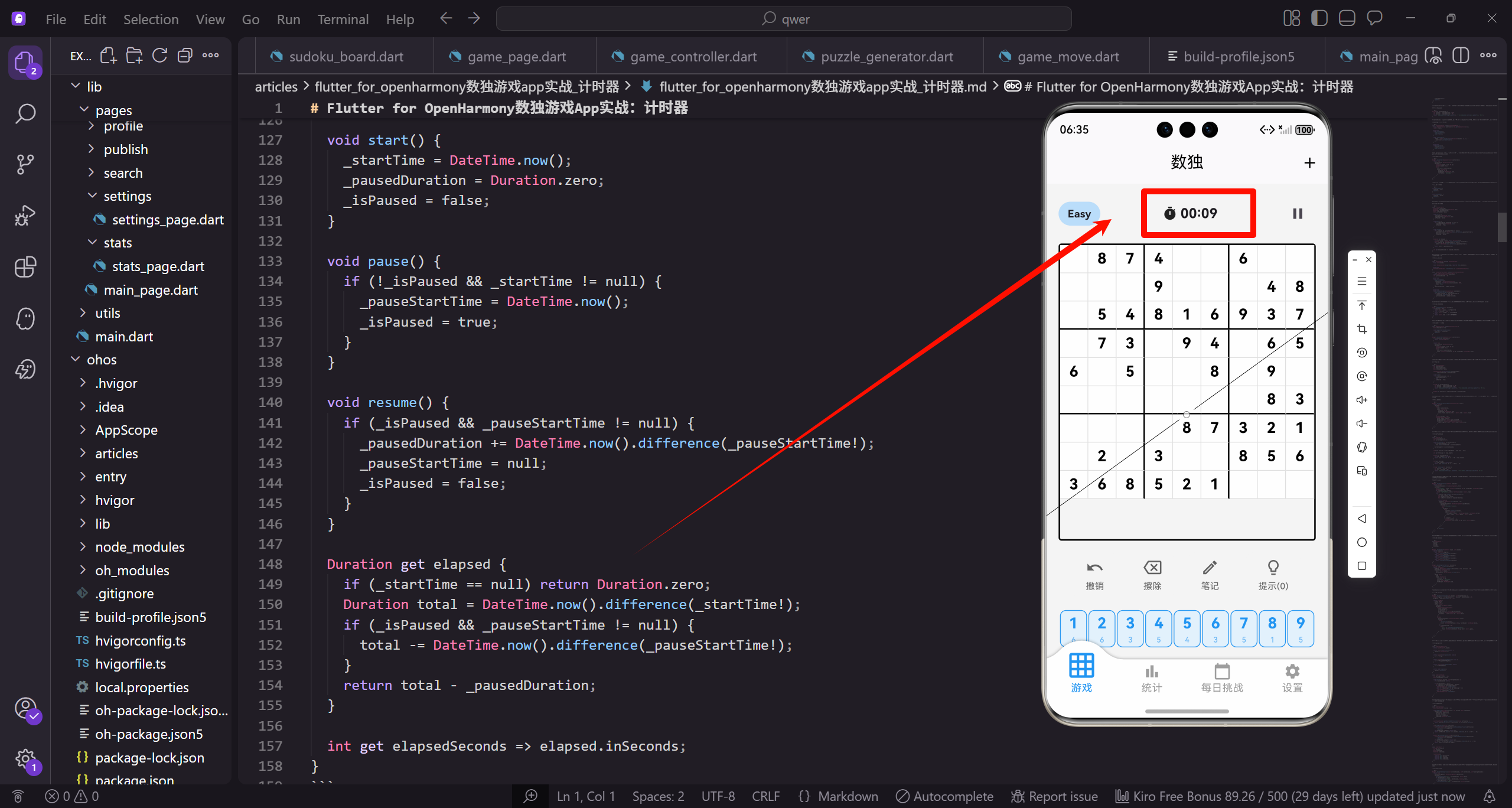
计时器是数独游戏的重要功能,它记录玩家完成谜题所用的时间。这个时间不仅是玩家的成绩,也是统计和排行榜的基础数据。今天我们来详细实现数独游戏的计时器功能。
在设计计时器之前,我们需要考虑几个关键问题。首先是计时的精度,通常秒级精度就足够了。其次是暂停处理,游戏暂停时计时器应该停止。最后是显示格式,需要清晰易读的时间显示。
让我们从GameController中的计时器状态开始。
class GameController extends GetxController {
  int elapsedSeconds = 0;
  bool isPaused = false;
  bool isComplete = false;

  void generateNewGame(String diff) {
    // 其他初始化代码...
    elapsedSeconds = 0;
    isPaused = false;
    isComplete = false;
  }
elapsedSeconds记录已经过的秒数。isPaused标记游戏是否暂停。isComplete标记游戏是否完成。新游戏开始时,这些状态都重置为初始值。
计时器增量方法。
void incrementTimer() {
  if (!isPaused && !isComplete) {
    elapsedSeconds++;
    update();
  }
}
incrementTimer只在游戏进行中才增加时间。暂停或完成时不计时。这个方法由外部的Timer每秒调用一次。update()触发UI更新,显示新的时间。
时间格式化方法。
String get formattedTime {
  int minutes = elapsedSeconds ~/ 60;
  int seconds = elapsedSeconds % 60;
  return '${minutes.toString().padLeft(2, '0')}:${seconds.toString().padLeft(2, '0')}';
}
formattedTime是一个getter,将秒数转换为"MM:SS"格式。padLeft确保分钟和秒数都是两位数,比如"05:09"而不是"5:9"。这种格式化让时间显示更加规范美观。
在GamePage中启动计时器。
class _GamePageState extends State<GamePage> {
final GameController controller = Get.put(GameController());
Timer? _timer;
void initState() {
super.initState();
_startTimer();
}
void _startTimer() {
_timer = Timer.periodic(const Duration(seconds: 1), (_) {
controller.incrementTimer();
});
}
void dispose() {
_timer?.cancel();
super.dispose();
}
Timer.periodic创建一个周期性定时器,每秒执行一次回调。回调中调用controller的incrementTimer方法。dispose中取消定时器,避免内存泄漏。使用可空类型是因为定时器可能还没有创建。
计时器的UI显示。
Widget _buildTimer(GameController controller) {
  return Row(
    mainAxisSize: MainAxisSize.min,
    children: [
      Icon(Icons.timer, size: 20.sp),
      SizedBox(width: 4.w),
      Text(
        controller.formattedTime,
        style: TextStyle(
          fontSize: 18.sp,
          fontWeight: FontWeight.bold,
          fontFamily: 'monospace',
        ),
      ),
    ],
  );
}
计时器显示一个时钟图标和格式化的时间。使用等宽字体(monospace)确保数字宽度一致,时间变化时不会跳动。粗体字让时间更加醒目。
暂停和恢复计时。
void pauseGame() {
  isPaused = true;
  update();
}

void resumeGame() {
  isPaused = false;
  update();
}
pauseGame和resumeGame方法切换isPaused状态。当isPaused为true时,incrementTimer不会增加时间。UI也会根据这个状态显示暂停界面。
更精确的计时实现。
class PreciseTimer {
  DateTime? _startTime;
  Duration _pausedDuration = Duration.zero;
  DateTime? _pauseStartTime;
  bool _isPaused = false;

  void start() {
    _startTime = DateTime.now();
    _pausedDuration = Duration.zero;
    _isPaused = false;
  }

  void pause() {
    if (!_isPaused && _startTime != null) {
      _pauseStartTime = DateTime.now();
      _isPaused = true;
    }
  }

  void resume() {
    if (_isPaused && _pauseStartTime != null) {
      _pausedDuration += DateTime.now().difference(_pauseStartTime!);
      _pauseStartTime = null;
      _isPaused = false;
    }
  }

  Duration get elapsed {
    if (_startTime == null) return Duration.zero;
    Duration total = DateTime.now().difference(_startTime!);
    if (_isPaused && _pauseStartTime != null) {
      total -= DateTime.now().difference(_pauseStartTime!);
    }
    return total - _pausedDuration;
  }

  int get elapsedSeconds => elapsed.inSeconds;
}
PreciseTimer使用DateTime计算精确的经过时间,而不是简单地累加秒数。这种方式更准确,不会因为系统延迟而产生误差。暂停时记录暂停开始时间,恢复时计算暂停的时长并累加。
计时器动画效果。
class AnimatedTimer extends StatefulWidget {
final int seconds;
const AnimatedTimer({super.key, required this.seconds});
State<AnimatedTimer> createState() => _AnimatedTimerState();
}
class _AnimatedTimerState extends State<AnimatedTimer>
with SingleTickerProviderStateMixin {
late AnimationController _controller;
int _previousSeconds = 0;
void initState() {
super.initState();
_controller = AnimationController(
duration: const Duration(milliseconds: 200),
vsync: this,
);
_previousSeconds = widget.seconds;
}
void didUpdateWidget(AnimatedTimer oldWidget) {
super.didUpdateWidget(oldWidget);
if (widget.seconds != _previousSeconds) {
_controller.forward(from: 0);
_previousSeconds = widget.seconds;
}
}
AnimatedTimer在时间变化时播放动画。每次秒数变化时,触发一个短暂的动画效果,让时间更新更加明显。
计时器的颜色变化。
Color _getTimerColor(int seconds) {
  if (seconds < 300) {
    return Colors.green;  // 5分钟内绿色
  } else if (seconds < 600) {
    return Colors.orange;  // 5-10分钟橙色
  } else {
    return Colors.red;  // 超过10分钟红色
  }
}
根据用时长短改变计时器颜色,给玩家视觉提示。绿色表示用时较短,橙色表示中等,红色表示用时较长。这种设计可以激励玩家提高速度。
计时器的可见性设置。
class GameController extends GetxController {
  bool showTimer = true;

  void toggleTimerVisibility() {
    showTimer = !showTimer;
    update();
  }
}

Widget _buildTimer(GameController controller) {
  if (!controller.showTimer) {
    return const SizedBox();
  }

  return Row(
    mainAxisSize: MainAxisSize.min,
    children: [
      Icon(Icons.timer, size: 20.sp),
      SizedBox(width: 4.w),
      Text(
        controller.formattedTime,
        style: TextStyle(fontSize: 18.sp, fontWeight: FontWeight.bold),
      ),
    ],
  );
}
showTimer设置控制计时器是否显示。有些玩家不喜欢看到时间压力,可以在设置中关闭计时器显示。即使不显示,计时仍然在后台进行,用于统计。
倒计时模式。
class CountdownTimer {
  int totalSeconds;
  int remainingSeconds;
  bool isExpired = false;

  CountdownTimer({required this.totalSeconds})
      : remainingSeconds = totalSeconds;

  void tick() {
    if (remainingSeconds > 0) {
      remainingSeconds--;
    } else {
      isExpired = true;
    }
  }

  String get formattedTime {
    int minutes = remainingSeconds ~/ 60;
    int seconds = remainingSeconds % 60;
    return '${minutes.toString().padLeft(2, '0')}:${seconds.toString().padLeft(2, '0')}';
  }

  double get progress => remainingSeconds / totalSeconds;
}
CountdownTimer实现倒计时功能,可以用于限时挑战模式。remainingSeconds从总时间开始递减,到0时标记为过期。progress返回剩余时间的比例,可以用于进度条显示。
计时器进度条。
Widget _buildTimerWithProgress(CountdownTimer timer) {
  return Column(
    children: [
      Text(
        timer.formattedTime,
        style: TextStyle(
          fontSize: 24.sp,
          fontWeight: FontWeight.bold,
          color: timer.progress < 0.2 ? Colors.red : Colors.black,
        ),
      ),
      SizedBox(height: 8.h),
      LinearProgressIndicator(
        value: timer.progress,
        backgroundColor: Colors.grey.shade200,
        valueColor: AlwaysStoppedAnimation<Color>(
          timer.progress < 0.2 ? Colors.red : Colors.blue,
        ),
      ),
    ],
  );
}
倒计时模式显示进度条,让玩家直观地看到剩余时间。当剩余时间少于20%时,颜色变为红色警示。LinearProgressIndicator是Material Design的进度条组件。
计时器的分段记录。
class LapTimer {
  List<int> laps = [];
  int currentLapStart = 0;

  void startNewLap(int currentSeconds) {
    if (currentLapStart > 0) {
      laps.add(currentSeconds - currentLapStart);
    }
    currentLapStart = currentSeconds;
  }

  int? get lastLap => laps.isNotEmpty ? laps.last : null;

  int get totalLaps => laps.length;

  double get averageLapTime {
    if (laps.isEmpty) return 0;
    return laps.reduce((a, b) => a + b) / laps.length;
  }

  int? get bestLap {
    if (laps.isEmpty) return null;
    return laps.reduce((a, b) => a < b ? a : b);
  }

  String formatLap(int seconds) {
    int minutes = seconds ~/ 60;
    int secs = seconds % 60;
    return '${minutes.toString().padLeft(2, '0')}:${secs.toString().padLeft(2, '0')}';
  }
}
LapTimer支持分段计时功能。每完成一个数字或一个区域,可以记录一个分段时间。averageLapTime计算平均分段时间,bestLap找出最快的分段。这种功能可以帮助玩家分析自己的解题节奏。
分段时间显示。
Widget _buildLapDisplay(LapTimer lapTimer) {
  return Column(
    crossAxisAlignment: CrossAxisAlignment.start,
    children: [
      Text('分段记录', style: TextStyle(fontSize: 16.sp, fontWeight: FontWeight.bold)),
      SizedBox(height: 8.h),
      if (lapTimer.laps.isEmpty)
        Text('暂无分段记录', style: TextStyle(color: Colors.grey))
      else
        ...lapTimer.laps.asMap().entries.map((entry) {
          int index = entry.key;
          int seconds = entry.value;
          bool isBest = seconds == lapTimer.bestLap;

          return Padding(
            padding: EdgeInsets.only(bottom: 4.h),
            child: Row(
              mainAxisAlignment: MainAxisAlignment.spaceBetween,
              children: [
                Text('第${index + 1}段'),
                Row(
                  children: [
                    Text(
                      lapTimer.formatLap(seconds),
                      style: TextStyle(
                        fontWeight: isBest ? FontWeight.bold : FontWeight.normal,
                        color: isBest ? Colors.green : Colors.black,
                      ),
                    ),
                    if (isBest) ...[
                      SizedBox(width: 4.w),
                      Icon(Icons.star, size: 14.sp, color: Colors.amber),
                    ],
                  ],
                ),
              ],
            ),
          );
        }).toList(),
    ],
  );
}
分段时间列表显示每个分段的用时。最快的分段用绿色加粗显示,并带有星标。这种可视化让玩家一眼就能看出自己哪个阶段表现最好。
计时器样式变体。
enum TimerStyle {
  digital,
  analog,
  minimal,
  circular,
}

Widget _buildTimer(TimerStyle style, int seconds) {
  switch (style) {
    case TimerStyle.digital:
      return _buildDigitalTimer(seconds);
    case TimerStyle.analog:
      return _buildAnalogTimer(seconds);
    case TimerStyle.minimal:
      return _buildMinimalTimer(seconds);
    case TimerStyle.circular:
      return _buildCircularTimer(seconds);
  }
}

Widget _buildDigitalTimer(int seconds) {
  String time = _formatTime(seconds);
  return Container(
    padding: EdgeInsets.symmetric(horizontal: 16.w, vertical: 8.h),
    decoration: BoxDecoration(
      color: Colors.black,
      borderRadius: BorderRadius.circular(8.r),
    ),
    child: Text(
      time,
      style: TextStyle(
        fontSize: 24.sp,
        fontFamily: 'monospace',
        color: Colors.green,
        fontWeight: FontWeight.bold,
      ),
    ),
  );
}
TimerStyle枚举定义不同的计时器样式。digital是经典的数字时钟样式,黑底绿字模拟LED显示屏。用户可以在设置中选择喜欢的样式。
圆形进度计时器。
Widget _buildCircularTimer(int seconds, int targetSeconds) {
  double progress = targetSeconds > 0 ? seconds / targetSeconds : 0;
  progress = progress.clamp(0.0, 1.0);

  return SizedBox(
    width: 100.w,
    height: 100.h,
    child: Stack(
      alignment: Alignment.center,
      children: [
        CircularProgressIndicator(
          value: progress,
          strokeWidth: 8,
          backgroundColor: Colors.grey.shade200,
          valueColor: AlwaysStoppedAnimation<Color>(
            progress > 0.8 ? Colors.red : Colors.blue,
          ),
        ),
        Column(
          mainAxisAlignment: MainAxisAlignment.center,
          children: [
            Text(
              _formatTime(seconds),
              style: TextStyle(fontSize: 18.sp, fontWeight: FontWeight.bold),
            ),
            if (targetSeconds > 0)
              Text(
                '目标: ${_formatTime(targetSeconds)}',
                style: TextStyle(fontSize: 10.sp, color: Colors.grey),
              ),
          ],
        ),
      ],
    ),
  );
}
圆形计时器用进度环显示时间进度。当接近目标时间时,进度环变为红色警示。中心显示当前时间和目标时间。这种设计在限时挑战模式中特别有用。
计时器声音提醒。
class TimerSoundService {
  static AudioPlayer? _player;

  static Future<void> init() async {
    _player = AudioPlayer();
  }

  static Future<void> playTick() async {
    // 播放滴答声
  }

  static Future<void> playWarning() async {
    // 播放警告声(时间快到时)
  }

  static Future<void> playTimeUp() async {
    // 播放时间到的声音
  }

  static void dispose() {
    _player?.dispose();
  }
}

class TimerWithSound {
  int warningThreshold = 60;
  bool soundEnabled = true;

  void onTick(int seconds, int? targetSeconds) {
    if (!soundEnabled) return;

    if (targetSeconds != null) {
      int remaining = targetSeconds - seconds;
      if (remaining == warningThreshold) {
        TimerSoundService.playWarning();
      } else if (remaining <= 10 && remaining > 0) {
        TimerSoundService.playTick();
      } else if (remaining <= 0) {
        TimerSoundService.playTimeUp();
      }
    }
  }
}
TimerSoundService提供计时器的声音反馈。在限时模式下,最后10秒每秒播放滴答声,时间到时播放提示音。soundEnabled开关让用户可以关闭声音。这种听觉反馈增加了游戏的紧张感。
计时器历史记录。
class TimerHistory {
  List<TimerRecord> records = [];

  void addRecord(String difficulty, int seconds, bool completed) {
    records.add(TimerRecord(
      difficulty: difficulty,
      seconds: seconds,
      completed: completed,
      timestamp: DateTime.now(),
    ));
  }

  List<TimerRecord> getRecordsByDifficulty(String difficulty) {
    return records.where((r) => r.difficulty == difficulty).toList();
  }

  int? getBestTime(String difficulty) {
    List<TimerRecord> diffRecords = getRecordsByDifficulty(difficulty)
        .where((r) => r.completed)
        .toList();
    if (diffRecords.isEmpty) return null;
    return diffRecords.map((r) => r.seconds).reduce((a, b) => a < b ? a : b);
  }

  double? getAverageTime(String difficulty) {
    List<TimerRecord> diffRecords = getRecordsByDifficulty(difficulty)
        .where((r) => r.completed)
        .toList();
    if (diffRecords.isEmpty) return null;
    int total = diffRecords.map((r) => r.seconds).reduce((a, b) => a + b);
    return total / diffRecords.length;
  }
}

class TimerRecord {
  String difficulty;
  int seconds;
  bool completed;
  DateTime timestamp;

  TimerRecord({
    required this.difficulty,
    required this.seconds,
    required this.completed,
    required this.timestamp,
  });
}
TimerHistory记录所有游戏的计时数据。getBestTime返回某个难度的最佳时间,getAverageTime返回平均时间。这些数据可以用于统计页面,帮助玩家追踪自己的进步。
计时器对比显示。
Widget _buildTimeComparison(int currentSeconds, int? bestSeconds, int? averageSeconds) {
  return Row(
    mainAxisAlignment: MainAxisAlignment.spaceEvenly,
    children: [
      _buildTimeColumn('当前', currentSeconds, Colors.blue),
      if (bestSeconds != null)
        _buildTimeColumn('最佳', bestSeconds, Colors.green),
      if (averageSeconds != null)
        _buildTimeColumn('平均', averageSeconds, Colors.orange),
    ],
  );
}

Widget _buildTimeColumn(String label, int seconds, Color color) {
  return Column(
    children: [
      Text(
        _formatTime(seconds),
        style: TextStyle(
          fontSize: 20.sp,
          fontWeight: FontWeight.bold,
          color: color,
        ),
      ),
      SizedBox(height: 4.h),
      Text(
        label,
        style: TextStyle(fontSize: 12.sp, color: Colors.grey),
      ),
    ],
  );
}
计时器对比显示当前时间、最佳时间和平均时间。不同颜色区分不同类型的时间。这种对比让玩家知道自己当前的表现相对于历史记录如何。
计时器暂停指示。
Widget _buildPausedTimer(int seconds) {
  return Row(
    mainAxisSize: MainAxisSize.min,
    children: [
      Icon(Icons.pause, size: 20.sp, color: Colors.orange),
      SizedBox(width: 4.w),
      Text(
        _formatTime(seconds),
        style: TextStyle(
          fontSize: 18.sp,
          fontWeight: FontWeight.bold,
          color: Colors.orange,
        ),
      ),
    ],
  );
}

Widget _buildTimerWithState(GameController controller) {
  if (controller.isPaused) {
    return _buildPausedTimer(controller.elapsedSeconds);
  } else if (controller.isComplete) {
    return _buildCompletedTimer(controller.elapsedSeconds);
  } else {
    return _buildRunningTimer(controller.elapsedSeconds);
  }
}
暂停时计时器显示橙色并带有暂停图标,让玩家清楚知道计时已停止。完成时可以显示不同的样式,比如绿色表示成功。这种状态指示让计时器的当前状态一目了然。
计时器小部件。
class TimerWidget extends StatelessWidget {
final int seconds;
final bool isPaused;
final bool showIcon;
final double fontSize;
const TimerWidget({
super.key,
required this.seconds,
this.isPaused = false,
this.showIcon = true,
this.fontSize = 18,
});
Widget build(BuildContext context) {
return Row(
mainAxisSize: MainAxisSize.min,
children: [
if (showIcon) ...[
Icon(
isPaused ? Icons.pause : Icons.timer,
size: fontSize,
color: isPaused ? Colors.orange : Colors.grey,
),
SizedBox(width: 4.w),
],
Text(
_formatTime(seconds),
style: TextStyle(
fontSize: fontSize.sp,
fontWeight: FontWeight.bold,
fontFamily: 'monospace',
color: isPaused ? Colors.orange : Colors.black,
),
),
],
);
}
String _formatTime(int seconds) {
int minutes = seconds ~/ 60;
int secs = seconds % 60;
return '${minutes.toString().padLeft(2, '0')}:${secs.toString().padLeft(2, '0')}';
}
}
TimerWidget是一个可复用的计时器组件。通过参数控制是否显示图标、字体大小、暂停状态等。这种封装让计时器可以在不同地方以不同样式使用。
总结一下计时器功能的关键设计要点。首先是准确计时,使用Timer或DateTime实现。其次是暂停支持,游戏暂停时停止计时。然后是格式化显示,使用"MM:SS"格式。接着是可配置性,让玩家可以选择是否显示计时器。还有历史记录,追踪最佳时间和平均时间。最后是多种样式,满足不同用户的审美偏好。
计时器是数独游戏的重要组成部分,它记录玩家的成绩,也增加了游戏的紧张感。良好的计时器设计可以提升游戏体验,激励玩家追求更好的成绩。通过丰富的功能和样式选项,我们可以让这个简单的功能变得更加完善和有趣。
欢迎加入开源鸿蒙跨平台社区:https://openharmonycrossplatform.csdn.net

开源鸿蒙跨平台开发社区汇聚开发者与厂商,共建“一次开发,多端部署”的开源生态,致力于降低跨端开发门槛,推动万物智联创新。
更多推荐

 20
20 0
0- 0


 已为社区贡献30条内容

所有评论(0)