分类管理模块 - Cordova与OpenHarmony混合开发实战
欢迎大家加入开源鸿蒙跨平台开发者社区,一起共建开源鸿蒙跨平台生态。
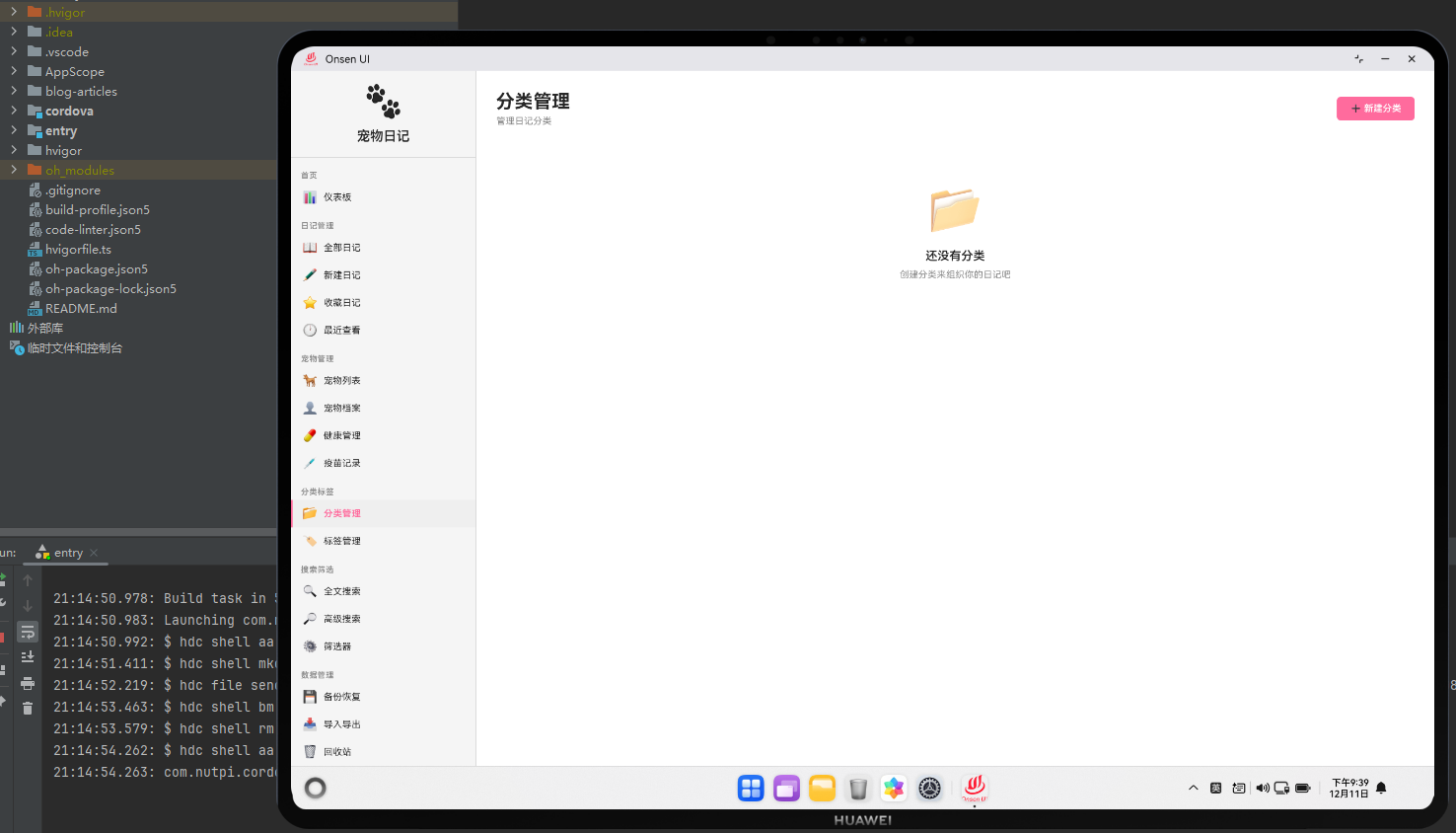
📌 概述
分类管理模块用于管理日记的分类系统。这个模块提供了创建、编辑和删除分类的功能,支持分类的层级结构和自定义颜色。通过Cordova框架,我们能够在Web层实现灵活的分类管理界面,同时利用OpenHarmony的数据库能力实现高效的分类查询。
分类管理模块采用了树形结构,支持父子分类的关系。用户可以为分类设置自定义颜色和图标,方便快速识别。
🔗 完整流程
分类创建流程:用户点击"添加分类"按钮,打开分类创建表单。表单包含分类名称、颜色、图标等字段。用户可以选择父分类,创建子分类。提交后,应用将分类保存到数据库。
分类编辑流程:用户可以编辑现有分类的信息,包括名称、颜色和图标。编辑后,应用会更新数据库中的分类信息,并自动更新所有使用该分类的日记。
分类删除流程:用户可以删除分类。删除前,应用会检查是否有日记使用该分类。如果有,应用会提示用户选择是否将这些日记转移到其他分类。
🔧 Web代码实现
// 加载所有分类
async function loadCategories() {
    try {
        const categories = await db.getAllCategories();
        return buildCategoryTree(categories);
    } catch (error) {
        console.error('加载分类失败:', error);
        return [];
    }
}

// 构建分类树
function buildCategoryTree(categories) {
    const categoryMap = {};
    const roots = [];

    categories.forEach(cat => {
        categoryMap[cat.id] = { ...cat, children: [] };
    });

    categories.forEach(cat => {
        if (cat.parentId) {
            if (categoryMap[cat.parentId]) {
                categoryMap[cat.parentId].children.push(categoryMap[cat.id]);
            }
        } else {
            roots.push(categoryMap[cat.id]);
        }
    });

    return roots;
}

// 添加分类
async function addCategory(categoryData) {
    try {
        const category = {
            name: categoryData.name,
            color: categoryData.color,
            icon: categoryData.icon,
            parentId: categoryData.parentId || null,
            createdAt: new Date()
        };

        await db.addCategory(category);
        showSuccess('分类已添加');
        renderCategoryManage();
    } catch (error) {
        showError('添加分类失败: ' + error.message);
    }
}
这些函数处理分类的加载、树形结构构建和添加。buildCategoryTree函数将平面的分类数组转换为树形结构。
// 渲染分类管理页面
async function renderCategoryManage() {
    const categoryTree = await loadCategories();

    const html = `
        <div class="category-container">
            <div class="category-header">
                <h1>分类管理</h1>
                <button class="btn-primary" onclick="showAddCategoryModal()">添加分类</button>
            </div>

            <div class="category-tree">
                ${renderCategoryTree(categoryTree)}
            </div>
        </div>
    `;

    document.getElementById('page-container').innerHTML = html;
}

// 递归渲染分类树
function renderCategoryTree(categories, level = 0) {
    return categories.map(cat => `
        <div class="category-item" style="margin-left: ${level * 20}px">
            <div class="category-info">
                <span class="category-color" style="background-color: ${cat.color}"></span>
                <span class="category-name">${cat.name}</span>
                <span class="category-count">(${getUsageCount(cat.id)})</span>
            </div>
            <div class="category-actions">
                <button class="btn-small" onclick="editCategory(${cat.id})">编辑</button>
                <button class="btn-small btn-danger" onclick="deleteCategory(${cat.id})">删除</button>
            </div>
            ${cat.children && cat.children.length > 0 ? `
                <div class="category-children">
                    ${renderCategoryTree(cat.children, level + 1)}
                </div>
            ` : ''}
        </div>
    `).join('');
}

// 删除分类
async function deleteCategory(categoryId) {
    const usageCount = await db.getCategoryUsageCount(categoryId);

    if (usageCount > 0) {
        const confirmed = confirm(`该分类下有 ${usageCount} 条日记,确定要删除吗?`);
        if (!confirmed) return;
    }

    try {
        await db.deleteCategory(categoryId);
        showSuccess('分类已删除');
        renderCategoryManage();
    } catch (error) {
        showError('删除分类失败: ' + error.message);
    }
}
这个渲染函数生成了分类管理界面,使用递归函数渲染树形结构。
🔌 原生代码实现
// CategoryPlugin.ets - 分类管理原生插件
import { fileIo } from '@kit.BasicServicesKit';

@Entry
@Component
struct CategoryPlugin {
    // 导出分类结构
    exportCategoryStructure(categories: string, callback: (path: string) => void): void {
        try {
            const data = JSON.parse(categories);
            const exportPath = `/data/exports/categories_${Date.now()}.json`;

            const file = fileIo.openSync(exportPath, fileIo.OpenMode.CREATE | fileIo.OpenMode.WRITE);
            fileIo.writeSync(file.fd, JSON.stringify(data, null, 2));
            fileIo.closeSync(file.fd);

            callback(exportPath);
        } catch (error) {
            console.error('[CategoryPlugin] 导出失败:', error);
            callback('');
        }
    }

    // 导入分类结构
    importCategoryStructure(filePath: string, callback: (success: boolean) => void): void {
        try {
            const file = fileIo.openSync(filePath, fileIo.OpenMode.READ);
            const buffer = new ArrayBuffer(1024 * 1024);
            const bytesRead = fileIo.readSync(file.fd, buffer);
            fileIo.closeSync(file.fd);

            const content = String.fromCharCode(...new Uint8Array(buffer, 0, bytesRead));
            const categories = JSON.parse(content);

            callback(true);
        } catch (error) {
            console.error('[CategoryPlugin] 导入失败:', error);
            callback(false);
        }
    }

    build() {
        Column() {
            Web({ src: 'resource://rawfile/www/index.html', controller: new WebviewController() })
        }
    }
}
这个原生插件提供了分类结构的导入导出功能。
Web-Native通信代码
// 导出分类
function exportNativeCategories(categories) {
    return new Promise((resolve, reject) => {
        cordova.exec(
            (path) => {
                if (path) {
                    showSuccess(`分类已导出到: ${path}`);
                    resolve(path);
                } else {
                    reject(new Error('导出失败'));
                }
            },
            (error) => {
                console.error('导出失败:', error);
                reject(error);
            },
            'CategoryPlugin',
            'exportCategoryStructure',
            [JSON.stringify(categories)]
        );
    });
}
这段代码展示了如何通过Cordova调用原生的导入导出功能。
📝 总结
分类管理模块展示了Cordova与OpenHarmony在数据结构管理方面的应用。在Web层,我们实现了灵活的树形分类管理界面。在原生层,我们提供了分类结构的导入导出功能。
通过树形结构,用户可以创建层级化的分类系统。通过自定义颜色和图标,用户可以快速识别不同的分类。通过Web-Native通信,我们能够充分利用OpenHarmony的文件系统能力,为用户提供完整的分类管理体验。
在实际开发中,建议实现分类的批量操作,提供分类的搜索功能,并支持分类的导入导出。

开源鸿蒙跨平台开发社区汇聚开发者与厂商,共建“一次开发,多端部署”的开源生态,致力于降低跨端开发门槛,推动万物智联创新。
更多推荐
 12
12 0
0- 0


 已为社区贡献22条内容

所有评论(0)