Cordova&OpenHarmony费用趋势分析
欢迎大家加入开源鸿蒙跨平台开发者社区,一起共建开源鸿蒙跨平台生态。
概述
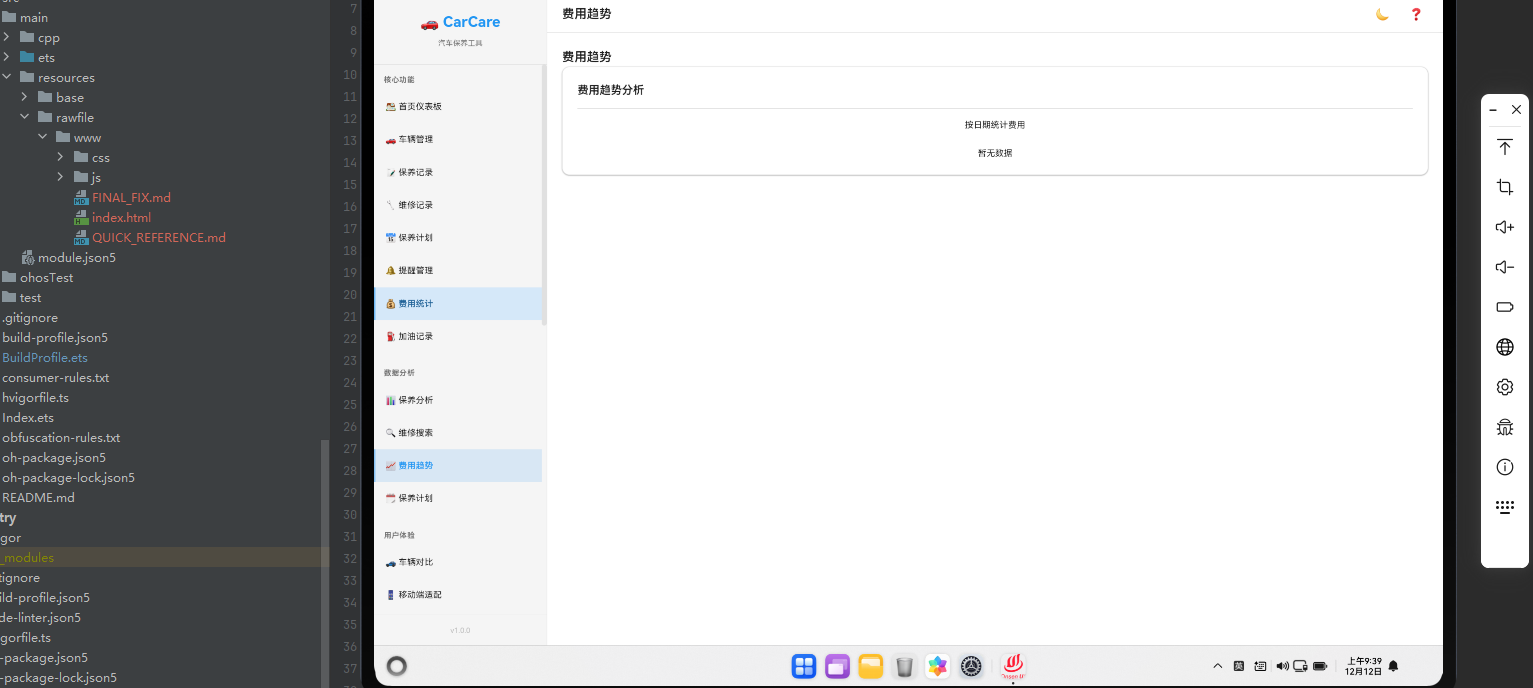
费用趋势分析帮助用户了解车辆维护成本的变化规律。通过可视化展示费用数据,用户可以更好地规划预算。本文将详细讲解如何在Cordova&OpenHarmony框架中实现费用趋势分析功能。
趋势数据获取
趋势分析需要从数据库中获取按时间排序的费用数据。
async renderTrends() {
    const expenses = await db.getAll('expenses');
    const grouped = Utils.groupBy(expenses, 'date');

    return `
        <div class="trends-container">
            <div class="page-header"><h2 class="page-title">费用趋势</h2></div>
            <div class="card">
                <div class="card-header"><h3 class="card-title">费用趋势分析</h3></div>
                <div class="card-body">
                    <p class="text-center mb-lg">按日期统计费用</p>
                    \${Object.entries(grouped).sort().map(([date, items]) => \`
                        <div class="list-item">
                            <div class="list-item-content">
                                <div class="list-item-title">\${Utils.formatDate(date)}</div>
                                <div class="list-item-subtitle">\${items.length}条记录</div>
                            </div>
                            <div class="list-item-action">¥\${Utils.sum(items, 'amount').toFixed(0)}</div>
                        </div>
                    \`).join('') || '<p class="text-center">暂无数据</p>'}
                </div>
            </div>
        </div>
    `;
}
这段代码展示了如何从数据库中获取费用数据并按日期进行分组。我们首先获取所有费用记录,然后按日期进行分组。接着,我们按日期排序,并为每个日期生成统计信息。在Cordova框架中,这种趋势数据处理是标准做法。
月度趋势分析
系统需要统计每个月的费用趋势。
async getMonthlyTrends() {
    const expenses = await db.getAll('expenses');
    const monthlyData = {};

    expenses.forEach(expense => {
        const date = new Date(expense.date);
        const monthKey = \`\${date.getFullYear()}-\${String(date.getMonth() + 1).padStart(2, '0')}\`;

        if (!monthlyData[monthKey]) {
            monthlyData[monthKey] = {
                total: 0,
                count: 0,
                categories: {}
            };
        }

        monthlyData[monthKey].total += expense.amount;
        monthlyData[monthKey].count += 1;

        if (!monthlyData[monthKey].categories[expense.category]) {
            monthlyData[monthKey].categories[expense.category] = 0;
        }
        monthlyData[monthKey].categories[expense.category] += expense.amount;
    });

    return monthlyData;
}
这段代码展示了如何计算月度趋势数据。我们遍历所有费用记录,根据日期提取年月信息,然后按月份进行汇总。同时,我们还统计每个月内不同分类的费用。这种月度统计在Cordova应用中非常常见。
趋势图表展示
系统可以使用图表来展示费用趋势。
async renderTrendChart() {
    const monthlyData = await this.getMonthlyTrends();
    const months = Object.keys(monthlyData).sort();

    const chartData = {
        labels: months,
        datasets: [{
            label: '月度费用',
            data: months.map(month => monthlyData[month].total),
            borderColor: '#FF6B6B',
            backgroundColor: 'rgba(255, 107, 107, 0.1)',
            tension: 0.4
        }]
    };

    return chartData;
}
这段代码展示了如何准备图表数据。我们提取月份标签和对应的费用数据,然后构建图表数据结构。这种图表数据准备在Cordova应用中非常常见,它为可视化展示做准备。
年度对比分析
系统可以对比不同年度的费用情况。
async getYearlyComparison() {
    const expenses = await db.getAll('expenses');
    const yearlyData = {};

    expenses.forEach(expense => {
        const date = new Date(expense.date);
        const year = date.getFullYear();

        if (!yearlyData[year]) {
            yearlyData[year] = {
                total: 0,
                count: 0,
                average: 0
            };
        }

        yearlyData[year].total += expense.amount;
        yearlyData[year].count += 1;
    });

    Object.keys(yearlyData).forEach(year => {
        yearlyData[year].average = yearlyData[year].total / yearlyData[year].count;
    });

    return yearlyData;
}
这段代码展示了如何进行年度对比分析。我们按年份统计费用数据,计算每年的总费用、记录数和平均费用。这种年度对比在Cordova应用中非常常见,它帮助用户了解长期的费用变化。
趋势预测
系统可以根据历史数据预测未来的费用趋势。
async predictFutureTrends() {
    const monthlyData = await this.getMonthlyTrends();
    const months = Object.keys(monthlyData).sort();

    if (months.length < 3) {
        return null;
    }

    const values = months.map(month => monthlyData[month].total);
    const lastThreeMonths = values.slice(-3);
    const average = lastThreeMonths.reduce((a, b) => a + b) / 3;

    const predictions = [];
    for (let i = 1; i <= 3; i++) {
        const nextMonth = new Date();
        nextMonth.setMonth(nextMonth.getMonth() + i);
        const monthKey = \`\${nextMonth.getFullYear()}-\${String(nextMonth.getMonth() + 1).padStart(2, '0')}\`;

        predictions.push({
            month: monthKey,
            predictedCost: average
        });
    }

    return predictions;
}
这段代码展示了如何进行趋势预测。我们基于最近三个月的平均费用来预测未来三个月的费用。这种预测功能在Cordova应用中非常常见,它帮助用户规划预算。
异常费用检测
系统可以检测异常的费用记录。
async detectAnomalies() {
    const expenses = await db.getAll('expenses');
    const monthlyData = await this.getMonthlyTrends();

    const months = Object.keys(monthlyData).sort();
    const values = months.map(month => monthlyData[month].total);

    const average = values.reduce((a, b) => a + b) / values.length;
    const stdDev = Math.sqrt(
        values.reduce((sum, val) => sum + Math.pow(val - average, 2), 0) / values.length
    );

    const anomalies = [];
    months.forEach((month, index) => {
        const value = values[index];
        if (Math.abs(value - average) > 2 * stdDev) {
            anomalies.push({
                month: month,
                value: value,
                deviation: ((value - average) / average * 100).toFixed(2)
            });
        }
    });

    return anomalies;
}
这段代码展示了如何检测异常的费用记录。我们计算费用的平均值和标准差,然后识别偏离平均值超过两倍标准差的异常月份。这种异常检测在Cordova应用中非常常见,它帮助用户发现异常的费用支出。
趋势报告生成
系统可以生成详细的趋势报告。
async generateTrendReport() {
    const monthlyData = await this.getMonthlyTrends();
    const yearlyData = await this.getYearlyComparison();
    const anomalies = await this.detectAnomalies();
    const predictions = await this.predictFutureTrends();

    const report = {
        generatedDate: new Date().toISOString(),
        summary: {
            totalExpenses: Object.values(monthlyData).reduce((sum, m) => sum + m.total, 0),
            averageMonthly: Object.values(monthlyData).reduce((sum, m) => sum + m.total, 0) / Object.keys(monthlyData).length,
            highestMonth: Object.entries(monthlyData).sort((a, b) => b[1].total - a[1].total)[0],
            lowestMonth: Object.entries(monthlyData).sort((a, b) => a[1].total - b[1].total)[0]
        },
        monthlyData: monthlyData,
        yearlyData: yearlyData,
        anomalies: anomalies,
        predictions: predictions
    };

    return report;
}
这段代码展示了如何生成详细的趋势报告。报告包含总费用、平均月费用、最高月份、最低月份、月度数据、年度数据、异常记录和预测数据。这种报告生成在Cordova应用中非常常见。
OpenHarmony中的趋势分析
在OpenHarmony系统中,趋势分析需要通过Cordova插件与原生系统进行交互。
export function pageShowEvent() {
  let result: ArkTsAttribute = {content:"resume", result:[]};
  cordova.onArkTsResult(JSON.stringify(result), "CoreHarmony", "");
}
这段ArkTS代码展示了如何在OpenHarmony系统中处理应用的显示事件。当应用显示时,我们可以刷新趋势数据。这种生命周期管理在OpenHarmony系统中非常重要。
总结
费用趋势分析是Cordova&OpenHarmony应用的重要功能。通过合理的数据分析、趋势预测和异常检测,我们可以创建一个功能完整、用户体验良好的趋势分析系统。在OpenHarmony系统中,通过Cordova框架的集成,我们可以充分利用原生系统的特性。

开源鸿蒙跨平台开发社区汇聚开发者与厂商,共建“一次开发,多端部署”的开源生态,致力于降低跨端开发门槛,推动万物智联创新。
更多推荐


 5
5 0
0- 0


 已为社区贡献23条内容

所有评论(0)