OpenHarmony PC开关控件 Flutter方案
·
案例概述
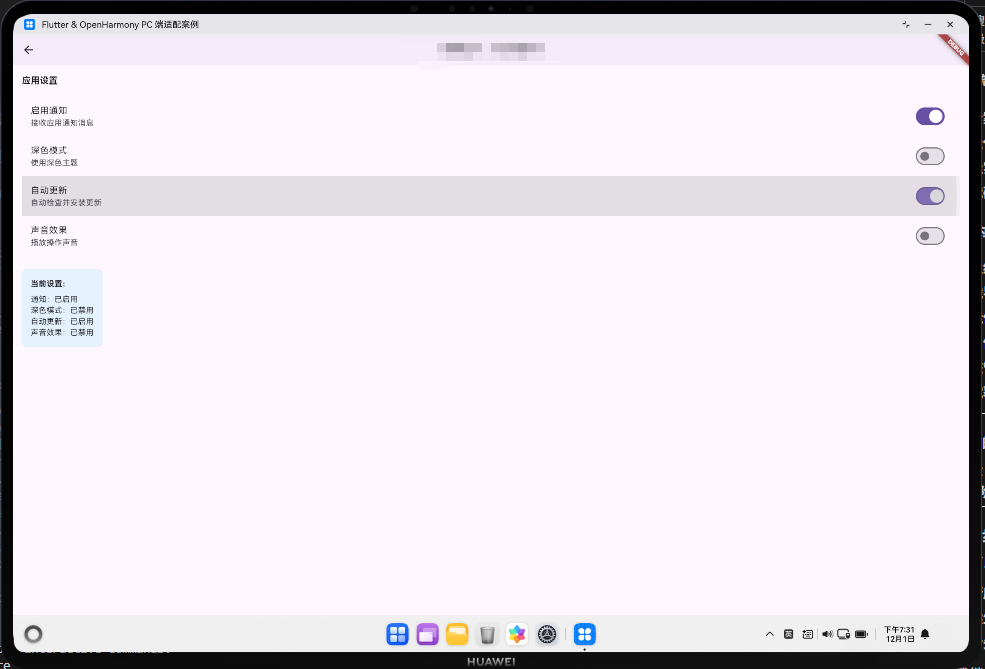
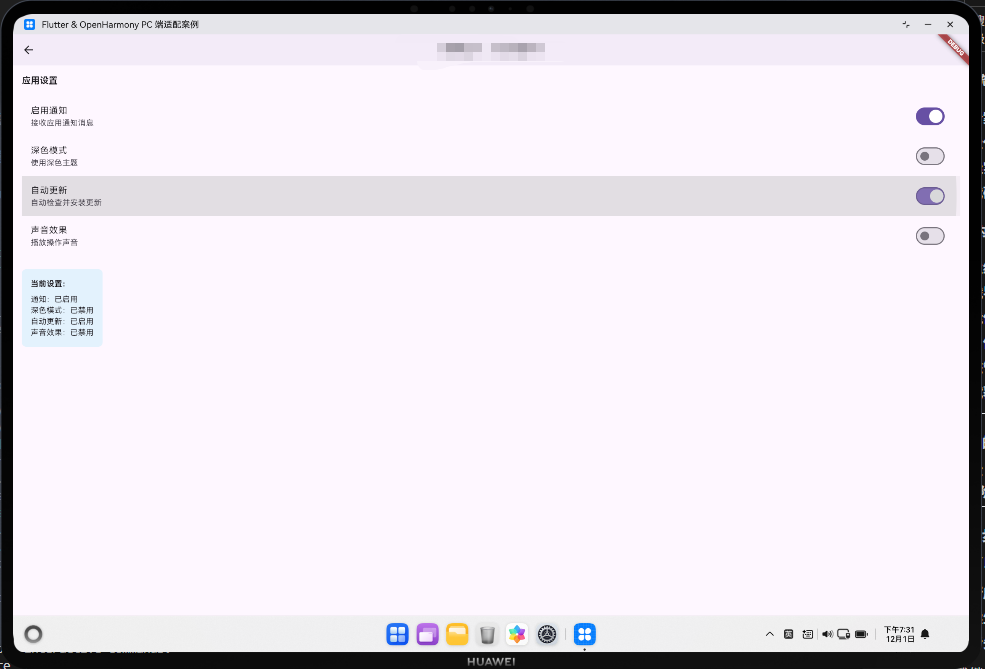
本案例展示如何使用 Switch 和 SwitchListTile 实现开关控件,用于切换布尔值状态。
核心概念
1. Switch
- 基础开关组件;
- 用于切换布尔值;
- 支持自定义颜色和大小。
2. SwitchListTile
- 包含标题和描述的开关;
- 整个区域都可点击;
- 适合设置列表中使用。
3. 开关状态
true:开启;false:关闭。
代码详解
1. 基础开关
bool _notificationEnabled = true;

Switch(
  value: _notificationEnabled,
  onChanged: (bool value) {
    setState(() {
      _notificationEnabled = value;
    });
  },
)
2. 开关列表
SwitchListTile(
  title: const Text('启用通知'),
  subtitle: const Text('接收应用通知消息'),
  value: _notificationEnabled,
  onChanged: (bool value) {
    setState(() {
      _notificationEnabled = value;
    });
  },
)
3. 开关样式
Switch(
  value: _darkModeEnabled,
  activeColor: Colors.blue,
  activeTrackColor: Colors.blue.shade200,
  inactiveThumbColor: Colors.grey,
  inactiveTrackColor: Colors.grey.shade300,
  onChanged: (value) => setState(() => _darkModeEnabled = value),
)
高级话题:开关的高级应用
1. 开关的依赖关系
某些开关的启用/禁用取决于其他开关:
SwitchListTile(
  title: Text('高级通知'),
  enabled: _notificationEnabled,
  value: _advancedNotification,
  onChanged: _notificationEnabled
      ? (value) => setState(() => _advancedNotification = value)
      : null,
)
2. 开关的验证
validator: (value) {
  if (!_termsAccepted) {
    return '必须同意服务条款';
  }
  return null;
}
3. 开关的动作确认
在切换某些重要开关时显示确认对话框:
onChanged: (bool value) async {
  if (value) {
    final confirmed = await showDialog<bool>(
      context: context,
      builder: (context) => AlertDialog(
        title: Text('确认'),
        content: Text('确定要启用此功能吗?'),
        actions: [
          TextButton(onPressed: () => Navigator.pop(context, false), child: Text('取消')),
          TextButton(onPressed: () => Navigator.pop(context, true), child: Text('确认')),
        ],
      ),
    );
    if (confirmed ?? false) {
      setState(() => _featureEnabled = value);
    }
  } else {
    setState(() => _featureEnabled = value);
  }
}
4. 开关的响应式设计
final isWideScreen = MediaQuery.of(context).size.width > 600;

if (isWideScreen) {
  // 显示为网格
  GridView.count(
    crossAxisCount: 2,
    children: [
      SwitchListTile(title: Text('选项1'), ...),
      SwitchListTile(title: Text('选项2'), ...),
    ],
  );
} else {
  // 显示为列表
  Column(
    children: [
      SwitchListTile(title: Text('选项1'), ...),
      SwitchListTile(title: Text('选项2'), ...),
    ],
  );
}
5. 开关的键盘控制
Focus(
  onKey: (node, event) {
    if (event.isKeyPressed(LogicalKeyboardKey.space)) {
      setState(() => _enabled = !_enabled);
      return KeyEventResult.handled;
    }
    return KeyEventResult.ignored;
  },
  child: Switch(value: _enabled, onChanged: ...),
)
6. 开关的无障碍支持
SwitchListTile(
  title: Text('启用通知'),
  semanticLabel: '启用或禁用通知',
  value: _notificationEnabled,
  onChanged: (value) => setState(() => _notificationEnabled = value),
)
7. 开关的动画效果
AnimatedBuilder(
  animation: _switchAnimation,
  builder: (context, child) {
    return Switch(
      value: _switchAnimation.value > 0.5,
      onChanged: (value) => setState(() => _enabled = value),
    );
  },
)
8. 开关的状态持久化
Future<void> _saveSwitchState() async {
  final prefs = await SharedPreferences.getInstance();
  await prefs.setBool('notification_enabled', _notificationEnabled);
}

Future<void> _loadSwitchState() async {
  final prefs = await SharedPreferences.getInstance();
  setState(() {
    _notificationEnabled = prefs.getBool('notification_enabled') ?? true;
  });
}
9. 开关的实时反馈
Column(
  children: [
    SwitchListTile(
      title: Text('深色模式'),
      value: _darkModeEnabled,
      onChanged: (value) {
        setState(() => _darkModeEnabled = value);
        _applyTheme(value);
      },
    ),
    if (_darkModeEnabled)
      Container(
        padding: EdgeInsets.all(16),
        color: Colors.grey.shade900,
        child: Text('深色模式已启用', style: TextStyle(color: Colors.white)),
      ),
  ],
)
10. 开关与表单集成
FormField<bool>(
  initialValue: _termsAccepted,
  validator: (value) {
    if (!(value ?? false)) return '必须同意条款';
    return null;
  },
  builder: (FormFieldState<bool> state) {
    return SwitchListTile(
      title: Text('我同意服务条款'),
      value: state.value ?? false,
      onChanged: (value) {
        state.didChange(value);
        setState(() => _termsAccepted = value);
      },
    );
  },
)
通过这些高级技巧,你可以构建出功能完整的开关控制系统。
高级话题:开关的企业级应用
1. 开关的依赖关系
SwitchListTile(
  title: Text('高级通知'),
  enabled: _notificationEnabled,
  value: _advancedNotification,
  onChanged: _notificationEnabled ? (value) => setState(() => _advancedNotification = value) : null,
)
2. 开关的动作确认
onChanged: (bool value) async {
  if (value) {
    final confirmed = await showDialog<bool>(
      context: context,
      builder: (context) => AlertDialog(
        title: Text('确认'),
        content: Text('确定要启用此功能吗?'),
        actions: [
          TextButton(onPressed: () => Navigator.pop(context, false), child: Text('取消')),
          TextButton(onPressed: () => Navigator.pop(context, true), child: Text('确认')),
        ],
      ),
    );
    if (confirmed ?? false) {
      setState(() => _featureEnabled = value);
    }
  } else {
    setState(() => _featureEnabled = value);
  }
}
3. 开关的响应式设计
final isWideScreen = MediaQuery.of(context).size.width > 600;
if (isWideScreen) {
  GridView.count(crossAxisCount: 2, children: [SwitchListTile(...), ...])
} else {
  Column(children: [SwitchListTile(...), ...])
}
4. 开关的键盘控制
Focus(
  onKey: (node, event) {
    if (event.isKeyPressed(LogicalKeyboardKey.space)) {
      setState(() => _enabled = !_enabled);
      return KeyEventResult.handled;
    }
    return KeyEventResult.ignored;
  },
  child: Switch(value: _enabled, onChanged: ...),
)
5. 开关的无障碍支持
SwitchListTile(
  title: Text('启用通知'),
  semanticLabel: '启用或禁用通知',
  value: _notificationEnabled,
  onChanged: (value) => setState(() => _notificationEnabled = value),
)
6. 开关的动画效果
AnimatedBuilder(
  animation: _switchAnimation,
  builder: (context, child) {
    return Switch(
      value: _switchAnimation.value > 0.5,
      onChanged: (value) => setState(() => _enabled = value),
    );
  },
)
7. 开关的状态持久化
Future<void> _saveSwitchState() async {
  final prefs = await SharedPreferences.getInstance();
  await prefs.setBool('notification_enabled', _notificationEnabled);
}

Future<void> _loadSwitchState() async {
  final prefs = await SharedPreferences.getInstance();
  setState(() {
    _notificationEnabled = prefs.getBool('notification_enabled') ?? true;
  });
}
8. 开关的实时反馈
Column(
  children: [
    SwitchListTile(
      title: Text('深色模式'),
      value: _darkModeEnabled,
      onChanged: (value) {
        setState(() => _darkModeEnabled = value);
        _applyTheme(value);
      },
    ),
    if (_darkModeEnabled)
      Container(
        padding: EdgeInsets.all(16),
        color: Colors.grey.shade900,
        child: Text('深色模式已启用', style: TextStyle(color: Colors.white)),
      ),
  ],
)
9. 开关与表单集成
FormField<bool>(
initialValue: _termsAccepted,
validator: (value) {
if (!(value ?? false)) return '必须同意条款';
return null;
},
builder: (FormFieldState<bool> state) {
title: Text('我同意服务条款'),
value: state.value ?? false,
onChanged: (value) {
state.didChange(value);
setState(() => _termsAccepted = value);
},
);
},
)
10. 开关的验证
validator: (value) {
  if (!_termsAccepted) {
    return '必须同意服务条款';
  }
  return null;
}
通过这些企业级技巧,你可以构建出功能完整的开关控制系统。
欢迎加入开源鸿蒙跨平台社区:https://openharmonycrossplatform.csdn.net

开源鸿蒙跨平台开发社区汇聚开发者与厂商,共建“一次开发,多端部署”的开源生态,致力于降低跨端开发门槛,推动万物智联创新。
更多推荐
 3
3 0
0- 0


 已为社区贡献16条内容

所有评论(0)