React Native跨平台鸿蒙开发实战系列(十二):加载bundle包,启动并运行工程
摘要 本文介绍了在HarmonyOS开发中加载和使用React Native bundle包的三种方法:本地加载、Metro服务加载和沙箱目录加载。详细说明了沙箱目录加载的具体实现步骤,包括通过DevEco Studio或hdc工具推送文件到应用沙箱路径。文章还提供了release包的使用指南,包括替换har文件、修改配置文件和CMakeLists.txt文件的具体操作步骤。最后给出了项目运行注意
加载bundle包
在之前的章节中,已经完成了 bundle 文件的生成,接下来将它加载到 DevEco Studio 中以运行 MyApplication 项目。加载 bundle 有三种方式:
- 方式一:本地加载 bundle。将 bundle 文件和 assets 图片放在
entry/src/main/resources/rawfile路径下,在entry/src/main/ets/pages/Index.ets中使用。 - 方式二:使用 Metro 服务加载 bundle。
- 方式三:加载沙箱目录的bundle:
应用沙箱是一种以安全防护为目的的隔离机制,避免数据受到恶意路径穿越访问。在这种沙箱的保护机制下,应用可见的目录范围即为“应用沙箱目录”,开发者在应用开发调试时,需要向应用沙箱下推送一些文件以期望在应用内访问或测试,此时有两种方式:
− 第一种:可以通过 DevEco Studio 向应用安装路径中放入目标文件。
− 第二种:在具备设备环境时,可以使用另一种更为灵活的方式,通过 hdc 工具来向设备中应用沙箱路径推送文件。推送命令如下,其中,沙箱路径可通过向应用沙箱推送文件查询:
hdc file send ${待推送文件的本地路径} ${沙箱路径}
- 加载沙箱目录 bundle,需要在 RNApp 的
jsBundlePrivider参数中使用new FileJSBundleProvider('bundlePath')将 bundle 注册进框架,并运行 bundle。
在 HarmonyRNShop\entry\src\main\ets\pages\Index.ets 文件中,创建 RNApp 时传入 jsBundleProvider 用于加载 bundle。jsBundleProvider 的 AnyJSBundleProvider 传入了 FileJSBundleProvider,用于沙箱目录加载 bundle。
启动并运行工程
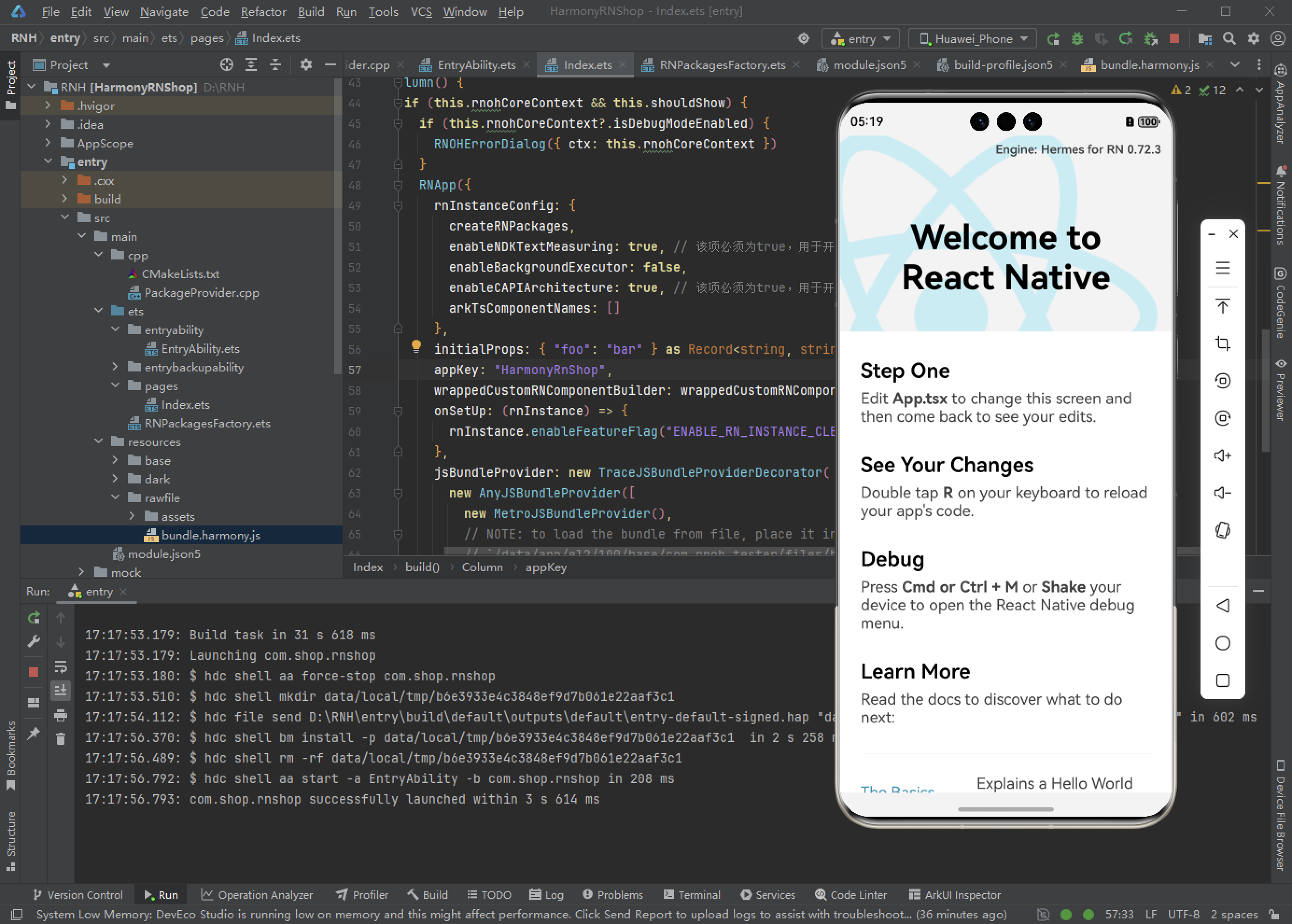
使用 DevEco Studio 运行 MyApplication 工程。执行完成后,控制台如图所示:
全量编译 C++ 代码耗时较长,请耐心等待。
release包使用
在执行完 npm run build:harmony 命令后,会在 HarmonyRNShop/entry/node_modules/@react-native-oh/react-native-harmony 下生成 release 包。如果要使用 release 包,则需要替换掉原有的 har 文件。
注意:如果想直接获取release包,可以执行’npm i @react-native-oh/react-native-harmony@x.x.x’命令,其中 x.x.x 为版本号。例如,如果想获取最新版本的 release 包,则执行 ‘npm i @react-native-oh/react-native-harmony@latest’ 命令。如果只想获取特定版本的 release 包,则可以指定版本号,如 ‘npm i @react-native-oh/react-native-harmony@1.0.0’。
执行完’npm i @react-native-oh/react-native-harmony@x.x.x’命令后,在生成的node_modules/@react-native-oh/react-native-harmony中即可获取release包。
-
在
HarmonyRNShop目录下新建 libs 文件夹,将react_native_openharmony-xxx-release.har放入该目录。 -
打开
HarmonyRNShop/entry下的oh-package.json5,替换 har 包的依赖为对应版本的 release 包:{ "name": "entry", "version": "1.0.0", "description": "Please describe the basic information.", "main": "", "author": "", "license": "", "dependencies": { + "@rnoh/react-native-openharmony": "file:../libs/react_native_openharmony-xxx-release.har" } } -
替换
HarmonyRNShop\entry\src\main\cpp\CMakeLists.txt文件为以下代码:project(rnapp) cmake_minimum_required(VERSION 3.4.1) set(CMAKE_SKIP_BUILD_RPATH TRUE) set(NATIVERENDER_ROOT_PATH "${CMAKE_CURRENT_SOURCE_DIR}") set(OH_MODULE_DIR "${CMAKE_CURRENT_SOURCE_DIR}/../../../oh_modules") set(RNOH_CPP_DIR "${OH_MODULE_DIR}/@rnoh/react-native-openharmony/src/main/include") set(REACT_COMMON_PATCH_DIR "${RNOH_CPP_DIR}/patches/react_native_core") set(CMAKE_CXX_STANDARD 17) set(LOG_VERBOSITY_LEVEL 1) set(CMAKE_ASM_FLAGS "-Wno-error=unused-command-line-argument -Qunused-arguments") set(RNOH_GENERATED_DIR "${CMAKE_CURRENT_SOURCE_DIR}/generated") set(CMAKE_CXX_FLAGS "-fstack-protector-strong -Wl,-z,relro,-z,now,-z,noexecstack -s -fPIE -pie -DNDEBUG") set(WITH_HITRACE_SYSTRACE 1) # for other CMakeLists.txt files to use add_compile_definitions(WITH_HITRACE_SYSTRACE) # folly的编译选项 set(folly_compile_options -DFOLLY_NO_CONFIG=1 -DFOLLY_MOBILE=1 -DFOLLY_USE_LIBCPP=1 -DFOLLY_HAVE_RECVMMSG=1 -DFOLLY_HAVE_PTHREAD=1 -Wno-comma -Wno-shorten-64-to-32 -Wno-documentation -faligned-new ) add_compile_options("-Wno-unused-command-line-argument") # 添加头文件目录 include_directories(${NATIVERENDER_ROOT_PATH} ${RNOH_CPP_DIR} ${REACT_COMMON_PATCH_DIR} ${RNOH_CPP_DIR}/third-party/folly ${RNOH_CPP_DIR}/third-party/rn/ReactCommon ${RNOH_CPP_DIR}/third-party/rn/ReactCommon/react/nativemodule/core ${RNOH_CPP_DIR}/third-party/rn/ReactCommon/jsi ${RNOH_CPP_DIR}/third-party/rn/ReactCommon/callinvoker ${RNOH_CPP_DIR}/third-party/boost/libs/utility/include ${RNOH_CPP_DIR}/third-party/boost/libs/stacktrace/include ${RNOH_CPP_DIR}/third-party/boost/libs/predef/include ${RNOH_CPP_DIR}/third-party/boost/libs/array/include ${RNOH_CPP_DIR}/third-party/boost/libs/throw_exception/include ${RNOH_CPP_DIR}/third-party/boost/libs/config/include ${RNOH_CPP_DIR}/third-party/boost/libs/core/include ${RNOH_CPP_DIR}/third-party/boost/libs/preprocessor/include ${RNOH_CPP_DIR}/third-party/double-conversion ${RNOH_CPP_DIR}/third-party/rn/ReactCommon/react/renderer/graphics/platform/cxx ${RNOH_CPP_DIR}/third-party/rn/ReactCommon/runtimeexecutor ${RNOH_CPP_DIR}/third-party/glog/src ${RNOH_CPP_DIR}/third-party/boost/libs/mpl/include ${RNOH_CPP_DIR}/third-party/boost/libs/type_traits/include ${RNOH_CPP_DIR}/third-party/rn/ReactCommon/yoga ${RNOH_CPP_DIR}/third-party/boost/libs/intrusive/include ${RNOH_CPP_DIR}/third-party/boost/libs/assert/include ${RNOH_CPP_DIR}/third-party/boost/libs/move/include ${RNOH_CPP_DIR}/third-party/boost/libs/static_assert/include ${RNOH_CPP_DIR}/third-party/boost/libs/container_hash/include ${RNOH_CPP_DIR}/third-party/boost/libs/describe/include ${RNOH_CPP_DIR}/third-party/boost/libs/mp11/include ${RNOH_CPP_DIR}/third-party/boost/libs/iterator/include ${RNOH_CPP_DIR}/third-party/boost/libs/detail/include ${RNOH_CPP_DIR}/patches/react_native_core/react/renderer/textlayoutmanager/platform/harmony ) configure_file( ${RNOH_CPP_DIR}/third-party/folly/CMake/folly-config.h.cmake ${RNOH_CPP_DIR}/third-party/folly/folly/folly-config.h ) file(GLOB GENERATED_CPP_FILES "./generated/*.cpp") # 添加rnoh动态共享包 add_library(rnoh SHARED "${RNOH_CPP_DIR}/RNOHOther.cpp" "${RNOH_CPP_DIR}/third-party/folly/folly/lang/SafeAssert.cpp" ) # 链接其他so target_link_directories(rnoh PUBLIC ${OH_MODULE_DIR}/@rnoh/react-native-openharmony/libs/arm64-v8a) target_link_libraries(rnoh PUBLIC rnoh_semi libace_napi.z.so libace_ndk.z.so librawfile.z.so libhilog_ndk.z.so libnative_vsync.so libnative_drawing.so libc++_shared.so libhitrace_ndk.z.so react_render_scheduler rrc_image rrc_text rrc_textinput rrc_scrollview react_nativemodule_core react_render_animations jsinspector hermes jsi logger react_config react_debug react_render_attributedstring react_render_componentregistry react_render_core react_render_debug react_render_graphics react_render_imagemanager react_render_mapbuffer react_render_mounting react_render_templateprocessor react_render_textlayoutmanager react_render_telemetry react_render_uimanager react_utils rrc_root rrc_view react_render_leakchecker react_render_runtimescheduler runtimeexecutor ) if("$ENV{RNOH_C_API_ARCH}" STREQUAL "1") message("Experimental C-API architecture enabled") target_link_libraries(rnoh PUBLIC libqos.so) target_compile_definitions(rnoh PUBLIC C_API_ARCH) endif() # RNOH_END: add_package_subdirectories # 添加rnoh_app共享包 add_library(rnoh_app SHARED ${GENERATED_CPP_FILES} "./PackageProvider.cpp" "${RNOH_CPP_DIR}/RNOHOther.cpp" "${RNOH_CPP_DIR}/RNOHAppNapiBridge.cpp" ) target_link_libraries(rnoh_app PUBLIC rnoh) target_compile_options(rnoh_app PUBLIC ${folly_compile_options} -DRAW_PROPS_ENABLED -std=c++17) -
将
MyApplication/entry的oh_modules文件夹删除,点击entry文件夹,再点击顶部菜单栏的build>Clean Project清除项目缓存。 -
点击顶部菜单栏的
File>Sync and Refresh Project来执行ohpm install,执行完成后会在entry目录下生成oh_modules文件夹。 -
点击顶部菜单栏的
Run>Run 'entry'运行工程,运行成功后截图如下
欢迎大家加入开源鸿蒙跨平台开发者社区,一起共建开源鸿蒙跨平台生态。

开源鸿蒙跨平台开发社区汇聚开发者与厂商,共建“一次开发,多端部署”的开源生态,致力于降低跨端开发门槛,推动万物智联创新。
更多推荐

 4
4 0
0- 0



 已为社区贡献57条内容

所有评论(0)