搜索框 - Flutter适配OpenHarmony PC端
·
欢迎加入开源鸿蒙跨平台社区:https://openharmonycrossplatform.csdn.net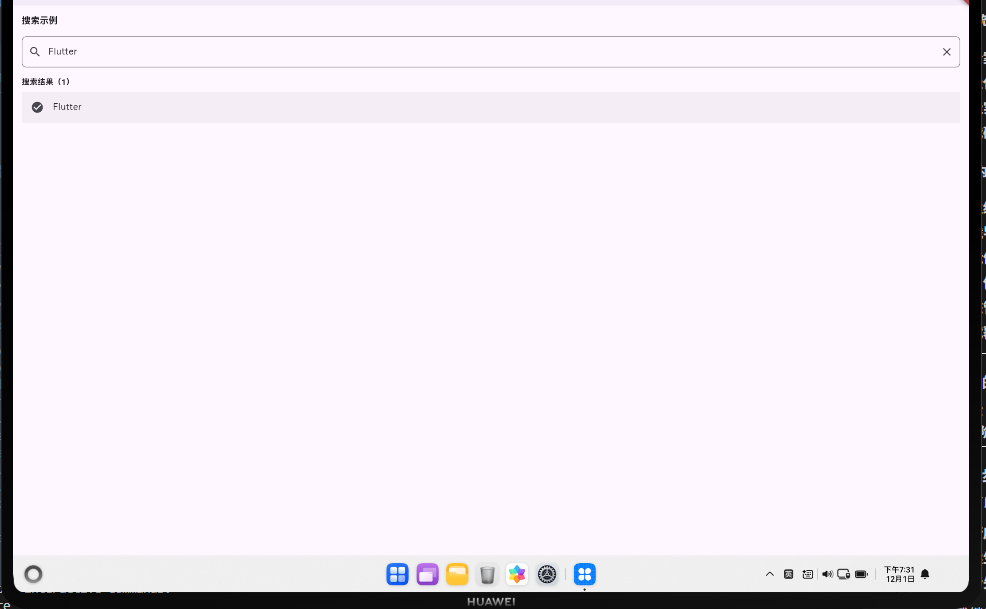
案例概述
本案例展示如何实现一个搜索框,包括实时搜索、搜索结果显示、搜索历史等功能。
核心概念
1. TextField
- 文本输入框;
- 支持
onChanged回调监听输入变化; - 支持
suffixIcon显示清除按钮。
2. 搜索逻辑
- 实时搜索:用户输入时立即搜索;
- 防抖搜索:延迟搜索,避免频繁查询;
- 过滤搜索:使用
contains()或正则表达式过滤。
3. 搜索结果显示
- 显示匹配的结果;
- 显示"未找到"提示;
- 显示热门搜索建议。
代码详解
1. 基础搜索框
TextField(
  controller: _searchController,
  decoration: InputDecoration(
    hintText: '搜索...',
    prefixIcon: Icon(Icons.search),
    border: OutlineInputBorder(borderRadius: BorderRadius.circular(8)),
  ),
  onChanged: (value) {
    setState(() {
      _searchResults = _filterResults(value);
    });
  },
)
2. 搜索结果显示
if (_searchResults.isEmpty) {
  Text('未找到匹配的结果');
} else {
  ListView.builder(
    itemCount: _searchResults.length,
    itemBuilder: (context, index) {
      return ListTile(
        title: Text(_searchResults[index]),
        onTap: () => _selectResult(_searchResults[index]),
      );
    },
  );
}
3. 清除按钮
TextField(
  controller: _searchController,
  decoration: InputDecoration(
    suffixIcon: _searchController.text.isNotEmpty
        ? IconButton(
            icon: Icon(Icons.clear),
            onPressed: () => _searchController.clear(),
          )
        : null,
  ),
)
高级话题:搜索的高级应用
1. 防抖搜索
避免频繁的搜索查询:
Timer? _debounce;
void _onSearchChanged(String value) {
_debounce?.cancel();
_debounce = Timer(const Duration(milliseconds: 500), () {
_performSearch(value);
});
}
void dispose() {
_debounce?.cancel();
super.dispose();
}
2. 搜索历史
保存用户的搜索历史:
List<String> _searchHistory = [];

void _addToHistory(String query) {
  if (!_searchHistory.contains(query)) {
    _searchHistory.insert(0, query);
    if (_searchHistory.length > 10) {
      _searchHistory.removeLast();
    }
    _saveHistory();
  }
}

Future<void> _saveHistory() async {
  final prefs = await SharedPreferences.getInstance();
  await prefs.setStringList('search_history', _searchHistory);
}
3. 热门搜索
显示热门搜索建议:
if (_searchController.text.isEmpty) {
  Wrap(
    spacing: 8,
    children: _hotSearches.map((item) {
      return ActionChip(
        label: Text(item),
        onPressed: () {
          _searchController.text = item;
          _performSearch(item);
        },
      );
    }).toList(),
  );
}
4. 高级搜索过滤
支持多条件搜索:
List<String> _advancedSearch(String query, {String? category, String? sortBy}) {
  return _allItems
      .where((item) {
        if (!item.toLowerCase().contains(query.toLowerCase())) return false;
        if (category != null && item.category != category) return false;
        return true;
      })
      .toList()
      ..sort((a, b) {
        if (sortBy == 'name') return a.compareTo(b);
        if (sortBy == 'date') return a.date.compareTo(b.date);
        return 0;
      });
}
5. 搜索建议(自动完成)
List<String> _getSuggestions(String query) {
  return _allItems
      .where((item) => item.toLowerCase().startsWith(query.toLowerCase()))
      .toList();
}

Autocomplete<String>(
  optionsBuilder: (TextEditingValue textEditingValue) {
    return _getSuggestions(textEditingValue.text);
  },
  onSelected: (String selection) {
    _searchController.text = selection;
    _performSearch(selection);
  },
)
6. 搜索结果高亮
Text.rich(
  TextSpan(
    children: _highlightMatches(result, _searchController.text),
  ),
)

List<TextSpan> _highlightMatches(String text, String query) {
  if (query.isEmpty) return [TextSpan(text: text)];

  final spans = <TextSpan>[];
  final parts = text.split(RegExp('($query)', caseSensitive: false));

  for (final part in parts) {
    if (part.toLowerCase() == query.toLowerCase()) {
      spans.add(TextSpan(
        text: part,
        style: TextStyle(backgroundColor: Colors.yellow),
      ));
    } else {
      spans.add(TextSpan(text: part));
    }
  }
  return spans;
}
7. 搜索过滤器
Row(
  children: [
    Expanded(
      child: TextField(
        controller: _searchController,
        decoration: InputDecoration(hintText: '搜索...'),
      ),
    ),
    PopupMenuButton<String>(
      itemBuilder: (context) => [
        PopupMenuItem(value: 'recent', child: Text('最近')),
        PopupMenuItem(value: 'popular', child: Text('热门')),
        PopupMenuItem(value: 'relevant', child: Text('相关')),
      ],
      onSelected: (value) => _setSortBy(value),
    ),
  ],
)
8. 搜索的响应式设计
SizedBox(
  width: MediaQuery.of(context).size.width < 600 ? double.infinity : 400,
  child: TextField(
    controller: _searchController,
    decoration: InputDecoration(hintText: '搜索...'),
  ),
)
9. 搜索的键盘快捷键
Focus(
  onKey: (node, event) {
    if (event.isKeyPressed(LogicalKeyboardKey.enter)) {
      _performSearch(_searchController.text);
      return KeyEventResult.handled;
    }
    if (event.isKeyPressed(LogicalKeyboardKey.escape)) {
      _searchController.clear();
      return KeyEventResult.handled;
    }
    return KeyEventResult.ignored;
  },
  child: TextField(controller: _searchController, ...),
)
10. 搜索的无障碍支持
TextField(
  controller: _searchController,
  decoration: InputDecoration(
    hintText: '搜索技术栈',
    semanticCounterText: '搜索输入框',
  ),
)
通过这些高级技巧,你可以构建出功能完整的搜索系统。
高级话题:搜索的企业级应用
1. 防抖搜索
Timer? _debounce;
void _onSearchChanged(String value) {
_debounce?.cancel();
_debounce = Timer(const Duration(milliseconds: 500), () {
_performSearch(value);
});
}
void dispose() {
_debounce?.cancel();
super.dispose();
}
2. 搜索历史
List<String> _searchHistory = [];

void _addToHistory(String query) {
  if (!_searchHistory.contains(query)) {
    _searchHistory.insert(0, query);
    if (_searchHistory.length > 10) {
      _searchHistory.removeLast();
    }
    _saveHistory();
  }
}
3. 热门搜索
if (_searchController.text.isEmpty) {
  Wrap(
    spacing: 8,
    children: _hotSearches.map((item) {
      return ActionChip(
        label: Text(item),
        onPressed: () {
          _searchController.text = item;
          _performSearch(item);
        },
      );
    }).toList(),
  );
}
4. 高级搜索过滤
List<String> _advancedSearch(String query, {String? category, String? sortBy}) {
  return _allItems
      .where((item) {
        if (!item.toLowerCase().contains(query.toLowerCase())) return false;
        if (category != null && item.category != category) return false;
        return true;
      })
      .toList()
      ..sort((a, b) {
        if (sortBy == 'name') return a.compareTo(b);
        if (sortBy == 'date') return a.date.compareTo(b.date);
        return 0;
      });
}
5. 搜索建议(自动完成)
Autocomplete<String>(
  optionsBuilder: (TextEditingValue textEditingValue) {
    return _getSuggestions(textEditingValue.text);
  },
  onSelected: (String selection) {
    _searchController.text = selection;
    _performSearch(selection);
  },
)
6. 搜索结果高亮
Text.rich(
  TextSpan(
    children: _highlightMatches(result, _searchController.text),
  ),
)
7. 搜索过滤器
Row(
  children: [
    Expanded(child: TextField(controller: _searchController, ...)),
    PopupMenuButton<String>(
      itemBuilder: (context) => [
        PopupMenuItem(value: 'recent', child: Text('最近')),
        PopupMenuItem(value: 'popular', child: Text('热门')),
      ],
      onSelected: (value) => _setSortBy(value),
    ),
  ],
)
8. 搜索的响应式设计
SizedBox(
  width: MediaQuery.of(context).size.width < 600 ? double.infinity : 400,
  child: TextField(controller: _searchController, ...),
)
9. 搜索的键盘快捷键
Focus(
  onKey: (node, event) {
    if (event.isKeyPressed(LogicalKeyboardKey.enter)) {
      _performSearch(_searchController.text);
      return KeyEventResult.handled;
    }
    if (event.isKeyPressed(LogicalKeyboardKey.escape)) {
      _searchController.clear();
      return KeyEventResult.handled;
    }
    return KeyEventResult.ignored;
  },
  child: TextField(controller: _searchController, ...),
)
10. 搜索的无障碍支持
TextField(
  controller: _searchController,
  decoration: InputDecoration(
    hintText: '搜索技术栈',
    semanticCounterText: '搜索输入框',
  ),
)
通过这些企业级技巧,你可以构建出功能完整的搜索系统。

开源鸿蒙跨平台开发社区汇聚开发者与厂商,共建“一次开发,多端部署”的开源生态,致力于降低跨端开发门槛,推动万物智联创新。
更多推荐
 4
4 0
0- 0


 已为社区贡献16条内容

所有评论(0)