React Native跨平台鸿蒙开发实战系列(bug):Text strings must be Text component
·
Console Warning
Text strings must be rendered within a <Text>
component. Warning: Text strings must be rendered within a <Text> component.%s
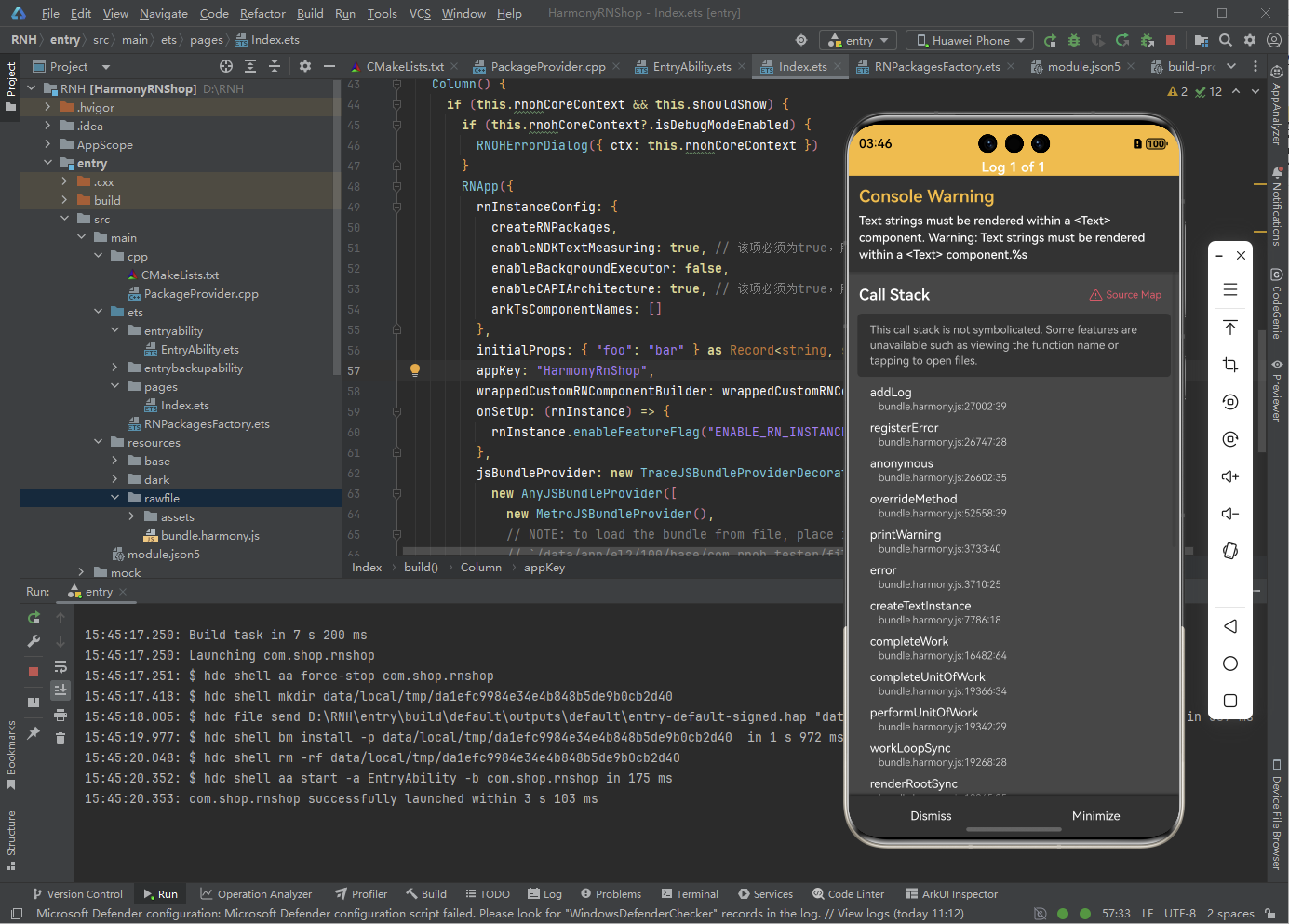
在 TextInput 组件上使用了它们的错误功能,这些组件基本上启用了可以设置错误消息样式和设置错误消息的道具。非常方便,但是升级已经破坏了这些,我现在遇到了这个错误:在 React Native 中,“Text strings must be rendered within a
问题原因
这个错误的核心原因是:所有文本内容都必须被
常见错误示例:
// ❌ 错误写法 - 字符串直接放在 View 中
<View>
  这是一个字符串
  <Text>这是正确的文本</Text>
</View>

// ✅ 正确写法 - 所有文本都用 Text 包裹
<View>
  <Text>这是一个字符串</Text>
  <Text>这是正确的文本</Text>
</View>
主要解决方案
-
- 检查条件渲染中的空字符串
当使用条件渲染时,如果状态变量是空字符串 “”,会导致表达式返回空字符串,从而触发这个错误。
- 检查条件渲染中的空字符串
// ❌ 当 this.state.error 是空字符串时会报错
{this.state.error && <Text>错误: {this.state.error}</Text>}

// ✅ 安全的条件渲染
{this.state.error ? <Text>错误: {this.state.error}</Text> : null}

// ✅ 或者检查字符串长度
{this.state.error && this.state.error.length > 0 &&
  <Text>错误: {this.state.error}</Text>
}
-
- 确保所有文本都有 Text 组件包裹
任何可见的文本内容,包括简单的字符串、数字、变量等,都必须放在
// ❌ 错误 - 数字直接渲染
<View>
  {count}
  <Text>次</Text>
</View>

// ✅ 正确 - 所有内容都包裹
<View>
  <Text>{count}</Text>
  <Text>次</Text>
</View>
-
- 检查注释和调试代码
有时开发过程中留下的调试代码或错误注释也会导致这个问题:
- 检查注释和调试代码
// ❌ 错误的注释方式可能导致问题
<View>
  {/* 调试信息: {debugValue} */}
  <Text>正常内容</Text>
</View>
实用建议,立即检查你的代码中是否有以下情况:
- 直接在 View 中写的中文字符串
- 条件渲染中可能返回空字符串的逻辑
- 未包裹的变量或状态值
- 错误的注释语法
这个错误很容易修复,只需要确保所有文本内容都被
欢迎大家加入开源鸿蒙跨平台开发者社区,一起共建开源鸿蒙跨平台生态。

开源鸿蒙跨平台开发社区汇聚开发者与厂商,共建“一次开发,多端部署”的开源生态,致力于降低跨端开发门槛,推动万物智联创新。
更多推荐
 3
3 0
0- 0



 已为社区贡献143条内容

所有评论(0)