Flutter for OpenHarmony 实战:flutter_local_notifications 本地通知触达方案
Flutter for OpenHarmony 实战:flutter_local_notifications 本地通知触达方案

前言
在一个优秀的 App 中,通知(Notification)是与用户沟通最直接的桥梁。无论是闹钟提醒、消息推送的端侧展示,还是后台任务完成的告知,都离不开本地通知系统。
在 HarmonyOS NEXT 中,通知系统具有极其严格的展示逻辑和高度可定制的 UI 样式。flutter_local_notifications 作为 Flutter 侧最全能的通知插件,为我们提供了统一的跨平台接口来调度鸿蒙系统的通知中心。
一、 为什么本地通知在鸿蒙端至关重要?
1.1 建立即时的“服务心跳”
在 HarmonyOS NEXT 的全场景生态中,App 如何在不占用前台资源的情况下与用户互动?本地通知是唯一的低功耗方案。无论是即时通讯的消息预览,还是金融 App 的动账提醒,本地通知能让用户在锁屏或使用其他应用时,依然能感受到你的应用时刻在线。
1.2 适配鸿蒙“秩序美学”的通知中心
鸿蒙系统的通知中心对各类消息有着严格的权重管理。通过细粒度的参数配置,你的通知可以拥有更精致的圆角进度条、更大尺寸的预览图以及更加符合鸿蒙系统级动效的展开体验,从视觉上建立高级感。
1.3 赋能离线业务场景
对于闹钟、吃药提醒等纯本地业务,即使手机处于断网状态(无 Push 接入),本地通知系统依旧能通过硬件级的定时器准时触发,稳定性远超任何后台轮询方案。
二、 技术内幕:拆解鸿蒙端的通知分发管道
2.1 从 SlotType 到消息分级
在鸿蒙底层,每条通知都需要归属于一个特定的 SlotType。
- SOCIAL_COMMUNICATION:特为社交消息优化,支持头像显示。
- SERVICE_INFORMATION:适合系统级的服务周知。
- CONTENT_INFORMATION:用于推送信件、活动等次要信息。
合理选择插槽类型,能避免你的关键消息被鸿蒙系统的免打扰过滤器误杀。
2.2 跨 Isolate 的初始化策略
通知的回调往往发生在应用处于后台或 Isolate 被销毁的边缘。插件通过一个独立的后台 Dispatcher,确保了当用户点击通知时,能够精准地唤起 Flutter 层的 onDidReceiveNotificationResponse 处理器,实现页面的二次跳转。
三、 集成指南
2.1 添加依赖
由于需要调用鸿蒙特有的 SlotType 和权限接口,建议直接使用 OpenHarmony SIG 维护的适配分支。
dependencies:
  flutter_local_notifications:
    git:
      url: https://gitcode.com/openharmony-sig/fluttertpc_flutter_local_notifications.git
      path: flutter_local_notifications
  timezone: ^0.9.4
2.2 鸿蒙原生权限声明
在鸿蒙端发送定时通知(代理提醒)属于敏感操作。你必须在 ohos/entry/src/main/module.json5 中手动添加权限声明:
"requestPermissions": [
  { "name": "ohos.permission.PUBLISH_AGENT_REMINDER" }
]
注:如果不添加此权限,zonedSchedule 调用在日志中会显示成功,但真机不会有任何弹窗。
四、 实战:构建鸿蒙应用的高级方案
4.1 发送带有操作按钮的通知
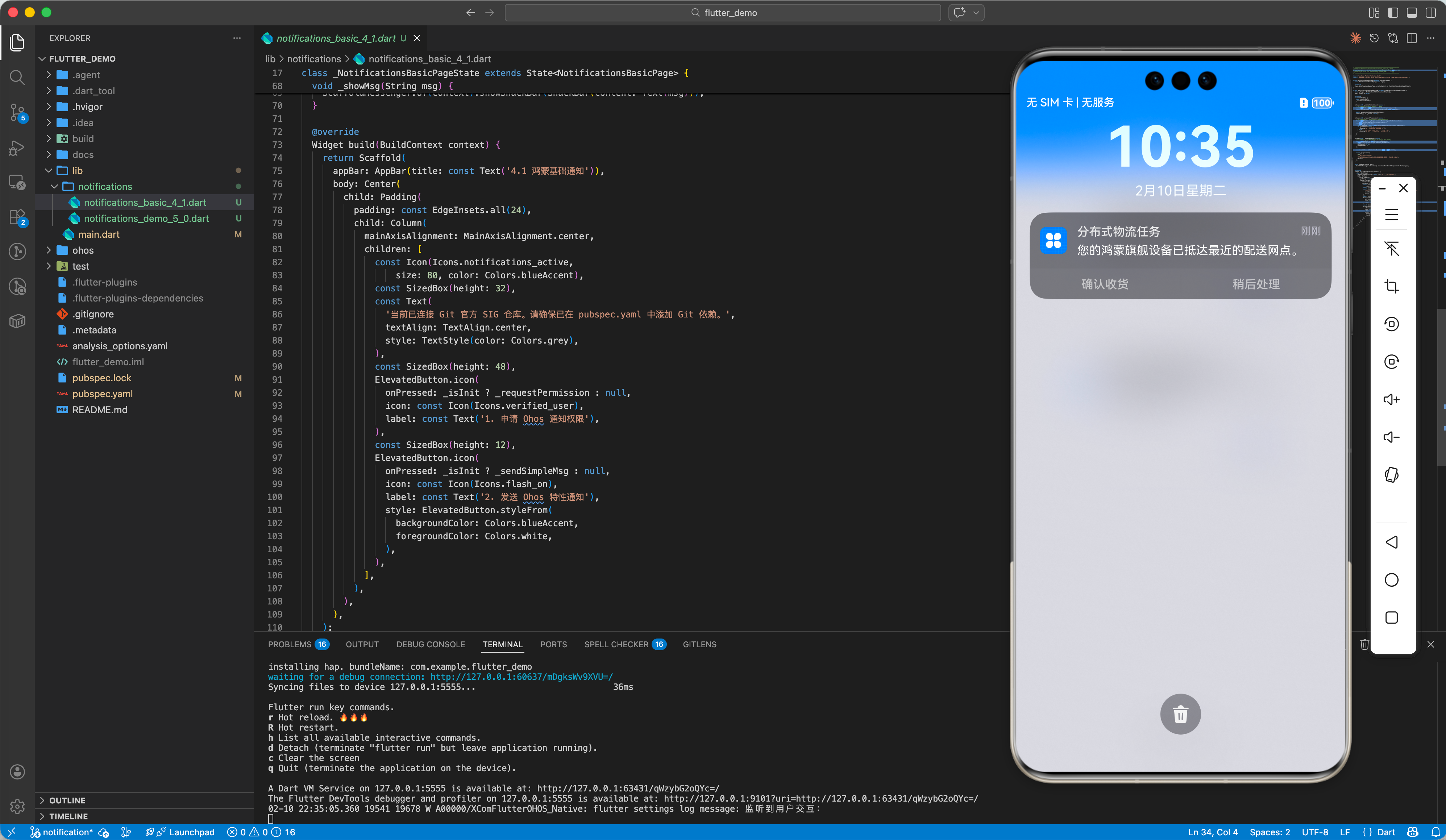
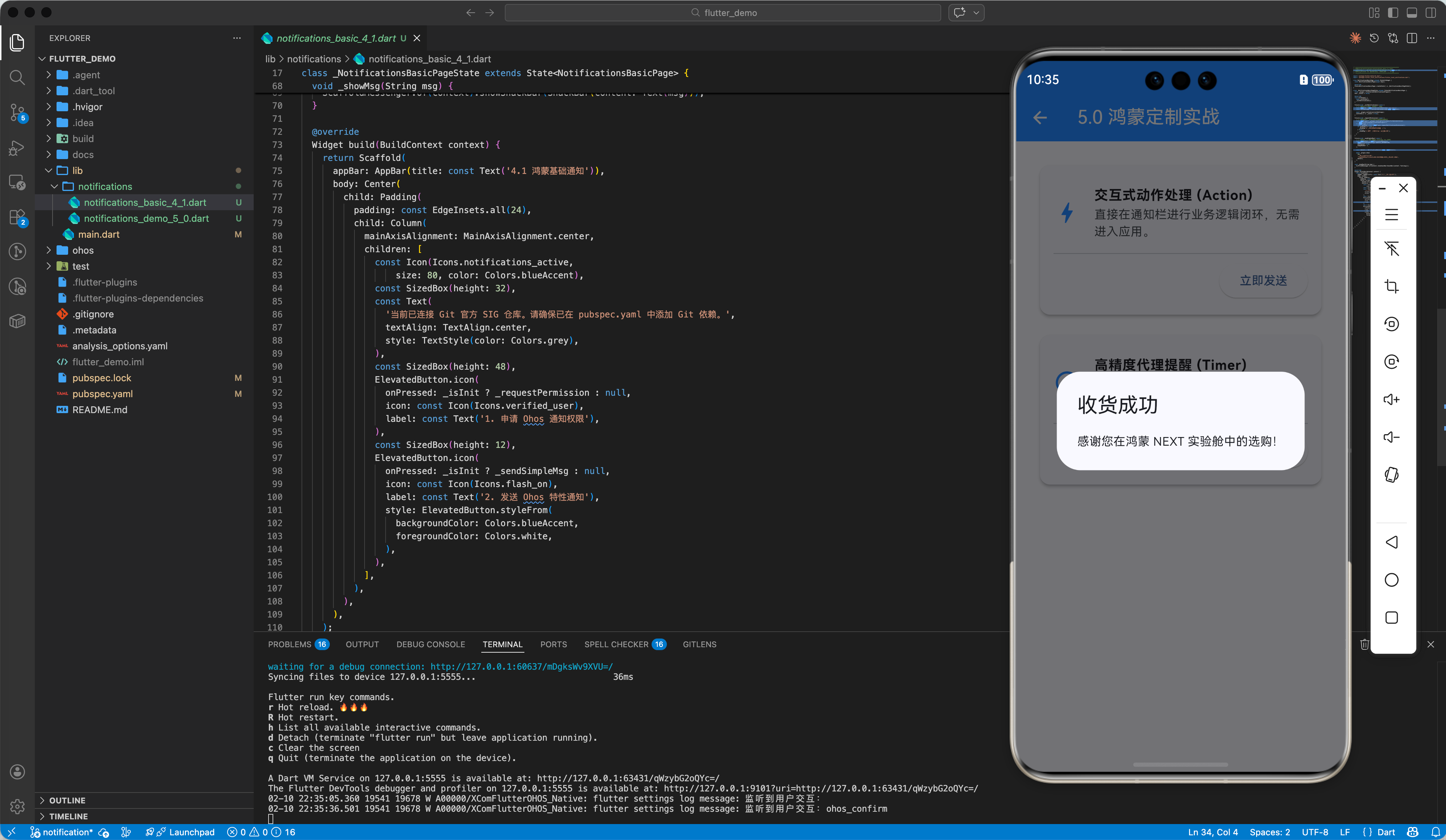
在鸿蒙通知栏直接进行交互(如:确认/取消):
// 💡 亮点:Ohos SIG 定制版使用位置参数定义动作
const ohosAction = OhosNotificationAction('confirm_id', '确认收货');

const ohosDetails = OhosNotificationDetails(
  OhosNotificationSlotType.CONTENT_INFORMATION, // 改用 CONTENT 插槽以获得更高显示权重
  actions: [ohosAction],
);

await flutterLocalNotificationsPlugin.show(
  1, '任务提醒', '分布式任务已就绪',
  const NotificationDetails(ohos: ohosDetails)
);
4.2 调度精准的定时提醒 (Scheduled)
⚠️ 重要发现:zonedSchedule 的系统级限制
在鸿蒙 NEXT 中,zonedSchedule 底层调用的是 reminderAgentManager.publishReminder()(代理提醒 API)。
经实测确认,该 API 受系统 ReminderControl 策略管控,第三方应用(非系统应用)的代理提醒配额可能被设置为 0,导致调用必定失败并返回错误码 1700002:
// 系统日志原文:
W  Ans: ReminderControl com.example.flutter_demo, notification not allowed.
W  ANS_REMINDER: The number of reminders exceeds the limit[0].
E  Flutter: publishTimerReminder-->err code:1700002 message:The number of reminders exceeds the limit.
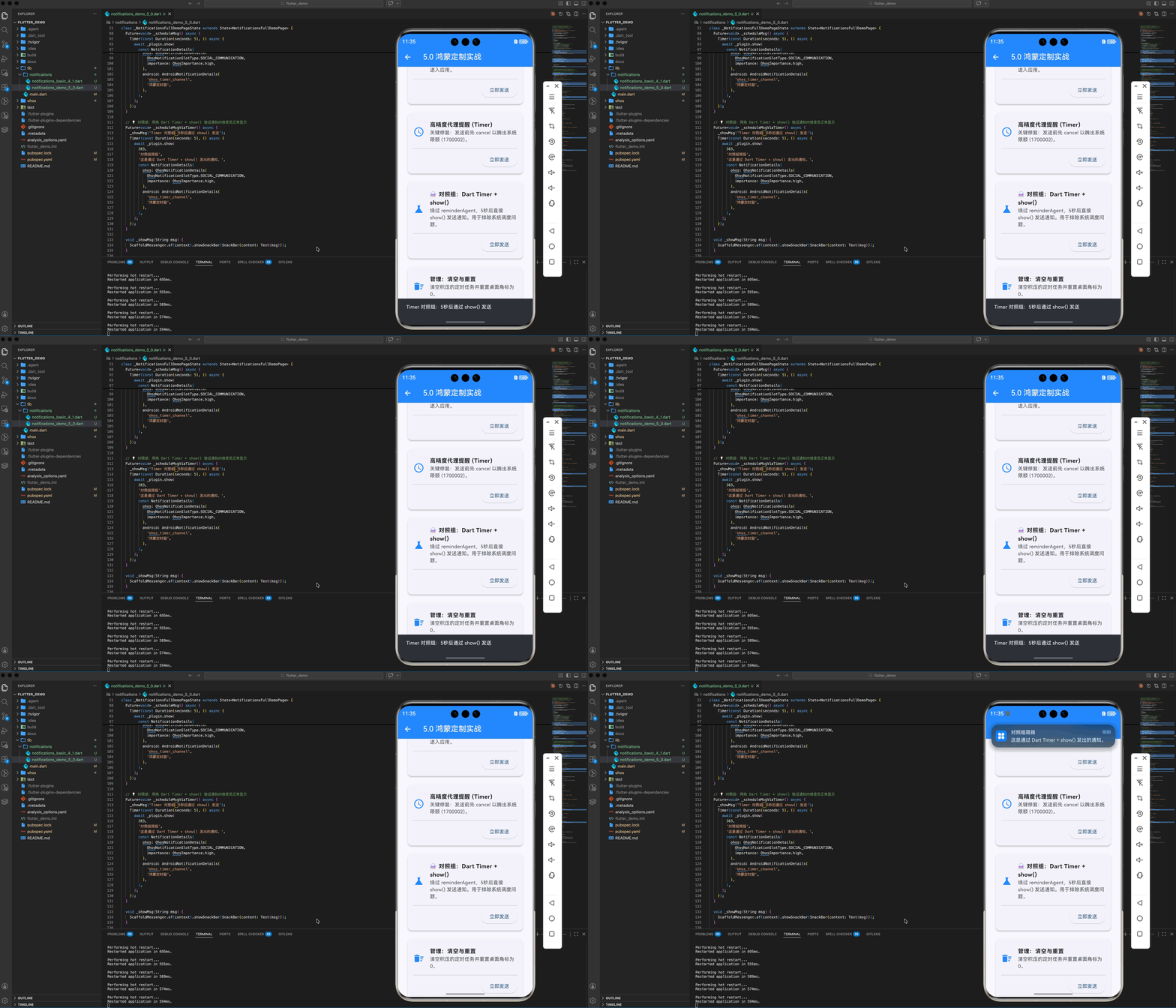
✅ 推荐方案:Dart Timer + show()
对于 App 进程存活期间的定时通知需求,推荐使用 Dart 端的 Timer + show() 组合:
import 'dart:async';

// 5秒后发送通知(App 进程在前台或后台均可)
Timer(const Duration(seconds: 5), () async {
  await flutterLocalNotificationsPlugin.show(
    202,
    '5 秒实验室简报',
    '已为您准时触达基于 Ohos 本地通知的定时提醒。',
    const NotificationDetails(
      ohos: OhosNotificationDetails(
        OhosNotificationSlotType.SOCIAL_COMMUNICATION, // 必须使用此类型才能弹横幅
        importance: OhosImportance.high,
      ),
    ),
  );
});
适用场景对比
方案 适用场景 局限性 zonedSchedule(reminderAgent)App 被杀死后仍需触发 第三方应用可能被系统策略拦截 Dart Timer + show()App 进程存活期间的定时需求 App 被杀后 Timer 失效
四、 鸿蒙平台的适配要点
4.1 通知 Slot 类型适配
鸿蒙系统引入了 SlotType 概念。社交类消息、普通系统消息、持续运行的服务通知,在通知栏的堆叠顺序和声音反馈各不相同。适配鸿蒙时,务必根据业务场景精准选择插槽类型。
关键: 如果使用
CONTENT_INFORMATION,系统默认仅在通知中心静默显示,不会弹出横幅!必须使用SOCIAL_COMMUNICATION才能获得横幅+响铃的完整展示效果。
4.2 权限动态申请
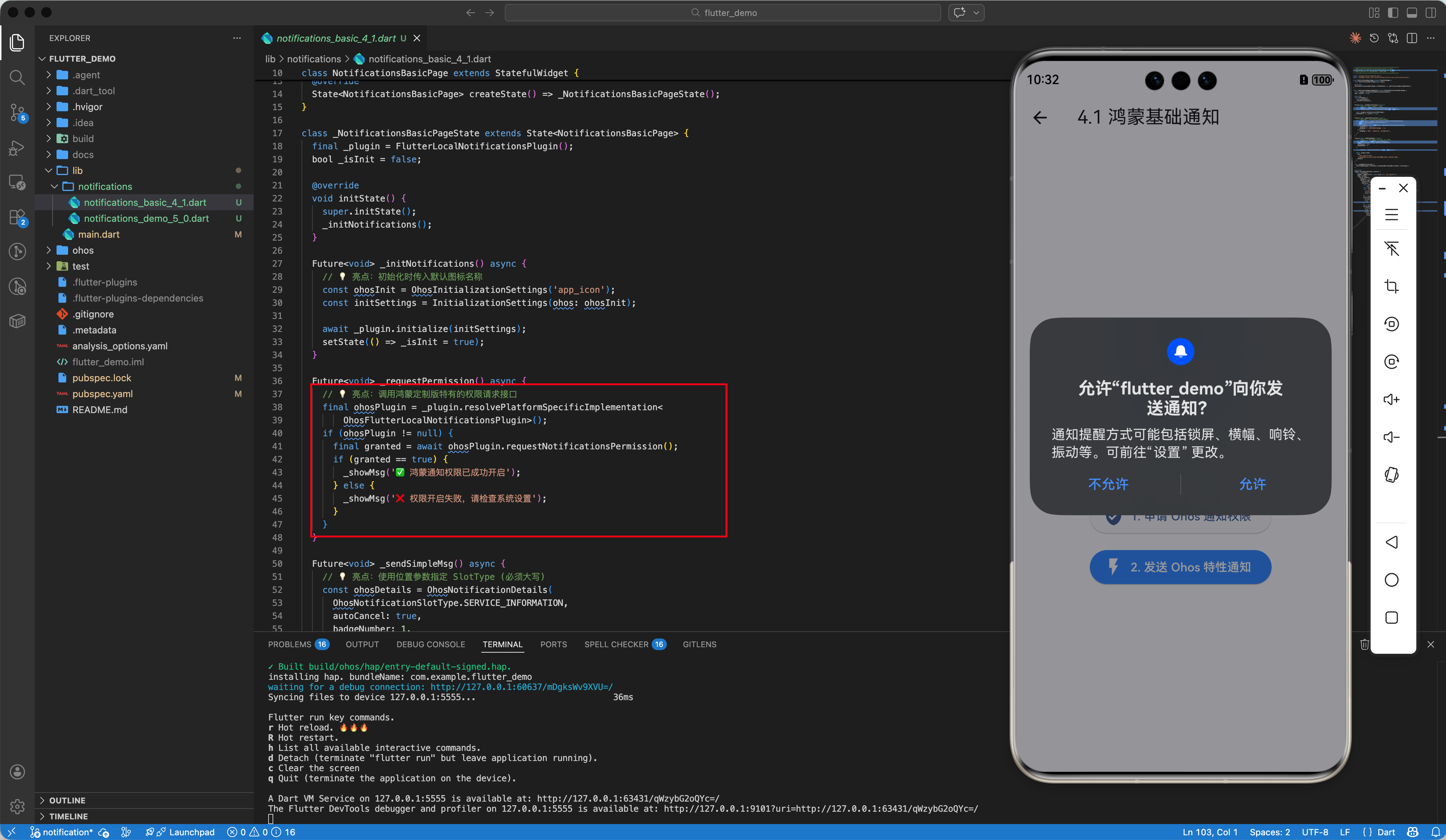
在 HarmonyOS NEXT 中,通知权限默认是关闭的。在发送通知前,务必先调用权限检查逻辑,并引导用户在系统设置中开启:
final bool? result = await flutterLocalNotificationsPlugin
    .resolvePlatformSpecificImplementation<OhosFlutterLocalNotificationsPlugin>()
    ?.requestNotificationsPermission();
4.3 精准定时通知与时区初始化
在鸿蒙端使用 zonedSchedule 时,必须确保 timezone 库已正确识别本地时区。不同于其他平台,鸿蒙端必须调用插件提供的 getLocalTimezone() 接口:
Future<void> _initTimeZone() async {
  tz.initializeTimeZones();
  final timeZoneName = await flutterLocalNotificationsPlugin.getLocalTimezone();
  try {
    tz.setLocalLocation(tz.getLocation(timeZoneName));
  } catch (_) {
    // 降级方案:系统返回的时区名无法识别时,强制指定上海时区
    tz.setLocalLocation(tz.getLocation('Asia/Shanghai'));
  }
}
避坑指南:错误码 1700002 (The number of reminders exceeds the limit)
这个错误不一定是因为配额用完了。经日志确认,鸿蒙系统的ReminderControl策略可能将第三方应用的代理提醒配额设为 0(即完全禁止)。此时cancelAll()也无法解决问题。建议改用Dart Timer + show()方案。
4.4 桌面角标清除技巧 (Badge)
在鸿蒙系统中,如果发现通知清空后角标(红色数字)依然残留,可以通过发送一条 badgeNumber 为 0 的静默通知来强制重置系统角标。
注意: 鸿蒙原生端的
show()方法会校验 title/body 不能为空(null或空字符串会被拒绝),所以需要传递空格字符串' '来绕过此校验。
await flutterLocalNotificationsPlugin.show(
  999, // 专用重置 ID
  ' ', // 原生端要求 title 非空,用空格绕过校验
  ' ', // 原生端要求 body 非空,用空格绕过校验
  const NotificationDetails(
    ohos: OhosNotificationDetails(
      OhosNotificationSlotType.CONTENT_INFORMATION,
      badgeNumber: 0, // 核心:重置为 0
      silent: true,   // 核心:静默,不触发声音或弹窗
    ),
  ),
);
五、 综合实战:构建带权限申请的通知流水线
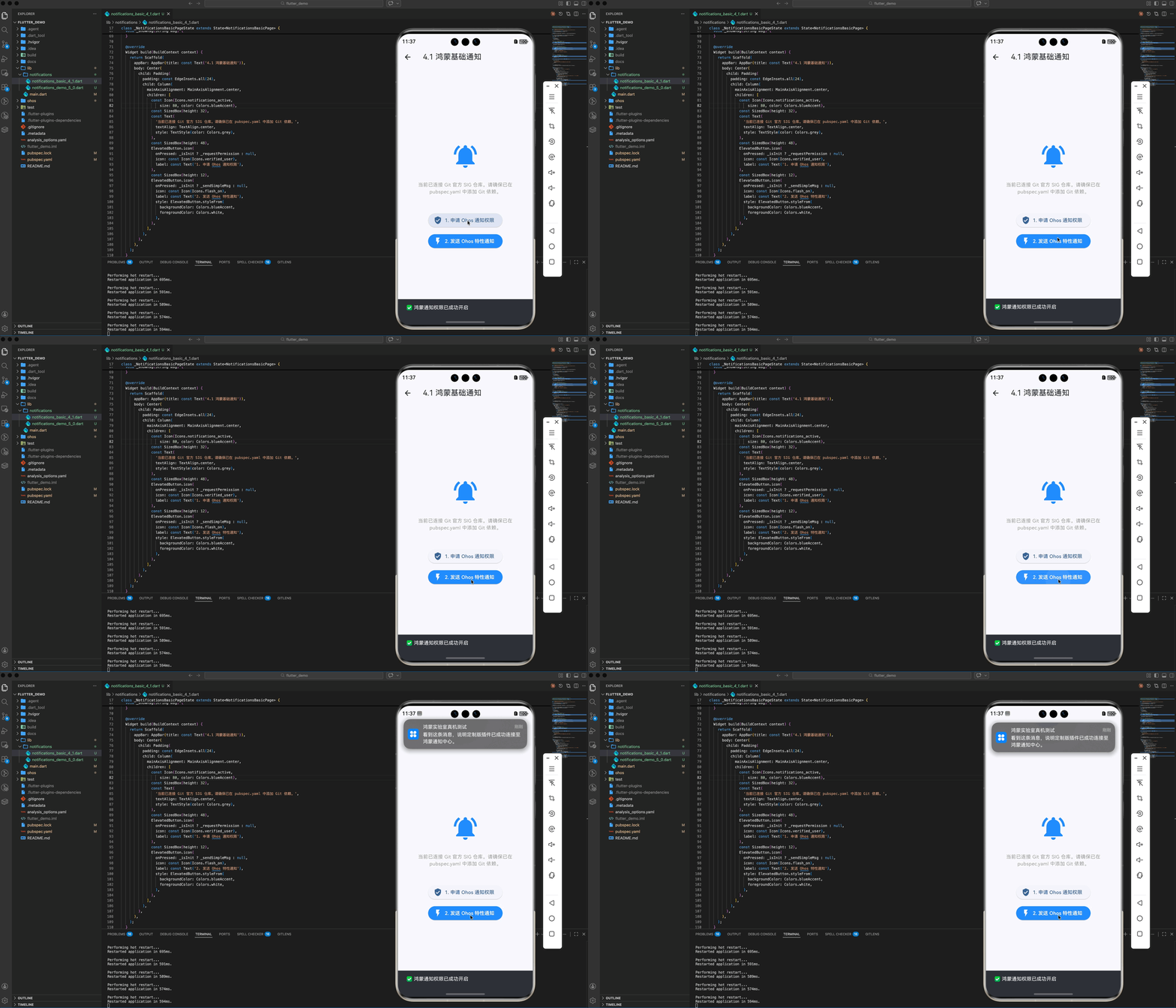
本 Demo 展示了如何在 HarmonyOS NEXT 中动态请求通知授权、并基于不同的业务等级调度对应的通知通道。
// ============================================================
// 文件:lib/notifications/notifications_basic_4_1.dart
// 描述:演示基于鸿蒙 SIG 定制版插件的本地通知 (完整 Ohos 特性版)
// 来源:《Flutter for OpenHarmony 实战》系列 - 第 21 篇
// ============================================================
import 'package:flutter/material.dart';
import 'package:flutter_local_notifications/flutter_local_notifications.dart';
class NotificationsBasicPage extends StatefulWidget {
const NotificationsBasicPage({super.key});
State<NotificationsBasicPage> createState() => _NotificationsBasicPageState();
}
class _NotificationsBasicPageState extends State<NotificationsBasicPage> {
final _plugin = FlutterLocalNotificationsPlugin();
bool _isInit = false;
void initState() {
super.initState();
_initNotifications();
}
Future<void> _initNotifications() async {
// 💡 亮点:初始化时传入默认图标名称
const ohosInit = OhosInitializationSettings('app_icon');
const initSettings = InitializationSettings(ohos: ohosInit);
await _plugin.initialize(initSettings);
setState(() => _isInit = true);
}
Future<void> _requestPermission() async {
// 💡 亮点:调用鸿蒙定制版特有的权限请求接口
final ohosPlugin = _plugin.resolvePlatformSpecificImplementation<
OhosFlutterLocalNotificationsPlugin>();
if (ohosPlugin != null) {
final granted = await ohosPlugin.requestNotificationsPermission();
if (granted == true) {
_showMsg('✅ 鸿蒙通知权限已成功开启');
} else {
_showMsg('❌ 权限开启失败,请检查系统设置');
}
}
}
Future<void> _sendSimpleMsg() async {
// 💡 亮点:使用位置参数指定 SlotType (必须大写)
const ohosDetails = OhosNotificationDetails(
OhosNotificationSlotType.SERVICE_INFORMATION,
autoCancel: true,
);
const details = NotificationDetails(ohos: ohosDetails);
await _plugin.show(
101,
'鸿蒙实验室真机测试',
'看到这条消息,说明定制版插件已成功连接至鸿蒙通知中心。',
details,
);
}
void _showMsg(String msg) {
ScaffoldMessenger.of(context).showSnackBar(SnackBar(content: Text(msg)));
}
Widget build(BuildContext context) {
return Scaffold(
appBar: AppBar(title: const Text('4.1 鸿蒙基础通知')),
body: Center(
child: Padding(
padding: const EdgeInsets.all(24),
child: Column(
mainAxisAlignment: MainAxisAlignment.center,
children: [
const Icon(Icons.notifications_active,
size: 80, color: Colors.blueAccent),
const SizedBox(height: 32),
const Text(
'当前已连接 Git 官方 SIG 仓库。请确保已在 pubspec.yaml 中添加 Git 依赖。',
textAlign: TextAlign.center,
style: TextStyle(color: Colors.grey),
),
const SizedBox(height: 48),
ElevatedButton.icon(
onPressed: _isInit ? _requestPermission : null,
icon: const Icon(Icons.verified_user),
label: const Text('1. 申请 Ohos 通知权限'),
),
const SizedBox(height: 12),
ElevatedButton.icon(
onPressed: _isInit ? _sendSimpleMsg : null,
icon: const Icon(Icons.flash_on),
label: const Text('2. 发送 Ohos 特性通知'),
style: ElevatedButton.styleFrom(
backgroundColor: Colors.blueAccent,
foregroundColor: Colors.white,
),
),
],
),
),
),
);
}
}
六、 总结
通知是应用“存在感”的尊严。通过 flutter_local_notifications 方案,我们能够以最小的代码代价,在 HarmonyOS NEXT 上实现高性能、高定制的消息触达服务。记住,好的通知不是干扰用户,而是在最恰当的时间给予最温柔的提醒。
🔗 相关阅读推荐:
🌐 欢迎加入开源鸿蒙跨平台社区:开源鸿蒙跨平台开发者社区

开源鸿蒙跨平台开发社区汇聚开发者与厂商,共建“一次开发,多端部署”的开源生态,致力于降低跨端开发门槛,推动万物智联创新。
更多推荐

 63
63 0
0- 0


 已为社区贡献209条内容

所有评论(0)