Flutter鸿蒙跨平台插件:map_launcher 使用指南
map_launcher是一款适配HarmonyOS的Flutter地图插件,支持启动主流地图应用、显示标记点和导航路线等功能。安装时需通过Git引入自定义版本,配置pubspec.yaml后同步依赖。使用示例包括获取已安装地图列表、展示指定位置标记点(如天安门广场)和规划导航路线(如故宫到天安门)。该插件简化了地图功能集成,提升开发效率,适用于鸿蒙设备。更多信息可访问开源鸿蒙跨平台社区。
Flutter三方库适配OpenHarmony【map_launcher】地图应用启动插件使用指南
前言
欢迎加入开源鸿蒙跨平台社区:https://openharmonycrossplatform.csdn.net
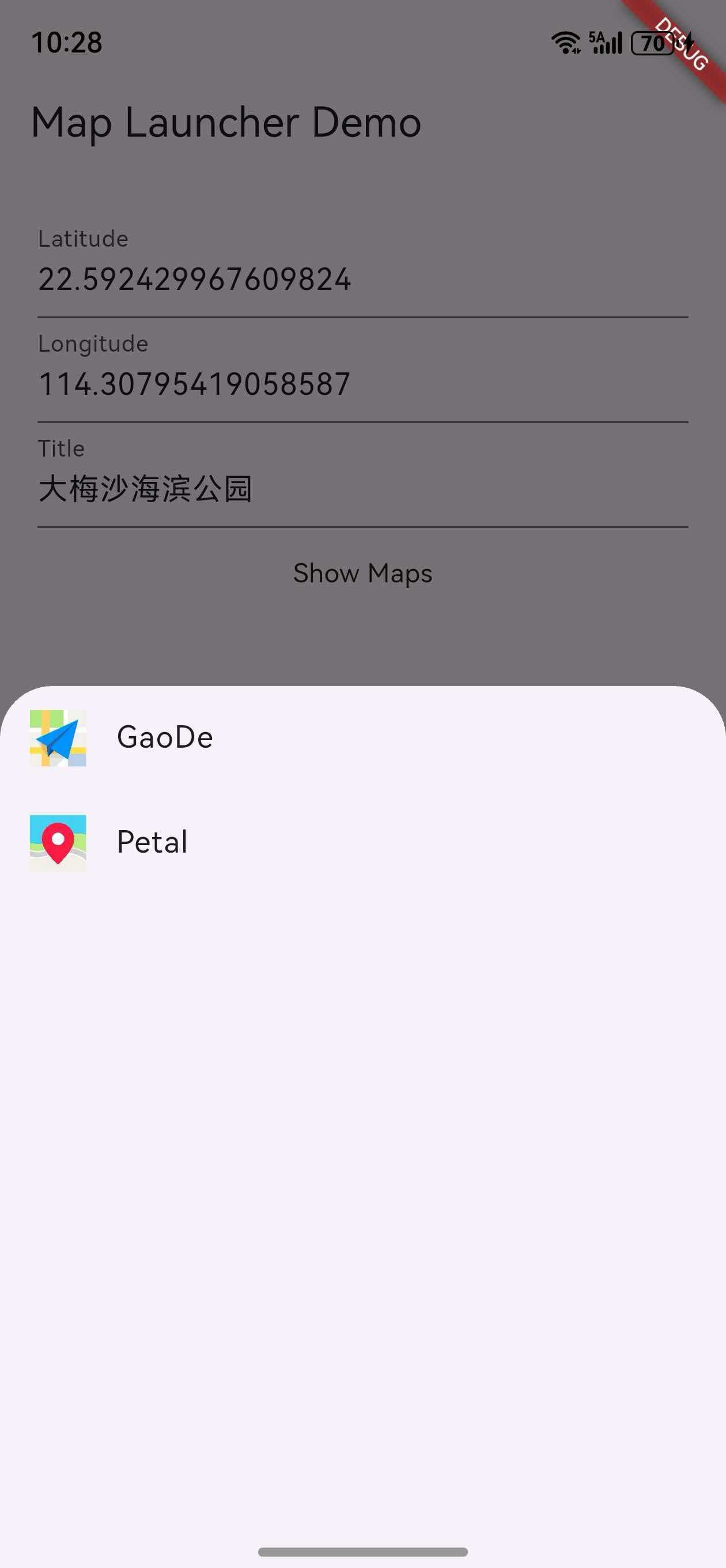
在移动应用开发中,地图功能是一个非常重要的组件,尤其是在需要位置导航、地点标记等场景中。无论是开发出行应用、本地服务应用还是旅游应用,集成地图功能都能大大提升用户体验。特别是在**鸿蒙(HarmonyOS)**平台上,如何实现跨平台的地图集成一直是开发者们关注的焦点。今天,我们将深入探讨一个强大的Flutter插件——map_launcher,它完美适配了鸿蒙平台,让你能轻松实现地图应用的启动和集成。
一、插件介绍:便捷的地图应用启动工具
1.1 什么是map_launcher
map_launcher是一个用于在移动应用中启动地图应用程序的Flutter插件,支持HarmonyOS平台。通过该插件,开发者可以轻松地在应用中集成地图功能,无需自行开发复杂的地图渲染逻辑。
1.2 核心功能特点
| 功能 | 描述 | 适用场景 |
|---|---|---|
| 启动已安装的地图应用程序 | 支持启动高德地图、百度地图、腾讯地图等主流地图应用 | 位置导航、地点搜索 |
| 在地图上显示指定位置的标记点 | 在地图上标记特定位置,显示标题和描述 | 地点展示、POI标记 |
| 展示两个位置之间的导航路线 | 规划并显示从起点到终点的导航路线 | 路线规划、导航指引 |
| 检查设备上可用的地图应用程序 | 获取设备上已安装的地图应用列表 | 多地图支持、用户选择 |
| 跨平台支持 | 同一套代码在Android、iOS和HarmonyOS上运行 | 跨平台应用开发 |
二、安装与配置
2.1 添加依赖
由于该三方库为自定义修改版本,需要以Git形式引入。在引用的项目中,pubspec.yaml中dependencies新增配置:
dependencies:
  map_launcher_ohos:
    git:
      url: "https://atomgit.com/"
      path: "fluttertpc_map_launcher-master/ohos"
2.2 同步依赖
添加依赖后,运行以下命令同步项目依赖:
flutter pub get
2.3 鸿蒙平台配置
💡 鸿蒙开发者请注意:插件已内置鸿蒙支持,无需额外配置,开箱即用!
三、核心API实战演练
3.1 导入插件
首先,在需要使用的文件中导入插件:
import 'package:map_launcher/map_launcher.dart';
3.2 检查可用地图
获取设备上已安装的地图应用列表:
// 获取设备上已安装的地图应用列表
final availableMaps = await MapLauncher.installedMaps;

// 打印可用地图
print(availableMaps);

// 显示可用地图列表给用户选择
showDialog(
  context: context,
  builder: (context) => AlertDialog(
    title: Text('选择地图应用'),
    content: SingleChildScrollView(
      child: Column(
        children: availableMaps.map((map) => ListTile(
          leading: Image.memory(
            map.icon,
            width: 30,
            height: 30,
          ),
          title: Text(map.mapName),
          onTap: () {
            Navigator.pop(context);
            _launchMap(map);
          },
        )).toList(),
      ),
    ),
  ),
);
3.3 显示标记点
在地图上显示指定位置的标记点:
// 在地图上显示指定位置的标记点
await MapLauncher.showMarker(
  mapType: MapType.amap, // 选择地图类型(如高德地图)
  coords: Coords(39.908860, 116.397390), // 位置坐标(北京天安门)
  title: "天安门广场",
  description: "北京市东城区天安门广场",
  zoom: 15, // 地图缩放级别
);
3.4 显示导航路线
展示从起点到终点的导航路线:
// 展示从起点到终点的导航路线
await MapLauncher.showDirections(
  mapType: MapType.baidu, // 选择地图类型(如百度地图)
  destination: Coords(39.908860, 116.397390), // 终点坐标
  destinationTitle: "天安门广场",
  origin: Coords(39.928900, 116.395600), // 起点坐标(北京故宫)
  originTitle: "故宫博物院",
  directionsMode: DirectionsMode.driving, // 导航模式(驾车)
);
四、API 速查表
| API | 功能描述 | 参数 | 返回值 | 鸿蒙支持 |
|---|---|---|---|---|
MapLauncher.installedMaps |
获取已安装的地图应用列表 | 无 | Future<List<AvailableMap>> |
✅ 支持 |
MapLauncher.showMarker() |
在地图上显示标记点 | mapType, coords, title, description, zoom |
Future<bool> |
✅ 支持 |
MapLauncher.showDirections() |
显示导航路线 | mapType, destination, destinationTitle, origin, originTitle, directionsMode |
Future<bool> |
✅ 支持 |
AvailableMap.mapName |
获取地图应用名称 | 无 | String |
✅ 支持 |
AvailableMap.icon |
获取地图应用图标 | 无 | Uint8List |
✅ 支持 |
AvailableMap.mapType |
获取地图类型 | 无 | MapType |
✅ 支持 |
AvailableMap.showMarker() |
在指定地图上显示标记点 | 同MapLauncher.showMarker() |
Future<bool> |
✅ 支持 |
AvailableMap.showDirections() |
在指定地图上显示导航路线 | 同MapLauncher.showDirections() |
Future<bool> |
✅ 支持 |
五、典型应用场景
5.1 位置分享功能
实现位置分享功能,让用户可以通过地图应用查看分享的位置:
import 'package:flutter/material.dart';
import 'package:map_launcher/map_launcher.dart';
class LocationShareExample extends StatelessWidget {
final double latitude;
final double longitude;
final String locationName;
const LocationShareExample({
Key? key,
required this.latitude,
required this.longitude,
required this.locationName,
}) : super(key: key);
Future<void> _openMap() async {
try {
await MapLauncher.showMarker(
mapType: MapType.amap,
coords: Coords(latitude, longitude),
title: locationName,
description: "分享的位置",
);
} catch (e) {
print('打开地图失败: $e');
}
}
Widget build(BuildContext context) {
return Scaffold(
appBar: AppBar(title: Text('位置分享')),
body: Center(
child: Column(
mainAxisAlignment: MainAxisAlignment.center,
children: [
Text('位置: $locationName'),
Text('坐标: $latitude, $longitude'),
SizedBox(height: 20),
ElevatedButton(
onPressed: _openMap,
child: Text('在地图中查看'),
),
],
),
),
);
}
}
5.2 导航功能
实现从当前位置到目标位置的导航功能:
import 'package:flutter/material.dart';
import 'package:map_launcher/map_launcher.dart';
import 'package:geolocator/geolocator.dart';
class NavigationExample extends StatefulWidget {
final double destinationLatitude;
final double destinationLongitude;
final String destinationName;
const NavigationExample({
Key? key,
required this.destinationLatitude,
required this.destinationLongitude,
required this.destinationName,
}) : super(key: key);
_NavigationExampleState createState() => _NavigationExampleState();
}
class _NavigationExampleState extends State<NavigationExample> {
Future<void> _startNavigation() async {
try {
// 获取当前位置
final position = await Geolocator.getCurrentPosition(
desiredAccuracy: LocationAccuracy.high,
);
// 打开导航
await MapLauncher.showDirections(
mapType: MapType.baidu,
origin: Coords(position.latitude, position.longitude),
originTitle: "当前位置",
destination: Coords(
widget.destinationLatitude,
widget.destinationLongitude,
),
destinationTitle: widget.destinationName,
directionsMode: DirectionsMode.driving,
);
} catch (e) {
print('导航失败: $e');
}
}
Widget build(BuildContext context) {
return Scaffold(
appBar: AppBar(title: Text('导航示例')),
body: Center(
child: Column(
mainAxisAlignment: MainAxisAlignment.center,
children: [
Text('目的地: ${widget.destinationName}'),
Text('坐标: ${widget.destinationLatitude}, ${widget.destinationLongitude}'),
SizedBox(height: 20),
ElevatedButton(
onPressed: _startNavigation,
child: Text('开始导航'),
),
],
),
),
);
}
}
六、约束与限制
6.1 平台差异
| 平台 | 支持的地图应用 | 注意事项 |
|---|---|---|
| Android | 高德地图、百度地图、腾讯地图、Google Maps等 | 需要相应地图应用已安装 |
| iOS | Apple Maps、Google Maps等 | 部分地图应用需要从App Store下载 |
| HarmonyOS | 高德地图、百度地图、腾讯地图等 | 已在鸿蒙OS 2.0及以上版本测试通过 |
6.2 权限要求
⚠️ 注意:在使用地图功能时,可能需要获取位置权限。请确保在
AndroidManifest.xml或Info.plist中添加必要的权限声明。
七、常见问题与解决方案
| 问题 | 原因 | 解决方案 |
|---|---|---|
| 地图应用未启动 | 未安装对应地图应用 | 检查并提示用户安装地图应用 |
| 坐标显示错误 | 坐标格式不正确 | 确保使用正确的经纬度格式(纬度在前,经度在后) |
| 导航路线规划失败 | 起点或终点坐标无效 | 验证坐标的有效性,确保在合理范围内 |
| 鸿蒙平台无法启动地图 | 插件未正确配置 | 确保使用正确的Git路径和依赖配置 |
| 权限被拒绝 | 未获取位置权限 | 在使用前请求位置权限,并处理权限被拒绝的情况 |
八、代码优化建议
8.1 封装工具类
创建一个工具类来封装地图相关操作:
import 'package:map_launcher/map_launcher.dart';

class MapUtil {
  // 打开地图显示标记点
  static Future<bool> openMapWithMarker({
    required double latitude,
    required double longitude,
    required String title,
    String? description,
    MapType? mapType,
  }) async {
    try {
      final availableMaps = await MapLauncher.installedMaps;
      if (availableMaps.isEmpty) {
        return false;
      }

      final map = mapType != null
          ? availableMaps.firstWhere(
              (m) => m.mapType == mapType,
              orElse: () => availableMaps.first,
            )
          : availableMaps.first;

      return await map.showMarker(
        coords: Coords(latitude, longitude),
        title: title,
        description: description,
        zoom: 15,
      );
    } catch (e) {
      print('打开地图失败: $e');
      return false;
    }
  }

  // 打开导航
  static Future<bool> openNavigation({
    required double originLatitude,
    required double originLongitude,
    required String originTitle,
    required double destinationLatitude,
    required double destinationLongitude,
    required String destinationTitle,
    DirectionsMode directionsMode = DirectionsMode.driving,
    MapType? mapType,
  }) async {
    try {
      final availableMaps = await MapLauncher.installedMaps;
      if (availableMaps.isEmpty) {
        return false;
      }

      final map = mapType != null
          ? availableMaps.firstWhere(
              (m) => m.mapType == mapType,
              orElse: () => availableMaps.first,
            )
          : availableMaps.first;

      return await map.showDirections(
        origin: Coords(originLatitude, originLongitude),
        originTitle: originTitle,
        destination: Coords(destinationLatitude, destinationLongitude),
        destinationTitle: destinationTitle,
        directionsMode: directionsMode,
      );
    } catch (e) {
      print('打开导航失败: $e');
      return false;
    }
  }

  // 获取可用地图列表
  static Future<List<AvailableMap>> getAvailableMaps() async {
    try {
      return await MapLauncher.installedMaps;
    } catch (e) {
      print('获取地图列表失败: $e');
      return [];
    }
  }
}
8.2 错误处理
添加错误处理以提高应用稳定性:
Future<void> safeLaunchMap(Function mapFunction) async {
  try {
    final result = await mapFunction();
    if (!result) {
      // 处理启动失败的情况
      print('地图启动失败');
    }
  } catch (e) {
    print('启动地图时发生错误: $e');
    // 可以添加错误提示或 fallback 逻辑
  }
}

// 使用示例
await safeLaunchMap(() => MapLauncher.showMarker(
      mapType: MapType.amap,
      coords: Coords(39.908860, 116.397390),
      title: "天安门广场",
    ));
九、最佳实践
9.1 用户体验
- 提供地图选择:让用户选择使用哪个地图应用
- 添加加载状态:在启动地图时显示加载指示器
- 处理无地图应用的情况:当设备上没有安装地图应用时,提供备选方案
- 添加错误提示:当地图启动失败时,向用户显示友好的错误信息
9.2 代码结构
- 分离关注点:将地图相关逻辑与业务逻辑分离
- 使用常量:定义常用坐标和地图类型常量
- 添加注释:为复杂的地图操作添加注释
- 使用枚举:使用枚举来表示地图类型和导航模式
十、与其他插件的对比
| 插件 | 支持平台 | 核心功能 | 鸿蒙支持 | 特点 |
|---|---|---|---|---|
| map_launcher | Android, iOS, HarmonyOS | 启动地图应用、显示标记点、导航 | ✅ 完美支持 | 支持多种地图应用,功能丰富 |
| url_launcher | Android, iOS, HarmonyOS | 打开URL和应用 | ✅ 支持 | 可以通过URL启动地图,但功能有限 |
| flutter_map | Android, iOS | 内置地图渲染 | ❌ 不支持 | 无需外部地图应用,但功能复杂度高 |
| google_maps_flutter | Android, iOS | Google Maps集成 | ❌ 不支持 | 功能强大,但仅支持Google Maps |
十一、高级功能
11.1 地图应用选择器
创建一个地图应用选择器,让用户选择 preferred地图应用:
import 'package:flutter/material.dart';
import 'package:map_launcher/map_launcher.dart';
class MapSelector extends StatelessWidget {
final Function(AvailableMap) onMapSelected;
const MapSelector({Key? key, required this.onMapSelected}) : super(key: key);
Widget build(BuildContext context) {
return FutureBuilder<List<AvailableMap>>(
future: MapLauncher.installedMaps,
builder: (context, snapshot) {
if (snapshot.connectionState == ConnectionState.waiting) {
return Center(child: CircularProgressIndicator());
}
if (!snapshot.hasData || snapshot.data!.isEmpty) {
return Center(child: Text('没有找到地图应用'));
}
return GridView.builder(
gridDelegate: SliverGridDelegateWithFixedCrossAxisCount(
crossAxisCount: 2,
childAspectRatio: 1.5,
),
itemCount: snapshot.data!.length,
itemBuilder: (context, index) {
final map = snapshot.data![index];
return GestureDetector(
onTap: () => onMapSelected(map),
child: Card(
child: Column(
mainAxisAlignment: MainAxisAlignment.center,
children: [
Image.memory(map.icon, width: 50, height: 50),
SizedBox(height: 10),
Text(map.mapName),
],
),
),
);
},
);
},
);
}
}
11.2 多平台适配
针对不同平台进行适配,确保在所有平台上都能正常工作:
import 'dart:io';
import 'package:map_launcher/map_launcher.dart';

Future<void> openMapPlatformSpecific({
  required double latitude,
  required double longitude,
  required String title,
}) async {
  MapType preferredMapType;

  if (Platform.isAndroid) {
    // Android平台优先使用高德地图
    preferredMapType = MapType.amap;
  } else if (Platform.isIOS) {
    // iOS平台优先使用Apple Maps
    preferredMapType = MapType.apple;
  } else if (Platform.isHarmonyOS) {
    // 鸿蒙平台优先使用高德地图
    preferredMapType = MapType.amap;
  } else {
    // 默认使用第一个可用地图
    preferredMapType = MapType.google;
  }

  await MapLauncher.showMarker(
    mapType: preferredMapType,
    coords: Coords(latitude, longitude),
    title: title,
  );
}
十二、未来展望
12.1 功能扩展
- 添加更多地图应用支持:支持更多国内外主流地图应用
- 增强导航功能:支持更多导航模式和路线选项
- 添加地图搜索功能:支持通过关键词搜索地点
- 集成地图SDK:在应用内直接显示地图,无需启动外部应用
12.2 平台支持
- 继续优化鸿蒙平台的支持
- 适配更多鸿蒙设备型号
- 跟进鸿蒙系统的更新
- 扩展对其他平台的支持
总结
map_launcher插件为鸿蒙平台的Flutter应用提供了便捷的地图集成解决方案。通过简单的API调用,开发者可以快速实现地图启动、标记点展示和导航路线规划等功能,无需自行开发复杂的地图渲染逻辑。
该插件支持多种主流地图应用,能够满足不同用户的使用习惯,提升应用的用户体验。无论是开发出行应用、本地服务应用还是旅游应用,map_launcher都能为你提供简洁高效的地图集成方案。
下一篇预告:我们将探讨如何使用Flutter开发鸿蒙平台的位置服务应用,敬请期待!
如果这篇文章对你有帮助,欢迎点赞👍、收藏⭐、关注🔔,你的支持是我持续创作的动力!
相关资源:
- OpenHarmony适配仓库:https://github.com/openharmony
- 开源鸿蒙跨平台社区:https://openharmonycrossplatform.csdn.net
- Flutter官方文档:https://flutter.dev/docs
- map_launcher插件GitHub:https://github.com/mattermoran/map_launcher
- HarmonyOS开发者文档:https://developer.harmonyos.com
- Flutter插件开发指南:https://flutter.dev/docs/development/packages-and-plugins/developing-packages
- 鸿蒙跨平台开发最佳实践:https://openharmonycrossplatform.csdn.net
- 位置服务相关文档:https://pub.dev/packages/geolocator

开源鸿蒙跨平台开发社区汇聚开发者与厂商,共建“一次开发,多端部署”的开源生态,致力于降低跨端开发门槛,推动万物智联创新。
更多推荐


 2
2 0
0- 0


 已为社区贡献10条内容

所有评论(0)