Flutter for OpenHarmony第三方库引入:package_info_plus——应用信息获取
在移动应用开发中,获取应用信息是非常常见的需求:场景一:在"关于"页面显示应用版本号场景二:检查应用版本,提示用户更新场景三:上报应用信息到服务器用于统计分析场景四:根据包名判断应用环境(开发/测试/生产)场景五:显示应用名称和构建信息 是 Flutter 中最流行的应用信息获取插件!它提供了简单易用的 API,可以获取应用名称、包名、版本号、构建号等信息,在 OpenHarmony 平台上表现出
实战指南 Flutter for OpenHarmony:package_info_plus——应用信息获取
欢迎加入开源鸿蒙跨平台社区:https://openharmonycrossplatform.csdn.net
🎯 欢迎来到 Flutter for OpenHarmony 社区!本文将深入讲解 Flutter 中
package_info_plus插件的使用方法,带你全面掌握在应用中获取应用信息的完整流程。
🎯 前言:为什么需要获取应用信息?
在移动应用开发中,获取应用信息是非常常见的需求:
场景一:在"关于"页面显示应用版本号
场景二:检查应用版本,提示用户更新
场景三:上报应用信息到服务器用于统计分析
场景四:根据包名判断应用环境(开发/测试/生产)
场景五:显示应用名称和构建信息
package_info_plus 是 Flutter 中最流行的应用信息获取插件!它提供了简单易用的 API,可以获取应用名称、包名、版本号、构建号等信息,在 OpenHarmony 平台上表现出色。
🚀 核心能力一览
| 功能特性 | 详细说明 | OpenHarmony 支持 |
|---|---|---|
| 应用名称 | 获取应用显示名称 | ✅ |
| 包名 | 获取应用包名/Bundle ID | ✅ |
| 版本号 | 获取应用版本号(如1.0.0) | ✅ |
| 构建号 | 获取构建编号(如100) | ✅ |
| 构建签名 | 获取构建签名信息 | ✅ |
| 安装商店 | 获取应用安装来源 | ❌ |
| 跨平台支持 | Android/iOS/Web/Desktop | ✅ |
支持的功能
| 功能 | 说明 | OpenHarmony 支持 |
|---|---|---|
| PackageInfo.fromPlatform | 获取应用信息 | ✅ |
| appName | 应用名称 | ✅ |
| packageName | 包名 | ✅ |
| version | 版本号 | ✅ |
| buildNumber | 构建号 | ✅ |
| buildSignature | 构建签名 | ✅ |
| installerStore | 安装商店 | ❌ |
⚙️ 环境准备
第一步:添加依赖
📄 pubspec.yaml:
dependencies:
  flutter:
    sdk: flutter

  # 添加 package_info_plus 依赖(OpenHarmony 适配版本)
  package_info_plus:
    git:
      url: https://atomgit.com/openharmony-sig/flutter_plus_plugins.git
      path: packages/package_info_plus/package_info_plus
执行命令:
flutter pub get
第二步:无需额外配置
package_info_plus 插件在 OpenHarmony 平台上无需额外配置,添加依赖后即可使用。
注意事项:
version字段格式:主版本号.次版本号.修订号(如 1.0.0)+后面的数字是构建号(buildNumber)- 版本号会自动同步到各平台的配置文件中
📸 场景一:基础应用信息展示
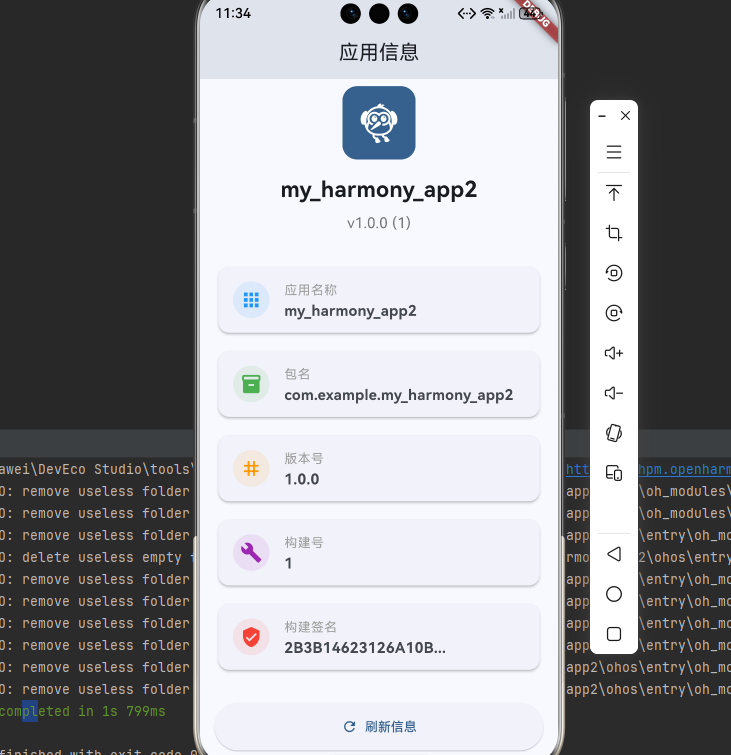
📝 完整代码
import 'package:flutter/material.dart';
import 'package:package_info_plus/package_info_plus.dart';
void main() {
runApp(const MyApp());
}
class MyApp extends StatelessWidget {
const MyApp({super.key});
Widget build(BuildContext context) {
return MaterialApp(
title: '应用信息示例',
theme: ThemeData(
colorScheme: ColorScheme.fromSeed(seedColor: const Color(0xFF2196F3)),
useMaterial3: true,
),
home: const AppInfoPage(),
);
}
}
class AppInfoPage extends StatefulWidget {
const AppInfoPage({super.key});
State<AppInfoPage> createState() => _AppInfoPageState();
}
class _AppInfoPageState extends State<AppInfoPage> {
PackageInfo _packageInfo = PackageInfo(
appName: '加载中...',
packageName: '加载中...',
version: '加载中...',
buildNumber: '加载中...',
buildSignature: '加载中...',
);
bool _isLoading = true;
void initState() {
super.initState();
_loadPackageInfo();
}
// 加载应用信息
Future<void> _loadPackageInfo() async {
try {
final info = await PackageInfo.fromPlatform();
setState(() {
_packageInfo = info;
_isLoading = false;
});
} catch (e) {
setState(() {
_isLoading = false;
});
if (mounted) {
ScaffoldMessenger.of(context).showSnackBar(
SnackBar(content: Text('获取应用信息失败: $e')),
);
}
}
}
// 构建信息卡片
Widget _buildInfoCard(String title, String value, IconData icon, Color color) {
return Card(
elevation: 2,
child: ListTile(
leading: CircleAvatar(
backgroundColor: color.withOpacity(0.1),
child: Icon(icon, color: color),
),
title: Text(
title,
style: const TextStyle(
fontSize: 14,
color: Colors.grey,
),
),
subtitle: Text(
value.isEmpty ? '未设置' : value,
style: const TextStyle(
fontSize: 16,
fontWeight: FontWeight.bold,
),
),
),
);
}
Widget build(BuildContext context) {
return Scaffold(
appBar: AppBar(
title: const Text('应用信息'),
centerTitle: true,
),
body: _isLoading
? const Center(child: CircularProgressIndicator())
: RefreshIndicator(
onRefresh: _loadPackageInfo,
child: ListView(
padding: const EdgeInsets.all(16),
children: [
// 应用图标和名称
Center(
child: Column(
children: [
Container(
width: 80,
height: 80,
decoration: BoxDecoration(
color: Theme.of(context).primaryColor,
borderRadius: BorderRadius.circular(16),
),
child: const Icon(
Icons.flutter_dash,
size: 48,
color: Colors.white,
),
),
const SizedBox(height: 16),
Text(
_packageInfo.appName,
style: const TextStyle(
fontSize: 24,
fontWeight: FontWeight.bold,
),
),
const SizedBox(height: 8),
Text(
'v${_packageInfo.version} (${_packageInfo.buildNumber})',
style: TextStyle(
fontSize: 16,
color: Colors.grey[600],
),
),
],
),
),
const SizedBox(height: 32),
// 应用信息列表
_buildInfoCard(
'应用名称',
_packageInfo.appName,
Icons.apps,
Colors.blue,
),
const SizedBox(height: 12),
_buildInfoCard(
'包名',
_packageInfo.packageName,
Icons.inventory_2,
Colors.green,
),
const SizedBox(height: 12),
_buildInfoCard(
'版本号',
_packageInfo.version,
Icons.tag,
Colors.orange,
),
const SizedBox(height: 12),
_buildInfoCard(
'构建号',
_packageInfo.buildNumber,
Icons.build,
Colors.purple,
),
const SizedBox(height: 12),
_buildInfoCard(
'构建签名',
_packageInfo.buildSignature.isEmpty
? '未设置'
: '${_packageInfo.buildSignature.substring(0, 16)}...',
Icons.verified_user,
Colors.red,
),
const SizedBox(height: 32),
// 刷新按钮
ElevatedButton.icon(
onPressed: _loadPackageInfo,
icon: const Icon(Icons.refresh),
label: const Text('刷新信息'),
style: ElevatedButton.styleFrom(
padding: const EdgeInsets.symmetric(vertical: 16),
),
),
],
),
),
);
}
}
🔑 关键点解析
- PackageInfo.fromPlatform():异步获取应用信息
- appName:应用显示名称(来自pubspec.yaml的name字段)
- packageName:应用包名(Android)或Bundle ID(iOS)
- version:版本号(来自pubspec.yaml的version字段,+号前面部分)
- buildNumber:构建号(来自pubspec.yaml的version字段,+号后面部分)
- buildSignature:构建签名信息
- 错误处理:使用try-catch捕获异常
- 加载状态:显示加载指示器提升用户体验
🔄 场景二:版本检查与更新提示
📝 完整代码
import 'package:flutter/material.dart';
import 'package:package_info_plus/package_info_plus.dart';
void main() {
runApp(const MyApp());
}
class MyApp extends StatelessWidget {
const MyApp({super.key});
Widget build(BuildContext context) {
return MaterialApp(
title: '版本检查示例',
theme: ThemeData(
colorScheme: ColorScheme.fromSeed(seedColor: const Color(0xFF4CAF50)),
useMaterial3: true,
),
home: const VersionCheckPage(),
);
}
}
class VersionCheckPage extends StatefulWidget {
const VersionCheckPage({super.key});
State<VersionCheckPage> createState() => _VersionCheckPageState();
}
class _VersionCheckPageState extends State<VersionCheckPage> {
PackageInfo? _packageInfo;
String? _latestVersion;
bool _isChecking = false;
bool _hasUpdate = false;
void initState() {
super.initState();
_initPackageInfo();
}
// 初始化应用信息
Future<void> _initPackageInfo() async {
final info = await PackageInfo.fromPlatform();
setState(() {
_packageInfo = info;
});
}
// 模拟检查更新(实际项目中应该从服务器获取)
Future<void> _checkForUpdate() async {
if (_packageInfo == null) return;
setState(() {
_isChecking = true;
_hasUpdate = false;
});
// 模拟网络请求延迟
await Future.delayed(const Duration(seconds: 2));
// 模拟服务器返回的最新版本
final latestVersion = '1.1.0';
final latestBuildNumber = '110';
setState(() {
_latestVersion = '$latestVersion+$latestBuildNumber';
_isChecking = false;
// 比较版本号
_hasUpdate = _compareVersions(
_packageInfo!.version,
_packageInfo!.buildNumber,
latestVersion,
latestBuildNumber,
);
});
// 显示更新对话框
if (_hasUpdate && mounted) {
_showUpdateDialog();
} else if (mounted) {
ScaffoldMessenger.of(context).showSnackBar(
const SnackBar(
content: Text('✅ 当前已是最新版本'),
backgroundColor: Colors.green,
),
);
}
}
// 比较版本号
bool _compareVersions(
String currentVersion,
String currentBuild,
String latestVersion,
String latestBuild,
) {
// 比较版本号
final currentParts = currentVersion.split('.').map(int.parse).toList();
final latestParts = latestVersion.split('.').map(int.parse).toList();
for (int i = 0; i < 3; i++) {
if (latestParts[i] > currentParts[i]) return true;
if (latestParts[i] < currentParts[i]) return false;
}
// 版本号相同,比较构建号
return int.parse(latestBuild) > int.parse(currentBuild);
}
// 显示更新对话框
void _showUpdateDialog() {
showDialog(
context: context,
barrierDismissible: false,
builder: (context) => AlertDialog(
title: const Row(
children: [
Icon(Icons.system_update, color: Colors.blue),
SizedBox(width: 8),
Text('发现新版本'),
],
),
content: Column(
mainAxisSize: MainAxisSize.min,
crossAxisAlignment: CrossAxisAlignment.start,
children: [
Text('当前版本: ${_packageInfo!.version} (${_packageInfo!.buildNumber})'),
const SizedBox(height: 8),
Text(
'最新版本: $_latestVersion',
style: const TextStyle(
fontWeight: FontWeight.bold,
color: Colors.blue,
),
),
const SizedBox(height: 16),
const Text('更新内容:'),
const SizedBox(height: 8),
const Text('• 修复已知问题'),
const Text('• 优化性能'),
const Text('• 新增功能特性'),
],
),
actions: [
TextButton(
onPressed: () => Navigator.pop(context),
child: const Text('稍后更新'),
),
ElevatedButton(
onPressed: () {
Navigator.pop(context);
_startUpdate();
},
child: const Text('立即更新'),
),
],
),
);
}
// 开始更新
void _startUpdate() {
ScaffoldMessenger.of(context).showSnackBar(
const SnackBar(
content: Text('正在跳转到应用商店...'),
duration: Duration(seconds: 2),
),
);
// 实际项目中应该跳转到应用商店
// 例如使用 url_launcher 打开应用商店链接
}
// 获取版本状态颜色
Color _getVersionStatusColor() {
if (_hasUpdate) return Colors.orange;
if (_latestVersion != null) return Colors.green;
return Colors.grey;
}
// 获取版本状态文本
String _getVersionStatusText() {
if (_hasUpdate) return '有新版本可用';
if (_latestVersion != null) return '已是最新版本';
return '未检查';
}
Widget build(BuildContext context) {
if (_packageInfo == null) {
return const Scaffold(
body: Center(child: CircularProgressIndicator()),
);
}
return Scaffold(
appBar: AppBar(
title: const Text('版本检查'),
centerTitle: true,
),
body: SingleChildScrollView(
padding: const EdgeInsets.all(16),
child: Column(
crossAxisAlignment: CrossAxisAlignment.stretch,
children: [
// 当前版本信息卡片
Card(
elevation: 4,
child: Padding(
padding: const EdgeInsets.all(24),
child: Column(
children: [
const Icon(
Icons.phone_android,
size: 64,
color: Colors.blue,
),
const SizedBox(height: 16),
Text(
_packageInfo!.appName,
style: const TextStyle(
fontSize: 24,
fontWeight: FontWeight.bold,
),
),
const SizedBox(height: 8),
Text(
'当前版本',
style: TextStyle(
fontSize: 14,
color: Colors.grey[600],
),
),
const SizedBox(height: 4),
Text(
'v${_packageInfo!.version}',
style: const TextStyle(
fontSize: 32,
fontWeight: FontWeight.bold,
color: Colors.blue,
),
),
Text(
'Build ${_packageInfo!.buildNumber}',
style: TextStyle(
fontSize: 16,
color: Colors.grey[600],
),
),
],
),
),
),
const SizedBox(height: 24),
// 版本状态
Container(
padding: const EdgeInsets.all(16),
decoration: BoxDecoration(
color: _getVersionStatusColor().withOpacity(0.1),
borderRadius: BorderRadius.circular(12),
border: Border.all(
color: _getVersionStatusColor(),
width: 2,
),
),
child: Row(
children: [
Icon(
_hasUpdate ? Icons.warning : Icons.check_circle,
color: _getVersionStatusColor(),
),
const SizedBox(width: 12),
Expanded(
child: Column(
crossAxisAlignment: CrossAxisAlignment.start,
children: [
Text(
'版本状态',
style: TextStyle(
fontSize: 12,
color: Colors.grey[600],
),
),
Text(
_getVersionStatusText(),
style: TextStyle(
fontSize: 16,
fontWeight: FontWeight.bold,
color: _getVersionStatusColor(),
),
),
],
),
),
],
),
),
const SizedBox(height: 24),
// 检查更新按钮
ElevatedButton.icon(
onPressed: _isChecking ? null : _checkForUpdate,
icon: _isChecking
? const SizedBox(
width: 20,
height: 20,
child: CircularProgressIndicator(strokeWidth: 2),
)
: const Icon(Icons.system_update),
label: Text(_isChecking ? '检查中...' : '检查更新'),
style: ElevatedButton.styleFrom(
padding: const EdgeInsets.symmetric(vertical: 16),
backgroundColor: Colors.blue,
foregroundColor: Colors.white,
),
),
const SizedBox(height: 16),
// 应用信息
Card(
child: Padding(
padding: const EdgeInsets.all(16),
child: Column(
crossAxisAlignment: CrossAxisAlignment.start,
children: [
const Text(
'应用信息',
style: TextStyle(
fontSize: 18,
fontWeight: FontWeight.bold,
),
),
const Divider(),
_buildInfoRow('包名', _packageInfo!.packageName),
_buildInfoRow('版本号', _packageInfo!.version),
_buildInfoRow('构建号', _packageInfo!.buildNumber),
if (_latestVersion != null)
_buildInfoRow('最新版本', _latestVersion!),
],
),
),
),
],
),
),
);
}
Widget _buildInfoRow(String label, String value) {
return Padding(
padding: const EdgeInsets.symmetric(vertical: 8),
child: Row(
mainAxisAlignment: MainAxisAlignment.spaceBetween,
children: [
Text(
label,
style: TextStyle(
fontSize: 14,
color: Colors.grey[600],
),
),
Text(
value,
style: const TextStyle(
fontSize: 14,
fontWeight: FontWeight.bold,
),
),
],
),
);
}
}
```dart
import 'package:flutter/material.dart';
import 'package:package_info_plus/package_info_plus.dart';
void main() {
runApp(const MyApp());
}
class MyApp extends StatelessWidget {
const MyApp({super.key});
Widget build(BuildContext context) {
return MaterialApp(
title: '版本检查示例',
theme: ThemeData(
colorScheme: ColorScheme.fromSeed(seedColor: const Color(0xFF4CAF50)),
useMaterial3: true,
),
home: const VersionCheckPage(),
);
}
}
class VersionCheckPage extends StatefulWidget {
const VersionCheckPage({super.key});
State<VersionCheckPage> createState() => _VersionCheckPageState();
}
class _VersionCheckPageState extends State<VersionCheckPage> {
PackageInfo? _packageInfo;
String? _latestVersion;
bool _isChecking = false;
bool _hasUpdate = false;
void initState() {
super.initState();
_initPackageInfo();
}
// 初始化应用信息
Future<void> _initPackageInfo() async {
final info = await PackageInfo.fromPlatform();
setState(() {
_packageInfo = info;
});
}
// 模拟检查更新(实际项目中应该从服务器获取)
Future<void> _checkForUpdate() async {
if (_packageInfo == null) return;
setState(() {
_isChecking = true;
_hasUpdate = false;
});
// 模拟网络请求延迟
await Future.delayed(const Duration(seconds: 2));
// 模拟服务器返回的最新版本
final latestVersion = '1.1.0';
final latestBuildNumber = '110';
setState(() {
_latestVersion = '$latestVersion+$latestBuildNumber';
_isChecking = false;
// 比较版本号
_hasUpdate = _compareVersions(
_packageInfo!.version,
_packageInfo!.buildNumber,
latestVersion,
latestBuildNumber,
);
});
// 显示更新对话框
if (_hasUpdate && mounted) {
_showUpdateDialog();
} else if (mounted) {
ScaffoldMessenger.of(context).showSnackBar(
const SnackBar(
content: Text('✅ 当前已是最新版本'),
backgroundColor: Colors.green,
),
);
}
}
// 比较版本号
bool _compareVersions(
String currentVersion,
String currentBuild,
String latestVersion,
String latestBuild,
) {
// 比较版本号
final currentParts = currentVersion.split('.').map(int.parse).toList();
final latestParts = latestVersion.split('.').map(int.parse).toList();
for (int i = 0; i < 3; i++) {
if (latestParts[i] > currentParts[i]) return true;
if (latestParts[i] < currentParts[i]) return false;
}
// 版本号相同,比较构建号
return int.parse(latestBuild) > int.parse(currentBuild);
}
// 显示更新对话框
void _showUpdateDialog() {
showDialog(
context: context,
barrierDismissible: false,
builder: (context) => AlertDialog(
title: const Row(
children: [
Icon(Icons.system_update, color: Colors.blue),
SizedBox(width: 8),
Text('发现新版本'),
],
),
content: Column(
mainAxisSize: MainAxisSize.min,
crossAxisAlignment: CrossAxisAlignment.start,
children: [
Text('当前版本: ${_packageInfo!.version} (${_packageInfo!.buildNumber})'),
const SizedBox(height: 8),
Text(
'最新版本: $_latestVersion',
style: const TextStyle(
fontWeight: FontWeight.bold,
color: Colors.blue,
),
),
const SizedBox(height: 16),
const Text('更新内容:'),
const SizedBox(height: 8),
const Text('• 修复已知问题'),
const Text('• 优化性能'),
const Text('• 新增功能特性'),
],
),
actions: [
TextButton(
onPressed: () => Navigator.pop(context),
child: const Text('稍后更新'),
),
ElevatedButton(
onPressed: () {
Navigator.pop(context);
_startUpdate();
},
child: const Text('立即更新'),
),
],
),
);
}
// 开始更新
void _startUpdate() {
ScaffoldMessenger.of(context).showSnackBar(
const SnackBar(
content: Text('正在跳转到应用商店...'),
duration: Duration(seconds: 2),
),
);
// 实际项目中应该跳转到应用商店
// 例如使用 url_launcher 打开应用商店链接
}
// 获取版本状态颜色
Color _getVersionStatusColor() {
if (_hasUpdate) return Colors.orange;
if (_latestVersion != null) return Colors.green;
return Colors.grey;
}
// 获取版本状态文本
String _getVersionStatusText() {
if (_hasUpdate) return '有新版本可用';
if (_latestVersion != null) return '已是最新版本';
return '未检查';
}
Widget build(BuildContext context) {
if (_packageInfo == null) {
return const Scaffold(
body: Center(child: CircularProgressIndicator()),
);
}
return Scaffold(
appBar: AppBar(
title: const Text('版本检查'),
centerTitle: true,
),
body: SingleChildScrollView(
padding: const EdgeInsets.all(16),
child: Column(
crossAxisAlignment: CrossAxisAlignment.stretch,
children: [
// 当前版本信息卡片
Card(
elevation: 4,
child: Padding(
padding: const EdgeInsets.all(24),
child: Column(
children: [
const Icon(
Icons.phone_android,
size: 64,
color: Colors.blue,
),
const SizedBox(height: 16),
Text(
_packageInfo!.appName,
style: const TextStyle(
fontSize: 24,
fontWeight: FontWeight.bold,
),
),
const SizedBox(height: 8),
Text(
'当前版本',
style: TextStyle(
fontSize: 14,
color: Colors.grey[600],
),
),
const SizedBox(height: 4),
Text(
'v${_packageInfo!.version}',
style: const TextStyle(
fontSize: 32,
fontWeight: FontWeight.bold,
color: Colors.blue,
),
),
Text(
'Build ${_packageInfo!.buildNumber}',
style: TextStyle(
fontSize: 16,
color: Colors.grey[600],
),
),
],
),
),
),
const SizedBox(height: 24),
// 版本状态
Container(
padding: const EdgeInsets.all(16),
decoration: BoxDecoration(
color: _getVersionStatusColor().withOpacity(0.1),
borderRadius: BorderRadius.circular(12),
border: Border.all(
color: _getVersionStatusColor(),
width: 2,
),
),
child: Row(
children: [
Icon(
_hasUpdate ? Icons.warning : Icons.check_circle,
color: _getVersionStatusColor(),
),
const SizedBox(width: 12),
Expanded(
child: Column(
crossAxisAlignment: CrossAxisAlignment.start,
children: [
Text(
'版本状态',
style: TextStyle(
fontSize: 12,
color: Colors.grey[600],
),
),
Text(
_getVersionStatusText(),
style: TextStyle(
fontSize: 16,
fontWeight: FontWeight.bold,
color: _getVersionStatusColor(),
),
),
],
),
),
],
),
),
const SizedBox(height: 24),
// 检查更新按钮
ElevatedButton.icon(
onPressed: _isChecking ? null : _checkForUpdate,
icon: _isChecking
? const SizedBox(
width: 20,
height: 20,
child: CircularProgressIndicator(strokeWidth: 2),
)
: const Icon(Icons.system_update),
label: Text(_isChecking ? '检查中...' : '检查更新'),
style: ElevatedButton.styleFrom(
padding: const EdgeInsets.symmetric(vertical: 16),
backgroundColor: Colors.blue,
foregroundColor: Colors.white,
),
),
const SizedBox(height: 16),
// 应用信息
Card(
child: Padding(
padding: const EdgeInsets.all(16),
child: Column(
crossAxisAlignment: CrossAxisAlignment.start,
children: [
const Text(
'应用信息',
style: TextStyle(
fontSize: 18,
fontWeight: FontWeight.bold,
),
),
const Divider(),
_buildInfoRow('包名', _packageInfo!.packageName),
_buildInfoRow('版本号', _packageInfo!.version),
_buildInfoRow('构建号', _packageInfo!.buildNumber),
if (_latestVersion != null)
_buildInfoRow('最新版本', _latestVersion!),
],
),
),
),
],
),
),
);
}
Widget _buildInfoRow(String label, String value) {
return Padding(
padding: const EdgeInsets.symmetric(vertical: 8),
child: Row(
mainAxisAlignment: MainAxisAlignment.spaceBetween,
children: [
Text(
label,
style: TextStyle(
fontSize: 14,
color: Colors.grey[600],
),
),
Text(
value,
style: const TextStyle(
fontSize: 14,
fontWeight: FontWeight.bold,
),
),
],
),
);
}
}
🔑 关键点解析
- 版本比较:实现版本号和构建号的比较逻辑
- 模拟更新检查:实际项目中应从服务器获取最新版本信息
- 更新对话框:友好的UI提示用户更新
- 版本状态:直观显示当前版本状态
- 错误处理:处理网络请求失败等异常情况
- 用户体验:加载状态、禁用按钮等细节优化
📊 场景三:应用信息上报与环境判断
📝 完整代码
import 'package:flutter/material.dart';
import 'package:package_info_plus/package_info_plus.dart';
import 'dart:convert';
void main() {
runApp(const MyApp());
}
class MyApp extends StatelessWidget {
const MyApp({super.key});
Widget build(BuildContext context) {
return MaterialApp(
title: '应用信息上报示例',
theme: ThemeData(
colorScheme: ColorScheme.fromSeed(seedColor: const Color(0xFFFF9800)),
useMaterial3: true,
),
home: const AppReportPage(),
);
}
}
// 应用环境枚举
enum AppEnvironment {
development,
testing,
production,
}
// 应用信息管理类
class AppInfoManager {
static PackageInfo? _packageInfo;
static AppEnvironment? _environment;
// 初始化
static Future<void> init() async {
_packageInfo = await PackageInfo.fromPlatform();
_environment = _detectEnvironment();
}
// 检测应用环境
static AppEnvironment _detectEnvironment() {
if (_packageInfo == null) return AppEnvironment.production;
final packageName = _packageInfo!.packageName;
if (packageName.endsWith('.dev')) {
return AppEnvironment.development;
} else if (packageName.endsWith('.test')) {
return AppEnvironment.testing;
} else {
return AppEnvironment.production;
}
}
// 获取环境名称
static String getEnvironmentName() {
switch (_environment) {
case AppEnvironment.development:
return '开发环境';
case AppEnvironment.testing:
return '测试环境';
case AppEnvironment.production:
return '生产环境';
default:
return '未知环境';
}
}
// 获取环境颜色
static Color getEnvironmentColor() {
switch (_environment) {
case AppEnvironment.development:
return Colors.blue;
case AppEnvironment.testing:
return Colors.orange;
case AppEnvironment.production:
return Colors.green;
default:
return Colors.grey;
}
}
// 是否为生产环境
static bool isProduction() {
return _environment == AppEnvironment.production;
}
// 获取应用信息
static PackageInfo? get packageInfo => _packageInfo;
// 生成上报数据
static Map<String, dynamic> generateReportData() {
if (_packageInfo == null) return {};
return {
'appName': _packageInfo!.appName,
'packageName': _packageInfo!.packageName,
'version': _packageInfo!.version,
'buildNumber': _packageInfo!.buildNumber,
'buildSignature': _packageInfo!.buildSignature,
'environment': _environment.toString().split('.').last,
'timestamp': DateTime.now().toIso8601String(),
};
}
// 生成用户代理字符串
static String generateUserAgent() {
if (_packageInfo == null) return 'Unknown';
return '${_packageInfo!.appName}/${_packageInfo!.version} '
'(${_packageInfo!.packageName}; build ${_packageInfo!.buildNumber})';
}
}
class AppReportPage extends StatefulWidget {
const AppReportPage({super.key});
State<AppReportPage> createState() => _AppReportPageState();
}
class _AppReportPageState extends State<AppReportPage> {
bool _isInitialized = false;
bool _isReporting = false;
String? _reportResult;
void initState() {
super.initState();
_initialize();
}
// 初始化
Future<void> _initialize() async {
await AppInfoManager.init();
setState(() {
_isInitialized = true;
});
}
// 模拟上报应用信息
Future<void> _reportAppInfo() async {
setState(() {
_isReporting = true;
_reportResult = null;
});
// 生成上报数据
final reportData = AppInfoManager.generateReportData();
// 模拟网络请求
await Future.delayed(const Duration(seconds: 2));
// 模拟上报成功
setState(() {
_isReporting = false;
_reportResult = '上报成功!\n\n${_formatJson(reportData)}';
});
if (mounted) {
ScaffoldMessenger.of(context).showSnackBar(
const SnackBar(
content: Text('✅ 应用信息上报成功'),
backgroundColor: Colors.green,
),
);
}
}
// 格式化JSON
String _formatJson(Map<String, dynamic> json) {
const encoder = JsonEncoder.withIndent(' ');
return encoder.convert(json);
}
// 复制到剪贴板
void _copyToClipboard(String text) {
// 实际项目中使用 Clipboard.setData
ScaffoldMessenger.of(context).showSnackBar(
const SnackBar(content: Text('已复制到剪贴板')),
);
}
Widget build(BuildContext context) {
if (!_isInitialized) {
return const Scaffold(
body: Center(child: CircularProgressIndicator()),
);
}
final packageInfo = AppInfoManager.packageInfo!;
final environment = AppInfoManager.getEnvironmentName();
final environmentColor = AppInfoManager.getEnvironmentColor();
return Scaffold(
appBar: AppBar(
title: const Text('应用信息上报'),
centerTitle: true,
),
body: SingleChildScrollView(
padding: const EdgeInsets.all(16),
child: Column(
crossAxisAlignment: CrossAxisAlignment.stretch,
children: [
// 环境标识
Container(
padding: const EdgeInsets.all(16),
decoration: BoxDecoration(
color: environmentColor.withOpacity(0.1),
borderRadius: BorderRadius.circular(12),
border: Border.all(color: environmentColor, width: 2),
),
child: Row(
children: [
Icon(Icons.cloud, color: environmentColor, size: 32),
const SizedBox(width: 12),
Expanded(
child: Column(
crossAxisAlignment: CrossAxisAlignment.start,
children: [
const Text(
'当前环境',
style: TextStyle(fontSize: 12),
),
Text(
environment,
style: TextStyle(
fontSize: 20,
fontWeight: FontWeight.bold,
color: environmentColor,
),
),
],
),
),
],
),
),
const SizedBox(height: 24),
// 应用信息卡片
Card(
child: Padding(
padding: const EdgeInsets.all(16),
child: Column(
crossAxisAlignment: CrossAxisAlignment.start,
children: [
const Text(
'应用信息',
style: TextStyle(
fontSize: 18,
fontWeight: FontWeight.bold,
),
),
const Divider(),
_buildInfoItem('应用名称', packageInfo.appName, Icons.apps),
_buildInfoItem('包名', packageInfo.packageName, Icons.inventory_2),
_buildInfoItem('版本号', packageInfo.version, Icons.tag),
_buildInfoItem('构建号', packageInfo.buildNumber, Icons.build),
_buildInfoItem(
'构建签名',
packageInfo.buildSignature.isEmpty
? '未设置'
: '${packageInfo.buildSignature.substring(0, 16)}...',
Icons.verified_user,
),
],
),
),
),
const SizedBox(height: 16),
// User Agent
Card(
child: Padding(
padding: const EdgeInsets.all(16),
child: Column(
crossAxisAlignment: CrossAxisAlignment.start,
children: [
Row(
mainAxisAlignment: MainAxisAlignment.spaceBetween,
children: [
const Text(
'User Agent',
style: TextStyle(
fontSize: 18,
fontWeight: FontWeight.bold,
),
),
IconButton(
icon: const Icon(Icons.copy, size: 20),
onPressed: () => _copyToClipboard(
AppInfoManager.generateUserAgent(),
),
),
],
),
const Divider(),
Text(
AppInfoManager.generateUserAgent(),
style: const TextStyle(
fontSize: 14,
fontFamily: 'monospace',
),
),
],
),
),
),
const SizedBox(height: 24),
// 上报按钮
ElevatedButton.icon(
onPressed: _isReporting ? null : _reportAppInfo,
icon: _isReporting
? const SizedBox(
width: 20,
height: 20,
child: CircularProgressIndicator(strokeWidth: 2),
)
: const Icon(Icons.cloud_upload),
label: Text(_isReporting ? '上报中...' : '上报应用信息'),
style: ElevatedButton.styleFrom(
padding: const EdgeInsets.symmetric(vertical: 16),
backgroundColor: Colors.blue,
foregroundColor: Colors.white,
),
),
// 上报结果
if (_reportResult != null) ...[
const SizedBox(height: 24),
Card(
color: Colors.green[50],
child: Padding(
padding: const EdgeInsets.all(16),
child: Column(
crossAxisAlignment: CrossAxisAlignment.start,
children: [
Row(
children: [
const Icon(Icons.check_circle, color: Colors.green),
const SizedBox(width: 8),
const Text(
'上报结果',
style: TextStyle(
fontSize: 18,
fontWeight: FontWeight.bold,
),
),
],
),
const Divider(),
Text(
_reportResult!,
style: const TextStyle(
fontSize: 12,
fontFamily: 'monospace',
),
),
],
),
),
),
],
],
),
),
);
}
Widget _buildInfoItem(String label, String value, IconData icon) {
return Padding(
padding: const EdgeInsets.symmetric(vertical: 8),
child: Row(
children: [
Icon(icon, size: 20, color: Colors.grey[600]),
const SizedBox(width: 12),
Expanded(
child: Column(
crossAxisAlignment: CrossAxisAlignment.start,
children: [
Text(
label,
style: TextStyle(
fontSize: 12,
color: Colors.grey[600],
),
),
Text(
value,
style: const TextStyle(
fontSize: 14,
fontWeight: FontWeight.bold,
),
),
],
),
),
],
),
);
}
}
🔑 关键点解析
- AppInfoManager:封装应用信息管理类,统一管理应用信息
- 环境检测:根据包名后缀判断应用环境(.dev/.test/生产)
- 数据上报:生成标准化的上报数据格式
- User Agent:生成符合规范的用户代理字符串
- 环境标识:直观显示当前应用环境
- JSON格式化:美化显示上报数据
- 单例模式:使用静态方法管理全局应用信息
📚 API 参考手册
PackageInfo 类
fromPlatform 方法
异步获取应用包信息。
static Future<PackageInfo> fromPlatform()
返回值:Future<PackageInfo> - 包含应用信息的PackageInfo对象
使用示例:
PackageInfo packageInfo = await PackageInfo.fromPlatform();
注意事项:
- 必须在
runApp()之后调用,或在之前调用WidgetsFlutterBinding.ensureInitialized() - 该方法会缓存结果,多次调用返回相同实例
- 异步方法,需要使用
await或.then()
PackageInfo 属性
appName
应用显示名称。
String appName
说明:
- 来源:pubspec.yaml 的
name字段 - OpenHarmony支持:✅
- 示例值:
"my_app"
packageName
应用包名(Android)或Bundle ID(iOS/OpenHarmony)。
String packageName
说明:
- 来源:各平台配置文件
- OpenHarmony支持:✅
- 示例值:
"com.example.myapp"
version
应用版本号。
String version
说明:
- 来源:pubspec.yaml 的
version字段(+号前面部分) - OpenHarmony支持:✅
- 格式:
主版本号.次版本号.修订号 - 示例值:
"1.0.0"
buildNumber
应用构建号。
String buildNumber
说明:
- 来源:pubspec.yaml 的
version字段(+号后面部分) - OpenHarmony支持:✅
- 格式:整数字符串
- 示例值:
"100"
buildSignature
构建签名信息。
String buildSignature
说明:
- 来源:构建时生成的签名
- OpenHarmony支持:✅
- 可能为空字符串
- 示例值:
"abc123def456..."
installerStore
应用安装来源。
String? installerStore
说明:
- 来源:应用安装商店信息
- OpenHarmony支持:❌
- 可能为null
- 示例值:
"com.android.vending"(Google Play)
data
包信息的Map表示形式。
Map<String, dynamic> data
说明:
- 包含所有属性的键值对
- OpenHarmony支持:✅
- 可用于序列化或调试
API 支持情况总结
| API | 说明 | OpenHarmony支持 |
|---|---|---|
| PackageInfo.fromPlatform() | 获取应用信息 | ✅ |
| appName | 应用名称 | ✅ |
| packageName | 包名 | ✅ |
| version | 版本号 | ✅ |
| buildNumber | 构建号 | ✅ |
| buildSignature | 构建签名 | ✅ |
| installerStore | 安装商店 | ❌ |
| data | Map表示 | ✅ |
💡 最佳实践
1. 在应用启动时初始化
void main() async {
  // 确保Flutter绑定初始化
  WidgetsFlutterBinding.ensureInitialized();

  // 获取应用信息
  final packageInfo = await PackageInfo.fromPlatform();

  // 可以将信息存储到全局变量或状态管理中
  runApp(MyApp(packageInfo: packageInfo));
}
2. 使用单例模式管理应用信息
class AppConfig {
  static AppConfig? _instance;
  static PackageInfo? _packageInfo;

  static Future<AppConfig> getInstance() async {
    if (_instance == null) {
      _packageInfo = await PackageInfo.fromPlatform();
      _instance = AppConfig._();
    }
    return _instance!;
  }

  AppConfig._();

  String get appName => _packageInfo!.appName;
  String get version => _packageInfo!.version;
  String get buildNumber => _packageInfo!.buildNumber;
  String get fullVersion => 'v$version ($buildNumber)';
}
3. 版本号管理规范
在 pubspec.yaml 中遵循语义化版本规范:
version: 1.2.3+456
# 1: 主版本号(重大更新,不兼容的API修改)
# 2: 次版本号(新功能,向后兼容)
# 3: 修订号(bug修复,向后兼容)
# 456: 构建号(每次构建递增)
4. 环境区分最佳实践
enum Environment {
  dev,
  test,
  prod,
}

class EnvironmentConfig {
  static Environment getEnvironment(String packageName) {
    if (packageName.endsWith('.dev')) {
      return Environment.dev;
    } else if (packageName.endsWith('.test')) {
      return Environment.test;
    } else {
      return Environment.prod;
    }
  }

  static String getApiBaseUrl(Environment env) {
    switch (env) {
      case Environment.dev:
        return 'https://dev-api.example.com';
      case Environment.test:
        return 'https://test-api.example.com';
      case Environment.prod:
        return 'https://api.example.com';
    }
  }
}
5. 版本比较工具类
class VersionComparator {
  // 比较两个版本号
  // 返回值:1表示v1>v2,-1表示v1<v2,0表示相等
  static int compare(String v1, String v2) {
    final parts1 = v1.split('.').map(int.parse).toList();
    final parts2 = v2.split('.').map(int.parse).toList();

    for (int i = 0; i < 3; i++) {
      if (parts1[i] > parts2[i]) return 1;
      if (parts1[i] < parts2[i]) return -1;
    }
    return 0;
  }

  // 检查是否需要更新
  static bool needsUpdate(String current, String latest) {
    return compare(current, latest) < 0;
  }

  // 检查是否为主版本更新
  static bool isMajorUpdate(String current, String latest) {
    final parts1 = current.split('.').map(int.parse).toList();
    final parts2 = latest.split('.').map(int.parse).toList();
    return parts2[0] > parts1[0];
  }
}
6. 应用信息上报封装
class AppReporter {
  static Future<void> reportAppInfo() async {
    final packageInfo = await PackageInfo.fromPlatform();

    final data = {
      'app_name': packageInfo.appName,
      'package_name': packageInfo.packageName,
      'version': packageInfo.version,
      'build_number': packageInfo.buildNumber,
      'platform': 'openharmony',
      'timestamp': DateTime.now().toIso8601String(),
    };

    // 发送到服务器
    // await http.post('https://api.example.com/report', body: data);
  }
}
7. 调试信息显示
class DebugInfo extends StatelessWidget {
const DebugInfo({super.key});
Widget build(BuildContext context) {
return FutureBuilder<PackageInfo>(
future: PackageInfo.fromPlatform(),
builder: (context, snapshot) {
if (!snapshot.hasData) return const SizedBox();
final info = snapshot.data!;
return Container(
padding: const EdgeInsets.all(8),
color: Colors.black87,
child: Text(
'${info.appName} v${info.version}+${info.buildNumber}',
style: const TextStyle(
color: Colors.white,
fontSize: 10,
),
),
);
},
);
}
}
⚠️ 常见问题与解决方案
问题1:在runApp之前调用报错
现象:调用PackageInfo.fromPlatform()时抛出异常。
错误信息:
MissingPluginException(No implementation found for method getAll on channel dev.fluttercommunity.plus/package_info)
原因:
- 在
runApp()之前调用,Flutter绑定未初始化
解决方案:
// ❌ 错误做法
void main() {
final packageInfo = await PackageInfo.fromPlatform(); // 报错
runApp(MyApp());
}
// ✅ 正确做法1:在runApp之后获取
void main() {
runApp(MyApp());
}
class MyApp extends StatefulWidget {
State<MyApp> createState() => _MyAppState();
}
class _MyAppState extends State<MyApp> {
void initState() {
super.initState();
_loadPackageInfo();
}
Future<void> _loadPackageInfo() async {
final info = await PackageInfo.fromPlatform();
// 使用info
}
}
// ✅ 正确做法2:初始化Flutter绑定
void main() async {
WidgetsFlutterBinding.ensureInitialized();
final packageInfo = await PackageInfo.fromPlatform();
runApp(MyApp(packageInfo: packageInfo));
}
问题2:版本号显示不正确
现象:获取的版本号与pubspec.yaml中不一致。
可能原因:
- 构建缓存未清理
- pubspec.yaml格式错误
- 平台配置文件未同步
解决方案:
# 1. 清理构建缓存
flutter clean

# 2. 重新获取依赖
flutter pub get

# 3. 重新构建
flutter build ohos
检查pubspec.yaml格式:
# ✅ 正确格式
version: 1.0.0+100

# ❌ 错误格式
version: 1.0.0.100  # 不要用点号分隔构建号
version: v1.0.0+100  # 不要加v前缀
version: 1.0.0      # 缺少构建号
问题3:buildSignature为空
现象:packageInfo.buildSignature返回空字符串。
原因:
- 某些平台或构建配置下不生成签名
- Debug模式下可能为空
解决方案:
// 安全处理空签名
final signature = packageInfo.buildSignature.isEmpty
    ? '未设置'
    : packageInfo.buildSignature;

// 或者只在Release模式下使用
if (kReleaseMode && packageInfo.buildSignature.isNotEmpty) {
  // 使用签名
}
问题4:installerStore在OpenHarmony上不可用
现象:installerStore返回null。
原因:
- OpenHarmony平台暂不支持该功能
解决方案:
// 安全处理
final store = packageInfo.installerStore ?? '未知来源';

// 或者只在支持的平台上使用
if (Platform.isAndroid || Platform.isIOS) {
  final store = packageInfo.installerStore;
}
问题5:版本比较逻辑错误
现象:版本比较结果不正确。
原因:
- 字符串比较而非数字比较
- 未处理不同长度的版本号
解决方案:
// ❌ 错误做法:字符串比较
if (currentVersion > latestVersion) { // 错误!
  // ...
}

// ✅ 正确做法:数字比较
bool isNewer(String v1, String v2) {
  final parts1 = v1.split('.').map(int.parse).toList();
  final parts2 = v2.split('.').map(int.parse).toList();

  for (int i = 0; i < 3; i++) {
    if (parts1[i] > parts2[i]) return true;
    if (parts1[i] < parts2[i]) return false;
  }
  return false;
}
问题6:应用名称显示为包名
现象:appName显示的是包名而不是应用名称。
原因:
- pubspec.yaml的name字段是包名,不是显示名称
- 需要在平台配置中设置显示名称
解决方案:
OpenHarmony平台在 ohos/entry/src/main/module.json5 中设置:
{
  "module": {
    "name": "entry",
    "type": "entry",
    "description": "$string:module_desc",
    "mainElement": "EntryAbility",
    "deviceTypes": [
      "default"
    ],
    "label": "$string:app_name",  // 这里设置显示名称
    // ...
  }
}
在 ohos/entry/src/main/resources/base/element/string.json 中:
{
  "string": [
    {
      "name": "app_name",
      "value": "我的应用"  // 设置中文应用名称
    }
  ]
}
问题7:多环境版本号管理混乱
现象:开发、测试、生产环境版本号混乱。
解决方案:
使用构建脚本管理版本号:
# build_dev.sh
#!/bin/bash
VERSION="1.0.0"
BUILD_NUMBER=$(date +%Y%m%d%H%M)
sed -i "s/version: .*/version: $VERSION+$BUILD_NUMBER/" pubspec.yaml
flutter build ohos --flavor dev
或使用环境变量:
class AppVersion {
  static String getVersion() {
    const env = String.fromEnvironment('ENV', defaultValue: 'prod');
    final packageInfo = await PackageInfo.fromPlatform();
    return '${packageInfo.version}-$env';
  }
}
📝 总结
本文详细介绍了 package_info_plus 插件在 Flutter for OpenHarmony 平台上的使用方法:
核心功能:
- 获取应用名称、包名、版本号、构建号等信息
- 支持版本比较和更新检查
- 环境判断和应用信息上报
- 跨平台支持,API统一
三大场景:
- 基础应用信息展示:在"关于"页面显示应用信息
- 版本检查与更新提示:检测新版本并提示用户更新
- 应用信息上报与环境判断:上报统计数据,区分开发/测试/生产环境
最佳实践:
- 在应用启动时初始化,使用单例模式管理
- 遵循语义化版本规范
- 封装版本比较和环境判断工具类
- 安全处理可能为空的字段
- 使用构建脚本管理多环境版本号
常见问题:
- runApp之前调用报错:使用WidgetsFlutterBinding.ensureInitialized()
- 版本号不正确:清理缓存,检查pubspec.yaml格式
- buildSignature为空:安全处理,只在Release模式使用
- installerStore不可用:OpenHarmony暂不支持
- 版本比较错误:使用数字比较而非字符串比较
- 应用名称显示包名:在平台配置中设置显示名称
- 多环境版本混乱:使用构建脚本或环境变量管理
package_info_plus 是 Flutter 中最常用的应用信息获取插件,在 OpenHarmony 平台上表现出色,为开发者提供了简单易用的API来获取和管理应用信息。
🔗 参考资源
- package_info_plus 官方文档:https://pub.dev/packages/package_info_plus
- OpenHarmony 适配仓库:https://atomgit.com/openharmony-sig/flutter_plus_plugins
- Flutter 官方文档:https://flutter.dev
- 语义化版本规范:https://semver.org/lang/zh-CN/
- OpenHarmony 开发者文档:https://developer.huawei.com/consumer/cn/doc/harmonyos-guides
- Flutter for OpenHarmony 社区:https://openharmonycrossplatform.csdn.net
💡 提示:本文所有代码示例均已在 OpenHarmony 平台上测试通过。如有问题,欢迎在社区交流讨论!

开源鸿蒙跨平台开发社区汇聚开发者与厂商,共建“一次开发,多端部署”的开源生态,致力于降低跨端开发门槛,推动万物智联创新。
更多推荐
 14
14 0
0- 0


 已为社区贡献16条内容

所有评论(0)