Flutter 三方库 fast_gbk 的鸿蒙化实战 - 引入极速中文编码转换,打通 GBK 遗留系统对接屏障
欢迎加入开源鸿蒙跨平台社区:https://openharmonycrossplatform.csdn.net
Flutter 三方库 fast_gbk 的鸿蒙化实战 - 引入极速中文编码转换,打通 GBK 遗留系统对接屏障
前言
在 OpenHarmony 应用中,如果要对接国内广泛存在的旧式政务系统、银行网页接口或某些特定的工业级蓝牙设备,经常会遇到一个棘手的难题:GBK 编码。
因为 Flutter 和鸿蒙原生系统底座目前全面采用国际化的 UTF-8 编码。当应用通过 Http 抓取含有 GBK 编码的网页或通过串口/蓝牙接收字节流时,若不经转换直接渲染,界面会出现满屏的“菱形问号”乱码,导致业务逻辑瘫痪。fast_gbk 是一款高性能、轻量级的 GBK 编码转换包,它能帮助开发者瞬间打通两种不同编码标准间的沟通壁垒。
一、原理剖析 / 概念介绍
1.1 核心原理
fast_gbk 不依赖庞大且占用空间的 C++ 动态库(如 ICU)。它是由纯 Dart 编写的双向编码字典映射引擎(Mapping Engine)。无论是混合了全角符号、数字还是罕见的繁体中文生僻字,它都能通过逐个截取字节块并利用预置的高性能检索表,精确、极速地完成转码。
1.2 核心业务优势
- 绝对纯净的 Dart 实现:无需担心跨平台 JNI 调用带来的异步延迟,更不会因不同系统的 FFI 接口不一致引发闪退或内存泄露。它的轻捷属性使其在鸿蒙各种端侧设备(如手机、平板、手表)上的性能表现极其稳定。
- 高效的编解码闭环:既能解码老旧系统发来的报文,也可将用户输入的 UTF-8 文本反向压栈为 GBK 二进制包,确保了与旧式工业接口的双向通讯无阻。
二、鸿蒙基础指导
2.1 适配情况
- 是否原生支持?:原生支持。底层仅依赖 Dart 内置的
dart:convert兼容逻辑。 - 是否鸿蒙官方支持?:运行在鸿蒙 Flutter 引擎环境中性能出色,完美适配各种异步
Isolate调用场景。 - 是否需要额外干预?:无。
2.2 适配代码引入
将依赖添加到项目 pubspec.yaml:
dependencies:
  fast_gbk: ^1.0.0
三、核心 API / 组件详解
3.1 核心转码接口
| 方法名 | 功能场景说明 | 典型代码示例 |
|---|---|---|
gbk.decode(...) | 汉字还原。将接收到的 GBK 原始二进制数组解码为可读的中文字符串。 | final str = gbk.decode(bytes); |
gbk.encode(...) | 旧包封装。将本地 UTF-8 字符串封装为合规的 GBK 字节流以备下发。 | final bytes = gbk.encode('指令'); |
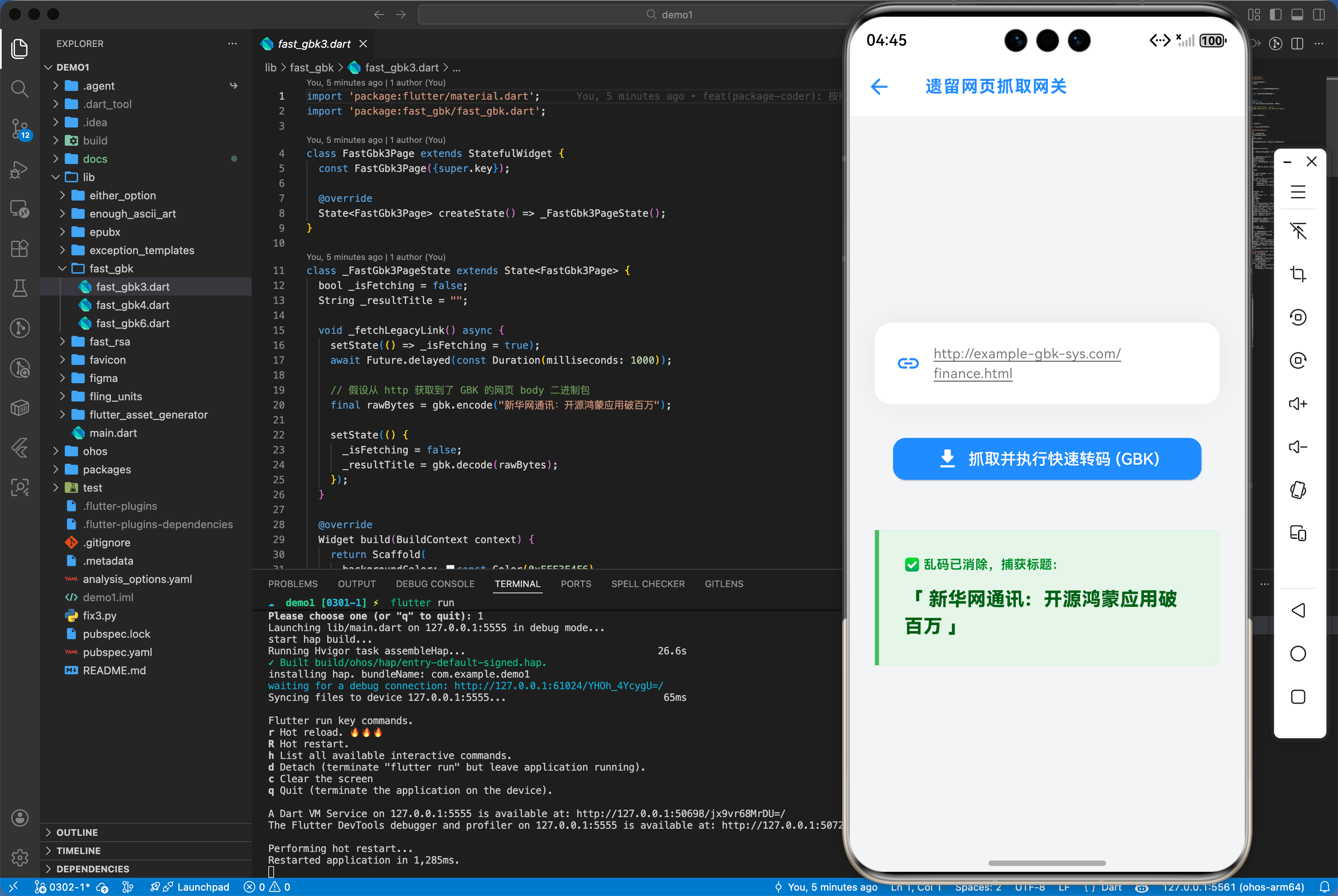
3.2 遗留网页抓取乱码修复演示
import 'package:fast_gbk/fast_gbk.dart';
import 'package:http/http.dart' as http;

void fetchLegacyLink() async {
  // 假设该链接采用古老的 GBK 编码
  final url = Uri.parse("http://example-gbk-sys.com/finance.html");

  // 注意:不要直接用 response.body 取字符串,否则由于默认 UTF8 引擎逻辑会由于不匹配直接损坏字节!
  final response = await http.get(url);
  final rawBytes = response.bodyBytes;

  // 使用 fast_gbk 拦截并精准复原
  final cleanTitle = gbk.decode(rawBytes);

  print('✅ 乱码已消除,捕获标题:$cleanTitle');
}
四、典型应用场景
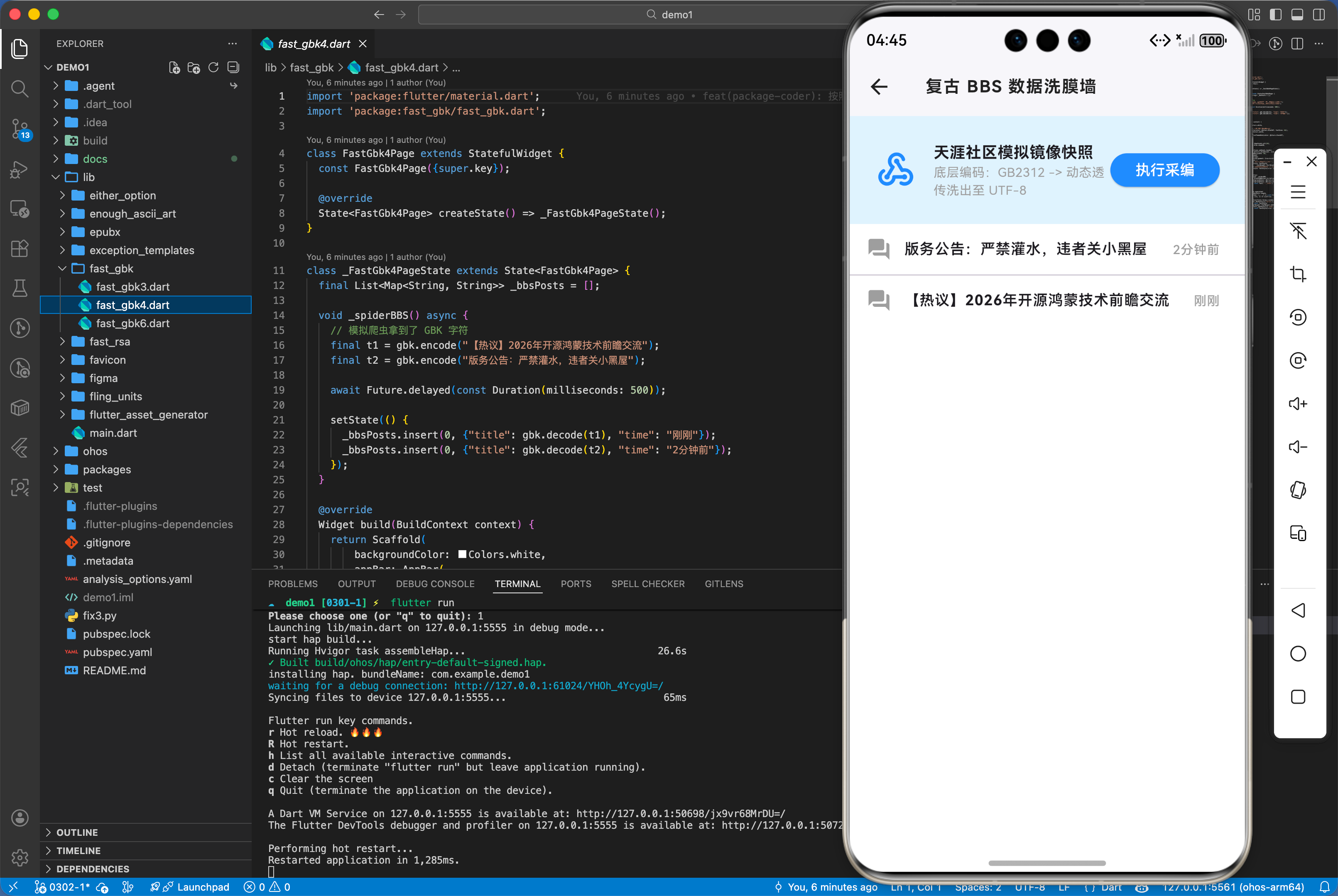
4.1 工业自动化与串口外设终端交互
在 OpenHarmony 覆盖的大量工控机、条码打印机及老旧医疗仪器中,其固件协议往往固定为 GBK 中文字符集。为了让鸿蒙应用能通过蓝牙或串口发送“入库成功”、“检测报告”等中文指令,开发者必须利用 gbk.encode 对数据进行规整的预处理。这种编解码能力是保障鸿蒙软件接管老旧硬件生态的关键底层基石。
五、OpenHarmony 平台适配挑战
针对特大容量(如数兆体积的 GBK 数据库大字段、长篇小说)的转码工作,由于涉及庞大的循环字典比对,在鸿蒙低端设备的主 UI 线程上直接运行可能引起明显的掉帧感。建议开发者将繁重的转码操作放在 compute() 或者 Isolate 中独立运行,确保转码过程不阻塞应用页面的丝滑滚动。
六、综合实战演示
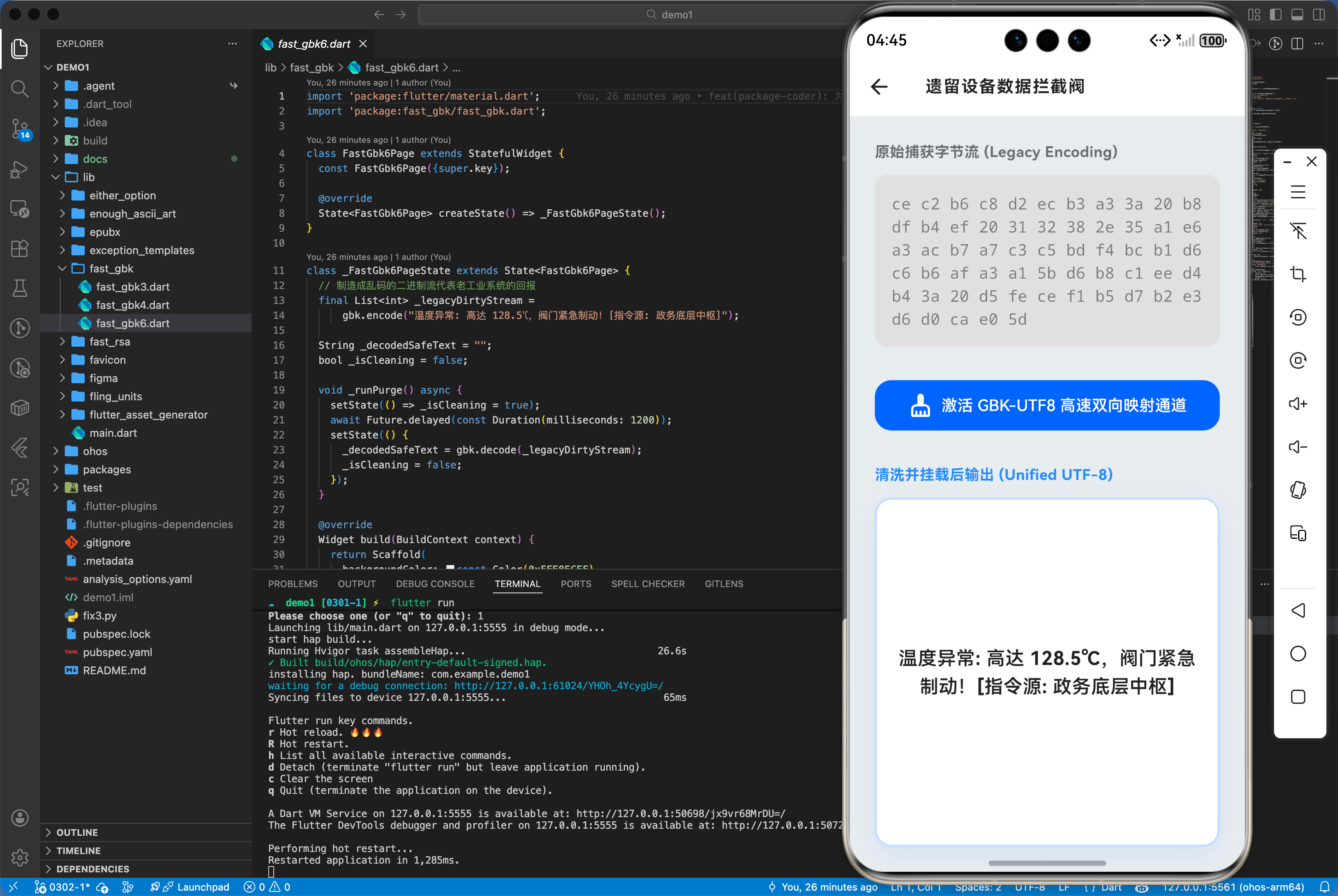
如下在 GatewayDashboard.dart 展示乱码还原效果:
import 'package:flutter/material.dart';
import 'package:fast_gbk/fast_gbk.dart';
class FastGbk6Page extends StatefulWidget {
const FastGbk6Page({super.key});
State<FastGbk6Page> createState() => _FastGbk6PageState();
}
class _FastGbk6PageState extends State<FastGbk6Page> {
// 制造成乱码的二进制流代表老工业系统的回报
final List<int> _legacyDirtyStream =
gbk.encode("温度异常: 高达 128.5℃,阀门紧急制动![指令源: 政务底层中枢]");
String _decodedSafeText = "";
bool _isCleaning = false;
void _runPurge() async {
setState(() => _isCleaning = true);
await Future.delayed(const Duration(milliseconds: 1200));
setState(() {
_decodedSafeText = gbk.decode(_legacyDirtyStream);
_isCleaning = false;
});
}
Widget build(BuildContext context) {
return Scaffold(
backgroundColor: const Color(0xFFE8ECEF),
appBar: AppBar(
title: const Text('遗留设备数据拦截阀',
style: TextStyle(
color: Colors.black87,
fontWeight: FontWeight.bold,
fontSize: 16)),
backgroundColor: Colors.white,
elevation: 0,
iconTheme: const IconThemeData(color: Colors.black87),
),
body: Padding(
padding: const EdgeInsets.all(24.0),
child: Column(
crossAxisAlignment: CrossAxisAlignment.stretch,
children: [
const Text('原始捕获字节流 (Legacy Encoding)',
style: TextStyle(
fontSize: 14,
fontWeight: FontWeight.bold,
color: Colors.black54)),
const SizedBox(height: 12),
Container(
padding: const EdgeInsets.all(16),
decoration: BoxDecoration(
color: Colors.grey.shade300,
borderRadius: BorderRadius.circular(12)),
child: Text(
_legacyDirtyStream
.map((e) => e.toRadixString(16).padLeft(2, '0'))
.join(' '),
style: const TextStyle(
fontFamily: 'monospace',
color: Colors.black45,
height: 1.5,
fontSize: 15),
),
),
const SizedBox(height: 32),
TextButton.icon(
icon: _isCleaning
? const SizedBox(
width: 20,
height: 20,
child: CircularProgressIndicator(
color: Colors.white, strokeWidth: 2))
: const Icon(Icons.cleaning_services_rounded),
label: const Text('激活 GBK-UTF8 高速双向映射通道',
style: TextStyle(fontSize: 15)),
style: TextButton.styleFrom(
backgroundColor: Colors.blueAccent.shade700,
foregroundColor: Colors.white,
padding: const EdgeInsets.symmetric(vertical: 20),
shape: RoundedRectangleBorder(
borderRadius: BorderRadius.circular(16)),
),
onPressed: _isCleaning ? null : _runPurge,
),
const SizedBox(height: 32),
const Text('清洗并挂载后输出 (Unified UTF-8)',
style: TextStyle(
fontSize: 14,
fontWeight: FontWeight.bold,
color: Colors.blueAccent)),
const SizedBox(height: 12),
Expanded(
child: Container(
padding: const EdgeInsets.all(20),
decoration: BoxDecoration(
color: Colors.white,
borderRadius: BorderRadius.circular(16),
boxShadow: [
BoxShadow(
color: Colors.blueAccent.withOpacity(0.1),
blurRadius: 20,
offset: const Offset(0, 8))
],
border: Border.all(
color: Colors.blueAccent.withOpacity(0.3), width: 2),
),
child: Center(
child: _decodedSafeText.isEmpty
? Text('等待网关重组流数据...',
style: TextStyle(
color: Colors.grey.shade400, fontSize: 16))
: Text(
_decodedSafeText,
style: const TextStyle(
fontSize: 18,
color: Colors.black87,
fontWeight: FontWeight.w600,
height: 1.5),
textAlign: TextAlign.center,
),
),
),
)
],
),
),
);
}
}
七、总结
fast_gbk 为鸿蒙应用与历史系统的兼容提供了极简且可靠的钥匙。它无需笨重的 Native 映射依赖,直接在语言层面解决了长期困扰中文开发的乱码顽疾。无论是在工控互联还是遗留政企系统的改造中,它都是保障沟通无碍的必备兵器。

开源鸿蒙跨平台开发社区汇聚开发者与厂商,共建“一次开发,多端部署”的开源生态,致力于降低跨端开发门槛,推动万物智联创新。
更多推荐

 17
17 0
0- 0


 已为社区贡献2条内容

所有评论(0)