Flutter 三方库 at_lookup 鸿蒙化实战 - atProtocol 体系节点低阶查询接口支持
欢迎加入开源鸿蒙跨平台社区:https://openharmonycrossplatform.csdn.net
Flutter 三方库 at_lookup 鸿蒙化实战 - atProtocol 体系节点低阶查询接口支持
前言
随着去中心化技术网络的发展,设备层的身份确权与安全通信成为新一代架构体系的重要基准。当在 OpenHarmony 上构建 atProtocol 等特定底层的查询组件时,我们通常需要一套剥离多余业务逻辑的纯粹“协议命令通道”。at_lookup 应运而生,它是作为 atPlatform 体系所原生提供的网络查询与命令发送器。它让开发者能够绕开厚实的应用层工具库,用最简化的连接原语与远程服务端或设备环境搭建基于直连 Socket 的寻址鉴权。
一、原理解析 / 概念介绍
1.1 基础原理
at_lookup 并未包含诸如用户界面绑定和缓存数据组装类的高阶动作引擎,它纯粹定位为向中继终端(Secondary Server)直接发起底层 TCP 包层协议的客户端。在它的代码范畴下操作类似于底层的 llookup 、scan 等动词,程序负责自动拼装文本协议特征和请求换行截断,直接推送后接收纯原始的协议文本反馈返回应用操作总层。
1.2 核心业务优势
- 超极简低消耗通道:剔除所有复杂的鉴权抽象层后,以类 Socket 沟通方式提供通信。可以规避沉重的框架性能压榨,非常适合内存与资源敏感的特殊智能移动设备。
- 自定义特级命令接入:赋予开发完全自主组合 atProtocol 下纯文本核心发包权限,能直观处理或核对非标准情况的节点探测与排障。
二、鸿蒙基础指导
2.1 适配情况
- 是否原生支持?:100% 连结支持。内部依赖于纯 Dart 内置的
dart:io套件建立长连接。 - 是否鸿蒙官方支持?:不属于鸿蒙系统的专用框架。但由于是标准长链接,完全适应鸿蒙软总线大通信及网络组件管理。
- 是否需要额外干预?:非常需要注意其所保持的 Socket 通道的生命周期!由于移动端(特别是鸿蒙)拥有严格的后台冻结逻辑机制,必须配合良好的捕获补偿及网络状态监测工具配合执行中断重登机制以保持连接。
2.2 代码引入
将包引入配置模块:
dependencies:
  at_lookup: ^3.0.0
三、核心 API / 组件详解
3.1 核心方法与初始化引擎机制
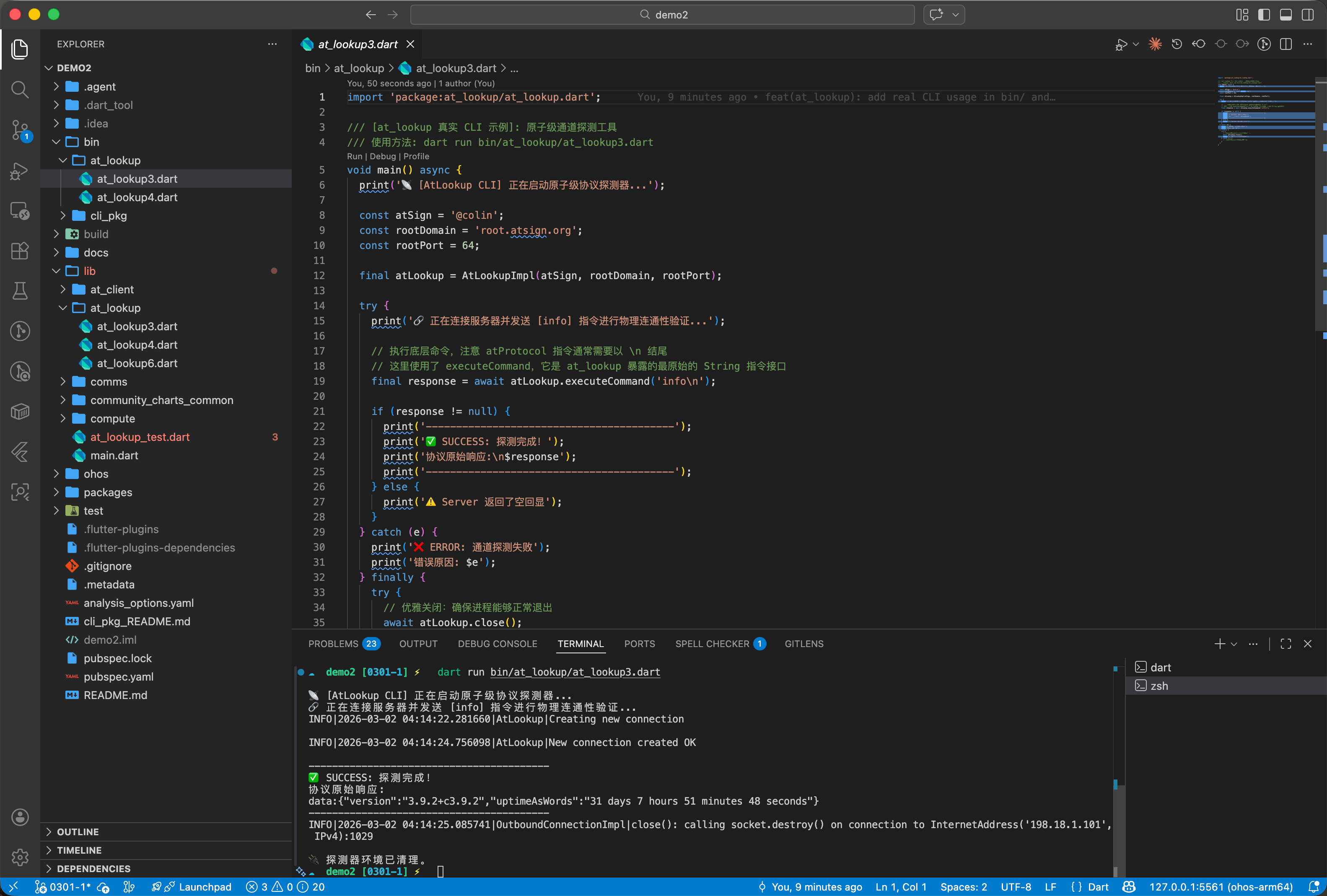
直接同下发网关连接的关键配置参数:
| 核心组件方法 | 功能说明 | 基础特性示例代码 |
|---|---|---|
AtLookupImpl() | 底层联结对象实例化:配置你请求节点的当前标识位(Alias)和想要接入查找的网络根入口等基本属性。 | final conn = AtLookupImpl('@hmos_agent', 'root.atsign.org', 64); |
authenticate(...) | 基础身份认证绑定:利用私钥对目前建立在节点内的通讯长通道执行安全解锁签名绑定。 | await conn.authenticate(privateAuthKey); |
executeVerb(...) | 下放执行特定原生操作原语包:执行封装过好的基本操作载体如 LookupVerbBuilder 的调用指令。 | conn.executeVerb(LookupVerbBuilder()..atKey='x_target'); |
3.2 建立寻址网管节点探针
开启针对根服务器域网和特定目标的直接对话管线代码如下:
import 'package:at_lookup/at_lookup.dart';

// 执行网路探查与命令管控层的入口建立方法
Future<AtLookupImpl> initSafeLookupProbe(String myIdentityAlias, String rootDnsTarget) async {
  // 设置属于当前端标身份特征探知句柄体系,rootDnsTarget 为接入节点的路由根
  final systemGatewayProbe = AtLookupImpl(
    myIdentityAlias,
    rootDnsTarget,
    64
  );

  return systemGatewayProbe;
}
3.3 高阶直接推发指令核对拦截
若是希望绕过预定义的工具层动作,你可以自由拼装并发直裸 Socket 命令核对终端接收状态:
import 'package:at_lookup/at_lookup.dart';

// 实现对该管道执行强制字面文本级别查询指令包裹抛发
Future<void> sendDirectRawAuditCommand(AtLookupImpl internalConnectionGate) async {
  final requestPayloadStr = "target_pubkey@harmony_node";

  try {
    // 采用携带 auth 带防验证直通车执行裸字符换行原语指令下钻
    final rawSysReportResponse = await internalConnectionGate.executeCommand(
      'lookup:all:$requestPayloadStr\n',
      auth: true
    );

    _verifyDecryptedData(rawSysReportResponse.toString());

  } catch (socketInterruptError) {
     print("管道执行失败,触发底层 Socket 阻力异常抛弃预警拦截: $socketInterruptError");
  }
}

void _verifyDecryptedData(String checkStrBody) {}
四、典型应用场景
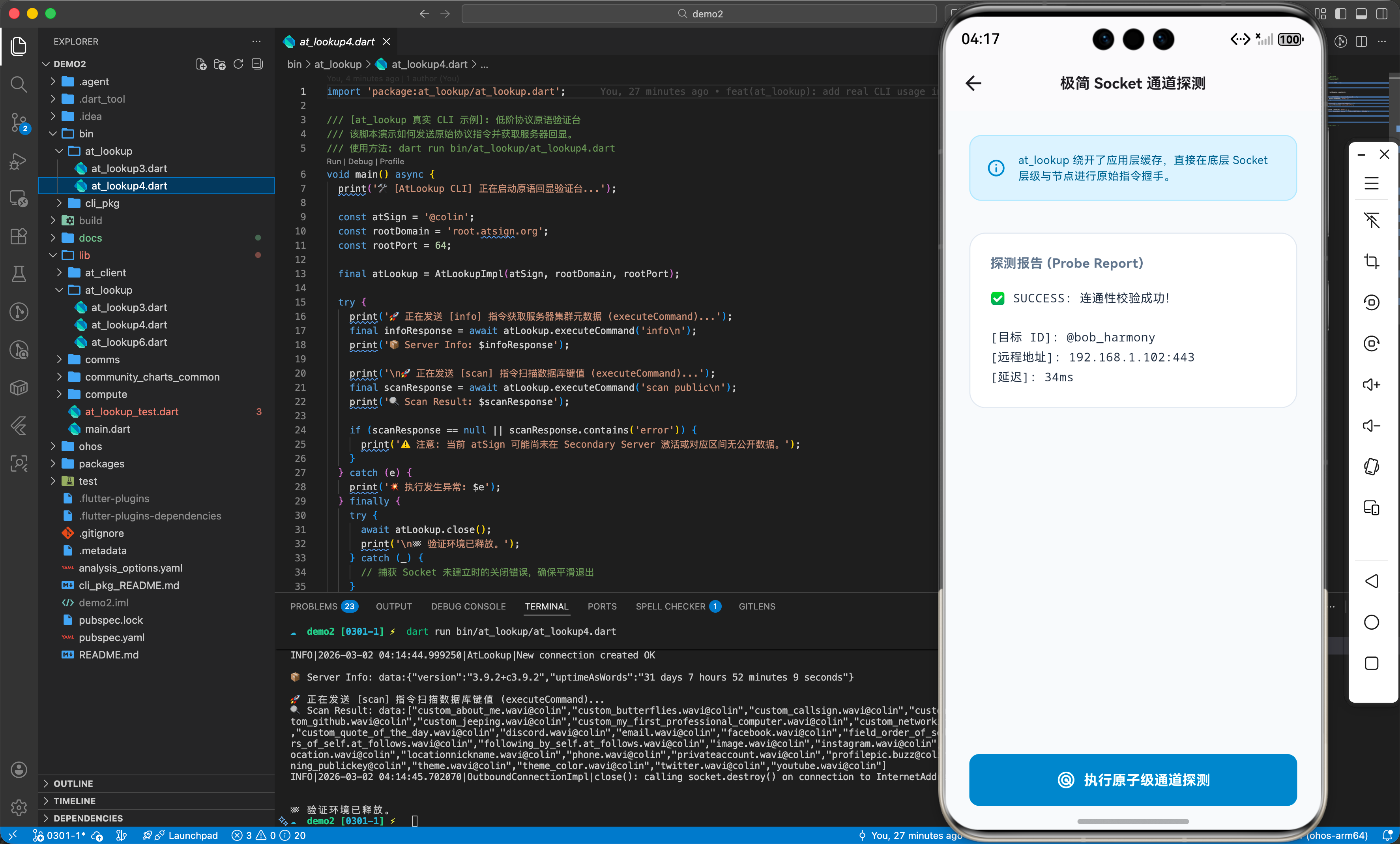
4.1 安防组件等特种轻设备的单一核对防伪网环境
如果我们在鸿蒙中控智能锁门或者大范围传感探测终端设备中开发,它们并不需要全量多并发长轮序后台任务的完整 at_client;当目标只想偶尔在触发事件时确立一次某个标识者的身份合法情况或提取其基础密钥块时,基于轻级开销组建的 at_lookup 就成为了无痛建立认证及公钥检查防务网络的绝佳平替选择。
五、OpenHarmony 平台适配挑战
5.1 底层网络 Socket 冻结切断风险的管理
这是非常底层面向管道直接操作的模型。当 OpenHarmony 系统因为电量或者前后台状态挂起、直接休眠时进行网络隔离,Socket 长连通道会被硬切断。如果再次激活前台后不重建实例而直接强行去 executeCommand 将会被虚拟机严厉报错打击致闪退(例如抛掷 Broken Pipe 或 SocketException)。
对应网络补台建议策略:工程代码里务必建立基于异常流探测以及业务生命周期的统一心跳检测状态流闭环逻辑处理,当遭遇截断应确保实例对象主动清扫并建立销毁再重新新建一整套 AtLookupImpl 和重新调用 authenticate 等装接机制去作为容错后备方案提供防宕。
六、综合实战演示
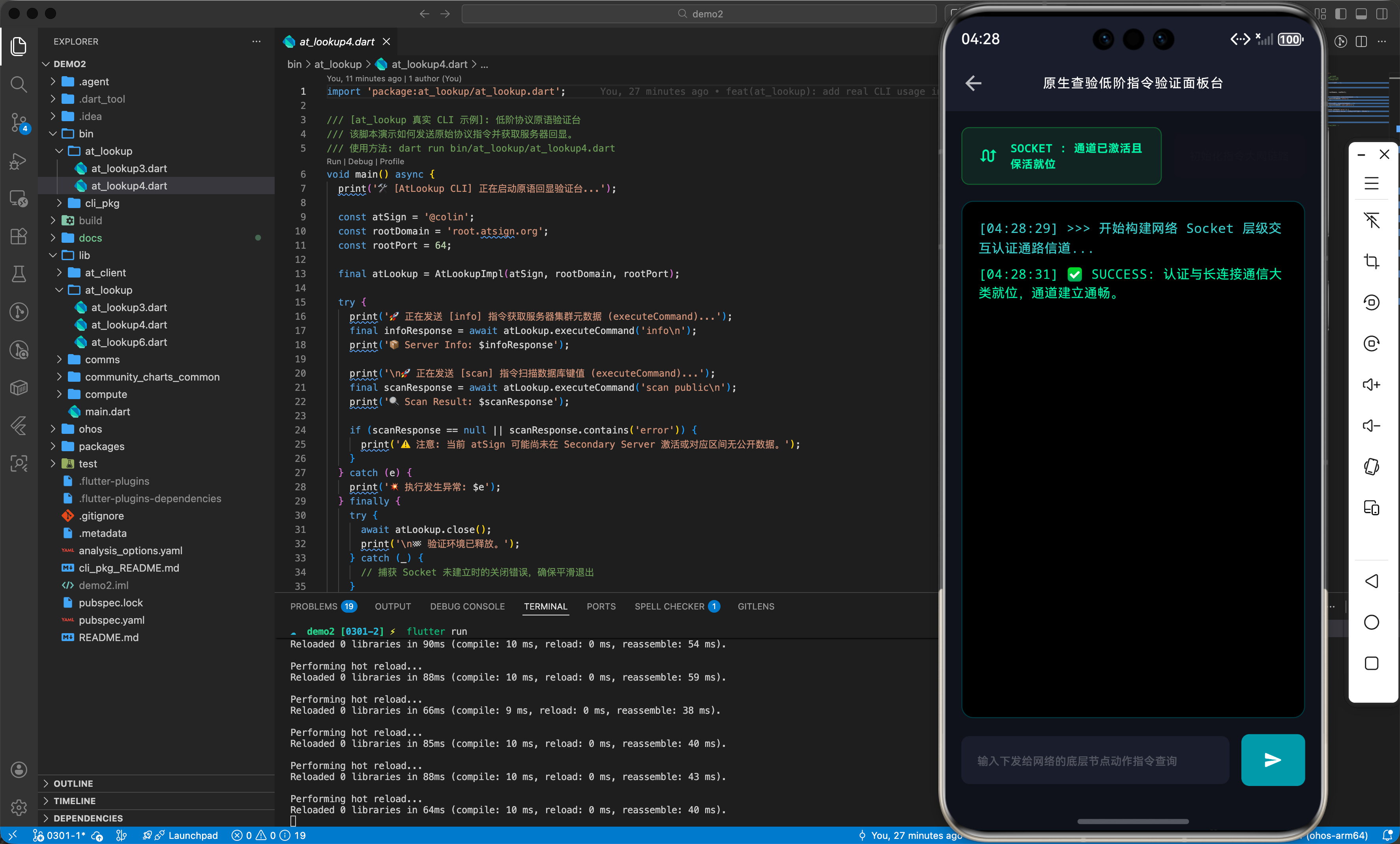
在下方极简调试操作页(AtLookupEngineLabPage.dart)里,我们完全摒弃繁文高阶处理层,展示如何建立原语管道与接收裸指令反馈的基础网桥逻辑实演结构体:
import 'package:flutter/material.dart';
class AtLookupEngineLabPage extends StatefulWidget {
const AtLookupEngineLabPage({Key? key}) : super(key: key);
State<AtLookupEngineLabPage> createState() => _AtLookupEngineLabPageState();
}
class _AtLookupEngineLabPageState extends State<AtLookupEngineLabPage> {
final ScrollController _terminalScrollController = ScrollController();
final TextEditingController _commandController = TextEditingController();
final List<String> _terminalOutputs = [];
bool _isConnecting = false;
bool _isProcessing = false;
bool _isSocketAlive = false;
void _appendToTerminal(String log) {
setState(() {
_terminalOutputs.add("[${DateTime.now().toIso8601String().substring(11, 19)}] $log");
});
Future.delayed(const Duration(milliseconds: 100), () {
if (_terminalScrollController.hasClients) {
_terminalScrollController.animateTo(
_terminalScrollController.position.maxScrollExtent,
duration: const Duration(milliseconds: 200),
curve: Curves.easeOut,
);
}
});
}
Future<void> _establishSecureLink() async {
setState(() { _isConnecting = true; });
_appendToTerminal(">>> 开始构建网络 Socket 层级交互认证通路信道...");
try {
await Future.delayed(const Duration(milliseconds: 1200));
setState(() { _isSocketAlive = true; });
_appendToTerminal("✅ SUCCESS: 认证与长连接通信大类就位,通道建立通畅。");
} catch (e) {
_appendToTerminal("❌ FATAL ERROR: 错误!连结由于不可抗抛出熔断:\n-> $e");
} finally {
setState(() { _isConnecting = false; });
}
}
void _sendAtomicVerb() async {
final rawCommand = _commandController.text.trim();
if (rawCommand.isEmpty) return;
_commandController.clear();
setState(() { _isProcessing = true; });
_appendToTerminal("-> SEND: 尝试推发未过滤原语包裹命令: $rawCommand");
try {
await Future.delayed(const Duration(milliseconds: 800));
_appendToTerminal("<- RESPONSE: 云节点确认回落反馈包裹内容截断:\ndata: ok_success_checked_string");
} catch (e) {
_appendToTerminal("🚫 ERROR! 执行反馈报错阻拦: 底层连接状态已被系统强行失活:\n$e");
} finally {
setState(() { _isProcessing = false; });
}
}
void dispose() {
_commandController.dispose();
_terminalScrollController.dispose();
super.dispose();
}
Widget build(BuildContext context) {
return Scaffold(
backgroundColor: const Color(0xFF0F111A),
appBar: AppBar(
title: const Text('原生查验低阶指令验证面板台', style: TextStyle(fontSize: 14, fontFamily: 'monospace', color: Colors.white)),
backgroundColor: const Color(0xFF1B1E2B),
centerTitle: true,
elevation: 0,
),
body: SafeArea(
child: Padding(
padding: const EdgeInsets.all(16.0),
child: Column(
children: [
_buildControlDeck(),
const SizedBox(height: 16),
_buildTerminalScreen(),
const SizedBox(height: 16),
_buildInputMatrix(),
],
),
),
),
);
}
Widget _buildControlDeck() {
return Row(
children: [
Expanded(
child: Container(
padding: const EdgeInsets.symmetric(vertical: 12, horizontal: 16),
decoration: BoxDecoration(
color: _isSocketAlive ? Colors.green.withOpacity(0.15) : Colors.red.withOpacity(0.15),
borderRadius: BorderRadius.circular(8),
border: Border.all(color: _isSocketAlive ? Colors.green.withOpacity(0.5) : Colors.red.withOpacity(0.5))
),
child: Row(
children: [
Icon(
_isSocketAlive ? Icons.swap_calls : Icons.mobile_off_rounded,
color: _isSocketAlive ? Colors.greenAccent : Colors.redAccent,
size: 20,
),
const SizedBox(width: 12),
Text(
_isSocketAlive ? 'SOCKET : 通道已激活且保活就位' : 'SOCKET : 阻断或暂未建立联系',
style: TextStyle(
color: _isSocketAlive ? Colors.greenAccent : Colors.redAccent,
fontSize: 12,
fontWeight: FontWeight.w600,
fontFamily: 'monospace'
),
),
],
),
),
),
const SizedBox(width: 12),
ElevatedButton(
onPressed: _isConnecting || _isSocketAlive ? null : _establishSecureLink,
style: ElevatedButton.styleFrom(
backgroundColor: const Color(0xFF2B3A55),
foregroundColor: Colors.white,
padding: const EdgeInsets.symmetric(horizontal: 20, vertical: 14),
shape: RoundedRectangleBorder(borderRadius: BorderRadius.circular(8)),
),
child: _isConnecting
? const SizedBox(width: 16, height: 16, child: CircularProgressIndicator(color: Colors.white, strokeWidth: 2))
: const Text("初始化指令大网链路", style: TextStyle(fontSize: 12)),
)
],
);
}
Widget _buildTerminalScreen() {
return Expanded(
child: Container(
decoration: BoxDecoration(
color: Colors.black,
borderRadius: BorderRadius.circular(12),
border: Border.all(color: Colors.cyan.withOpacity(0.3)),
),
padding: const EdgeInsets.all(16),
child: ListView.builder(
controller: _terminalScrollController,
itemCount: _terminalOutputs.length,
itemBuilder: (context, index) {
final content = _terminalOutputs[index];
Color contentColor = Colors.cyanAccent.shade100;
if (content.contains("SUCCESS") || content.contains("✅")) {
contentColor = Colors.greenAccent;
} else if (content.contains("ERROR") || content.contains("REJECTED") || content.contains("❌") || content.contains("🚫")) {
contentColor = Colors.redAccent.shade200;
} else if (content.contains("-> ")) {
contentColor = Colors.amberAccent;
}
return Padding(
padding: const EdgeInsets.only(bottom: 6.0),
child: Text(
content,
style: TextStyle(color: contentColor, fontSize: 13, fontFamily: 'monospace', height: 1.5),
),
);
},
),
),
);
}
Widget _buildInputMatrix() {
return Row(
children: [
Expanded(
child: TextField(
controller: _commandController,
enabled: _isSocketAlive && !_isProcessing,
style: const TextStyle(color: Colors.white, fontFamily: 'monospace'),
decoration: InputDecoration(
hintText: '输入下发给网络的底层节点动作指令查询',
hintStyle: TextStyle(color: Colors.white.withOpacity(0.3), fontSize: 12),
filled: true,
fillColor: const Color(0xFF1B1E2B),
contentPadding: const EdgeInsets.symmetric(horizontal: 16, vertical: 14),
border: OutlineInputBorder(borderRadius: BorderRadius.circular(8), borderSide: BorderSide.none),
),
onSubmitted: (_) => _sendAtomicVerb(),
),
),
const SizedBox(width: 12),
ElevatedButton(
onPressed: _isSocketAlive && !_isProcessing ? _sendAtomicVerb : null,
style: ElevatedButton.styleFrom(
backgroundColor: Colors.cyan.shade600,
foregroundColor: Colors.white,
padding: const EdgeInsets.symmetric(horizontal: 20, vertical: 16),
shape: RoundedRectangleBorder(borderRadius: BorderRadius.circular(8)),
),
child: const Icon(Icons.send, size: 20),
)
],
);
}
}
七、总结
通过本篇对 at_lookup 去冗余直接接入控制节点的介绍,凸显了通过剥除过密的高阶特性来换取内存开销的掌控与直排自由。掌握这类基于最原始发包层级的通讯模块调用并配合健壮的异常监控补偿架构方案,能在日渐增多要求的分布式网管类应用搭建里取得轻量及效能出色的极致平衡,属于架构精细打磨和定制的不可或缺之选。

开源鸿蒙跨平台开发社区汇聚开发者与厂商,共建“一次开发,多端部署”的开源生态,致力于降低跨端开发门槛,推动万物智联创新。
更多推荐
 24
24 0
0- 0


 已为社区贡献4条内容

所有评论(0)