Flutter 三方库 comms 的鸿蒙实战 - 构筑跨组件强类型信使,拆解耦合壁垒
欢迎加入开源鸿蒙跨平台社区:https://openharmonycrossplatform.csdn.net
Flutter 三方库 comms 的鸿蒙实战 - 构筑跨组件强类型信使,拆解耦合壁垒
前言
在 OpenHarmony (开源鸿蒙) 应用开发中,当 Widget 树层级变得深邃、业务模块变得庞大时,传统的“逐层回调”或“Context 状态下传”往往会陷入逻辑胶着的泥潭。例如:如何从一个独立的后台下载 Service 中发送进度更新给 UI 深处的某个角标?如何让两个毫无血缘关系的业务组件实现低延迟的指令交互?
comms 是一套精简而强悍的事件总线(Event Bus)方案。它的核心理念是“类型即频道(Type as Channel)”,通过强类型的消息匹配机制,帮助开发者在无需 BuildContext 的情况下实现模块间的高效、解耦通信。
一、原理解析 / 概念介绍
1.1 核心原理
comms 抛弃了基于字符串或 ID 的传统总线模式,转而利用 Dart 的强类型特性。发送方(Sender)抛出一个特定类型的类实例,系统会自动分发给所有声明了对该类型感兴趣的监听器(MessageListener)。
1.2 核心业务优势
- Context-Free 通信:可以在 Service、纯 Dart 类或拦截器中随时发信,彻底摆脱 UI 树的束缚。
- 编译时安全:由于基于类型过滤,不同团队编写的模块即便在一个总线下运行,也不会因为字符串“频道名”冲突而产生意外干扰。
- 按需拦截与消费:支持单次任务模式或持续监听模式,提供了极其细粒度的控制力。
二、鸿蒙基础指导
2.1 适配情况
- 是否原生支持?:原生支持。它完全基于 Dart 语言特性编写。
- 是否鸿蒙官方支持?:在多端协同、跨层通信场景下,它是构建鸿蒙大型应用的理想架构组件。
- 是否需要额外干预?:无。
2.2 适配代码引入
将依赖添加到 pubspec.yaml:
dependencies:
  comms: ^1.1.0
三、核心 API / 组件详解
3.1 三大核心支柱
| 角色 | 功能说明 | 典型代码示例 |
|---|---|---|
Message | 自定义的普通类,作为通信的载体,决定了通信的频道。 | class ThemeChangeEvent {} |
Sender<T> | 消息发送者。调用 send 方法将 T 类型的实例推入总线。 | Sender<ThemeChangeEvent>().send(...) |
MessageListener<T> | 消息监听者。在销毁时会自动取消订阅,防止内存泄漏。 | MessageListener<ThemeChangeEvent>(...) |
3.2 基础应用演示
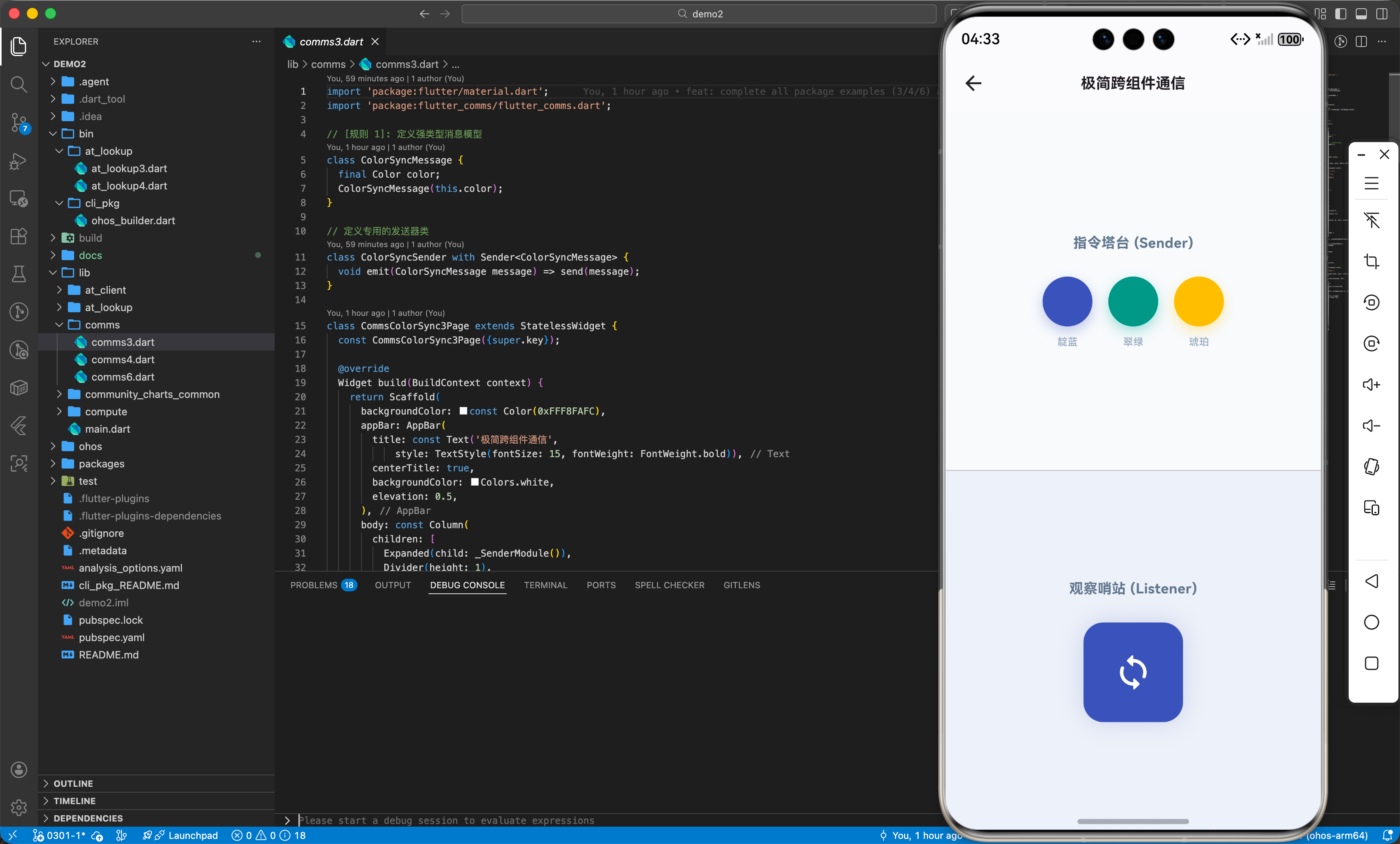
如下是我们在鸿蒙应用中封装的基础跨组件通信 UI 演示 ( comms3.dart ):
import 'package:flutter/material.dart';
import 'package:comms/comms.dart';
// [规则 1]: 定义强类型消息模型
class ColorSyncMessage {
final Color color;
ColorSyncMessage(this.color);
}
class CommsColorSync3Page extends StatelessWidget {
const CommsColorSync3Page({super.key});
Widget build(BuildContext context) {
return Scaffold(
backgroundColor: const Color(0xFFF8FAFC),
appBar: AppBar(
title: const Text('极简跨组件通信', style: TextStyle(fontSize: 15, fontWeight: FontWeight.bold)),
centerTitle: true,
backgroundColor: Colors.white,
elevation: 0.5,
),
body: const Column(
children: [
Expanded(child: _SenderModule()),
Divider(height: 1),
Expanded(child: _ListenerModule()),
],
),
);
}
}
// ---------------- 发送逻辑组件 ----------------
class _SenderModule extends StatelessWidget {
const _SenderModule();
void _sendColor(Color c) {
// [核心调用]: 无需 BuildContext,全局抛发强类型消息
Sender<ColorSyncMessage>().send(ColorSyncMessage(c));
}
Widget build(BuildContext context) {
return Container(
padding: const EdgeInsets.all(24),
child: Column(
mainAxisAlignment: MainAxisAlignment.center,
children: [
const Text("指令塔台 (Sender)", style: TextStyle(fontWeight: FontWeight.bold, color: Color(0xFF64748B))),
const SizedBox(height: 24),
Row(
mainAxisAlignment: MainAxisAlignment.center,
children: [
_colorBtn(Colors.indigo, "靛蓝"),
const SizedBox(width: 16),
_colorBtn(Colors.teal, "翠绿"),
const SizedBox(width: 16),
_colorBtn(Colors.amber, "琥珀"),
],
),
],
),
);
}
Widget _colorBtn(Color c, String label) {
return InkWell(
onTap: () => _sendColor(c),
child: Column(
children: [
Container(width: 50, height: 50, decoration: BoxDecoration(color: c, shape: BoxShape.circle)),
const SizedBox(height: 8),
Text(label, style: const TextStyle(fontSize: 10, color: Color(0xFF94A3B8))),
],
),
);
}
}
// ---------------- 接收逻辑组件 ----------------
class _ListenerModule extends StatefulWidget {
const _ListenerModule();
State<_ListenerModule> createState() => _ListenerModuleState();
}
class _ListenerModuleState extends State<_ListenerModule> with MessageListener<ColorSyncMessage> {
Color _currentColor = Colors.grey.shade300;
void onMessage(ColorSyncMessage message) {
setState(() => _currentColor = message.color);
}
Widget build(BuildContext context) {
return Container(
color: _currentColor.withOpacity(0.05),
child: Center(
child: AnimatedContainer(
duration: const Duration(milliseconds: 500),
width: 80, height: 80,
decoration: BoxDecoration(color: _currentColor, borderRadius: BorderRadius.circular(20)),
child: const Icon(Icons.sync_rounded, color: Colors.white),
),
),
);
}
}
四、典型应用场景
4.1 鸿蒙后台任务流控与 UI 反馈
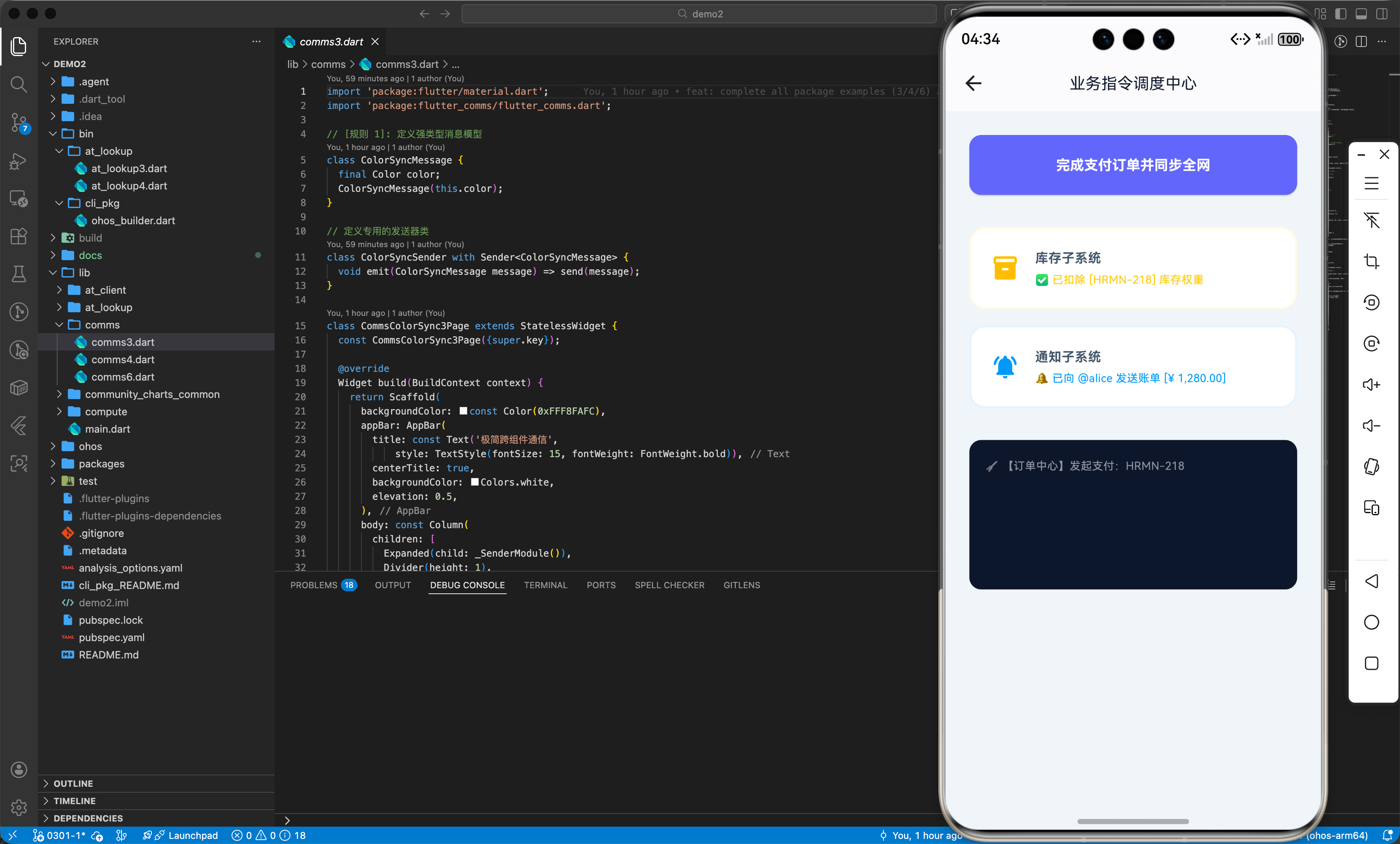
在鸿蒙应用中,利用 comms 实现业务指令流转极其便捷 ( comms4.dart ):
import 'package:flutter/material.dart';
import 'package:comms/comms.dart';
// [规则 1]: 定义核心业务消息
class OrderPaidEvent {
final String orderId;
final String amount;
OrderPaidEvent(this.orderId, this.amount);
}
class CommsDispatchCenter4Page extends StatefulWidget {
const CommsDispatchCenter4Page({super.key});
State<CommsDispatchCenter4Page> createState() => _CommsDispatchCenter4PageState();
}
class _CommsDispatchCenter4PageState extends State<CommsDispatchCenter4Page> {
void _onFireOrder() {
final orderId = "HRMN-${DateTime.now().millisecondsSinceEpoch.toString().substring(10)}";
final amount = "¥ 1,280.00";
// 一键全网分流
Sender<OrderPaidEvent>().send(OrderPaidEvent(orderId, amount));
}
Widget build(BuildContext context) {
return Scaffold(
appBar: AppBar(title: const Text('业务指令调度中心')),
body: Center(
child: Column(
children: [
ElevatedButton(onPressed: _onFireOrder, child: const Text("完成支付")),
const _InventoryModule(),
const _NotificationModule(),
],
),
),
);
}
}
// ---------------- 每个模块独立监听 ----------------
class _InventoryModule extends StatefulWidget {
const _InventoryModule();
State<_InventoryModule> createState() => _InventoryModuleState();
}
class _InventoryModuleState extends State<_InventoryModule> with MessageListener<OrderPaidEvent> {
void onMessage(OrderPaidEvent event) {
print("✅ 已扣除 [${event.orderId}] 远程库存权重");
}
Widget build(BuildContext context) => const Text("库存模块待机中");
}
class _NotificationModule extends StatefulWidget {
const _NotificationModule();
State<_NotificationModule> createState() => _NotificationModuleState();
}
class _NotificationModuleState extends State<_NotificationModule> with MessageListener<OrderPaidEvent> {
void onMessage(OrderPaidEvent event) {
print("🔔 已发送 [${event.amount}] 的账单通知");
}
Widget build(BuildContext context) => const Text("通知模块待机中");
}
五、OpenHarmony 平台适配注意事项
由于 comms 强依赖于 Stream 订阅机制,在 OpenHarmony 应用复杂的生命周期管理下(如多实例流转、后台挂起),开发者必须对订阅对象的生命周期保持高度警惕。在一个非 Widget 环境中(如纯单例类)手动创建 Listener 时,务必通过 cancel() 显式解除销毁,以适配鸿蒙系统严苛的内存管理策略。
六、综合实战演示
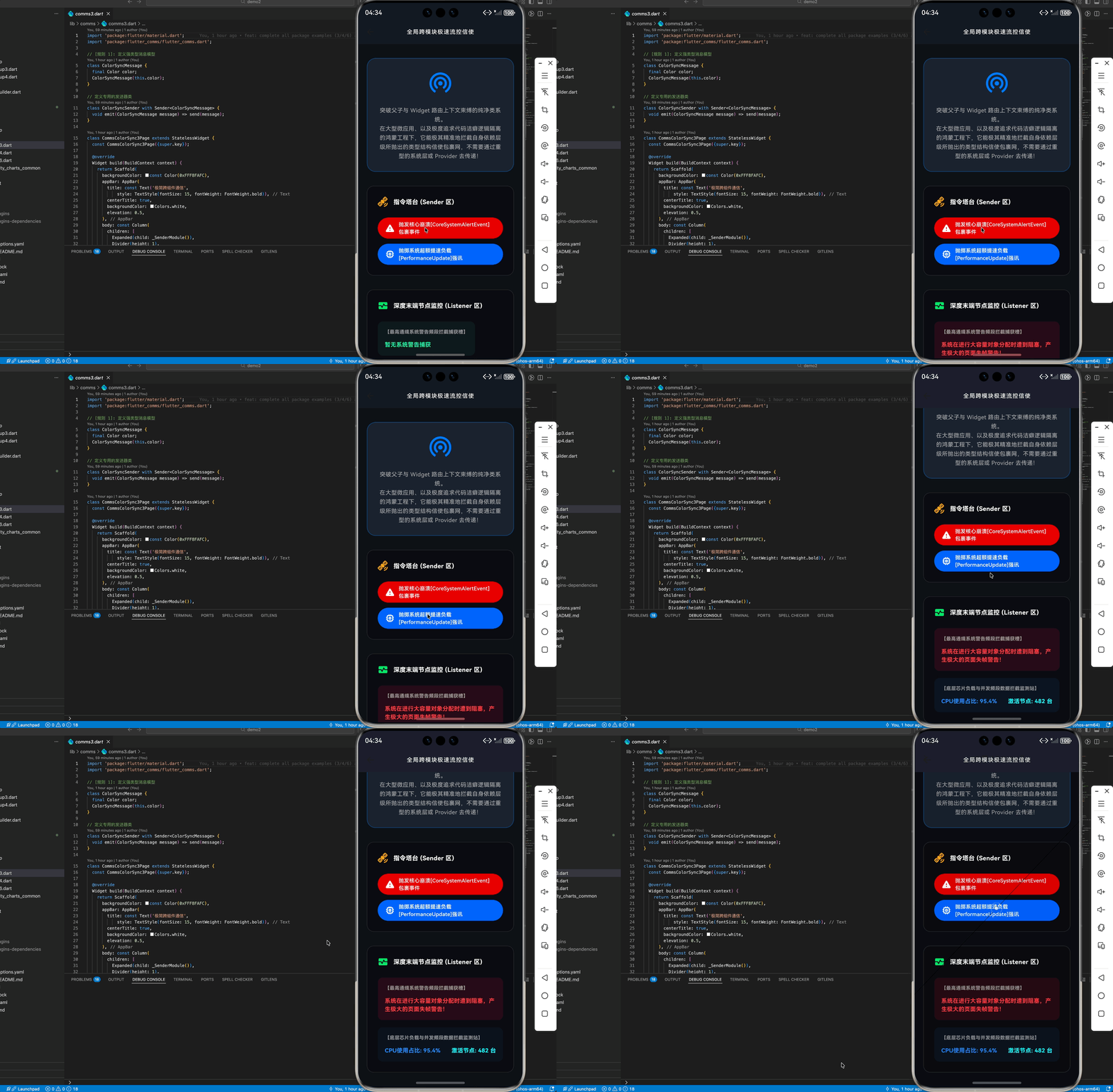
如下在 CommsDemoPage.dart 展示跨组件通信效果:
import 'package:flutter/material.dart';
import 'package:flutter_comms/flutter_comms.dart';
// [模型层]: 定义系统广播与指令拦截类型的信使承载实体类,确保极强的结构校验
class CoreSystemAlertEvent {
final String statusBrief;
final int severityLvl;
CoreSystemAlertEvent(this.statusBrief, this.severityLvl);
}
class SystemPerformanceUpdateEvent {
final double loadCpu;
final int activeNodes;
SystemPerformanceUpdateEvent(this.loadCpu, this.activeNodes);
}
// [发送器]: 创建 Sender 为带有混入特性的专用事件发射器
class SystemCrashSender with Sender<CoreSystemAlertEvent> {}
class HardwareLoadSender with Sender<SystemPerformanceUpdateEvent> {}
// ================= 主展示入口 =================
class CommsFlowUI6Page extends StatefulWidget {
const CommsFlowUI6Page({super.key});
State<CommsFlowUI6Page> createState() => _CommsFlowUI6PageState();
}
class _CommsFlowUI6PageState extends State<CommsFlowUI6Page> {
Widget build(BuildContext context) {
return Scaffold(
backgroundColor: const Color(0xFF0F1218),
appBar: AppBar(
title: const Text('全局跨模块极速流控信使', style: TextStyle(color: Colors.white, fontSize: 13, letterSpacing: 1.1)),
centerTitle: true,
backgroundColor: const Color(0xFF161A23),
elevation: 0,
),
body: const SingleChildScrollView(
child: Padding(
padding: EdgeInsets.symmetric(horizontal: 20, vertical: 32),
child: Column(
crossAxisAlignment: CrossAxisAlignment.stretch,
children: [
_IntroductionPanel(),
SizedBox(height: 32),
_IsolatedControlCommandCenter(),
SizedBox(height: 32),
_DeepIndependentMonitorDisplay(),
],
),
),
),
);
}
}
class _IntroductionPanel extends StatelessWidget {
const _IntroductionPanel();
Widget build(BuildContext context) {
return Container(
padding: const EdgeInsets.all(24),
decoration: BoxDecoration(
color: const Color(0xFF1D222E),
borderRadius: BorderRadius.circular(20),
border: Border.all(color: Colors.blueAccent.shade400.withOpacity(0.3), width: 1.5)
),
child: Column(
children: [
Icon(Icons.wifi_tethering, size: 60, color: Colors.blueAccent.shade400),
const SizedBox(height: 24),
const Text("突破父子与 Widget 路由上下文束缚的纯净类系统。\n在大型微应用、以及极度追求代码洁癖逻辑隔离的鸿蒙工程下,它能极其精准地拦截自身依赖层级所抛出的类型结构信使包裹网,不需要通过重型的系统层或 Provider 去传递!", textAlign: TextAlign.center, style: TextStyle(color: Colors.white60, fontSize: 13, height: 1.6)),
],
),
);
}
}
class _IsolatedControlCommandCenter extends StatelessWidget {
const _IsolatedControlCommandCenter();
void _fireSystemCrashState() {
SystemCrashSender().send(CoreSystemAlertEvent("系统在进行大容量对象分配时遭到阻塞,产生极大的页面失帧警告!", 3));
}
void _fireHardwareLoadPush() {
HardwareLoadSender().send(SystemPerformanceUpdateEvent(95.4, 482));
}
Widget build(BuildContext context) {
return Container(
padding: const EdgeInsets.all(24),
decoration: BoxDecoration(color: Colors.black26, borderRadius: BorderRadius.circular(16), border: Border.all(color: Colors.white12)),
child: Column(
crossAxisAlignment: CrossAxisAlignment.start,
children: [
Row(
children: [
Icon(Icons.satellite_alt_rounded, color: Colors.orangeAccent.shade200),
const SizedBox(width: 12),
const Text("指令塔台 (Sender 区)", style: TextStyle(color: Colors.white, fontWeight: FontWeight.bold)),
],
),
const SizedBox(height: 24),
ElevatedButton.icon(
onPressed: _fireSystemCrashState,
style: ElevatedButton.styleFrom(backgroundColor: Colors.redAccent.shade700, minimumSize: const Size(double.infinity, 48)),
icon: const Icon(Icons.warning_rounded, color: Colors.white),
label: const Text("抛发核心崩溃事件", style: TextStyle(color: Colors.white, fontSize: 12)),
),
const SizedBox(height: 12),
ElevatedButton.icon(
onPressed: _fireHardwareLoadPush,
style: ElevatedButton.styleFrom(backgroundColor: Colors.blueAccent.shade700, minimumSize: const Size(double.infinity, 48)),
icon: const Icon(Icons.memory_rounded, color: Colors.white),
label: const Text("抛掷系统提速负载强讯", style: TextStyle(color: Colors.white, fontSize: 12)),
),
],
)
);
}
}
class _DeepIndependentMonitorDisplay extends StatefulWidget {
const _DeepIndependentMonitorDisplay();
State<_DeepIndependentMonitorDisplay> createState() => _DeepIndependentMonitorDisplayState();
}
class _DeepIndependentMonitorDisplayState extends State<_DeepIndependentMonitorDisplay> {
String _latestCrashReport = "暂无系统警告捕获";
int _latestCrashLvl = 0;
double _loadVal = 10.0;
int _nodeCount = 20;
Widget build(BuildContext context) {
return MessageListener<CoreSystemAlertEvent>(
onMessage: (event) {
setState(() {
_latestCrashReport = event.statusBrief;
_latestCrashLvl = event.severityLvl;
});
},
child: MessageListener<SystemPerformanceUpdateEvent>(
onMessage: (perfEvent) {
setState(() {
_loadVal = perfEvent.loadCpu;
_nodeCount = perfEvent.activeNodes;
});
},
child: Container(
padding: const EdgeInsets.all(24),
decoration: BoxDecoration(color: Colors.black26, borderRadius: BorderRadius.circular(16), border: Border.all(color: Colors.white12)),
child: Column(
crossAxisAlignment: CrossAxisAlignment.start,
children: [
Row(
children: [
Icon(Icons.monitor_heart_rounded, color: Colors.greenAccent.shade400),
const SizedBox(width: 12),
const Text("末端节点监控 (Listener 区)", style: TextStyle(color: Colors.white, fontWeight: FontWeight.bold)),
],
),
const SizedBox(height: 24),
Container(
padding: const EdgeInsets.all(16),
decoration: BoxDecoration(color: _latestCrashLvl > 0 ? Colors.redAccent.shade400.withOpacity(0.1) : Colors.greenAccent.withOpacity(0.05), borderRadius: BorderRadius.circular(12)),
child: Column(
crossAxisAlignment: CrossAxisAlignment.start,
children: [
const Text("【系统警告拦截捕获槽】", style: TextStyle(color: Colors.white54, fontSize: 11, fontWeight: FontWeight.bold)),
const SizedBox(height: 12),
Text(_latestCrashReport, style: TextStyle(color: _latestCrashLvl > 0 ? Colors.redAccent.shade200 : Colors.greenAccent.shade200, fontSize: 13, height: 1.5, fontWeight: FontWeight.bold)),
]
)
),
const SizedBox(height: 16),
Container(
padding: const EdgeInsets.all(16),
decoration: BoxDecoration(color: Colors.blueAccent.withOpacity(0.05), borderRadius: BorderRadius.circular(12)),
child: Column(
crossAxisAlignment: CrossAxisAlignment.start,
children: [
const Text("【芯片负载监控】", style: TextStyle(color: Colors.white54, fontSize: 11, fontWeight: FontWeight.bold)),
const SizedBox(height: 12),
Row(
mainAxisAlignment: MainAxisAlignment.spaceBetween,
children: [
Text("CPU占用: ${_loadVal.toStringAsFixed(1)}%", style: const TextStyle(color: Colors.blueAccent, fontSize: 13, fontWeight: FontWeight.bold)),
Text("激活节点: $_nodeCount 台", style: const TextStyle(color: Colors.cyanAccent, fontSize: 13, fontWeight: FontWeight.bold)),
],
)
]
)
)
]
)
)
),
);
}
}
七、总结
comms 为鸿蒙应用架构提供了高度纯净的通信防护,其强类型机制是规避系统混乱和提升开发鲁棒性的利器。官方建议大型鸿蒙项目优先采用此类解耦方案来替代传统的 EventEmitter。

开源鸿蒙跨平台开发社区汇聚开发者与厂商,共建“一次开发,多端部署”的开源生态,致力于降低跨端开发门槛,推动万物智联创新。
更多推荐
 13
13 0
0- 0


 已为社区贡献4条内容

所有评论(0)