Flutter for Open Harmony 开发学习 DAY10-11:深色模式与分级数据管理
欢迎加入开源鸿蒙跨平台社区:https://openharmonycrossplatform.csdn.net。
欢迎加入开源鸿蒙跨平台社区:https://openharmonycrossplatform.csdn.net
一、总体思路
| 模块 | 职责 | 关键技术 |
|---|---|---|
| SettingsService | 主题模式与设置读写 | 单例 + JSON 文件 |
| GameRecordService | 按类型批量删除记录 | 名称白名单 |
| UI 层 | 实时响应 + 二次确认 | ValueNotifier + AlertDialog |
二、SettingsService 实现
单例管理主题,JSON 持久化,启动时一次性加载:
class SettingsService {
  static const String _fileName = 'app_settings.json';
  static final SettingsService _instance = SettingsService._internal();
  factory SettingsService() => _instance;
  SettingsService._internal();

  final ValueNotifier<ThemeMode> themeModeNotifier =
      ValueNotifier(ThemeMode.system);

  Future<void> load() async {
    final file = await _localFile;
    if (!file.existsSync()) return;
    try {
      final map = jsonDecode(await file.readAsString());
      final modeStr = map['theme'] ?? 'system';
      themeModeNotifier.value = modeStr == 'dark'
          ? ThemeMode.dark
          : modeStr == 'light'
              ? ThemeMode.light
              : ThemeMode.system;
    } catch (_) {
      // 文件损坏则使用默认值
    }
  }

  Future<void> save() async {
    final modeStr = themeModeNotifier.value == ThemeMode.dark
        ? 'dark'
        : themeModeNotifier.value == ThemeMode.light'
            ? 'light'
            : 'system';
    await (await _localFile).writeAsString(jsonEncode({'theme': modeStr}));
  }

  Future<File> get _localFile async {
    final dir = await getApplicationDocumentsDirectory();
    return File('${dir.path}/$_fileName');
  }
}
设计要点:
ValueNotifier避免 Stream 频繁重建- 仅一个 key,后续可扩展语言、字体大小等字段
- 文件损坏自动降级,防止用户手动修改后崩溃
三、分级数据清理
通过「名称白名单」区分经典游戏与在线游戏,旧数据无需补字段:
class GameRecordService {
  static final Set<String> _classicGames = {
    '2048', '俄罗斯方块', '贪吃蛇', '扫雷', '数独',
    '消消乐', '打砖块', '飞机大战', '拼图游戏', '五子棋', '推箱子'
  };

  bool _isClassic(String name) => _classicGames.contains(name);

  /// 返回实际删除条数
  Future<int> clearClassic() async {
    final all = await getAllRecords();
    int count = 0;
    final toRemove = <String>[];
    all.forEach((name, list) {
      if (_isClassic(name)) {
        count += list.length;
        toRemove.add(name);
      }
    });
    for (final n in toRemove) all.remove(n);
    await _saveAll(all);
    return count;
  }

  Future<int> clearOnline() async {
    // 反向删除,同上逻辑
  }
}
白名单优势:
- 兼容旧数据(无类型字段)
- 可远程配置,热更新修正
四、主题实时切换
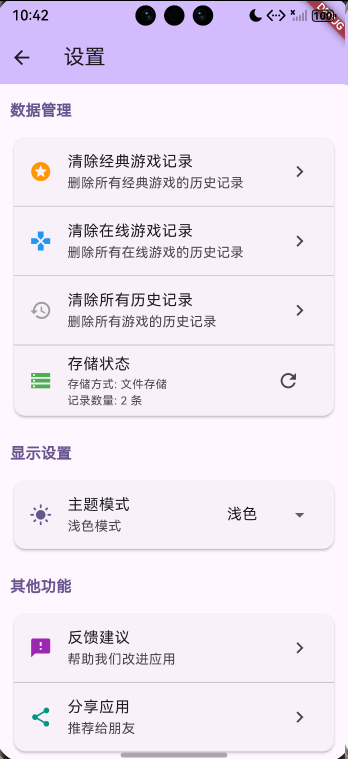
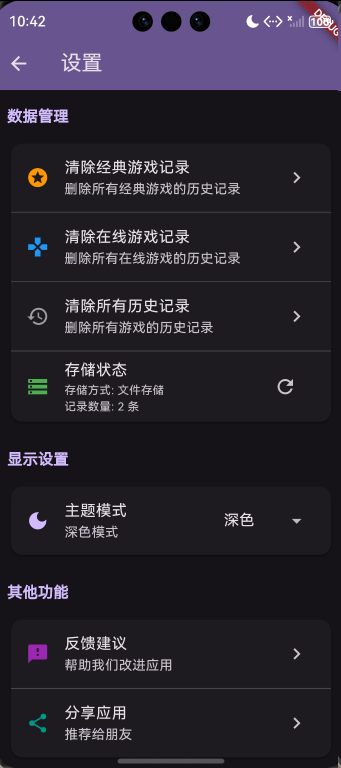
main.dart 监听 ValueNotifier,设置页下拉菜单即刻落盘:
class _MyAppState extends State<MyApp> {
final SettingsService _svc = SettingsService();
void initState() {
super.initState();
_svc.load();
_svc.themeModeNotifier.addListener(() => setState(() {}));
}
Widget build(BuildContext context) {
return MaterialApp(
theme: lightTheme,
darkTheme: darkTheme,
themeMode: _svc.themeModeNotifier.value,
home: const MainPage(),
);
}
}
设置页 UI:
DropdownButton<ThemeMode>(
  value: _svc.themeModeNotifier.value,
  onChanged: (v) async {
    if (v != null) {
      _svc.themeModeNotifier.value = v;
      await _svc.save();
    }
  },
  items: const [
    DropdownMenuItem(value: ThemeMode.system, child: Text('跟随系统')),
    DropdownMenuItem(value: ThemeMode.light, child: Text('浅色')),
    DropdownMenuItem(value: ThemeMode.dark, child: Text('深色')),
  ],
)
五、数据管理 UI
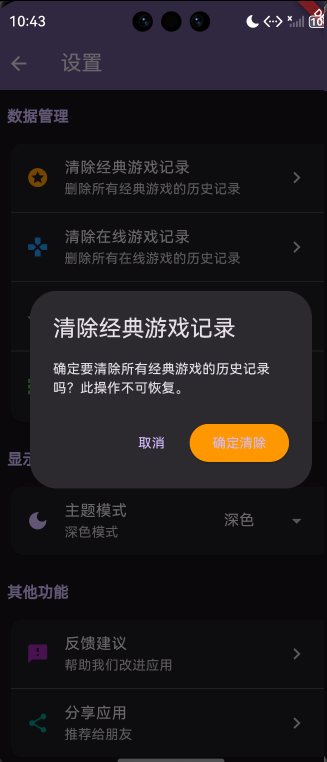
卡片分组 + 二次确认 + 实时反馈:
Widget _buildDataCard() {
  return Card(
    child: Column(
      children: [
        ListTile(
          leading: const Icon(Icons.delete_sweep, color: Colors.orange),
          title: const Text('清除经典游戏记录'),
          subtitle: Text('$_classicCount 条记录将被删除'),
          trailing: TextButton(
            onPressed: () => _showConfirm('经典游戏', clearClassic),
            child: const Text('清除', style: TextStyle(color: Colors.orange)),
          ),
        ),
        const Divider(height: 0),
        ListTile(
          leading: const Icon(Icons.storage, color: Colors.blue),
          title: const Text('存储方式'),
          subtitle: Text(_storageType),
          trailing: Text(_totalSize, style: const TextStyle(fontSize: 12)),
        ),
      ],
    ),
  );
}

void _showConfirm(String type, Future<int> Function() onClear) async {
  final yes = await showDialog<bool>(...);
  if (yes == true) {
    final count = await onClear();
    if (mounted) ScaffoldMessenger.of(context).showSnackBar(
      SnackBar(content: Text('已删除 $count 条记录')),
    );
  }
}
六、扩展方向
-
云端备份与多端同步
将本地 JSON 上传至华为云 OBS,换机时通过账号体系一键拉取。可在「设置-账号」页增加「上传/恢复」按钮,首次上传仅 1 KB,流量可忽略。同步策略采用「增量合并」:本地时间戳较新的记录覆盖云端,避免重复上传全量数据。 -
精细化清理策略
在「数据管理」卡片内新增「高级清理」入口,提供「保留最近 30 天」「仅删除低分记录」「按游戏单独清理」三个选项。实现方式:在GameRecord模型增加score与playTime索引,清理前先做where过滤,再执行批量删除,减少文件重写次数。 -
语言与字体大小设置
在同一 JSON 结构内扩展locale与fontScale字段,UI 提供「系统/简体中文/英文」下拉菜单及「小/标准/大/超大」字体滑块。主框架通过MediaQuery动态计算textScaleFactor,无需重启应用即可预览效果,降低用户学习成本。 -
存储方式升级
当记录数超过 500 条时,自动提示「切换到 SQLite 以获得更快查询」,提供「一键迁移」按钮。迁移完成后,原 JSON 文件作为备份保留,用户可随时回退,确保数据安全。 -
可配置白名单
将_classicGames移至远程配置(华为远程配置服务),运营可在后台动态增删游戏名称,应用内无需发版即可生效,提升运营灵活性。

开源鸿蒙跨平台开发社区汇聚开发者与厂商,共建“一次开发,多端部署”的开源生态,致力于降低跨端开发门槛,推动万物智联创新。
更多推荐
 4
4 0
0- 0


 已为社区贡献9条内容

所有评论(0)