React Native鸿蒙跨平台购物车数量徽标与头部购物车按钮属于“局部状态 + 条件渲染”
本文展示了一个电商应用的TypeScript实现,重点介绍了其核心业务建模与跨平台架构设计。系统采用严格的类型定义(Product、Category、CartItem)确保商业数据一致性,并通过状态管理实现购物车同步等核心功能。组件化架构将商品展示、分类筛选等业务逻辑封装为独立组件,支持跨平台复用。文章特别强调了鸿蒙平台的分布式特性应用,如多设备购物车同步和原生支付集成,并探讨了性能优化、个性化推
核心业务实体建模
电商应用展示了企业级 TypeScript 类型系统的商业应用:
type Product = {
  id: string;
  name: string;
  price: number;
  originalPrice?: number;
  rating: number;
  reviewCount: number;
  image: string;
  category: string;
  discount?: number;
  isFavorite: boolean;
  isNew?: boolean;
};

type Category = {
  id: string;
  name: string;
  icon: string;
};

type CartItem = {
  id: string;
  productId: string;
  productName: string;
  price: number;
  quantity: number;
};
这种类型定义方式在跨平台电商开发中具有重要的商业意义。通过将核心业务实体(商品、类别、购物车项)进行严格的类型约束,确保了商业逻辑的正确性和数据的一致性。在鸿蒙平台上,这种模型可以无缝对接鸿蒙的分布式数据服务,实现多设备间的购物车同步和商品状态共享。折扣价格、新品标记等商业属性的类型化定义,为促销活动的跨平台展示提供了可靠保障。
状态驱动的商业逻辑
应用实现了复杂的状态管理模式:
const [products, setProducts] = useState<Product[]>([]);
const [cart, setCart] = useState<CartItem[]>([]);
const [categories] = useState<Category[]>([]);
这种状态架构在电商场景中体现了清晰的业务分层。商品数据、购物车状态和分类信息各自独立管理,既保证了数据隔离又便于扩展。在鸿蒙的分布式场景中,购物车状态可以实时同步到用户的所有设备,而商品数据可以采用缓存策略优化性能。状态管理的粒度控制是电商应用性能优化的关键,特别是在处理大量商品数据时尤为重要。
组件化商业界面架构
高阶业务组件设计
电商界面采用多层次组件架构:
const ProductCard = ({ product, onAddToCart, onToggleFavorite }) => {
  // 商品卡片实现
};

const CategoryCard = ({ category, onPress }) => {
  // 分类卡片实现
};

const CartItemCard = ({ item, onIncrease, onDecrease, onRemove }) => {
  // 购物车项实现
};
这种组件化设计在跨平台电商开发中展现了强大的商业价值。每个组件都对应明确的业务语义,通过props接口暴露商业行为。商品卡片的收藏功能、分类卡片的筛选行为、购物车项的数量调整,都是电商核心体验的组成部分。在鸿蒙平台上,这些组件可以深度集成鸿蒙的原生UI组件,如使用鸿蒙的分布式动画实现加入购物车的飞入效果,提升用户体验的连贯性。
促销标签与视觉层次
代码实现了丰富的商品展示效果:
{product.discount && (
  <View style={styles.discountBadge}>
    <Text style={styles.discountText}>-{product.discount}%</Text>
  </View>
)}
{product.isNew && (
  <View style={styles.newBadge}>
    <Text style={styles.newText}>新品</Text>
  </View>
)}
这种条件渲染的促销标签在电商平台中至关重要。折扣徽章和新品标记不仅是视觉元素,更是重要的商业信息传达。在跨平台开发中,需要确保这些关键商业元素在各平台上的显示一致性和性能表现。鸿蒙平台的原生渲染能力可以进一步提升这些动态标签的显示效果,特别是在处理大量商品列表时的滚动性能。
购物车与订单业务逻辑
购物车管理核心算法
代码实现了完整的购物车管理逻辑:
const addToCart = (product: Product) => {
  const existingItem = cart.find(item => item.productId === product.id);

  if (existingItem) {
    setCart(cart.map(item =>
      item.id === existingItem.id
        ? { ...item, quantity: item.quantity + 1 }
        : item
    ));
  } else {
    const newItem: CartItem = {
      id: `${Date.now()}`,
      productId: product.id,
      productName: product.name,
      price: product.price,
      quantity: 1
    };
    setCart([...cart, newItem]);
  }
};
这种购物车算法在电商应用中具有核心商业价值。它处理了商品添加、数量累加等关键场景,同时保持不可变数据更新的性能优势。在鸿蒙平台上,这种购物车逻辑可以与分布式数据服务结合,实现多设备实时同步。例如,用户在手机上添加商品后,平板上的购物车可以立即更新,提供无缝的跨设备购物体验。
订单金额计算与验证
代码实现了订单金额的实时计算:
const getTotalPrice = () => {
  return cart.reduce((total, item) => total + (item.price * item.quantity), 0);
};
这种纯函数的金额计算方式在电商交易中至关重要,确保了金额计算的准确性和可测试性。在商业应用中,还需要考虑折扣、运费、税费等复杂计算逻辑。鸿蒙平台的安全计算环境可以为金融交易提供额外的安全保障,特别是在处理支付环节时尤为重要。
鸿蒙跨端适配关键技术
分布式购物车同步
鸿蒙的分布式特性为电商应用带来创新体验:
// 伪代码:分布式购物车
const DistributedCart = {
  syncCartState: (cartItems) => {
    if (Platform.OS === 'harmony') {
      harmonyNative.syncCartAcrossDevices(cartItems);
    }
  },
  getCrossDeviceCart: () => {
    if (Platform.OS === 'harmony') {
      return harmonyNative.getUnifiedCart();
    }
    return localCart;
  }
};
原生支付能力集成
利用鸿蒙的原生支付服务提升转化率:
// 伪代码:支付集成
const PaymentIntegration = {
  useNativePayment: () => {
    if (Platform.OS === 'harmony') {
      return harmonyNative.integratePaymentGateway();
    }
    return webPaymentFallback;
  },
  optimizeCheckoutFlow: () => {
    if (Platform.OS === 'harmony') {
      harmonyNative.enableOneClickCheckout();
    }
  }
};
性能优化与商业指标
电商应用需要特别关注性能与转化:
// 伪代码:性能与商业
const CommerceOptimization = {
  trackConversionRate: () => {
    if (Platform.OS === 'harmony') {
      harmonyNative.enableCommerceAnalytics();
    }
  },
  preloadProductImages: (productList) => {
    if (Platform.OS === 'harmony') {
      harmonyNative.cacheProductImages(productList);
    }
  }
};
商业扩展与未来演进
个性化推荐集成
// 伪代码:智能推荐
const Personalization = {
  enableRecommendations: (userBehavior) => {
    if (Platform.OS === 'harmony') {
      return harmonyNative.showPersonalizedProducts(userBehavior);
    }
    return defaultRecommendations;
  }
};
微服务架构演进
// 伪代码:微服务
const Microservices = {
  connectProductService: () => {
    if (Platform.OS === 'harmony') {
      harmonyNative.linkProductMicroservice();
    }
  }
};
类型建模与跨端语义
- Product、Category、CartItem 的类型把“展示数据”和“交互状态”明确分层:可选字段(originalPrice、discount、isNew)只影响渲染,不改变交互协议;平台侧仅接收已决策的纯 JS 数据,ArkUI、UIKit、Android View 三端表现更可预期。
- 价格/评分/收藏等语义全部在 JS 线程判定,UI 线程只做批量接收与合成;这种“协议层在 JS、绘制在原生”的协作路径是跨端一致性的基础。
不可变更新与函数式 setState
- addToCart/increase/decrease/remove/toggleFavorite 当前都直接用闭包中的 cart/products 更新,这在高频点击或异步场景存在读取旧快照的风险。函数式 setState以“最新快照”为基准更新,能避免旧值覆盖,跨端事件节流场景更稳。
const addToCart = (product: Product) => {
  setCart(prev => {
    const existing = prev.find(i => i.productId === product.id);
    if (existing) {
      return prev.map(i => i.id === existing.id ? { ...i, quantity: i.quantity + 1 } : i);
    }
    return [...prev, { id: `${Date.now()}`, productId: product.id, productName: product.name, price: product.price, quantity: 1 }];
  });
  Alert.alert('成功', `${product.name} 已添加到购物车`);
};

const toggleFavorite = (id: string) => {
  setProducts(prev => prev.map(p => p.id === id ? { ...p, isFavorite: !p.isFavorite } : p));
};

const increaseQuantity = (id: string) => {
  setCart(prev => prev.map(i => i.id === id ? { ...i, quantity: i.quantity + 1 } : i));
};

const decreaseQuantity = (id: string) => {
  setCart(prev => prev.map(i => i.id === id && i.quantity > 1 ? { ...i, quantity: i.quantity - 1 } : i));
};

const removeCartItem = (id: string) => {
  setCart(prev => prev.filter(i => i.id !== id));
};
- 订单总价建议以 useMemo 绑定到 cart,减少每次 render 重算,提高 JS 线程空闲度,对鸿蒙端的桥接节拍也更友好。
const totalPrice = useMemo(() => cart.reduce((sum, i) => sum + i.price * i.quantity, 0), [cart]);
列表与滚动容器的职责
- 页面使用外层 ScrollView 包裹产品栅格的 FlatList,这会产生嵌套滚动的事件竞争与重复布局。跨端最佳实践是让 FlatList“接管整页滚动”,把搜索栏、分类条、促销横幅、购物车与推荐区都作为 ListHeaderComponent/ListFooterComponent 注入,形成单一滚动容器,ArkUI/Skia 合成层更易优化。
const Header = (
  <View>
    {/* 搜索栏、分类、促销、商品列表标题等 */}
  </View>
);

<FlatList
  data={products}
  keyExtractor={item => item.id}
  renderItem={({ item }) => <ProductCard product={item} onAddToCart={addToCart} onToggleFavorite={toggleFavorite} />}
  numColumns={2}
  columnWrapperStyle={styles.columnWrapper}
  ListHeaderComponent={Header}
  ListFooterComponent={
    <View>
      {/* 购物车区块与特色推荐 */}
    </View>
  }
  removeClippedSubviews
  initialNumToRender={8}
  windowSize={5}
/>
- 购物车区块若数据增长,同样建议改为 FlatList 并提供稳定 key,配合 React.memo 子项减少重绘;三端滚动性能和内存占用都会更可控。
栅格布局与测量
- 商品卡宽度以 Dimensions.get(‘window’) 计算,形成栅格网格;这是 RN 常用的“定宽卡片 + 列包装”模式,ArkUI/UIKit/View 在合成层上能稳定处理。若卡片高度近似固定,提供 getItemLayout 可以让滚动定位更确定,减少“滚到位置后再测量校正”的抖动。
const CARD_HEIGHT = 220;
const getItemLayout = (_: Product[], index: number) => ({ length: CARD_HEIGHT, offset: CARD_HEIGHT * Math.floor(index / 2), index });
图标与图形策略
- 全局采用 Emoji 图标,零依赖、桥接简单,但不同平台字体渲染差异明显。若追求统一视觉与可控色彩,推荐切换到 react-native-svg 或图标字库;在鸿蒙端需验证 SVG/字体桥接的完整性与性能,并准备文本图标的回退。
- 评分目前始终展示五颗星字符,建议按 rating 映射星级,提升语义可信度与交互一致性。
const Stars = ({ rating }: { rating: number }) => {
  const full = Math.floor(rating);
  const half = rating - full >= 0.5;
  const icons = '⭐'.repeat(full) + (half ? '✨' : '') + '☆'.repeat(5 - full - (half ? 1 : 0));
  return <Text>{icons}</Text>;
};
交互桥接与动效原生化
- Alert 在三端映射原生弹窗;当前用于筛选/搜索/加入购物车提示,属轻交互。若需要批量状态更新(如清空购物车),在确认回调中合并 setState,降低 Bridge 消息频率,让 ArkUI/UIKit/View 的批处理更高效。
- 收藏心形、加入购物车按钮的动效建议采用 Animated 或 Reanimated 并使用 useNativeDriver 的 transform/opacity 属性,把插值交给 UI 线程,避免 JS 定时器与布局重算造成帧抖动;三端均受益于原生驱动。
import { Animated, useRef, useEffect } from 'react-native';
const Heart = ({ active }: { active: boolean }) => {
  const scale = useRef(new Animated.Value(1)).current;
  useEffect(() => {
    Animated.sequence([
      Animated.timing(scale, { toValue: active ? 1.25 : 1, duration: 140, useNativeDriver: true }),
      Animated.timing(scale, { toValue: 1, duration: 120, useNativeDriver: true }),
    ]).start();
  }, [active]);
  return <Animated.Text style={{ transform: [{ scale }] }}>{active ? '❤️' : '♡'}</Animated.Text>;
};
图片资源与跨端管线
- 当前商品/购物车图片用 Emoji 占位。真实业务建议使用 Image 并开启缓存/预取,降低列表滚动中的解码抖动;鸿蒙端需验证图片管线的缓存策略与权限模型。
import { Image } from 'react-native';
<Image source={{ uri: product.image }} style={{ height: 120 }} resizeMode="cover" />
代码问题与修正建议
- 特色推荐区块的闭合标签书写为小写 ,在 RN 中这是语法错误,应改为大写 ,否则运行时会报错并中断渲染。
<View style={styles.featuredItem}>
  <View style={styles.featuredImage}>
    <Text style={styles.featuredImageText}>🎧</Text>
  </View>
  <View style={styles.featuredInfo}>
    <Text style={styles.featuredName}>Beats Studio Buds 无线耳机</Text>
    <Text style={styles.featuredPrice}>¥1099</Text>
    <Text style={styles.featuredDescription}>主动降噪,音质卓越,全天候佩戴舒适</Text>
  </View>
</View>
- 购物车数量徽标与头部购物车按钮属于“局部状态 + 条件渲染”,在高频加入/移除场景中,函数式 setState能避免延迟渲染导致的数值不同步;同理,购物车集合的 map/filter 都应基于最新快照,避免闭包陈旧。
真实演示案例代码:
// app.tsx
import React, { useState } from 'react';
import { SafeAreaView, View, Text, StyleSheet, TouchableOpacity, ScrollView, Dimensions, Alert, FlatList } from 'react-native';

// 图标库
const ICONS = {
  cart: '🛒',
  heart: '❤️',
  search: '🔍',
  home: '🏠',
  profile: '👤',
  shop: '🏪',
  star: '⭐',
  bell: '🔔',
};

const { width } = Dimensions.get('window');

// 商品类型
type Product = {
  id: string;
  name: string;
  price: number;
  originalPrice?: number;
  rating: number;
  reviewCount: number;
  image: string;
  category: string;
  discount?: number;
  isFavorite: boolean;
  isNew?: boolean;
};

// 类别类型
type Category = {
  id: string;
  name: string;
  icon: string;
};

// 购物车商品类型
type CartItem = {
  id: string;
  productId: string;
  productName: string;
  price: number;
  quantity: number;
};

// 商品卡片组件
const ProductCard = ({
  product,
  onAddToCart,
  onToggleFavorite
}: {
  product: Product;
  onAddToCart: (product: Product) => void;
  onToggleFavorite: (id: string) => void;
}) => {
  return (
    <View style={styles.productCard}>
      <View style={styles.productImageContainer}>
        <View style={styles.productImage}>
          <Text style={styles.productImageText}>📱</Text>
        </View>
        {product.discount && (
          <View style={styles.discountBadge}>
            <Text style={styles.discountText}>-{product.discount}%</Text>
          </View>
        )}
        {product.isNew && (
          <View style={styles.newBadge}>
            <Text style={styles.newText}>新品</Text>
          </View>
        )}
      </View>

      <View style={styles.productInfo}>
        <Text style={styles.productName} numberOfLines={2}>{product.name}</Text>
        <View style={styles.ratingContainer}>
          <Text style={styles.rating}>{product.rating}</Text>
          <Text style={styles.stars}>{ICONS.star}{ICONS.star}{ICONS.star}{ICONS.star}{ICONS.star}</Text>
          <Text style={styles.reviewCount}>({product.reviewCount})</Text>
        </View>
        <View style={styles.priceContainer}>
          <Text style={styles.currentPrice}>¥{product.price}</Text>
          {product.originalPrice && (
            <Text style={styles.originalPrice}>¥{product.originalPrice}</Text>
          )}
        </View>
        <View style={styles.productActions}>
          <TouchableOpacity style={styles.addToCartButton} onPress={() => onAddToCart(product)}>
            <Text style={styles.addToCartText}>加入购物车</Text>
          </TouchableOpacity>
          <TouchableOpacity
            style={[styles.favoriteButton, product.isFavorite && styles.favoriteButtonActive]}
            onPress={() => onToggleFavorite(product.id)}
          >
            <Text style={[styles.favoriteIcon, product.isFavorite && styles.favoriteIconActive]}>
              {product.isFavorite ? ICONS.heart : '♡'}
            </Text>
          </TouchableOpacity>
        </View>
      </View>
    </View>
  );
};

// 类别卡片组件
const CategoryCard = ({
  category,
  onPress
}: {
  category: Category;
  onPress: () => void
}) => {
  return (
    <TouchableOpacity style={styles.categoryCard} onPress={onPress}>
      <View style={styles.categoryIcon}>
        <Text style={styles.categoryIconText}>{category.icon}</Text>
      </View>
      <Text style={styles.categoryName}>{category.name}</Text>
    </TouchableOpacity>
  );
};

// 购物车项组件
const CartItemCard = ({
  item,
  onIncrease,
  onDecrease,
  onRemove
}: {
  item: CartItem;
  onIncrease: (id: string) => void;
  onDecrease: (id: string) => void;
  onRemove: (id: string) => void;
}) => {
  return (
    <View style={styles.cartItem}>
      <View style={styles.cartItemImage}>
        <Text style={styles.cartItemImageText}>📱</Text>
      </View>
      <View style={styles.cartItemInfo}>
        <Text style={styles.cartItemName}>{item.productName}</Text>
        <Text style={styles.cartItemPrice}>¥{item.price}</Text>
        <View style={styles.quantityControl}>
          <TouchableOpacity style={styles.quantityButton} onPress={() => onDecrease(item.id)}>
            <Text style={styles.quantityButtonText}>-</Text>
          </TouchableOpacity>
          <Text style={styles.quantity}>{item.quantity}</Text>
          <TouchableOpacity style={styles.quantityButton} onPress={() => onIncrease(item.id)}>
            <Text style={styles.quantityButtonText}>+</Text>
          </TouchableOpacity>
          <TouchableOpacity style={styles.removeButton} onPress={() => onRemove(item.id)}>
            <Text style={styles.removeButtonText}>删除</Text>
          </TouchableOpacity>
        </View>
      </View>
    </View>
  );
};

// 主页面组件
const ShoppingApp: React.FC = () => {
  const [products, setProducts] = useState<Product[]>([
    {
      id: '1',
      name: 'iPhone 14 Pro Max 256GB 深空黑色',
      price: 9999,
      originalPrice: 10999,
      rating: 4.8,
      reviewCount: 1243,
      image: '',
      category: '手机',
      discount: 10,
      isFavorite: true,
      isNew: true
    },
    {
      id: '2',
      name: 'MacBook Air M2芯片 13英寸',
      price: 8999,
      originalPrice: 9499,
      rating: 4.9,
      reviewCount: 876,
      image: '',
      category: '电脑',
      discount: 5,
      isFavorite: false
    },
    {
      id: '3',
      name: 'AirPods Pro 第二代',
      price: 1899,
      originalPrice: 2199,
      rating: 4.7,
      reviewCount: 2156,
      image: '',
      category: '耳机',
      discount: 15,
      isFavorite: false
    },
    {
      id: '4',
      name: 'iPad Pro 12.9英寸 M1芯片',
      price: 8499,
      originalPrice: 8999,
      rating: 4.6,
      reviewCount: 542,
      image: '',
      category: '平板',
      discount: 5,
      isFavorite: true
    },
    {
      id: '5',
      name: 'Apple Watch Series 8 GPS版',
      price: 2999,
      originalPrice: 3299,
      rating: 4.5,
      reviewCount: 987,
      image: '',
      category: '手表',
      discount: 10,
      isFavorite: false
    },
    {
      id: '6',
      name: 'HomePod mini 深空灰色',
      price: 749,
      originalPrice: 799,
      rating: 4.4,
      reviewCount: 423,
      image: '',
      category: '音响',
      discount: 6,
      isFavorite: false
    }
  ]);

  const [cart, setCart] = useState<CartItem[]>([]);
  const [categories] = useState<Category[]>([
    { id: '1', name: '手机', icon: '📱' },
    { id: '2', name: '电脑', icon: '💻' },
    { id: '3', name: '耳机', icon: '🎧' },
    { id: '4', name: '平板', icon: '📱' },
    { id: '5', name: '手表', icon: '⌚' },
    { id: '6', name: '配件', icon: '🔌' },
  ]);

  const addToCart = (product: Product) => {
    const existingItem = cart.find(item => item.productId === product.id);

    if (existingItem) {
      setCart(cart.map(item =>
        item.id === existingItem.id
          ? { ...item, quantity: item.quantity + 1 }
          : item
      ));
    } else {
      const newItem: CartItem = {
        id: `${Date.now()}`,
        productId: product.id,
        productName: product.name,
        price: product.price,
        quantity: 1
      };
      setCart([...cart, newItem]);
    }

    Alert.alert('成功', `${product.name} 已添加到购物车`);
  };

  const toggleFavorite = (id: string) => {
    setProducts(products.map(product =>
      product.id === id
        ? { ...product, isFavorite: !product.isFavorite }
        : product
    ));
  };

  const increaseQuantity = (id: string) => {
    setCart(cart.map(item =>
      item.id === id
        ? { ...item, quantity: item.quantity + 1 }
        : item
    ));
  };

  const decreaseQuantity = (id: string) => {
    setCart(cart.map(item =>
      item.id === id && item.quantity > 1
        ? { ...item, quantity: item.quantity - 1 }
        : item
    ));
  };

  const removeCartItem = (id: string) => {
    setCart(cart.filter(item => item.id !== id));
  };

  const getTotalPrice = () => {
    return cart.reduce((total, item) => total + (item.price * item.quantity), 0);
  };

  const handleCategoryPress = (name: string) => {
    Alert.alert('类别筛选', `显示 ${name} 类别的商品`);
  };

  const handleSearch = () => {
    Alert.alert('搜索', '打开商品搜索功能');
  };

  return (
    <SafeAreaView style={styles.container}>
      {/* 头部 */}
      <View style={styles.header}>
        <Text style={styles.title}>心仪商城</Text>
        <View style={styles.headerActions}>
          <TouchableOpacity style={styles.searchButton} onPress={handleSearch}>
            <Text style={styles.searchIcon}>{ICONS.search}</Text>
          </TouchableOpacity>
          <TouchableOpacity style={styles.cartButton}>
            <Text style={styles.cartIcon}>{ICONS.cart}</Text>
            {cart.length > 0 && (
              <View style={styles.badge}>
                <Text style={styles.badgeText}>{cart.length}</Text>
              </View>
            )}
          </TouchableOpacity>
        </View>
      </View>

      <ScrollView style={styles.content}>
        {/* 搜索栏 */}
        <View style={styles.searchContainer}>
          <Text style={styles.searchIcon}>{ICONS.search}</Text>
          <Text style={styles.searchPlaceholder}>搜索您心仪的商品</Text>
        </View>

        {/* 类别列表 */}
        <Text style={styles.sectionTitle}>商品分类</Text>
        <ScrollView horizontal showsHorizontalScrollIndicator={false} style={styles.categoriesContainer}>
          <View style={styles.categoriesList}>
            {categories.map(category => (
              <CategoryCard
                key={category.id}
                category={category}
                onPress={() => handleCategoryPress(category.name)}
              />
            ))}
          </View>
        </ScrollView>

        {/* 促销横幅 */}
        <View style={styles.promoBanner}>
          <Text style={styles.promoText}>🎉 限时抢购:全场商品满减优惠 🎉</Text>
        </View>

        {/* 商品列表标题 */}
        <View style={styles.sectionHeader}>
          <Text style={styles.sectionTitle}>精选商品</Text>
          <Text style={styles.productCount}>({products.length} 件商品)</Text>
        </View>

        {/* 商品列表 */}
        <FlatList
          data={products}
          keyExtractor={item => item.id}
          renderItem={({ item }) => (
            <ProductCard
              product={item}
              onAddToCart={addToCart}
              onToggleFavorite={toggleFavorite}
            />
          )}
          numColumns={2}
          columnWrapperStyle={styles.columnWrapper}
          showsVerticalScrollIndicator={false}
        />

        {/* 购物车标题 */}
        <View style={styles.sectionHeader}>
          <Text style={styles.sectionTitle}>购物车</Text>
          <Text style={styles.productCount}>({cart.length} 件商品)</Text>
        </View>

        {/* 购物车列表 */}
        {cart.length === 0 ? (
          <View style={styles.emptyCart}>
            <Text style={styles.emptyCartText}>购物车为空,快去挑选心仪商品吧!</Text>
          </View>
        ) : (
          <View>
            {cart.map(item => (
              <CartItemCard
                key={item.id}
                item={item}
                onIncrease={increaseQuantity}
                onDecrease={decreaseQuantity}
                onRemove={removeCartItem}
              />
            ))}
            <View style={styles.cartSummary}>
              <Text style={styles.totalText}>总计: ¥{getTotalPrice()}</Text>
              <TouchableOpacity style={styles.checkoutButton}>
                <Text style={styles.checkoutButtonText}>去结算</Text>
              </TouchableOpacity>
            </View>
          </View>
        )}

        {/* 特色推荐 */}
        <View style={styles.featuredSection}>
          <Text style={styles.sectionTitle}>为你推荐</Text>
          <View style={styles.featuredItem}>
            <View style={styles.featuredImage}>
              <Text style={styles.featuredImageText}>🎧</Text>
            </View>
            <View style={styles.featuredInfo}>
              <Text style={styles.featuredName}>Beats Studio Buds 无线耳机</Text>
              <Text style={styles.featuredPrice}>¥1099</Text>
              <Text style={styles.featuredDescription}>主动降噪,音质卓越,全天候佩戴舒适</Text>
            </view>
          </View>
        </View>
      </ScrollView>

      {/* 底部导航 */}
      <View style={styles.bottomNav}>
        <TouchableOpacity style={styles.navItem}>
          <Text style={styles.navIcon}>{ICONS.home}</Text>
          <Text style={styles.navText}>首页</Text>
        </TouchableOpacity>
        <TouchableOpacity style={styles.navItem}>
          <Text style={styles.navIcon}>{ICONS.shop}</Text>
          <Text style={styles.navText}>分类</Text>
        </TouchableOpacity>
        <TouchableOpacity style={styles.navItem}>
          <Text style={styles.navIcon}>{ICONS.cart}</Text>
          <Text style={styles.navText}>购物车</Text>
        </TouchableOpacity>
        <TouchableOpacity style={styles.navItem}>
          <Text style={styles.navIcon}>{ICONS.profile}</Text>
          <Text style={styles.navText}>我的</Text>
        </TouchableOpacity>
      </View>
    </SafeAreaView>
  );
};

const styles = StyleSheet.create({
  container: {
    flex: 1,
    backgroundColor: '#f8fafc',
  },
  header: {
    flexDirection: 'row',
    alignItems: 'center',
    justifyContent: 'space-between',
    padding: 20,
    backgroundColor: '#ffffff',
    borderBottomWidth: 1,
    borderBottomColor: '#e2e8f0',
  },
  title: {
    fontSize: 20,
    fontWeight: 'bold',
    color: '#1e293b',
  },
  headerActions: {
    flexDirection: 'row',
    alignItems: 'center',
  },
  searchButton: {
    width: 36,
    height: 36,
    borderRadius: 18,
    backgroundColor: '#f1f5f9',
    alignItems: 'center',
    justifyContent: 'center',
    marginRight: 12,
  },
  searchIcon: {
    fontSize: 18,
    color: '#64748b',
  },
  cartButton: {
    width: 36,
    height: 36,
    borderRadius: 18,
    backgroundColor: '#f1f5f9',
    alignItems: 'center',
    justifyContent: 'center',
    position: 'relative',
  },
  cartIcon: {
    fontSize: 18,
    color: '#64748b',
  },
  badge: {
    position: 'absolute',
    top: -5,
    right: -5,
    backgroundColor: '#ef4444',
    borderRadius: 10,
    width: 18,
    height: 18,
    alignItems: 'center',
    justifyContent: 'center',
  },
  badgeText: {
    color: '#ffffff',
    fontSize: 10,
    fontWeight: 'bold',
  },
  content: {
    flex: 1,
    padding: 16,
  },
  searchContainer: {
    flexDirection: 'row',
    alignItems: 'center',
    backgroundColor: '#ffffff',
    borderRadius: 20,
    paddingVertical: 12,
    paddingHorizontal: 16,
    marginBottom: 16,
    elevation: 1,
    shadowColor: '#000',
    shadowOffset: { width: 0, height: 1 },
    shadowOpacity: 0.1,
    shadowRadius: 2,
  },
  searchPlaceholder: {
    fontSize: 14,
    color: '#94a3b8',
    marginLeft: 12,
    flex: 1,
  },
  sectionTitle: {
    fontSize: 18,
    fontWeight: 'bold',
    color: '#1e293b',
    marginVertical: 12,
  },
  productCount: {
    fontSize: 14,
    color: '#64748b',
  },
  categoriesContainer: {
    marginBottom: 16,
  },
  categoriesList: {
    flexDirection: 'row',
  },
  categoryCard: {
    backgroundColor: '#ffffff',
    borderRadius: 12,
    padding: 16,
    marginRight: 12,
    alignItems: 'center',
    width: 80,
    elevation: 1,
    shadowColor: '#000',
    shadowOffset: { width: 0, height: 1 },
    shadowOpacity: 0.1,
    shadowRadius: 2,
  },
  categoryIcon: {
    width: 40,
    height: 40,
    borderRadius: 20,
    backgroundColor: '#dbeafe',
    alignItems: 'center',
    justifyContent: 'center',
    marginBottom: 8,
  },
  categoryIconText: {
    fontSize: 20,
    color: '#3b82f6',
  },
  categoryName: {
    fontSize: 12,
    color: '#1e293b',
    textAlign: 'center',
  },
  promoBanner: {
    backgroundColor: '#fef3c7',
    borderRadius: 12,
    padding: 16,
    marginBottom: 16,
    borderLeftWidth: 4,
    borderLeftColor: '#f59e0b',
  },
  promoText: {
    fontSize: 14,
    color: '#92400e',
    fontWeight: '500',
    textAlign: 'center',
  },
  sectionHeader: {
    flexDirection: 'row',
    justifyContent: 'space-between',
    alignItems: 'center',
  },
  columnWrapper: {
    justifyContent: 'space-between',
    marginBottom: 16,
  },
  productCard: {
    backgroundColor: '#ffffff',
    borderRadius: 12,
    width: (width - 48) / 2,
    marginBottom: 16,
    elevation: 1,
    shadowColor: '#000',
    shadowOffset: { width: 0, height: 1 },
    shadowOpacity: 0.1,
    shadowRadius: 2,
  },
  productImageContainer: {
    position: 'relative',
  },
  productImage: {
    height: 120,
    backgroundColor: '#f1f5f9',
    alignItems: 'center',
    justifyContent: 'center',
    borderTopLeftRadius: 12,
    borderTopRightRadius: 12,
  },
  productImageText: {
    fontSize: 40,
  },
  discountBadge: {
    position: 'absolute',
    top: 8,
    left: 8,
    backgroundColor: '#ef4444',
    paddingHorizontal: 8,
    paddingVertical: 4,
    borderRadius: 12,
  },
  discountText: {
    color: '#ffffff',
    fontSize: 10,
    fontWeight: 'bold',
  },
  newBadge: {
    position: 'absolute',
    top: 8,
    right: 8,
    backgroundColor: '#10b981',
    paddingHorizontal: 8,
    paddingVertical: 4,
    borderRadius: 12,
  },
  newText: {
    color: '#ffffff',
    fontSize: 10,
    fontWeight: 'bold',
  },
  productInfo: {
    padding: 12,
  },
  productName: {
    fontSize: 14,
    fontWeight: '500',
    color: '#1e293b',
    marginBottom: 8,
    height: 40,
  },
  ratingContainer: {
    flexDirection: 'row',
    alignItems: 'center',
    marginBottom: 8,
  },
  rating: {
    fontSize: 12,
    color: '#f59e0b',
    fontWeight: 'bold',
    marginRight: 4,
  },
  stars: {
    fontSize: 10,
    color: '#f59e0b',
    marginRight: 4,
  },
  reviewCount: {
    fontSize: 10,
    color: '#64748b',
  },
  priceContainer: {
    flexDirection: 'row',
    alignItems: 'center',
    marginBottom: 12,
  },
  currentPrice: {
    fontSize: 16,
    fontWeight: 'bold',
    color: '#ef4444',
    marginRight: 8,
  },
  originalPrice: {
    fontSize: 12,
    color: '#94a3b8',
    textDecorationLine: 'line-through',
  },
  productActions: {
    flexDirection: 'row',
    justifyContent: 'space-between',
    alignItems: 'center',
  },
  addToCartButton: {
    backgroundColor: '#3b82f6',
    paddingHorizontal: 12,
    paddingVertical: 6,
    borderRadius: 6,
    flex: 1,
    marginRight: 8,
  },
  addToCartText: {
    color: '#ffffff',
    fontSize: 12,
    fontWeight: '500',
    textAlign: 'center',
  },
  favoriteButton: {
    width: 32,
    height: 32,
    borderRadius: 16,
    borderWidth: 1,
    borderColor: '#cbd5e1',
    alignItems: 'center',
    justifyContent: 'center',
  },
  favoriteButtonActive: {
    backgroundColor: '#fee2e2',
    borderColor: '#ef4444',
  },
  favoriteIcon: {
    fontSize: 16,
    color: '#94a3b8',
  },
  favoriteIconActive: {
    color: '#ef4444',
  },
  cartItem: {
    backgroundColor: '#ffffff',
    borderRadius: 12,
    flexDirection: 'row',
    padding: 12,
    marginBottom: 12,
    elevation: 1,
    shadowColor: '#000',
    shadowOffset: { width: 0, height: 1 },
    shadowOpacity: 0.1,
    shadowRadius: 2,
  },
  cartItemImage: {
    width: 60,
    height: 60,
    borderRadius: 8,
    backgroundColor: '#f1f5f9',
    alignItems: 'center',
    justifyContent: 'center',
    marginRight: 12,
  },
  cartItemImageText: {
    fontSize: 24,
  },
  cartItemInfo: {
    flex: 1,
  },
  cartItemName: {
    fontSize: 14,
    fontWeight: '500',
    color: '#1e293b',
    marginBottom: 4,
  },
  cartItemPrice: {
    fontSize: 14,
    fontWeight: 'bold',
    color: '#ef4444',
    marginBottom: 8,
  },
  quantityControl: {
    flexDirection: 'row',
    alignItems: 'center',
  },
  quantityButton: {
    width: 28,
    height: 28,
    borderRadius: 14,
    backgroundColor: '#f1f5f9',
    alignItems: 'center',
    justifyContent: 'center',
    marginHorizontal: 4,
  },
  quantityButtonText: {
    fontSize: 16,
    fontWeight: 'bold',
    color: '#64748b',
  },
  quantity: {
    fontSize: 14,
    fontWeight: 'bold',
    color: '#1e293b',
    marginHorizontal: 8,
  },
  removeButton: {
    backgroundColor: '#fee2e2',
    paddingHorizontal: 8,
    paddingVertical: 4,
    borderRadius: 4,
    marginLeft: 8,
  },
  removeButtonText: {
    fontSize: 12,
    color: '#dc2626',
  },
  cartSummary: {
    flexDirection: 'row',
    justifyContent: 'space-between',
    alignItems: 'center',
    padding: 16,
    backgroundColor: '#ffffff',
    borderRadius: 12,
    marginTop: 12,
    elevation: 1,
    shadowColor: '#000',
    shadowOffset: { width: 0, height: 1 },
    shadowOpacity: 0.1,
    shadowRadius: 2,
  },
  totalText: {
    fontSize: 16,
    fontWeight: 'bold',
    color: '#ef4444',
  },
  checkoutButton: {
    backgroundColor: '#3b82f6',
    paddingHorizontal: 16,
    paddingVertical: 10,
    borderRadius: 8,
  },
  checkoutButtonText: {
    color: '#ffffff',
    fontWeight: '500',
  },
  emptyCart: {
    backgroundColor: '#ffffff',
    borderRadius: 12,
    padding: 32,
    alignItems: 'center',
    marginBottom: 16,
  },
  emptyCartText: {
    fontSize: 14,
    color: '#64748b',
  },
  featuredSection: {
    backgroundColor: '#ffffff',
    borderRadius: 12,
    padding: 16,
    marginTop: 16,
    elevation: 1,
    shadowColor: '#000',
    shadowOffset: { width: 0, height: 1 },
    shadowOpacity: 0.1,
    shadowRadius: 2,
  },
  featuredItem: {
    flexDirection: 'row',
    alignItems: 'center',
  },
  featuredImage: {
    width: 60,
    height: 60,
    borderRadius: 8,
    backgroundColor: '#f1f5f9',
    alignItems: 'center',
    justifyContent: 'center',
    marginRight: 12,
  },
  featuredImageText: {
    fontSize: 24,
  },
  featuredInfo: {
    flex: 1,
  },
  featuredName: {
    fontSize: 14,
    fontWeight: '500',
    color: '#1e293b',
    marginBottom: 4,
  },
  featuredPrice: {
    fontSize: 14,
    fontWeight: 'bold',
    color: '#ef4444',
    marginBottom: 4,
  },
  featuredDescription: {
    fontSize: 12,
    color: '#64748b',
  },
  bottomNav: {
    flexDirection: 'row',
    justifyContent: 'space-around',
    backgroundColor: '#ffffff',
    borderTopWidth: 1,
    borderTopColor: '#e2e8f0',
    paddingVertical: 12,
  },
  navItem: {
    alignItems: 'center',
    flex: 1,
  },
  navIcon: {
    fontSize: 20,
    color: '#94a3b8',
    marginBottom: 4,
  },
  activeNavIcon: {
    color: '#3b82f6',
  },
  navText: {
    fontSize: 12,
    color: '#94a3b8',
  },
  activeNavText: {
    color: '#3b82f6',
    fontWeight: '500',
  },
});

export default ShoppingApp;
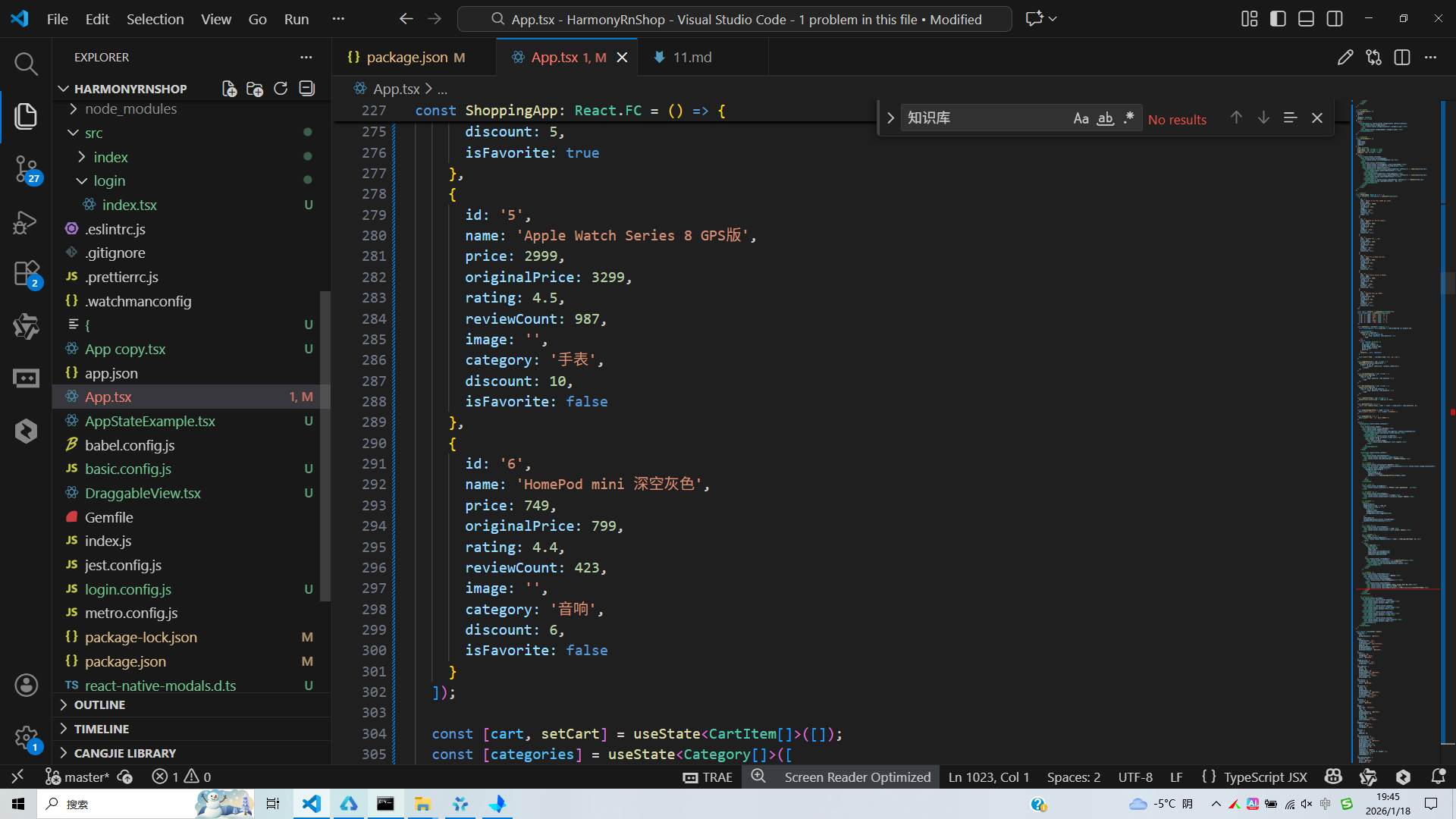
打包
接下来通过打包命令npn run harmony将reactNative的代码打包成为bundle,这样可以进行在开源鸿蒙OpenHarmony中进行使用。

打包之后再将打包后的鸿蒙OpenHarmony文件拷贝到鸿蒙的DevEco-Studio工程目录去:

最后运行效果图如下显示: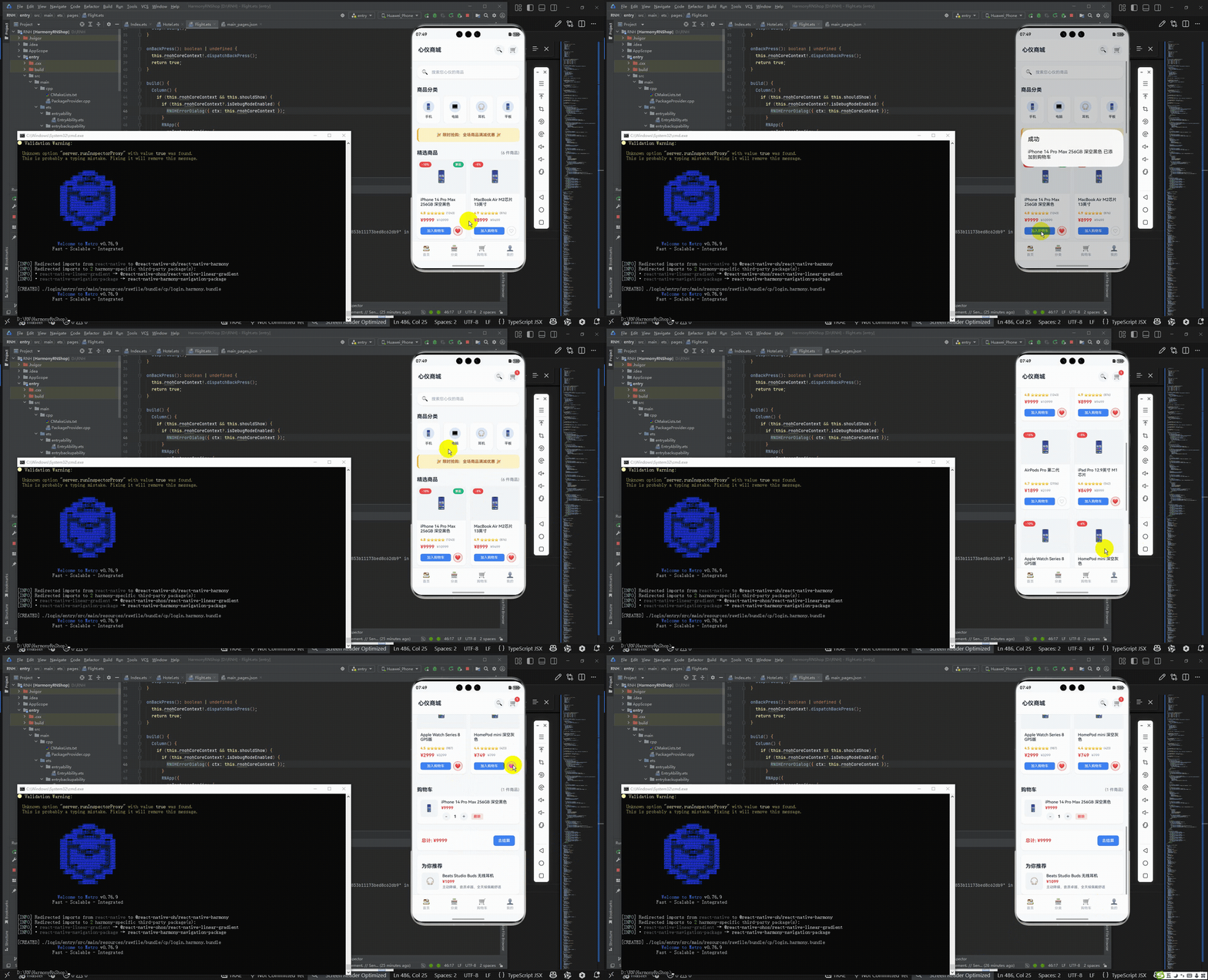
欢迎大家加入开源鸿蒙跨平台开发者社区,一起共建开源鸿蒙跨平台生态。

开源鸿蒙跨平台开发社区汇聚开发者与厂商,共建“一次开发,多端部署”的开源生态,致力于降低跨端开发门槛,推动万物智联创新。
更多推荐
 10
10 0
0- 0


 已为社区贡献28条内容

所有评论(0)