React Native鸿蒙跨平台使用轮播区通过 FlatList(horizontal + pagingEnabled)承载当前单词卡片,配合左右导航按钮控制 currentWordIndex
这页“英语单词学习”以 React Native 的核心原语拼装出一个通用的学习场景:进度汇总、快速学习入口、任务卡片、单词卡片轮播、学习历史与底部导航。架构遵循“状态驱动 + 纯视图 + 适配层”的跨端黄金路径,落到鸿蒙(HarmonyOS/OpenHarmony)时,用 RN-OH 映射 ArkUI 实现稳定一致的渲染与交互。值得关注的是列表虚拟化、渐进式渲染、字词内容的切换节奏以及一些工程细
这页“英语单词学习”以 React Native 的核心原语拼装出一个通用的学习场景:进度汇总、快速学习入口、任务卡片、单词卡片轮播、学习历史与底部导航。架构遵循“状态驱动 + 纯视图 + 适配层”的跨端黄金路径,落到鸿蒙(HarmonyOS/OpenHarmony)时,用 RN-OH 映射 ArkUI 实现稳定一致的渲染与交互。值得关注的是列表虚拟化、渐进式渲染、字词内容的切换节奏以及一些工程细节对三端的体验统一带来的影响。
状态驱动的学习节奏
- 页面以 words、studyRecords、tests 作为源数据,currentTab、currentWordIndex 与 showMeaning 作为学习交互的状态;所有 UI 派生(进度百分比、轮播卡片内容、导航高亮)都由这些状态计算而来。这样的组织使 ArkUI 只接收最终属性,渲染可预测,交互切换轻量。
- 快速学习区把“单词卡片”和“词汇测试”做为轻入口,当前实现用 Alert 做最小交互闭环,跨端一致。可进一步抽象统一的 Modal 层,屏蔽 ArkUI/Dialog 与 RN Modal 的差异,在三端获得一致的按钮排序与动效。
- 进度卡片用派生值(masteredWords/totalWords)驱动百分比,渲染前对宽度做 0–100 的边界限制能避免极端数据导致进度条溢出。
单词卡片与横向虚拟化
- 轮播区通过 FlatList(horizontal + pagingEnabled)承载当前单词卡片,配合左右导航按钮控制 currentWordIndex,这是跨端非常稳健的做法;当卡片数量增多或需要更流畅的分页体验,可以考虑“受控分页 + FlatList windowSize/initialNumToRender”组合,在鸿蒙设备上进一步优化滚动帧率与内存。
- 卡片内容展示受 showMeaning 控制,当前实现是页面级状态,只有一个卡片实例渲染时无副作用;如需多卡片并发展示,建议把状态下沉到卡片项或用 key 定位,防止“多个卡片同时展开/收起”的全局副作用。
- 字段的字面格式(词形、音标、词性、例句)是纯 Text 输出,跨端渲染稳定;字体层级与行距设置适中,保证了在 ArkUI 上的可读性。深色主题下建议做颜色适配,避免灰阶在高对比模式下变得过于淡。
列表与历史的渲染策略
- 快速学习卡片与学习历史当前用静态切片渲染;随着内容增长,迁移到 FlatList 能显著改善在鸿蒙设备上的滚动体验。结合 windowSize、initialNumToRender 与 removeClippedSubviews,避免一次性渲染过多项造成掉帧。
- 子项推荐 memo 化,仅在 props 变化时重绘,降低 JS→UI 桥接负载与重排抖动,三端表现更平滑。
安全区域
- 顶层 SafeAreaView 护住状态栏与异形屏;鸿蒙设备形态(圆角/打孔/折叠屏)更多样,建议引入 react-native-safe-area-context 做 inset 兜底,统一头部与底部导航的安全间距。
- 卡片阴影采用“双栈统一”(iOS 的 shadow* + 鸿蒙/Android 的 elevation),是跨端一致的正确做法。进一步抽象“阴影适配器”,为三端映射同等级的强度与半径,避免某端阴影过重或消失。
细节
- JSX 中多处使用了
</div>关闭标签(学习历史与运动记录等区块),React Native 不支持 HTML 标签,必须全部替换为</View>;这是运行时硬错误,会直接导致页面崩溃。 - 进度条宽度计算建议统一做 clamp 到 0–100,防止异常数据导致填充条溢出边界。
- “已掌握”按钮目前只弹出提醒没有更新状态;如果需要即时反映学习成果,建议在 words 中执行不可变更新(按 id 设置 mastered=true),并触发进度卡片的派生更新。
- 学习记录与测试题目是静态数据,后续引入后端时建议将“日期/时区”的逻辑集中到适配层,用“本地日历语义”生成键值(getFullYear/getMonth/getDate),避免 ISO/UTC 在东八区设备上的跨天错位。
类型化单词数据结构
单词学习应用展示了高效的类型化学习数据结构:
type Word = {
  id: string;
  word: string;
  pronunciation: string;
  meaning: string;
  example: string;
  partOfSpeech: string;
  mastered: boolean;
  lastReviewed: string;
};

type StudyRecord = {
  id: string;
  date: string;
  wordsStudied: number;
  wordsMastered: number;
  timeSpent: number;
};
这种类型化设计在学习应用中具有重要的学习管理价值。通过明确的单词属性定义(发音、词性、例句等),确保了学习数据的完整性和教学有效性。在鸿蒙平台上,这种类型可以无缝转化为鸿蒙的分布式学习服务,实现跨设备的单词学习进度同步。
多维度进度计算
应用实现了精确的学习进度追踪:
const masteredWords = words.filter(word => word.mastered).length;
const totalWords = words.length;
const progressPercentage = Math.round((masteredWords / totalWords) * 100);
这种进度计算在学习管理中展现了强大的数据感知能力。通过实时统计掌握数量、计算完成比例和可视化展示,提供了直观的学习反馈体验。在跨平台开发中,需要特别注意大量单词数据的处理性能。鸿蒙平台的分布式数据管理可以提供更高效的学习数据同步和更快的进度计算。
单词卡片交互系统
智能卡片翻转机制
组件采用了直观的卡片展示模式:
const renderFlashcard = ({ item }: { item: Word }) => (
  <View style={styles.flashcard}>
    <View style={styles.flashcardHeader}>
      <Text style={styles.word}>{item.word}</Text>
      <Text style={styles.pronunciation}>{item.pronunciation}</Text>
    </View>
    <View style={styles.flashcardContent}>
      <Text style={styles.partOfSpeech}>{item.partOfSpeech}</Text>
      {showMeaning && (
        <>
          <Text style={styles.meaning}>{item.meaning}</Text>
          <Text style={styles.example}>{item.example}</Text>
        </>
      )}
    </View>
    <View style={styles.flashcardFooter}>
      <TouchableOpacity style={styles.showButton} onPress={toggleShowMeaning}>
        <Text style={styles.showButtonText}>{showMeaning ? '隐藏' : '显示'}含义</Text>
      </TouchableOpacity>
      <TouchableOpacity style={styles.masterButton} onPress={() => markAsMastered(item.id)}>
        <Text style={styles.masterButtonText}>已掌握</Text>
      </TouchableOpacity>
    </View>
  </View>
);
这种卡片设计在学习应用中展现了重要的交互创新。通过渐进式信息展示、即时翻转反馈和掌握标记,提供了高效的记忆学习体验。在鸿蒙平台上,这种设计可以利用鸿蒙的原生动画引擎实现更流畅的卡片切换和更丰富的翻牌效果。
轮播导航控制
代码实现了便捷的卡片浏览系统:
const handleNextWord = () => {
  if (currentWordIndex < words.length - 1) {
    setCurrentWordIndex(currentWordIndex + 1);
    setShowMeaning(false);
  } else {
    Alert.alert('恭喜', '您已学习完所有单词!');
  }
};
这种导航控制在单词学习中展现了重要的学习引导能力。通过边界检测、自动重置和完成提示,提供了流畅的连续学习体验。在跨平台开发中,需要特别注意列表渲染性能和状态管理。鸿蒙平台的原生列表组件可以提供更高效的卡片渲染和更平滑的滚动体验。
鸿蒙跨端适配关键技术
分布式学习进度同步
鸿蒙的分布式特性为语言学习带来创新体验:
// 伪代码:分布式学习同步
const DistributedLearning = {
  syncLearningProgress: (progressData) => {
    if (Platform.OS === 'harmony') {
      harmonyNative.syncWordMastery(progressData);
    }
  },
  getCrossDeviceProgress: () => {
    if (Platform.OS === 'harmony') {
      return harmonyNative.getUnifiedLearningState();
    }
    return localProgress;
  }
};
语音识别集成
利用鸿蒙的原生语音能力提升发音练习:
// 伪代码:语音集成
const SpeechIntegration = {
  enablePronunciationCheck: () => {
    if (Platform.OS === 'harmony') {
      harmonyNative.accessSpeechRecognition();
    }
  },
  provideAudioFeedback: () => {
    if (Platform.OS === 'harmony') {
      harmonyNative.generatePronunciationScore();
    }
  }
};
智能学习推荐
鸿蒙平台为学习应用提供智能分析能力:
// 伪代码:智能推荐
const IntelligentLearning = {
  suggestReviewSchedule: () => {
    if (Platform.OS === 'harmony') {
      harmonyNative.optimizeReviewTiming();
    }
  },
  personalizeWordList: () => {
    if (Platform.OS === 'harmony') {
      harmonyNative.customizeLearningPath();
    }
  }
};
用户体验与学习管理
学习目标跟踪
应用实现了清晰的目标进度展示:
<View style={styles.taskProgress}>
  <Text style={styles.taskProgressText}>已学习 6/10 个新单词</Text>
  <View style={styles.taskProgressBar}>
    <View
      style={[
        styles.taskProgressFill,
        { width: '60%', backgroundColor: '#10b981' }
      ]}
    />
  </View>
</View>
这种目标跟踪在学习管理中展现了重要的激励机制。通过可视化的进度条、明确的学习目标,激发用户的学习动力。在鸿蒙平台上,这种设计可以利用鸿蒙的分布式通知服务实现更及时的学习提醒和目标达成通知。
个性化学习建议
<View style={styles.suggestionCard}>
  <Text style={styles.suggestionTitle}>学习建议</Text>
  <Text style={styles.suggestionText}>• 每天花15分钟复习单词卡片</Text>
  <Text style={styles.suggestionText}>• 每周进行一次词汇测试</Text>
  <Text style={styles.suggestionText}>• 结合例句理解单词用法</Text>
</View>
自适应学习系统
// 伪代码:自适应学习
const AdaptiveLearning = {
  adjustDifficulty: () => {
    if (Platform.OS === 'harmony') {
      harmonyNative.personalizeWordDifficulty();
    }
  },
  predictForgettingCurve: () => {
    if (Platform.OS === 'harmony') {
      harmonyNative.optimizeReviewSchedule();
    }
  }
};
沉浸式语言学习
// 伪代码:沉浸学习
const ImmersiveLearning = {
  enableContextualScenarios: () => {
    if (Platform.OS === 'harmony') {
      harmonyNative.createRealWorldScenarios();
    }
  },
  supportConversationPractice: () => {
    if (Platform.OS === 'harmony') {
      harmonyNative.facilitateDialoguePractice();
    }
  }
};
真实演示案例代码:
// app.tsx
import React, { useState } from 'react';
import { SafeAreaView, View, Text, StyleSheet, TouchableOpacity, ScrollView, Dimensions, Alert, FlatList } from 'react-native';

// 图标库
const ICONS = {
  book: '📖',
  flashcard: '🃏',
  test: '📝',
  history: '🕒',
  trophy: '🏆',
  settings: '⚙️',
  home: '🏠',
  speaker: '🔊',
};

const { width } = Dimensions.get('window');

// 单词类型
type Word = {
  id: string;
  word: string;
  pronunciation: string;
  meaning: string;
  example: string;
  partOfSpeech: string;
  mastered: boolean;
  lastReviewed: string;
};

// 学习记录类型
type StudyRecord = {
  id: string;
  date: string;
  wordsStudied: number;
  wordsMastered: number;
  timeSpent: number; // 分钟
};

// 测试题目类型
type TestQuestion = {
  id: string;
  word: string;
  options: string[];
  correctAnswer: string;
  userAnswer?: string;
};

// 主页面组件
const LearningApp: React.FC = () => {
  const [words] = useState<Word[]>([
    { id: '1', word: 'abandon', pronunciation: '/əˈbændən/', meaning: '放弃,抛弃', example: 'He had to abandon his car.', partOfSpeech: 'v.', mastered: true, lastReviewed: '2023-05-15' },
    { id: '2', word: 'benefit', pronunciation: '/ˈbenɪfɪt/', meaning: '利益,好处', example: 'The new policy will benefit everyone.', partOfSpeech: 'n./v.', mastered: false, lastReviewed: '2023-05-14' },
    { id: '3', word: 'consequence', pronunciation: '/ˈkɒnsɪkwəns/', meaning: '结果,后果', example: 'There will be serious consequences.', partOfSpeech: 'n.', mastered: false, lastReviewed: '2023-05-13' },
    { id: '4', word: 'demonstrate', pronunciation: '/ˈdemənstreɪt/', meaning: '证明,展示', example: 'She demonstrated her skills.', partOfSpeech: 'v.', mastered: true, lastReviewed: '2023-05-12' },
    { id: '5', word: 'efficient', pronunciation: '/ɪˈfɪʃənt/', meaning: '高效的,有效率的', example: 'This machine is very efficient.', partOfSpeech: 'adj.', mastered: false, lastReviewed: '2023-05-11' },
    { id: '6', word: 'flexible', pronunciation: '/ˈfleksəbl/', meaning: '灵活的,柔韧的', example: 'Working hours are flexible.', partOfSpeech: 'adj.', mastered: false, lastReviewed: '2023-05-10' },
  ]);

  const [studyRecords] = useState<StudyRecord[]>([
    { id: '1', date: '2023-05-15', wordsStudied: 20, wordsMastered: 15, timeSpent: 25 },
    { id: '2', date: '2023-05-14', wordsStudied: 18, wordsMastered: 12, timeSpent: 22 },
    { id: '3', date: '2023-05-13', wordsStudied: 22, wordsMastered: 18, timeSpent: 28 },
    { id: '4', date: '2023-05-12', wordsStudied: 15, wordsMastered: 10, timeSpent: 18 },
  ]);

  const [tests] = useState<TestQuestion[]>([
    { id: '1', word: 'abandon', options: ['接受', '放弃', '坚持', '保护'], correctAnswer: '放弃' },
    { id: '2', word: 'benefit', options: ['负担', '利益', '损失', '风险'], correctAnswer: '利益' },
    { id: '3', word: 'consequence', options: ['原因', '过程', '结果', '机会'], correctAnswer: '结果' },
  ]);

  const [currentTab, setCurrentTab] = useState<'home' | 'flashcards' | 'test' | 'history'>('home');
  const [currentWordIndex, setCurrentWordIndex] = useState(0);
  const [showMeaning, setShowMeaning] = useState(false);

  const masteredWords = words.filter(word => word.mastered).length;
  const totalWords = words.length;
  const progressPercentage = Math.round((masteredWords / totalWords) * 100);

  const handleNextWord = () => {
    if (currentWordIndex < words.length - 1) {
      setCurrentWordIndex(currentWordIndex + 1);
      setShowMeaning(false);
    } else {
      Alert.alert('恭喜', '您已学习完所有单词!');
    }
  };

  const handlePrevWord = () => {
    if (currentWordIndex > 0) {
      setCurrentWordIndex(currentWordIndex - 1);
      setShowMeaning(false);
    }
  };

  const toggleShowMeaning = () => {
    setShowMeaning(!showMeaning);
  };

  const markAsMastered = (wordId: string) => {
    Alert.alert('掌握', '已标记为已掌握');
  };

  const startTest = () => {
    Alert.alert('开始测试', '即将开始词汇测试,请准备好!');
  };

  const renderFlashcard = ({ item }: { item: Word }) => (
    <View style={styles.flashcard}>
      <View style={styles.flashcardHeader}>
        <Text style={styles.word}>{item.word}</Text>
        <Text style={styles.pronunciation}>{item.pronunciation}</Text>
      </View>
      <View style={styles.flashcardContent}>
        <Text style={styles.partOfSpeech}>{item.partOfSpeech}</Text>
        {showMeaning && (
          <>
            <Text style={styles.meaning}>{item.meaning}</Text>
            <Text style={styles.example}>{item.example}</Text>
          </>
        )}
      </View>
      <View style={styles.flashcardFooter}>
        <TouchableOpacity
          style={styles.showButton}
          onPress={toggleShowMeaning}
        >
          <Text style={styles.showButtonText}>{showMeaning ? '隐藏' : '显示'}含义</Text>
        </TouchableOpacity>
        <TouchableOpacity
          style={styles.masterButton}
          onPress={() => markAsMastered(item.id)}
        >
          <Text style={styles.masterButtonText}>已掌握</Text>
        </TouchableOpacity>
      </View>
    </View>
  );

  return (
    <SafeAreaView style={styles.container}>
      {/* 头部 */}
      <View style={styles.header}>
        <Text style={styles.title}>英语单词学习</Text>
        <View style={styles.headerActions}>
          <TouchableOpacity style={styles.settingsButton}>
            <Text style={styles.settingsIcon}>{ICONS.settings}</Text>
          </TouchableOpacity>
          <TouchableOpacity style={styles.trophyButton}>
            <Text style={styles.trophyIcon}>{ICONS.trophy}</Text>
          </TouchableOpacity>
        </View>
      </View>

      <ScrollView style={styles.content}>
        {/* 学习进度卡片 */}
        <View style={styles.progressCard}>
          <Text style={styles.progressTitle}>学习进度</Text>
          <View style={styles.progressRow}>
            <View style={styles.progressItem}>
              <Text style={styles.progressNumber}>{masteredWords}</Text>
              <Text style={styles.progressLabel}>已掌握</Text>
            </View>
            <View style={styles.progressItem}>
              <Text style={styles.progressNumber}>{totalWords}</Text>
              <Text style={styles.progressLabel}>总单词数</Text>
            </View>
            <View style={styles.progressItem}>
              <Text style={styles.progressNumber}>{progressPercentage}%</Text>
              <Text style={styles.progressLabel}>完成度</Text>
            </View>
          </View>
          <View style={styles.progressBar}>
            <View
              style={[
                styles.progressFill,
                { width: `${progressPercentage}%`, backgroundColor: '#3b82f6' }
              ]}
            />
          </View>
        </View>

        {/* 快速操作卡片 */}
        <Text style={styles.sectionTitle}>快速学习</Text>
        <View style={styles.quickActionsContainer}>
          <TouchableOpacity
            style={styles.quickActionCard}
            onPress={() => setCurrentTab('flashcards')}
          >
            <Text style={styles.quickActionIcon}>{ICONS.flashcard}</Text>
            <Text style={styles.quickActionTitle}>单词卡片</Text>
            <Text style={styles.quickActionDesc}>复习单词卡片</Text>
          </TouchableOpacity>
          <TouchableOpacity
            style={styles.quickActionCard}
            onPress={startTest}
          >
            <Text style={styles.quickActionIcon}>{ICONS.test}</Text>
            <Text style={styles.quickActionTitle}>词汇测试</Text>
            <Text style={styles.quickActionDesc}>测试词汇掌握程度</Text>
          </TouchableOpacity>
        </View>

        {/* 今日学习任务 */}
        <Text style={styles.sectionTitle}>今日学习任务</Text>
        <View style={styles.taskCard}>
          <Text style={styles.taskTitle}>每日学习目标</Text>
          <Text style={styles.taskDescription}>今天的目标是学习10个新单词并复习20个已学单词</Text>
          <View style={styles.taskProgress}>
            <Text style={styles.taskProgressText}>已学习 6/10 个新单词</Text>
            <View style={styles.taskProgressBar}>
              <View
                style={[
                  styles.taskProgressFill,
                  { width: '60%', backgroundColor: '#10b981' }
                ]}
              />
            </View>
          </View>
          <TouchableOpacity style={styles.startLearningButton}>
            <Text style={styles.startLearningButtonText}>继续学习</Text>
          </TouchableOpacity>
        </View>

        {/* 单词卡片轮播 */}
        <Text style={styles.sectionTitle}>当前单词</Text>
        <View style={styles.carouselContainer}>
          <TouchableOpacity
            style={styles.navButton}
            onPress={handlePrevWord}
            disabled={currentWordIndex === 0}
          >
            <Text style={[styles.navButtonText, currentWordIndex === 0 && styles.disabledNavButton]}>‹ 上一个</Text>
          </TouchableOpacity>
          <FlatList
            data={[words[currentWordIndex]]}
            renderItem={renderFlashcard}
            keyExtractor={item => item.id}
            horizontal
            pagingEnabled
            showsHorizontalScrollIndicator={false}
          />
          <TouchableOpacity
            style={styles.navButton}
            onPress={handleNextWord}
            disabled={currentWordIndex === words.length - 1}
          >
            <Text style={[styles.navButtonText, currentWordIndex === words.length - 1 && styles.disabledNavButton]}>下一个 ›</Text>
          </TouchableOpacity>
        </View>

        {/* 学习历史 */}
        <Text style={styles.sectionTitle}>最近学习记录</Text>
        <View style={styles.historyList}>
          {studyRecords.slice(0, 3).map(record => (
            <View key={record.id} style={styles.historyItem}>
              <View style={styles.historyDate}>
                <Text style={styles.historyDateText}>{record.date}</Text>
              </div>
              <View style={styles.historyDetails}>
                <Text style={styles.historyDetail}>学习单词: {record.wordsStudied}个</Text>
                <Text style={styles.historyDetail}>掌握单词: {record.wordsMastered}个</Text>
                <Text style={styles.historyDetail}>学习时长: {record.timeSpent}分钟</Text>
              </div>
            </View>
          ))}
        </div>

        {/* 学习建议 */}
        <View style={styles.suggestionCard}>
          <Text style={styles.suggestionTitle}>学习建议</Text>
          <Text style={styles.suggestionText}>• 每天花15分钟复习单词卡片</Text>
          <Text style={styles.suggestionText}>• 每周进行一次词汇测试</Text>
          <Text style={styles.suggestionText}>• 结合例句理解单词用法</Text>
          <Text style={styles.suggestionText}>• 尝试在写作中使用新学单词</Text>
        </div>
      </ScrollView>

      {/* 底部导航 */}
      <View style={styles.bottomNav}>
        <TouchableOpacity
          style={styles.navItem}
          onPress={() => setCurrentTab('home')}
        >
          <Text style={[styles.navIcon, currentTab === 'home' && styles.activeNavIcon]}>{ICONS.home}</Text>
          <Text style={[styles.navText, currentTab === 'home' && styles.activeNavText]}>首页</Text>
        </TouchableOpacity>

        <TouchableOpacity
          style={styles.navItem}
          onPress={() => setCurrentTab('flashcards')}
        >
          <Text style={[styles.navIcon, currentTab === 'flashcards' && styles.activeNavIcon]}>{ICONS.flashcard}</Text>
          <Text style={[styles.navText, currentTab === 'flashcards' && styles.activeNavText]}>单词</Text>
        </TouchableOpacity>

        <TouchableOpacity
          style={styles.navItem}
          onPress={() => setCurrentTab('test')}
        >
          <Text style={[styles.navIcon, currentTab === 'test' && styles.activeNavIcon]}>{ICONS.test}</Text>
          <Text style={[styles.navText, currentTab === 'test' && styles.activeNavText]}>测试</Text>
        </TouchableOpacity>

        <TouchableOpacity
          style={styles.navItem}
          onPress={() => setCurrentTab('history')}
        >
          <Text style={[styles.navIcon, currentTab === 'history' && styles.activeNavIcon]}>{ICONS.history}</Text>
          <Text style={[styles.navText, currentTab === 'history' && styles.activeNavText]}>记录</Text>
        </TouchableOpacity>
      </View>
    </SafeAreaView>
  );
};

const styles = StyleSheet.create({
  container: {
    flex: 1,
    backgroundColor: '#f8fafc',
  },
  header: {
    flexDirection: 'row',
    alignItems: 'center',
    justifyContent: 'space-between',
    padding: 20,
    backgroundColor: '#ffffff',
    borderBottomWidth: 1,
    borderBottomColor: '#e2e8f0',
  },
  title: {
    fontSize: 20,
    fontWeight: 'bold',
    color: '#1e293b',
  },
  headerActions: {
    flexDirection: 'row',
    alignItems: 'center',
  },
  settingsButton: {
    width: 36,
    height: 36,
    borderRadius: 18,
    backgroundColor: '#f1f5f9',
    alignItems: 'center',
    justifyContent: 'center',
    marginRight: 12,
  },
  settingsIcon: {
    fontSize: 18,
    color: '#64748b',
  },
  trophyButton: {
    width: 36,
    height: 36,
    borderRadius: 18,
    backgroundColor: '#f1f5f9',
    alignItems: 'center',
    justifyContent: 'center',
  },
  trophyIcon: {
    fontSize: 18,
    color: '#64748b',
  },
  content: {
    flex: 1,
    padding: 16,
  },
  progressCard: {
    backgroundColor: '#ffffff',
    borderRadius: 16,
    padding: 20,
    marginBottom: 16,
    elevation: 1,
    shadowColor: '#000',
    shadowOffset: { width: 0, height: 1 },
    shadowOpacity: 0.1,
    shadowRadius: 2,
  },
  progressTitle: {
    fontSize: 18,
    fontWeight: 'bold',
    color: '#1e293b',
    marginBottom: 16,
  },
  progressRow: {
    flexDirection: 'row',
    justifyContent: 'space-between',
    marginBottom: 16,
  },
  progressItem: {
    alignItems: 'center',
    flex: 1,
  },
  progressNumber: {
    fontSize: 24,
    fontWeight: 'bold',
    color: '#3b82f6',
  },
  progressLabel: {
    fontSize: 12,
    color: '#64748b',
    marginTop: 4,
  },
  progressBar: {
    height: 8,
    backgroundColor: '#e2e8f0',
    borderRadius: 4,
    overflow: 'hidden',
  },
  progressFill: {
    height: '100%',
    borderRadius: 4,
  },
  sectionTitle: {
    fontSize: 18,
    fontWeight: 'bold',
    color: '#1e293b',
    marginVertical: 12,
  },
  quickActionsContainer: {
    flexDirection: 'row',
    justifyContent: 'space-between',
    marginBottom: 16,
  },
  quickActionCard: {
    backgroundColor: '#ffffff',
    borderRadius: 12,
    padding: 16,
    alignItems: 'center',
    width: (width - 48) / 2 - 8,
    elevation: 1,
    shadowColor: '#000',
    shadowOffset: { width: 0, height: 1 },
    shadowOpacity: 0.1,
    shadowRadius: 2,
  },
  quickActionIcon: {
    fontSize: 32,
    marginBottom: 8,
  },
  quickActionTitle: {
    fontSize: 14,
    fontWeight: 'bold',
    color: '#1e293b',
    marginBottom: 4,
  },
  quickActionDesc: {
    fontSize: 12,
    color: '#64748b',
    textAlign: 'center',
  },
  taskCard: {
    backgroundColor: '#ffffff',
    borderRadius: 12,
    padding: 16,
    marginBottom: 16,
    elevation: 1,
    shadowColor: '#000',
    shadowOffset: { width: 0, height: 1 },
    shadowOpacity: 0.1,
    shadowRadius: 2,
  },
  taskTitle: {
    fontSize: 16,
    fontWeight: 'bold',
    color: '#1e293b',
    marginBottom: 8,
  },
  taskDescription: {
    fontSize: 14,
    color: '#64748b',
    marginBottom: 12,
    lineHeight: 18,
  },
  taskProgress: {
    marginBottom: 16,
  },
  taskProgressText: {
    fontSize: 12,
    color: '#64748b',
    marginBottom: 8,
  },
  taskProgressBar: {
    height: 6,
    backgroundColor: '#e2e8f0',
    borderRadius: 3,
    overflow: 'hidden',
  },
  taskProgressFill: {
    height: '100%',
    borderRadius: 3,
  },
  startLearningButton: {
    backgroundColor: '#3b82f6',
    borderRadius: 8,
    padding: 12,
    alignItems: 'center',
  },
  startLearningButtonText: {
    color: '#ffffff',
    fontSize: 14,
    fontWeight: 'bold',
  },
  carouselContainer: {
    flexDirection: 'row',
    alignItems: 'center',
    marginBottom: 16,
  },
  navButton: {
    padding: 8,
    zIndex: 1,
  },
  navButtonText: {
    fontSize: 14,
    color: '#3b82f6',
    fontWeight: '500',
  },
  disabledNavButton: {
    color: '#cbd5e1',
  },
  flashcard: {
    backgroundColor: '#ffffff',
    borderRadius: 16,
    padding: 20,
    width: width - 64,
    elevation: 2,
    shadowColor: '#000',
    shadowOffset: { width: 0, height: 2 },
    shadowOpacity: 0.1,
    shadowRadius: 4,
    marginHorizontal: 8,
  },
  flashcardHeader: {
    alignItems: 'center',
    marginBottom: 16,
  },
  word: {
    fontSize: 28,
    fontWeight: 'bold',
    color: '#1e293b',
    marginBottom: 4,
  },
  pronunciation: {
    fontSize: 14,
    color: '#64748b',
    fontStyle: 'italic',
  },
  flashcardContent: {
    marginBottom: 20,
  },
  partOfSpeech: {
    fontSize: 14,
    color: '#f59e0b',
    fontWeight: '500',
    marginBottom: 8,
  },
  meaning: {
    fontSize: 16,
    color: '#1e293b',
    fontWeight: '500',
    marginBottom: 8,
  },
  example: {
    fontSize: 14,
    color: '#64748b',
    lineHeight: 18,
  },
  flashcardFooter: {
    flexDirection: 'row',
    justifyContent: 'space-between',
  },
  showButton: {
    backgroundColor: '#e0f2fe',
    paddingHorizontal: 12,
    paddingVertical: 8,
    borderRadius: 8,
  },
  showButtonText: {
    color: '#0369a1',
    fontSize: 12,
    fontWeight: '500',
  },
  masterButton: {
    backgroundColor: '#dcfce7',
    paddingHorizontal: 12,
    paddingVertical: 8,
    borderRadius: 8,
  },
  masterButtonText: {
    color: '#166534',
    fontSize: 12,
    fontWeight: '500',
  },
  historyList: {
    marginBottom: 16,
  },
  historyItem: {
    backgroundColor: '#ffffff',
    borderRadius: 12,
    padding: 16,
    flexDirection: 'row',
    alignItems: 'center',
    marginBottom: 12,
    elevation: 1,
    shadowColor: '#000',
    shadowOffset: { width: 0, height: 1 },
    shadowOpacity: 0.1,
    shadowRadius: 2,
  },
  historyDate: {
    backgroundColor: '#dbeafe',
    paddingHorizontal: 12,
    paddingVertical: 8,
    borderRadius: 8,
    marginRight: 12,
  },
  historyDateText: {
    fontSize: 12,
    color: '#3b82f6',
    fontWeight: '500',
  },
  historyDetails: {
    flex: 1,
  },
  historyDetail: {
    fontSize: 12,
    color: '#64748b',
    marginBottom: 2,
  },
  suggestionCard: {
    backgroundColor: '#ffffff',
    borderRadius: 12,
    padding: 16,
    elevation: 1,
    shadowColor: '#000',
    shadowOffset: { width: 0, height: 1 },
    shadowOpacity: 0.1,
    shadowRadius: 2,
  },
  suggestionTitle: {
    fontSize: 16,
    fontWeight: 'bold',
    color: '#1e293b',
    marginBottom: 8,
  },
  suggestionText: {
    fontSize: 12,
    color: '#64748b',
    lineHeight: 18,
    marginBottom: 4,
  },
  bottomNav: {
    flexDirection: 'row',
    justifyContent: 'space-around',
    backgroundColor: '#ffffff',
    borderTopWidth: 1,
    borderTopColor: '#e2e8f0',
    paddingVertical: 12,
  },
  navItem: {
    alignItems: 'center',
    flex: 1,
  },
  navIcon: {
    fontSize: 20,
    color: '#94a3b8',
    marginBottom: 4,
  },
  activeNavIcon: {
    color: '#3b82f6',
  },
  navText: {
    fontSize: 12,
    color: '#94a3b8',
  },
  activeNavText: {
    color: '#3b82f6',
    fontWeight: '500',
  },
});

export default LearningApp;
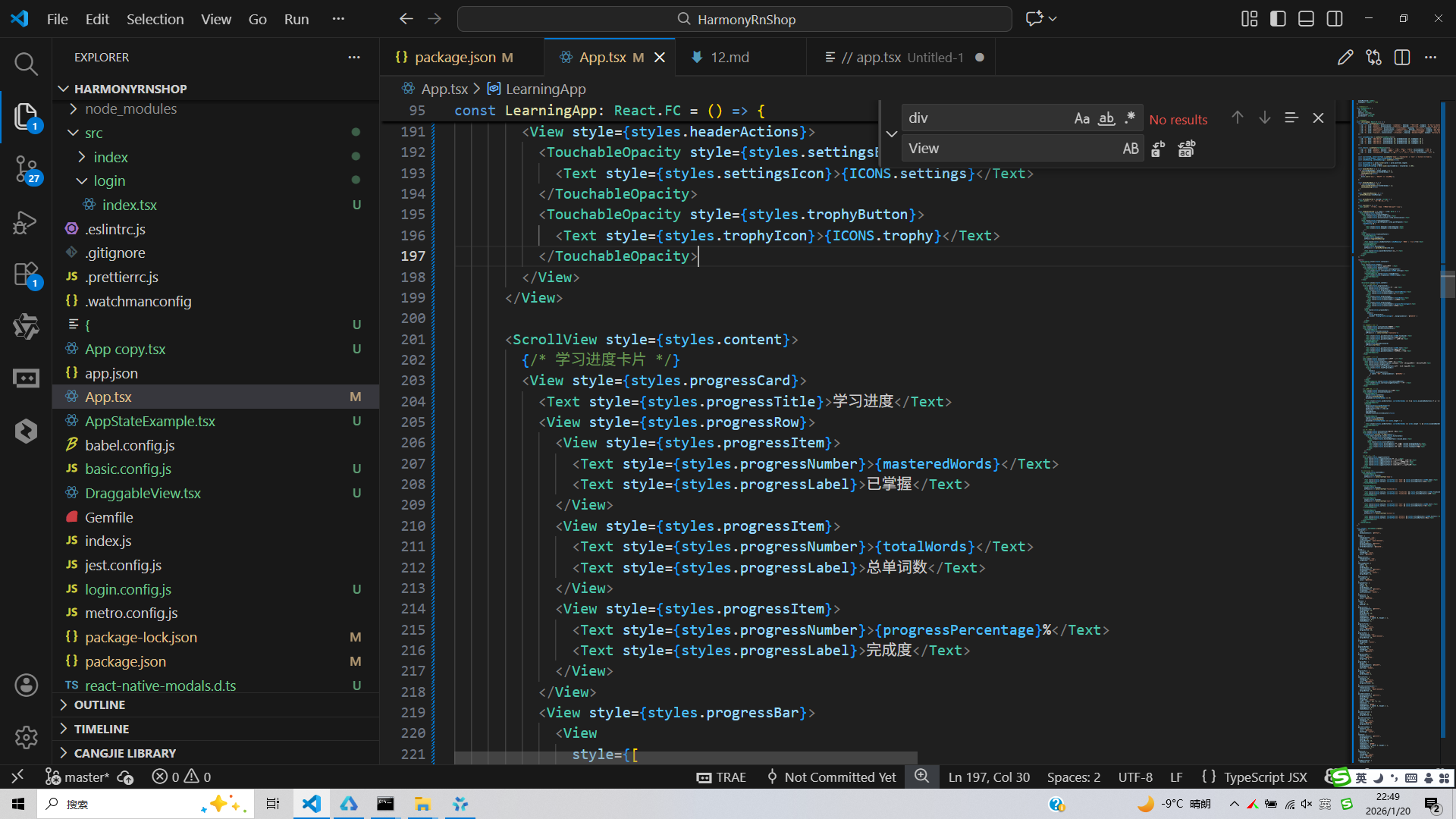
打包
接下来通过打包命令npn run harmony将reactNative的代码打包成为bundle,这样可以进行在开源鸿蒙OpenHarmony中进行使用。

打包之后再将打包后的鸿蒙OpenHarmony文件拷贝到鸿蒙的DevEco-Studio工程目录去:

最后运行效果图如下显示: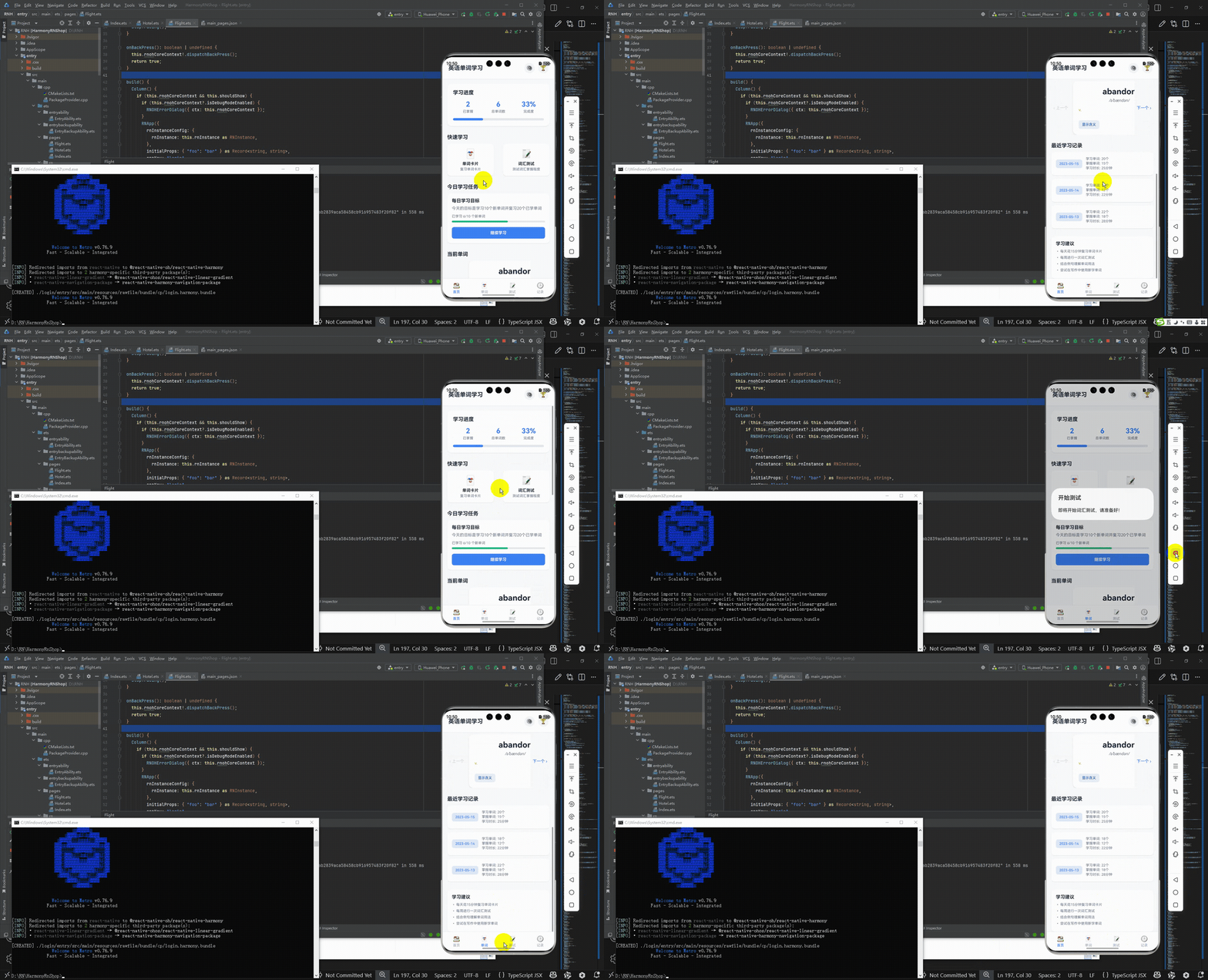
欢迎大家加入开源鸿蒙跨平台开发者社区,一起共建开源鸿蒙跨平台生态。

开源鸿蒙跨平台开发社区汇聚开发者与厂商,共建“一次开发,多端部署”的开源生态,致力于降低跨端开发门槛,推动万物智联创新。
更多推荐

 15
15 0
0- 0


 已为社区贡献28条内容

所有评论(0)