Flutter鸿蒙跨平台插件:Deeplink Store Example 使用指南
Deeplink Store Example是一个基于Flutter和go_router实现的商店应用示例,演示了深度链接功能。该应用包含产品列表、详情和分类三个页面,支持通过URL直接访问特定内容。采用定制版go_router包(通过Git引入),特别适配了鸿蒙系统。路由配置使用GoRouter管理,支持参数传递。在鸿蒙系统中,需在配置文件中声明URL模式,并在EntryAbility中处理深度
插件介绍
Deeplink Store Example 是一个使用 Flutter 和 go_router 实现的商店应用示例,主要用于演示深度链接(deeplink)的使用。该应用允许用户通过 URL 直接访问应用内的特定页面,例如产品详情页或特定分类的产品列表。
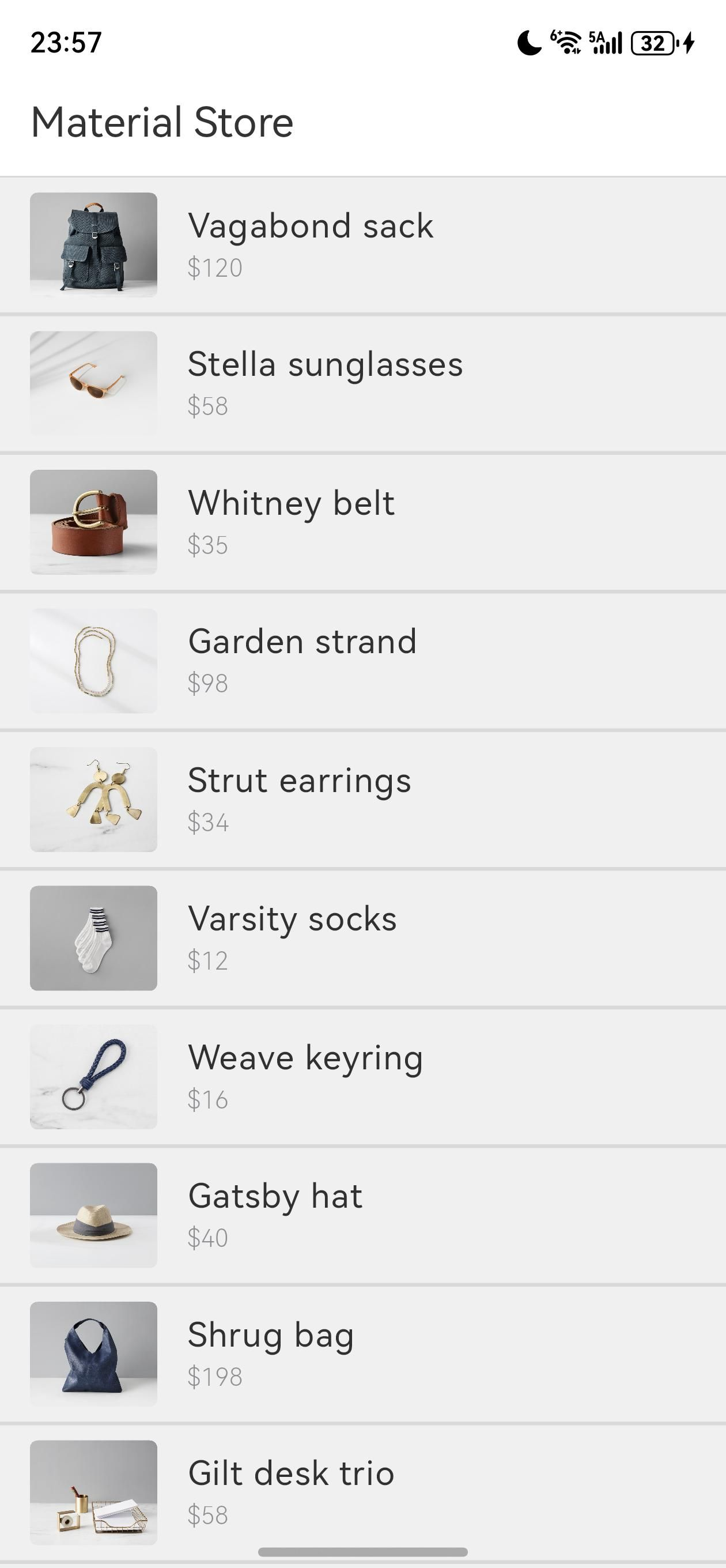
应用包含三个主要页面:
- 产品列表页(ProductList):显示所有产品
- 产品详情页(ProductDetails):显示单个产品的详细信息
- 产品分类列表页(ProductCategoryList):按分类显示产品
该应用使用 go_router 管理路由,支持深度链接导航,已被适配为支持鸿蒙(OpenHarmony)系统。
包的引入
由于这是为鸿蒙适配的自定义修改版本,需要通过 Git 形式引入 go_router 包。在您的项目的 pubspec.yaml 文件中添加以下依赖:
dependencies:
  flutter:
    sdk: flutter
  cupertino_icons: ^1.0.2
  shrine_images: ^2.0.2
  go_router:
    git:
      url: "https://gitcode.com/openharmony-tpc/flutter_packages.git"
      path: "packages/go_router/go_router"
然后运行 flutter pub get 命令来获取依赖。
API 的调用
路由配置
使用 go_router 配置应用的路由表:
import 'package:flutter/material.dart';
import 'package:go_router/go_router.dart';
import 'product_list.dart';
import 'product_details.dart';
import 'product_category_list.dart';
void main() => runApp(const MyApp());
class MyApp extends StatelessWidget {
const MyApp({super.key});
Widget build(BuildContext context) {
return MaterialApp.router(
debugShowCheckedModeBanner: false,
theme: ThemeData.light(useMaterial3: true),
routerConfig: GoRouter(
routes: [
GoRoute(
path: '/',
builder: (_, __) => const ProductList(),
routes: [
GoRoute(path: ':id', builder: (_, __) => const ProductDetails()),
],
),
GoRoute(
path: '/category/:category',
builder: (_, __) => const ProductCategoryList()),
],
),
);
}
}
获取路由参数
在页面组件中,可以通过 GoRouterState 获取路由参数:
// 在 ProductDetails 页面中获取产品 ID
final id = int.parse(GoRouterState.of(context).params['id']!);
final product = ProductsRepository.loadProduct(id: id);

// 在 ProductCategoryList 页面中获取分类
final category = GoRouterState.of(context).params['category']!;
final products = ProductsRepository.loadProducts(
  category: categoryFromString(category),
);
鸿蒙深度链接配置
要在鸿蒙上支持深度链接,需要在应用的配置文件中添加 URL 模式。
- 修改
ohos/entry/src/main/module.json5文件,添加深度链接配置:
{
  "module": {
    "name": "entry",
    "type": "entry",
    "description": "Deeplink Store Example Entry",
    "mainElement": "EntryAbility",
    "deviceTypes": ["phone", "tablet"],
    "distro": {
      "deliveryWithInstall": true,
      "moduleName": "entry",
      "moduleType": "entry"
    },
    "abilities": [
      {
        "name": "EntryAbility",
        "srcEntry": "./ets/entryability/EntryAbility.ets",
        "description": "Main Entry Ability",
        "icon": "$media:icon",
        "label": "Deeplink Store Example",
        "visible": true,
        "formsEnabled": false,
        "skills": [
          {
            "entities": ["entity.system.home"],
            "actions": ["action.system.home"],
            "uris": [
              {
                "scheme": "https",
                "host": "example.com",
                "path": "/product/*",
                "type": "url"
              },
              {
                "scheme": "https",
                "host": "example.com",
                "path": "/category/*",
                "type": "url"
              }
            ]
          }
        ]
      }
    ]
  }
}
- 在
EntryAbility.ets中处理深度链接:
import Ability from '@ohos.app.ability.UIAbility';
import hilog from '@ohos.hilog';
import window from '@ohos.window';

const TAG: string = '[EntryAbility]';
const DOMAIN_NUMBER: number = 0xFF00;

export default class EntryAbility extends Ability {
  onCreate(want, launchParam) {
    hilog.info(DOMAIN_NUMBER, TAG, '%{public}s', 'Ability onCreate');

    // 处理深度链接
    if (want && want.uri) {
      const uri = want.uri;
      hilog.info(DOMAIN_NUMBER, TAG, 'Received URI: %{public}s', uri);

      // 将 URI 传递给 Flutter 应用
      // 这部分需要根据 Flutter 引擎的具体实现进行调整
    }
  }

  onDestroy() {
    hilog.info(DOMAIN_NUMBER, TAG, '%{public}s', 'Ability onDestroy');
  }

  onWindowStageCreate(windowStage: window.WindowStage) {
    // Main window is created, set main page for this ability
    hilog.info(DOMAIN_NUMBER, TAG, '%{public}s', 'Ability onWindowStageCreate');

    windowStage.loadContent('pages/Index', (err, data) => {
      if (err.code) {
        hilog.error(DOMAIN_NUMBER, TAG, 'Failed to load the content. Cause: %{public}s', JSON.stringify(err));
        return;
      }
      hilog.info(DOMAIN_NUMBER, TAG, 'Succeeded in loading the content. Data: %{public}s', JSON.stringify(data));
    });
  }

  onWindowStageDestroy() {
    // Main window is destroyed, release UI related resources
    hilog.info(DOMAIN_NUMBER, TAG, '%{public}s', 'Ability onWindowStageDestroy');
  }

  onForeground() {
    // Ability has brought to foreground
    hilog.info(DOMAIN_NUMBER, TAG, '%{public}s', 'Ability onForeground');
  }

  onBackground() {
    // Ability has back to background
    hilog.info(DOMAIN_NUMBER, TAG, '%{public}s', 'Ability onBackground');
  }
}
使用示例
以下是一些使用深度链接的示例:
-
打开产品列表页:
https://example.com/ -
打开特定产品详情页:
https://example.com/1这将打开 ID 为 1 的产品详情页
-
打开特定分类的产品列表:
https://example.com/category/accessories这将打开配件分类的产品列表
在鸿蒙上运行示例
要在鸿蒙设备上运行 deeplink_store_example 示例项目,请按照以下步骤操作:
-
克隆仓库:
git clone https://github.com/flutter/samples.git cd samples/experimental/deeplink_store_example -
修改
pubspec.yaml文件,添加鸿蒙适配的依赖:
dependencies:
flutter:
sdk: flutter
cupertino_icons: ^1.0.2
shrine_images: ^2.0.2
go_router:
git:
url: “https://gitcode.com/openharmony-tpc/flutter_packages.git”
path: “packages/go_router/go_router”
3. 为鸿蒙平台准备项目:
```bash
flutter create . --platforms ohos
-
配置鸿蒙深度链接(如前所述)
-
运行项目:
flutter run -d ohos
总结
Deeplink Store Example 是一个功能完善的商店应用示例,展示了如何在 Flutter 中使用 go_router 实现路由管理和深度链接功能。通过鸿蒙适配,您现在可以在鸿蒙设备上体验和使用这些功能。
主要功能包括:
- 使用 go_router 配置灵活的路由表
- 支持参数化路由和嵌套路由
- 实现深度链接导航,允许通过 URL 直接访问应用内页面
- 适配鸿蒙系统,支持鸿蒙设备上的深度链接功能
深度链接是移动应用中非常重要的功能,它允许用户从外部链接直接跳转到应用内的特定页面,提升用户体验和应用的可访问性。
欢迎加入开源鸿蒙跨平台社区: https://openharmonycrossplatform.csdn.net

开源鸿蒙跨平台开发社区汇聚开发者与厂商,共建“一次开发,多端部署”的开源生态,致力于降低跨端开发门槛,推动万物智联创新。
更多推荐


 25
25 0
0- 0


 已为社区贡献10条内容

所有评论(0)