Flutter鸿蒙跨平台插件:Place Tracker 使用指南
Place Tracker是一个基于Flutter开发的地点跟踪应用,集成Google Maps API实现地图功能。核心功能包括:分类管理收藏、已访问和想去的地点;在地图显示标记点;添加/编辑地点信息;查看地点详情和导航路线。技术栈采用google_maps_flutter插件实现地图,配合provider状态管理、go_router路由和uuid生成唯一ID。支持多平台配置(Android/i
插件介绍
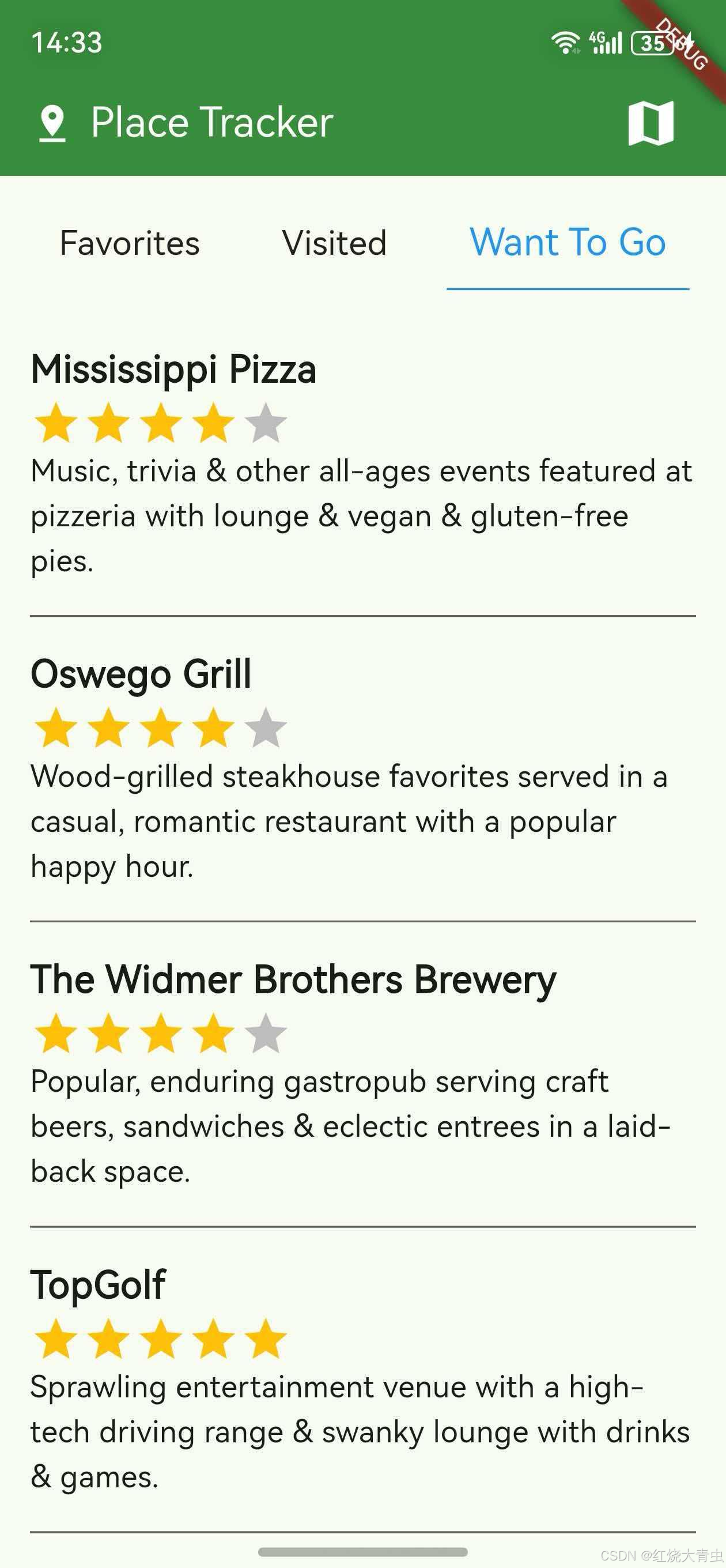
Place Tracker 是一个基于 Flutter 的地点跟踪应用示例,使用了 google_maps_flutter 插件。该应用允许用户跟踪收藏的地点、已访问的地点和想去的地点,查看地点详情,在地图上显示这些地点,并获取前往这些地点的路线。
核心功能
- 支持三种地点分类:收藏地点(Favorites)、已访问地点(Visited)和想去的地点(Want To Go)
- 在全屏地图上显示地点标记
- 支持添加新地点并设置名称、描述和评分
- 查看地点详情,包括嵌入式地图
- 支持地图类型切换(普通、卫星、混合等)
- 支持地图缩放和相机移动
技术特点
- 使用
google_maps_flutter实现地图功能 - 使用
provider进行状态管理 - 使用
go_router进行路由管理 - 使用
uuid生成唯一标识符 - 采用响应式设计,适配不同屏幕尺寸
使用步骤
1. 包的引入
由于这是自定义修改版本的 Place Tracker,需要以 Git 形式引入。在您的项目的 pubspec.yaml 文件中添加以下依赖配置:
dependencies:
  place_tracker:
    git:
      url: "https://atomgit.com/"
      path: "packages/place_tracker/place_tracker"
同时,需要确保您的项目也添加了 Place Tracker 所需的依赖:
dependencies:
  flutter:
    sdk: flutter
  cupertino_icons: ^1.0.0
  google_maps_flutter: ^2.2.0
  provider: ^6.0.2
  uuid: ^4.0.0
  go_router: ^10.0.0
  collection: ^1.16.0
2. API Key 配置
Place Tracker 使用 Google Maps API,因此需要配置 API Key。在鸿蒙系统上,您需要进行以下配置:
Android 平台(鸿蒙兼容层)
在 android/app/src/main/AndroidManifest.xml 文件中添加:
<manifest ...
  <application ...
    <meta-data android:name="com.google.android.geo.API_KEY"
               android:value="YOUR_API_KEY_HERE"/>
iOS 平台(鸿蒙兼容层)
在 ios/Runner/AppDelegate.swift 文件中添加:
@UIApplicationMain
@objc class AppDelegate: FlutterAppDelegate {
  override func application(
    _ application: UIApplication,
    didFinishLaunchingWithOptions launchOptions: [UIApplication.LaunchOptionsKey: Any]?
  ) -> Bool {
    GMSServices.provideAPIKey("YOUR_API_KEY_HERE")
    GeneratedPluginRegistrant.register(with: self)
    return super.application(application, didFinishLaunchingWithOptions: launchOptions)
  }
}
Web 平台(鸿蒙 WebView)
在 web/index.html 文件的 <head> 标签中添加:
<script src="https://maps.googleapis.com/maps/api/js?key=YOUR_API_KEY_HERE"></script>
3. API 调用示例
初始化地图
PlaceMap(
  center: LatLng(37.4220, -122.0841), // 地图中心点坐标
)
创建 Place 对象
final place = Place(
  id: const Uuid().v1(),
  latLng: LatLng(37.4220, -122.0841),
  name: "Googleplex",
  category: PlaceCategory.favorite,
  description: "Google Headquarters",
  starRating: 5,
);
显示地点详情
PlaceDetails(
  place: place,
)
切换地点分类
void _switchCategory(PlaceCategory category) {
  Provider.of<AppState>(context, listen: false)
      .setSelectedCategory(category);
}
添加新地点
final newPlace = Place(
  id: const Uuid().v1(),
  latLng: LatLng(37.4220, -122.0841),
  name: "New Place",
  category: PlaceCategory.wantToGo,
);

final appState = Provider.of<AppState>(context, listen: false);
final newPlaces = List<Place>.from(appState.places)..add(newPlace);
appState.setPlaces(newPlaces);
核心组件说明
PlaceMap 组件
全屏显示 Google 地图,支持添加标记和交互:
class PlaceMap extends StatefulWidget {
final LatLng? center;
const PlaceMap({
super.key,
this.center,
});
State<PlaceMap> createState() => _PlaceMapState();
}
PlaceDetails 组件
显示地点详细信息,包括嵌入式地图:
class PlaceDetails extends StatefulWidget {
final Place place;
const PlaceDetails({
required this.place,
super.key,
});
State<PlaceDetails> createState() => _PlaceDetailsState();
}
Place 类
表示一个地点的模型类:
class Place {
  final String id;
  final LatLng latLng;
  final String name;
  final PlaceCategory category;
  final String? description;
  final int starRating;

  // 构造函数、getter 和方法...
}

enum PlaceCategory {
  favorite,
  visited,
  wantToGo,
}
总结
Place Tracker 是一个功能完整的地点跟踪应用示例,展示了如何在 Flutter 中使用 Google Maps API 实现地图功能和地点管理。通过本指南,您可以了解如何将 Place Tracker 引入到您的鸿蒙 Flutter 项目中,并使用其核心 API 实现地点跟踪功能。
该应用提供了以下关键功能:
- 地点分类管理
- 地图显示和交互
- 地点标记和详情查看
- 新地点添加和编辑
使用 Place Tracker,您可以快速构建具有地图功能的地点管理应用,或者将其地图相关功能集成到您现有的应用中。
欢迎加入开源鸿蒙跨平台社区:https://openharmonycrossplatform.csdn.net

开源鸿蒙跨平台开发社区汇聚开发者与厂商,共建“一次开发,多端部署”的开源生态,致力于降低跨端开发门槛,推动万物智联创新。
更多推荐

 5
5 0
0- 0


 已为社区贡献13条内容

所有评论(0)