Flutter for Openharmo第三方库实战:通讯录智能助手 —— flutter_contacts
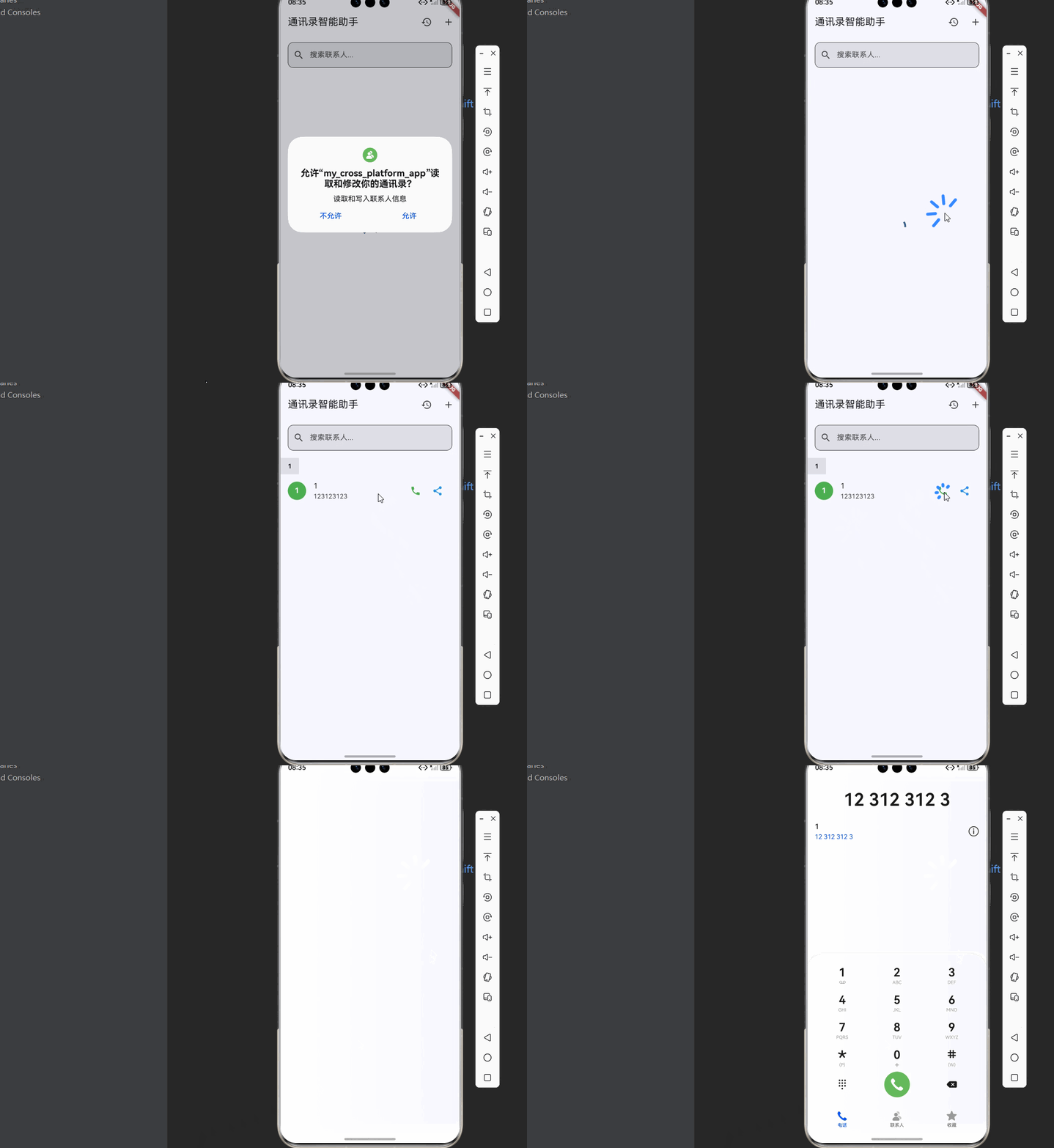
想象一下这样的场景:用户打开你的应用,快速浏览联系人列表,一键拨打电话或发送信息,还能将联系人名片分享给好友。这个流程涵盖了现代通讯录应用的核心体验。fill:#333;important;important;fill:none;color:#333;color:#333;important;fill:none;fill:#333;height:1em;拨打电话分享名片编辑联系人加载联系人列表搜索
欢迎加入开源鸿蒙跨平台社区:https://openharmonycrossplatform.csdn.net
🚀 项目概述:我们要构建什么?
想象一下这样的场景:用户打开你的应用,快速浏览联系人列表,一键拨打电话或发送信息,还能将联系人名片分享给好友。这个流程涵盖了现代通讯录应用的核心体验。
🎯 核心功能一览
| 功能模块 | 实现库 | 核心能力 |
|---|---|---|
| 📱 通讯录管理 | flutter_contacts | 联系人增删改查、搜索筛选 |
| 📞 一键拨号 | flutter_phone_direct_caller | 直接拨打电话 |
| 📤 信息分享 | share_extend | 分享联系人名片 |
💡 为什么选择这三个库?
1️⃣ flutter_contacts - 全能通讯录管理
- 完整的联系人增删改查功能
- 支持姓名、电话、邮箱、地址等多种信息
- 内置权限管理功能
- 支持联系人分组
- 支持监听通讯录变化
2️⃣ flutter_phone_direct_caller - 极速拨号
- 一行代码直接拨打电话
- 自动处理权限请求
- 跨平台支持
- API 简洁易用
3️⃣ share_extend - 系统级分享
- 调用系统原生分享面板
- 支持分享文本、图片、文件
- 无需集成各平台 SDK
- 用户可自主选择分享目标
📦 第一步:环境配置
1.1 添加依赖
打开 pubspec.yaml,添加三个库的依赖:
dependencies:
  flutter:
    sdk: flutter

  # 通讯录管理
  flutter_contacts:
    git:
      url: "https://atomgit.com/openharmony-sig/fluttertpc_flutter_contacts.git"

  # 电话拨号
  flutter_phone_direct_caller:
    git:
      url: "https://atomgit.com/openharmony-sig/fluttertpc_flutter_phone_direct_caller.git"

  # 系统分享
  share_extend:
    git:
      url: "https://atomgit.com/openharmony-sig/fluttertpc_share_extend.git"
      ref: "master"
1.2 权限配置
⚠️ 重要提示:通讯录权限属于 system_basic 级别权限,需要进行特殊配置。
步骤 1:修改 Debug 签名模板
找到 SDK 目录下的签名模板文件:
{SDK路径}/openharmony/toolchains/lib/UnsgnedDebugProfileTemplate.json
修改以下内容:
1. 将 APL 等级从 normal 改为 system_basic:
"bundle-info": {
    ...
    "apl": "system_basic",
    ...
}
2. 在 acls 中添加允许的权限:
"acls": {
    "allowed-acls": [
        "ohos.permission.READ_CONTACTS",
        "ohos.permission.WRITE_CONTACTS"
    ]
}
步骤 2:配置应用权限
📄 ohos/entry/src/main/module.json5:
{
  "module": {
    "requestPermissions": [
      {
        "name": "ohos.permission.READ_CONTACTS",
        "reason": "$string:contacts_reason",
        "usedScene": {
          "abilities": ["EntryAbility"],
          "when": "inuse"
        }
      },
      {
        "name": "ohos.permission.WRITE_CONTACTS",
        "reason": "$string:contacts_reason",
        "usedScene": {
          "abilities": ["EntryAbility"],
          "when": "inuse"
        }
      }
    ]
  }
}
📄 ohos/entry/src/main/resources/base/element/string.json:
{
  "string": [
    {
      "name": "contacts_reason",
      "value": "应用需要访问通讯录以提供联系人管理服务"
    }
  ]
}
1.3 执行依赖安装
flutter pub get
📱 第二步:通讯录服务模块
2.1 联系人服务封装
import 'package:flutter/foundation.dart';
import 'package:flutter_contacts/flutter_contacts.dart';

class ContactInfo {
  final String id;
  final String displayName;
  final String? firstName;
  final String? lastName;
  final List<PhoneInfo> phones;
  final List<EmailInfo> emails;
  final String? company;
  final String? note;
  final Uint8List? photo;

  ContactInfo({
    required this.id,
    required this.displayName,
    this.firstName,
    this.lastName,
    this.phones = const [],
    this.emails = const [],
    this.company,
    this.note,
    this.photo,
  });

  factory ContactInfo.fromContact(Contact contact) {
    return ContactInfo(
      id: contact.id,
      displayName: contact.displayName,
      firstName: contact.name.first,
      lastName: contact.name.last,
      phones: contact.phones.map((p) => PhoneInfo.fromPhone(p)).toList(),
      emails: contact.emails.map((e) => EmailInfo.fromEmail(e)).toList(),
      company: contact.organizations.isNotEmpty
          ? contact.organizations.first.company
          : null,
      note: contact.notes.isNotEmpty ? contact.notes.first.note : null,
      photo: contact.photo,
    );
  }

  String get primaryPhone => phones.isNotEmpty ? phones.first.number : '';
  String get primaryEmail => emails.isNotEmpty ? emails.first.address : '';

  String get initials {
    if (displayName.isNotEmpty) {
      return displayName[0].toUpperCase();
    }
    return '?';
  }
}

class PhoneInfo {
  final String number;
  final String label;

  PhoneInfo({required this.number, this.label = '手机'});

  factory PhoneInfo.fromPhone(Phone phone) {
    return PhoneInfo(
      number: phone.number,
      label: _getPhoneLabel(phone.label),
    );
  }

  static String _getPhoneLabel(PhoneLabel label) {
    switch (label) {
      case PhoneLabel.mobile: return '手机';
      case PhoneLabel.home: return '住宅';
      case PhoneLabel.work: return '工作';
      case PhoneLabel.main: return '主要';
      default: return '其他';
    }
  }
}

class EmailInfo {
  final String address;
  final String label;

  EmailInfo({required this.address, this.label = '邮箱'});

  factory EmailInfo.fromEmail(Email email) {
    return EmailInfo(
      address: email.address,
      label: _getEmailLabel(email.label),
    );
  }

  static String _getEmailLabel(EmailLabel label) {
    switch (label) {
      case EmailLabel.home: return '住宅';
      case EmailLabel.work: return '工作';
      default: return '其他';
    }
  }
}

class ContactService extends ChangeNotifier {
  List<ContactInfo> _contacts = [];
  List<ContactInfo> _filteredContacts = [];
  bool _isLoading = false;
  String? _errorMessage;
  String _searchQuery = '';

  List<ContactInfo> get contacts => _filteredContacts;
  bool get isLoading => _isLoading;
  String? get errorMessage => _errorMessage;
  String get searchQuery => _searchQuery;

  Future<bool> requestPermission() async {
    try {
      final permission = await FlutterContacts.requestPermission(readonly: false);
      return permission;
    } catch (e) {
      _errorMessage = '请求权限失败: $e';
      notifyListeners();
      return false;
    }
  }

  Future<void> loadContacts() async {
    _isLoading = true;
    _errorMessage = null;
    notifyListeners();

    try {
      final granted = await requestPermission();
      if (!granted) {
        _errorMessage = '通讯录权限被拒绝';
        _isLoading = false;
        notifyListeners();
        return;
      }

      final contacts = await FlutterContacts.getContacts(
        withProperties: true,
        withPhoto: true,
      );

      _contacts = contacts.map((c) => ContactInfo.fromContact(c)).toList();
      _contacts.sort((a, b) => a.displayName.compareTo(b.displayName));
      _applyFilter();

      _isLoading = false;
      notifyListeners();
    } catch (e) {
      _errorMessage = '加载联系人失败: $e';
      _isLoading = false;
      notifyListeners();
    }
  }

  void search(String query) {
    _searchQuery = query;
    _applyFilter();
    notifyListeners();
  }

  void _applyFilter() {
    if (_searchQuery.isEmpty) {
      _filteredContacts = List.from(_contacts);
    } else {
      final query = _searchQuery.toLowerCase();
      _filteredContacts = _contacts.where((c) {
        return c.displayName.toLowerCase().contains(query) ||
            c.phones.any((p) => p.number.contains(query)) ||
            c.emails.any((e) => e.address.toLowerCase().contains(query));
      }).toList();
    }
  }

  Future<ContactInfo?> getContact(String id) async {
    try {
      final contact = await FlutterContacts.getContact(id, withPhoto: true);
      if (contact != null) {
        return ContactInfo.fromContact(contact);
      }
      return null;
    } catch (e) {
      debugPrint('获取联系人详情失败: $e');
      return null;
    }
  }

  Future<bool> addContact(ContactInfo contact) async {
    try {
      final newContact = Contact()
        ..name.first = contact.firstName ?? ''
        ..name.last = contact.lastName ?? '';

      for (final phone in contact.phones) {
        newContact.phones.add(Phone(phone.number));
      }

      for (final email in contact.emails) {
        newContact.emails.add(Email(email.address));
      }

      await newContact.insert();
      await loadContacts();
      return true;
    } catch (e) {
      _errorMessage = '添加联系人失败: $e';
      notifyListeners();
      return false;
    }
  }

  Future<bool> deleteContact(String id) async {
    try {
      final contact = await FlutterContacts.getContact(id);
      if (contact != null) {
        await contact.delete();
        await loadContacts();
        return true;
      }
      return false;
    } catch (e) {
      _errorMessage = '删除联系人失败: $e';
      notifyListeners();
      return false;
    }
  }

  Map<String, List<ContactInfo>> get groupedContacts {
    final groups = <String, List<ContactInfo>>{};

    for (final contact in _filteredContacts) {
      final key = contact.displayName.isNotEmpty
          ? contact.displayName[0].toUpperCase()
          : '#';
      groups.putIfAbsent(key, () => []).add(contact);
    }

    final sortedKeys = groups.keys.toList()..sort();
    return Map.fromEntries(
      sortedKeys.map((key) => MapEntry(key, groups[key]!)),
    );
  }
}
📞 第三步:电话服务模块
3.1 拨号服务封装
import 'package:flutter/foundation.dart';
import 'package:flutter_phone_direct_caller/flutter_phone_direct_caller.dart';

class CallService extends ChangeNotifier {
  final List<CallHistory> _history = [];
  String? _lastError;

  List<CallHistory> get history => List.unmodifiable(_history);
  String? get lastError => _lastError;

  Future<bool> makeCall(String phoneNumber, {String? contactName}) async {
    try {
      _lastError = null;

      final result = await FlutterPhoneDirectCaller.callNumber(phoneNumber);

      _history.insert(0, CallHistory(
        phoneNumber: phoneNumber,
        contactName: contactName,
        timestamp: DateTime.now(),
        success: result ?? false,
      ));

      if (_history.length > 50) {
        _history.removeLast();
      }

      notifyListeners();
      return result ?? false;
    } catch (e) {
      _lastError = '拨号失败: $e';
      notifyListeners();
      return false;
    }
  }

  Future<bool> dialNumber(String phoneNumber) async {
    try {
      final result = await FlutterPhoneDirectCaller.callNumber(phoneNumber);
      return result ?? false;
    } catch (e) {
      _lastError = '拨号失败: $e';
      notifyListeners();
      return false;
    }
  }

  void clearHistory() {
    _history.clear();
    notifyListeners();
  }
}

class CallHistory {
  final String phoneNumber;
  final String? contactName;
  final DateTime timestamp;
  final bool success;

  CallHistory({
    required this.phoneNumber,
    this.contactName,
    required this.timestamp,
    required this.success,
  });

  String get displayName => contactName ?? phoneNumber;
}
📤 第四步:分享服务模块
4.1 分享服务封装
import 'package:flutter/foundation.dart';
import 'package:share_extend/share_extend.dart';

class ShareService extends ChangeNotifier {
  String? _lastError;

  String? get lastError => _lastError;

  Future<bool> shareContact(ContactInfo contact) async {
    try {
      _lastError = null;

      final vcard = _generateVCard(contact);

      await ShareExtend.share(vcard, 'text');

      return true;
    } catch (e) {
      _lastError = '分享失败: $e';
      notifyListeners();
      return false;
    }
  }

  Future<bool> shareText(String text) async {
    try {
      _lastError = null;
      await ShareExtend.share(text, 'text');
      return true;
    } catch (e) {
      _lastError = '分享失败: $e';
      notifyListeners();
      return false;
    }
  }

  Future<bool> sharePhone(String phoneNumber, {String? contactName}) async {
    try {
      _lastError = null;

      final text = contactName != null
          ? '$contactName: $phoneNumber'
          : phoneNumber;

      await ShareExtend.share(text, 'text');
      return true;
    } catch (e) {
      _lastError = '分享失败: $e';
      notifyListeners();
      return false;
    }
  }

  String _generateVCard(ContactInfo contact) {
    final buffer = StringBuffer();
    buffer.writeln('BEGIN:VCARD');
    buffer.writeln('VERSION:3.0');
    buffer.writeln('FN:${contact.displayName}');

    if (contact.firstName != null || contact.lastName != null) {
      buffer.writeln('N:${contact.lastName ?? ''};${contact.firstName ?? ''};;;');
    }

    for (final phone in contact.phones) {
      buffer.writeln('TEL;TYPE=${phone.label}:${phone.number}');
    }

    for (final email in contact.emails) {
      buffer.writeln('EMAIL;TYPE=${email.label}:${email.address}');
    }

    if (contact.company != null) {
      buffer.writeln('ORG:${contact.company}');
    }

    if (contact.note != null) {
      buffer.writeln('NOTE:${contact.note}');
    }

    buffer.writeln('END:VCARD');
    return buffer.toString();
  }
}
🔧 第五步:完整实战应用
5.1 主页面布局
import 'package:flutter/material.dart';
import 'package:flutter_contacts/flutter_contacts.dart';
import 'package:flutter_phone_direct_caller/flutter_phone_direct_caller.dart';
import 'package:share_extend/share_extend.dart';
void main() {
runApp(const MyApp());
}
class MyApp extends StatelessWidget {
const MyApp({super.key});
Widget build(BuildContext context) {
return MaterialApp(
title: '通讯录智能助手',
theme: ThemeData(
colorScheme: ColorScheme.fromSeed(seedColor: Colors.blue),
useMaterial3: true,
),
home: const ContactAssistantPage(),
);
}
}
class ContactAssistantPage extends StatefulWidget {
const ContactAssistantPage({super.key});
State<ContactAssistantPage> createState() => _ContactAssistantPageState();
}
class _ContactAssistantPageState extends State<ContactAssistantPage> {
final ContactService _contactService = ContactService();
final CallService _callService = CallService();
final ShareService _shareService = ShareService();
final TextEditingController _searchController = TextEditingController();
void initState() {
super.initState();
_contactService.addListener(() => setState(() {}));
_contactService.loadContacts();
}
void dispose() {
_contactService.dispose();
_callService.dispose();
_shareService.dispose();
_searchController.dispose();
super.dispose();
}
void _showContactOptions(ContactInfo contact) {
showModalBottomSheet(
context: context,
builder: (context) => Container(
padding: const EdgeInsets.all(16),
child: Column(
mainAxisSize: MainAxisSize.min,
children: [
ListTile(
leading: const CircleAvatar(
backgroundColor: Colors.blue,
child: Icon(Icons.phone, color: Colors.white),
),
title: Text(contact.displayName),
subtitle: Text(contact.primaryPhone),
),
const Divider(),
ListTile(
leading: const Icon(Icons.phone, color: Colors.green),
title: const Text('拨打电话'),
onTap: () {
Navigator.pop(context);
_makeCall(contact);
},
),
ListTile(
leading: const Icon(Icons.message, color: Colors.orange),
title: const Text('发送短信'),
onTap: () {
Navigator.pop(context);
// 发送短信功能
},
),
ListTile(
leading: const Icon(Icons.share, color: Colors.blue),
title: const Text('分享联系人'),
onTap: () {
Navigator.pop(context);
_shareContact(contact);
},
),
ListTile(
leading: const Icon(Icons.edit, color: Colors.purple),
title: const Text('编辑联系人'),
onTap: () {
Navigator.pop(context);
// 编辑联系人功能
},
),
ListTile(
leading: const Icon(Icons.delete, color: Colors.red),
title: const Text('删除联系人'),
onTap: () {
Navigator.pop(context);
_confirmDelete(contact);
},
),
],
),
),
);
}
Future<void> _makeCall(ContactInfo contact) async {
if (contact.primaryPhone.isEmpty) {
_showSnackBar('该联系人没有电话号码');
return;
}
final success = await _callService.makeCall(
contact.primaryPhone,
contactName: contact.displayName,
);
if (!success) {
_showSnackBar(_callService.lastError ?? '拨号失败');
}
}
Future<void> _shareContact(ContactInfo contact) async {
final success = await _shareService.shareContact(contact);
if (!success) {
_showSnackBar(_shareService.lastError ?? '分享失败');
}
}
Future<void> _confirmDelete(ContactInfo contact) async {
final confirmed = await showDialog<bool>(
context: context,
builder: (context) => AlertDialog(
title: const Text('删除联系人'),
content: Text('确定要删除 ${contact.displayName} 吗?'),
actions: [
TextButton(
onPressed: () => Navigator.pop(context, false),
child: const Text('取消'),
),
TextButton(
onPressed: () => Navigator.pop(context, true),
style: TextButton.styleFrom(foregroundColor: Colors.red),
child: const Text('删除'),
),
],
),
);
if (confirmed == true) {
final success = await _contactService.deleteContact(contact.id);
if (success) {
_showSnackBar('联系人已删除');
} else {
_showSnackBar(_contactService.errorMessage ?? '删除失败');
}
}
}
void _showSnackBar(String message) {
ScaffoldMessenger.of(context).showSnackBar(
SnackBar(content: Text(message), behavior: SnackBarBehavior.floating),
);
}
Widget build(BuildContext context) {
return Scaffold(
appBar: AppBar(
title: const Text('通讯录智能助手'),
elevation: 0,
actions: [
IconButton(
icon: const Icon(Icons.history),
onPressed: () => _showCallHistory(),
tooltip: '通话记录',
),
IconButton(
icon: const Icon(Icons.add),
onPressed: () => _showAddContact(),
tooltip: '添加联系人',
),
],
),
body: Column(
children: [
_buildSearchBar(),
Expanded(child: _buildContactList()),
],
),
);
}
Widget _buildSearchBar() {
return Padding(
padding: const EdgeInsets.all(16),
child: TextField(
controller: _searchController,
decoration: InputDecoration(
hintText: '搜索联系人...',
prefixIcon: const Icon(Icons.search),
suffixIcon: _searchController.text.isNotEmpty
? IconButton(
icon: const Icon(Icons.clear),
onPressed: () {
_searchController.clear();
_contactService.search('');
},
)
: null,
border: OutlineInputBorder(borderRadius: BorderRadius.circular(12)),
filled: true,
fillColor: Theme.of(context).colorScheme.surfaceContainerHighest,
),
onChanged: _contactService.search,
),
);
}
Widget _buildContactList() {
if (_contactService.isLoading) {
return const Center(child: CircularProgressIndicator());
}
if (_contactService.errorMessage != null) {
return Center(
child: Column(
mainAxisAlignment: MainAxisAlignment.center,
children: [
const Icon(Icons.error_outline, size: 48, color: Colors.grey),
const SizedBox(height: 16),
Text(_contactService.errorMessage!),
const SizedBox(height: 16),
ElevatedButton(
onPressed: _contactService.loadContacts,
child: const Text('重试'),
),
],
),
);
}
final groupedContacts = _contactService.groupedContacts;
if (groupedContacts.isEmpty) {
return const Center(
child: Column(
mainAxisAlignment: MainAxisAlignment.center,
children: [
Icon(Icons.contacts, size: 48, color: Colors.grey),
SizedBox(height: 16),
Text('暂无联系人'),
],
),
);
}
return ListView.builder(
itemCount: groupedContacts.length,
itemBuilder: (context, index) {
final letter = groupedContacts.keys.elementAt(index);
final contacts = groupedContacts[letter]!;
return Column(
crossAxisAlignment: CrossAxisAlignment.start,
children: [
Container(
padding: const EdgeInsets.symmetric(horizontal: 16, vertical: 8),
color: Theme.of(context).colorScheme.surfaceContainerHighest,
child: Text(
letter,
style: const TextStyle(fontWeight: FontWeight.bold),
),
),
...contacts.map((contact) => _buildContactItem(contact)),
],
);
},
);
}
Widget _buildContactItem(ContactInfo contact) {
return ListTile(
leading: CircleAvatar(
backgroundColor: _getAvatarColor(contact.displayName),
child: contact.photo != null
? ClipOval(child: Image.memory(contact.photo!, fit: BoxFit.cover))
: Text(
contact.initials,
style: const TextStyle(color: Colors.white, fontWeight: FontWeight.bold),
),
),
title: Text(contact.displayName),
subtitle: contact.primaryPhone.isNotEmpty
? Text(contact.primaryPhone)
: null,
trailing: Row(
mainAxisSize: MainAxisSize.min,
children: [
IconButton(
icon: const Icon(Icons.phone, color: Colors.green),
onPressed: () => _makeCall(contact),
),
IconButton(
icon: const Icon(Icons.share, color: Colors.blue),
onPressed: () => _shareContact(contact),
),
],
),
onTap: () => _showContactOptions(contact),
);
}
Color _getAvatarColor(String name) {
final colors = [
Colors.blue,
Colors.green,
Colors.orange,
Colors.purple,
Colors.red,
Colors.teal,
Colors.indigo,
Colors.pink,
];
final index = name.isNotEmpty ? name.codeUnitAt(0) % colors.length : 0;
return colors[index];
}
void _showCallHistory() {
showModalBottomSheet(
context: context,
builder: (context) => Container(
padding: const EdgeInsets.all(16),
child: Column(
crossAxisAlignment: CrossAxisAlignment.start,
children: [
Row(
mainAxisAlignment: MainAxisAlignment.spaceBetween,
children: [
Text('通话记录', style: Theme.of(context).textTheme.titleLarge),
if (_callService.history.isNotEmpty)
TextButton(
onPressed: () {
_callService.clearHistory();
Navigator.pop(context);
},
child: const Text('清空'),
),
],
),
const Divider(),
Expanded(
child: _callService.history.isEmpty
? const Center(child: Text('暂无通话记录'))
: ListView.builder(
itemCount: _callService.history.length,
itemBuilder: (context, index) {
final history = _callService.history[index];
return ListTile(
leading: CircleAvatar(
backgroundColor: history.success
? Colors.green.withOpacity(0.2)
: Colors.red.withOpacity(0.2),
child: Icon(
history.success ? Icons.phone : Icons.phone_missed,
color: history.success ? Colors.green : Colors.red,
),
),
title: Text(history.displayName),
subtitle: Text(
'${history.timestamp.hour}:${history.timestamp.minute.toString().padLeft(2, '0')}',
),
trailing: IconButton(
icon: const Icon(Icons.phone),
onPressed: () {
Navigator.pop(context);
_callService.makeCall(history.phoneNumber);
},
),
);
},
),
),
],
),
),
);
}
void _showAddContact() {
final nameController = TextEditingController();
final phoneController = TextEditingController();
final emailController = TextEditingController();
showDialog(
context: context,
builder: (context) => AlertDialog(
title: const Text('添加联系人'),
content: SingleChildScrollView(
child: Column(
mainAxisSize: MainAxisSize.min,
children: [
TextField(
controller: nameController,
decoration: const InputDecoration(
labelText: '姓名',
border: OutlineInputBorder(),
),
),
const SizedBox(height: 12),
TextField(
controller: phoneController,
decoration: const InputDecoration(
labelText: '电话',
border: OutlineInputBorder(),
),
keyboardType: TextInputType.phone,
),
const SizedBox(height: 12),
TextField(
controller: emailController,
decoration: const InputDecoration(
labelText: '邮箱',
border: OutlineInputBorder(),
),
keyboardType: TextInputType.emailAddress,
),
],
),
),
actions: [
TextButton(
onPressed: () => Navigator.pop(context),
child: const Text('取消'),
),
ElevatedButton(
onPressed: () async {
if (nameController.text.isEmpty) {
_showSnackBar('请输入姓名');
return;
}
final contact = ContactInfo(
id: '',
displayName: nameController.text,
firstName: nameController.text,
phones: phoneController.text.isNotEmpty
? [PhoneInfo(number: phoneController.text)]
: [],
emails: emailController.text.isNotEmpty
? [EmailInfo(address: emailController.text)]
: [],
);
Navigator.pop(context);
final success = await _contactService.addContact(contact);
if (success) {
_showSnackBar('联系人已添加');
} else {
_showSnackBar(_contactService.errorMessage ?? '添加失败');
}
},
child: const Text('保存'),
),
],
),
);
}
}
📊 第六步:功能优化与扩展
6.1 联系人收藏功能
class FavoriteService extends ChangeNotifier {
  final Set<String> _favorites = {};

  Set<String> get favorites => Set.unmodifiable(_favorites);

  bool isFavorite(String contactId) => _favorites.contains(contactId);

  void toggleFavorite(String contactId) {
    if (_favorites.contains(contactId)) {
      _favorites.remove(contactId);
    } else {
      _favorites.add(contactId);
    }
    notifyListeners();
  }

  List<ContactInfo> getFavoriteContacts(List<ContactInfo> allContacts) {
    return allContacts.where((c) => _favorites.contains(c.id)).toList();
  }
}
6.2 快速拨号功能
class SpeedDialService extends ChangeNotifier {
  final Map<int, ContactInfo> _speedDials = {};

  Map<int, ContactInfo> get speedDials => Map.unmodifiable(_speedDials);

  void setSpeedDial(int position, ContactInfo contact) {
    _speedDials[position] = contact;
    notifyListeners();
  }

  void removeSpeedDial(int position) {
    _speedDials.remove(position);
    notifyListeners();
  }

  ContactInfo? getSpeedDial(int position) => _speedDials[position];
}
6.3 联系人分组管理
class ContactGroupService extends ChangeNotifier {
  final Map<String, List<String>> _groups = {};

  Map<String, List<String>> get groups => Map.unmodifiable(_groups);

  void createGroup(String name) {
    _groups.putIfAbsent(name, () => []);
    notifyListeners();
  }

  void addToGroup(String groupName, String contactId) {
    _groups.putIfAbsent(groupName, () => []);
    if (!_groups[groupName]!.contains(contactId)) {
      _groups[groupName]!.add(contactId);
      notifyListeners();
    }
  }

  void removeFromGroup(String groupName, String contactId) {
    _groups[groupName]?.remove(contactId);
    notifyListeners();
  }

  List<String> getContactsInGroup(String groupName) {
    return _groups[groupName] ?? [];
  }
}
🎯 第七步:最佳实践与注意事项
7.1 权限处理最佳实践
Future<bool> handleContactsPermission(BuildContext context) async {
  final hasPermission = await FlutterContacts.checkPermission();

  if (hasPermission) return true;

  final granted = await FlutterContacts.requestPermission();

  if (!granted && context.mounted) {
    showDialog(
      context: context,
      builder: (context) => AlertDialog(
        title: const Text('需要通讯录权限'),
        content: const Text('请在设置中开启通讯录权限以使用此功能'),
        actions: [
          TextButton(
            onPressed: () => Navigator.pop(context),
            child: const Text('取消'),
          ),
          TextButton(
            onPressed: () {
              Navigator.pop(context);
              // 打开应用设置
            },
            child: const Text('去设置'),
          ),
        ],
      ),
    );
  }

  return granted;
}
7.2 性能优化建议
| 场景 | 建议 |
|---|---|
| 大量联系人 | 使用分页加载 |
| 搜索功能 | 添加防抖处理 |
| 头像加载 | 使用缓存机制 |
| 列表滚动 | 使用 ListView.builder |
| 后台同步 | 避免频繁读取通讯录 |
7.3 数据安全建议
class ContactSecurity {
  static String maskPhoneNumber(String phone) {
    if (phone.length > 7) {
      return '${phone.substring(0, 3)}****${phone.substring(phone.length - 4)}';
    }
    return phone;
  }

  static String maskEmail(String email) {
    final parts = email.split('@');
    if (parts.length == 2) {
      final name = parts[0];
      final domain = parts[1];
      if (name.length > 2) {
        return '${name[0]}***@domain';
      }
    }
    return email;
  }
}
📝 总结
本文通过组合 flutter_contacts、flutter_phone_direct_caller 和 share_extend 三个库,构建了一个完整的通讯录智能助手应用。核心要点:
- 通讯录管理:完整的联系人增删改查功能
- 一键拨号:快速拨打电话,记录通话历史
- 信息分享:生成 vCard 格式分享联系人名片
- 搜索筛选:支持按姓名、电话、邮箱搜索
- 分组展示:按首字母分组显示联系人
这些技术的组合应用,可以满足大多数通讯录相关应用的需求。
🔗 相关资源

开源鸿蒙跨平台开发社区汇聚开发者与厂商,共建“一次开发,多端部署”的开源生态,致力于降低跨端开发门槛,推动万物智联创新。
更多推荐


 7
7 0
0- 0


 已为社区贡献56条内容

所有评论(0)