Flutter 框架跨平台鸿蒙开发 - 公交地铁实时查询 - 完整开发教程
模块化设计:清晰的数据模型和页面结构实时更新:使用Timer实现自动刷新数据持久化:SharedPreferences保存用户数据类型安全:使用枚举管理交通工具类型UI可视化:站点列表的垂直线展示搜索功能:支持线路和站点快速查找。
Flutter公交地铁实时查询 - 完整开发教程
项目简介
这是一个使用Flutter开发的公交地铁实时查询应用,支持线路查询、站点查询、实时到站信息和收藏管理等功能。应用采用模拟数据的方式,无需额外依赖包,适合学习Flutter列表展示和定时刷新。
运行效果图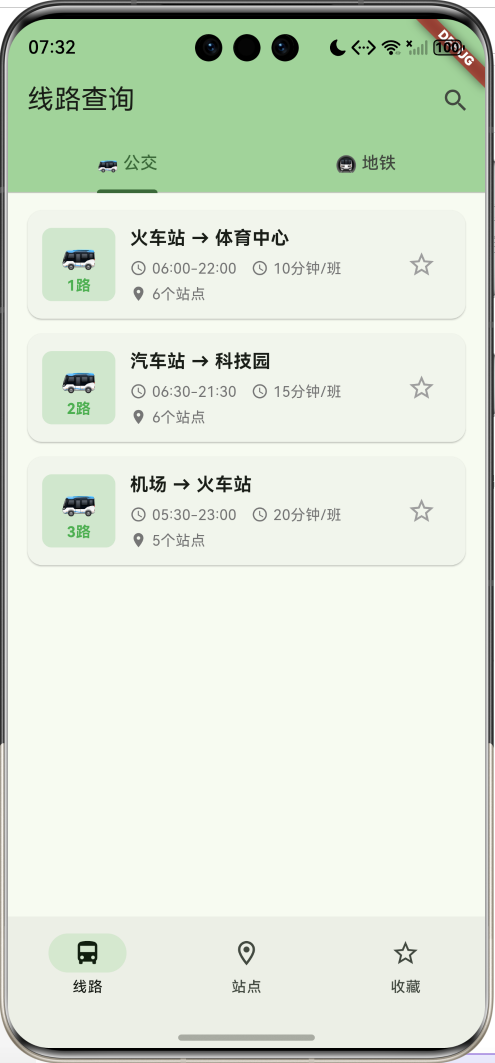
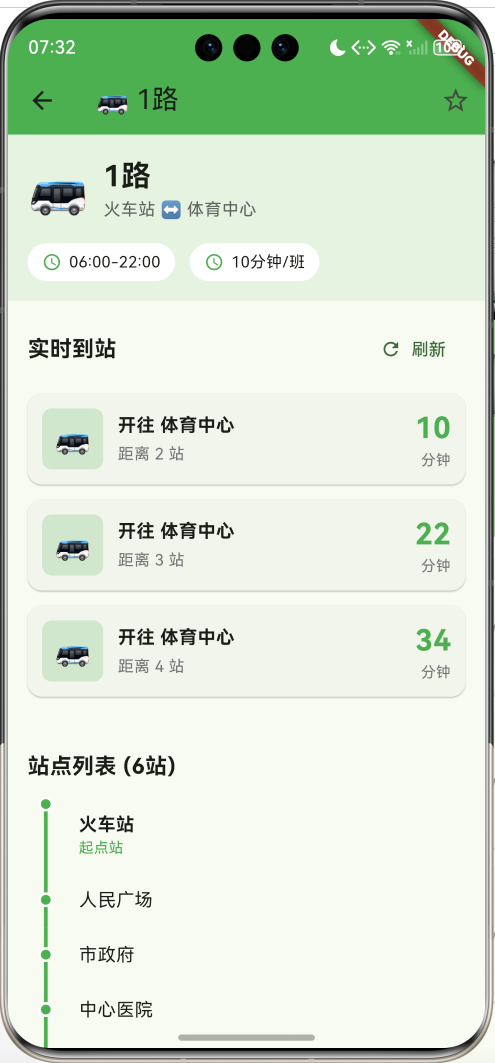
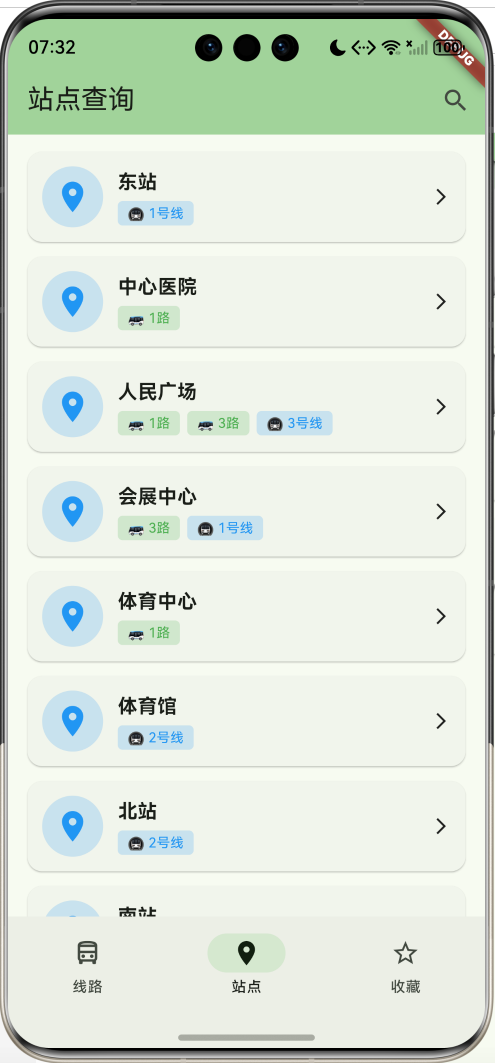
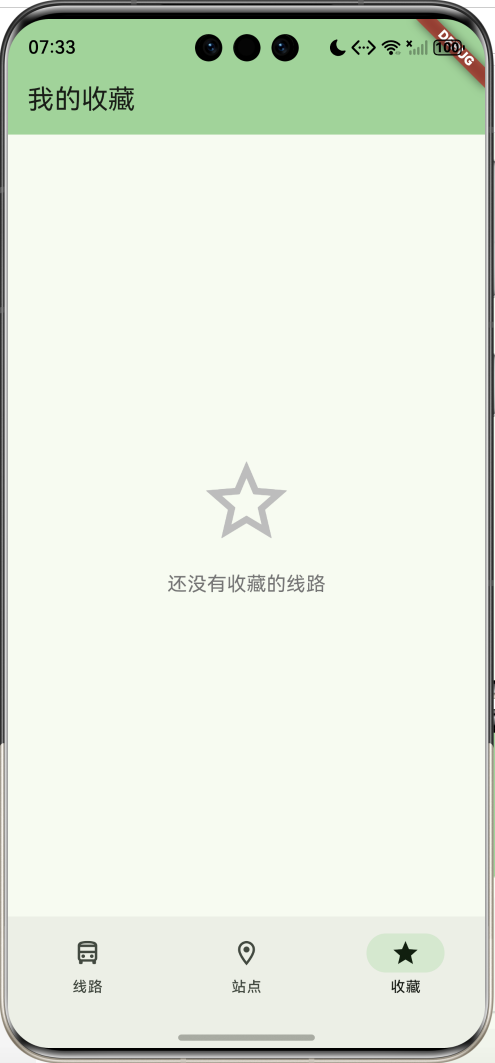
核心特性
- 🚌 线路查询:公交和地铁线路分类浏览
- 📍 站点查询:查看站点信息和经过线路
- ⏱️ 实时到站:模拟实时到站信息,自动刷新
- ⭐ 收藏管理:收藏常用线路
- 🔍 搜索功能:快速搜索线路和站点
- 🎨 精美UI:分类标签、渐变效果
- 💾 数据持久化:使用SharedPreferences
技术栈
- Flutter 3.6+
- Dart 3.0+
- shared_preferences: 数据持久化
- Timer: 定时刷新
- TabBar: 分类切换
项目架构
数据模型设计
TransitType - 交通工具类型枚举
enum TransitType {
  bus('公交', '🚌', Colors.green),
  subway('地铁', '🚇', Colors.blue);

  final String label;
  final String icon;
  final Color color;
  const TransitType(this.label, this.icon, this.color);
}
枚举优势:
- 类型安全
- 包含图标和颜色
- 便于UI展示
TransitLine - 线路模型
class TransitLine {
  final String id;              // 唯一标识
  final String name;            // 线路名称
  final TransitType type;       // 类型(公交/地铁)
  final String startStation;    // 起点站
  final String endStation;      // 终点站
  final List<String> stations;  // 站点列表
  final String operatingHours;  // 运营时间
  final int interval;           // 发车间隔(分钟)
  bool isFavorite;              // 是否收藏
}
ArrivalInfo - 到站信息模型
class ArrivalInfo {
  final String lineName;        // 线路名称
  final String direction;       // 方向(终点站)
  final int arrivalTime;        // 到站时间(分钟)
  final int distance;           // 距离(站数)
}
Station - 站点模型
class Station {
  final String id;              // 唯一标识
  final String name;            // 站点名称
  final List<String> lines;     // 经过线路
  final double latitude;        // 纬度
  final double longitude;       // 经度
}
核心功能实现
1. TabBar分类切换
使用DefaultTabController管理公交和地铁分类:
DefaultTabController(
  length: 2,
  child: Scaffold(
    appBar: AppBar(
      title: const Text('线路查询'),
      bottom: const TabBar(
        tabs: [
          Tab(text: '🚌 公交'),
          Tab(text: '🚇 地铁'),
        ],
      ),
    ),
    body: TabBarView(
      children: [
        _buildLinesList(busLines),
        _buildLinesList(subwayLines),
      ],
    ),
  ),
)
2. 线路列表展示
根据类型过滤和展示线路:
Widget _buildLinesList(List<TransitLine> lines) {
  if (lines.isEmpty) {
    return Center(
      child: Column(
        mainAxisAlignment: MainAxisAlignment.center,
        children: [
          Icon(Icons.directions_bus_outlined, size: 80, color: Colors.grey.shade400),
          const SizedBox(height: 16),
          Text('暂无线路'),
        ],
      ),
    );
  }

  return ListView.builder(
    padding: const EdgeInsets.all(8),
    itemCount: lines.length,
    itemBuilder: (context, index) {
      return _buildLineCard(lines[index]);
    },
  );
}

// 过滤线路
final busLines = allLines.where((l) => l.type == TransitType.bus).toList();
final subwayLines = allLines.where((l) => l.type == TransitType.subway).toList();
3. 线路卡片设计
创建信息丰富的线路卡片:
Widget _buildLineCard(TransitLine line) {
  return Card(
    child: InkWell(
      onTap: () => _openLineDetail(line),
      child: Padding(
        padding: const EdgeInsets.all(12),
        child: Row(
          children: [
            // 线路图标
            Container(
              width: 60,
              height: 60,
              decoration: BoxDecoration(
                color: line.type.color.withValues(alpha: 0.2),
                borderRadius: BorderRadius.circular(8),
              ),
              child: Center(
                child: Column(
                  mainAxisAlignment: MainAxisAlignment.center,
                  children: [
                    Text(line.type.icon, style: TextStyle(fontSize: 24)),
                    Text(
                      line.name,
                      style: TextStyle(
                        fontSize: 12,
                        fontWeight: FontWeight.bold,
                        color: line.type.color,
                      ),
                    ),
                  ],
                ),
              ),
            ),
            const SizedBox(width: 12),
            // 线路信息
            Expanded(
              child: Column(
                crossAxisAlignment: CrossAxisAlignment.start,
                children: [
                  Text('${line.startStation} → ${line.endStation}'),
                  Row(
                    children: [
                      Icon(Icons.access_time, size: 14),
                      Text(line.operatingHours),
                      Icon(Icons.schedule, size: 14),
                      Text('${line.interval}分钟/班'),
                    ],
                  ),
                  Text('${line.stations.length}个站点'),
                ],
              ),
            ),
            // 收藏按钮
            IconButton(
              icon: Icon(
                line.isFavorite ? Icons.star : Icons.star_border,
                color: line.isFavorite ? Colors.amber : Colors.grey,
              ),
              onPressed: () => _toggleFavorite(line),
            ),
          ],
        ),
      ),
    ),
  );
}
4. 站点查询功能
从所有线路中提取站点并展示:
Widget _buildStationsPage() {
  // 从所有线路中提取站点
  final stationsSet = <String>{};
  for (var line in allLines) {
    stationsSet.addAll(line.stations);
  }
  final stations = stationsSet.toList()..sort();

  return ListView.builder(
    padding: const EdgeInsets.all(8),
    itemCount: stations.length,
    itemBuilder: (context, index) {
      return _buildStationCard(stations[index]);
    },
  );
}
技术要点:
- 使用Set去重站点
- 自动排序站点列表
- 动态查找经过线路
5. 收藏功能实现
使用SharedPreferences持久化收藏数据:
void _toggleFavorite(TransitLine line) {
  setState(() {
    line.isFavorite = !line.isFavorite;
    if (line.isFavorite) {
      if (!favoriteLines.any((l) => l.id == line.id)) {
        favoriteLines.insert(0, line);
      }
    } else {
      favoriteLines.removeWhere((l) => l.id == line.id);
    }
  });
  _saveData();
}

Future<void> _saveData() async {
  final prefs = await SharedPreferences.getInstance();

  final linesData = allLines.map((l) => jsonEncode(l.toJson())).toList();
  await prefs.setStringList('transit_lines', linesData);

  final favData = favoriteLines.map((l) => jsonEncode(l.toJson())).toList();
  await prefs.setStringList('favorite_lines', favData);
}
6. 实时到站信息模拟
使用随机算法模拟实时到站:
void _generateArrivalInfo() {
  setState(() {
    _arrivalInfos = List.generate(3, (index) {
      return ArrivalInfo(
        lineName: widget.line.name,
        direction: widget.line.endStation,
        arrivalTime: (index + 1) * widget.line.interval + (index * 2),
        distance: index + 2,
      );
    });
  });
}
模拟逻辑:
- 根据发车间隔计算到站时间
- 生成3班车的到站信息
- 距离递增(2、3、4站)
7. 定时自动刷新
使用Timer实现30秒自动刷新:
Timer? _refreshTimer;
void initState() {
super.initState();
_generateArrivalInfo();
_startAutoRefresh();
}
void _startAutoRefresh() {
_refreshTimer = Timer.periodic(const Duration(seconds: 30), (timer) {
_generateArrivalInfo();
});
}
void dispose() {
_refreshTimer?.cancel();
super.dispose();
}
注意事项:
- 在dispose中取消Timer
- 避免内存泄漏
- 用户可手动刷新
8. 搜索功能实现
支持线路名称和站点名称搜索:
void _performSearch(String query) {
  final results = allLines
      .where((line) =>
          line.name.contains(query) ||
          line.startStation.contains(query) ||
          line.endStation.contains(query))
      .toList();

  if (results.isEmpty) {
    ScaffoldMessenger.of(context).showSnackBar(
      const SnackBar(content: Text('未找到相关线路')),
    );
  } else {
    Navigator.push(
      context,
      MaterialPageRoute(
        builder: (context) => SearchResultsPage(
          query: query,
          results: results,
          onToggleFavorite: _toggleFavorite,
        ),
      ),
    );
  }
}
9. 站点列表可视化
使用垂直线和圆点展示站点顺序:
Widget _buildStationsList() {
  return Column(
    children: List.generate(widget.line.stations.length, (index) {
      final isFirst = index == 0;
      final isLast = index == widget.line.stations.length - 1;
      final station = widget.line.stations[index];

      return IntrinsicHeight(
        child: Row(
          crossAxisAlignment: CrossAxisAlignment.stretch,
          children: [
            // 站点图标和连线
            SizedBox(
              width: 30,
              child: Column(
                children: [
                  if (!isFirst)
                    Expanded(
                      child: Container(
                        width: 3,
                        color: widget.line.type.color,
                      ),
                    ),
                  Container(
                    width: 12,
                    height: 12,
                    decoration: BoxDecoration(
                      color: widget.line.type.color,
                      shape: BoxShape.circle,
                      border: Border.all(color: Colors.white, width: 2),
                    ),
                  ),
                  if (!isLast)
                    Expanded(
                      child: Container(
                        width: 3,
                        color: widget.line.type.color,
                      ),
                    ),
                ],
              ),
            ),
            const SizedBox(width: 12),
            // 站点信息
            Expanded(
              child: Container(
                padding: const EdgeInsets.symmetric(vertical: 12),
                child: Column(
                  crossAxisAlignment: CrossAxisAlignment.start,
                  children: [
                    Text(
                      station,
                      style: TextStyle(
                        fontSize: 15,
                        fontWeight: isFirst || isLast
                            ? FontWeight.bold
                            : FontWeight.normal,
                      ),
                    ),
                    if (isFirst || isLast)
                      Text(
                        isFirst ? '起点站' : '终点站',
                        style: TextStyle(
                          fontSize: 12,
                          color: widget.line.type.color,
                        ),
                      ),
                  ],
                ),
              ),
            ),
          ],
        ),
      );
    }),
  );
}
可视化特点:
- 垂直连线表示线路
- 圆点表示站点
- 起点和终点站加粗显示
- 使用线路主题色
UI组件设计
1. 线路卡片组件
Widget _buildLineCard(TransitLine line) {
  return Card(
    margin: const EdgeInsets.symmetric(horizontal: 8, vertical: 6),
    child: InkWell(
      onTap: () => _openLineDetail(line),
      child: Padding(
        padding: const EdgeInsets.all(12),
        child: Row(
          children: [
            // 图标容器
            Container(
              width: 60,
              height: 60,
              decoration: BoxDecoration(
                color: line.type.color.withValues(alpha: 0.2),
                borderRadius: BorderRadius.circular(8),
              ),
              child: Center(
                child: Column(
                  mainAxisAlignment: MainAxisAlignment.center,
                  children: [
                    Text(line.type.icon, style: TextStyle(fontSize: 24)),
                    Text(line.name, style: TextStyle(fontSize: 12)),
                  ],
                ),
              ),
            ),
            // 线路信息
            Expanded(child: _buildLineInfo(line)),
            // 收藏按钮
            IconButton(
              icon: Icon(
                line.isFavorite ? Icons.star : Icons.star_border,
                color: line.isFavorite ? Colors.amber : Colors.grey,
              ),
              onPressed: () => _toggleFavorite(line),
            ),
          ],
        ),
      ),
    ),
  );
}
2. 到站信息卡片
Widget _buildArrivalCard(ArrivalInfo info) {
  return Card(
    margin: const EdgeInsets.only(bottom: 12),
    child: Padding(
      padding: const EdgeInsets.all(12),
      child: Row(
        children: [
          // 线路图标
          Container(
            width: 50,
            height: 50,
            decoration: BoxDecoration(
              color: widget.line.type.color.withValues(alpha: 0.2),
              borderRadius: BorderRadius.circular(8),
            ),
            child: Center(
              child: Text(widget.line.type.icon, style: TextStyle(fontSize: 24)),
            ),
          ),
          const SizedBox(width: 12),
          // 到站信息
          Expanded(
            child: Column(
              crossAxisAlignment: CrossAxisAlignment.start,
              children: [
                Text('开往 ${info.direction}', style: TextStyle(fontWeight: FontWeight.bold)),
                Text('距离 ${info.distance} 站'),
              ],
            ),
          ),
          // 到站时间
          Column(
            crossAxisAlignment: CrossAxisAlignment.end,
            children: [
              Text(
                '${info.arrivalTime}',
                style: TextStyle(
                  fontSize: 24,
                  fontWeight: FontWeight.bold,
                  color: widget.line.type.color,
                ),
              ),
              Text('分钟'),
            ],
          ),
        ],
      ),
    ),
  );
}
3. 站点卡片组件
Widget _buildStationCard(String stationName) {
  final passingLines = allLines
      .where((line) => line.stations.contains(stationName))
      .toList();

  return Card(
    margin: const EdgeInsets.symmetric(horizontal: 8, vertical: 6),
    child: InkWell(
      onTap: () => _openStationDetail(stationName, passingLines),
      child: Padding(
        padding: const EdgeInsets.all(12),
        child: Row(
          children: [
            // 站点图标
            Container(
              width: 50,
              height: 50,
              decoration: BoxDecoration(
                color: Colors.blue.withValues(alpha: 0.2),
                borderRadius: BorderRadius.circular(25),
              ),
              child: const Icon(Icons.location_on, color: Colors.blue, size: 30),
            ),
            const SizedBox(width: 12),
            // 站点信息
            Expanded(
              child: Column(
                crossAxisAlignment: CrossAxisAlignment.start,
                children: [
                  Text(stationName, style: TextStyle(fontWeight: FontWeight.bold)),
                  Wrap(
                    spacing: 6,
                    runSpacing: 4,
                    children: passingLines.map((line) {
                      return Container(
                        padding: EdgeInsets.symmetric(horizontal: 8, vertical: 2),
                        decoration: BoxDecoration(
                          color: line.type.color.withValues(alpha: 0.2),
                          borderRadius: BorderRadius.circular(4),
                        ),
                        child: Text('${line.type.icon} ${line.name}'),
                      );
                    }).toList(),
                  ),
                ],
              ),
            ),
            const Icon(Icons.arrow_forward_ios, size: 16),
          ],
        ),
      ),
    ),
  );
}
4. 底部导航栏
NavigationBar(
  selectedIndex: _selectedIndex,
  onDestinationSelected: (index) {
    setState(() {
      _selectedIndex = index;
    });
  },
  destinations: const [
    NavigationDestination(
      icon: Icon(Icons.directions_bus_outlined),
      selectedIcon: Icon(Icons.directions_bus),
      label: '线路',
    ),
    NavigationDestination(
      icon: Icon(Icons.location_on_outlined),
      selectedIcon: Icon(Icons.location_on),
      label: '站点',
    ),
    NavigationDestination(
      icon: Icon(Icons.star_outline),
      selectedIcon: Icon(Icons.star),
      label: '收藏',
    ),
  ],
)
功能扩展建议
1. 真实API集成
class TransitApiService {
  static const String baseUrl = 'https://api.transit.com';

  // 获取线路列表
  Future<List<TransitLine>> fetchLines() async {
    final response = await http.get(Uri.parse('$baseUrl/lines'));
    if (response.statusCode == 200) {
      final List data = jsonDecode(response.body);
      return data.map((json) => TransitLine.fromJson(json)).toList();
    }
    throw Exception('Failed to load lines');
  }

  // 获取实时到站信息
  Future<List<ArrivalInfo>> fetchArrivals(String stationId) async {
    final response = await http.get(
      Uri.parse('$baseUrl/arrivals/$stationId')
    );
    if (response.statusCode == 200) {
      final List data = jsonDecode(response.body);
      return data.map((json) => ArrivalInfo.fromJson(json)).toList();
    }
    throw Exception('Failed to load arrivals');
  }
}
2. 地图显示功能
集成地图SDK显示站点位置:
// 使用flutter_map或google_maps_flutter
import 'package:flutter_map/flutter_map.dart';

Widget _buildStationMap() {
  return FlutterMap(
    options: MapOptions(
      center: LatLng(station.latitude, station.longitude),
      zoom: 15.0,
    ),
    children: [
      TileLayer(
        urlTemplate: 'https://tile.openstreetmap.org/{z}/{x}/{y}.png',
      ),
      MarkerLayer(
        markers: [
          Marker(
            point: LatLng(station.latitude, station.longitude),
            builder: (ctx) => Icon(Icons.location_on, color: Colors.red),
          ),
        ],
      ),
    ],
  );
}
3. 路线规划功能
实现起点到终点的换乘方案:
class RouteResult {
  final List<TransitLine> lines;
  final List<String> stations;
  final int totalTime;
  final int transfers;

  RouteResult({
    required this.lines,
    required this.stations,
    required this.totalTime,
    required this.transfers,
  });
}

class RoutePlanner {
  // 使用广度优先搜索算法
  RouteResult? findRoute(String from, String to, List<TransitLine> allLines) {
    // 实现换乘算法
    // 1. 查找直达线路
    // 2. 查找一次换乘方案
    // 3. 查找多次换乘方案
    // 4. 按时间和换乘次数排序
  }
}
4. 换乘查询优化
Widget _buildTransferRoute(RouteResult route) {
  return Column(
    children: [
      // 显示总时间和换乘次数
      Container(
        padding: EdgeInsets.all(16),
        color: Colors.blue.shade50,
        child: Row(
          mainAxisAlignment: MainAxisAlignment.spaceAround,
          children: [
            Column(
              children: [
                Text('${route.totalTime}', style: TextStyle(fontSize: 24)),
                Text('分钟'),
              ],
            ),
            Column(
              children: [
                Text('${route.transfers}', style: TextStyle(fontSize: 24)),
                Text('次换乘'),
              ],
            ),
          ],
        ),
      ),
      // 显示详细路线
      ...route.lines.asMap().entries.map((entry) {
        final index = entry.key;
        final line = entry.value;
        return Column(
          children: [
            _buildLineSegment(line),
            if (index < route.lines.length - 1)
              _buildTransferIndicator(),
          ],
        );
      }),
    ],
  );
}
5. 到站提醒功能
使用本地通知提醒用户:
import 'package:flutter_local_notifications/flutter_local_notifications.dart';

class ArrivalNotificationService {
  final FlutterLocalNotificationsPlugin _notifications =
      FlutterLocalNotificationsPlugin();

  Future<void> scheduleArrivalNotification(
    TransitLine line,
    int minutesBeforeArrival,
  ) async {
    await _notifications.zonedSchedule(
      0,
      '${line.name}即将到站',
      '还有${minutesBeforeArrival}分钟到达',
      tz.TZDateTime.now(tz.local).add(Duration(minutes: minutesBeforeArrival)),
      const NotificationDetails(
        android: AndroidNotificationDetails(
          'transit_channel',
          '公交地铁提醒',
          importance: Importance.high,
        ),
      ),
      uiLocalNotificationDateInterpretation:
          UILocalNotificationDateInterpretation.absoluteTime,
    );
  }
}
6. NFC刷卡功能
集成NFC读取交通卡余额:
import 'package:nfc_manager/nfc_manager.dart';

class NFCCardReader {
  Future<double?> readCardBalance() async {
    bool isAvailable = await NfcManager.instance.isAvailable();
    if (!isAvailable) return null;

    double? balance;
    await NfcManager.instance.startSession(
      onDiscovered: (NfcTag tag) async {
        // 读取卡片数据
        var ndef = Ndef.from(tag);
        if (ndef != null) {
          // 解析余额信息
          balance = _parseBalance(ndef);
        }
        await NfcManager.instance.stopSession();
      },
    );
    return balance;
  }
}
7. 实时拥挤度显示
显示车厢拥挤程度:
enum CrowdLevel {
  empty('空闲', Colors.green),
  normal('正常', Colors.blue),
  crowded('拥挤', Colors.orange),
  full('满载', Colors.red);

  final String label;
  final Color color;
  const CrowdLevel(this.label, this.color);
}

Widget _buildCrowdIndicator(CrowdLevel level) {
  return Container(
    padding: EdgeInsets.symmetric(horizontal: 12, vertical: 6),
    decoration: BoxDecoration(
      color: level.color.withValues(alpha: 0.2),
      borderRadius: BorderRadius.circular(16),
    ),
    child: Row(
      mainAxisSize: MainAxisSize.min,
      children: [
        Icon(Icons.people, size: 16, color: level.color),
        SizedBox(width: 4),
        Text(level.label, style: TextStyle(color: level.color)),
      ],
    ),
  );
}
8. 无障碍信息
显示站点无障碍设施:
class AccessibilityInfo {
  final bool hasElevator;
  final bool hasEscalator;
  final bool hasWheelchairAccess;
  final bool hasBrailleMap;

  AccessibilityInfo({
    required this.hasElevator,
    required this.hasEscalator,
    required this.hasWheelchairAccess,
    required this.hasBrailleMap,
  });
}

Widget _buildAccessibilityIcons(AccessibilityInfo info) {
  return Row(
    children: [
      if (info.hasElevator)
        Icon(Icons.elevator, color: Colors.blue),
      if (info.hasEscalator)
        Icon(Icons.escalator, color: Colors.blue),
      if (info.hasWheelchairAccess)
        Icon(Icons.accessible, color: Colors.blue),
      if (info.hasBrailleMap)
        Icon(Icons.touch_app, color: Colors.blue),
    ],
  );
}
9. 票价查询
计算乘车费用:
class FareCalculator {
  // 基础票价
  static const double baseFare = 2.0;
  // 每公里价格
  static const double pricePerKm = 0.5;

  double calculateFare(String from, String to, List<TransitLine> route) {
    int totalStations = 0;
    for (var line in route) {
      int fromIndex = line.stations.indexOf(from);
      int toIndex = line.stations.indexOf(to);
      if (fromIndex != -1 && toIndex != -1) {
        totalStations += (toIndex - fromIndex).abs();
      }
    }

    // 简化计算:每站0.5元,最低2元
    double fare = baseFare + (totalStations * 0.3);
    return fare;
  }
}

Widget _buildFareInfo(double fare) {
  return Container(
    padding: EdgeInsets.all(16),
    decoration: BoxDecoration(
      color: Colors.green.shade50,
      borderRadius: BorderRadius.circular(8),
    ),
    child: Row(
      children: [
        Icon(Icons.payment, color: Colors.green),
        SizedBox(width: 8),
        Text('票价:'),
        Text(
          '¥${fare.toStringAsFixed(1)}',
          style: TextStyle(
            fontSize: 20,
            fontWeight: FontWeight.bold,
            color: Colors.green,
          ),
        ),
      ],
    ),
  );
}
10. 附近站点查询
基于GPS定位查找附近站点:
import 'package:geolocator/geolocator.dart';

class NearbyStationFinder {
  Future<List<Station>> findNearbyStations(
    List<Station> allStations,
    double radiusInMeters,
  ) async {
    Position position = await Geolocator.getCurrentPosition();

    List<Station> nearbyStations = [];
    for (var station in allStations) {
      double distance = Geolocator.distanceBetween(
        position.latitude,
        position.longitude,
        station.latitude,
        station.longitude,
      );

      if (distance <= radiusInMeters) {
        nearbyStations.add(station);
      }
    }

    // 按距离排序
    nearbyStations.sort((a, b) {
      double distA = Geolocator.distanceBetween(
        position.latitude, position.longitude,
        a.latitude, a.longitude,
      );
      double distB = Geolocator.distanceBetween(
        position.latitude, position.longitude,
        b.latitude, b.longitude,
      );
      return distA.compareTo(distB);
    });

    return nearbyStations;
  }
}
性能优化建议
1. 列表优化
使用ListView.builder实现懒加载:
// 好的做法:懒加载
ListView.builder(
  itemCount: lines.length,
  itemBuilder: (context, index) {
    return _buildLineCard(lines[index]);
  },
)

// 避免:一次性创建所有Widget
ListView(
  children: lines.map((line) => _buildLineCard(line)).toList(),
)
2. 图片缓存
使用cached_network_image缓存线路图标:
import 'package:cached_network_image/cached_network_image.dart';

Widget _buildLineIcon(String imageUrl) {
  return CachedNetworkImage(
    imageUrl: imageUrl,
    placeholder: (context, url) => CircularProgressIndicator(),
    errorWidget: (context, url, error) => Icon(Icons.error),
    memCacheWidth: 100,
    memCacheHeight: 100,
  );
}
3. 状态管理优化
使用Provider管理全局状态:
class TransitProvider extends ChangeNotifier {
  List<TransitLine> _allLines = [];
  List<TransitLine> _favoriteLines = [];

  List<TransitLine> get allLines => _allLines;
  List<TransitLine> get favoriteLines => _favoriteLines;

  void toggleFavorite(TransitLine line) {
    line.isFavorite = !line.isFavorite;
    if (line.isFavorite) {
      _favoriteLines.add(line);
    } else {
      _favoriteLines.removeWhere((l) => l.id == line.id);
    }
    notifyListeners();
    _saveData();
  }
}

// 在main.dart中使用
void main() {
  runApp(
    ChangeNotifierProvider(
      create: (context) => TransitProvider(),
      child: MyApp(),
    ),
  );
}
4. 数据库优化
使用sqflite替代SharedPreferences存储大量数据:
import 'package:sqflite/sqflite.dart';

class TransitDatabase {
  static Database? _database;

  Future<Database> get database async {
    if (_database != null) return _database!;
    _database = await _initDatabase();
    return _database!;
  }

  Future<Database> _initDatabase() async {
    String path = join(await getDatabasesPath(), 'transit.db');
    return await openDatabase(
      path,
      version: 1,
      onCreate: (db, version) async {
        await db.execute('''
          CREATE TABLE lines(
            id TEXT PRIMARY KEY,
            name TEXT,
            type TEXT,
            startStation TEXT,
            endStation TEXT,
            stations TEXT,
            operatingHours TEXT,
            interval INTEGER,
            isFavorite INTEGER
          )
        ''');
      },
    );
  }

  Future<void> insertLine(TransitLine line) async {
    final db = await database;
    await db.insert('lines', line.toMap());
  }

  Future<List<TransitLine>> getLines() async {
    final db = await database;
    final List<Map<String, dynamic>> maps = await db.query('lines');
    return List.generate(maps.length, (i) => TransitLine.fromMap(maps[i]));
  }
}
5. 网络请求优化
使用Dio实现请求缓存和重试:
import 'package:dio/dio.dart';
import 'package:dio_cache_interceptor/dio_cache_interceptor.dart';

class ApiClient {
  late Dio _dio;

  ApiClient() {
    _dio = Dio(BaseOptions(
      baseUrl: 'https://api.transit.com',
      connectTimeout: Duration(seconds: 5),
      receiveTimeout: Duration(seconds: 3),
    ));

    // 添加缓存拦截器
    _dio.interceptors.add(
      DioCacheInterceptor(
        options: CacheOptions(
          store: MemCacheStore(),
          maxStale: Duration(days: 7),
        ),
      ),
    );

    // 添加重试拦截器
    _dio.interceptors.add(
      RetryInterceptor(
        dio: _dio,
        retries: 3,
        retryDelays: [
          Duration(seconds: 1),
          Duration(seconds: 2),
          Duration(seconds: 3),
        ],
      ),
    );
  }
}
6. 内存优化
及时释放资源:
void dispose() {
// 取消Timer
_refreshTimer?.cancel();
// 取消StreamSubscription
_subscription?.cancel();
// 释放Controller
_scrollController.dispose();
_searchController.dispose();
super.dispose();
}
7. 构建优化
使用const构造函数:
// 好的做法
const Text('线路查询')
const SizedBox(height: 16)
const Icon(Icons.star)

// 避免
Text('线路查询')
SizedBox(height: 16)
Icon(Icons.star)
测试建议
1. 单元测试
测试数据模型和业务逻辑:
import 'package:flutter_test/flutter_test.dart';

void main() {
  group('TransitLine Tests', () {
    test('TransitLine toJson and fromJson', () {
      final line = TransitLine(
        id: 'test_1',
        name: '测试线路',
        type: TransitType.bus,
        startStation: '起点',
        endStation: '终点',
        stations: ['起点', '中间', '终点'],
        operatingHours: '06:00-22:00',
        interval: 10,
      );

      final json = line.toJson();
      final newLine = TransitLine.fromJson(json);

      expect(newLine.id, line.id);
      expect(newLine.name, line.name);
      expect(newLine.stations.length, 3);
    });

    test('Toggle favorite', () {
      final line = TransitLine(
        id: 'test_1',
        name: '测试线路',
        type: TransitType.bus,
        startStation: '起点',
        endStation: '终点',
        stations: ['起点', '终点'],
        operatingHours: '06:00-22:00',
        interval: 10,
      );

      expect(line.isFavorite, false);
      line.isFavorite = true;
      expect(line.isFavorite, true);
    });
  });
}
2. Widget测试
测试UI组件:
void main() {
  testWidgets('LineCard displays correctly', (WidgetTester tester) async {
    final line = TransitLine(
      id: 'test_1',
      name: '1路',
      type: TransitType.bus,
      startStation: '火车站',
      endStation: '体育中心',
      stations: ['火车站', '体育中心'],
      operatingHours: '06:00-22:00',
      interval: 10,
    );

    await tester.pumpWidget(
      MaterialApp(
        home: Scaffold(
          body: _buildLineCard(line),
        ),
      ),
    );

    expect(find.text('1路'), findsOneWidget);
    expect(find.text('火车站 → 体育中心'), findsOneWidget);
    expect(find.byIcon(Icons.star_border), findsOneWidget);
  });
}
3. 集成测试
测试完整流程:
import 'package:integration_test/integration_test.dart';

void main() {
  IntegrationTestWidgetsFlutterBinding.ensureInitialized();

  testWidgets('Search and favorite flow', (WidgetTester tester) async {
    await tester.pumpWidget(MyApp());

    // 点击搜索按钮
    await tester.tap(find.byIcon(Icons.search));
    await tester.pumpAndSettle();

    // 输入搜索关键词
    await tester.enterText(find.byType(TextField), '1路');
    await tester.pumpAndSettle();

    // 点击搜索结果
    await tester.tap(find.text('1路'));
    await tester.pumpAndSettle();

    // 点击收藏按钮
    await tester.tap(find.byIcon(Icons.star_border));
    await tester.pumpAndSettle();

    // 验证收藏成功
    expect(find.byIcon(Icons.star), findsOneWidget);
  });
}
部署发布
1. Android打包
# 生成签名密钥
keytool -genkey -v -keystore ~/transit-key.jks -keyalg RSA -keysize 2048 -validity 10000 -alias transit

# 配置key.properties
storePassword=your_password
keyPassword=your_password
keyAlias=transit
storeFile=/path/to/transit-key.jks

# 构建APK
flutter build apk --release

# 构建App Bundle
flutter build appbundle --release
2. iOS打包
# 安装依赖
cd ios && pod install

# 构建IPA
flutter build ipa --release

# 或使用Xcode
open ios/Runner.xcworkspace
3. 版本管理
在pubspec.yaml中管理版本:
version: 1.0.0+1
# 格式:主版本.次版本.修订号+构建号
4. 应用图标
使用flutter_launcher_icons生成:
dev_dependencies:
  flutter_launcher_icons: ^0.13.1

flutter_launcher_icons:
  android: true
  ios: true
  image_path: "assets/icon/app_icon.png"
flutter pub run flutter_launcher_icons
项目总结
技术亮点
- 模块化设计:清晰的数据模型和页面结构
- 实时更新:使用Timer实现自动刷新
- 数据持久化:SharedPreferences保存用户数据
- 类型安全:使用枚举管理交通工具类型
- UI可视化:站点列表的垂直线展示
- 搜索功能:支持线路和站点快速查找
- 收藏管理:便捷的收藏和取消操作
学习收获
通过本项目,你将掌握:
- Flutter列表展示和懒加载
- TabBar分类切换
- Timer定时任务
- SharedPreferences数据持久化
- 页面导航和参数传递
- 自定义Widget组件
- 状态管理基础
- JSON序列化和反序列化
应用场景
本应用适用于:
- 城市公交地铁查询
- 校园班车查询
- 企业通勤车查询
- 旅游景区交通查询
后续优化方向
- 接入真实公交API
- 添加地图显示功能
- 实现路线规划
- 支持离线数据
- 添加到站提醒
- 集成支付功能
- 多语言支持
- 深色模式适配
这个公交地铁查询应用展示了Flutter在实用工具类应用开发中的强大能力。通过模拟数据的方式,我们实现了完整的查询、收藏、实时更新等功能,为后续接入真实API打下了坚实基础。
欢迎加入开源鸿蒙跨平台社区:https://openharmonycrossplatform.csdn.net

开源鸿蒙跨平台开发社区汇聚开发者与厂商,共建“一次开发,多端部署”的开源生态,致力于降低跨端开发门槛,推动万物智联创新。
更多推荐
 10
10 0
0- 0



 已为社区贡献21条内容

所有评论(0)