Flutter Google Sign In 在鸿蒙平台的使用指南
Flutter Google Sign In 是一个用于在 Flutter 应用中集成 Google 账号登录功能的官方插件,支持 Android、iOS 和 Web 平台。该插件提供了安全、便捷的用户身份验证和授权管理功能,使应用能够轻松获取用户的 Google 身份信息和访问 Google API 的权限。Flutter Google Sign In 插件为鸿蒙平台提供了便捷、安全的 Goog
插件介绍
Flutter Google Sign In 是一个用于在 Flutter 应用中集成 Google 账号登录功能的官方插件,支持 Android、iOS 和 Web 平台。该插件提供了安全、便捷的用户身份验证和授权管理功能,使应用能够轻松获取用户的 Google 身份信息和访问 Google API 的权限。
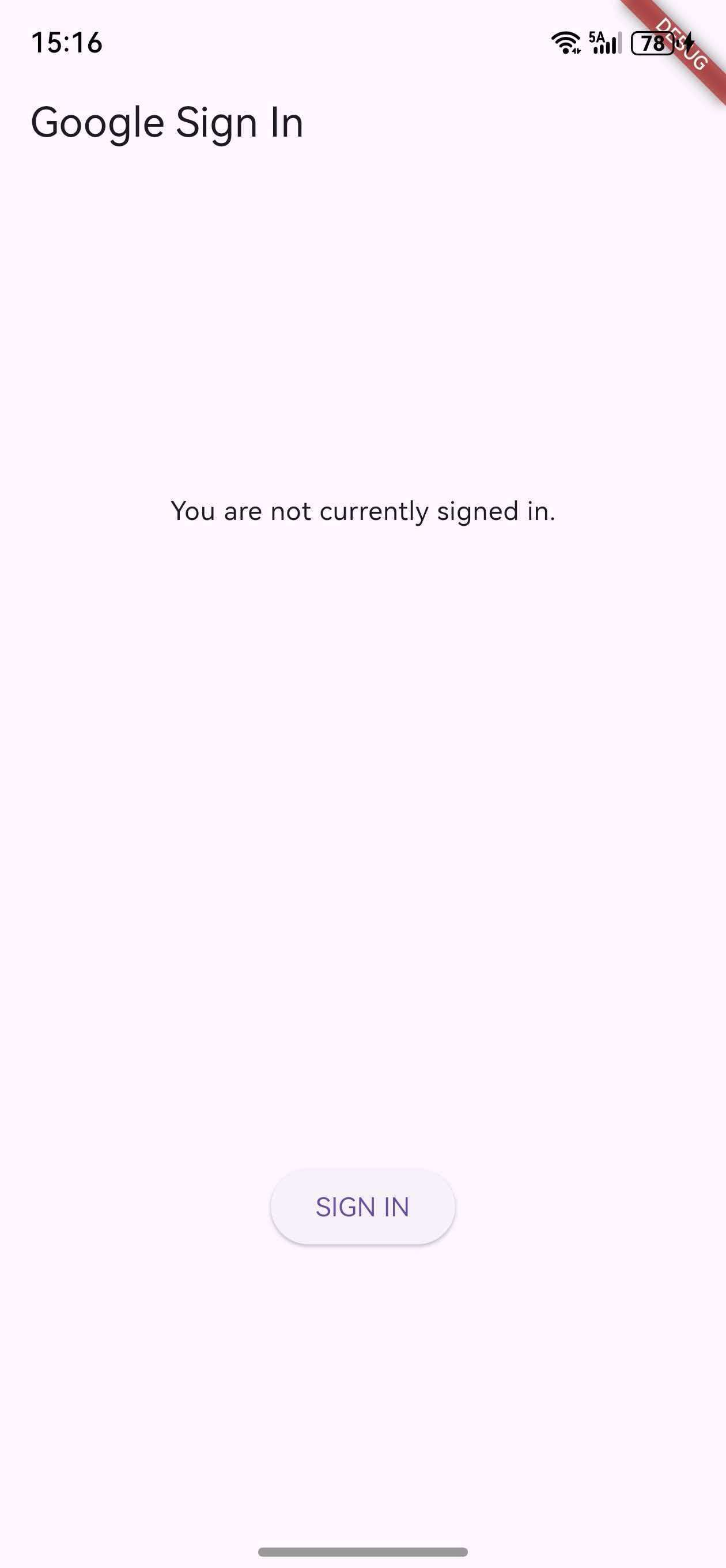
主要功能
- 身份验证:支持用户通过 Google 账号登录应用
- 授权管理:支持请求和管理 OAuth 2.0 作用域
- 增量授权:支持在应用运行时动态请求额外的权限
- 静默登录:支持自动登录已授权的用户
- 跨平台支持:适配 Android、iOS、Web 和鸿蒙平台
适用场景
- 需要实现用户身份验证的应用
- 需要访问 Google API(如 Google Drive、YouTube、Calendar 等)的应用
- 需要提供便捷登录方式以提高用户体验的应用
安装与配置
1. 添加依赖
由于该三方库为自定义修改版本,需要以 git 形式引入。在项目的 pubspec.yaml 文件中添加以下配置:
dependencies:
  google_sign_in:
    git:
      url: "https://gitcode.com/openharmony-tpc/flutter_packages.git"
      path: "packages/google_sign_in/google_sign_in"
2. 平台集成配置
鸿蒙平台配置
-
注册 Google 应用
- 访问 Google Cloud Console
- 创建新项目或选择现有项目
- 在 “API 和服务” > “凭据” 中创建 OAuth 2.0 客户端 ID
- 选择 “Web 应用” 类型并填写相关信息
- 记录生成的客户端 ID,后续将用于配置
-
配置 Web 视图
- 由于鸿蒙平台目前主要通过 Web 视图实现 Google 登录,需要确保应用已配置 Web 支持
- 在
web/index.html文件中添加 Google Sign In SDK:
<script src="https://accounts.google.com/gsi/client" async defer></script> -
配置 URL Scheme
- 在
web/manifest.json中添加合适的 URL Scheme 配置,以便处理登录回调
- 在
API 调用示例
1. 初始化 GoogleSignIn
import 'package:google_sign_in/google_sign_in.dart';

// 定义需要请求的作用域
const List<String> scopes = <String>[
  'email',
  'https://www.googleapis.com/auth/contacts.readonly',
];

// 初始化 GoogleSignIn 实例
GoogleSignIn _googleSignIn = GoogleSignIn(
  // 可选:配置客户端 ID
  // clientId: 'your-client_id.apps.googleusercontent.com',
  scopes: scopes,
);
2. 处理用户登录状态变化
GoogleSignInAccount? _currentUser;
bool _isAuthorized = false;
void initState() {
super.initState();
// 监听用户登录状态变化
_googleSignIn.onCurrentUserChanged.listen((GoogleSignInAccount? account) async {
bool isAuthorized = account != null;
// 在 Web 平台上需要单独检查作用域授权
if (kIsWeb && account != null) {
isAuthorized = await _googleSignIn.canAccessScopes(scopes);
}
setState(() {
_currentUser = account;
_isAuthorized = isAuthorized;
});
// 当用户已授权时,可以调用需要权限的 API
if (isAuthorized) {
// 例如:获取用户联系人
}
});
// 尝试静默登录(已授权的用户)
_googleSignIn.signInSilently();
}
3. 实现登录功能
Future<void> _handleSignIn() async {
  try {
    await _googleSignIn.signIn();
  } catch (error) {
    print('登录失败: $error');
    // 处理登录错误
  }
}
4. 请求额外权限
Future<void> _handleAuthorizeScopes() async {
  final bool isAuthorized = await _googleSignIn.requestScopes(scopes);
  setState(() {
    _isAuthorized = isAuthorized;
  });

  if (isAuthorized) {
    // 权限已获取,可以调用相关 API
  }
}
5. 实现登出功能
Future<void> _handleSignOut() async {
  try {
    await _googleSignIn.disconnect(); // 完全登出并撤销授权
    // 或使用 await _googleSignIn.signOut(); // 仅登出当前应用
  } catch (error) {
    print('登出失败: $error');
  }
}
6. 使用用户认证信息
// 获取用户信息
if (_currentUser != null) {
  print('用户ID: ${_currentUser!.id}');
  print('用户名: ${_currentUser!.displayName}');
  print('用户邮箱: ${_currentUser!.email}');
  print('用户头像: ${_currentUser!.photoUrl}');
}

// 获取认证令牌
GoogleSignInAuthentication? auth = await _currentUser?.authentication;
if (auth != null) {
  String? idToken = auth.idToken;
  String? accessToken = auth.accessToken;
  // 使用令牌访问 Google API
}
7. 完整示例界面
Widget _buildBody() {
  final GoogleSignInAccount? user = _currentUser;
  if (user != null) {
    // 用户已登录
    return Column(
      mainAxisAlignment: MainAxisAlignment.spaceAround,
      children: <Widget>[
        ListTile(
          leading: GoogleUserCircleAvatar(identity: user),
          title: Text(user.displayName ?? ''),
          subtitle: Text(user.email),
        ),
        const Text('登录成功'),

        if (_isAuthorized) ...<Widget>[
          // 用户已授权所有需要的作用域
          const Text('已获取所有必要权限'),
        ] else ...<Widget>[
          // 用户尚未授权所有需要的作用域
          const Text('需要额外权限'),
          ElevatedButton(
            onPressed: _handleAuthorizeScopes,
            child: const Text('请求权限'),
          ),
        ],

        ElevatedButton(
          onPressed: _handleSignOut,
          child: const Text('登出'),
        ),
      ],
    );
  } else {
    // 用户未登录
    return Column(
      mainAxisAlignment: MainAxisAlignment.spaceAround,
      children: <Widget>[
        const Text('您尚未登录'),
        ElevatedButton(
          onPressed: _handleSignIn,
          child: const Text('使用 Google 账号登录'),
        ),
      ],
    );
  }
}
鸿蒙平台注意事项
-
Web 视图集成
- 鸿蒙平台目前通过 Web 视图实现 Google 登录功能
- 确保应用已正确配置 Web 视图支持
-
客户端 ID 配置
- 建议在初始化 GoogleSignIn 时显式配置客户端 ID
- 确保客户端 ID 已在 Google Cloud Console 中正确注册
-
网络权限
- 确保应用已获取网络访问权限
-
跨域资源共享 (CORS)
- 若应用需要直接从前端调用 Google API,需确保已正确配置 CORS
-
错误处理
- 鸿蒙平台可能会出现与其他平台不同的错误类型
- 建议添加详细的错误处理逻辑
-
性能优化
- 登录操作可能需要较长时间,建议添加加载状态提示
- 合理使用静默登录功能,避免频繁的网络请求
-
用户体验
- 在调用登录功能前,建议向用户说明需要的权限
- 提供清晰的登出选项
总结
Flutter Google Sign In 插件为鸿蒙平台提供了便捷、安全的 Google 账号登录和授权功能。通过本文的介绍,您可以了解到:
- 插件功能:支持身份验证、授权管理、增量授权等核心功能
- 安装配置:通过 git 形式引入依赖,并进行必要的平台配置
- API 使用:学习了初始化、登录、授权、登出等关键 API 的使用方法
- 鸿蒙注意事项:了解了在鸿蒙平台上使用该插件的特殊考虑
该插件能够帮助您快速实现用户身份验证功能,提高应用的安全性和用户体验。在实际应用开发中,建议根据具体需求合理配置权限,并注意处理各种边界情况和错误。
通过集成 Google Sign In,您的应用可以轻松接入 Google 生态系统,为用户提供更加丰富和便捷的服务。
欢迎加入开源鸿蒙跨平台社区: https://openharmonycrossplatform.csdn.net

开源鸿蒙跨平台开发社区汇聚开发者与厂商,共建“一次开发,多端部署”的开源生态,致力于降低跨端开发门槛,推动万物智联创新。
更多推荐


 16
16 0
0- 0


 已为社区贡献14条内容

所有评论(0)