Flutter 框架跨平台鸿蒙开发 - 虚拟抽奖转盘应用开发教程
这是一款功能丰富的虚拟抽奖转盘应用,为用户提供有趣的抽奖体验。应用采用Material Design 3设计风格,支持自定义奖品、转盘动画、中奖记录、概率控制等功能,界面精美生动,操作简单有趣,适用于各种抽奖活动场景。运行效果图LotteryWheelHomePageWheelPagePrizesPageHistoryPageSettingsPageLotteryWheelSpinButtonQu
Flutter虚拟抽奖转盘应用开发教程
项目简介
这是一款功能丰富的虚拟抽奖转盘应用,为用户提供有趣的抽奖体验。应用采用Material Design 3设计风格,支持自定义奖品、转盘动画、中奖记录、概率控制等功能,界面精美生动,操作简单有趣,适用于各种抽奖活动场景。
运行效果图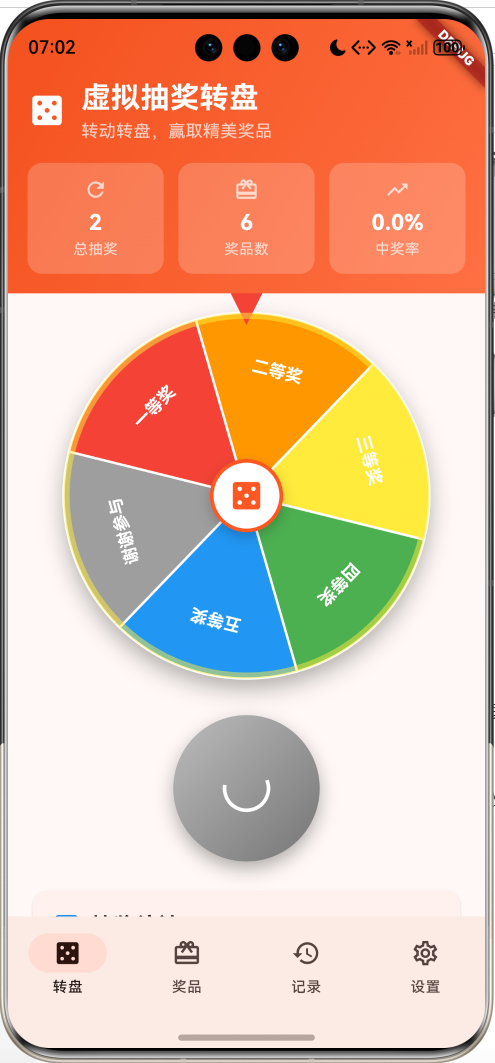
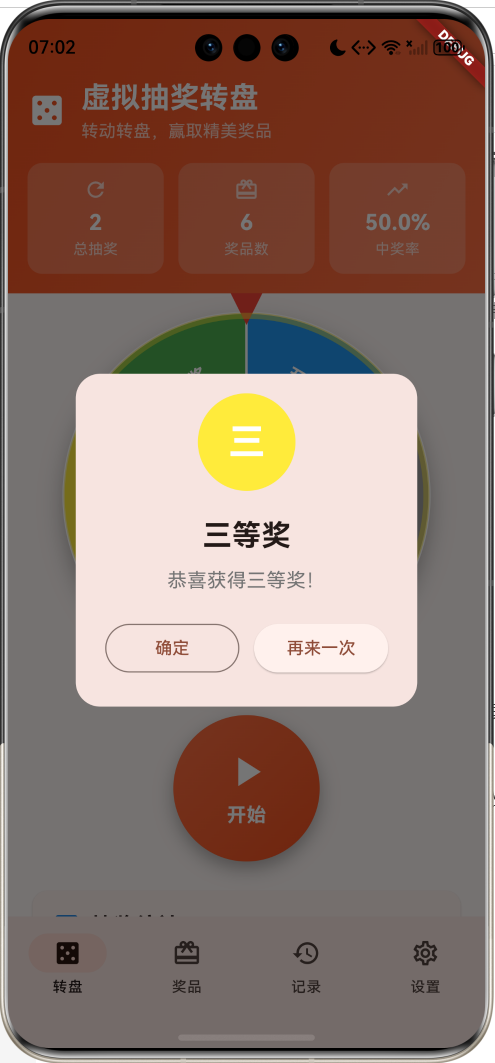
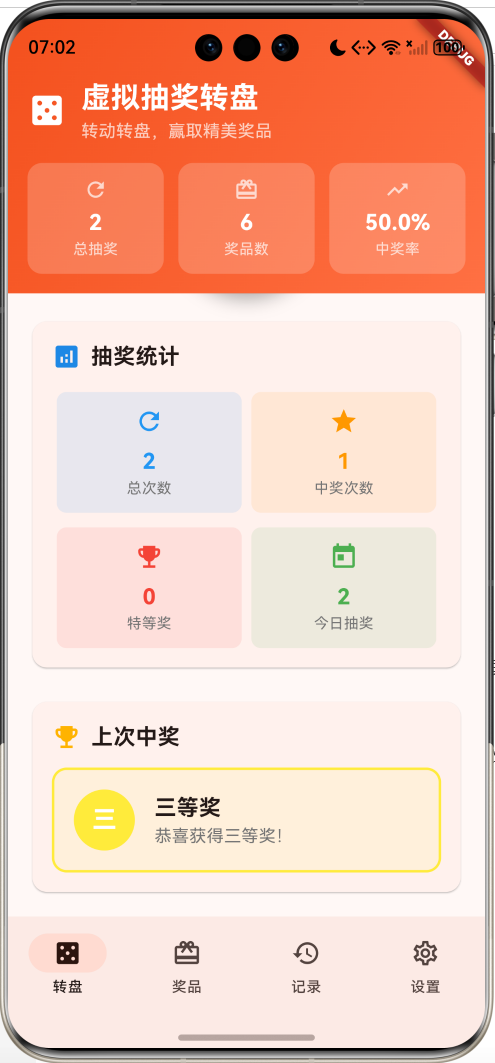
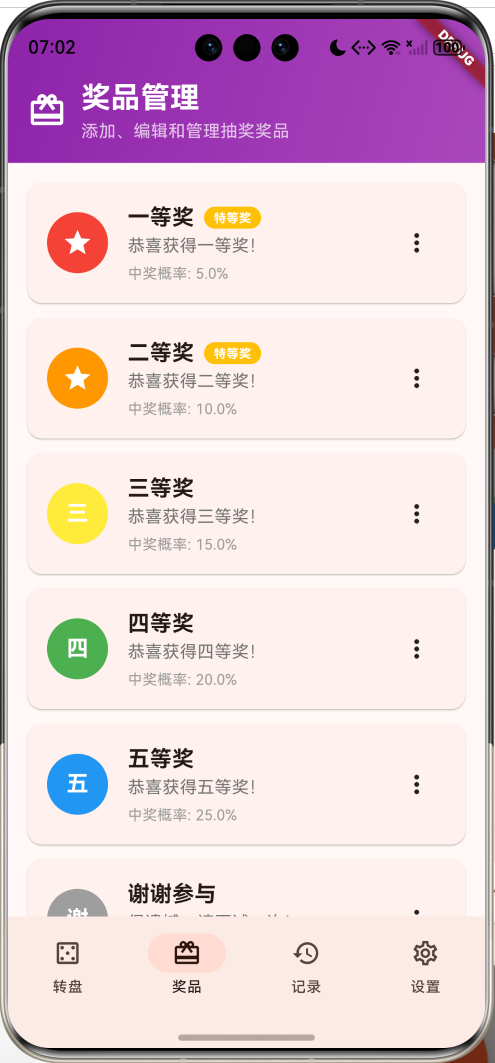
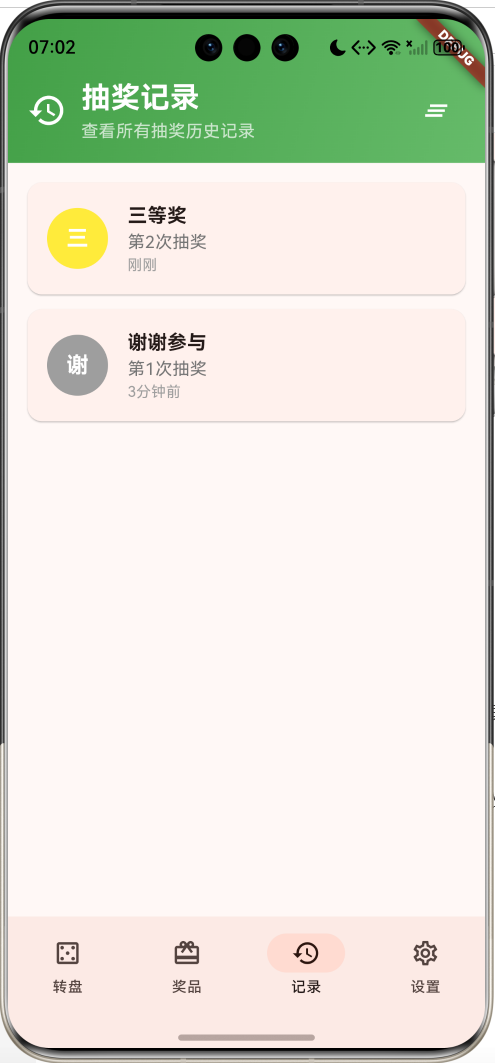
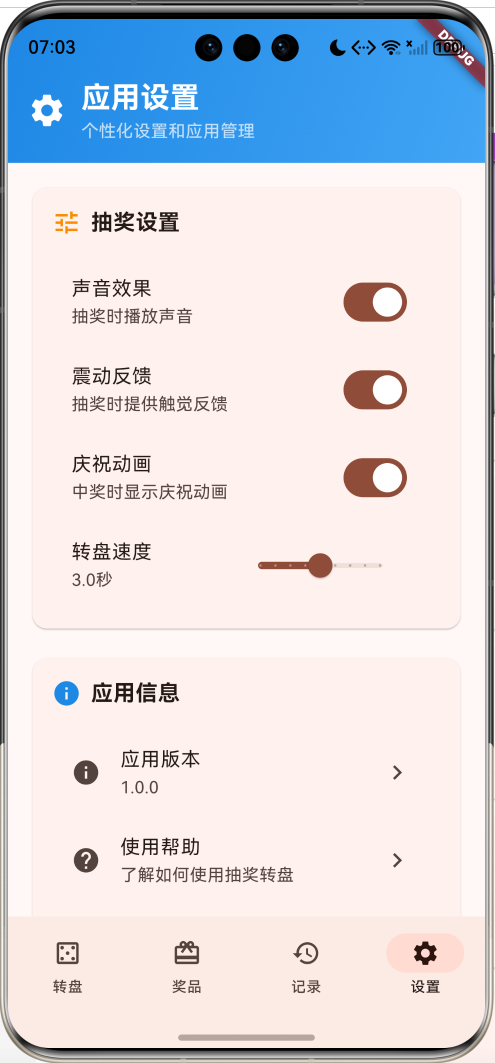
核心特性
- 转盘抽奖:逼真的转盘动画和抽奖体验
- 自定义奖品:支持添加、编辑、删除奖品
- 概率控制:可设置每个奖品的中奖概率
- 特等奖标识:支持设置特等奖并特殊显示
- 抽奖记录:完整的历史记录和统计分析
- 动画效果:转盘旋转、庆祝动画等视觉效果
- 触觉反馈:震动和声音反馈增强体验
- 个性化设置:转盘速度、效果开关等自定义选项
- 精美界面:渐变设计和流畅动画
技术栈
- Flutter 3.x
- Material Design 3
- 动画控制器(AnimationController)
- 自定义绘制(CustomPainter)
- 数学计算(dart:math)
- 触觉反馈(HapticFeedback)
项目架构
数据模型设计
Prize(奖品模型)
class Prize {
  final String name;                 // 奖品名称
  final String description;          // 奖品描述
  final Color color;                 // 奖品颜色
  final double probability;          // 中奖概率
  final bool isSpecial;              // 是否为特等奖
}
设计要点:
- name和description用于显示奖品信息
- color用于转盘扇形区域的颜色
- probability控制中奖概率(0-1之间)
- isSpecial标识特等奖,会有特殊显示效果
LotteryRecord(抽奖记录模型)
class LotteryRecord {
  final Prize prize;                 // 中奖奖品
  final DateTime timestamp;          // 抽奖时间
  final int spinNumber;              // 抽奖次数
}
奖品类型配置
| 奖品等级 | 默认概率 | 颜色 | 特殊标识 |
|---|---|---|---|
| 一等奖 | 5% | 红色 | 特等奖 ⭐ |
| 二等奖 | 10% | 橙色 | 特等奖 ⭐ |
| 三等奖 | 15% | 黄色 | 普通奖品 |
| 四等奖 | 20% | 绿色 | 普通奖品 |
| 五等奖 | 25% | 蓝色 | 普通奖品 |
| 谢谢参与 | 25% | 灰色 | 安慰奖 |
动画配置参数
| 动画类型 | 持续时间 | 缓动曲线 | 说明 |
|---|---|---|---|
| 转盘旋转 | 1-5秒 | easeOutCubic | 主要抽奖动画 |
| 庆祝动画 | 1.5秒 | elasticOut | 中奖庆祝效果 |
| 按钮反馈 | 0.2秒 | linear | 按钮点击反馈 |
核心功能实现
1. 转盘绘制与显示
使用CustomPainter绘制转盘,支持动态奖品数量和颜色。
class WheelPainter extends CustomPainter {
final List<Prize> prizes;
WheelPainter(this.prizes);
void paint(Canvas canvas, Size size) {
final center = Offset(size.width / 2, size.height / 2);
final radius = size.width / 2;
final anglePerPrize = 2 * math.pi / prizes.length;
for (int i = 0; i < prizes.length; i++) {
final startAngle = i * anglePerPrize - math.pi / 2;
final sweepAngle = anglePerPrize;
// 绘制扇形
final paint = Paint()
..color = prizes[i].color
..style = PaintingStyle.fill;
canvas.drawArc(
Rect.fromCircle(center: center, radius: radius),
startAngle,
sweepAngle,
true,
paint,
);
// 绘制边框
final borderPaint = Paint()
..color = Colors.white
..style = PaintingStyle.stroke
..strokeWidth = 2;
canvas.drawArc(
Rect.fromCircle(center: center, radius: radius),
startAngle,
sweepAngle,
true,
borderPaint,
);
// 绘制文字
final textAngle = startAngle + sweepAngle / 2;
final textRadius = radius * 0.7;
final textCenter = Offset(
center.dx + textRadius * math.cos(textAngle),
center.dy + textRadius * math.sin(textAngle),
);
final textPainter = TextPainter(
text: TextSpan(
text: prizes[i].name,
style: const TextStyle(
color: Colors.white,
fontSize: 14,
fontWeight: FontWeight.bold,
),
),
textDirection: TextDirection.ltr,
);
textPainter.layout();
canvas.save();
canvas.translate(textCenter.dx, textCenter.dy);
canvas.rotate(textAngle + math.pi / 2);
textPainter.paint(canvas, Offset(-textPainter.width / 2, -textPainter.height / 2));
canvas.restore();
}
}
bool shouldRepaint(covariant CustomPainter oldDelegate) => true;
}
绘制特点:
- 动态扇形:根据奖品数量自动计算扇形角度
- 颜色区分:每个奖品使用不同颜色区分
- 文字旋转:奖品名称沿扇形方向显示
- 边框装饰:白色边框增强视觉效果
2. 转盘动画控制
实现流畅的转盘旋转动画和庆祝效果。
Widget _buildLotteryWheel() {
  return Container(
    width: 300,
    height: 300,
    decoration: BoxDecoration(
      shape: BoxShape.circle,
      boxShadow: [
        BoxShadow(
          color: Colors.black.withValues(alpha: 0.3),
          blurRadius: 15,
          offset: const Offset(0, 8),
        ),
      ],
    ),
    child: Stack(
      alignment: Alignment.center,
      children: [
        // 转盘背景
        AnimatedBuilder(
          animation: _spinAnimation,
          builder: (context, child) {
            return Transform.rotate(
              angle: _currentRotation * 2 * math.pi * 5 + (_getTargetAngle() ?? 0),
              child: CustomPaint(
                size: const Size(300, 300),
                painter: WheelPainter(_prizes),
              ),
            );
          },
        ),

        // 中心圆
        Container(
          width: 60,
          height: 60,
          decoration: BoxDecoration(
            shape: BoxShape.circle,
            color: Colors.white,
            border: Border.all(color: Colors.deepOrange, width: 3),
            boxShadow: [
              BoxShadow(
                color: Colors.black.withValues(alpha: 0.2),
                blurRadius: 8,
                offset: const Offset(0, 4),
              ),
            ],
          ),
          child: Icon(
            Icons.casino,
            color: Colors.deepOrange,
            size: 30,
          ),
        ),

        // 指针
        Positioned(
          top: 10,
          child: Container(
            width: 0,
            height: 0,
            decoration: const BoxDecoration(
              border: Border(
                left: BorderSide(width: 15, color: Colors.transparent),
                right: BorderSide(width: 15, color: Colors.transparent),
                bottom: BorderSide(width: 30, color: Colors.red),
              ),
            ),
          ),
        ),

        // 庆祝动画
        if (_enableCelebration)
          AnimatedBuilder(
            animation: _celebrationAnimation,
            builder: (context, child) {
              return Transform.scale(
                scale: _celebrationAnimation.value,
                child: Container(
                  width: 320,
                  height: 320,
                  decoration: BoxDecoration(
                    shape: BoxShape.circle,
                    border: Border.all(
                      color: Colors.yellow.withValues(alpha: 0.5),
                      width: 5,
                    ),
                  ),
                ),
              );
            },
          ),
      ],
    ),
  );
}
动画设计:
- 旋转动画:使用Transform.rotate实现转盘旋转
- 多圈旋转:转盘旋转5圈增加悬念感
- 目标角度:根据中奖奖品计算最终停止角度
- 庆祝效果:中奖时显示扩散的圆环动画
3. 概率抽奖算法
实现基于概率的公平抽奖算法。
Prize _selectWinnerByProbability() {
  final random = math.Random();
  double totalProbability = _prizes.fold(0, (sum, prize) => sum + prize.probability);
  double randomValue = random.nextDouble() * totalProbability;

  double currentSum = 0;
  for (final prize in _prizes) {
    currentSum += prize.probability;
    if (randomValue <= currentSum) {
      return prize;
    }
  }

  return _prizes.last; // 默认返回最后一个奖品
}

double? _getTargetAngle() {
  if (_lastWinner == null) return null;

  final index = _prizes.indexOf(_lastWinner!);
  final anglePerPrize = 2 * math.pi / _prizes.length;
  return index * anglePerPrize;
}
算法特点:
- 概率累积:计算所有奖品的概率总和
- 随机选择:生成随机数并映射到概率区间
- 公平抽奖:严格按照设定概率进行抽奖
- 角度计算:根据中奖奖品计算转盘停止角度
4. 抽奖流程控制
完整的抽奖流程,包括动画、反馈和记录。
void _spinWheel() {
  if (_isSpinning) return;

  setState(() {
    _isSpinning = true;
    _totalSpins++;
  });

  // 根据概率选择奖品
  final winner = _selectWinnerByProbability();
  _lastWinner = winner;

  // 播放震动反馈
  if (_enableVibration) {
    HapticFeedback.mediumImpact();
  }

  // 开始转盘动画
  _spinController.reset();
  _spinController.forward().then((_) {
    setState(() {
      _isSpinning = false;
    });

    // 添加到历史记录
    _lotteryHistory.insert(0, LotteryRecord(
      prize: winner,
      timestamp: DateTime.now(),
      spinNumber: _totalSpins,
    ));

    // 限制历史记录数量
    if (_lotteryHistory.length > 100) {
      _lotteryHistory.removeLast();
    }
  });
}
流程控制:
- 检查转盘状态,防止重复点击
- 更新抽奖次数统计
- 执行概率抽奖算法
- 播放触觉反馈
- 启动转盘动画
- 保存抽奖记录
- 显示中奖结果
5. 中奖结果展示
美观的中奖对话框和庆祝效果。
void _showWinnerDialog() {
  if (_lastWinner == null) return;

  // 播放庆祝动画
  if (_enableCelebration) {
    _celebrationController.reset();
    _celebrationController.forward();
  }

  showDialog(
    context: context,
    barrierDismissible: false,
    builder: (context) {
      return AlertDialog(
        shape: RoundedRectangleBorder(
          borderRadius: BorderRadius.circular(20),
        ),
        content: Column(
          mainAxisSize: MainAxisSize.min,
          children: [
            Container(
              width: 80,
              height: 80,
              decoration: BoxDecoration(
                color: _lastWinner!.color,
                shape: BoxShape.circle,
              ),
              child: Center(
                child: _lastWinner!.isSpecial
                    ? const Icon(Icons.star, color: Colors.white, size: 40)
                    : Text(
                          _lastWinner!.name[0],
                          style: const TextStyle(
                            color: Colors.white,
                            fontSize: 30,
                            fontWeight: FontWeight.bold,
                          ),
                        ),
              ),
            ),
            const SizedBox(height: 20),
            Text(
              _lastWinner!.name,
              style: const TextStyle(
                fontSize: 24,
                fontWeight: FontWeight.bold,
              ),
            ),
            const SizedBox(height: 8),
            Text(
              _lastWinner!.description,
              style: TextStyle(
                fontSize: 16,
                color: Colors.grey.shade600,
              ),
              textAlign: TextAlign.center,
            ),
            const SizedBox(height: 20),
            Row(
              children: [
                Expanded(
                  child: OutlinedButton(
                    onPressed: () => Navigator.pop(context),
                    child: const Text('确定'),
                  ),
                ),
                const SizedBox(width: 12),
                Expanded(
                  child: ElevatedButton(
                    onPressed: () {
                      Navigator.pop(context);
                      _spinWheel();
                    },
                    child: const Text('再来一次'),
                  ),
                ),
              ],
            ),
          ],
        ),
      );
    },
  );
}
展示特点:
- 圆形头像:使用奖品颜色作为背景
- 特等奖标识:特等奖显示星星图标
- 奖品信息:显示奖品名称和描述
- 操作按钮:提供确定和再次抽奖选项
6. 奖品管理功能
完整的奖品增删改查功能。
void _showPrizeDialog({Prize? prize, int? index}) {
  final nameController = TextEditingController(text: prize?.name ?? '');
  final descriptionController = TextEditingController(text: prize?.description ?? '');
  final probabilityController = TextEditingController(
    text: prize?.probability.toString() ?? '0.1',
  );

  Color selectedColor = prize?.color ?? Colors.blue;
  bool isSpecial = prize?.isSpecial ?? false;

  showDialog(
    context: context,
    builder: (context) {
      return StatefulBuilder(
        builder: (context, setDialogState) {
          return AlertDialog(
            title: Text(prize == null ? '添加奖品' : '编辑奖品'),
            content: SingleChildScrollView(
              child: Column(
                mainAxisSize: MainAxisSize.min,
                children: [
                  TextField(
                    controller: nameController,
                    decoration: const InputDecoration(
                      labelText: '奖品名称',
                      border: OutlineInputBorder(),
                    ),
                  ),
                  const SizedBox(height: 16),
                  TextField(
                    controller: descriptionController,
                    decoration: const InputDecoration(
                      labelText: '奖品描述',
                      border: OutlineInputBorder(),
                    ),
                  ),
                  const SizedBox(height: 16),
                  TextField(
                    controller: probabilityController,
                    keyboardType: TextInputType.number,
                    decoration: const InputDecoration(
                      labelText: '中奖概率 (0-1)',
                      border: OutlineInputBorder(),
                    ),
                  ),
                  const SizedBox(height: 16),
                  Row(
                    children: [
                      const Text('颜色: '),
                      const SizedBox(width: 8),
                      ...Colors.primaries.take(8).map((color) {
                        return GestureDetector(
                          onTap: () {
                            setDialogState(() {
                              selectedColor = color;
                            });
                          },
                          child: Container(
                            width: 30,
                            height: 30,
                            margin: const EdgeInsets.only(right: 8),
                            decoration: BoxDecoration(
                              color: color,
                              shape: BoxShape.circle,
                              border: selectedColor == color
                                  ? Border.all(color: Colors.black, width: 2)
                                  : null,
                            ),
                          ),
                        );
                      }),
                    ],
                  ),
                  const SizedBox(height: 16),
                  CheckboxListTile(
                    title: const Text('特等奖'),
                    value: isSpecial,
                    onChanged: (value) {
                      setDialogState(() {
                        isSpecial = value ?? false;
                      });
                    },
                  ),
                ],
              ),
            ),
            actions: [
              TextButton(
                onPressed: () => Navigator.pop(context),
                child: const Text('取消'),
              ),
              ElevatedButton(
                onPressed: () {
                  final name = nameController.text.trim();
                  final description = descriptionController.text.trim();
                  final probability = double.tryParse(probabilityController.text) ?? 0.1;

                  if (name.isEmpty || description.isEmpty) {
                    ScaffoldMessenger.of(context).showSnackBar(
                      const SnackBar(content: Text('请填写完整信息')),
                    );
                    return;
                  }

                  if (probability <= 0 || probability > 1) {
                    ScaffoldMessenger.of(context).showSnackBar(
                      const SnackBar(content: Text('概率必须在0-1之间')),
                    );
                    return;
                  }

                  final newPrize = Prize(
                    name: name,
                    description: description,
                    color: selectedColor,
                    probability: probability,
                    isSpecial: isSpecial,
                  );

                  setState(() {
                    if (index != null) {
                      _prizes[index] = newPrize;
                    } else {
                      _prizes.add(newPrize);
                    }
                  });

                  Navigator.pop(context);
                },
                child: Text(prize == null ? '添加' : '保存'),
              ),
            ],
          );
        },
      );
    },
  );
}
管理功能:
- 添加奖品:支持自定义名称、描述、颜色、概率
- 编辑奖品:修改现有奖品的所有属性
- 删除奖品:删除不需要的奖品(至少保留2个)
- 颜色选择:提供8种预设颜色选择
- 特等奖设置:可标记奖品为特等奖
7. 统计分析功能
提供详细的抽奖统计和分析数据。
Widget _buildQuickStats() {
  return Card(
    child: Padding(
      padding: const EdgeInsets.all(16),
      child: Column(
        crossAxisAlignment: CrossAxisAlignment.start,
        children: [
          Row(
            children: [
              Icon(Icons.analytics, color: Colors.blue.shade600),
              const SizedBox(width: 8),
              const Text(
                '抽奖统计',
                style: TextStyle(fontSize: 18, fontWeight: FontWeight.bold),
              ),
            ],
          ),
          const SizedBox(height: 16),
          Row(
            children: [
              Expanded(
                child: _buildStatItem('总次数', '$_totalSpins', Icons.refresh, Colors.blue),
              ),
              Expanded(
                child: _buildStatItem('中奖次数', '${_getWinCount()}', Icons.star, Colors.orange),
              ),
            ],
          ),
          const SizedBox(height: 12),
          Row(
            children: [
              Expanded(
                child: _buildStatItem('特等奖', '${_getSpecialWinCount()}', Icons.emoji_events, Colors.red),
              ),
              Expanded(
                child: _buildStatItem('今日抽奖', '${_getTodaySpins()}', Icons.today, Colors.green),
              ),
            ],
          ),
        ],
      ),
    ),
  );
}

// 获取中奖率
String _getWinRate() {
  if (_totalSpins == 0) return '0';
  final winCount = _getWinCount();
  return ((winCount / _totalSpins) * 100).toStringAsFixed(1);
}

// 获取中奖次数
int _getWinCount() {
  return _lotteryHistory.where((record) => record.prize.name != '谢谢参与').length;
}

// 获取特等奖次数
int _getSpecialWinCount() {
  return _lotteryHistory.where((record) => record.prize.isSpecial).length;
}

// 获取今日抽奖次数
int _getTodaySpins() {
  final today = DateTime.now();
  return _lotteryHistory.where((record) {
    return record.timestamp.year == today.year &&
           record.timestamp.month == today.month &&
           record.timestamp.day == today.day;
  }).length;
}
统计指标:
- 总抽奖次数:累计抽奖次数
- 中奖次数:除"谢谢参与"外的中奖次数
- 中奖率:中奖次数占总次数的百分比
- 特等奖次数:特等奖中奖次数
- 今日抽奖:当天的抽奖次数
8. 历史记录管理
完整的抽奖历史记录和管理功能。
Widget _buildHistoryItem(LotteryRecord record, int index) {
  return Card(
    margin: const EdgeInsets.only(bottom: 12),
    child: Padding(
      padding: const EdgeInsets.all(16),
      child: Row(
        children: [
          Container(
            width: 50,
            height: 50,
            decoration: BoxDecoration(
              color: record.prize.color,
              shape: BoxShape.circle,
            ),
            child: Center(
              child: record.prize.isSpecial
                  ? const Icon(Icons.star, color: Colors.white, size: 25)
                  : Text(
                      record.prize.name[0],
                      style: const TextStyle(
                        color: Colors.white,
                        fontSize: 18,
                        fontWeight: FontWeight.bold,
                      ),
                    ),
            ),
          ),
          const SizedBox(width: 16),
          Expanded(
            child: Column(
              crossAxisAlignment: CrossAxisAlignment.start,
              children: [
                Row(
                  children: [
                    Text(
                      record.prize.name,
                      style: const TextStyle(
                        fontSize: 16,
                        fontWeight: FontWeight.bold,
                      ),
                    ),
                    if (record.prize.isSpecial) ...[
                      const SizedBox(width: 8),
                      const Icon(Icons.star, color: Colors.amber, size: 20),
                    ],
                  ],
                ),
                Text(
                  '第${record.spinNumber}次抽奖',
                  style: TextStyle(
                    fontSize: 14,
                    color: Colors.grey.shade600,
                  ),
                ),
                Text(
                  _formatTime(record.timestamp),
                  style: TextStyle(
                    fontSize: 12,
                    color: Colors.grey.shade500,
                  ),
                ),
              ],
            ),
          ),
        ],
      ),
    ),
  );
}

String _formatTime(DateTime dateTime) {
  final now = DateTime.now();
  final difference = now.difference(dateTime);

  if (difference.inMinutes < 1) {
    return '刚刚';
  } else if (difference.inHours < 1) {
    return '${difference.inMinutes}分钟前';
  } else if (difference.inDays < 1) {
    return '${difference.inHours}小时前';
  } else if (difference.inDays < 7) {
    return '${difference.inDays}天前';
  } else {
    return '${dateTime.month}/${dateTime.day}';
  }
}
记录特点:
- 奖品信息:显示中奖奖品的名称和颜色
- 特等奖标识:特等奖显示星星图标
- 抽奖序号:显示是第几次抽奖
- 时间显示:智能显示相对时间
- 批量管理:支持清空所有历史记录
9. 个性化设置
丰富的设置选项,满足不同用户需求。
Widget _buildSettingsPage() {
  return Column(
    children: [
      _buildSettingsHeader(),
      Expanded(
        child: ListView(
          padding: const EdgeInsets.all(16),
          children: [
            Card(
              child: Padding(
                padding: const EdgeInsets.all(16),
                child: Column(
                  crossAxisAlignment: CrossAxisAlignment.start,
                  children: [
                    Row(
                      children: [
                        Icon(Icons.tune, color: Colors.orange.shade600),
                        const SizedBox(width: 8),
                        const Text('抽奖设置', style: TextStyle(fontSize: 18, fontWeight: FontWeight.bold)),
                      ],
                    ),
                    const SizedBox(height: 16),
                    SwitchListTile(
                      title: const Text('声音效果'),
                      subtitle: const Text('抽奖时播放声音'),
                      value: _enableSound,
                      onChanged: (value) {
                        setState(() {
                          _enableSound = value;
                        });
                      },
                    ),
                    SwitchListTile(
                      title: const Text('震动反馈'),
                      subtitle: const Text('抽奖时提供触觉反馈'),
                      value: _enableVibration,
                      onChanged: (value) {
                        setState(() {
                          _enableVibration = value;
                        });
                      },
                    ),
                    SwitchListTile(
                      title: const Text('庆祝动画'),
                      subtitle: const Text('中奖时显示庆祝动画'),
                      value: _enableCelebration,
                      onChanged: (value) {
                        setState(() {
                          _enableCelebration = value;
                        });
                      },
                    ),
                    ListTile(
                      title: const Text('转盘速度'),
                      subtitle: Text('${_spinDuration.toStringAsFixed(1)}秒'),
                      trailing: SizedBox(
                        width: 150,
                        child: Slider(
                          value: _spinDuration,
                          min: 1.0,
                          max: 5.0,
                          divisions: 8,
                          onChanged: (value) {
                            setState(() {
                              _spinDuration = value;
                              _spinController.duration = Duration(milliseconds: (value * 1000).toInt());
                            });
                          },
                        ),
                      ),
                    ),
                  ],
                ),
              ),
            ),
          ],
        ),
      ),
    ],
  );
}
设置选项:
- 声音效果:控制抽奖时的声音播放
- 震动反馈:控制触觉反馈的开关
- 庆祝动画:控制中奖庆祝动画
- 转盘速度:调整转盘旋转的持续时间
- 数据重置:清空所有记录和设置
10. 动画系统设计
完整的动画系统,提供流畅的用户体验。
void initState() {
super.initState();
_spinController = AnimationController(
duration: Duration(milliseconds: (_spinDuration * 1000).toInt()),
vsync: this,
);
_celebrationController = AnimationController(
duration: const Duration(milliseconds: 1500),
vsync: this,
);
_spinAnimation = Tween<double>(
begin: 0,
end: 1,
).animate(CurvedAnimation(
parent: _spinController,
curve: Curves.easeOutCubic,
));
_celebrationAnimation = Tween<double>(
begin: 0,
end: 1,
).animate(CurvedAnimation(
parent: _celebrationController,
curve: Curves.elasticOut,
));
_spinController.addListener(() {
setState(() {
_currentRotation = _spinAnimation.value;
});
});
_spinController.addStatusListener((status) {
if (status == AnimationStatus.completed) {
_showWinnerDialog();
}
});
}
动画特点:
- 转盘动画:使用easeOutCubic缓动曲线,先快后慢
- 庆祝动画:使用elasticOut弹性效果
- 状态监听:动画完成后自动显示结果
- 性能优化:合理使用AnimatedBuilder减少重绘
UI组件设计
1. 渐变头部组件
Widget _buildWheelHeader() {
  return Container(
    padding: const EdgeInsets.fromLTRB(16, 48, 16, 16),
    decoration: BoxDecoration(
      gradient: LinearGradient(
        colors: [Colors.deepOrange.shade600, Colors.deepOrange.shade400],
        begin: Alignment.topLeft,
        end: Alignment.bottomRight,
      ),
    ),
    child: Column(
      children: [
        Row(
          children: [
            const Icon(Icons.casino, color: Colors.white, size: 32),
            const SizedBox(width: 12),
            const Expanded(
              child: Column(
                crossAxisAlignment: CrossAxisAlignment.start,
                children: [
                  Text(
                    '虚拟抽奖转盘',
                    style: TextStyle(
                      fontSize: 24,
                      fontWeight: FontWeight.bold,
                      color: Colors.white,
                    ),
                  ),
                  Text(
                    '转动转盘,赢取精美奖品',
                    style: TextStyle(
                      fontSize: 14,
                      color: Colors.white70,
                    ),
                  ),
                ],
              ),
            ),
          ],
        ),
        const SizedBox(height: 16),
        Row(
          children: [
            Expanded(
              child: _buildHeaderCard('总抽奖', '$_totalSpins', Icons.refresh),
            ),
            const SizedBox(width: 12),
            Expanded(
              child: _buildHeaderCard('奖品数', '${_prizes.length}', Icons.card_giftcard),
            ),
            const SizedBox(width: 12),
            Expanded(
              child: _buildHeaderCard('中奖率', '${_getWinRate()}%', Icons.trending_up),
            ),
          ],
        ),
      ],
    ),
  );
}
2. 统计卡片组件
Widget _buildStatCard(String label, String value, IconData icon, Color color) {
  return Container(
    padding: const EdgeInsets.all(12),
    decoration: BoxDecoration(
      color: color.withValues(alpha: 0.1),
      borderRadius: BorderRadius.circular(12),
    ),
    child: Column(
      children: [
        Icon(icon, color: color, size: 24),
        const SizedBox(height: 8),
        Text(
          value,
          style: TextStyle(
            fontSize: 20,
            fontWeight: FontWeight.bold,
            color: color,
          ),
        ),
        Text(
          label,
          style: TextStyle(
            fontSize: 12,
            color: Colors.grey.shade600,
          ),
        ),
      ],
    ),
  );
}
3. 转盘绘制组件
class WheelPainter extends CustomPainter {
final List<Prize> prizes;
WheelPainter(this.prizes);
void paint(Canvas canvas, Size size) {
final center = Offset(size.width / 2, size.height / 2);
final radius = size.width / 2;
final anglePerPrize = 2 * math.pi / prizes.length;
for (int i = 0; i < prizes.length; i++) {
final startAngle = i * anglePerPrize - math.pi / 2;
final sweepAngle = anglePerPrize;
// 绘制扇形
final paint = Paint()
..color = prizes[i].color
..style = PaintingStyle.fill;
canvas.drawArc(
Rect.fromCircle(center: center, radius: radius),
startAngle,
sweepAngle,
true,
paint,
);
// 绘制边框
final borderPaint = Paint()
..color = Colors.white
..style = PaintingStyle.stroke
..strokeWidth = 2;
canvas.drawArc(
Rect.fromCircle(center: center, radius: radius),
startAngle,
sweepAngle,
true,
borderPaint,
);
// 绘制文字
final textAngle = startAngle + sweepAngle / 2;
final textRadius = radius * 0.7;
final textCenter = Offset(
center.dx + textRadius * math.cos(textAngle),
center.dy + textRadius * math.sin(textAngle),
);
final textPainter = TextPainter(
text: TextSpan(
text: prizes[i].name,
style: const TextStyle(
color: Colors.white,
fontSize: 14,
fontWeight: FontWeight.bold,
),
),
textDirection: TextDirection.ltr,
);
textPainter.layout();
canvas.save();
canvas.translate(textCenter.dx, textCenter.dy);
canvas.rotate(textAngle + math.pi / 2);
textPainter.paint(canvas, Offset(-textPainter.width / 2, -textPainter.height / 2));
canvas.restore();
}
}
bool shouldRepaint(covariant CustomPainter oldDelegate) => true;
}
4. NavigationBar底部导航
NavigationBar(
  selectedIndex: _selectedIndex,
  onDestinationSelected: (index) {
    setState(() {
      _selectedIndex = index;
    });
  },
  destinations: const [
    NavigationDestination(
      icon: Icon(Icons.casino_outlined),
      selectedIcon: Icon(Icons.casino),
      label: '转盘',
    ),
    NavigationDestination(
      icon: Icon(Icons.card_giftcard_outlined),
      selectedIcon: Icon(Icons.card_giftcard),
      label: '奖品',
    ),
    NavigationDestination(
      icon: Icon(Icons.history_outlined),
      selectedIcon: Icon(Icons.history),
      label: '记录',
    ),
    NavigationDestination(
      icon: Icon(Icons.settings_outlined),
      selectedIcon: Icon(Icons.settings),
      label: '设置',
    ),
  ],
)
功能扩展建议
1. 奖品图片支持
class PrizeWithImage extends Prize {
  final String? imagePath;
  final String? imageUrl;

  const PrizeWithImage({
    required String name,
    required String description,
    required Color color,
    required double probability,
    bool isSpecial = false,
    this.imagePath,
    this.imageUrl,
  }) : super(
    name: name,
    description: description,
    color: color,
    probability: probability,
    isSpecial: isSpecial,
  );

  // 图片选择功能
  Future<void> selectPrizeImage() async {
    final picker = ImagePicker();
    final image = await picker.pickImage(source: ImageSource.gallery);

    if (image != null) {
      // 保存图片到本地
      final directory = await getApplicationDocumentsDirectory();
      final fileName = '${DateTime.now().millisecondsSinceEpoch}.jpg';
      final savedImage = await File(image.path).copy('${directory.path}/$fileName');

      // 更新奖品信息
      setState(() {
        _prizes[index] = _prizes[index].copyWith(imagePath: savedImage.path);
      });
    }
  }

  // 在转盘上显示图片
  Widget buildPrizeImage() {
    if (imagePath != null) {
      return ClipOval(
        child: Image.file(
          File(imagePath!),
          width: 40,
          height: 40,
          fit: BoxFit.cover,
        ),
      );
    } else if (imageUrl != null) {
      return ClipOval(
        child: Image.network(
          imageUrl!,
          width: 40,
          height: 40,
          fit: BoxFit.cover,
        ),
      );
    }
    return Icon(Icons.card_giftcard, color: Colors.white, size: 30);
  }
}
2. 声音效果系统
class SoundManager {
  static AudioPlayer? _audioPlayer;

  // 初始化音频播放器
  static Future<void> initialize() async {
    _audioPlayer = AudioPlayer();
  }

  // 播放转盘旋转音效
  static Future<void> playSpinSound() async {
    if (_audioPlayer != null) {
      await _audioPlayer!.play(AssetSource('sounds/spin.mp3'));
    }
  }

  // 播放中奖音效
  static Future<void> playWinSound(bool isSpecial) async {
    if (_audioPlayer != null) {
      final soundFile = isSpecial ? 'sounds/special_win.mp3' : 'sounds/normal_win.mp3';
      await _audioPlayer!.play(AssetSource(soundFile));
    }
  }

  // 播放失败音效
  static Future<void> playLoseSound() async {
    if (_audioPlayer != null) {
      await _audioPlayer!.play(AssetSource('sounds/lose.mp3'));
    }
  }

  // 设置音量
  static Future<void> setVolume(double volume) async {
    if (_audioPlayer != null) {
      await _audioPlayer!.setVolume(volume);
    }
  }

  // 释放资源
  static Future<void> dispose() async {
    await _audioPlayer?.dispose();
    _audioPlayer = null;
  }
}

// 在抽奖流程中集成声音
void _spinWheelWithSound() {
  if (_enableSound) {
    SoundManager.playSpinSound();
  }

  _spinWheel();
}

void _showWinnerDialogWithSound() {
  if (_enableSound && _lastWinner != null) {
    if (_lastWinner!.name == '谢谢参与') {
      SoundManager.playLoseSound();
    } else {
      SoundManager.playWinSound(_lastWinner!.isSpecial);
    }
  }

  _showWinnerDialog();
}
3. 抽奖动画增强
class EnhancedAnimations {
late AnimationController _particleController;
late AnimationController _scaleController;
late Animation<double> _particleAnimation;
late Animation<double> _scaleAnimation;
void initializeAnimations() {
_particleController = AnimationController(
duration: const Duration(milliseconds: 2000),
vsync: this,
);
_scaleController = AnimationController(
duration: const Duration(milliseconds: 800),
vsync: this,
);
_particleAnimation = Tween<double>(begin: 0, end: 1).animate(
CurvedAnimation(parent: _particleController, curve: Curves.easeOut),
);
_scaleAnimation = Tween<double>(begin: 0.8, end: 1.2).animate(
CurvedAnimation(parent: _scaleController, curve: Curves.elasticOut),
);
}
// 粒子效果组件
Widget buildParticleEffect() {
return AnimatedBuilder(
animation: _particleAnimation,
builder: (context, child) {
return CustomPaint(
painter: ParticlePainter(_particleAnimation.value),
size: const Size(400, 400),
);
},
);
}
// 缩放动画组件
Widget buildScaleAnimation(Widget child) {
return AnimatedBuilder(
animation: _scaleAnimation,
builder: (context, _) {
return Transform.scale(
scale: _scaleAnimation.value,
child: child,
);
},
);
}
// 启动庆祝动画
void startCelebrationAnimations() {
_particleController.forward();
_scaleController.forward().then((_) {
_scaleController.reverse();
});
}
}
class ParticlePainter extends CustomPainter {
final double progress;
final List<Particle> particles;
ParticlePainter(this.progress) : particles = _generateParticles();
static List<Particle> _generateParticles() {
final random = math.Random();
return List.generate(50, (index) {
return Particle(
x: random.nextDouble() * 400,
y: random.nextDouble() * 400,
vx: (random.nextDouble() - 0.5) * 200,
vy: (random.nextDouble() - 0.5) * 200,
color: Colors.primaries[random.nextInt(Colors.primaries.length)],
size: random.nextDouble() * 8 + 2,
);
});
}
void paint(Canvas canvas, Size size) {
for (final particle in particles) {
final paint = Paint()
..color = particle.color.withValues(alpha: 1.0 - progress)
..style = PaintingStyle.fill;
final x = particle.x + particle.vx * progress;
final y = particle.y + particle.vy * progress;
canvas.drawCircle(Offset(x, y), particle.size, paint);
}
}
bool shouldRepaint(covariant CustomPainter oldDelegate) => true;
}
class Particle {
final double x, y, vx, vy, size;
final Color color;
Particle({
required this.x,
required this.y,
required this.vx,
required this.vy,
required this.color,
required this.size,
});
}
4. 数据持久化
class LotteryDataManager {
  static const String _prizesKey = 'lottery_prizes';
  static const String _historyKey = 'lottery_history';
  static const String _settingsKey = 'lottery_settings';

  // 保存奖品数据
  static Future<void> savePrizes(List<Prize> prizes) async {
    final prefs = await SharedPreferences.getInstance();
    final prizesJson = prizes.map((prize) => prize.toJson()).toList();
    await prefs.setString(_prizesKey, jsonEncode(prizesJson));
  }

  // 加载奖品数据
  static Future<List<Prize>> loadPrizes() async {
    final prefs = await SharedPreferences.getInstance();
    final prizesString = prefs.getString(_prizesKey);

    if (prizesString != null) {
      final prizesJson = jsonDecode(prizesString) as List;
      return prizesJson.map((json) => Prize.fromJson(json)).toList();
    }

    return _getDefaultPrizes();
  }

  // 保存抽奖历史
  static Future<void> saveHistory(List<LotteryRecord> history) async {
    final prefs = await SharedPreferences.getInstance();
    final historyJson = history.map((record) => record.toJson()).toList();
    await prefs.setString(_historyKey, jsonEncode(historyJson));
  }

  // 加载抽奖历史
  static Future<List<LotteryRecord>> loadHistory() async {
    final prefs = await SharedPreferences.getInstance();
    final historyString = prefs.getString(_historyKey);

    if (historyString != null) {
      final historyJson = jsonDecode(historyString) as List;
      return historyJson.map((json) => LotteryRecord.fromJson(json)).toList();
    }

    return [];
  }

  // 保存设置
  static Future<void> saveSettings(Map<String, dynamic> settings) async {
    final prefs = await SharedPreferences.getInstance();
    await prefs.setString(_settingsKey, jsonEncode(settings));
  }

  // 加载设置
  static Future<Map<String, dynamic>> loadSettings() async {
    final prefs = await SharedPreferences.getInstance();
    final settingsString = prefs.getString(_settingsKey);

    if (settingsString != null) {
      return jsonDecode(settingsString) as Map<String, dynamic>;
    }

    return {
      'enableSound': true,
      'enableVibration': true,
      'enableCelebration': true,
      'spinDuration': 3.0,
    };
  }
}

// 扩展Prize类支持JSON序列化
extension PrizeJson on Prize {
  Map<String, dynamic> toJson() {
    return {
      'name': name,
      'description': description,
      'color': color.value,
      'probability': probability,
      'isSpecial': isSpecial,
    };
  }

  static Prize fromJson(Map<String, dynamic> json) {
    return Prize(
      name: json['name'],
      description: json['description'],
      color: Color(json['color']),
      probability: json['probability'],
      isSpecial: json['isSpecial'] ?? false,
    );
  }
}
5. 多语言支持
class LotteryLocalizations {
  static const Map<String, Map<String, String>> _localizedValues = {
    'zh': {
      'app_title': '虚拟抽奖转盘',
      'wheel_tab': '转盘',
      'prizes_tab': '奖品',
      'history_tab': '记录',
      'settings_tab': '设置',
      'start_spin': '开始',
      'add_prize': '添加奖品',
      'edit_prize': '编辑奖品',
      'delete_prize': '删除奖品',
      'prize_name': '奖品名称',
      'prize_description': '奖品描述',
      'probability': '中奖概率',
      'special_prize': '特等奖',
      'congratulations': '恭喜中奖!',
      'try_again': '再来一次',
      'confirm': '确定',
      'cancel': '取消',
    },
    'en': {
      'app_title': 'Virtual Lottery Wheel',
      'wheel_tab': 'Wheel',
      'prizes_tab': 'Prizes',
      'history_tab': 'History',
      'settings_tab': 'Settings',
      'start_spin': 'Start',
      'add_prize': 'Add Prize',
      'edit_prize': 'Edit Prize',
      'delete_prize': 'Delete Prize',
      'prize_name': 'Prize Name',
      'prize_description': 'Prize Description',
      'probability': 'Probability',
      'special_prize': 'Special Prize',
      'congratulations': 'Congratulations!',
      'try_again': 'Try Again',
      'confirm': 'Confirm',
      'cancel': 'Cancel',
    },
  };

  static String translate(String key, String locale) {
    return _localizedValues[locale]?[key] ?? key;
  }

  // 使用示例
  Widget buildLocalizedText(String key) {
    final locale = Localizations.of(context).languageCode;
    return Text(LotteryLocalizations.translate(key, locale));
  }
}
6. 云端同步功能
class CloudSyncManager {
  static final FirebaseFirestore _firestore = FirebaseFirestore.instance;

  // 上传抽奖数据到云端
  static Future<void> uploadLotteryData(String userId, Map<String, dynamic> data) async {
    try {
      await _firestore.collection('lottery_data').doc(userId).set({
        'prizes': data['prizes'],
        'history': data['history'],
        'settings': data['settings'],
        'lastUpdated': FieldValue.serverTimestamp(),
      });
    } catch (e) {
      throw Exception('上传失败: $e');
    }
  }

  // 从云端下载抽奖数据
  static Future<Map<String, dynamic>?> downloadLotteryData(String userId) async {
    try {
      final doc = await _firestore.collection('lottery_data').doc(userId).get();

      if (doc.exists) {
        return doc.data();
      }

      return null;
    } catch (e) {
      throw Exception('下载失败: $e');
    }
  }

  // 实时同步监听
  static Stream<Map<String, dynamic>?> syncLotteryData(String userId) {
    return _firestore.collection('lottery_data').doc(userId).snapshots().map((doc) {
      return doc.exists ? doc.data() : null;
    });
  }

  // 同步界面
  Widget buildSyncPanel() {
    return Card(
      child: Column(
        children: [
          ListTile(
            leading: const Icon(Icons.cloud_upload),
            title: const Text('上传到云端'),
            subtitle: const Text('将数据备份到云端'),
            trailing: IconButton(
              icon: const Icon(Icons.upload),
              onPressed: _uploadData,
            ),
          ),
          ListTile(
            leading: const Icon(Icons.cloud_download),
            title: const Text('从云端下载'),
            subtitle: const Text('恢复云端备份数据'),
            trailing: IconButton(
              icon: const Icon(Icons.download),
              onPressed: _downloadData,
            ),
          ),
          SwitchListTile(
            title: const Text('自动同步'),
            subtitle: const Text('自动同步数据到云端'),
            value: _autoSync,
            onChanged: (value) {
              setState(() {
                _autoSync = value;
              });
            },
          ),
        ],
      ),
    );
  }
}
7. 统计分析增强
class AdvancedAnalytics {
  // 生成详细统计报告
  Map<String, dynamic> generateAnalyticsReport(List<LotteryRecord> history) {
    final now = DateTime.now();
    final today = DateTime(now.year, now.month, now.day);
    final thisWeek = today.subtract(Duration(days: now.weekday - 1));
    final thisMonth = DateTime(now.year, now.month, 1);

    return {
      'totalSpins': history.length,
      'todaySpins': _getSpinsInPeriod(history, today, now),
      'weekSpins': _getSpinsInPeriod(history, thisWeek, now),
      'monthSpins': _getSpinsInPeriod(history, thisMonth, now),
      'prizeDistribution': _getPrizeDistribution(history),
      'winRate': _calculateWinRate(history),
      'specialPrizeRate': _calculateSpecialPrizeRate(history),
      'averageSpinsPerDay': _calculateAverageSpinsPerDay(history),
      'mostActiveHour': _getMostActiveHour(history),
      'longestWinStreak': _getLongestWinStreak(history),
      'longestLoseStreak': _getLongestLoseStreak(history),
    };
  }

  // 获取指定时间段的抽奖次数
  int _getSpinsInPeriod(List<LotteryRecord> history, DateTime start, DateTime end) {
    return history.where((record) {
      return record.timestamp.isAfter(start) && record.timestamp.isBefore(end);
    }).length;
  }

  // 获取奖品分布
  Map<String, int> _getPrizeDistribution(List<LotteryRecord> history) {
    final distribution = <String, int>{};

    for (final record in history) {
      distribution[record.prize.name] = (distribution[record.prize.name] ?? 0) + 1;
    }

    return distribution;
  }

  // 计算中奖率
  double _calculateWinRate(List<LotteryRecord> history) {
    if (history.isEmpty) return 0.0;

    final winCount = history.where((record) => record.prize.name != '谢谢参与').length;
    return winCount / history.length;
  }

  // 获取最活跃时段
  int _getMostActiveHour(List<LotteryRecord> history) {
    final hourCounts = <int, int>{};

    for (final record in history) {
      final hour = record.timestamp.hour;
      hourCounts[hour] = (hourCounts[hour] ?? 0) + 1;
    }

    if (hourCounts.isEmpty) return 0;

    return hourCounts.entries.reduce((a, b) => a.value > b.value ? a : b).key;
  }

  // 统计图表界面
  Widget buildAnalyticsCharts(Map<String, dynamic> analytics) {
    return Column(
      children: [
        // 奖品分布饼图
        Card(
          child: Column(
            children: [
              const Text('奖品分布', style: TextStyle(fontSize: 18, fontWeight: FontWeight.bold)),
              SizedBox(
                height: 200,
                child: PieChart(
                  PieChartData(
                    sections: _buildPieChartSections(analytics['prizeDistribution']),
                  ),
                ),
              ),
            ],
          ),
        ),

        // 每日抽奖趋势图
        Card(
          child: Column(
            children: [
              const Text('抽奖趋势', style: TextStyle(fontSize: 18, fontWeight: FontWeight.bold)),
              SizedBox(
                height: 200,
                child: LineChart(
                  LineChartData(
                    lineBarsData: [_buildTrendLine(history)],
                  ),
                ),
              ),
            ],
          ),
        ),
      ],
    );
  }
}
8. 社交分享功能
class SocialShareManager {
  // 分享中奖结果
  static Future<void> shareWinResult(Prize prize, int spinNumber) async {
    final text = '我在虚拟抽奖转盘中获得了${prize.name}!这是我第${spinNumber}次抽奖的结果。';

    // 生成分享图片
    final shareImage = await _generateShareImage(prize, spinNumber);

    await Share.shareFiles(
      [shareImage.path],
      text: text,
      subject: '抽奖结果分享',
    );
  }

  // 生成分享图片
  static Future<File> _generateShareImage(Prize prize, int spinNumber) async {
    final recorder = ui.PictureRecorder();
    final canvas = Canvas(recorder);
    final size = const Size(400, 600);

    // 绘制背景
    final backgroundPaint = Paint()
      ..shader = LinearGradient(
        colors: [Colors.purple.shade400, Colors.blue.shade400],
        begin: Alignment.topLeft,
        end: Alignment.bottomRight,
      ).createShader(Rect.fromLTWH(0, 0, size.width, size.height));

    canvas.drawRect(Rect.fromLTWH(0, 0, size.width, size.height), backgroundPaint);

    // 绘制奖品信息
    final textPainter = TextPainter(
      text: TextSpan(
        children: [
          const TextSpan(
            text: '恭喜中奖!\n',
            style: TextStyle(fontSize: 32, fontWeight: FontWeight.bold, color: Colors.white),
          ),
          TextSpan(
            text: prize.name,
            style: const TextStyle(fontSize: 28, fontWeight: FontWeight.bold, color: Colors.yellow),
          ),
          TextSpan(
            text: '\n第${spinNumber}次抽奖',
            style: const TextStyle(fontSize: 18, color: Colors.white70),
          ),
        ],
      ),
      textDirection: TextDirection.ltr,
      textAlign: TextAlign.center,
    );

    textPainter.layout(minWidth: 0, maxWidth: size.width - 40);
    textPainter.paint(canvas, Offset(20, size.height / 2 - textPainter.height / 2));

    // 转换为图片
    final picture = recorder.endRecording();
    final image = await picture.toImage(size.width.toInt(), size.height.toInt());
    final byteData = await image.toByteData(format: ui.ImageByteFormat.png);

    // 保存到临时文件
    final tempDir = await getTemporaryDirectory();
    final file = File('${tempDir.path}/share_${DateTime.now().millisecondsSinceEpoch}.png');
    await file.writeAsBytes(byteData!.buffer.asUint8List());

    return file;
  }

  // 分享抽奖统计
  static Future<void> shareStatistics(Map<String, dynamic> stats) async {
    final text = '''
我的抽奖统计:
总抽奖次数:${stats['totalSpins']}
中奖率:${(stats['winRate'] * 100).toStringAsFixed(1)}%
特等奖次数:${stats['specialPrizes']}
连续中奖记录:${stats['winStreak']}

快来试试虚拟抽奖转盘吧!
''';

    await Share.share(text, subject: '我的抽奖统计');
  }
}
性能优化建议
1. 动画性能优化
class AnimationOptimizations {
// 使用RepaintBoundary优化重绘
Widget buildOptimizedWheel() {
return RepaintBoundary(
child: AnimatedBuilder(
animation: _spinAnimation,
builder: (context, child) {
return Transform.rotate(
angle: _currentRotation * 2 * math.pi * 5 + (_getTargetAngle() ?? 0),
child: CustomPaint(
size: const Size(300, 300),
painter: WheelPainter(_prizes),
),
);
},
),
);
}
// 优化CustomPainter性能
class OptimizedWheelPainter extends CustomPainter {
final List<Prize> prizes;
final ui.Image? cachedImage;
OptimizedWheelPainter(this.prizes, this.cachedImage);
void paint(Canvas canvas, Size size) {
// 使用缓存图片提高性能
if (cachedImage != null) {
canvas.drawImage(cachedImage!, Offset.zero, Paint());
return;
}
// 原始绘制逻辑
_drawWheel(canvas, size);
}
bool shouldRepaint(covariant CustomPainter oldDelegate) {
return oldDelegate is! OptimizedWheelPainter ||
oldDelegate.prizes != prizes;
}
}
// 预缓存转盘图像
Future<ui.Image> _precacheWheelImage() async {
final recorder = ui.PictureRecorder();
final canvas = Canvas(recorder);
const size = Size(300, 300);
final painter = WheelPainter(_prizes);
painter.paint(canvas, size);
final picture = recorder.endRecording();
return await picture.toImage(300, 300);
}
}
2. 内存管理优化
class MemoryOptimizations {
// 限制历史记录数量
static const int maxHistorySize = 100;
void addToHistory(LotteryRecord record) {
_lotteryHistory.insert(0, record);
// 限制历史记录数量,防止内存溢出
if (_lotteryHistory.length > maxHistorySize) {
_lotteryHistory.removeRange(maxHistorySize, _lotteryHistory.length);
}
}
// 延迟加载历史记录
Widget buildLazyHistoryList() {
return LazyLoadScrollView(
onEndOfPage: _loadMoreHistory,
child: ListView.builder(
itemCount: _displayedHistoryCount,
itemBuilder: (context, index) {
return RepaintBoundary(
child: _buildHistoryItem(_lotteryHistory[index], index),
);
},
),
);
}
// 图片缓存管理
static final Map<String, ui.Image> _imageCache = {};
Future<ui.Image?> getCachedImage(String key) async {
if (_imageCache.containsKey(key)) {
return _imageCache[key];
}
// 限制缓存大小
if (_imageCache.length > 20) {
_imageCache.clear();
}
return null;
}
void dispose() {
_spinController.dispose();
_celebrationController.dispose();
_imageCache.clear();
super.dispose();
}
}
3. 渲染性能优化
class RenderOptimizations {
  // 使用Isolate处理复杂计算
  Future<List<Prize>> calculateOptimalProbabilities(List<Prize> prizes) async {
    return await compute(_calculateProbabilitiesIsolate, prizes);
  }

  static List<Prize> _calculateProbabilitiesIsolate(List<Prize> prizes) {
    // 在独立线程中执行复杂的概率计算
    final totalProbability = prizes.fold(0.0, (sum, prize) => sum + prize.probability);

    return prizes.map((prize) {
      final normalizedProbability = prize.probability / totalProbability;
      return prize.copyWith(probability: normalizedProbability);
    }).toList();
  }

  // 防抖处理用户输入
  Timer? _debounceTimer;

  void _onProbabilityChanged(String value) {
    _debounceTimer?.cancel();
    _debounceTimer = Timer(const Duration(milliseconds: 300), () {
      _updateProbability(value);
    });
  }

  // 优化列表渲染
  Widget buildOptimizedPrizeList() {
    return ListView.builder(
      itemCount: _prizes.length,
      itemExtent: 80, // 固定高度提高性能
      itemBuilder: (context, index) {
        return RepaintBoundary(
          key: ValueKey(_prizes[index].name),
          child: _buildPrizeItem(_prizes[index], index),
        );
      },
    );
  }
}
4. 网络请求优化
class NetworkOptimizations {
  static final Dio _dio = Dio();

  // 配置网络请求优化
  static void configureNetworking() {
    _dio.options.connectTimeout = const Duration(seconds: 5);
    _dio.options.receiveTimeout = const Duration(seconds: 10);

    // 添加缓存拦截器
    _dio.interceptors.add(DioCacheInterceptor(
      options: CacheOptions(
        store: MemCacheStore(),
        maxStale: const Duration(days: 7),
      ),
    ));

    // 添加重试拦截器
    _dio.interceptors.add(RetryInterceptor(
      dio: _dio,
      options: const RetryOptions(
        retries: 3,
        retryInterval: Duration(seconds: 1),
      ),
    ));
  }

  // 批量上传优化
  Future<void> batchUploadData(List<Map<String, dynamic>> dataList) async {
    const batchSize = 10;

    for (int i = 0; i < dataList.length; i += batchSize) {
      final batch = dataList.skip(i).take(batchSize).toList();

      try {
        await _dio.post('/api/batch-upload', data: {'items': batch});
      } catch (e) {
        // 记录失败的批次,稍后重试
        _failedBatches.add(batch);
      }
    }
  }
}
测试建议
1. 单元测试
// test/lottery_test.dart
import 'package:flutter_test/flutter_test.dart';
import 'package:lottery_wheel/models/prize.dart';
import 'package:lottery_wheel/services/lottery_service.dart';

void main() {
  group('Lottery Service Tests', () {
    late LotteryService lotteryService;

    setUp(() {
      lotteryService = LotteryService();
    });

    test('should select winner based on probability', () {
      final prizes = [
        Prize(name: '一等奖', description: '大奖', color: Colors.red, probability: 0.1),
        Prize(name: '二等奖', description: '中奖', color: Colors.orange, probability: 0.2),
        Prize(name: '谢谢参与', description: '安慰奖', color: Colors.grey, probability: 0.7),
      ];

      final results = <String, int>{};

      // 模拟1000次抽奖
      for (int i = 0; i < 1000; i++) {
        final winner = lotteryService.selectWinner(prizes);
        results[winner.name] = (results[winner.name] ?? 0) + 1;
      }

      // 验证概率分布是否合理
      expect(results['一等奖']! / 1000, closeTo(0.1, 0.05));
      expect(results['二等奖']! / 1000, closeTo(0.2, 0.05));
      expect(results['谢谢参与']! / 1000, closeTo(0.7, 0.05));
    });

    test('should handle empty prize list', () {
      expect(() => lotteryService.selectWinner([]), throwsException);
    });

    test('should normalize probabilities correctly', () {
      final prizes = [
        Prize(name: '奖品1', description: '', color: Colors.red, probability: 0.3),
        Prize(name: '奖品2', description: '', color: Colors.blue, probability: 0.7),
      ];

      final normalized = lotteryService.normalizeProbabilities(prizes);
      final totalProbability = normalized.fold(0.0, (sum, prize) => sum + prize.probability);

      expect(totalProbability, closeTo(1.0, 0.001));
    });
  });

  group('Prize Model Tests', () {
    test('should create prize with correct properties', () {
      final prize = Prize(
        name: '测试奖品',
        description: '测试描述',
        color: Colors.red,
        probability: 0.5,
        isSpecial: true,
      );

      expect(prize.name, equals('测试奖品'));
      expect(prize.description, equals('测试描述'));
      expect(prize.color, equals(Colors.red));
      expect(prize.probability, equals(0.5));
      expect(prize.isSpecial, isTrue);
    });

    test('should copy prize with new properties', () {
      final original = Prize(
        name: '原始奖品',
        description: '原始描述',
        color: Colors.red,
        probability: 0.3,
      );

      final copied = original.copyWith(
        name: '新奖品',
        probability: 0.5,
      );

      expect(copied.name, equals('新奖品'));
      expect(copied.description, equals('原始描述')); // 保持不变
      expect(copied.probability, equals(0.5));
    });
  });
}
2. Widget测试
// test/widget_test.dart
import 'package:flutter/material.dart';
import 'package:flutter_test/flutter_test.dart';
import 'package:lottery_wheel/main.dart';
import 'package:lottery_wheel/widgets/lottery_wheel.dart';

void main() {
  group('Lottery Wheel Widget Tests', () {
    testWidgets('should display lottery wheel interface', (WidgetTester tester) async {
      await tester.pumpWidget(const LotteryWheelApp());

      expect(find.text('虚拟抽奖转盘'), findsOneWidget);
      expect(find.byType(NavigationBar), findsOneWidget);
      expect(find.byIcon(Icons.casino), findsWidgets);
    });

    testWidgets('should show spin button', (WidgetTester tester) async {
      await tester.pumpWidget(const LotteryWheelApp());

      expect(find.text('开始'), findsOneWidget);
      expect(find.byIcon(Icons.play_arrow), findsOneWidget);
    });

    testWidgets('should navigate between tabs', (WidgetTester tester) async {
      await tester.pumpWidget(const LotteryWheelApp());

      // 点击奖品标签
      await tester.tap(find.text('奖品'));
      await tester.pumpAndSettle();

      expect(find.text('奖品管理'), findsOneWidget);

      // 点击记录标签
      await tester.tap(find.text('记录'));
      await tester.pumpAndSettle();

      expect(find.text('抽奖记录'), findsOneWidget);
    });

    testWidgets('should disable spin button during animation', (WidgetTester tester) async {
      await tester.pumpWidget(const LotteryWheelApp());

      final spinButton = find.text('开始');

      // 点击开始按钮
      await tester.tap(spinButton);
      await tester.pump();

      // 验证按钮被禁用
      expect(find.byType(CircularProgressIndicator), findsOneWidget);
    });
  });

  group('Prize Management Tests', () {
    testWidgets('should add new prize', (WidgetTester tester) async {
      await tester.pumpWidget(const LotteryWheelApp());

      // 切换到奖品页面
      await tester.tap(find.text('奖品'));
      await tester.pumpAndSettle();

      // 点击添加奖品
      await tester.tap(find.text('添加新奖品'));
      await tester.pumpAndSettle();

      // 填写奖品信息
      await tester.enterText(find.byType(TextField).first, '新奖品');
      await tester.enterText(find.byType(TextField).at(1), '新奖品描述');
      await tester.enterText(find.byType(TextField).at(2), '0.1');

      // 保存奖品
      await tester.tap(find.text('添加'));
      await tester.pumpAndSettle();

      // 验证奖品已添加
      expect(find.text('新奖品'), findsOneWidget);
    });
  });
}
3. 集成测试
// integration_test/app_test.dart
import 'package:flutter/material.dart';
import 'package:flutter_test/flutter_test.dart';
import 'package:integration_test/integration_test.dart';
import 'package:lottery_wheel/main.dart' as app;

void main() {
  IntegrationTestWidgetsFlutterBinding.ensureInitialized();

  group('Lottery Wheel Integration Tests', () {
    testWidgets('complete lottery flow', (WidgetTester tester) async {
      app.main();
      await tester.pumpAndSettle();

      // 验证应用启动
      expect(find.text('虚拟抽奖转盘'), findsOneWidget);

      // 执行抽奖
      await tester.tap(find.text('开始'));
      await tester.pumpAndSettle(const Duration(seconds: 5));

      // 验证结果对话框
      expect(find.byType(AlertDialog), findsOneWidget);

      // 关闭对话框
      await tester.tap(find.text('确定'));
      await tester.pumpAndSettle();

      // 检查历史记录
      await tester.tap(find.text('记录'));
      await tester.pumpAndSettle();

      expect(find.byType(Card), findsAtLeastNWidgets(1));
    });

    testWidgets('prize management flow', (WidgetTester tester) async {
      app.main();
      await tester.pumpAndSettle();

      // 进入奖品管理
      await tester.tap(find.text('奖品'));
      await tester.pumpAndSettle();

      // 添加新奖品
      await tester.tap(find.text('添加新奖品'));
      await tester.pumpAndSettle();

      await tester.enterText(find.byType(TextField).first, '集成测试奖品');
      await tester.enterText(find.byType(TextField).at(1), '测试描述');
      await tester.enterText(find.byType(TextField).at(2), '0.15');

      await tester.tap(find.text('添加'));
      await tester.pumpAndSettle();

      // 验证奖品已添加
      expect(find.text('集成测试奖品'), findsOneWidget);

      // 编辑奖品
      await tester.tap(find.byIcon(Icons.more_vert).first);
      await tester.pumpAndSettle();

      await tester.tap(find.text('编辑'));
      await tester.pumpAndSettle();

      await tester.enterText(find.byType(TextField).first, '修改后的奖品');
      await tester.tap(find.text('保存'));
      await tester.pumpAndSettle();

      expect(find.text('修改后的奖品'), findsOneWidget);
    });
  });
}
部署指南
1. Android部署
# 构建调试版APK
flutter build apk --debug

# 构建发布版APK
flutter build apk --release

# 构建App Bundle(推荐用于Google Play)
flutter build appbundle --release

# 分析APK大小
flutter build apk --analyze-size
Android配置文件:
<!-- android/app/src/main/AndroidManifest.xml -->
<manifest xmlns:android="http://schemas.android.com/apk/res/android"
    package="com.example.lottery_wheel">

    <uses-permission android:name="android.permission.INTERNET" />
    <uses-permission android:name="android.permission.VIBRATE" />
    <uses-permission android:name="android.permission.WRITE_EXTERNAL_STORAGE" />

    <application
        android:label="虚拟抽奖转盘"
        android:icon="@mipmap/ic_launcher"
        android:theme="@style/LaunchTheme">

        <activity
            android:name=".MainActivity"
            android:exported="true"
            android:launchMode="singleTop"
            android:theme="@style/LaunchTheme"
            android:configChanges="orientation|keyboardHidden|keyboard|screenSize|smallestScreenSize|locale|layoutDirection|fontScale|screenLayout|density|uiMode"
            android:hardwareAccelerated="true"
            android:windowSoftInputMode="adjustResize">

            <meta-data
              android:name="io.flutter.embedding.android.NormalTheme"
              android:resource="@style/NormalTheme" />

            <intent-filter android:autoVerify="true">
                <action android:name="android.intent.action.MAIN"/>
                <category android:name="android.intent.category.LAUNCHER"/>
            </intent-filter>
        </activity>

        <meta-data
            android:name="flutterEmbedding"
            android:value="2" />
    </application>
</manifest>
2. iOS部署
# 构建iOS应用
flutter build ios --release

# 构建并打开Xcode
flutter build ios --release && open ios/Runner.xcworkspace
iOS配置文件:
<!-- ios/Runner/Info.plist -->
<?xml version="1.0" encoding="UTF-8"?>
<!DOCTYPE plist PUBLIC "-//Apple//DTD PLIST 1.0//EN" "http://www.apple.com/DTDs/PropertyList-1.0.dtd">
<plist version="1.0">
<dict>
    <key>CFBundleDevelopmentRegion</key>
    <string>$(DEVELOPMENT_LANGUAGE)</string>
    <key>CFBundleDisplayName</key>
    <string>虚拟抽奖转盘</string>
    <key>CFBundleExecutable</key>
    <string>$(EXECUTABLE_NAME)</string>
    <key>CFBundleIdentifier</key>
    <string>$(PRODUCT_BUNDLE_IDENTIFIER)</string>
    <key>CFBundleInfoDictionaryVersion</key>
    <string>6.0</string>
    <key>CFBundleName</key>
    <string>lottery_wheel</string>
    <key>CFBundlePackageType</key>
    <string>APPL</string>
    <key>CFBundleShortVersionString</key>
    <string>$(FLUTTER_BUILD_NAME)</string>
    <key>CFBundleSignature</key>
    <string>????</string>
    <key>CFBundleVersion</key>
    <string>$(FLUTTER_BUILD_NUMBER)</string>
    <key>LSRequiresIPhoneOS</key>
    <true/>
    <key>UILaunchStoryboardName</key>
    <string>LaunchScreen</string>
    <key>UIMainStoryboardFile</key>
    <string>Main</string>
    <key>UISupportedInterfaceOrientations</key>
    <array>
        <string>UIInterfaceOrientationPortrait</string>
        <string>UIInterfaceOrientationLandscapeLeft</string>
        <string>UIInterfaceOrientationLandscapeRight</string>
    </array>
    <key>UISupportedInterfaceOrientations~ipad</key>
    <array>
        <string>UIInterfaceOrientationPortrait</string>
        <string>UIInterfaceOrientationPortraitUpsideDown</string>
        <string>UIInterfaceOrientationLandscapeLeft</string>
        <string>UIInterfaceOrientationLandscapeRight</string>
    </array>
    <key>UIViewControllerBasedStatusBarAppearance</key>
    <false/>
</dict>
</plist>
3. 应用图标配置
# pubspec.yaml
dev_dependencies:
  flutter_launcher_icons: ^0.13.1

flutter_icons:
  android: true
  ios: true
  image_path: "assets/icon/lottery_icon.png"
  adaptive_icon_background: "#FF5722"
  adaptive_icon_foreground: "assets/icon/foreground.png"

  # 不同尺寸的图标
  android_icons:
    - size: 36
      path: "assets/icon/android_36.png"
    - size: 48
      path: "assets/icon/android_48.png"
    - size: 72
      path: "assets/icon/android_72.png"
    - size: 96
      path: "assets/icon/android_96.png"
    - size: 144
      path: "assets/icon/android_144.png"
    - size: 192
      path: "assets/icon/android_192.png"
4. 应用签名配置
Android签名:
# 生成密钥库
keytool -genkey -v -keystore ~/lottery-wheel-key.jks -keyalg RSA -keysize 2048 -validity 10000 -alias lottery-wheel

# 配置gradle签名
# android/app/build.gradle
android {
    signingConfigs {
        release {
            keyAlias keystoreProperties['keyAlias']
            keyPassword keystoreProperties['keyPassword']
            storeFile keystoreProperties['storeFile'] ? file(keystoreProperties['storeFile']) : null
            storePassword keystoreProperties['storePassword']
        }
    }
    buildTypes {
        release {
            signingConfig signingConfigs.release
        }
    }
}
5. 版本管理
# pubspec.yaml
name: lottery_wheel
description: 虚拟抽奖转盘应用
version: 1.0.0+1

environment:
  sdk: '>=3.0.0 <4.0.0'
  flutter: ">=3.10.0"
6. 混淆配置
# 启用代码混淆
flutter build apk --release --obfuscate --split-debug-info=build/debug-info
flutter build appbundle --release --obfuscate --split-debug-info=build/debug-info
ProGuard规则:
# android/app/proguard-rules.pro
-keep class io.flutter.app.** { *; }
-keep class io.flutter.plugin.**  { *; }
-keep class io.flutter.util.**  { *; }
-keep class io.flutter.view.**  { *; }
-keep class io.flutter.**  { *; }
-keep class io.flutter.plugins.**  { *; }
-dontwarn io.flutter.embedding.**
7. 应用商店发布
Google Play发布清单:
- 应用图标和截图
- 应用描述和关键词
- 隐私政策链接
- 内容分级
- 目标受众设置
- 应用权限说明
- 测试版本验证
App Store发布清单:
- 应用元数据
- 应用截图(多种设备尺寸)
- 应用预览视频
- 应用描述和关键词
- 隐私政策
- 年龄分级
- 应用审核信息
项目总结
这个虚拟抽奖转盘应用展示了Flutter在游戏化应用开发中的强大能力。通过精美的动画效果、直观的用户界面和丰富的功能特性,为用户提供了有趣的抽奖体验。
技术亮点
- 自定义绘制:使用CustomPainter实现精美的转盘绘制
- 流畅动画:多层次动画系统提供丰富的视觉效果
- 概率算法:公平的概率抽奖算法确保结果的随机性
- 数据管理:完整的奖品管理和历史记录功能
- 用户体验:触觉反馈、声音效果等增强交互体验
学习价值
- 自定义绘制和动画的高级应用
- 数学算法在实际项目中的运用
- 状态管理和数据持久化最佳实践
- 用户界面设计和交互优化
- 性能优化和内存管理技巧
扩展方向
- 多人抽奖:支持多人同时参与的抽奖活动
- 主题定制:提供多种转盘主题和皮肤
- 奖品库:预设丰富的奖品模板和图标
- 活动管理:支持创建和管理多个抽奖活动
- 数据分析:提供详细的抽奖数据分析和报表
- 社交功能:分享抽奖结果到社交媒体
- 云端同步:跨设备数据同步和备份
- 权限管理:支持管理员和参与者角色
通过这个项目,开发者可以深入学习Flutter的高级特性,掌握复杂UI组件的开发技巧,为后续开发更复杂的应用打下坚实基础。
欢迎加入开源鸿蒙跨平台社区:https://openharmonycrossplatform.csdn.net

开源鸿蒙跨平台开发社区汇聚开发者与厂商,共建“一次开发,多端部署”的开源生态,致力于降低跨端开发门槛,推动万物智联创新。
更多推荐
 20
20 0
0- 0



 已为社区贡献20条内容

所有评论(0)