Flutter三方库适配OpenHarmony【doc_text】— OLE2 复合文档格式深度解析
欢迎加入开源鸿蒙跨平台社区:https://openharmonycrossplatform.csdn.net从这篇开始进入 doc_text 最硬核的部分——.doc 文件的 OLE2 解析。前面说过,.doc 的解析难度是 .docx 的 10 倍,原因就在于 OLE2 这个二进制格式。它本质上是一个"文件中的文件系统",有自己的扇区管理、FAT 表、目录结构。doc_text 用 200 行
前言
欢迎加入开源鸿蒙跨平台社区:https://openharmonycrossplatform.csdn.net
从这篇开始进入 doc_text 最硬核的部分——.doc 文件的 OLE2 解析。前面说过,.doc 的解析难度是 .docx 的 10 倍,原因就在于 OLE2 这个二进制格式。它本质上是一个"文件中的文件系统",有自己的扇区管理、FAT 表、目录结构。doc_text 用 200 行 ArkTS 代码手写了一个 OLE2 解析器,这篇先把格式本身讲清楚。
一、OLE2 魔数验证
1.1 代码
// 验证 OLE2 魔数
const magic = [0xD0, 0xCF, 0x11, 0xE0, 0xA1, 0xB1, 0x1A, 0xE1];
for (let i = 0; i < 8; i++) {
  if (bytes[i] !== magic[i]) {
    return null;
  }
}
1.2 魔数的含义
十六进制:D0 CF 11 E0 A1 B1 1A E1
| 字节 | 值 | 说明 |
|---|---|---|
| 0-3 | D0 CF 11 E0 | 类似 “DOCFILE0” 的谐音 |
| 4-7 | A1 B1 1A E1 | 签名后半部分 |
1.3 常见文件格式的魔数对比
| 格式 | 魔数(十六进制) | ASCII 近似 |
|---|---|---|
| OLE2 (.doc/.xls/.ppt) | D0 CF 11 E0 A1 B1 1A E1 | - |
| ZIP (.docx/.xlsx/.zip) | 50 4B 03 04 | PK… |
| 25 50 44 46 | ||
| PNG | 89 50 4E 47 | .PNG |
| JPEG | FF D8 FF | … |
1.4 验证失败的处理
if (bytes[i] !== magic[i]) {
  return null;  // 不是 OLE2 格式,静默返回
}
💡 魔数验证是二进制格式解析的第一步。如果前 8 个字节不对,后面的所有解析都没有意义。doc_text 在这里返回 null 而不是抛异常,是因为文件可能只是扩展名被改了。
二、文件头结构(Header)
2.1 头部布局
偏移    长度    字段                    doc_text 中的读取
0x00    8       魔数                    magic 数组比较
0x08    16      CLSID                   (跳过)
0x18    2       次版本号                (跳过)
0x1A    2       主版本号                (跳过)
0x1C    2       字节序(0xFFFE=小端)    (跳过)
0x1E    2       sectorShift             this.readU16(30)
0x20    2       miniShift               this.readU16(32)
0x2C    4       FAT 扇区总数            this.readU32(44)
0x30    4       第一个目录扇区           this.readU32(48)
0x38    4       miniStreamCutoff        this.readU32(56)
0x3C    4       第一个 MiniFAT 扇区     this.readU32(60)
0x44    4       DIFAT 扇区数            (跳过)
0x4C    436     DIFAT 数组(109个条目)  76 + i * 4
2.2 关键字段解析
// OLE2Parser.parse() 中的头部解析
const sectorShift = this.readU16(30);    // 通常是 9
const miniShift = this.readU16(32);      // 通常是 6

this.sectorSize = 1 << sectorShift;      // 2^9 = 512
this.miniSectorSize = 1 << miniShift;    // 2^6 = 64
this.miniStreamCutoff = this.readU32(56); // 通常是 4096
this.firstDirSector = this.readU32(48);   // 目录流的起始扇区
2.3 位移运算
this.sectorSize = 1 << sectorShift;
// sectorShift = 9
// 1 << 9 = 512
// 即扇区大小为 512 字节
| sectorShift | sectorSize | 说明 |
|---|---|---|
| 9 | 512 | 标准(Word 97-2003) |
| 12 | 4096 | 大扇区(Word 2003+,少见) |
📌 绝大多数 .doc 文件的 sectorShift 是 9,即 512 字节扇区。doc_text 的实现假设了这个值,虽然代码中用了变量,但没有对 4096 字节扇区做特殊处理。
三、扇区与扇区偏移
3.1 扇区编号到文件偏移的转换
private sectorOffset(sector: number): number {
  return 512 + sector * this.sectorSize;
}
3.2 为什么要加 512
文件布局:
偏移 0x000: ┌──────────────┐
            │ 文件头 512B   │  ← 不算扇区
偏移 0x200: ├──────────────┤
            │ 扇区 0        │  ← sectorOffset(0) = 512 + 0*512 = 512
偏移 0x400: ├──────────────┤
            │ 扇区 1        │  ← sectorOffset(1) = 512 + 1*512 = 1024
偏移 0x600: ├──────────────┤
            │ 扇区 2        │  ← sectorOffset(2) = 512 + 2*512 = 1536
            └──────────────┘
文件头占了前 512 字节,扇区从偏移 512 开始。所以扇区 N 的偏移是 512 + N × 512。
3.3 与磁盘文件系统的类比
| OLE2 概念 | 文件系统类比 |
|---|---|
| 扇区 | 磁盘块 |
| FAT | 文件分配表 |
| 目录流 | 目录/inode 表 |
| 流(Stream) | 文件 |
| 存储(Storage) | 文件夹 |
| Root Entry | 根目录 |
四、FAT(File Allocation Table)
4.1 FAT 的作用
FAT 是一个数组,记录了每个扇区的"下一个扇区"编号。通过 FAT 可以把分散的扇区串成一条链,组成一个完整的流。
FAT 数组:
索引:  [0]    [1]    [2]    [3]    [4]    [5]
值:    [1]    [2]    [END]  [5]    [END]  [END]

流 A(从扇区 0 开始):
扇区 0 → FAT[0]=1 → 扇区 1 → FAT[1]=2 → 扇区 2 → FAT[2]=END → 结束
数据 = 扇区0的数据 + 扇区1的数据 + 扇区2的数据

流 B(从扇区 3 开始):
扇区 3 → FAT[3]=5 → 扇区 5 → FAT[5]=END → 结束
数据 = 扇区3的数据 + 扇区5的数据
4.2 FAT 特殊值
| 值 | 十六进制 | 含义 |
|---|---|---|
| 正常值 | 0x00000000 - 0xFFFFFFFA | 下一个扇区编号 |
| ENDOFCHAIN | 0xFFFFFFFE | 链结束 |
| FREESECT | 0xFFFFFFFF | 空闲扇区 |
| FATSECT | 0xFFFFFFFD | FAT 扇区自身 |
| DIFSECT | 0xFFFFFFFC | DIFAT 扇区 |
4.3 readFAT 实现
private readFAT(numSectors: number): void {
  this.fat = [];

  for (let i = 0; i < Math.min(numSectors, 109); i++) {
    const fatSector = this.readU32(76 + i * 4);
    if (fatSector === 0xFFFFFFFF || fatSector === 0xFFFFFFFE) break;

    const offset = this.sectorOffset(fatSector);
    const entriesPerSector = this.sectorSize / 4;

    for (let j = 0; j < entriesPerSector; j++) {
      const entryOffset = offset + j * 4;
      if (entryOffset + 4 <= this.bytes.length) {
        this.fat.push(this.readU32(entryOffset));
      }
    }
  }
}
4.4 DIFAT 数组
文件头偏移 0x4C 开始,有 109 个 DIFAT 条目(每个 4 字节):
偏移 0x4C: DIFAT[0] → FAT 扇区 0 的编号
偏移 0x50: DIFAT[1] → FAT 扇区 1 的编号
...
偏移 0x1FC: DIFAT[108] → FAT 扇区 108 的编号
每个 DIFAT 条目指向一个 FAT 扇区。每个 FAT 扇区包含 512/4 = 128 个 FAT 条目。所以 109 个 DIFAT 条目最多可以描述 109 × 128 = 13952 个扇区,即约 6.8MB 的文件。
💡 对于大于 6.8MB 的文件,需要额外的 DIFAT 扇区。doc_text 的实现只读取头部的 109 个 DIFAT 条目(
Math.min(numSectors, 109)),对于大多数 Word 文档来说足够了。
五、Mini FAT 与 Mini Stream
5.1 为什么需要 Mini 系统
问题:
如果一个流只有 100 字节,用 512 字节的扇区来存储,浪费了 412 字节(80%)。

解决:
对于小于 4096 字节的流,使用 64 字节的迷你扇区来存储。
5.2 Mini 系统的结构
Mini Stream:存储在 Root Entry 的流数据中
Mini FAT:和主 FAT 一样的链表结构,但管理的是迷你扇区

读取小流的过程:
1. 从 Mini FAT 中获取迷你扇区链
2. 在 Mini Stream 中按迷你扇区偏移读取数据
5.3 readMiniFAT 实现
private readMiniFAT(startSector: number): void {
  const data = this.readStream(startSector, this.sectorSize * 10, false);
  if (!data) return;

  this.miniFat = [];
  for (let i = 0; i < data.length - 3; i += 4) {
    this.miniFat.push(
      (data[i] | (data[i + 1] << 8) | (data[i + 2] << 16) | (data[i + 3] << 24)) >>> 0
    );
  }
}
5.4 readMiniStream 实现
private readMiniStream(): void {
  const dirData = this.readStream(this.firstDirSector, this.sectorSize, false);
  if (!dirData) return;

  const entry = this.parseDirectoryEntry(dirData, 0);
  if (entry.type === 5 && entry.size > 0) {  // type 5 = Root Entry
    this.miniStream = this.readStream(entry.startSector, entry.size, false);
  }
}
📌 Mini Stream 存储在 Root Entry 的数据中。Root Entry 是目录中的第一个条目(索引 0),它的 startSector 和 size 指向 Mini Stream 的实际数据。
六、readStream:双模式流读取
6.1 实现
private readStream(startSector: number, size: number, useMini: boolean): Uint8Array | null {
  if (size <= 0) return null;

  const result = new Uint8Array(size);
  let bytesRead = 0;
  let current = startSector;

  if (useMini && this.miniStream) {
    // 迷你扇区模式
    while (current !== 0xFFFFFFFE && bytesRead < size) {
      const offset = current * this.miniSectorSize;
      const toRead = Math.min(this.miniSectorSize, size - bytesRead);
      if (offset + toRead <= this.miniStream.length) {
        result.set(this.miniStream.subarray(offset, offset + toRead), bytesRead);
        bytesRead += toRead;
      }
      if (current < this.miniFat.length) {
        current = this.miniFat[current];
      } else {
        break;
      }
    }
  } else {
    // 普通扇区模式
    while (current !== 0xFFFFFFFE && bytesRead < size) {
      const offset = this.sectorOffset(current);
      const toRead = Math.min(this.sectorSize, size - bytesRead);
      if (offset + toRead <= this.bytes.length) {
        result.set(this.bytes.subarray(offset, offset + toRead), bytesRead);
        bytesRead += toRead;
      }
      if (current < this.fat.length) {
        current = this.fat[current];
      } else {
        break;
      }
    }
  }

  return result;
}
6.2 两种模式的对比
| 维度 | 普通扇区模式 | 迷你扇区模式 |
|---|---|---|
| 数据源 | 文件本身(this.bytes) | Mini Stream |
| 扇区大小 | 512 字节 | 64 字节 |
| FAT | this.fat | this.miniFat |
| 偏移计算 | sectorOffset(current) | current × miniSectorSize |
| 适用场景 | 流 ≥ 4096 字节 | 流 < 4096 字节 |
6.3 流读取的通用算法
1. 从起始扇区开始
2. 读取当前扇区的数据
3. 从 FAT 中获取下一个扇区编号
4. 如果是 END(0xFFFFFFFE),结束
5. 否则跳到步骤 2
七、readU16 和 readU32:小端序读取
7.1 实现
private readU16(offset: number): number {
  if (offset + 1 >= this.bytes.length) return 0;
  return this.bytes[offset] | (this.bytes[offset + 1] << 8);
}

private readU32(offset: number): number {
  if (offset + 3 >= this.bytes.length) return 0;
  return (this.bytes[offset] |
         (this.bytes[offset + 1] << 8) |
         (this.bytes[offset + 2] << 16) |
         (this.bytes[offset + 3] << 24)) >>> 0;
}
7.2 小端序(Little-Endian)
内存中的字节:[0x78, 0x56, 0x34, 0x12]

小端序读取(OLE2 使用):
readU32 = 0x78 | (0x56 << 8) | (0x34 << 16) | (0x12 << 24)
        = 0x12345678

大端序读取(网络字节序):
readU32 = (0x78 << 24) | (0x56 << 16) | (0x34 << 8) | 0x12
        = 0x78563412
7.3 >>> 0 的作用
return (... | (bytes[offset + 3] << 24)) >>> 0;
>>> 0 是无符号右移 0 位,作用是把结果转换为无符号 32 位整数。
不加 >>> 0:
如果最高位是 1(比如 0x80000000),JavaScript 会把它当作负数
0x80000000 = -2147483648(有符号)

加了 >>> 0:
0x80000000 >>> 0 = 2147483648(无符号)
📌 OLE2 中的扇区编号和大小都是无符号整数。
>>> 0确保了正确的无符号解释。这是 JavaScript/ArkTS 处理二进制数据时的常见技巧。
八、OLE2 解析的完整初始化流程
8.1 parse() 方法
private parse(): void {
  // 1. 读取头部
  const sectorShift = this.readU16(30);
  const miniShift = this.readU16(32);
  this.sectorSize = 1 << sectorShift;
  this.miniSectorSize = 1 << miniShift;
  this.miniStreamCutoff = this.readU32(56);
  this.firstDirSector = this.readU32(48);
  const numFatSectors = this.readU32(44);

  // 2. 读取 FAT
  this.readFAT(numFatSectors);

  // 3. 读取 Mini FAT
  const firstMiniFatSector = this.readU32(60);
  if (firstMiniFatSector !== 0xFFFFFFFE) {
    this.readMiniFAT(firstMiniFatSector);
  }

  // 4. 读取 Mini Stream
  this.readMiniStream();
}
8.2 初始化顺序
1. 解析头部 → 获取扇区大小、FAT 位置等基本参数
2. 构建 FAT → 有了 FAT 才能读取任意流
3. 构建 Mini FAT → 有了 FAT 才能读取 Mini FAT 扇区链
4. 读取 Mini Stream → 有了 FAT 和目录才能找到 Root Entry
每一步都依赖前一步的结果,顺序不能打乱。
总结
OLE2 复合文档格式是一个精巧的"文件中的文件系统":
- 魔数验证:D0 CF 11 E0 A1 B1 1A E1,8 字节签名
- 扇区模型:512 字节扇区 + 64 字节迷你扇区
- FAT 链表:通过 FAT 数组把分散的扇区串成流
- 双模式读取:大流用普通扇区,小流用迷你扇区
- 小端序:所有多字节值都是 Little-Endian
下一篇我们看 OLE2Parser 类的完整实现——构造函数、parse 方法、readFAT 的每一行代码。
如果这篇文章对你有帮助,欢迎点赞👍、收藏⭐、关注🔔,你的支持是我持续创作的动力!
相关资源:
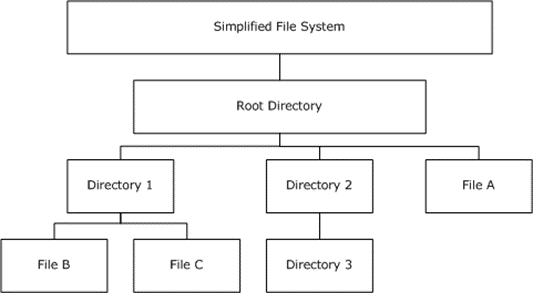
OLE2 复合文档的扇区与 FAT 结构

开源鸿蒙跨平台开发社区汇聚开发者与厂商,共建“一次开发,多端部署”的开源生态,致力于降低跨端开发门槛,推动万物智联创新。
更多推荐



 8
8 0
0- 0


 已为社区贡献71条内容

所有评论(0)