Flutter三方库适配OpenHarmony【flutter_web_auth】— Dangling Calls 清理与用户取消处理
欢迎加入开源鸿蒙跨平台社区:https://openharmonycrossplatform.csdn.net用户点了登录按钮,浏览器打开了,然后……用户改主意了,直接切回 App 不登录了。这时候的 Future 还在等着呢,如果不处理就会永远挂在那里。flutter_web_auth 用一个叫的机制来解决这个问题——检测到用户回来了,就把所有等待中的认证调用标记为"取消"。Dangling C
前言
欢迎加入开源鸿蒙跨平台社区:https://openharmonycrossplatform.csdn.net
用户点了登录按钮,浏览器打开了,然后……用户改主意了,直接切回 App 不登录了。这时候 authenticate() 的 Future 还在等着呢,如果不处理就会永远挂在那里。flutter_web_auth 用一个叫 Dangling Calls 的机制来解决这个问题——检测到用户回来了,就把所有等待中的认证调用标记为"取消"。
一、什么是 Dangling Call
1.1 定义
Dangling Call 是指已经发起但永远不会收到回调的方法调用。在 flutter_web_auth 的场景中:
1. authenticate() 被调用 → MethodResult 存入 callbacks Map
2. 浏览器打开 → 用户应该在浏览器中完成认证
3. 用户没有完成认证,直接切回 App
4. callbacks Map 中的 MethodResult 永远不会被 onNewWant 取出
5. authenticate() 的 Future 永远不会 complete → Dangling Call
1.2 Dangling Call 的危害
| 危害 | 说明 |
|---|---|
| 内存泄漏 | MethodResult 对象一直被 Map 引用 |
| UI 卡死 | 如果 UI 在等待 authenticate 返回 |
| 逻辑错误 | 下次认证可能与旧的回调冲突 |
| 用户困惑 | 点击登录没反应 |
1.3 各平台的取消检测
| 平台 | 检测方式 | 时机 |
|---|---|---|
| iOS/macOS | ASWebAuthenticationSession 回调 | 即时 |
| Android | App resumed + cleanUpDanglingCalls | 延迟 |
| OpenHarmony | App resumed + cleanUpDanglingCalls | 延迟 |
| Web | window.close 事件 | 即时 |
💡 Android 和 OpenHarmony 使用相同的 Dangling Calls 清理机制——都是通过 Dart 层的 WidgetsBindingObserver 检测 App 回到前台来触发清理。
二、_OnAppLifecycleResumeObserver 的工作原理
2.1 Dart 层代码
class _OnAppLifecycleResumeObserver extends WidgetsBindingObserver {
final Function onResumed;
_OnAppLifecycleResumeObserver(this.onResumed);
void didChangeAppLifecycleState(AppLifecycleState state) {
if (state == AppLifecycleState.resumed) {
onResumed();
}
}
}
2.2 注册时机
static Future<String> authenticate(...) async {
  // ...
  WidgetsBinding.instance.removeObserver(_resumedObserver);  // 先移除
  WidgetsBinding.instance.addObserver(_resumedObserver);      // 再添加
  return await _channel.invokeMethod('authenticate', ...);
}
2.3 触发流程
authenticate() 调用
    ↓
注册 Observer → 监听 AppLifecycleState
    ↓
浏览器打开 → App 进入后台(inactive → paused)
    ↓
用户切回 App(不是通过深度链接)
    ↓
AppLifecycleState.resumed 触发
    ↓
_OnAppLifecycleResumeObserver.didChangeAppLifecycleState(resumed)
    ↓
onResumed() → _cleanUpDanglingCalls()
2.4 正常回调 vs 取消的区别
正常回调:
浏览器重定向 → 深度链接 → onNewWant → result.success(uri)
→ authenticate() 返回 uri
→ Observer 不会触发(因为 authenticate 已经 complete)

用户取消:
用户手动切回 App → resumed 触发 → cleanUpDanglingCalls
→ result.error("CANCELED") → authenticate() 抛出 PlatformException
→ Observer 被移除
📌 关键区别:正常回调通过深度链接触发 onNewWant,用户取消通过 App 生命周期触发 resumed。两条路径最终都会让 authenticate() 的 Future complete。
三、cleanUpDanglingCalls 的遍历清理
3.1 原生端实现
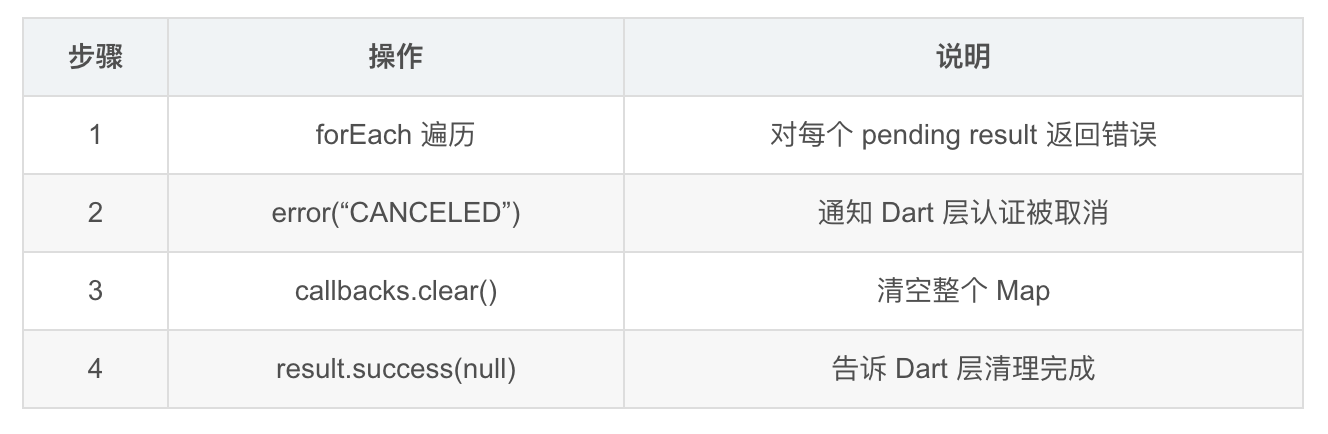
private cleanUpDanglingCalls(result: MethodResult): void {
  FlutterWebAuthPlugin.callbacks.forEach((danglingResult: MethodResult) => {
    danglingResult.error("CANCELED", "User canceled login", null);
  });
  FlutterWebAuthPlugin.callbacks.clear();
  result.success(null);
}
3.2 执行步骤
3.3 Dart 层的清理
static Future<void> _cleanUpDanglingCalls() async {
  await _channel.invokeMethod('cleanUpDanglingCalls');
  WidgetsBinding.instance.removeObserver(_resumedObserver);
}
清理完成后移除 Observer,不再监听生命周期变化。
3.4 错误传播链
Native: danglingResult.error("CANCELED", "User canceled login", null)
    ↓
MethodChannel 传递
    ↓
Dart: _channel.invokeMethod('authenticate') 的 Future 收到错误
    ↓
Dart: authenticate() 抛出 PlatformException(code: "CANCELED")
    ↓
调用者: catch (PlatformException e) { ... }
四、WidgetsBinding.removeObserver 的时机控制
4.1 注册时的安全措施
WidgetsBinding.instance.removeObserver(_resumedObserver);  // 先移除
WidgetsBinding.instance.addObserver(_resumedObserver);      // 再添加
为什么先 remove 再 add?
| 场景 | 不先 remove | 先 remove |
|---|---|---|
| 首次调用 | remove 无效,add 成功 | remove 无效,add 成功 |
| 连续调用两次 | 两个 Observer! | 只有一个 Observer |
4.2 清理时的移除
static Future<void> _cleanUpDanglingCalls() async {
  await _channel.invokeMethod('cleanUpDanglingCalls');
  WidgetsBinding.instance.removeObserver(_resumedObserver);  // 清理后移除
}
清理完成后移除 Observer 的原因:
- 没有 pending 的认证了,不需要监听
- 减少不必要的生命周期回调
- 下次 authenticate 时会重新注册
4.3 Observer 的生命周期
authenticate() 调用 → 注册 Observer
    ↓
等待认证...
    ↓
├── 正常回调 → onNewWant → authenticate complete
│       → Observer 仍然注册(但下次 authenticate 时会先 remove)
│
└── 用户取消 → resumed → cleanUpDanglingCalls
        → Observer 被移除
💡 注意:正常回调路径中 Observer 没有被移除。这不是 bug——下次调用 authenticate 时会先 remove 再 add,所以不会重复。
五、边界场景分析
5.1 多次 authenticate 调用
// 用户快速点击两次登录按钮
final future1 = FlutterWebAuth.authenticate(url: url1, callbackUrlScheme: "app1");
final future2 = FlutterWebAuth.authenticate(url: url2, callbackUrlScheme: "app2");
| 步骤 | 操作 | callbacks 状态 |
|---|---|---|
| 1 | authenticate(url1, “app1”) | {“app1”: result1} |
| 2 | authenticate(url2, “app2”) | {“app1”: result1, “app2”: result2} |
| 3 | 用户取消 | cleanUpDanglingCalls → 两个都收到 CANCELED |
5.2 快速切换
1. authenticate() → 浏览器打开
2. 用户立即切回 App(还没到认证页面)
3. resumed 触发 → cleanUpDanglingCalls
4. authenticate() 收到 CANCELED
5. 用户再次点击登录 → 新的 authenticate()
这个场景是正常的——用户可以随时取消并重试。
5.3 深度链接和 resumed 同时触发
1. 用户完成认证 → 浏览器重定向
2. 系统通过深度链接唤起 App
3. onNewWant 被调用 → result.success(uri)
4. App 回到前台 → resumed 触发 → cleanUpDanglingCalls
5. 但 callbacks 已经被 onNewWant 清空了 → forEach 遍历空 Map → 无操作
这个场景也是安全的——onNewWant 先处理了回调,cleanUpDanglingCalls 发现没有 pending 的回调就什么都不做。
5.4 内存不足导致 App 被杀
1. authenticate() → 浏览器打开
2. 系统因内存不足杀掉 App
3. 用户完成认证 → 深度链接唤起 App
4. App 冷启动 → onCreate → onNewWant
5. 但 callbacks 是空的(App 被杀后 static 变量重置)
6. 认证结果丢失
| 处理方式 | 说明 |
|---|---|
| 当前 | 静默忽略,用户需要重新登录 |
| 理想 | 持久化 pending 状态,冷启动后恢复 |
📌 App 被杀后认证结果丢失是所有平台的共同问题。iOS 的 ASWebAuthenticationSession 也无法在 App 被杀后恢复。实际上这种情况很少发生。
六、完整的取消处理时序
6.1 时序图
┌──────┐     ┌──────────┐     ┌──────────┐     ┌──────────┐
│ 用户  │     │  Dart 层  │     │  原生层   │     │  浏览器   │
└──┬───┘     └────┬─────┘     └────┬─────┘     └────┬─────┘
   │  点击登录    │                │                │
   │ ──────────> │                │                │
   │             │  authenticate  │                │
   │             │ ─────────────> │                │
   │             │                │  openLink      │
   │             │                │ ─────────────> │
   │             │                │                │
   │  切回 App   │                │                │
   │ ──────────> │                │                │
   │             │  resumed       │                │
   │             │  ↓             │                │
   │             │  cleanUp       │                │
   │             │ ─────────────> │                │
   │             │                │  forEach →     │
   │             │                │  error(CANCELED)│
   │             │  PlatformEx    │                │
   │             │ <───────────── │                │
   │  登录取消    │                │                │
   │ <────────── │                │                │
七、Dart 层的最佳实践
7.1 处理取消
try {
  final result = await FlutterWebAuth.authenticate(
    url: authUrl,
    callbackUrlScheme: scheme,
  );
  // 认证成功
  final code = Uri.parse(result).queryParameters['code'];
  await exchangeCodeForToken(code!);
} on PlatformException catch (e) {
  if (e.code == 'CANCELED') {
    // 用户取消,不需要提示错误
    debugPrint('用户取消了登录');
  } else if (e.code == 'LAUNCH_FAILED') {
    // 浏览器打开失败
    showError('无法打开浏览器,请检查网络设置');
  } else {
    showError('登录失败: ${e.message}');
  }
}
7.2 区分取消和错误
| 错误码 | 含义 | 用户提示 |
|---|---|---|
| CANCELED | 用户主动取消 | 不提示(正常行为) |
| NO_CONTEXT | 插件初始化问题 | “请重启应用” |
| LAUNCH_FAILED | 浏览器打开失败 | “无法打开浏览器” |
总结
本文详细分析了 flutter_web_auth 的 Dangling Calls 清理机制:
- Dangling Call:用户取消认证导致的永远不会完成的 Future
- Observer 机制:监听 App resumed 状态触发清理
- cleanUpDanglingCalls:遍历 callbacks Map,返回 CANCELED 错误
- 边界安全:多次调用、快速切换、同时触发都能正确处理
- App 被杀:认证结果丢失,需要重新登录
下一篇我们讲 URI 解析与 Scheme 匹配——onNewWant 中如何从 want.uri 提取 Scheme。
如果这篇文章对你有帮助,欢迎点赞👍、收藏⭐、关注🔔,你的支持是我持续创作的动力!
相关资源:

开源鸿蒙跨平台开发社区汇聚开发者与厂商,共建“一次开发,多端部署”的开源生态,致力于降低跨端开发门槛,推动万物智联创新。
更多推荐



 22
22 0
0- 0


 已为社区贡献70条内容

所有评论(0)