Flutter三方库适配OpenHarmony【flutter_libphonenumber】——MethodChannel 通信机制:Dart 与 ArkTS 的桥梁
本文深入解析了Flutter三方库flutter_libphonenumber在OpenHarmony平台的MethodChannel通信实现。MethodChannel作为Flutter与ArkTS之间的异步通信桥梁,通过标准化的通道命名(如com.bottlepay/flutter_libphonenumber_ohos)实现跨平台调用。文章详细介绍了三个核心方法(format、parse、g
前言
欢迎来到 Flutter三方库适配OpenHarmony 系列文章!本系列围绕 flutter_libphonenumber 这个 电话号码处理库 的鸿蒙平台适配,进行全面深入的技术分享。
欢迎加入开源鸿蒙跨平台社区:https://openharmonycrossplatform.csdn.net
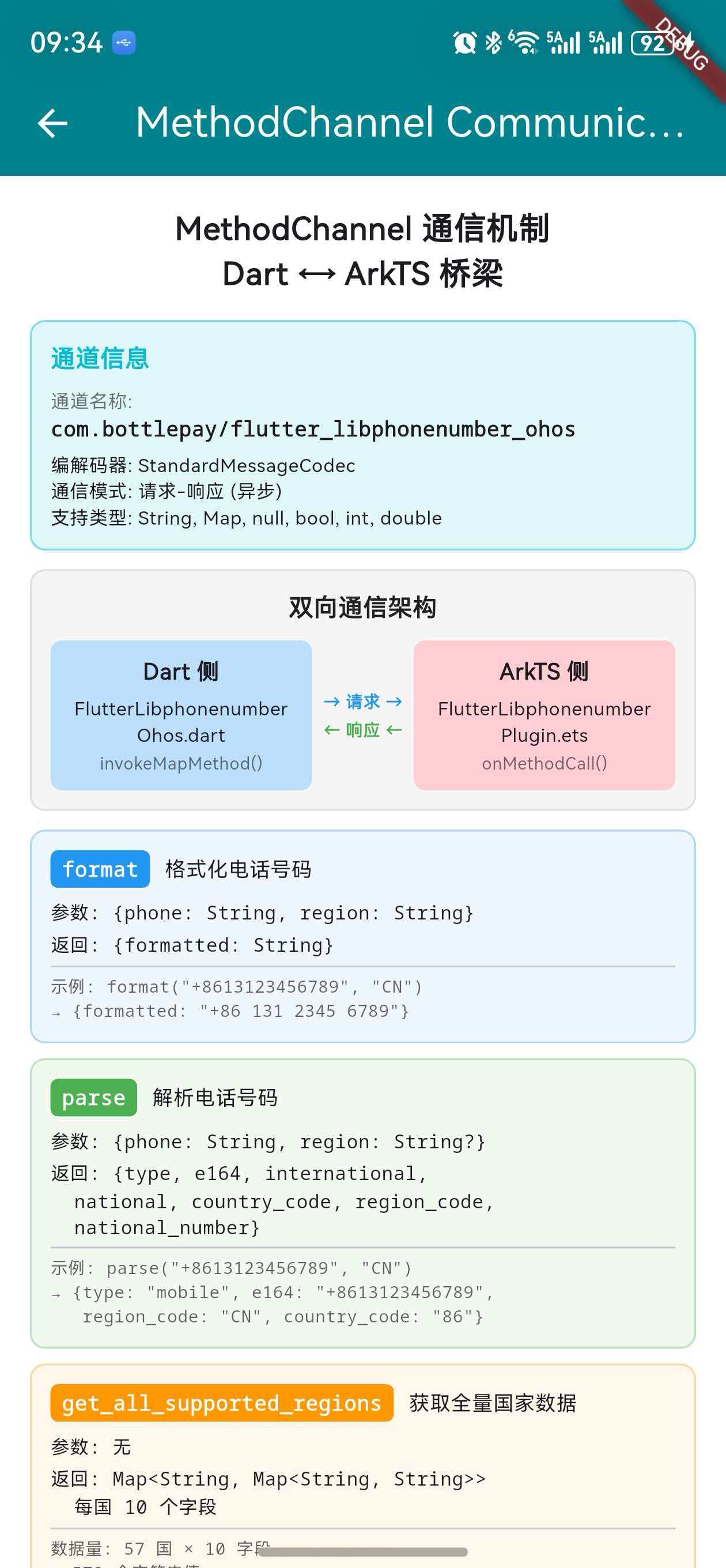
上一篇我们深入分析了 CountryManager 单例模式和缓存机制。本篇将进入 原生层实现 部分,深入解析 MethodChannel 通信机制——Flutter Dart 侧与鸿蒙 ArkTS 侧之间的 数据传输桥梁。
MethodChannel 是 Flutter 平台插件的核心通信手段。理解它的工作原理,是理解整个插件如何跨语言协作的关键。本文将从通道命名、方法定义、数据序列化、调用流程到错误处理,全面剖析
flutter_libphonenumber_ohos的 MethodChannel 实现。
一、MethodChannel 的基本原理
1.1 什么是 MethodChannel
MethodChannel 是 Flutter 提供的 平台通道(Platform Channel) 机制之一,用于 Dart 代码与原生平台代码之间的 异步方法调用。Flutter 提供了三种平台通道:
| 通道类型 | 用途 | 通信模式 |
|---|---|---|
| MethodChannel | 方法调用与响应 | 请求-响应(一次性) |
| EventChannel | 事件流 | 持续推送(流式) |
| BasicMessageChannel | 自定义消息 | 双向消息 |
flutter_libphonenumber_ohos 使用的是 MethodChannel,因为所有操作都是"调用一个方法,等待返回结果"的模式。
1.2 通信模型
┌─────────────────────┐                    ┌─────────────────────┐
│     Dart 侧          │                    │     ArkTS 侧        │
│                     │                    │                     │
│  MethodChannel      │  ── invokeMethod ──→  MethodCallHandler  │
│  (客户端)            │                    │  (服务端)            │
│                     │  ←── result ───────  MethodResult        │
└─────────────────────┘                    └─────────────────────┘
         │                                          │
    StandardMessageCodec                   StandardMessageCodec
    (自动序列化/反序列化)                     (自动序列化/反序列化)
1.3 异步特性
MethodChannel 的所有调用都是 异步 的:
- Dart 侧:返回
Future<T>,使用await等待结果 - ArkTS 侧:通过
MethodResult的success()/error()回调返回结果 - 底层传输:通过 Flutter Engine 的 BinaryMessenger 进行二进制数据传输
// Dart 侧:异步调用
final result = await _channel.invokeMapMethod<String, String>('format', {
  'phone': '+8613123456789',
  'region': 'CN',
});
// result 是 Map<String, String>,包含 {'formatted': '131 2345 6789'}
二、通道命名与注册
2.1 通道名称
flutter_libphonenumber_ohos 使用的通道名称为:
com.bottlepay/flutter_libphonenumber_ohos
这个名称在 Dart 侧和 ArkTS 侧 必须完全一致,否则消息无法路由到正确的处理器。
2.2 Dart 侧通道定义
// flutter_libphonenumber_ohos.dart
const _channel = MethodChannel('com.bottlepay/flutter_libphonenumber_ohos');
注意这里使用了 const 关键字——MethodChannel 是一个不可变对象,通道名称在编译时确定。
2.3 ArkTS 侧通道定义
// FlutterLibphonenumberPlugin.ets
const CHANNEL_NAME: string = 'com.bottlepay/flutter_libphonenumber_ohos';

export default class FlutterLibphonenumberPlugin
    implements FlutterPlugin, MethodCallHandler {
  private channel: MethodChannel | null = null;

  onAttachedToEngine(binding: FlutterPluginBinding): void {
    this.channel = new MethodChannel(
      binding.getBinaryMessenger(), CHANNEL_NAME);
    this.channel.setMethodCallHandler(this);
  }
}
2.4 通道名称的命名规范
| 组成部分 | 值 | 说明 |
|---|---|---|
| 域名前缀 | com.bottlepay |
组织/公司的反向域名 |
| 分隔符 | / |
标准路径分隔 |
| 插件名 | flutter_libphonenumber_ohos |
鸿蒙平台特有的通道名 |
对比:platform_interface 中默认的 MethodChannel 名称是
com.bottlepay/flutter_libphonenumber(不带_ohos后缀)。鸿蒙平台使用了独立的通道名称,这是因为鸿蒙实现 完全绕过了 platform_interface 的默认 MethodChannel,直接在自己的 Dart 类中定义了新通道。
2.5 为什么鸿蒙使用独立通道名
platform_interface 默认通道:
  com.bottlepay/flutter_libphonenumber
  └── 被 Android/iOS 使用

鸿蒙独立通道:
  com.bottlepay/flutter_libphonenumber_ohos
  └── 鸿蒙专用,避免与其他平台冲突
这种设计的好处:
- 隔离性 — 鸿蒙通道不会与 Android/iOS 的通道产生冲突
- 独立性 — 鸿蒙侧可以自由定义方法名和参数格式
- 可调试性 — 通过通道名称可以快速定位是哪个平台的通信
三、三个核心方法定义
3.1 方法概览
flutter_libphonenumber_ohos 通过 MethodChannel 暴露了 3 个方法:
| 方法名 | 功能 | Dart 调用方式 | 返回类型 |
|---|---|---|---|
format |
格式化电话号码 | invokeMapMethod<String, String> |
Map<String, String> |
parse |
解析电话号码 | invokeMapMethod<String, dynamic> |
Map<String, dynamic> |
get_all_supported_regions |
获取所有支持的国家/地区 | invokeMapMethod<String, dynamic> |
Map<String, dynamic> |
3.2 format 方法
Dart 侧调用:
Future<Map<String, String>> format(
final String phone,
final String region,
) async {
return await _channel.invokeMapMethod<String, String>('format', {
'phone': phone,
'region': region,
}) ??
<String, String>{};
}
ArkTS 侧处理:
private handleFormat(call: MethodCall, result: MethodResult): void {
  let phone = call.argument('phone') as string;
  let region = call.argument('region') as string;

  if (phone === null || phone.length === 0) {
    result.error('InvalidParameters',
      "Invalid 'phone' parameter.", null);
    return;
  }

  let formatter = this.phoneUtil.getAsYouTypeFormatter(useRegion);
  formatter.clear();
  let formatted: string = '';
  for (let i = 0; i < phone.length; i++) {
    formatted = formatter.inputDigit(phone.charAt(i));
  }

  let response: Map<string, string> = new Map();
  response.set('formatted', formatted);
  result.success(this.convertMapToRecord(response));
}
数据流:
Dart: format('+8613123456789', 'CN')
  │
  ├── 参数: {'phone': '+8613123456789', 'region': 'CN'}
  │
  ──→ MethodChannel ──→ BinaryMessenger ──→
  │
  ArkTS: handleFormat(call, result)
  │   ├── phone = '+8613123456789'
  │   ├── region = 'CN'
  │   ├── AsYouTypeFormatter 逐字符格式化
  │   └── result.success({'formatted': '+86 131 2345 6789'})
  │
  ←── BinaryMessenger ←── MethodChannel ←──
  │
  Dart: {'formatted': '+86 131 2345 6789'}
3.3 parse 方法
Dart 侧调用:
Future<Map<String, dynamic>> parse(
final String phone, {
final String? region,
}) async {
return await _channel.invokeMapMethod<String, dynamic>('parse', {
'phone': phone,
'region': region,
}) ??
<String, dynamic>{};
}
ArkTS 侧处理:
private handleParse(call: MethodCall, result: MethodResult): void {
  let phone = call.argument('phone') as string;
  let region = call.argument('region') as string;

  let phoneNumber = this.phoneUtil.parse(phone, useRegion);

  if (phoneNumber === null || !this.phoneUtil.isValidNumber(phoneNumber)) {
    result.error('InvalidNumber',
      'Number ' + phone + ' is invalid', null);
    return;
  }

  let regionCode = this.phoneUtil.getRegionCodeForNumber(phoneNumber);
  let numberType = this.phoneUtil.getNumberType(phoneNumber);

  let response: Map<string, string> = new Map();
  response.set('type', numberType);
  response.set('e164', this.phoneUtil.formatE164(phoneNumber));
  response.set('international',
    this.phoneUtil.formatInternational(phoneNumber));
  response.set('national',
    this.phoneUtil.formatNational(phoneNumber, regionCode));
  response.set('country_code', phoneNumber.countryCode.toString());
  response.set('region_code', regionCode);
  response.set('national_number', phoneNumber.nationalNumber);

  result.success(this.convertMapToRecord(response));
}
返回字段说明:
| 字段 | 示例值 | 说明 |
|---|---|---|
type |
mobile |
号码类型(mobile/fixedLine/fixedOrMobile) |
e164 |
+8613123456789 |
E.164 国际标准格式 |
international |
+86 131 2345 6789 |
国际格式(带空格) |
national |
131 2345 6789 |
国内格式 |
country_code |
86 |
国家电话区号 |
region_code |
CN |
ISO 3166-1 国家代码 |
national_number |
13123456789 |
国内号码(纯数字) |
3.4 get_all_supported_regions 方法
Dart 侧调用:
Future<Map<String, CountryWithPhoneCode>> getAllSupportedRegions() async {
final result = await _channel
.invokeMapMethod<String, dynamic>('get_all_supported_regions') ?? {};
final returnMap = <String, CountryWithPhoneCode>{};
result.forEach(
(final k, final v) => returnMap[k] = CountryWithPhoneCode(
countryName: v['countryName'] ?? '',
phoneCode: v['phoneCode'] ?? '',
countryCode: k,
exampleNumberMobileNational: v['exampleNumberMobileNational'] ?? '',
// ... 其余 7 个字段
),
);
return returnMap;
}
ArkTS 侧处理:
private handleGetAllSupportedRegions(result: MethodResult): void {
  let regionsInfo = this.phoneUtil.getAllRegionInfo();
  let regionsMap: Map<string, Record<string, string>> = new Map();

  regionsInfo.forEach((info: RegionInfo, region: string) => {
    let itemMap: Map<string, string> = new Map();
    itemMap.set('phoneCode', info.phoneCode);
    itemMap.set('countryName', info.countryName);
    itemMap.set('exampleNumberMobileNational',
      info.exampleNumberMobileNational);
    // ... 其余 7 个字段
    regionsMap.set(region,
      this.convertMapToRecord(itemMap));
  });

  result.success(this.convertRegionsMapToRecord(regionsMap));
}
数据结构:
返回结构: Map<String, Map<String, String>>
{
  'CN': {
    'phoneCode': '86',
    'countryName': 'China',
    'exampleNumberMobileNational': '131 2345 6789',
    'phoneMaskMobileNational': '000 0000 0000',
    'exampleNumberMobileInternational': '+86 131 2345 6789',
    'phoneMaskMobileInternational': '+00 000 0000 0000',
    ... (共 10 个字段)
  },
  'US': { ... },
  'GB': { ... },
  ... (共 57 个国家)
}
数据量:57 个国家 × 10 个字段 = 570 个字符串值,通过一次 MethodChannel 调用完成传输。这种"一次加载全量数据"的策略避免了后续频繁的跨平台通信。
四、数据序列化与反序列化
4.1 StandardMessageCodec
MethodChannel 默认使用 StandardMessageCodec 进行数据的序列化和反序列化。它支持以下 Dart 类型的自动转换:
| Dart 类型 | 序列化格式 | ArkTS 对应类型 |
|---|---|---|
null |
0x00 | null |
bool |
0x01/0x02 | boolean |
int (≤32位) |
0x03 | number |
int (≤64位) |
0x04 | number |
double |
0x06 | number |
String |
0x07 | string |
Uint8List |
0x08 | Uint8Array |
List |
0x0C | Array |
Map |
0x0D | Record / Map |
4.2 flutter_libphonenumber_ohos 中的数据类型
本插件只使用了三种基本类型:
| 使用场景 | Dart 类型 | ArkTS 类型 |
|---|---|---|
| 方法参数 | Map<String, String?> |
Record<string, string> |
| format 返回值 | Map<String, String> |
Record<string, string> |
| parse 返回值 | Map<String, dynamic> |
Record<string, string> |
| regions 返回值 | Map<String, Map<String, String>> |
Record<string, Record<string, string>> |
设计简洁性:整个插件的跨平台数据传输只涉及
String和Map两种类型,没有使用复杂的嵌套对象或自定义类型。这大大降低了序列化的复杂度和出错概率。
4.3 ArkTS 侧的 Map → Record 转换
ArkTS 中 MethodResult.success() 接受的是 Record 类型(类似 JavaScript 的普通对象),而不是 Map 类型。因此需要一个转换步骤:
private convertMapToRecord(
  map: Map<string, string>
): Record<string, string> {
  let record: Record<string, string> = {} as Record<string, string>;
  map.forEach((value: string, key: string) => {
    record[key] = value;
  });
  return record;
}
对于嵌套的 Map(get_all_supported_regions 的返回值),需要两层转换:
private convertRegionsMapToRecord(
  map: Map<string, Record<string, string>>
): Record<string, Record<string, string>> {
  let record = {} as Record<string, Record<string, string>>;
  map.forEach((value: Record<string, string>, key: string) => {
    record[key] = value;
  });
  return record;
}
4.4 Dart 侧的数据重建
Dart 侧收到原始 Map<String, dynamic> 后,需要将其转换为强类型的 CountryWithPhoneCode 对象:
result.forEach(
  (final k, final v) => returnMap[k] = CountryWithPhoneCode(
    countryName: v['countryName'] ?? '',
    phoneCode: v['phoneCode'] ?? '',
    countryCode: k,
    exampleNumberMobileNational: v['exampleNumberMobileNational'] ?? '',
    // ... 每个字段都有 ?? '' 兜底
  ),
);
防御性编程:每个字段都使用
?? ''提供默认值,确保即使 ArkTS 侧某个字段缺失,Dart 侧也不会抛出空指针异常。
五、完整调用链路分析
5.1 format() 的完整链路
时间线 ──────────────────────────────────────────────────→

① 应用层调用
   _plugin.format('+8613123456789', 'CN')
   │
② FlutterLibphonenumberOhos.format()
   │  _channel.invokeMapMethod<String, String>('format', {
   │    'phone': '+8613123456789', 'region': 'CN'
   │  })
   │
③ Flutter Engine (BinaryMessenger)
   │  StandardMessageCodec.encodeMessage()
   │  → 二进制数据
   │  → 通过 com.bottlepay/flutter_libphonenumber_ohos 通道发送
   │
④ ArkTS 侧 FlutterLibphonenumberPlugin
   │  onMethodCall(call, result)
   │  call.method === 'format' → handleFormat()
   │
⑤ PhoneNumberUtil 处理
   │  AsYouTypeFormatter 逐字符格式化
   │  → '+86 131 2345 6789'
   │
⑥ 结果返回
   │  result.success({'formatted': '+86 131 2345 6789'})
   │  → StandardMessageCodec.encodeMessage()
   │  → 二进制数据回传
   │
⑦ Dart 侧接收
   Map<String, String> {'formatted': '+86 131 2345 6789'}
5.2 init() 的完整链路
init() 是最重要的调用,它触发了 get_all_supported_regions:
① init() 调用
   │
② getAllSupportedRegions()
   │  _channel.invokeMapMethod('get_all_supported_regions')
   │
③ ArkTS 侧
   │  PhoneNumberUtil.getAllRegionInfo()
   │  → 构建 57 国 × 10 字段的数据
   │  → Map → Record 转换
   │  → result.success(regionsRecord)
   │
④ Dart 侧接收
   │  Map<String, dynamic> → CountryWithPhoneCode 对象转换
   │  → 57 个 CountryWithPhoneCode 实例
   │
⑤ CountryManager().loadCountries()
   │  → _countries = 57 国数据
   │  → _initialized = true
   │
⑥ init() 完成
   应用可以开始使用同步 API
六、错误处理机制
6.1 ArkTS 侧的错误处理
ArkTS 侧通过 MethodResult 的三个方法返回结果:
| 方法 | 用途 | 对应 Dart 行为 |
|---|---|---|
result.success(data) |
成功返回数据 | Future 正常完成 |
result.error(code, msg, details) |
返回错误 | Future 抛出 PlatformException |
result.notImplemented() |
方法未实现 | Future 抛出 MissingPluginException |
6.2 三种错误场景
参数无效:
if (phone === null || phone.length === 0) {
  result.error('InvalidParameters',
    "Invalid 'phone' parameter.", null);
  return;
}
号码无效(parse):
if (phoneNumber === null ||
    !this.phoneUtil.isValidNumber(phoneNumber)) {
  result.error('InvalidNumber',
    'Number ' + phone + ' is invalid', null);
  return;
}
未知方法:
onMethodCall(call: MethodCall, result: MethodResult): void {
  if (call.method === 'format') {
    this.handleFormat(call, result);
  } else if (call.method === 'parse') {
    this.handleParse(call, result);
  } else if (call.method === 'get_all_supported_regions') {
    this.handleGetAllSupportedRegions(result);
  } else {
    result.notImplemented();  // 未知方法
  }
}
6.3 Dart 侧的错误处理
Dart 侧使用 ?? <默认值> 模式处理可能的 null 返回:
// format:返回空 Map 而非 null
return await _channel.invokeMapMethod<String, String>('format', {
      'phone': phone, 'region': region,
    }) ?? <String, String>{};

// parse:同样返回空 Map
return await _channel.invokeMapMethod<String, dynamic>('parse', {
      'phone': phone, 'region': region,
    }) ?? <String, dynamic>{};
设计理念:Dart 侧不抛出异常,而是返回空数据。这让调用方可以通过检查返回值是否为空来判断操作是否成功,而不需要 try-catch。
七、invokeMapMethod 的类型安全
7.1 三种 invoke 方法对比
Flutter 的 MethodChannel 提供了多种调用方法:
| 方法 | 返回类型 | 适用场景 |
|---|---|---|
invokeMethod<T> |
Future<T?> |
返回单一值 |
invokeListMethod<T> |
Future<List<T>?> |
返回列表 |
invokeMapMethod<K, V> |
Future<Map<K, V>?> |
返回键值对 |
7.2 本插件的选择
// format:Map<String, String> — 键值都是字符串
_channel.invokeMapMethod<String, String>('format', ...)

// parse:Map<String, dynamic> — 值可能是不同类型
_channel.invokeMapMethod<String, dynamic>('parse', ...)

// regions:Map<String, dynamic> — 值是嵌套的 Map
_channel.invokeMapMethod<String, dynamic>('get_all_supported_regions')
7.3 为什么 parse 和 regions 使用 dynamic
虽然 ArkTS 侧返回的都是 string 类型,但 Flutter 的 StandardMessageCodec 在反序列化嵌套 Map 时,内层 Map 的类型信息会丢失。因此:
format返回的是扁平的Map<String, String>,可以安全使用<String, String>parse和regions返回的包含嵌套结构,需要使用<String, dynamic>然后手动转换
八、与 Android/iOS 实现的对比
8.1 通道名称对比
| 平台 | 通道名称 | 定义位置 |
|---|---|---|
| Android/iOS | com.bottlepay/flutter_libphonenumber |
platform_interface |
| 鸿蒙 | com.bottlepay/flutter_libphonenumber_ohos |
ohos 包 |
8.2 方法名对比
三个平台使用 完全相同 的方法名:
| 方法名 | Android | iOS | 鸿蒙 |
|---|---|---|---|
format |
✅ | ✅ | ✅ |
parse |
✅ | ✅ | ✅ |
get_all_supported_regions |
✅ | ✅ | ✅ |
8.3 原生处理差异
| 对比项 | Android | iOS | 鸿蒙 |
|---|---|---|---|
| 原生语言 | Kotlin | Swift | ArkTS |
| 号码处理库 | Google libphonenumber | PhoneNumberKit | 纯自研实现 |
| 数据来源 | libphonenumber 内置 | PhoneNumberKit 内置 | 硬编码 57 国数据 |
| 支持国家数 | 200+ | 200+ | 57 |
| 格式化方式 | 库内置规则 | 库内置规则 | AsYouTypeFormatter |
| 号码验证 | 正则 + 元数据 | 正则 + 元数据 | 长度 + 简单规则 |
8.4 鸿蒙实现的独特之处
- 纯自研 — 没有依赖第三方号码处理库,所有逻辑在 ArkTS 中从零实现
- 数据精简 — 只支持 57 个主要国家,而非 200+ 个
- Map → Record 转换 — ArkTS 的类型系统要求额外的转换步骤
- AsYouTypeFormatter — 自研的逐字符格式化器,模拟 libphonenumber 的同名类
九、BinaryMessenger 底层传输
9.1 传输层架构
Dart 侧                    Flutter Engine              ArkTS 侧
────────                    ─────────────              ──────────
MethodChannel          →    BinaryMessenger        →   MethodChannel
  │                         │                          │
  ├── method name           ├── 序列化为字节流           ├── 反序列化
  ├── arguments             ├── 通过通道名路由           ├── MethodCall
  └── codec                 └── 平台线程调度             └── MethodResult
9.2 消息编码过程
当 Dart 侧调用 invokeMapMethod('format', {'phone': '...', 'region': 'CN'}) 时:
StandardMethodCodec将方法名和参数编码为字节流- 方法名
'format'编码为 UTF-8 字符串 - 参数 Map 编码为键值对序列
- 字节流通过
BinaryMessenger发送到 Flutter Engine - Engine 根据通道名称路由到对应的原生 Handler
9.3 性能考量
| 操作 | 耗时级别 | 说明 |
|---|---|---|
| 序列化 | 微秒级 | StandardMessageCodec 非常高效 |
| 跨平台传输 | 微秒级 | 共享内存,无网络开销 |
| 反序列化 | 微秒级 | 与序列化对称 |
| 原生处理 | 毫秒级 | 主要耗时在业务逻辑 |
性能结论:MethodChannel 的通信开销非常小(微秒级),瓶颈在于原生侧的业务处理。对于
get_all_supported_regions这种一次性加载操作,即使传输 57 国数据也只需要几毫秒。
十、通道生命周期管理
10.1 创建时机
onAttachedToEngine(binding: FlutterPluginBinding): void {
  // 插件附加到 Engine 时创建通道
  this.channel = new MethodChannel(
    binding.getBinaryMessenger(), CHANNEL_NAME);
  this.channel.setMethodCallHandler(this);
}
10.2 销毁时机
onDetachedFromEngine(binding: FlutterPluginBinding): void {
  // 插件从 Engine 分离时清理通道
  if (this.channel !== null) {
    this.channel.setMethodCallHandler(null);  // 移除处理器
    this.channel = null;                       // 释放引用
  }
}
10.3 生命周期时序
FlutterEngine 启动
    │
    ├── GeneratedPluginRegistrant.register()
    │   └── new FlutterLibphonenumberPlugin()
    │       └── onAttachedToEngine()
    │           ├── 创建 MethodChannel
    │           └── 设置 MethodCallHandler
    │
    ├── Dart 侧 registerWith()
    │   └── Platform.instance = OhosImpl
    │
    ├── 应用运行期间
    │   └── MethodChannel 通信(format/parse/regions)
    │
    └── FlutterEngine 销毁
        └── onDetachedFromEngine()
            ├── 移除 MethodCallHandler
            └── channel = null
10.4 为什么要在 detach 时清理
- 防止内存泄漏 —
MethodCallHandler持有 Plugin 实例的引用 - 防止野指针 — Engine 销毁后,通道不应再接收消息
- 资源释放 — 让 GC 可以回收 Plugin 和相关资源
十一、调试与排查技巧
11.1 通道名称不匹配
症状:调用方法时抛出 MissingPluginException
排查:检查 Dart 侧和 ArkTS 侧的通道名称是否完全一致
// Dart 侧
const _channel = MethodChannel(
  'com.bottlepay/flutter_libphonenumber_ohos');

// ArkTS 侧 — 必须完全一致
const CHANNEL_NAME: string =
  'com.bottlepay/flutter_libphonenumber_ohos';
11.2 方法名不匹配
症状:ArkTS 侧返回 notImplemented()
排查:检查 Dart 侧调用的方法名与 ArkTS 侧 onMethodCall 中的判断是否一致
// Dart 侧调用
_channel.invokeMapMethod('get_all_supported_regions')

// ArkTS 侧判断 — 必须完全一致
if (call.method === 'get_all_supported_regions')
11.3 数据类型不匹配
症状:返回值为 null 或类型转换异常
排查:确认 ArkTS 侧返回的数据类型与 Dart 侧期望的类型一致
// Dart 侧期望 Map<String, String>
_channel.invokeMapMethod<String, String>('format', ...)

// ArkTS 侧必须返回 Record<string, string>
result.success(this.convertMapToRecord(response));
11.4 日志调试
在 example 工程中,关键操作都有 print 日志:
print('[_initPlugin] calling init...');
print('[_initPlugin] init done, countries count: '
    '${CountryManager().countries.length}');
print('[Format Async] result: $res');
print('[Parse] result: $res');
十二、设计模式与最佳实践总结
12.1 本插件使用的设计模式
| 模式 | 应用位置 | 说明 |
|---|---|---|
| 代理模式 | Dart 侧 FlutterLibphonenumberOhos |
将调用代理给 MethodChannel |
| 命令模式 | onMethodCall 分发 |
方法名作为命令标识 |
| 工厂模式 | PhoneNumberUtil.getInstance() |
ArkTS 侧单例 |
| 适配器模式 | Map → Record 转换 |
适配 ArkTS 类型系统 |
12.2 MethodChannel 最佳实践
- 通道名称使用反向域名 — 避免与其他插件冲突
- 方法名使用 snake_case — 与 Flutter 官方风格一致
- 参数使用 Map — 便于扩展,新增参数不破坏兼容性
- 返回值使用 Map — 同上,便于扩展
- 错误使用 result.error() — 提供错误码和描述信息
- null 安全 — Dart 侧对所有返回值做
?? 默认值处理
12.3 鸿蒙适配的特殊注意事项
- Record vs Map — ArkTS 的
MethodResult.success()需要Record类型 - 类型转换 — 需要手动实现
Map → Record的转换函数 - 独立通道名 — 建议使用带平台后缀的通道名避免冲突
- FlutterPlugin 接口 — 必须实现
onAttachedToEngine和onDetachedFromEngine
总结
本文深入分析了 flutter_libphonenumber_ohos 的 MethodChannel 通信机制。关键要点回顾:
- MethodChannel 使用 通道名称 路由消息,Dart 侧和 ArkTS 侧的名称必须完全一致(
com.bottlepay/flutter_libphonenumber_ohos) - 插件通过 MethodChannel 暴露了 3 个方法:
format(格式化)、parse(解析)、get_all_supported_regions(获取全量国家数据) - 数据序列化使用 StandardMessageCodec,自动处理 String、Map 等基本类型的跨平台转换
- ArkTS 侧需要将
Map转换为Record类型才能通过result.success()返回,这是鸿蒙平台的 特殊要求 - 错误处理通过
result.error()返回错误码和描述,Dart 侧使用?? 默认值模式做 防御性处理 - 与 Android/iOS 相比,鸿蒙平台使用 独立通道名 和 纯自研的 ArkTS 实现,方法名保持一致确保接口兼容
下一篇我们将深入分析 FlutterLibphonenumberPlugin.ets 的消息分发实现,详细解读 onMethodCall 中三个方法的处理逻辑。
如果这篇文章对你有帮助,欢迎点赞👍、收藏⭐、关注🔔,你的支持是我持续创作的动力!
相关资源:
- OpenHarmony 适配仓库:gitcode.com/oh-flutter/flutter_libphonenumber
- 开源鸿蒙跨平台社区:openharmonycrossplatform.csdn.net
- Flutter Platform Channels 官方文档:docs.flutter.dev - Platform channels
- Flutter MethodChannel API:api.flutter.dev - MethodChannel
- StandardMessageCodec 文档:api.flutter.dev - StandardMessageCodec
- Flutter 联合插件官方文档:docs.flutter.dev - Federated plugins
- ArkTS 语言文档:developer.huawei.com - ArkTS
- Google libphonenumber:github.com/google/libphonenumber
- Flutter-OHOS 项目:gitee.com/openharmony-sig/flutter_flutter
- plugin_platform_interface:pub.dev/packages/plugin_platform_interface

开源鸿蒙跨平台开发社区汇聚开发者与厂商,共建“一次开发,多端部署”的开源生态,致力于降低跨端开发门槛,推动万物智联创新。
更多推荐



 12
12 0
0- 0


 已为社区贡献28条内容

所有评论(0)