Flutter三方库适配OpenHarmony【apple_product_name】设备兼容性检测方案
本文介绍了OpenHarmony生态中设备兼容性检测的系统方案。主要内容包括:1)构建基于设备识别的多层级检测架构,利用apple_product_name库实现设备型号转换;2)设计三级支持分类体系(完全/部分/不支持),通过单例模式管理检测器;3)实现支持级别判定和性能等级评估机制,将设备划分为高/中/低三个性能层级。该方案采用宽容策略处理未知设备,支持远程配置更新,确保应用在不同OpenHa
前言
欢迎加入开源鸿蒙跨平台社区:https://openharmonycrossplatform.csdn.net
在OpenHarmony生态中,设备种类繁多、硬件规格差异显著——从旗舰折叠屏到中端直板机,从高性能平板到智能手表,设备兼容性检测是确保应用在不同设备上稳定运行的关键环节。apple_product_name库提供了精确的设备识别能力,可以将原始型号标识符(如ALN-AL00)转换为用户友好的产品名称(如HUAWEI Mate 60 Pro),为兼容性检测提供数据基础。
本文将系统讲解如何构建一套完整的设备兼容性检测方案,涵盖支持级别判定、性能等级评估、功能特性检测、批量设备扫描、功能开关控制、远程配置更新等核心模块,并提供一个完整的兼容性检测中心演示页面,展示从检测到报告的全流程。
一、兼容性检测架构设计
1.1 整体架构
一个完善的设备兼容性检测系统包含以下层次:
| 层次 | 职责 | 关键组件 |
|---|---|---|
| 设备识别层 | 获取设备型号和产品名称 | OhosProductName |
| 规则判定层 | 根据设备信息判定兼容性 | 支持列表、分类规则 |
| 功能控制层 | 根据判定结果控制功能开关 | FeatureGate |
| 展示反馈层 | 向用户展示兼容性状态 | 提示界面、检测报告 |
| 配置更新层 | 远程动态更新兼容性规则 | 远程配置服务 |
设计原则:兼容性检测应在应用启动时一次性完成,结果缓存供全局使用,避免重复的异步调用和跨平台通信开销。
1.2 核心API基础
兼容性检测依赖apple_product_name库的三个核心API:
import 'package:apple_product_name/apple_product_name_ohos.dart';

final ohos = OhosProductName();

// 获取当前设备型号标识符
final machineId = await ohos.getMachineId();
// 返回: "ALN-AL00"

// 获取当前设备产品名称
final productName = await ohos.getProductName();
// 返回: "HUAWEI Mate 60 Pro"

// 根据型号标识符查找产品名称(用于批量扫描)
final name = await ohos.lookup('CFR-AN00');
// 返回: "HUAWEI Mate 70"
其中:
getMachineId用于获取原始型号标识符,作为支持列表的匹配键getProductName用于获取产品名称,作为功能特性判断的依据lookup用于批量设备扫描,将服务端收集的型号批量转换
1.3 兼容性检测器单例
检测器采用单例模式,确保全局只有一个实例:
class CompatibilityChecker {
  static final CompatibilityChecker _instance = CompatibilityChecker._();
  factory CompatibilityChecker() => _instance;
  CompatibilityChecker._();

  String? _productName;
  String? _machineId;
  bool _initialized = false;

  /// 应用启动时调用一次
  Future<void> initialize() async {
    if (_initialized) return;
    final ohos = OhosProductName();
    _productName = await ohos.getProductName();
    _machineId = await ohos.getMachineId();
    _initialized = true;
  }

  String get productName => _productName ?? 'Unknown';
  String get machineId => _machineId ?? 'Unknown';
}
防重复初始化:通过
_initialized标志位确保initialize只执行一次,即使被多处调用也不会重复进行MethodChannel通信。
二、支持设备列表管理
2.1 三级支持分类
根据实际测试验证情况,将设备划分为三个支持级别:
class SupportedDevices {
  /// 完全支持:经过全面测试,所有功能正常
  static const fullSupport = [
    'ALN-AL00', 'ALN-AL10',  // HUAWEI Mate 60 Pro
    'GGK-AL10',               // HUAWEI Mate 60 Pro+
    'CFR-AN00', 'CFR-AL00',  // HUAWEI Mate 70
    'CFS-AN00', 'CFS-AL00',  // HUAWEI Mate 70 Pro
    'CFT-AN00',               // HUAWEI Mate 70 Pro+
    'HBK-AL00',               // HUAWEI Pura 70 Ultra
    'DUA-AL00',               // HUAWEI Pura 70 Pro
    'HBN-AL00',               // HUAWEI Pura 70
    'GGK-W10',                // HUAWEI Mate X5
    'PGT-AN00',               // Honor Magic6 Pro
    'GROK-W09',               // HUAWEI MatePad Pro 13.2
  ];

  /// 部分支持:核心功能正常,部分高级特性受限
  static const partialSupport = [
    'BRA-AL00',  // HUAWEI Mate 60
    'CTR-AL00',  // HUAWEI nova 12
    'FOA-AL00',  // HUAWEI nova 13
    'BVL-AN00',  // Honor Magic6
    'GOT-W09',   // HUAWEI MatePad Pro 12.6
    'BAL-AL00',  // HUAWEI Pocket 2
    'FNA-AL00',  // HUAWEI nova 13 Pro
  ];

  /// 不支持:已知无法正常运行
  static const notSupported = <String>[
    // 旧设备或已知不兼容设备
  ];
}
2.2 支持级别对照表
| 支持级别 | 代表设备 | 功能范围 | 用户提示 |
|---|---|---|---|
| 完全支持 | Mate 60 Pro、Mate 70、Pura 70 | 全部功能可用 | 无需提示 |
| 部分支持 | Mate 60、nova 12、Pocket 2 | 核心功能可用,高级特性受限 | 温和提醒 |
| 未知设备 | 未收录的新设备 | 允许使用,可能有问题 | 建议反馈 |
| 不支持 | 旧设备 | 无法正常运行 | 明确告知 |
2.3 列表维护策略
支持设备列表的维护应遵循以下原则:
- 新设备发布时:第一时间获取型号标识符,进行兼容性测试后加入列表
- 用户反馈时:收到未知设备的兼容性报告后,验证并归类
- 版本更新时:每次应用更新前,重新验证所有已收录设备
- 远程配置:将列表托管到远程配置服务,支持动态更新
三、支持级别判定
3.1 支持级别枚举
enum SupportLevel {
  full,          // 完全支持
  partial,       // 部分支持
  unknown,       // 未知设备
  notSupported,  // 不支持
}
3.2 判定逻辑实现
class DeviceSupportChecker {
  /// 检测当前设备的支持级别
  static Future<SupportLevel> checkSupport() async {
    final checker = CompatibilityChecker();
    await checker.initialize();
    final machineId = checker.machineId;

    if (SupportedDevices.fullSupport.contains(machineId)) {
      return SupportLevel.full;
    }
    if (SupportedDevices.partialSupport.contains(machineId)) {
      return SupportLevel.partial;
    }
    if (SupportedDevices.notSupported.contains(machineId)) {
      return SupportLevel.notSupported;
    }
    return SupportLevel.unknown;
  }

  /// 获取支持级别的中文描述
  static String getLevelText(SupportLevel level) {
    switch (level) {
      case SupportLevel.full: return '完全支持';
      case SupportLevel.partial: return '部分支持';
      case SupportLevel.unknown: return '未知设备';
      case SupportLevel.notSupported: return '不支持';
    }
  }
}
宽容策略:对于
unknown状态的设备,建议允许用户继续使用但显示温和提示,同时将设备信息上报服务端以便后续验证归类。
四、性能等级评估
4.1 三级性能分层
根据产品名称中的关键词判断设备性能等级:
enum PerformanceLevel {
  high,    // 高性能:旗舰级
  medium,  // 中等性能:高端级
  low,     // 基础性能:中端及以下
}

class PerformanceChecker {
  static Future<PerformanceLevel> checkPerformance() async {
    final checker = CompatibilityChecker();
    await checker.initialize();
    final name = checker.productName;

    // 旗舰级:Pro+、Ultra、RS、Mate 70、Mate X5
    if (name.contains('Pro+') || name.contains('Ultra') ||
        name.contains('RS') || name.contains('Mate 70') ||
        name.contains('Mate X5')) {
      return PerformanceLevel.high;
    }
    // 高端级:Pro、Mate 60、Pura、Magic
    if (name.contains('Pro') || name.contains('Mate 60') ||
        name.contains('Pura') || name.contains('Magic')) {
      return PerformanceLevel.medium;
    }
    // 其他设备
    return PerformanceLevel.low;
  }
}
4.2 性能等级与应用策略
| 性能等级 | 代表设备 | 渲染质量 | 动画帧率 | 图片加载 |
|---|---|---|---|---|
| 高性能 | Mate 70 Pro+、Pura 70 Ultra | 最高画质 | 120fps | 原图加载 |
| 中等性能 | Mate 60 Pro、Magic6 Pro | 高画质 | 90fps | 高清缩略图 |
| 基础性能 | nova 13、Honor 200 | 标准画质 | 60fps | 标准缩略图 |
优雅降级:性能等级决定的是视觉效果和流畅度的平衡点,不应影响核心功能的可用性。低端设备关闭的只是非必要的视觉特效。
五、功能特性兼容检测
5.1 特性检测器
不同设备在硬件能力上存在差异,需要逐项检测功能特性的兼容性:
class FeatureCompatibility {
  static Future<Map<String, bool>> checkFeatures() async {
    final checker = CompatibilityChecker();
    await checker.initialize();
    final name = checker.productName;

    return {
      'highResCamera': _checkHighResCamera(name),
      'foldableScreen': _checkFoldable(name),
      'aiFeatures': _checkAI(name),
      '5G': _check5G(name),
      'highRefreshRate': _checkHighRefresh(name),
      'nfc': _checkNFC(name),
      'multiWindow': _checkMultiWindow(name),
      'satelliteComm': _checkSatellite(name),
    };
  }

  static bool _checkHighResCamera(String name) =>
      name.contains('Pro') || name.contains('Ultra') ||
      name.contains('Pura');

  static bool _checkFoldable(String name) =>
      name.contains('Mate X') || name.contains('Pocket');

  static bool _checkAI(String name) =>
      name.contains('Mate 70') || name.contains('Mate 60') ||
      name.contains('Pura 70');

  static bool _check5G(String name) =>
      !name.contains('MatePad') && !name.contains('WATCH');

  static bool _checkHighRefresh(String name) =>
      name.contains('Pro') || name.contains('Mate 7') ||
      name.contains('Mate 6');

  static bool _checkNFC(String name) =>
      !name.contains('WATCH');

  static bool _checkMultiWindow(String name) =>
      name.contains('MatePad') || name.contains('Mate X');

  static bool _checkSatellite(String name) =>
      name.contains('Mate 60') || name.contains('Mate 70');
}
5.2 功能特性兼容矩阵
| 功能特性 | Mate 70 Pro | Mate 60 Pro | nova 13 | MatePad Pro | Mate X5 |
|---|---|---|---|---|---|
| 高分辨率相机 | ✅ | ✅ | ❌ | ❌ | ❌ |
| 折叠屏适配 | ❌ | ❌ | ❌ | ❌ | ✅ |
| AI 智能特性 | ✅ | ✅ | ❌ | ❌ | ❌ |
| 5G 网络 | ✅ | ✅ | ✅ | ❌ | ✅ |
| 高刷新率 | ✅ | ✅ | ❌ | ❌ | ❌ |
| NFC 支付 | ✅ | ✅ | ✅ | ✅ | ✅ |
| 大屏多窗口 | ❌ | ❌ | ❌ | ✅ | ✅ |
| 卫星通信 | ✅ | ✅ | ❌ | ❌ | ❌ |
这个矩阵清晰展示了不同设备的功能覆盖情况,开发者可以据此决定在特定设备上启用或禁用哪些功能入口。
六、兼容性结果聚合
6.1 结果数据模型
将所有检测结果聚合为一个统一的数据对象:
class CompatibilityResult {
  final SupportLevel supportLevel;
  final PerformanceLevel performanceLevel;
  final Map<String, bool> features;
  final String deviceName;
  final String machineId;

  CompatibilityResult({
    required this.supportLevel,
    required this.performanceLevel,
    required this.features,
    required this.deviceName,
    required this.machineId,
  });

  /// 是否完全支持
  bool get isFullySupported =>
      supportLevel == SupportLevel.full;

  /// 是否可以使用(非不支持即可)
  bool get isUsable =>
      supportLevel != SupportLevel.notSupported;

  /// 支持的功能数量
  int get supportedFeatureCount =>
      features.values.where((v) => v).length;
}
6.2 统一检测服务
class CompatibilityService {
  /// 一次性完成所有检测
  static Future<CompatibilityResult> check() async {
    final checker = CompatibilityChecker();
    await checker.initialize();

    return CompatibilityResult(
      supportLevel: await DeviceSupportChecker.checkSupport(),
      performanceLevel: await PerformanceChecker.checkPerformance(),
      features: await FeatureCompatibility.checkFeatures(),
      deviceName: checker.productName,
      machineId: checker.machineId,
    );
  }
}

// 使用方式:一行代码获取全部检测结果
final result = await CompatibilityService.check();
print('设备: ${result.deviceName}');
print('支持: ${result.isFullySupported}');
print('性能: ${result.performanceLevel}');
print('特性: ${result.supportedFeatureCount}/${result.features.length}');
聚合优势:调用方只需一行代码即可获取完整的兼容性信息,无需关心内部的检测细节和调用顺序。
七、功能开关控制
7.1 FeatureGate 设计
功能开关将兼容性检测结果转化为实际的应用行为:
class FeatureGate {
  static CompatibilityResult? _cachedResult;

  /// 初始化功能开关(应用启动时调用)
  static Future<void> initialize() async {
    _cachedResult = await CompatibilityService.check();
  }

  /// 查询单个功能是否可用
  static bool isEnabled(String featureName) {
    return _cachedResult?.features[featureName] ?? false;
  }

  /// 获取性能等级
  static PerformanceLevel get performanceLevel =>
      _cachedResult?.performanceLevel ?? PerformanceLevel.low;

  /// 根据性能等级获取配置
  static Map<String, dynamic> getPerformanceConfig() {
    switch (performanceLevel) {
      case PerformanceLevel.high:
        return {
          'renderQuality': 'ultra',
          'targetFps': 120,
          'imageQuality': 100,
          'enableParticles': true,
          'enableBlur': true,
        };
      case PerformanceLevel.medium:
        return {
          'renderQuality': 'high',
          'targetFps': 90,
          'imageQuality': 85,
          'enableParticles': true,
          'enableBlur': false,
        };
      case PerformanceLevel.low:
        return {
          'renderQuality': 'standard',
          'targetFps': 60,
          'imageQuality': 70,
          'enableParticles': false,
          'enableBlur': false,
        };
    }
  }
}
7.2 功能开关使用示例
在业务代码中使用功能开关:
// 条件渲染高级功能入口
if (FeatureGate.isEnabled('aiFeatures')) {
  showAIAssistantButton();
}

// 根据性能等级调整动画
final config = FeatureGate.getPerformanceConfig();
final targetFps = config['targetFps'] as int;
final enableBlur = config['enableBlur'] as bool;

// 折叠屏适配
if (FeatureGate.isEnabled('foldableScreen')) {
  enableSplitScreenLayout();
}
八、兼容性提示界面
8.1 分级提示策略
根据支持级别显示不同的提示内容:
class CompatibilityPrompt {
  static void show(BuildContext context, CompatibilityResult result) {
    // 完全支持:不显示任何提示
    if (result.isFullySupported) return;

    // 不支持:阻塞式提示
    if (!result.isUsable) {
      _showBlockingDialog(context, result);
      return;
    }

    // 部分支持/未知设备:非阻塞提示
    _showInfoSnackBar(context, result);
  }

  static void _showBlockingDialog(
    BuildContext context, CompatibilityResult result,
  ) {
    showDialog(
      context: context,
      barrierDismissible: false,
      builder: (_) => AlertDialog(
        title: const Text('设备不兼容'),
        content: Text(
          '您的设备 ${result.deviceName} 不支持本应用,'
          '请使用受支持的设备。'),
        actions: [
          TextButton(
            onPressed: () => Navigator.pop(context),
            child: const Text('退出'),
          ),
        ],
      ),
    );
  }

  static void _showInfoSnackBar(
    BuildContext context, CompatibilityResult result,
  ) {
    final msg = result.supportLevel == SupportLevel.partial
        ? '您的设备部分功能可能受限'
        : '您的设备尚未经过兼容性验证';
    ScaffoldMessenger.of(context).showSnackBar(
      SnackBar(content: Text(msg), duration: const Duration(seconds: 5)),
    );
  }
}
8.2 提示策略对比
| 支持级别 | 提示方式 | 是否阻塞 | 提示内容 |
|---|---|---|---|
| 完全支持 | 无提示 | — | — |
| 部分支持 | SnackBar | 否 | “部分功能可能受限” |
| 未知设备 | SnackBar | 否 | “尚未经过兼容性验证” |
| 不支持 | 阻塞对话框 | 是 | “设备不兼容,请更换设备” |
用户体验原则:提示信息应清晰、简洁且具有建设性。避免每次启动都弹出相同警告,可以使用本地存储记录用户已确认的提示,不再重复显示。
九、启动时检测集成
9.1 应用启动流程
将兼容性检测集成到应用启动流程中:
class AppInitializer {
  static Future<void> initialize(BuildContext context) async {
    // 1. 执行兼容性检测
    final result = await CompatibilityService.check();

    // 2. 初始化功能开关
    await FeatureGate.initialize();

    // 3. 根据支持级别处理
    if (!result.isUsable) {
      // 不支持的设备:显示阻塞提示
      CompatibilityPrompt.show(context, result);
      return;
    }

    // 4. 部分支持/未知设备:显示非阻塞提示
    if (!result.isFullySupported) {
      CompatibilityPrompt.show(context, result);
    }

    // 5. 上报兼容性数据
    await CompatibilityReport.send(result);

    // 6. 继续正常启动流程
    _continueAppStartup();
  }

  static void _continueAppStartup() {
    // 正常的应用初始化逻辑
  }
}
9.2 启动检测时序
完整的启动检测流程按以下顺序执行:
- 调用
CompatibilityChecker.initialize()获取设备信息 - 执行支持级别判定(匹配支持列表)
- 执行性能等级评估(分析产品名称)
- 执行功能特性检测(逐项检查)
- 聚合检测结果为
CompatibilityResult - 根据结果初始化功能开关
- 显示兼容性提示(如需要)
- 上报兼容性数据到服务端
性能考量:整个检测流程只涉及2次MethodChannel调用(
getMachineId和getProductName),其余都是内存中的字符串匹配,总耗时通常在50ms以内。
十、远程配置更新
10.1 远程配置方案
静态的支持列表需要发版才能更新,远程配置可以解决这个问题:
class RemoteCompatConfig {
  static List<String> _remoteFullSupport = [];
  static List<String> _remotePartialSupport = [];

  /// 从服务端获取最新的兼容设备列表
  static Future<void> fetchLatest() async {
    try {
      // 实际项目中使用 http 请求
      final response = await _fetchFromServer(
        'https://api.example.com/compat-config');

      if (response != null) {
        _remoteFullSupport =
            List<String>.from(response['fullSupport'] ?? []);
        _remotePartialSupport =
            List<String>.from(response['partialSupport'] ?? []);
      }
    } catch (e) {
      // 网络失败时使用本地默认配置
      debugPrint('远程配置获取失败,使用本地配置: $e');
    }
  }

  /// 合并远程和本地配置
  static List<String> get fullSupport => [
    ...SupportedDevices.fullSupport,
    ..._remoteFullSupport,
  ];

  static List<String> get partialSupport => [
    ...SupportedDevices.partialSupport,
    ..._remotePartialSupport,
  ];

  static Future<Map<String, dynamic>?> _fetchFromServer(
    String url,
  ) async {
    // 实际HTTP请求实现
    return null;
  }
}
10.2 远程配置数据格式
服务端返回的配置JSON格式:
{
  "version": "2.1.0",
  "lastUpdated": "2025-03-15",
  "fullSupport": [
    "NEW-MODEL-01",
    "NEW-MODEL-02"
  ],
  "partialSupport": [
    "NEW-MODEL-03"
  ],
  "notSupported": [],
  "featureOverrides": {
    "NEW-MODEL-01": {
      "aiFeatures": true,
      "satelliteComm": false
    }
  }
}
远程配置的更新策略:
- 应用启动时异步拉取,不阻塞启动流程
- 使用版本号比对,只在配置更新时才下载
- 本地缓存远程配置,离线时使用缓存
- 配置数据进行签名校验,防止篡改
十一、兼容性报告上报
11.1 报告数据采集
将兼容性检测结果上报到服务端,用于持续改进兼容性方案:
class CompatibilityReport {
  /// 上报兼容性检测结果
  static Future<void> send(CompatibilityResult result) async {
    final report = {
      'deviceName': result.deviceName,
      'machineId': result.machineId,
      'supportLevel': result.supportLevel.name,
      'performanceLevel': result.performanceLevel.name,
      'features': result.features,
      'supportedCount': result.supportedFeatureCount,
      'totalFeatures': result.features.length,
      'timestamp': DateTime.now().toIso8601String(),
      'appVersion': '1.0.0',
    };

    try {
      await _sendToServer(report);
    } catch (e) {
      debugPrint('兼容性报告上报失败: $e');
    }
  }

  static Future<void> _sendToServer(
    Map<String, dynamic> data,
  ) async {
    debugPrint('[CompatReport] $data');
  }
}
11.2 报告数据分析价值
收集的兼容性报告可以用于:
- 发现高频出现的未知设备,优先进行兼容性验证
- 统计各支持级别的用户占比,评估兼容性覆盖率
- 分析功能特性的设备覆盖情况,指导功能开发优先级
- 监控兼容性问题趋势,及时发现新增的不兼容设备
十二、批量设备兼容性扫描
12.1 批量扫描实现
在测试和运维场景中,需要对一批设备进行兼容性扫描:
class BatchCompatScanner {
  /// 批量扫描设备兼容性
  static Future<List<DeviceCompatResult>> scan(
    List<String> machineIds,
  ) async {
    final ohos = OhosProductName();
    final results = <DeviceCompatResult>[];

    for (final id in machineIds) {
      final name = await ohos.lookup(id);
      String level;
      if (SupportedDevices.fullSupport.contains(id)) {
        level = '完全支持';
      } else if (SupportedDevices.partialSupport.contains(id)) {
        level = '部分支持';
      } else {
        level = '未验证';
      }
      results.add(DeviceCompatResult(
        machineId: id,
        productName: name,
        level: level,
      ));
    }
    return results;
  }
}

class DeviceCompatResult {
  final String machineId;
  final String productName;
  final String level;

  DeviceCompatResult({
    required this.machineId,
    required this.productName,
    required this.level,
  });
}
12.2 扫描结果统计
批量扫描后可以生成统计摘要:
class ScanSummary {
  static Map<String, int> summarize(
    List<DeviceCompatResult> results,
  ) {
    final summary = <String, int>{
      '完全支持': 0,
      '部分支持': 0,
      '未验证': 0,
    };
    for (final r in results) {
      summary[r.level] = (summary[r.level] ?? 0) + 1;
    }
    return summary;
  }
}
十三、原生层支持机制
13.1 MethodChannel通信
兼容性检测的所有设备信息都通过MethodChannel从原生层获取:
// AppleProductNamePlugin.ets(鸿蒙原生层)
onMethodCall(call: MethodCall, result: MethodResult): void {
  switch (call.method) {
    case "getMachineId":
      // 返回设备型号标识符
      result.success(deviceInfo.productModel);
      break;
    case "getProductName":
      // 优先查映射表,否则用系统 marketName
      const model = deviceInfo.productModel;
      let name = HUAWEI_DEVICE_MAP[model];
      if (!name) {
        name = deviceInfo.marketName || model;
      }
      result.success(name);
      break;
    case "lookup":
      // 根据传入的machineId查映射表
      const machineId = call.argument("machineId") as string;
      result.success(HUAWEI_DEVICE_MAP[machineId]);
      break;
  }
}
13.2 映射表覆盖范围
HUAWEI_DEVICE_MAP映射表当前覆盖的设备系列:
| 系列 | 收录型号数 | 代表设备 |
|---|---|---|
| Mate 70 | 8 | Mate 70、70 Pro、70 Pro+、70 RS |
| Mate 60 | 8 | Mate 60、60 Pro、60 Pro+、60 RS |
| Mate X | 6 | Mate X5、Mate X3、Mate Xs 2 |
| Pura 70 | 7 | Pura 70、70 Pro、70 Pro+、70 Ultra |
| nova | 14 | nova 11/12/13 全系列 |
| MatePad | 10 | MatePad Pro 13.2/12.6/11、Air 11.5 |
| Honor | 14 | Magic5/6、Honor 100/200 系列 |
| 其他 | 13+ | Pocket 2、WATCH GT/4 系列 |
未收录设备处理:对于映射表中未收录的型号,
getProductName会回退到系统deviceInfo.marketName,lookup则返回null(Dart层回退到原始machineId)。
十四、完整演示页面
14.1 演示页面设计
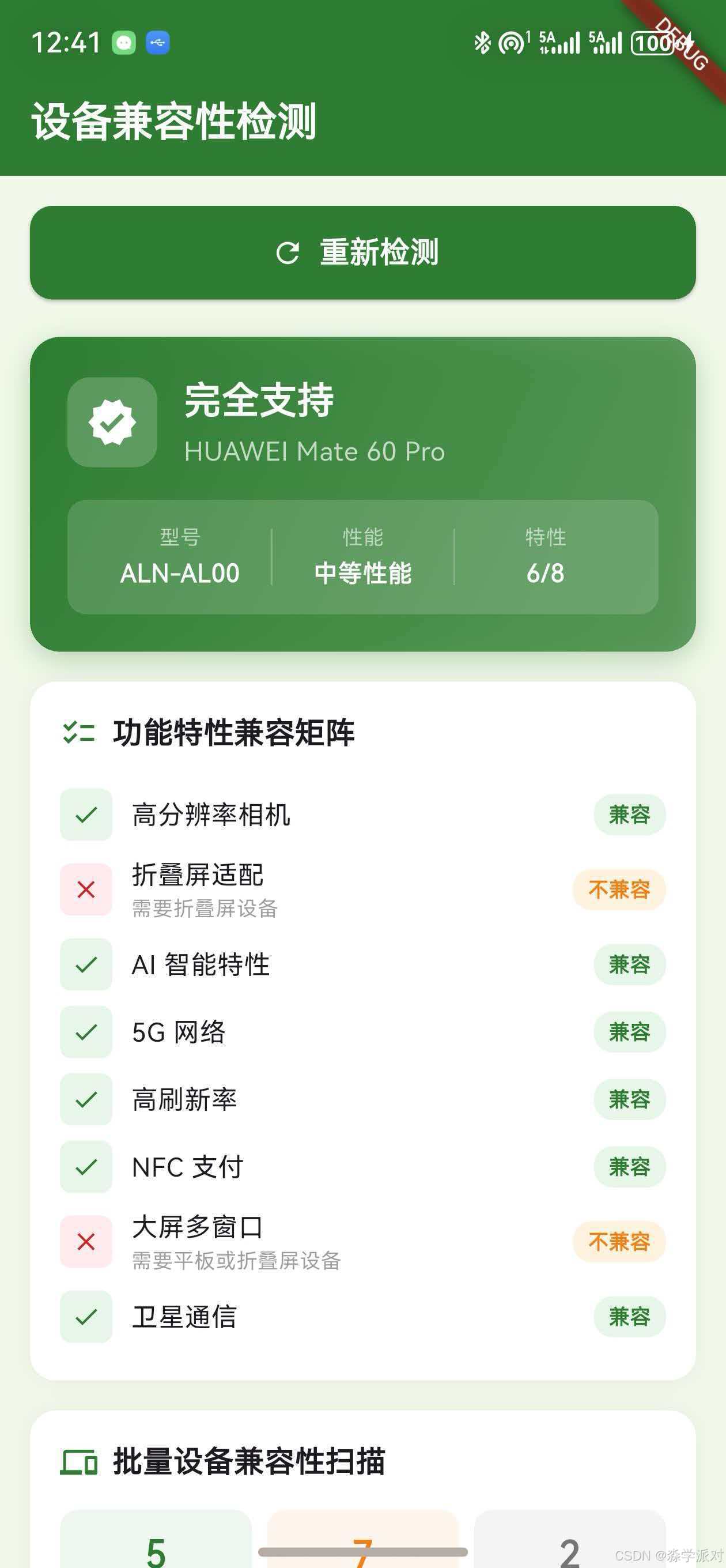
本文提供一个完整的兼容性检测中心演示页面,采用绿色主题(Color(0xFF2E7D32)),包含以下模块:
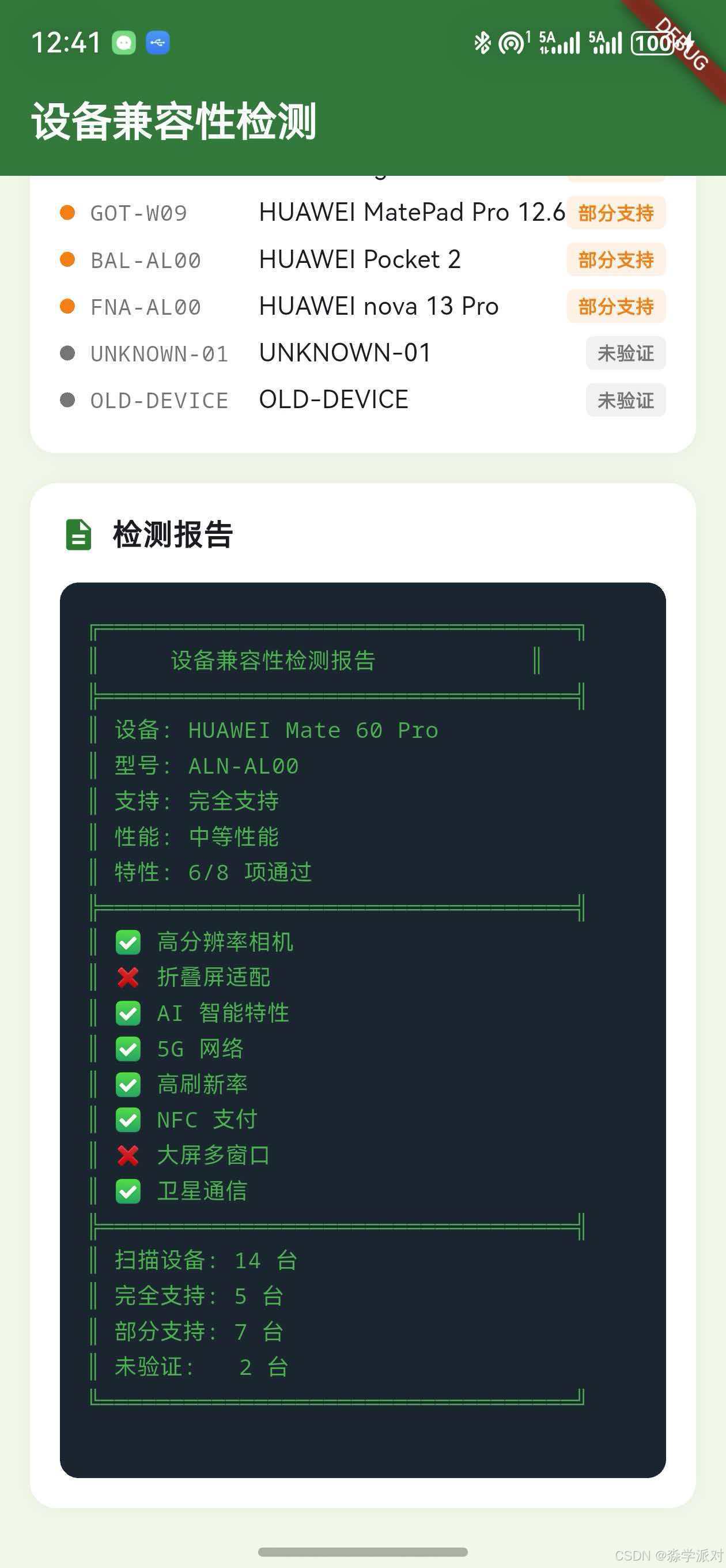
- 当前设备识别与支持级别卡片(动态颜色渐变)
- 功能特性兼容矩阵(逐项✅/❌展示)
- 批量设备兼容性扫描(统计摘要 + 设备列表)
- 检测报告(终端风格深色代码块)
交互设计:所有检测操作需要用户点击"开始兼容性检测"按钮触发,不会在页面加载时自动执行。
14.2 页面入口与主题
import 'package:apple_product_name/apple_product_name_ohos.dart';
import 'package:flutter/material.dart';
void main() {
runApp(const MyApp());
}
class MyApp extends StatelessWidget {
const MyApp({Key? key}) : super(key: key);
Widget build(BuildContext context) {
return MaterialApp(
title: '设备兼容性检测',
theme: ThemeData(
primarySwatch: Colors.green,
scaffoldBackgroundColor: const Color(0xFFF1F8E9),
),
home: const Article26DemoPage(),
);
}
}
14.3 状态管理与数据模型
class _Article26DemoPageState extends State<Article26DemoPage> {
  bool _isLoading = false;
  bool _hasData = false;

  String _deviceName = '';
  String _machineId = '';
  String _supportLevel = '';
  String _perfLevel = '';
  Color _supportColor = Colors.grey;
  IconData _supportIcon = Icons.help_outline;

  final List<_FeatureCheck> _features = [];
  final List<_DeviceCompat> _batchResults = [];
  String _report = '';

  // 已验证的完全支持设备
  static const _fullSupportIds = [
    'ALN-AL00', 'ALN-AL10', 'GGK-AL10',
    'CFR-AN00', 'CFS-AN00', 'CFT-AN00',
    'HBK-AL00', 'DUA-AL00', 'HBN-AL00',
    'GGK-W10', 'PGT-AN00', 'GROK-W09',
  ];

  // 部分支持设备
  static const _partialSupportIds = [
    'BRA-AL00', 'CTR-AL00', 'FOA-AL00',
    'BVL-AN00', 'GOT-W09', 'BAL-AL00', 'FNA-AL00',
  ];

  // 批量扫描的设备池
  static const _scanDevices = [
    'CFR-AN00', 'ALN-AL00', 'GGK-AL10', 'HBK-AL00',
    'DUA-AL00', 'BRA-AL00', 'CTR-AL00', 'FOA-AL00',
    'BVL-AN00', 'GOT-W09', 'BAL-AL00', 'FNA-AL00',
    'UNKNOWN-01', 'OLD-DEVICE',
  ];
  // ...
}
14.4 核心检测逻辑
Future<void> _runCheck() async {
  if (_isLoading) return;
  setState(() {
    _isLoading = true;
    _features.clear();
    _batchResults.clear();
    _report = '';
  });

  final ohos = OhosProductName();

  // 1. 当前设备识别
  _machineId = await ohos.getMachineId();
  _deviceName = await ohos.getProductName();

  // 2. 支持级别判定
  if (_fullSupportIds.contains(_machineId)) {
    _supportLevel = '完全支持';
    _supportColor = const Color(0xFF2E7D32);
    _supportIcon = Icons.verified;
  } else if (_partialSupportIds.contains(_machineId)) {
    _supportLevel = '部分支持';
    _supportColor = const Color(0xFFF57F17);
    _supportIcon = Icons.warning_amber_rounded;
  } else {
    _supportLevel = '未知设备';
    _supportColor = const Color(0xFF757575);
    _supportIcon = Icons.help_outline;
  }

  // 3. 性能等级评估
  if (_deviceName.contains('Pro+') ||
      _deviceName.contains('Ultra') ||
      _deviceName.contains('RS') ||
      _deviceName.contains('Mate 70') ||
      _deviceName.contains('Mate X5')) {
    _perfLevel = '高性能';
  } else if (_deviceName.contains('Pro') ||
      _deviceName.contains('Mate 6') ||
      _deviceName.contains('Pura') ||
      _deviceName.contains('Magic')) {
    _perfLevel = '中等性能';
  } else {
    _perfLevel = '基础性能';
  }

  // 4. 功能特性检测(8项)
  _features.addAll([
    _FeatureCheck('高分辨率相机',
      _deviceName.contains('Pro') ||
      _deviceName.contains('Ultra') ||
      _deviceName.contains('Pura'),
      '需要 Pro/Ultra/Pura 系列'),
    _FeatureCheck('折叠屏适配',
      _deviceName.contains('Mate X') ||
      _deviceName.contains('Pocket'),
      '需要折叠屏设备'),
    _FeatureCheck('AI 智能特性',
      _deviceName.contains('Mate 70') ||
      _deviceName.contains('Mate 60') ||
      _deviceName.contains('Pura 70'),
      '需要 Mate 60+ / Pura 70 系列'),
    // ... 更多特性检测
  ]);

  // 5. 批量设备扫描
  for (final id in _scanDevices) {
    final name = await ohos.lookup(id);
    String level;
    Color color;
    if (_fullSupportIds.contains(id)) {
      level = '完全支持';
      color = const Color(0xFF2E7D32);
    } else if (_partialSupportIds.contains(id)) {
      level = '部分支持';
      color = const Color(0xFFF57F17);
    } else {
      level = '未验证';
      color = const Color(0xFF757575);
    }
    _batchResults.add(_DeviceCompat(id, name, level, color));
  }

  // 6. 生成检测报告
  final supported = _features.where((f) => f.supported).length;
  final buf = StringBuffer();
  buf.writeln('╔══════════════════════════════════╗');
  buf.writeln('║     设备兼容性检测报告           ║');
  buf.writeln('╠══════════════════════════════════╣');
  buf.writeln('║ 设备: $_deviceName');
  buf.writeln('║ 型号: $_machineId');
  buf.writeln('║ 支持: $_supportLevel');
  buf.writeln('║ 性能: $_perfLevel');
  buf.writeln('║ 特性: $supported/${_features.length} 项通过');
  buf.writeln('╚══════════════════════════════════╝');
  _report = buf.toString();

  setState(() { _isLoading = false; _hasData = true; });
}
14.5 设备卡片(动态颜色)
设备卡片的背景色根据支持级别动态变化——完全支持为绿色、部分支持为橙色、未知设备为灰色:
Widget _buildDeviceCard() {
  return Container(
    width: double.infinity,
    padding: const EdgeInsets.all(20),
    decoration: BoxDecoration(
      gradient: LinearGradient(
        colors: [_supportColor, _supportColor.withOpacity(0.7)],
        begin: Alignment.topLeft,
        end: Alignment.bottomRight,
      ),
      borderRadius: BorderRadius.circular(16),
      boxShadow: [BoxShadow(
        color: _supportColor.withOpacity(0.3),
        blurRadius: 12,
        offset: const Offset(0, 4))],
    ),
    child: Column(
      crossAxisAlignment: CrossAxisAlignment.start,
      children: [
        Row(children: [
          Container(
            padding: const EdgeInsets.all(10),
            decoration: BoxDecoration(
              color: Colors.white.withOpacity(0.2),
              borderRadius: BorderRadius.circular(12)),
            child: Icon(_supportIcon,
              color: Colors.white, size: 28),
          ),
          const SizedBox(width: 14),
          Column(
            crossAxisAlignment: CrossAxisAlignment.start,
            children: [
              Text(_supportLevel, style: const TextStyle(
                color: Colors.white, fontSize: 20,
                fontWeight: FontWeight.bold)),
              Text(_deviceName, style: const TextStyle(
                color: Colors.white70, fontSize: 14)),
            ],
          ),
        ]),
        const SizedBox(height: 16),
        // 型号 | 性能 | 特性 三栏信息
        Container(
          padding: const EdgeInsets.all(12),
          decoration: BoxDecoration(
            color: Colors.white.withOpacity(0.15),
            borderRadius: BorderRadius.circular(10)),
          child: Row(children: [
            _infoChip('型号', _machineId),
            _infoChip('性能', _perfLevel),
            _infoChip('特性',
              '${_features.where((f) => f.supported).length}'
              '/${_features.length}'),
          ]),
        ),
      ],
    ),
  );
}
14.6 数据模型
class _FeatureCheck {
  final String name;
  final bool supported;
  final String requirement;
  _FeatureCheck(this.name, this.supported, this.requirement);
}

class _DeviceCompat {
  final String machineId;
  final String name;
  final String level;
  final Color color;
  _DeviceCompat(this.machineId, this.name, this.level, this.color);
}
十五、最佳实践总结
15.1 检测策略最佳实践
- 应用启动时执行一次完整检测并缓存结果,后续直接使用缓存
- 使用
_initialized标志位防止重复初始化 - 整个检测流程控制在50ms以内,不影响启动速度
- 对未知设备采用宽容策略,允许使用但上报信息
15.2 列表维护最佳实践
- 本地列表作为基础,远程配置作为增量补充
- 新设备发布后第一时间测试并更新列表
- 每个型号标注对应的产品名称,方便维护
- 使用版本号管理配置变更,支持回滚
15.3 用户体验最佳实践
- 完全支持的设备不显示任何提示
- 部分支持使用非阻塞的SnackBar提示
- 不支持的设备使用阻塞对话框明确告知
- 提示信息只显示一次,不重复打扰用户
总结
本文系统讲解了如何利用apple_product_name库构建完整的设备兼容性检测方案。通过支持级别判定确定设备的整体兼容状态,通过性能等级评估实现渲染质量的自适应调整,通过功能特性检测实现细粒度的功能开关控制,通过远程配置更新实现兼容性规则的动态维护,通过兼容性报告上报持续改进检测方案。最后提供了一个完整的兼容性检测中心演示页面,展示了从设备识别到报告生成的全流程。
下一篇文章将介绍性能优化与缓存策略,讲解如何优化设备信息获取的性能并实现高效的缓存机制。
如果这篇文章对你有帮助,欢迎点赞👍、收藏⭐、关注🔔,你的支持是我持续创作的动力!
相关资源:

开源鸿蒙跨平台开发社区汇聚开发者与厂商,共建“一次开发,多端部署”的开源生态,致力于降低跨端开发门槛,推动万物智联创新。
更多推荐
 10
10 0
0- 0


 已为社区贡献69条内容

所有评论(0)