基础入门 Flutter for OpenHarmony:三方库实战 get 框架详解
GetX 是一个超轻量级且强大的 Flutter 框架,它集成了状态管理、路由管理、依赖注入和国际化等功能,帮助开发者快速构建高性能应用。get 框架以高性能、易用性和低耦合著称,大幅提升了开发效率。基础概念:get 框架的特点、应用场景平台适配:工作原理、支持的功能项目配置:依赖添加核心功能:状态管理、路由管理、依赖注入、国际化实际应用:用户登录、主题切换、网络请求完整示例:完整的 get 框架
欢迎加入开源鸿蒙跨平台社区:https://openharmonycrossplatform.csdn.net
🎯 欢迎来到 Flutter for OpenHarmony 社区!本文将深入讲解 Flutter 中 get 框架的使用方法,带你全面掌握这个功能强大、轻量级的 Flutter 状态管理、路由管理和依赖注入框架。
一、get 框架概述
GetX 是一个超轻量级且强大的 Flutter 框架,它集成了状态管理、路由管理、依赖注入和国际化等功能,帮助开发者快速构建高性能应用。get 框架以高性能、易用性和低耦合著称,大幅提升了开发效率。
📋 get 框架特点
| 特点 | 说明 |
|---|---|
| 轻量级 | 代码体积小,性能优异,启动速度快 |
| 状态管理 | 提供响应式状态管理,支持细粒度响应式更新 |
| 路由管理 | 声明式路由,支持路由守卫、中间件、参数传递 |
| 依赖注入 | 强大的依赖注入系统,支持懒加载、生命周期管理 |
| 国际化支持 | 内置多语言支持,支持单复数、参数替换 |
| 工具类丰富 | 提供丰富的工具类,如字符串验证、屏幕适配等 |
| 跨平台支持 | 支持 Android、iOS、OpenHarmony |
| 鸿蒙适配 | 专门为 OpenHarmony 平台进行了适配 |
应用场景
1. 状态管理
管理应用的全局状态,如用户信息、主题设置、语言设置等。
2. 路由导航
管理应用的路由跳转,支持路由守卫、中间件、参数传递。
3. 依赖注入
管理应用的依赖关系,支持懒加载、生命周期管理。
4. 国际化
支持多语言切换,支持单复数、参数替换。
5. HTTP 请求
提供便捷的 HTTP 请求封装,支持 GET、POST、PUT、DELETE 等。
6. WebSocket 通信
支持 WebSocket 实时通信。
💡 使用场景:企业级应用、电商应用、社交应用、管理后台等复杂应用。
二、OpenHarmony 平台适配说明
2.1 兼容性信息
本项目基于 get 开发,适配 Flutter 3.7.12-ohos-1.1.3 和 Flutter 3.22.1-ohos-1.0.3。
2.2 工作原理
get 框架在 OpenHarmony 平台上使用以下机制:
- 依赖注入:使用单例模式管理依赖实例
- 响应式状态:使用 GetXController 和响应式变量管理状态
- 路由管理:使用 GetMaterialApp 进行路由配置
- 国际化:使用 Translations 接口实现多语言
2.3 支持的功能
| 功能 | 说明 | OpenHarmony 支持 |
|---|---|---|
| 状态管理 | 响应式状态管理 | ✅ yes |
| 路由管理 | 声明式路由 | ✅ yes |
| 依赖注入 | 依赖注入系统 | ✅ yes |
| 国际化 | 多语言支持 | ✅ yes |
| HTTP 请求 | 网络请求封装 | ✅ yes |
| WebSocket | 实时通信 | ✅ yes |
| 工具类 | 字符串验证等 | ✅ yes |
三、项目配置与安装
3.1 添加依赖配置
在 pubspec.yaml 文件中添加以下依赖:
dependencies:
  flutter:
    sdk: flutter

  # 添加 get 依赖(OpenHarmony 适配版本)
  get:
    git:
      url: https://gitcode.com/openharmony-sig/fluttertpc_get
配置说明:
- 使用 git 方式引用开源鸿蒙适配的 get 仓库
url:指定 GitCode 托管的仓库地址- 无需指定
path,因为这是根目录包
3.2 下载依赖
配置完成后,执行以下命令下载依赖:
flutter pub get
3.3 权限配置
get 框架本身不需要特殊权限,如果使用 HTTP 请求,需要配置网络权限。
ohos/entry/src/main/module.json5:
{
  "module": {
    "requestPermissions": [
      {
        "name": "ohos.permission.INTERNET",
        "reason": "$string:network_reason",
        "usedScene": {
          "abilities": ["EntryAbility"],
          "when": "inuse"
        }
      }
    ]
  }
}
四、get 框架基础用法
4.1 导入库
在使用 get 框架之前,需要先导入库:
import 'package:get/get.dart';
4.2 状态管理
使用 GetXController 管理状态:
class CounterController extends GetxController {
  // 响应式变量
  final count = 0.obs;

  // 增加计数
  void increment() {
    count.value++;
  }

  // 减少计数
  void decrement() {
    count.value--;
  }
}
在 Widget 中使用:
class CounterPage extends StatelessWidget {
// 使用 Get.put 注册控制器
final controller = Get.put(CounterController());
Widget build(BuildContext context) {
return Scaffold(
body: Center(
child: Obx(() => Text('计数: ${controller.count.value}')),
),
floatingActionButton: FloatingActionButton(
onPressed: controller.increment,
child: const Icon(Icons.add),
),
);
}
}
4.3 路由管理
使用 GetMaterialApp 配置路由:
void main() {
runApp(MyApp());
}
class MyApp extends StatelessWidget {
Widget build(BuildContext context) {
return GetMaterialApp(
debugShowCheckedModeBanner: false,
initialRoute: '/',
getPages: [
GetPage(
name: '/',
page: () => HomePage(),
),
GetPage(
name: '/detail',
page: () => DetailPage(),
),
],
);
}
}
路由跳转:
// 跳转到指定路由
Get.toNamed('/detail');

// 跳转并传递参数
Get.toNamed('/detail', arguments: {'id': 1, 'title': '详情'});

// 获取参数
final args = Get.arguments;
print('ID: ${args['id']}');

// 返回上一页
Get.back();
4.4 依赖注入
使用 Get.put、Get.lazyPut 注册依赖:
// 立即注册
final controller = Get.put(MyController());

// 延迟注册(使用时才创建)
Get.lazyPut(() => MyController());

// 查找依赖
final controller = Get.find<MyController>();

// 删除依赖
Get.delete<MyController>();
4.5 国际化
定义翻译:
class MyTranslations extends Translations {
Map<String, Map<String, String>> get keys => {
'zh_CN': {
'hello': '你好',
'welcome': '欢迎',
},
'en_US': {
'hello': 'Hello',
'welcome': 'Welcome',
},
};
}
使用翻译:
GetMaterialApp(
  translations: MyTranslations(),
  locale: Locale('zh', 'CN'),
  fallbackLocale: Locale('en', 'US'),
  initialRoute: '/',
  getPages: [...],
);

// 在代码中使用
Text('hello'.tr);
Text('welcome'.tr);
五、实际应用场景
5.1 用户登录状态管理
class AuthController extends GetxController {
  final isLoggedIn = false.obs;
  final user = Rxn<User>();

  Future<void> login(String username, String password) async {
    // 执行登录逻辑
    final result = await api.login(username, password);

    if (result.success) {
      isLoggedIn.value = true;
      user.value = result.user;
    }
  }

  Future<void> logout() async {
    isLoggedIn.value = false;
    user.value = null;
  }
}
5.2 主题切换
class ThemeController extends GetxController {
  final isDarkMode = false.obs;

  void toggleTheme() {
    isDarkMode.value = !isDarkMode.value;
    Get.changeThemeMode(
      isDarkMode.value ? ThemeMode.dark : ThemeMode.light,
    );
  }
}
5.3 网络请求封装
class ApiProvider extends GetConnect {
void onInit() {
httpClient.baseUrl = 'https://api.example.com';
httpClient.timeout = const Duration(seconds: 30);
}
Future<Response<User>> getUser(int id) async {
return get('/users/$id');
}
Future<Response<List<User>>> getUsers() async {
return get('/users');
}
Future<Response<User>> createUser(Map<String, dynamic> data) async {
return post('/users', data);
}
Future<Response<User>> updateUser(int id, Map<String, dynamic> data) async {
return put('/users/$id', data);
}
Future<Response> deleteUser(int id) async {
return delete('/users/$id');
}
}
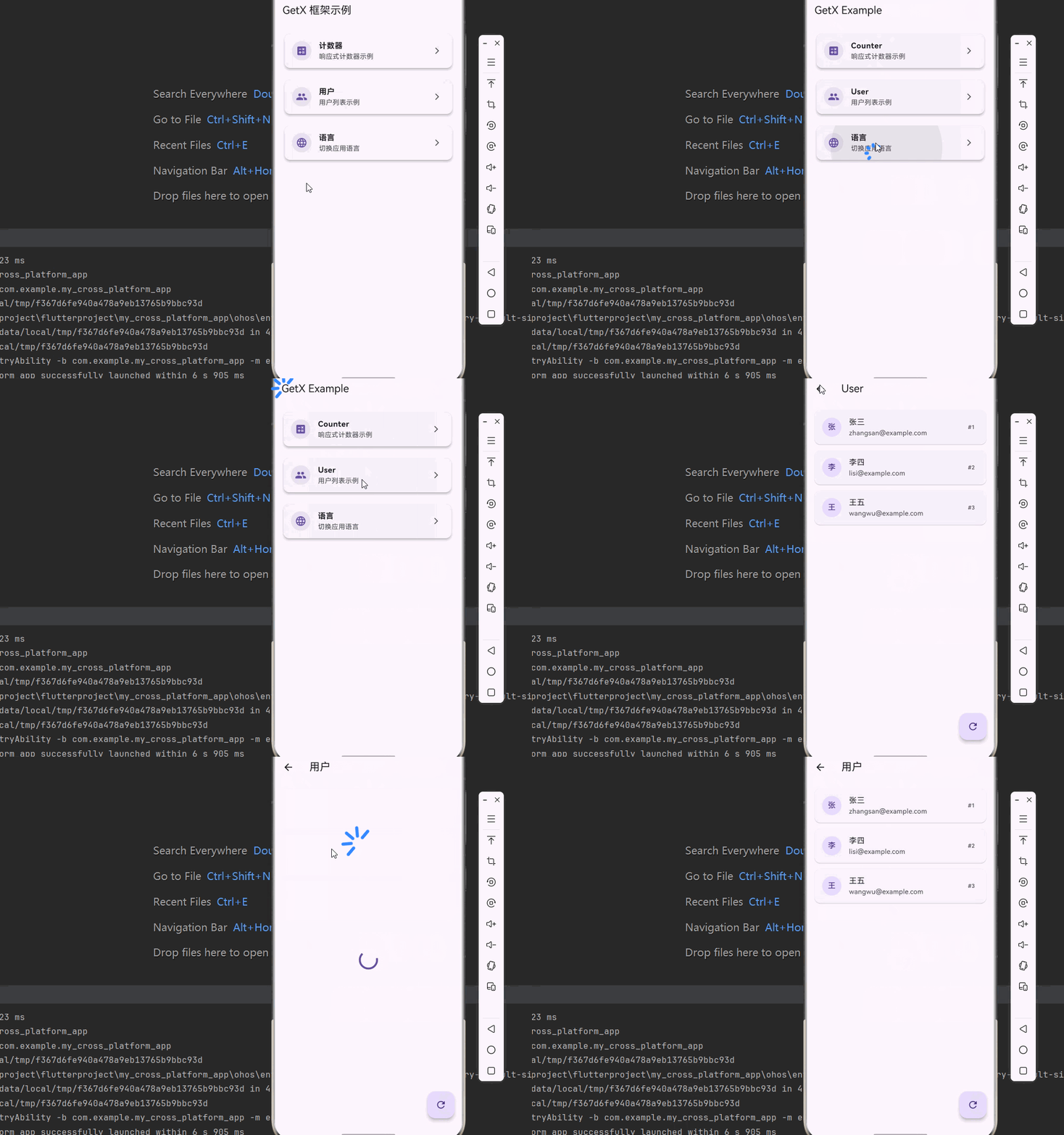
六、完整示例代码
下面是一个完整的 get 框架示例应用:
import 'package:flutter/material.dart';
import 'package:get/get.dart';
void main() => runApp(MyApp());
class MyApp extends StatelessWidget {
Widget build(BuildContext context) {
return GetMaterialApp(
title: 'GetX 框架示例',
debugShowCheckedModeBanner: false,
theme: ThemeData.light(),
darkTheme: ThemeData.dark(),
themeMode: ThemeMode.light,
translations: MyTranslations(),
locale: Locale('zh', 'CN'),
fallbackLocale: Locale('en', 'US'),
initialRoute: '/',
getPages: [
GetPage(
name: '/',
page: () => HomePage(),
binding: HomeBinding(),
),
GetPage(
name: '/counter',
page: () => CounterPage(),
binding: CounterBinding(),
),
GetPage(
name: '/user',
page: () => UserPage(),
binding: UserBinding(),
),
],
);
}
}
// ==================== 翻译 ====================
class MyTranslations extends Translations {
Map<String, Map<String, String>> get keys => {
'zh_CN': {
'app_title': 'GetX 框架示例',
'home': '首页',
'counter': '计数器',
'user': '用户',
'increment': '增加',
'decrement': '减少',
'count': '计数',
'welcome': '欢迎',
},
'en_US': {
'app_title': 'GetX Example',
'home': 'Home',
'counter': 'Counter',
'user': 'User',
'increment': 'Increment',
'decrement': 'Decrement',
'count': 'Count',
'welcome': 'Welcome',
},
};
}
// ==================== 控制器 ====================
class HomeController extends GetxController {
// HomeController 不应该依赖其他页面的控制器
// 每个页面应该管理自己的状态
// 这是一个正确的GetX架构实践
}
class CounterController extends GetxController {
final count = 0.obs;
void increment() {
count.value++;
}
void decrement() {
count.value--;
}
}
class UserController extends GetxController {
final users = <User>[].obs;
final isLoading = false.obs;
void onInit() {
super.onInit();
fetchUsers();
}
Future<void> fetchUsers() async {
isLoading.value = true;
await Future.delayed(const Duration(seconds: 1));
users.value = [
User(id: 1, name: '张三', email: 'zhangsan@example.com'),
User(id: 2, name: '李四', email: 'lisi@example.com'),
User(id: 3, name: '王五', email: 'wangwu@example.com'),
];
isLoading.value = false;
}
}
class User {
final int id;
final String name;
final String email;
User({required this.id, required this.name, required this.email});
}
// ==================== 绑定 ====================
class HomeBinding extends Bindings {
void dependencies() {
Get.lazyPut(() => HomeController());
}
}
class CounterBinding extends Bindings {
void dependencies() {
Get.lazyPut(() => CounterController());
}
}
class UserBinding extends Bindings {
void dependencies() {
Get.lazyPut(() => UserController());
}
}
// ==================== 页面 ====================
class HomePage extends StatelessWidget {
Widget build(BuildContext context) {
final controller = Get.put(HomeController());
return Scaffold(
appBar: AppBar(
title: Text('app_title'.tr),
),
body: ListView(
padding: const EdgeInsets.all(16),
children: [
_buildMenuCard(
icon: Icons.calculate,
title: 'counter'.tr,
description: '响应式计数器示例',
onTap: () => Get.toNamed('/counter'),
),
const SizedBox(height: 16),
_buildMenuCard(
icon: Icons.people,
title: 'user'.tr,
description: '用户列表示例',
onTap: () => Get.toNamed('/user'),
),
const SizedBox(height: 16),
_buildMenuCard(
icon: Icons.language,
title: '语言',
description: '切换应用语言',
onTap: () {
final currentLocale = Get.locale;
final newLocale = currentLocale?.languageCode == 'zh'
? Locale('en', 'US')
: Locale('zh', 'CN');
Get.updateLocale(newLocale);
},
),
],
),
);
}
Widget _buildMenuCard({
required IconData icon,
required String title,
required String description,
required VoidCallback onTap,
}) {
return Card(
elevation: 4,
shape: RoundedRectangleBorder(
borderRadius: BorderRadius.circular(12),
),
child: ListTile(
leading: CircleAvatar(
backgroundColor: Get.theme.primaryColor.withOpacity(0.1),
child: Icon(icon, color: Get.theme.primaryColor),
),
title: Text(title, style: const TextStyle(fontWeight: FontWeight.bold)),
subtitle: Text(description),
trailing: const Icon(Icons.arrow_forward_ios, size: 16),
onTap: onTap,
),
);
}
}
class CounterPage extends StatelessWidget {
Widget build(BuildContext context) {
final controller = Get.find<CounterController>();
return Scaffold(
appBar: AppBar(
title: Text('counter'.tr),
),
body: Center(
child: Column(
mainAxisAlignment: MainAxisAlignment.center,
children: [
Text(
'count'.tr,
style: const TextStyle(fontSize: 18),
),
const SizedBox(height: 16),
Obx(() => Text(
'${controller.count.value}',
style: const TextStyle(
fontSize: 72,
fontWeight: FontWeight.bold,
),
)),
const SizedBox(height: 32),
Row(
mainAxisAlignment: MainAxisAlignment.center,
children: [
FloatingActionButton(
heroTag: 'decrement',
onPressed: controller.decrement,
child: const Icon(Icons.remove),
),
const SizedBox(width: 32),
FloatingActionButton(
heroTag: 'increment',
onPressed: controller.increment,
child: const Icon(Icons.add),
),
],
),
],
),
),
);
}
}
class UserPage extends StatelessWidget {
Widget build(BuildContext context) {
final controller = Get.find<UserController>();
return Scaffold(
appBar: AppBar(
title: Text('user'.tr),
),
body: Obx(() {
if (controller.isLoading.value) {
return const Center(child: CircularProgressIndicator());
}
return ListView.builder(
padding: const EdgeInsets.all(16),
itemCount: controller.users.length,
itemBuilder: (context, index) {
final user = controller.users[index];
return Card(
margin: const EdgeInsets.only(bottom: 12),
child: ListTile(
leading: CircleAvatar(
child: Text(user.name[0]),
),
title: Text(user.name),
subtitle: Text(user.email),
trailing: Text('#${user.id}'),
),
);
},
);
}),
floatingActionButton: FloatingActionButton(
onPressed: controller.fetchUsers,
child: const Icon(Icons.refresh),
),
);
}
}
七、API 参考
7.1 GetXController API
| 方法 | 说明 | 参数 | 返回值 | OpenHarmony 支持 |
|---|---|---|---|---|
| onInit | 控制器初始化 | / | void | ✅ yes |
| onReady | 控制器准备就绪 | / | void | ✅ yes |
| onClose | 控制器销毁 | / | void | ✅ yes |
| update | 更新 UI | [List? ids] | void | ✅ yes |
7.2 GetX API
| 方法 | 说明 | 参数 | 返回值 | OpenHarmony 支持 |
|---|---|---|---|---|
| put | 立即注册依赖 | S dependency, {String? tag, bool permanent = false} | S | ✅ yes |
| lazyPut | 延迟注册依赖 | InstanceBuilderCallback |
void | ✅ yes |
| find | 查找依赖 | {String? tag} | S | ✅ yes |
| delete | 删除依赖 | {String? tag, bool force = false} | Future | ✅ yes |
| toNamed | 路由跳转 | String page, {dynamic arguments, Map<String, String>? parameters} | Future | ✅ yes |
| back | 返回上一页 | {dynamic result} | void | ✅ yes |
| changeTheme | 切换主题 | ThemeData theme, {bool? isDark} | void | ✅ yes |
| updateLocale | 更新语言 | Locale locale | void | ✅ yes |
7.3 GetConnect API
| 方法 | 说明 | 参数 | 返回值 | OpenHarmony 支持 |
|---|---|---|---|---|
| get | GET 请求 | String url, {Map<String, String>? headers, Map<String, dynamic>? query} | Future<Response> | ✅ yes |
| post | POST 请求 | String url, dynamic body, {Map<String, String>? headers} | Future<Response> | ✅ yes |
| put | PUT 请求 | String url, dynamic body, {Map<String, String>? headers} | Future<Response> | ✅ yes |
| delete | DELETE 请求 | String url, {Map<String, String>? headers} | Future<Response> | ✅ yes |
| socket | WebSocket | String url, {Duration ping = const Duration(seconds: 5)} | GetSocket | ✅ yes |
八、常见问题与解决方案
8.1 状态不更新
问题描述:修改响应式变量后 UI 没有更新。
可能原因:
- 没有使用 Obx 包裹 Widget
- 没有访问响应式变量的 value 属性
解决方案:
// 正确写法
Obx(() => Text(controller.count.value.toString()))

// 错误写法
Text(controller.count.toString())
8.2 控制器找不到
问题描述:调用 Get.find 时抛出异常。
可能原因:
- 控制器未注册
- 控制器已被删除
解决方案:
// 使用 Get.put 或 Get.lazyPut 注册控制器
Get.put(MyController());

// 检查控制器是否已注册
if (Get.isRegistered<MyController>()) {
  final controller = Get.find<MyController>();
}
8.3 路由跳转失败
问题描述:调用 Get.toNamed 时找不到路由。
可能原因:
- 路由未配置
- 路由名称不匹配
解决方案:
// 确保在 GetMaterialApp 中配置路由
GetMaterialApp(
  initialRoute: '/',
  getPages: [
    GetPage(name: '/detail', page: () => DetailPage()),
  ],
);

// 路由名称必须以 / 开头
Get.toNamed('/detail');
九、最佳实践
9.1 使用 Binding 管理依赖
使用 Binding 集中管理页面依赖:
class MyPageBinding extends Bindings {
void dependencies() {
Get.lazyPut(() => MyController());
Get.lazyPut(() => ApiService());
}
}
// 在路由中指定 binding
GetPage(
name: '/my_page',
page: () => MyPage(),
binding: MyPageBinding(),
);
9.2 分离控制器和视图
将业务逻辑放在控制器中,视图只负责展示:
// Controller
class MyController extends GetxController {
final data = <Item>[].obs;
Future<void> fetchData() async {
// 业务逻辑
}
}
// View
class MyPage extends StatelessWidget {
Widget build(BuildContext context) {
final controller = Get.find<MyController>();
return Obx(() => ListView.builder(...));
}
}
9.3 使用响应式变量
使用响应式变量实现细粒度更新:
// 只更新需要更新的部分
Obx(() => Text(controller.name.value))

// 避免全量更新
// Don't: controller.update() 会更新整个页面
十、总结
本文详细介绍了 Flutter for OpenHarmony 中 get 框架的使用方法,包括:
- 基础概念:get 框架的特点、应用场景
- 平台适配:工作原理、支持的功能
- 项目配置:依赖添加
- 核心功能:状态管理、路由管理、依赖注入、国际化
- 实际应用:用户登录、主题切换、网络请求
- 完整示例:完整的 get 框架应用
- 最佳实践:Binding 管理、分离关注点、响应式变量
get 框架是一个功能强大且易用的 Flutter 框架,集成了状态管理、路由管理、依赖注入等功能,大幅提升了开发效率。使用 get 框架可以快速构建高性能、易维护的应用。
十一、参考资料
📌 提示:本文基于 get 的 OpenHarmony 适配版本编写。

开源鸿蒙跨平台开发社区汇聚开发者与厂商,共建“一次开发,多端部署”的开源生态,致力于降低跨端开发门槛,推动万物智联创新。
更多推荐
 14
14 0
0- 0


 已为社区贡献65条内容

所有评论(0)