基础入门 Flutter for OpenHarmony:三方库实战 flutter_lifecycle_detector 生命周期检测详解
在移动应用开发中,监听应用的生命周期状态是非常重要的功能。当应用切换到后台或前台时,可能需要执行特定的操作,如暂停网络请求、保存数据、恢复播放等。flutter_lifecycle_detector 是一个简单易用的生命周期检测插件。基础概念:flutter_lifecycle_detector 的特点、应用场景平台适配:工作原理、支持的功能项目配置:依赖添加核心 API:监听前后台状态实际应用:
欢迎加入开源鸿蒙跨平台社区:https://openharmonycrossplatform.csdn.net
🎯 欢迎来到 Flutter for OpenHarmony 社区!本文将深入讲解 Flutter 中 flutter_lifecycle_detector 生命周期检测插件的使用方法,带你全面掌握在应用中监听应用前后台切换状态的能力。
一、flutter_lifecycle_detector 组件概述
在移动应用开发中,监听应用的生命周期状态是非常重要的功能。当应用切换到后台或前台时,可能需要执行特定的操作,如暂停网络请求、保存数据、恢复播放等。flutter_lifecycle_detector 是一个简单易用的生命周期检测插件。
📋 flutter_lifecycle_detector 组件特点
| 特点 | 说明 |
|---|---|
| 轻量级 | 代码简洁,功能单一,易于集成 |
| 实时监听 | 实时监听应用前后台切换状态 |
| Stream API | 使用 Dart Stream 提供响应式的状态通知 |
| 跨平台支持 | 支持 Android、iOS、OpenHarmony |
| 鸿蒙适配 | 专门为 OpenHarmony 平台进行了适配 |
应用场景
1. 暂停网络请求
应用进入后台时暂停不必要的网络请求,节省流量和电量。例如:视频缓冲、数据轮询、实时消息推送等。
class NetworkManager {
  Timer? _pollingTimer;

  void startPolling() {
    _pollingTimer = Timer.periodic(Duration(seconds: 5), (_) {
      _fetchData();
    });
  }

  void stopPolling() {
    _pollingTimer?.cancel();
  }

  void _fetchData() {
    // 发起网络请求
  }
}

// 在生命周期监听中使用
final networkManager = NetworkManager();

FlutterLifecycleDetector().onBackgroundChange.listen((isBackground) {
  if (isBackground) {
    networkManager.stopPolling();
  } else {
    networkManager.startPolling();
  }
});
2. 保存应用状态
应用进入后台时保存当前状态,防止数据丢失。例如:表单数据、滚动位置、用户输入等。
class FormState {
  String? username;
  String? email;
  int? scrollPosition;

  void save() {
    // 保存到本地存储
    final data = {
      'username': username,
      'email': email,
      'scrollPosition': scrollPosition,
    };
    // 保存到 SharedPreferences 或其他存储
  }

  void load() {
    // 从本地存储加载
  }
}

final formState = FormState();

FlutterLifecycleDetector().onBackgroundChange.listen((isBackground) {
  if (isBackground) {
    formState.save();
  }
});
3. 暂停/恢复播放
播放器应用在后台暂停,前台恢复。例如:音乐播放器、视频播放器、播客应用等。
class AudioPlayer {
  bool isPlaying = false;

  void pause() {
    // 暂停播放
    isPlaying = false;
  }

  void resume() {
    // 恢复播放
    isPlaying = true;
  }
}

final audioPlayer = AudioPlayer();

FlutterLifecycleDetector().onBackgroundChange.listen((isBackground) {
  if (isBackground && audioPlayer.isPlaying) {
    audioPlayer.pause();
  } else if (!isBackground && audioPlayer.isPlaying) {
    audioPlayer.resume();
  }
});
4. 统计使用时长
记录用户在前台的使用时长,用于数据分析和用户行为分析。
class UsageAnalytics {
  DateTime? startTime;
  Duration totalDuration = Duration.zero;

  void startTracking() {
    startTime = DateTime.now();
  }

  void stopTracking() {
    if (startTime != null) {
      final sessionDuration = DateTime.now().difference(startTime!);
      totalDuration += sessionDuration;
      startTime = null;
      // 上报使用时长
      _reportUsage(sessionDuration);
    }
  }

  void _reportUsage(Duration duration) {
    // 上报到 analytics 服务
  }
}

final analytics = UsageAnalytics();

FlutterLifecycleDetector().onBackgroundChange.listen((isBackground) {
  if (isBackground) {
    analytics.stopTracking();
  } else {
    analytics.startTracking();
  }
});
5. 显示通知
应用进入后台时显示通知提示用户,例如:下载完成、消息提醒等。
class NotificationManager {
  void showNotification(String title, String body) {
    // 显示本地通知
  }
}

final notificationManager = NotificationManager();

FlutterLifecycleDetector().onBackgroundChange.listen((isBackground) {
  if (isBackground) {
    notificationManager.showNotification(
      '应用已切换到后台',
      '您可以随时回到应用继续使用',
    );
  }
});
6. 资源释放
应用进入后台时释放不必要的资源,如关闭相机、停止定位、释放内存等。
class ResourceManager {
  CameraController? cameraController;
  StreamSubscription<Position>? locationSubscription;

  void releaseCamera() {
    cameraController?.dispose();
    cameraController = null;
  }

  void stopLocationTracking() {
    locationSubscription?.cancel();
    locationSubscription = null;
  }

  void releaseAll() {
    releaseCamera();
    stopLocationTracking();
  }
}

final resourceManager = ResourceManager();

FlutterLifecycleDetector().onBackgroundChange.listen((isBackground) {
  if (isBackground) {
    resourceManager.releaseAll();
  }
});
7. 动画控制
应用进入后台时暂停动画,前台恢复。例如:游戏动画、页面过渡动画等。
class AnimationControllerManager {
  final List<AnimationController> controllers = [];

  void pauseAll() {
    for (var controller in controllers) {
      controller.stop();
    }
  }

  void resumeAll() {
    for (var controller in controllers) {
      controller.forward();
    }
  }
}

final animationManager = AnimationControllerManager();

FlutterLifecycleDetector().onBackgroundChange.listen((isBackground) {
  if (isBackground) {
    animationManager.pauseAll();
  } else {
    animationManager.resumeAll();
  }
});
💡 使用场景:应用状态保存、播放器控制、网络请求管理、使用时长统计、资源释放、动画控制等。
二、OpenHarmony 平台适配说明
2.1 兼容性信息
本项目基于 flutter_lifecycle_detector@0.0.8 开发,适配 Flutter 3.7.12-ohos-1.1.3。
2.2 工作原理
flutter_lifecycle_detector 在 OpenHarmony 平台上使用以下机制:
- UIAbility 生命周期监听:使用 OpenHarmony 的 ApplicationContext 订阅进程内 UIAbility 生命周期变化
- EventChannel 通信:当发生前台后台切换时,通过 Flutter EventChannel 发送消息
- Stream 推送:在 Dart 层通过 Stream 提供实时状态通知
详细工作流程
OpenHarmony 平台实现
在 OpenHarmony 平台上,flutter_lifecycle_detector 通过以下方式实现:
// OpenHarmony 原生代码(伪代码)
public class FlutterLifecycleDetectorPlugin implements MethodCallHandler {
private EventChannel.EventSink eventSink;
public void onMethodCall(MethodCall call, Result result) {
if (call.method.equals("startLifecycleListener")) {
startLifecycleListener();
result.success(null);
}
}
private void startLifecycleListener() {
// 订阅 UIAbility 生命周期
context.getApplicationContext()
.getAbilityManager()
.registerAbilityLifecycleCallback(callback);
}
private final AbilityLifecycleCallback callback = new AbilityLifecycleCallback() {
public void onAbilityForeground(Ability ability) {
// 应用进入前台
if (eventSink != null) {
eventSink.success(false); // false 表示前台
}
}
public void onAbilityBackground(Ability ability) {
// 应用进入后台
if (eventSink != null) {
eventSink.success(true); // true 表示后台
}
}
};
}
Dart 层实现
在 Dart 层,flutter_lifecycle_detector 使用 StreamController 管理状态流:
class FlutterLifecycleDetector {
  static final FlutterLifecycleDetector _instance = FlutterLifecycleDetector._internal();
  factory FlutterLifecycleDetector() => _instance;
  FlutterLifecycleDetector._internal();

  final StreamController<bool> _onBackgroundChangeController =
      StreamController<bool>.broadcast();

  Stream<bool> get onBackgroundChange => _onBackgroundChangeController.stream;

  void _init() {
    // 通过 EventChannel 监听原生层的状态变化
    const EventChannel('flutter_lifecycle_detector/lifecycle')
        .receiveBroadcastStream()
        .listen((dynamic event) {
      final isBackground = event as bool;
      _onBackgroundChangeController.add(isBackground);
    });
  }
}
2.3 支持的功能
| 功能 | 说明 | OpenHarmony 支持 |
|---|---|---|
| 前台状态检测 | 检测应用是否在前台 | ✅ yes |
| 后台状态检测 | 检测应用是否在后台 | ✅ yes |
| 状态变化监听 | 监听前后台切换事件 | ✅ yes |
| 多实例支持 | 支持多个页面同时监听 | ✅ yes |
| 广播 Stream | 支持多个订阅者 | ✅ yes |
2.3 支持的功能
| 功能 | 说明 | OpenHarmony 支持 |
|---|---|---|
| 前台状态检测 | 检测应用是否在前台 | ✅ yes |
| 后台状态检测 | 检测应用是否在后台 | ✅ yes |
| 状态变化监听 | 监听前后台切换事件 | ✅ yes |
三、项目配置与安装
3.1 添加依赖配置
在 pubspec.yaml 文件中添加以下依赖:
dependencies:
  flutter:
    sdk: flutter

  # 添加 flutter_lifecycle_detector_ohos依赖(OpenHarmony 适配版本)
  flutter_lifecycle_detector_ohos:
    git:
      url: https://atomgit.com/openharmony-sig/fluttertpc_flutter_lifecycle_detector.git
      path: ohos
      ref: master
配置说明:
- 使用 git 方式引用开源鸿蒙适配的 flutter_lifecycle_detector 仓库
url:指定 GitCode 托管的仓库地址path:指定包的具体路径为ohosref:指定分支为master
⚠️ 注意:path 为
ohos,不是根目录。
3.2 下载依赖
配置完成后,执行以下命令下载依赖:
flutter pub get
3.3 权限配置
flutter_lifecycle_detector 不需要特殊权限,直接在应用中使用即可。
四、flutter_lifecycle_detector 基础用法
4.1 导入库
在使用生命周期检测之前,需要先导入库:
import 'package:flutter_lifecycle_detector_ohos/flutter_lifecycle_detector_ohos.dart';
4.2 监听前后台状态
使用 Stream 监听应用的前后台状态变化:
final detector = FlutterLifecycleDetector();

// 监听前后台状态变化
detector.onBackgroundChange.listen((isBackground) {
  if (isBackground) {
    print('应用进入后台');
    // 执行后台操作:暂停网络请求、保存数据等
  } else {
    print('应用回到前台');
    // 执行前台操作:恢复网络请求、恢复播放等
  }
});
参数说明:
isBackground:布尔值true:应用在后台false:应用在前台
4.3 取消监听
当不再需要监听时,可以取消 Stream 订阅:
StreamSubscription<bool>? _subscription;
void initState() {
super.initState();
_subscription = FlutterLifecycleDetector().onBackgroundChange.listen((isBackground) {
print('状态变化: $isBackground');
});
}
void dispose() {
_subscription?.cancel();
super.dispose();
}
五、实际应用场景
5.1 应用状态保存
class MyApp extends StatefulWidget {
_MyAppState createState() => _MyAppState();
}
class _MyAppState extends State<MyApp> {
bool _isInBackground = false;
void initState() {
super.initState();
// 监听前后台状态
FlutterLifecycleDetector().onBackgroundChange.listen((isBackground) {
setState(() {
_isInBackground = isBackground;
});
if (isBackground) {
_saveAppState();
}
});
}
void _saveAppState() {
// 保存应用状态
print('保存应用状态...');
}
Widget build(BuildContext context) {
return MaterialApp(
home: Scaffold(
appBar: AppBar(title: Text('状态: ${_isInBackground ? "后台" : "前台"}')),
body: Center(child: Text('应用状态示例')),
),
);
}
}
5.2 播放器控制
class PlayerWidget extends StatefulWidget {
_PlayerWidgetState createState() => _PlayerWidgetState();
}
class _PlayerWidgetState extends State<PlayerWidget> {
bool _isPlaying = false;
bool _isInBackground = false;
void initState() {
super.initState();
_setupLifecycleListener();
}
void _setupLifecycleListener() {
FlutterLifecycleDetector().onBackgroundChange.listen((isBackground) {
setState(() {
_isInBackground = isBackground;
});
if (isBackground && _isPlaying) {
_pause();
}
});
}
void _togglePlay() {
setState(() {
_isPlaying = !_isPlaying;
});
}
void _pause() {
// 暂停播放
print('暂停播放');
}
Widget build(BuildContext context) {
return Column(
children: [
IconButton(
icon: Icon(_isPlaying ? Icons.pause : Icons.play_arrow),
onPressed: _togglePlay,
),
Text('状态: ${_isInBackground ? "后台" : "前台"}'),
],
);
}
}
六、高级用法
6.1 全局生命周期监听
在应用启动时初始化全局生命周期监听,方便在各个页面使用:
class LifecycleManager extends GetxController {
static LifecycleManager get to => Get.find();
final _isBackground = false.obs;
final _lifecycleEvents = <LifecycleEvent>[].obs;
bool get isBackground => _isBackground.value;
List<LifecycleEvent> get events => _lifecycleEvents;
void onInit() {
super.onInit();
_initLifecycleListener();
}
void _initLifecycleListener() {
FlutterLifecycleDetector().onBackgroundChange.listen((isBackground) {
_isBackground.value = isBackground;
// 记录生命周期事件
final event = LifecycleEvent(
type: isBackground ? LifecycleEventType.background : LifecycleEventType.foreground,
timestamp: DateTime.now(),
);
_lifecycleEvents.add(event);
// 保持最近 100 条事件记录
if (_lifecycleEvents.length > 100) {
_lifecycleEvents.removeAt(0);
}
});
}
}
enum LifecycleEventType { foreground, background }
class LifecycleEvent {
final LifecycleEventType type;
final DateTime timestamp;
LifecycleEvent({required this.type, required this.timestamp});
}
// 在 main.dart 中初始化
void main() {
Get.put(LifecycleManager());
runApp(MyApp());
}
// 在任何页面中使用
class MyPage extends StatelessWidget {
Widget build(BuildContext context) {
final lifecycleManager = LifecycleManager.to;
return Obx(() => Text(
'当前状态: ${lifecycleManager.isBackground ? "后台" : "前台"}'
));
}
}
6.2 生命周期事件队列
实现一个事件队列,按顺序处理生命周期事件:
class LifecycleEventQueue {
  final Queue<LifecycleEvent> _queue = Queue<LifecycleEvent>();
  bool _isProcessing = false;

  void enqueue(LifecycleEvent event) {
    _queue.add(event);
    _processNext();
  }

  Future<void> _processNext() async {
    if (_isProcessing || _queue.isEmpty) return;

    _isProcessing = true;
    final event = _queue.removeFirst();

    try {
      await _handleEvent(event);
    } catch (e) {
      print('处理生命周期事件失败: $e');
    } finally {
      _isProcessing = false;
      _processNext();
    }
  }

  Future<void> _handleEvent(LifecycleEvent event) async {
    // 处理事件
    switch (event.type) {
      case LifecycleEventType.foreground:
        await _handleForeground();
        break;
      case LifecycleEventType.background:
        await _handleBackground();
        break;
    }
  }

  Future<void> _handleForeground() async {
    // 处理前台事件
    print('处理前台事件');
  }

  Future<void> _handleBackground() async {
    // 处理后台事件
    print('处理后台事件');
  }
}

class LifecycleEvent {
  final LifecycleEventType type;
  final DateTime timestamp;

  LifecycleEvent({required this.type, required this.timestamp});
}

enum LifecycleEventType { foreground, background }

// 使用事件队列
final eventQueue = LifecycleEventQueue();

FlutterLifecycleDetector().onBackgroundChange.listen((isBackground) {
  final event = LifecycleEvent(
    type: isBackground ? LifecycleEventType.background : LifecycleEventType.foreground,
    timestamp: DateTime.now(),
  );
  eventQueue.enqueue(event);
});
6.3 生命周期与状态管理结合
将生命周期状态与状态管理框架(如 Provider、GetX)结合使用:
// 使用 GetX
class AppLifecycleController extends GetxController {
final _isBackground = false.obs;
final _lastActiveTime = DateTime.now().obs;
final _totalBackgroundTime = Duration.zero.obs;
bool get isBackground => _isBackground.value;
DateTime get lastActiveTime => _lastActiveTime.value;
Duration get totalBackgroundTime => _totalBackgroundTime.value;
DateTime? _backgroundStartTime;
void onInit() {
super.onInit();
_setupLifecycleListener();
}
void _setupLifecycleListener() {
FlutterLifecycleDetector().onBackgroundChange.listen((isBackground) {
_handleLifecycleChange(isBackground);
});
}
void _handleLifecycleChange(bool isBackground) {
if (isBackground) {
_backgroundStartTime = DateTime.now();
_isBackground.value = true;
} else {
if (_backgroundStartTime != null) {
final backgroundDuration = DateTime.now().difference(_backgroundStartTime!);
_totalBackgroundTime.value += backgroundDuration;
_backgroundStartTime = null;
}
_lastActiveTime.value = DateTime.now();
_isBackground.value = false;
}
}
}
// 在应用中使用
class MyApp extends StatelessWidget {
Widget build(BuildContext context) {
Get.put(AppLifecycleController());
return GetMaterialApp(
home: Obx(() {
final controller = Get.find<AppLifecycleController>();
return Text('后台时长: ${controller.totalBackgroundTime.inMinutes} 分钟');
}),
);
}
}
6.4 防抖处理
对生命周期事件进行防抖处理,避免短时间内频繁触发:
class DebouncedLifecycleListener {
  Timer? _debounceTimer;
  final Duration debounceDuration;

  DebouncedLifecycleListener({this.debounceDuration = const Duration(milliseconds: 300)});

  void listen(Function(bool) callback) {
    FlutterLifecycleDetector().onBackgroundChange.listen((isBackground) {
      _debounceTimer?.cancel();
      _debounceTimer = Timer(debounceDuration, () {
        callback(isBackground);
      });
    });
  }

  void dispose() {
    _debounceTimer?.cancel();
  }
}

// 使用防抖监听
final debouncedListener = DebouncedLifecycleListener(
  debounceDuration: Duration(milliseconds: 500),
);

debouncedListener.listen((isBackground) {
  print('防抖处理后的状态: $isBackground');
});
6.5 生命周期与性能监控
结合生命周期监控应用性能:
class PerformanceMonitor {
  final _metrics = <PerformanceMetric>[];

  void recordMetric(String name, Duration duration) {
    _metrics.add(PerformanceMetric(
      name: name,
      duration: duration,
      timestamp: DateTime.now(),
    ));
  }

  List<PerformanceMetric> get metrics => List.unmodifiable(_metrics);

  void clear() {
    _metrics.clear();
  }
}

class PerformanceMetric {
  final String name;
  final Duration duration;
  final DateTime timestamp;

  PerformanceMetric({
    required this.name,
    required this.duration,
    required this.timestamp,
  });
}

final performanceMonitor = PerformanceMonitor();

FlutterLifecycleDetector().onBackgroundChange.listen((isBackground) async {
  if (!isBackground) {
    // 应用回到前台,测量启动时间
    final stopwatch = Stopwatch()..start();

    // 模拟应用启动
    await Future.delayed(Duration(milliseconds: 100));

    stopwatch.stop();
    performanceMonitor.recordMetric('app_start_time', stopwatch.elapsed);

    print('应用启动时间: ${stopwatch.elapsed.inMilliseconds}ms');
  }
});
6.6 生命周期与用户行为分析
结合生命周期分析用户行为:
class UserBehaviorAnalytics {
  final _sessions = <UserSession>[];
  UserSession? _currentSession;

  void startSession() {
    _currentSession = UserSession(
      startTime: DateTime.now(),
      events: [],
    );
  }

  void endSession() {
    if (_currentSession != null) {
      _sessions.add(_currentSession!);
      _currentSession = null;
    }
  }

  void recordEvent(String eventName) {
    _currentSession?.events.add(UserEvent(
      name: eventName,
      timestamp: DateTime.now(),
    ));
  }

  List<UserSession> get sessions => List.unmodifiable(_sessions);
}

class UserSession {
  final DateTime startTime;
  final List<UserEvent> events;
  DateTime? endTime;

  Duration get duration {
    if (endTime != null) {
      return endTime!.difference(startTime);
    }
    return DateTime.now().difference(startTime);
  }
}

class UserEvent {
  final String name;
  final DateTime timestamp;
}

final analytics = UserBehaviorAnalytics();

FlutterLifecycleDetector().onBackgroundChange.listen((isBackground) {
  if (isBackground) {
    analytics.endSession();
  } else {
    analytics.startSession();
  }
});
七、完整示例代码
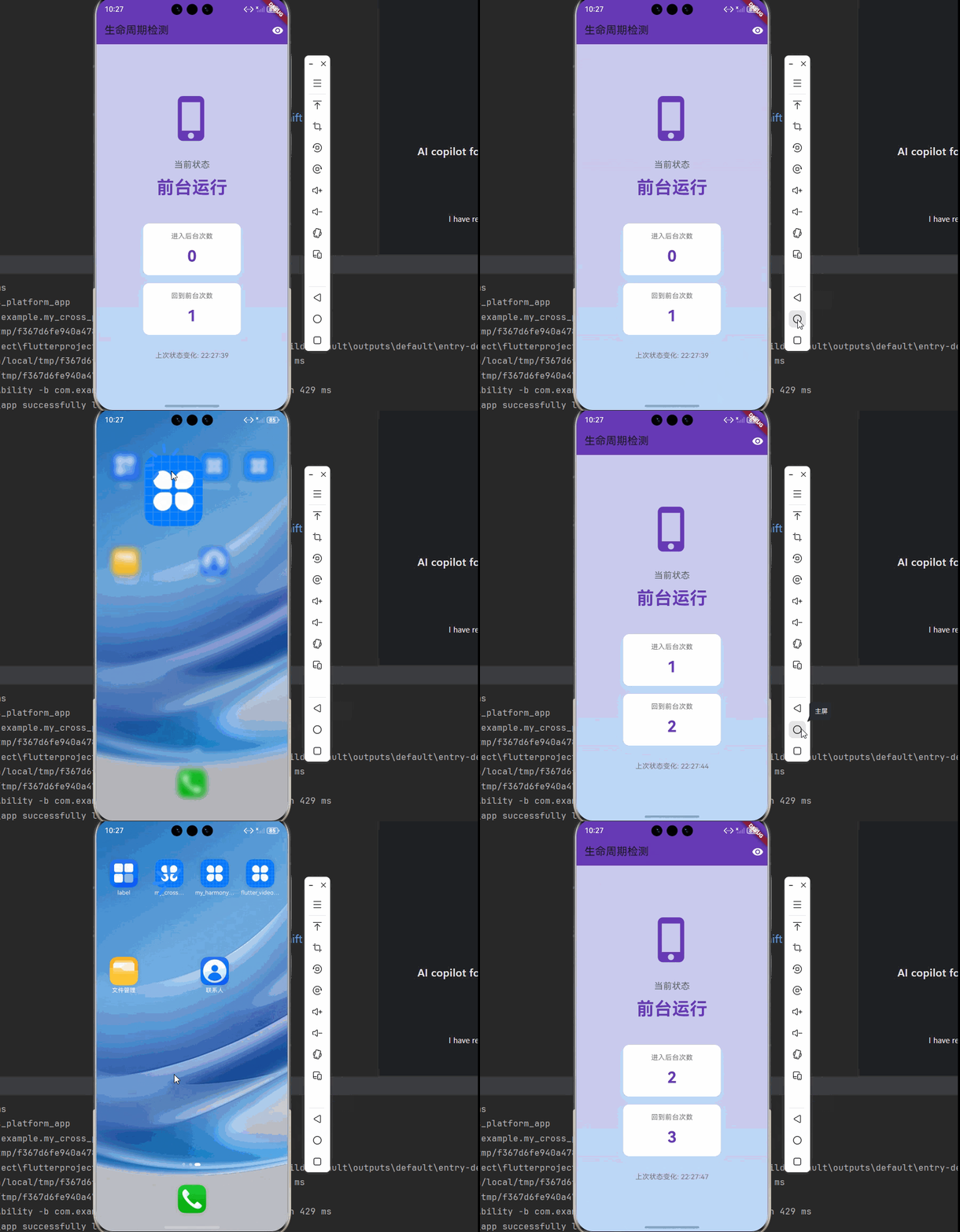
下面是一个完整的生命周期检测示例应用:
import 'dart:developer';
import 'package:flutter/material.dart';
import 'package:flutter_lifecycle_detector_ohos/flutter_lifecycle_detector_ohos.dart';
void main() {
runApp(const MyApp());
}
class MyApp extends StatefulWidget {
const MyApp({Key? key}) : super(key: key);
State<MyApp> createState() => _MyAppState();
}
class _MyAppState extends State<MyApp> {
bool _isBackground = false;
int _backgroundCount = 0;
int _foregroundCount = 0;
DateTime? _lastStateChangeTime;
void initState() {
super.initState();
// 监听前后台状态变化
FlutterLifecycleDetector().onBackgroundChange.listen((isBackground) {
log('应用状态变化: ${isBackground ? "后台" : "前台"}');
setState(() {
_isBackground = isBackground;
_lastStateChangeTime = DateTime.now();
if (isBackground) {
_backgroundCount++;
} else {
_foregroundCount++;
}
});
});
}
Widget build(BuildContext context) {
return MaterialApp(
title: '生命周期检测示例',
theme: ThemeData(
colorScheme: ColorScheme.fromSeed(seedColor: Colors.deepPurple),
useMaterial3: true,
),
home: Scaffold(
appBar: AppBar(
title: const Text('生命周期检测'),
backgroundColor: Colors.deepPurple,
actions: [
Icon(
_isBackground ? Icons.visibility_off : Icons.visibility,
color: Colors.white,
),
const SizedBox(width: 8),
],
),
body: Container(
decoration: BoxDecoration(
gradient: LinearGradient(
begin: Alignment.topCenter,
end: Alignment.bottomCenter,
colors: _isBackground
? [Colors.grey.shade800, Colors.grey.shade900]
: [Colors.deepPurple.shade100, Colors.blue.shade100],
),
),
child: Center(
child: Column(
mainAxisAlignment: MainAxisAlignment.center,
children: [
Icon(
_isBackground ? Icons.phone_android : Icons.phone_iphone,
size: 100,
color: _isBackground ? Colors.grey : Colors.deepPurple,
),
const SizedBox(height: 32),
Text(
'当前状态',
style: TextStyle(
fontSize: 18,
color: Colors.grey.shade700,
),
),
const SizedBox(height: 8),
Text(
_isBackground ? '后台运行' : '前台运行',
style: TextStyle(
fontSize: 36,
fontWeight: FontWeight.bold,
color: _isBackground ? Colors.white : Colors.deepPurple,
),
),
const SizedBox(height: 48),
_buildStatCard('进入后台次数', _backgroundCount.toString()),
const SizedBox(height: 16),
_buildStatCard('回到前台次数', _foregroundCount.toString()),
const SizedBox(height: 32),
if (_lastStateChangeTime != null)
Text(
'上次状态变化: ${_formatTime(_lastStateChangeTime!)}',
style: TextStyle(
color: Colors.grey.shade600,
fontSize: 14,
),
),
],
),
),
),
),
);
}
Widget _buildStatCard(String title, String value) {
return Container(
width: 200,
padding: const EdgeInsets.all(16),
decoration: BoxDecoration(
color: Colors.white,
borderRadius: BorderRadius.circular(12),
boxShadow: [
BoxShadow(
color: Colors.black.withOpacity(0.1),
blurRadius: 10,
offset: const Offset(0, 4),
),
],
),
child: Column(
children: [
Text(
title,
style: TextStyle(
fontSize: 14,
color: Colors.grey.shade600,
),
),
const SizedBox(height: 8),
Text(
value,
style: const TextStyle(
fontSize: 32,
fontWeight: FontWeight.bold,
color: Colors.deepPurple,
),
),
],
),
);
}
String _formatTime(DateTime time) {
return '${time.hour.toString().padLeft(2, '0')}:${time.minute.toString().padLeft(2, '0')}:${time.second.toString().padLeft(2, '0')}';
}
}
七、API 参考
7.1 FlutterLifecycleDetector API
| 方法 | 说明 | 返回值 | OpenHarmony 支持 |
|---|---|---|---|
| onBackgroundChange | Stream,监听前后台状态变化 | Stream <bool> |
✅ yes |
| cancel | 关闭 StreamController | void | ✅ yes |
7.2 参数说明
onBackgroundChange
- 返回类型:
Stream<bool> - 输出值:
booltrue:应用在后台false:应用在前台
八、常见问题与解决方案
8.1 监听不生效
问题描述:监听前后台状态没有回调。
可能原因:
- import 路径错误
- 没有正确订阅 Stream
解决方案:
// 确保使用正确的 import
import 'package:flutter_lifecycle_detector_ohos/flutter_lifecycle_detector_ohos.dart';

// 确保订阅 Stream
FlutterLifecycleDetector().onBackgroundChange.listen((isBackground) {
  print('状态: $isBackground');
});
8.2 内存泄漏
问题描述:页面销毁后 Stream 仍在监听。
解决方案:在 dispose 中取消订阅。
StreamSubscription<bool>? _subscription;
void initState() {
super.initState();
_subscription = FlutterLifecycleDetector().onBackgroundChange.listen((isBackground) {
// 处理状态变化
});
}
void dispose() {
_subscription?.cancel();
super.dispose();
}
九、最佳实践
9.1 合理使用生命周期监听
- 只在需要的时候监听,不要在不需要的页面监听
- 在页面销毁时取消订阅,避免内存泄漏
9.2 区分前后台操作
if (isBackground) {
  // 后台操作:暂停、保存、减少资源消耗
} else {
  // 前台操作:恢复、刷新、正常工作
}
9.3 使用状态管理
将前后台状态纳入状态管理,方便全局访问:
class AppState extends GetxController {
  final _isBackground = false.obs;

  bool get isBackground => _isBackground.value;

  void init() {
    FlutterLifecycleDetector().onBackgroundChange.listen((isBackground) {
      _isBackground.value = isBackground;
    });
  }
}
十、总结
本文详细介绍了 Flutter for OpenHarmony 中 flutter_lifecycle_detector 生命周期检测插件的使用方法,包括:
- 基础概念:flutter_lifecycle_detector 的特点、应用场景
- 平台适配:工作原理、支持的功能、详细的实现流程
- 项目配置:依赖添加、权限配置
- 核心 API:监听前后台状态、取消监听
- 实际应用:7个详细的应用场景,包括网络请求、状态保存、播放器控制、使用时长统计、通知显示、资源释放、动画控制
- 高级用法:6个高级使用技巧,包括全局生命周期监听、事件队列、状态管理结合、防抖处理、性能监控、用户行为分析
- 完整示例:功能完整的生命周期检测应用
- 最佳实践:合理使用、避免内存泄漏、状态管理集成
flutter_lifecycle_detector 是一个简单易用的生命周期检测插件,非常适合需要监听应用前后台状态的应用。使用 Stream API 提供了响应式的状态通知,使用起来非常方便。通过合理使用生命周期监听,可以优化应用性能、提升用户体验、实现更复杂的功能。
十一、参考资料
📌 提示:本文基于 flutter_lifecycle_detector@0.0.8 和 OpenHarmony 适配版本编写。

开源鸿蒙跨平台开发社区汇聚开发者与厂商,共建“一次开发,多端部署”的开源生态,致力于降低跨端开发门槛,推动万物智联创新。
更多推荐

 9
9 0
0- 0


 已为社区贡献65条内容

所有评论(0)