基础入门 Flutter for OpenHarmony:第三方库实战 cryptography_flutter 加密解密详解
在现代移动应用开发中,数据安全是至关重要的。cryptography_flutter 是一个强大的加密解密插件,基于 OpenHarmony 平台的原生加密能力,为 Flutter 应用提供了完整的加密功能支持。基础概念:cryptography_flutter 的特点、支持的加密算法平台适配:依赖配置、工作原理项目配置:依赖添加核心功能:对称加密、数字签名、密钥交换、密钥派生实际应用:完整的加密
欢迎加入开源鸿蒙跨平台社区:https://openharmonycrossplatform.csdn.net
🎯 欢迎来到 Flutter for OpenHarmony 社区!本文将深入讲解 Flutter 中 cryptography_flutter 加密解密库的使用方法,带你全面掌握在应用中进行对称加密、数字签名、密钥交换等安全操作的完整流程。
一、cryptography_flutter 组件概述
在现代移动应用开发中,数据安全是至关重要的。cryptography_flutter 是一个强大的加密解密插件,基于 OpenHarmony 平台的原生加密能力,为 Flutter 应用提供了完整的加密功能支持。
📋 cryptography_flutter 组件特点
| 特点 | 说明 |
|---|---|
| 多种加密算法 | 支持 AES、ChaCha20 等多种对称加密算法 |
| 数字签名 | 支持 ECDSA 数字签名和验证 |
| 密钥交换 | 支持 ECDH 密钥交换协议 |
| 密钥派生 | 支持 PBKDF2 密钥派生算法 |
| 平台优化 | 使用 OpenHarmony 原生加密 API,性能优异 |
| 纯 Dart API | 提供统一的 Dart API,跨平台使用简单 |
| 鸿蒙适配 | 专门为 OpenHarmony 平台进行了适配 |
支持的加密算法
| 算法 | 类名 | 说明 |
|---|---|---|
| AES-CBC | AesCbc | AES-CBC 模式加密 |
| AES-CTR | AesCtr | AES-CTR 模式加密 |
| AES-GCM | AesGcm | AES-GCM 模式加密 |
| ChaCha20 | Chacha20 | ChaCha20-Poly1305 加密 |
| XChaCha20 | Xchacha20 | XChaCha20-Poly1305 加密 |
💡 使用场景:数据加密存储、敏感信息传输、数字签名验证、密钥管理等。
二、OpenHarmony 平台适配说明
2.1 兼容性信息
本项目基于 cryptography_flutter@2.5.0 开发,适配 Flutter 3.7.12-ohos-1.1.3 和 Flutter 3.22.1-ohos-1.0.3。
2.2 依赖配置
cryptography_flutter 在 OpenHarmony 平台上依赖 cryptography_ohos 插件来调用原生加密能力。
2.3 工作原理
cryptography_flutter 采用分层架构:
- cryptography 包:提供纯 Dart 的加密实现
- cryptography_ohos 包:提供 OpenHarmony 原生加密实现
- 自动切换:在 OpenHarmony 平台上自动使用原生实现,性能更优
三、项目配置与安装
3.1 添加依赖配置
在 pubspec.yaml 文件中添加以下依赖:
dependencies:
  flutter:
    sdk: flutter

  # 添加 cryptography_flutter 依赖(OpenHarmony 适配版本)
  cryptography_ohos:
    git:
      url: https://atomgit.com/openharmony-sig/fluttertpc_cryptography_flutter.git
      path: cryptography_ohos
配置说明:
- 使用 git 方式引用开源鸿蒙适配的 cryptography_ohos 仓库
url:指定 AtomGit托管的仓库地址path:指定包的具体路径
⚠️ 注意:使用 cryptography_ohos 后,import 语句仍然使用
package:cryptography/cryptography.dart,API 完全一致。
3.2 下载依赖
配置完成后,执行以下命令下载依赖:
flutter pub get
3.3 权限配置
cryptography_flutter 不需要特殊权限,直接在应用中使用即可。
四、基础用法
4.1 导入库
在使用加密功能之前,需要先导入库:
import 'package:cryptography/cryptography.dart';
4.2 AES-GCM 加密和解密
AES-GCM 是最常用的对称加密算法,提供加密和消息认证:
// 创建 AES-256-GCM 加密实例
final algorithm = AesGcm.with256bits();

// 生成密钥
final secretKey = await algorithm.newSecretKey();
final secretKeyBytes = await secretKey.extractBytes();

// 生成随机 nonce
final nonce = algorithm.newNonce();

// 加密
final plaintext = utf8.encode('Hello, World!');
final secretBox = await algorithm.encrypt(
  plaintext,
  secretKey: secretKey,
  nonce: nonce,
);

// 获取密文
final ciphertext = secretBox.cipherText;
final mac = secretBox.mac.bytes;

// 解密
final decrypted = await algorithm.decrypt(
  secretBox,
  secretKey: secretKey,
  nonce: nonce,
);
4.3 AES-CBC 加密和解密
AES-CBC 是另一种常用的对称加密模式:
// 创建 AES-128-CBC 加密实例,配合 HMAC-SHA256
final algorithm = AesCbc.with128bits(macAlgorithm: Hmac.sha256());

// 加密和解密流程与 AES-GCM 类似
4.4 AES-CTR 加密和解密
AES-CTR 是流加密模式:
// 创建 AES-128-CTR 加密实例
final algorithm = AesCtr.with128bits(macAlgorithm: Hmac.sha256());
4.5 ChaCha20-Poly1305 加密和解密
ChaCha20-Poly1305 是现代加密算法,性能优异:
// 创建 ChaCha20-Poly1305 加密实例
final algorithm = Chacha20.poly1305Aead();
五、数字签名
5.1 ECDSA 数字签名
ECDSA 是基于椭圆曲线的数字签名算法:
// 创建 ECDSA-P384-SHA256 实例
final algorithm = Ecdsa.p384(Sha256());

// 生成密钥对
final keyPair = await algorithm.newKeyPair();

// 签名
final message = <int>[1, 2, 3];
final signature = await algorithm.sign(
  message,
  keyPair: keyPair,
);

// 验证签名
final isVerified = await algorithm.verify(
  message,
  signature: signature,
);
5.2 ECDH 密钥交换
ECDH 用于双方协商共享密钥:
// 创建 ECDH-P384 实例
final algorithm = Ecdh.p384(length: 16);

// Alice 生成密钥对
final aliceKeyPair = await algorithm.newKeyPair();

// Bob 生成密钥对
final bobKeyPair = await algorithm.newKeyPair();
final bobPublicKey = await bobKeyPair.extractPublicKey();

// Alice 计算共享密钥
final sharedSecretKey = await algorithm.sharedSecretKey(
  keyPair: aliceKeyPair,
  remotePublicKey: bobPublicKey,
);
六、密钥派生
6.1 PBKDF2 密钥派生
PBKDF2 用于从密码派生加密密钥:
// 创建 PBKDF2 实例
final pbkdf2 = Pbkdf2(
  macAlgorithm: Hmac.sha256(),
  iterations: 10000,
  bits: 256,
);

// 从密码派生密钥
final secretKey = await pbkdf2.deriveKeyFromPassword(
  password: 'my_password',
  nonce: [1, 2, 3], // 盐值
);
七、完整示例代码
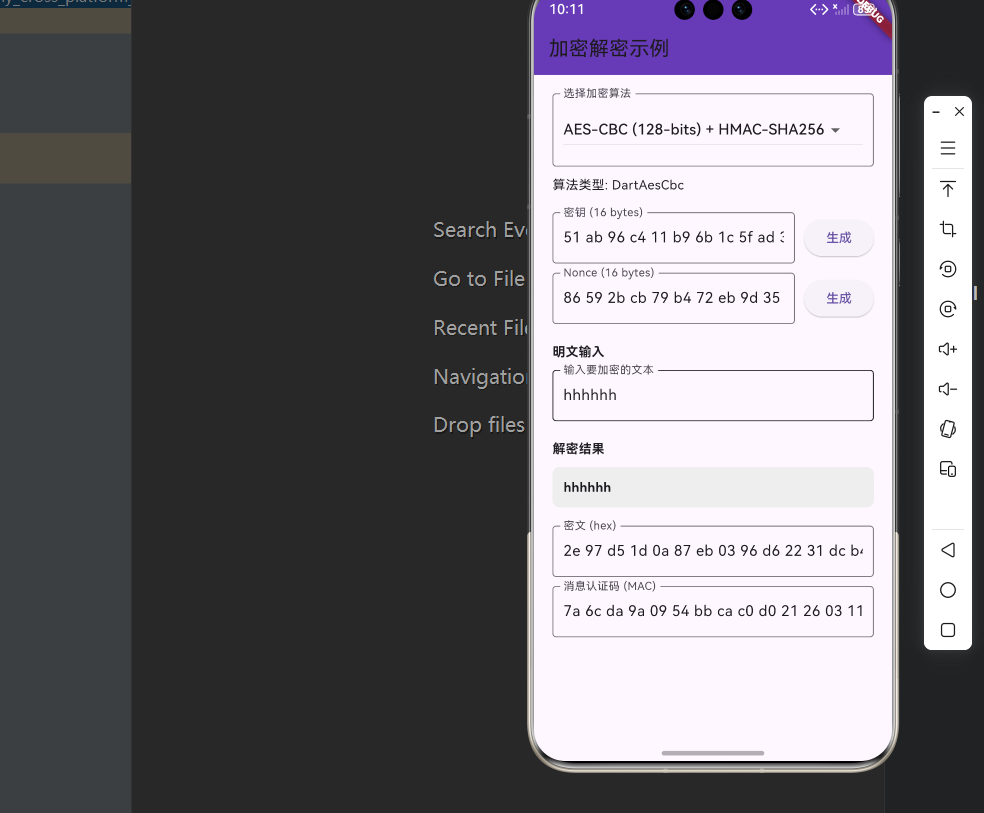
下面是一个完整的加密解密示例应用:
import 'dart:convert';
import 'package:cryptography/cryptography.dart';
import 'package:flutter/material.dart';
void main() {
runApp(const MaterialApp(
title: 'Cryptography demo',
home: CipherPage(),
));
}
class CipherPage extends StatefulWidget {
const CipherPage({Key? key}) : super(key: key);
State<StatefulWidget> createState() {
return _CipherPageState();
}
}
class _CipherPageState extends State<CipherPage> {
// 支持的加密算法
static final _aesCbc128 = AesCbc.with128bits(macAlgorithm: Hmac.sha256());
static final _aesCtr128 = AesCtr.with128bits(macAlgorithm: Hmac.sha256());
static final _aesGcm128 = AesGcm.with128bits();
static final _aesGcm256 = AesGcm.with256bits();
static final _chacha20Poly1305 = Chacha20.poly1305Aead();
static final _xchacha20Poly1305 = Xchacha20.poly1305Aead();
Cipher _cipher = _aesGcm128;
final _secretKeyController = TextEditingController();
final _nonceController = TextEditingController();
final _plaintextController = TextEditingController();
final _cipherTextController = TextEditingController();
final _macController = TextEditingController();
Object? _error;
String _decryptedText = '';
Widget build(BuildContext context) {
final error = _error;
final cipher = _cipher;
return Scaffold(
appBar: AppBar(
title: const Text('加密解密示例'),
backgroundColor: Colors.deepPurple,
),
body: SafeArea(
child: Center(
child: Container(
constraints: const BoxConstraints(maxWidth: 500),
padding: const EdgeInsets.all(20),
child: ListView(
children: [
// 加密算法选择
InputDecorator(
decoration: const InputDecoration(
labelText: '选择加密算法',
border: OutlineInputBorder(),
),
child: DropdownButton<Cipher>(
value: _cipher,
onChanged: (newValue) {
setState(() {
_cipher = newValue ?? _aesGcm128;
_encrypt();
});
},
items: [
DropdownMenuItem(
value: _aesCbc128,
child: const Text('AES-CBC (128-bits) + HMAC-SHA256'),
),
DropdownMenuItem(
value: _aesCtr128,
child: const Text('AES-CTR (128-bits) + HMAC-SHA256'),
),
DropdownMenuItem(
value: _aesGcm128,
child: const Text('AES-GCM (128-bits)'),
),
DropdownMenuItem(
value: _aesGcm256,
child: const Text('AES-GCM (256-bits)'),
),
DropdownMenuItem(
value: _chacha20Poly1305,
child: const Text('ChaCha20 + Poly1305'),
),
DropdownMenuItem(
value: _xchacha20Poly1305,
child: const Text('XChaCha20 + Poly1305'),
),
],
),
),
const SizedBox(height: 10),
Text('算法类型: ${cipher.runtimeType}'),
const SizedBox(height: 20),
// 密钥输入
Row(children: [
Expanded(
child: TextField(
controller: _secretKeyController,
onChanged: (value) {
_encrypt();
},
decoration: InputDecoration(
labelText: '密钥 (${_cipher.secretKeyLength} bytes)',
border: const OutlineInputBorder(),
),
),
),
const SizedBox(width: 10),
ElevatedButton(
onPressed: () async {
final secretKey = await _cipher.newSecretKey();
final bytes = await secretKey.extractBytes();
_secretKeyController.text = _toHex(bytes);
await _encrypt();
},
child: const Text('生成'),
),
]),
const SizedBox(height: 10),
// Nonce 输入
Row(children: [
Expanded(
child: TextField(
controller: _nonceController,
onChanged: (value) {
_encrypt();
},
decoration: InputDecoration(
labelText: 'Nonce (${_cipher.nonceLength} bytes)',
border: const OutlineInputBorder(),
),
),
),
const SizedBox(width: 10),
ElevatedButton(
onPressed: () async {
_nonceController.text = _toHex(_cipher.newNonce());
await _encrypt();
},
child: const Text('生成'),
),
]),
const SizedBox(height: 20),
// 明文输入
const Text('明文输入', style: TextStyle(fontWeight: FontWeight.bold)),
const SizedBox(height: 10),
TextField(
controller: _plaintextController,
onChanged: (newValue) {
try {
final clearText = utf8.encode(newValue);
_encryptWithText(clearText);
} catch (error) {
setState(() {
_error = error;
});
}
},
decoration: const InputDecoration(
labelText: '输入要加密的文本',
border: OutlineInputBorder(),
),
),
const SizedBox(height: 20),
// 解密结果
const Text('解密结果', style: TextStyle(fontWeight: FontWeight.bold)),
const SizedBox(height: 10),
Container(
padding: const EdgeInsets.all(12),
decoration: BoxDecoration(
color: Colors.grey.shade200,
borderRadius: BorderRadius.circular(8),
),
child: Text(
_decryptedText,
style: const TextStyle(fontWeight: FontWeight.bold),
),
),
const SizedBox(height: 20),
// 密文输出
TextField(
controller: _cipherTextController,
readOnly: true,
decoration: const InputDecoration(
labelText: '密文 (hex)',
border: OutlineInputBorder(),
),
),
const SizedBox(height: 10),
// MAC 输出
TextField(
controller: _macController,
readOnly: true,
decoration: const InputDecoration(
labelText: '消息认证码 (MAC)',
border: OutlineInputBorder(),
),
),
const SizedBox(height: 10),
// 错误信息
if (error != null)
Container(
padding: const EdgeInsets.all(10),
decoration: BoxDecoration(
color: Colors.red.shade100,
borderRadius: BorderRadius.circular(8),
),
child: Text(
error.toString(),
style: const TextStyle(color: Colors.red),
),
),
],
),
),
),
),
);
}
Future<void> _encryptWithText(List<int> clearText) async {
try {
final cipher = _cipher;
final secretBox = await cipher.encrypt(
clearText,
secretKey: SecretKeyData(
_fromHex(_secretKeyController.text),
),
nonce: _fromHex(_nonceController.text),
);
_cipherTextController.text = _toHex(secretBox.cipherText);
_macController.text = _toHex(secretBox.mac.bytes);
_decrypt();
setState(() {
_error = null;
});
} catch (error, stackTrace) {
setState(() {
_error = '$error\n\n$stackTrace';
_cipherTextController.text = '';
_macController.text = '';
});
}
}
Future<void> _encrypt() async {
final plaintext = _plaintextController.text;
if (plaintext.isEmpty) return;
_encryptWithText(utf8.encode(plaintext));
}
Future<void> _decrypt() async {
final cipher = _cipher;
_decryptedText = utf8.decode(await cipher.decrypt(
SecretBox(
_fromHex(_cipherTextController.text),
nonce: _fromHex(_nonceController.text),
mac: Mac(_fromHex(_macController.text)),
),
secretKey: SecretKeyData(
_fromHex(_secretKeyController.text),
),
));
}
List<int> _fromHex(String s) {
s = s.replaceAll(' ', '').replaceAll('\n', '');
return List<int>.generate(s.length ~/ 2, (i) {
var byteInHex = s.substring(2 * i, 2 * i + 2);
if (byteInHex.startsWith('0')) {
byteInHex = byteInHex.substring(1);
}
final result = int.tryParse(byteInHex, radix: 16);
if (result == null) {
throw StateError('Not valid hexadecimal bytes: $s');
}
return result;
});
}
String _toHex(List<int> bytes) {
return bytes.map((e) => e.toRadixString(16).padLeft(2, '0')).join(' ');
}
}
八、API 参考
8.1 对称加密
| 算法 | 类名 | 创建方法 |
|---|---|---|
| AES-CBC | AesCbc | AesCbc.with128bits() |
| AES-CTR | AesCtr | AesCtr.with128bits() |
| AES-GCM | AesGcm | AesGcm.with256bits() |
| ChaCha20 | Chacha20 | Chacha20.poly1305Aead() |
| XChaCha20 | Xchacha20 | Xchacha20.poly1305Aead() |
8.2 数字签名
| 算法 | 类名 | 创建方法 |
|---|---|---|
| ECDSA | Ecdsa | Ecdsa.p384(Sha256()) |
8.3 密钥交换
| 算法 | 类名 | 创建方法 |
|---|---|---|
| ECDH | Ecdh | Ecdh.p384(length: 16) |
8.4 密钥派生
| 算法 | 类名 | 创建方法 |
|---|---|---|
| PBKDF2 | Pbkdf2 | Pbkdf2(macAlgorithm: Hmac.sha256()) |
九、常见问题与解决方案
9.1 密钥长度错误
问题描述:加密时提示密钥长度错误。
解决方案:确保密钥长度正确,使用 algorithm.newSecretKey() 生成正确长度的密钥。
9.2 解密失败
问题描述:解密时抛出异常。
可能原因:
- 密钥不正确
- Nonce 不匹配
- 数据被篡改
解决方案:检查密钥和 Nonce 是否正确,确保数据完整性。
十、总结
本文详细介绍了 Flutter for OpenHarmony 中 cryptography_flutter 加密解密库的使用方法,包括:
- 基础概念:cryptography_flutter 的特点、支持的加密算法
- 平台适配:依赖配置、工作原理
- 项目配置:依赖添加
- 核心功能:对称加密、数字签名、密钥交换、密钥派生
- 实际应用:完整的加密解密示例
- API 参考:各类算法的创建方法
cryptography_flutter 是一个功能完整的加密解密库,适合需要数据安全保护的应用。在 OpenHarmony 平台上,它通过原生实现提供了优异的性能表现。
十一、参考资料
📌 提示:本文基于 cryptography@2.5.0 和 cryptography_flutter OpenHarmony 适配版本编写。

开源鸿蒙跨平台开发社区汇聚开发者与厂商,共建“一次开发,多端部署”的开源生态,致力于降低跨端开发门槛,推动万物智联创新。
更多推荐
 31
31 0
0- 0


 已为社区贡献57条内容

所有评论(0)