Flutter for Harmony 跨平台开发实战:希尔伯特曲线——空间填充的无限递归
1891年,德国数学家大卫·希尔伯特(David Hilbert)发现了一种能够填满整个平面的曲线,这就是著名的希尔伯特曲线。它是空间填充曲线家族中最具代表性的成员之一。历史背景:核心悖论:希尔伯特曲线示意:📐 1.2 递归构造原理希尔伯特曲线通过递归方式构造,每一阶都是前一阶的变换组合:递归规则:数学描述:坐标映射:🔬 1.3 希尔伯特曲线的性质数学性质:分形维度:局部性分析:🎯 1.4
·
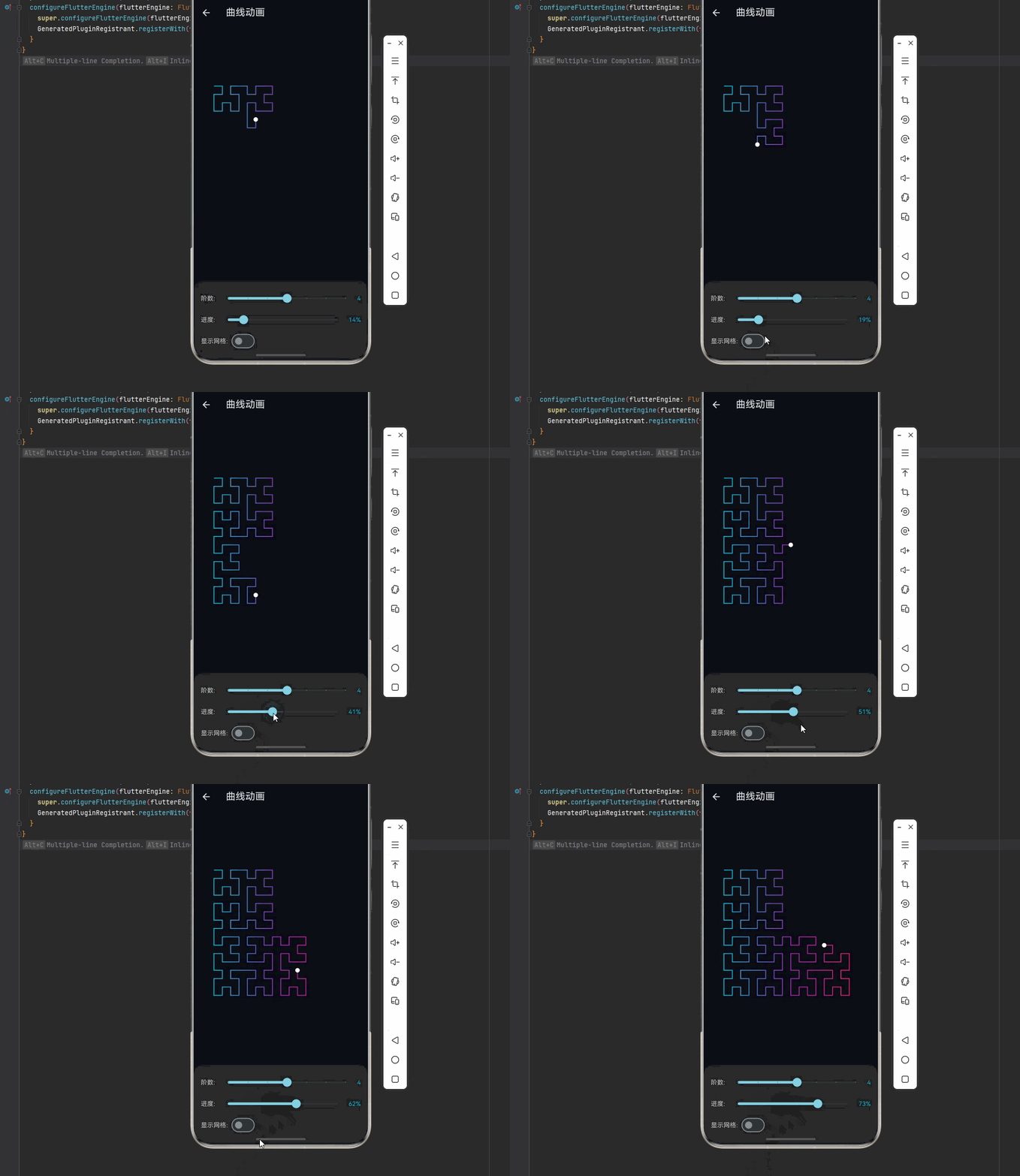
欢迎加入开源鸿蒙跨平台社区:https://openharmonycrossplatform.csdn.net
🌀 一、希尔伯特曲线:数学之美
📚 1.1 空间填充曲线的发现
1891年,德国数学家大卫·希尔伯特(David Hilbert)发现了一种能够填满整个平面的曲线,这就是著名的希尔伯特曲线。它是空间填充曲线家族中最具代表性的成员之一。
历史背景:
1879年:康托尔证明实数集与单位区间等势
1890年:皮亚诺首次发现空间填充曲线
1891年:希尔伯特提出更直观的希尔伯特曲线
1938年:Peano 曲线被证明连续但不可微
现代:广泛应用于计算机图形学、数据结构
核心悖论:
直觉:曲线是一维的(长度),平面是二维的(面积)
悖论:存在一条曲线可以"填满"整个平面

解决:
- 曲线的极限是平面
- 曲线本身无限长
- 维度在极限过程中"升维"
希尔伯特曲线示意:
第1阶:        第2阶:         第3阶:
┌──┐          ┌┐┌┐           ┌┐┌┐┌┐┌┐
│  │          ││││           ││││││││
└──┘          └┘└┘           └┘└┘└┘└┘
              ┌┐┌┐           ┌┐┌┐┌┐┌┐
              ││││           ││││││││
              └┘└┘           └┘└┘└┘└┘
                             ┌┐┌┐┌┐┌┐
                             ││││││││
                             └┘└┘└┘└┘
                             ┌┐┌┐┌┐┌┐
                             ││││││││
                             └┘└┘└┘└┘

每增加一阶,曲线覆盖更细密的网格
📐 1.2 递归构造原理
希尔伯特曲线通过递归方式构造,每一阶都是前一阶的变换组合:
递归规则:
H(n) 由 4 个 H(n-1) 组成,经过旋转和连接:

    ┌───┐       ┌─┐   ┌─┐
    │ 1 │       │A│   │B│
    │   │  →    │ └─┬─┘ │
    │ 2 │       │ ┌─┐  │
    └───┘       │D│ │C │
                └─┘ └──┘

A: H(n-1) 逆时针旋转90°
B: H(n-1) 不变
C: H(n-1) 不变
D: H(n-1) 顺时针旋转90°
数学描述:
设 H_n 为第 n 阶希尔伯特曲线,则:

H_1: 基本形状(U形)
H_n = L(H_{n-1}) + ─ + H_{n-1} + │ + H_{n-1} + ─ + R(H_{n-1})

其中:
- L: 逆时针旋转90°
- R: 顺时针旋转90°
- ─, │: 连接线段
坐标映射:
希尔伯特曲线建立了从 [0, 1] 到 [0,1]² 的连续映射

一维索引 d ∈ [0, 1] → 二维坐标 (x, y) ∈ [0,1]²

性质:
- 连续性:相邻的 d 映射到相邻的 (x, y)
- 局部性:空间上接近的点在曲线上也接近
- 稠密性:曲线经过单位正方形内的每一点
🔬 1.3 希尔伯特曲线的性质
数学性质:
| 性质 | 描述 | 意义 |
|---|---|---|
| 连续性 | 曲线无断点 | 可用一笔画完 |
| 不可微 | 处处不可导 | 无切线方向 |
| 自相似 | 各部分与整体相似 | 分形特征 |
| 无限长 | 长度 = 2ⁿ - 1/2ⁿ | n→∞ 时发散 |
| 零面积 | 极限前面积为0 | 曲线不"占"面积 |
| 满射 | 覆盖整个正方形 | 空间填充 |
分形维度:
Hausdorff 维度:D = 2

计算:
- 每阶分成 4 个自相似部分
- 每部分边长为 1/2
- D = log(4) / log(2) = 2

意义:希尔伯特曲线的"维度"是2
它"填满"了二维空间
局部性分析:
一维距离 d₁ 和 d₂
二维距离 √((x₁-x₂)² + (y₁-y₂)²)

局部性保证:
如果 |d₁ - d₂| < 1/4ⁿ
则 √((x₁-x₂)² + (y₁-y₂)²) < 1/2ⁿ

应用价值:
- 数据库索引优化
- 图像压缩
- 空间数据结构
🎯 1.4 空间填充曲线家族
希尔伯特曲线是空间填充曲线家族的重要成员:
| 曲线名称 | 发现者 | 特点 |
|---|---|---|
| 🌀 希尔伯特曲线 | Hilbert (1891) | 最直观,递归构造 |
| 📊 皮亚诺曲线 | Peano (1890) | 首个空间填充曲线 |
| 🔄 高斯帕曲线 | Gosper (1970s) | 六边形网格填充 |
| ⚡ Z阶曲线 | Morton (1966) | 计算简单,位操作 |
| 🔷 谢尔宾斯基曲线 | Sierpiński (1915) | 三角形填充 |
| 🌊 龙曲线 | Heighway (1966) | 折叠构造 |
曲线对比:
希尔伯特曲线:        Z阶曲线:         皮亚诺曲线:
┌┐┌┐┌┐┌┐            ┌┬┬┬┐           ┌─┬─┬─┐
││││││││            │││││           │ │ │ │
└┘└┘└┘└┘            ├┼┼┼┤           ├─┼─┼─┤
┌┐┌┐┌┐┌┐            │││││           │ │ │ │
││││││││            ├┼┼┼┤           ├─┼─┼─┤
└┘└┘└┘└┘            │││││           │ │ │ │
┌┐┌┐┌┐┌┐            ├┼┼┼┤           ├─┼─┼─┤
││││││││            │││││           │ │ │ │
└┘└┘└┘└┘            └┴┴┴┴┘           └─┴─┴─┘

连续性好            计算快            填充密度高
局部性优            局部性差          连续性好
🔧 二、希尔伯特曲线的 Dart 实现
🧮 2.1 递归生成算法
import 'dart:math';

/// 希尔伯特曲线生成器
class HilbertCurve {
  final int order;
  final int size;

  late List<Point<int>> _points;

  HilbertCurve({required this.order, this.size = 1}) {
    _points = _generate();
  }

  /// 生成曲线点序列
  List<Point<int>> _generate() {
    final points = <Point<int>>[];
    final n = pow(2, order).toInt();

    for (int i = 0; i < n * n; i++) {
      final point = _indexToPoint(i, n);
      points.add(Point(point.x * size, point.y * size));
    }

    return points;
  }

  /// 将一维索引映射到二维坐标
  Point<int> _indexToPoint(int index, int n) {
    int x = 0, y = 0;
    int s = 1;

    while (s < n) {
      final rx = (index >> 1) & 1;
      final ry = (index ^ rx) & 1;

      if (ry == 0) {
        if (rx == 1) {
          x = s - 1 - x;
          y = s - 1 - y;
        }
        final temp = x;
        x = y;
        y = temp;
      }

      x += s * rx;
      y += s * ry;

      index >>= 2;
      s <<= 1;
    }

    return Point(x, y);
  }

  /// 将二维坐标映射到一维索引
  int pointToIndex(int x, int y) {
    int index = 0;
    int n = pow(2, order).toInt();

    for (int s = n ~/ 2; s > 0; s ~/= 2) {
      int rx = (x & s) > 0 ? 1 : 0;
      int ry = (y & s) > 0 ? 1 : 0;

      index += s * s * ((3 * rx) ^ ry);

      if (ry == 0) {
        if (rx == 1) {
          x = s - 1 - x;
          y = s - 1 - y;
        }
        final temp = x;
        x = y;
        y = temp;
      }
    }

    return index;
  }

  /// 获取点序列
  List<Point<int>> get points => _points;

  /// 获取路径
  Path toPath(Offset origin, double scale) {
    final path = Path();

    for (int i = 0; i < _points.length; i++) {
      final x = origin.dx + _points[i].x * scale;
      final y = origin.dy + _points[i].y * scale;

      if (i == 0) {
        path.moveTo(x, y);
      } else {
        path.lineTo(x, y);
      }
    }

    return path;
  }

  /// 获取网格大小
  int get gridSize => pow(2, order).toInt();

  /// 获取曲线长度
  int get length => _points.length - 1;
}

/// 希尔伯特曲线方向
enum HilbertDirection {
  up,
  right,
  down,
  left,
}

/// 希尔伯特曲线绘制器
class HilbertCurvePainter {
  final int order;
  final double cellSize;

  HilbertCurvePainter({
    required this.order,
    this.cellSize = 10.0,
  });

  /// 递归生成路径
  Path generatePath(Offset start) {
    final path = Path();
    path.moveTo(start.dx, start.dy);

    _drawHilbert(path, order, start, cellSize, HilbertDirection.up);

    return path;
  }

  void _drawHilbert(
    Path path,
    int level,
    Offset pos,
    double size,
    HilbertDirection dir,
  ) {
    if (level == 0) return;

    final halfSize = size / 2;

    // 根据方向调整绘制顺序
    switch (dir) {
      case HilbertDirection.up:
        _drawHilbert(path, level - 1, pos, halfSize, HilbertDirection.right);
        _drawLine(path, pos, 0, halfSize);
        _drawHilbert(path, level - 1, Offset(pos.dx, pos.dy + halfSize), halfSize, HilbertDirection.up);
        _drawLine(path, Offset(pos.dx, pos.dy + halfSize), halfSize, 0);
        _drawHilbert(path, level - 1, Offset(pos.dx + halfSize, pos.dy + halfSize), halfSize, HilbertDirection.up);
        _drawLine(path, Offset(pos.dx + halfSize, pos.dy + halfSize), 0, -halfSize);
        _drawHilbert(path, level - 1, Offset(pos.dx + halfSize, pos.dy), halfSize, HilbertDirection.left);
        break;
      case HilbertDirection.right:
        _drawHilbert(path, level - 1, pos, halfSize, HilbertDirection.up);
        _drawLine(path, pos, halfSize, 0);
        _drawHilbert(path, level - 1, Offset(pos.dx + halfSize, pos.dy), halfSize, HilbertDirection.right);
        _drawLine(path, Offset(pos.dx + halfSize, pos.dy), 0, halfSize);
        _drawHilbert(path, level - 1, Offset(pos.dx + halfSize, pos.dy + halfSize), halfSize, HilbertDirection.right);
        _drawLine(path, Offset(pos.dx + halfSize, pos.dy + halfSize), -halfSize, 0);
        _drawHilbert(path, level - 1, Offset(pos.dx, pos.dy + halfSize), halfSize, HilbertDirection.down);
        break;
      case HilbertDirection.down:
        _drawHilbert(path, level - 1, pos, halfSize, HilbertDirection.left);
        _drawLine(path, pos, 0, -halfSize);
        _drawHilbert(path, level - 1, Offset(pos.dx, pos.dy - halfSize), halfSize, HilbertDirection.down);
        _drawLine(path, Offset(pos.dx, pos.dy - halfSize), -halfSize, 0);
        _drawHilbert(path, level - 1, Offset(pos.dx - halfSize, pos.dy - halfSize), halfSize, HilbertDirection.down);
        _drawLine(path, Offset(pos.dx - halfSize, pos.dy - halfSize), 0, halfSize);
        _drawHilbert(path, level - 1, Offset(pos.dx - halfSize, pos.dy), halfSize, HilbertDirection.right);
        break;
      case HilbertDirection.left:
        _drawHilbert(path, level - 1, pos, halfSize, HilbertDirection.down);
        _drawLine(path, pos, -halfSize, 0);
        _drawHilbert(path, level - 1, Offset(pos.dx - halfSize, pos.dy), halfSize, HilbertDirection.left);
        _drawLine(path, Offset(pos.dx - halfSize, pos.dy), 0, -halfSize);
        _drawHilbert(path, level - 1, Offset(pos.dx - halfSize, pos.dy - halfSize), halfSize, HilbertDirection.left);
        _drawLine(path, Offset(pos.dx - halfSize, pos.dy - halfSize), halfSize, 0);
        _drawHilbert(path, level - 1, Offset(pos.dx, pos.dy - halfSize), halfSize, HilbertDirection.up);
        break;
    }
  }

  void _drawLine(Path path, Offset start, double dx, double dy) {
    path.lineTo(start.dx + dx, start.dy + dy);
  }
}
⚡ 2.2 高效编码算法
/// 高效的希尔伯特编码器
class HilbertEncoder {
  /// 将二维坐标编码为希尔伯特索引
  static int encode(int x, int y, int order) {
    int index = 0;
    int s = 1 << (order - 1);

    for (int i = 0; i < order; i++) {
      int rx = (x & s) > 0 ? 1 : 0;
      int ry = (y & s) > 0 ? 1 : 0;

      index += s * s * ((3 * rx) ^ ry);

      _rotate(s, x, y, rx, ry);

      s >>= 1;
    }

    return index;
  }

  /// 将希尔伯特索引解码为二维坐标
  static Point<int> decode(int index, int order) {
    int x = 0, y = 0;
    int s = 1;

    for (int i = 0; i < order; i++) {
      int rx = (index >> 1) & 1;
      int ry = (index ^ rx) & 1;

      _rotate(s, x, y, rx, ry);

      x += s * rx;
      y += s * ry;

      index >>= 2;
      s <<= 1;
    }

    return Point(x, y);
  }

  /// 旋转坐标
  static void _rotate(int n, int x, int y, int rx, int ry) {
    if (ry == 0) {
      if (rx == 1) {
        x = n - 1 - x;
        y = n - 1 - y;
      }
      // 交换 x 和 y
      // 注意:这里需要返回修改后的值
    }
  }

  /// 批量编码
  static List<int> encodeBatch(List<Point<int>> points, int order) {
    return points.map((p) => encode(p.x, p.y, order)).toList();
  }

  /// 批量解码
  static List<Point<int>> decodeBatch(List<int> indices, int order) {
    return indices.map((i) => decode(i, order)).toList();
  }
}

/// 希尔伯特空间索引
class HilbertSpatialIndex {
  final int order;
  final int gridSize;
  final Map<int, List<dynamic>> _index = {};

  HilbertSpatialIndex(this.order) : gridSize = 1 << order;

  /// 插入数据
  void insert(int x, int y, dynamic data) {
    final index = HilbertEncoder.encode(x, y, order);
    _index.putIfAbsent(index, () => []).add(data);
  }

  /// 范围查询
  List<dynamic> rangeQuery(int x1, int y1, int x2, int y2) {
    final results = <dynamic>[];

    for (int x = x1; x <= x2; x++) {
      for (int y = y1; y <= y2; y++) {
        if (x >= 0 && x < gridSize && y >= 0 && y < gridSize) {
          final index = HilbertEncoder.encode(x, y, order);
          if (_index.containsKey(index)) {
            results.addAll(_index[index]!);
          }
        }
      }
    }

    return results;
  }

  /// 最近邻查询
  List<dynamic> nearestNeighbors(int x, int y, int k) {
    final centerIndex = HilbertEncoder.encode(x, y, order);
    final results = <dynamic>[];

    // 在希尔伯特曲线上向两边扩展
    for (int offset = 0; offset < gridSize * gridSize && results.length < k; offset++) {
      final left = centerIndex - offset;
      final right = centerIndex + offset;

      if (left >= 0 && _index.containsKey(left)) {
        results.addAll(_index[left]!);
      }
      if (right < gridSize * gridSize && _index.containsKey(right)) {
        results.addAll(_index[right]!);
      }
    }

    return results.take(k).toList();
  }
}
🎨 2.3 动画控制器
import 'package:flutter/material.dart';

/// 希尔伯特曲线动画控制器
class HilbertAnimationController extends ChangeNotifier {
  int _order = 4;
  double _progress = 0.0;
  double _animationSpeed = 1.0;
  bool _isAnimating = true;
  bool _showGrid = false;
  bool _showNumbers = false;
  Color _curveColor = Colors.cyan;
  double _lineWidth = 2.0;

  late HilbertCurve _curve;
  late List<Point<int>> _points;

  HilbertAnimationController() {
    _updateCurve();
  }

  int get order => _order;
  double get progress => _progress;
  double get animationSpeed => _animationSpeed;
  bool get isAnimating => _isAnimating;
  bool get showGrid => _showGrid;
  bool get showNumbers => _showNumbers;
  Color get curveColor => _curveColor;
  double get lineWidth => _lineWidth;
  HilbertCurve get curve => _curve;
  List<Point<int>> get points => _points;

  void _updateCurve() {
    _curve = HilbertCurve(order: _order);
    _points = _curve.points;
  }

  void update(double dt) {
    if (_isAnimating) {
      _progress += dt * _animationSpeed * 0.5;
      if (_progress > 1.0) _progress = 0.0;
      notifyListeners();
    }
  }

  void setOrder(int value) {
    _order = value.clamp(1, 8);
    _progress = 0.0;
    _updateCurve();
    notifyListeners();
  }

  void setProgress(double value) {
    _progress = value.clamp(0.0, 1.0);
    notifyListeners();
  }

  void setAnimationSpeed(double value) {
    _animationSpeed = value.clamp(0.1, 5.0);
    notifyListeners();
  }

  void toggleAnimation() {
    _isAnimating = !_isAnimating;
    notifyListeners();
  }

  void toggleGrid() {
    _showGrid = !_showGrid;
    notifyListeners();
  }

  void toggleNumbers() {
    _showNumbers = !_showNumbers;
    notifyListeners();
  }

  void setCurveColor(Color color) {
    _curveColor = color;
    notifyListeners();
  }

  void setLineWidth(double width) {
    _lineWidth = width.clamp(0.5, 5.0);
    notifyListeners();
  }

  void reset() {
    _progress = 0.0;
    notifyListeners();
  }
}
📦 三、完整示例代码
以下是完整的希尔伯特曲线可视化示例代码:
import 'package:flutter/material.dart';
import 'dart:math';
void main() {
runApp(const HilbertApp());
}
class HilbertApp extends StatelessWidget {
const HilbertApp({super.key});
Widget build(BuildContext context) {
return MaterialApp(
title: '希尔伯特曲线',
theme: ThemeData(
colorScheme: ColorScheme.fromSeed(seedColor: Colors.cyan, brightness: Brightness.dark),
useMaterial3: true,
),
home: const HilbertHomePage(),
debugShowCheckedModeBanner: false,
);
}
}
class HilbertHomePage extends StatelessWidget {
const HilbertHomePage({super.key});
Widget build(BuildContext context) {
return Scaffold(
appBar: AppBar(
title: const Text('🌀 希尔伯特曲线'),
backgroundColor: Theme.of(context).colorScheme.inversePrimary,
),
body: ListView(
padding: const EdgeInsets.all(16),
children: [
_buildCard(
context,
title: '曲线动画',
description: '递归生成过程可视化',
icon: Icons.animation,
color: Colors.cyan,
onTap: () => Navigator.push(
context,
MaterialPageRoute(builder: (_) => const HilbertAnimationDemo()),
),
),
_buildCard(
context,
title: '阶数对比',
description: '不同阶数的曲线形态',
icon: Icons.compare,
color: Colors.purple,
onTap: () => Navigator.push(
context,
MaterialPageRoute(builder: (_) => const OrderComparisonDemo()),
),
),
_buildCard(
context,
title: '空间映射',
description: '一维到二维的映射演示',
icon: Icons.map,
color: Colors.orange,
onTap: () => Navigator.push(
context,
MaterialPageRoute(builder: (_) => const SpatialMappingDemo()),
),
),
_buildCard(
context,
title: '曲线家族',
description: '多种空间填充曲线对比',
icon: Icons.family_restroom,
color: Colors.teal,
onTap: () => Navigator.push(
context,
MaterialPageRoute(builder: (_) => const CurveFamilyDemo()),
),
),
],
),
);
}
Widget _buildCard(
BuildContext context, {
required String title,
required String description,
required IconData icon,
required Color color,
required VoidCallback onTap,
}) {
return Card(
margin: const EdgeInsets.only(bottom: 12),
shape: RoundedRectangleBorder(borderRadius: BorderRadius.circular(16)),
child: InkWell(
onTap: onTap,
borderRadius: BorderRadius.circular(16),
child: Padding(
padding: const EdgeInsets.all(16),
child: Row(
children: [
Container(
width: 56,
height: 56,
decoration: BoxDecoration(
color: color.withOpacity(0.1),
borderRadius: BorderRadius.circular(12),
),
child: Icon(icon, color: color, size: 28),
),
const SizedBox(width: 16),
Expanded(
child: Column(
crossAxisAlignment: CrossAxisAlignment.start,
children: [
Text(title, style: const TextStyle(fontSize: 16, fontWeight: FontWeight.bold)),
const SizedBox(height: 4),
Text(description, style: TextStyle(color: Colors.grey[600], fontSize: 14)),
],
),
),
Icon(Icons.chevron_right, color: Colors.grey[400]),
],
),
),
),
);
}
}
/// 希尔伯特曲线生成器
class HilbertGenerator {
static List<Offset> generate(int order, double size) {
final points = <Offset>[];
final n = 1 << order;
final cellSize = size / n;
for (int i = 0; i < n * n; i++) {
final point = _indexToPoint(i, n);
points.add(Offset(point.dx * cellSize, point.dy * cellSize));
}
return points;
}
static Offset _indexToPoint(int index, int n) {
double x = 0, y = 0;
int s = 1;
while (s < n) {
final rx = (index >> 1) & 1;
final ry = (index ^ rx) & 1;
if (ry == 0) {
if (rx == 1) {
x = s - 1 - x;
y = s - 1 - y;
}
final temp = x;
x = y;
y = temp;
}
x += s * rx;
y += s * ry;
index >>= 2;
s <<= 1;
}
return Offset(x, y);
}
static int pointToIndex(int x, int y, int order) {
int index = 0;
int n = 1 << order;
for (int s = n >> 1; s > 0; s >>= 1) {
int rx = (x & s) > 0 ? 1 : 0;
int ry = (y & s) > 0 ? 1 : 0;
index += s * s * ((3 * rx) ^ ry);
if (ry == 0) {
if (rx == 1) {
x = s - 1 - x;
y = s - 1 - y;
}
final temp = x;
x = y;
y = temp;
}
}
return index;
}
}
/// 曲线动画演示
class HilbertAnimationDemo extends StatefulWidget {
const HilbertAnimationDemo({super.key});
State<HilbertAnimationDemo> createState() => _HilbertAnimationDemoState();
}
class _HilbertAnimationDemoState extends State<HilbertAnimationDemo> with SingleTickerProviderStateMixin {
late AnimationController _ctrl;
int _order = 4;
double _progress = 0.0;
bool _showGrid = false;
double _time = 0;
void initState() {
super.initState();
_ctrl = AnimationController(vsync: this, duration: const Duration(milliseconds: 16))..repeat();
_ctrl.addListener(_update);
}
void _update() {
_time += 0.016;
_progress += 0.003;
if (_progress > 1.0) _progress = 0.0;
setState(() {});
}
void dispose() {
_ctrl.removeListener(_update);
_ctrl.dispose();
super.dispose();
}
Widget build(BuildContext context) {
return Scaffold(
appBar: AppBar(title: const Text('曲线动画')),
body: Column(
children: [
Expanded(child: Center(child: CustomPaint(
painter: HilbertPainter(_order, _progress, _showGrid, _time),
size: const Size(300, 300),
))),
_buildControls(),
],
),
);
}
Widget _buildControls() {
return Container(
padding: const EdgeInsets.all(16),
decoration: BoxDecoration(color: Colors.grey[900], borderRadius: const BorderRadius.vertical(top: Radius.circular(20))),
child: Column(mainAxisSize: MainAxisSize.min, children: [
Row(children: [
const Text('阶数: ', style: TextStyle(color: Colors.white70)),
Expanded(child: Slider(value: _order.toDouble(), min: 1, max: 7, divisions: 6, onChanged: (v) => setState(() { _order = v.toInt(); _progress = 0; }))),
Text('$_order', style: const TextStyle(color: Colors.cyan)),
]),
Row(children: [
const Text('进度: ', style: TextStyle(color: Colors.white70)),
Expanded(child: Slider(value: _progress, min: 0, max: 1, onChanged: (v) => setState(() => _progress = v))),
Text('${(_progress * 100).toStringAsFixed(0)}%', style: const TextStyle(color: Colors.cyan)),
]),
Row(children: [
const Text('显示网格: ', style: TextStyle(color: Colors.white70)),
Switch(value: _showGrid, onChanged: (v) => setState(() => _showGrid = v)),
]),
]),
);
}
}
class HilbertPainter extends CustomPainter {
final int order;
final double progress;
final bool showGrid;
final double time;
HilbertPainter(this.order, this.progress, this.showGrid, this.time);
void paint(Canvas canvas, Size size) {
final points = HilbertGenerator.generate(order, size.width);
canvas.drawRect(Rect.fromLTWH(0, 0, size.width, size.height), Paint()..color = const Color(0xFF0a0a15));
if (showGrid) _drawGrid(canvas, size);
final drawCount = (points.length * progress).toInt();
if (drawCount > 1) {
final path = Path();
path.moveTo(points[0].dx, points[0].dy);
for (int i = 1; i < drawCount; i++) {
path.lineTo(points[i].dx, points[i].dy);
}
final paint = Paint()
..style = PaintingStyle.stroke
..strokeWidth = 2
..shader = LinearGradient(
colors: [Colors.cyan, Colors.purple, Colors.pink],
).createShader(Rect.fromLTWH(0, 0, size.width, size.height));
canvas.drawPath(path, paint);
}
// 绘制当前点
if (drawCount > 0 && drawCount < points.length) {
final currentPoint = points[drawCount - 1];
canvas.drawCircle(currentPoint, 5, Paint()..color = Colors.white);
}
}
void _drawGrid(Canvas canvas, Size size) {
final n = 1 << order;
final cellSize = size.width / n;
final paint = Paint()..color = Colors.white10..style = PaintingStyle.stroke;
for (int i = 0; i <= n; i++) {
canvas.drawLine(Offset(i * cellSize, 0), Offset(i * cellSize, size.height), paint);
canvas.drawLine(Offset(0, i * cellSize), Offset(size.width, i * cellSize), paint);
}
}
bool shouldRepaint(covariant HilbertPainter old) => true;
}
/// 阶数对比演示
class OrderComparisonDemo extends StatelessWidget {
const OrderComparisonDemo({super.key});
Widget build(BuildContext context) {
return Scaffold(
appBar: AppBar(title: const Text('阶数对比')),
body: GridView.builder(
padding: const EdgeInsets.all(8),
gridDelegate: const SliverGridDelegateWithFixedCrossAxisCount(crossAxisCount: 2, crossAxisSpacing: 8, mainAxisSpacing: 8),
itemCount: 6,
itemBuilder: (ctx, i) {
final order = i + 1;
return Column(children: [
Expanded(child: CustomPaint(painter: StaticHilbertPainter(order), size: Size.infinite)),
Padding(padding: const EdgeInsets.all(8), child: Text('第 $order 阶', style: const TextStyle(fontWeight: FontWeight.bold))),
]);
},
),
);
}
}
class StaticHilbertPainter extends CustomPainter {
final int order;
StaticHilbertPainter(this.order);
void paint(Canvas canvas, Size size) {
final actualSize = min(size.width, size.height);
final offset = Offset((size.width - actualSize) / 2, (size.height - actualSize) / 2);
canvas.save();
canvas.translate(offset.dx, offset.dy);
final points = HilbertGenerator.generate(order, actualSize);
canvas.drawRect(Rect.fromLTWH(0, 0, actualSize, actualSize), Paint()..color = const Color(0xFF0a0a15));
if (points.length > 1) {
final path = Path();
path.moveTo(points[0].dx, points[0].dy);
for (int i = 1; i < points.length; i++) {
path.lineTo(points[i].dx, points[i].dy);
}
final hue = (order - 1) * 60.0;
canvas.drawPath(path, Paint()..color = HSVColor.fromAHSV(1, hue, 0.8, 1).toColor()..style = PaintingStyle.stroke..strokeWidth = 1);
}
canvas.restore();
}
bool shouldRepaint(covariant StaticHilbertPainter old) => false;
}
/// 空间映射演示
class SpatialMappingDemo extends StatefulWidget {
const SpatialMappingDemo({super.key});
State<SpatialMappingDemo> createState() => _SpatialMappingDemoState();
}
class _SpatialMappingDemoState extends State<SpatialMappingDemo> with SingleTickerProviderStateMixin {
late AnimationController _ctrl;
int _order = 4;
int _selectedIndex = 0;
double _time = 0;
void initState() {
super.initState();
_ctrl = AnimationController(vsync: this, duration: const Duration(milliseconds: 16))..repeat();
_ctrl.addListener(_update);
}
void _update() {
_time += 0.016;
final n = (1 << _order) * (1 << _order);
_selectedIndex = ((_time * 100) % n).toInt();
setState(() {});
}
void dispose() {
_ctrl.removeListener(_update);
_ctrl.dispose();
super.dispose();
}
Widget build(BuildContext context) {
final n = 1 << _order;
final point = HilbertGenerator._indexToPoint(_selectedIndex, n);
return Scaffold(
appBar: AppBar(title: const Text('空间映射')),
body: Column(children: [
Expanded(child: Row(children: [
Expanded(child: _build1DView()),
Expanded(child: CustomPaint(painter: MappingPainter(_order, _selectedIndex), size: Size.infinite)),
])),
Padding(
padding: const EdgeInsets.all(16),
child: Text('索引: $_selectedIndex → 坐标: (${point.dx.toInt()}, ${point.dy.toInt()})', style: const TextStyle(fontSize: 16)),
),
]),
);
}
Widget _build1DView() {
return Container(
color: Colors.grey[900],
child: Center(child: Container(
width: 50,
height: 300,
decoration: BoxDecoration(border: Border.all(color: Colors.white30)),
child: CustomPaint(painter: IndexBarPainter(_order, _selectedIndex)),
)),
);
}
}
class MappingPainter extends CustomPainter {
final int order;
final int selectedIndex;
MappingPainter(this.order, this.selectedIndex);
void paint(Canvas canvas, Size size) {
final actualSize = min(size.width, size.height) - 20;
final offset = Offset((size.width - actualSize) / 2, (size.height - actualSize) / 2);
canvas.save();
canvas.translate(offset.dx, offset.dy);
final points = HilbertGenerator.generate(order, actualSize);
final n = 1 << order;
final cellSize = actualSize / n;
canvas.drawRect(Rect.fromLTWH(0, 0, actualSize, actualSize), Paint()..color = const Color(0xFF0a0a15));
// 绘制完整曲线
if (points.length > 1) {
final path = Path();
path.moveTo(points[0].dx, points[0].dy);
for (int i = 1; i < points.length; i++) {
path.lineTo(points[i].dx, points[i].dy);
}
canvas.drawPath(path, Paint()..color = Colors.white24..style = PaintingStyle.stroke..strokeWidth = 1);
}
// 高亮选中点
if (selectedIndex < points.length) {
final point = points[selectedIndex];
canvas.drawCircle(point, 8, Paint()..color = Colors.cyan);
canvas.drawCircle(point, 5, Paint()..color = Colors.white);
}
canvas.restore();
}
bool shouldRepaint(covariant MappingPainter old) => true;
}
class IndexBarPainter extends CustomPainter {
final int order;
final int selectedIndex;
IndexBarPainter(this.order, this.selectedIndex);
void paint(Canvas canvas, Size size) {
final total = (1 << order) * (1 << order);
final barHeight = size.height / total;
for (int i = 0; i < total; i++) {
final y = i * barHeight;
final hue = (i / total) * 360;
canvas.drawRect(
Rect.fromLTWH(0, y, size.width, barHeight + 0.5),
Paint()..color = HSVColor.fromAHSV(i == selectedIndex ? 1 : 0.5, hue, 0.8, 1).toColor(),
);
}
}
bool shouldRepaint(covariant IndexBarPainter old) => true;
}
/// 曲线家族演示
class CurveFamilyDemo extends StatelessWidget {
const CurveFamilyDemo({super.key});
Widget build(BuildContext context) {
return Scaffold(
appBar: AppBar(title: const Text('曲线家族')),
body: GridView.count(
crossAxisCount: 2,
padding: const EdgeInsets.all(8),
childAspectRatio: 1,
children: [
_buildCurveCard(context, '希尔伯特', () => const HilbertCurvePage(), Colors.cyan),
_buildCurveCard(context, 'Z阶曲线', () => const ZOrderCurvePage(), Colors.purple),
_buildCurveCard(context, '皮亚诺', () => const PeanoCurvePage(), Colors.orange),
_buildCurveCard(context, '龙曲线', () => const DragonCurvePage(), Colors.pink),
],
),
);
}
Widget _buildCurveCard(BuildContext context, String title, Widget Function() page, Color color) {
return Card(
margin: const EdgeInsets.all(4),
shape: RoundedRectangleBorder(borderRadius: BorderRadius.circular(12)),
child: InkWell(
onTap: () => Navigator.push(context, MaterialPageRoute(builder: (_) => page())),
borderRadius: BorderRadius.circular(12),
child: Column(
mainAxisAlignment: MainAxisAlignment.center,
children: [
Container(
width: 80, height: 80,
decoration: BoxDecoration(color: color.withOpacity(0.1), borderRadius: BorderRadius.circular(12)),
child: CustomPaint(painter: MiniCurvePainter(title, color), size: const Size(80, 80)),
),
const SizedBox(height: 8),
Text(title, style: const TextStyle(fontWeight: FontWeight.bold)),
],
),
),
);
}
}
class MiniCurvePainter extends CustomPainter {
final String type;
final Color color;
MiniCurvePainter(this.type, this.color);
void paint(Canvas canvas, Size size) {
final paint = Paint()..color = color..strokeWidth = 1.5..style = PaintingStyle.stroke..strokeCap = StrokeCap.round;
final cx = size.width / 2, cy = size.height / 2;
final scale = size.width / 6;
if (type == '希尔伯特') {
final points = _hilbert(3);
final path = Path();
for (int i = 0; i < points.length; i++) {
final x = cx + (points[i].dx - 3.5) * scale / 2;
final y = cy + (points[i].dy - 3.5) * scale / 2;
if (i == 0) path.moveTo(x, y);
else path.lineTo(x, y);
}
canvas.drawPath(path, paint);
} else if (type == 'Z阶曲线') {
final points = _zOrder(3);
final path = Path();
for (int i = 0; i < points.length; i++) {
final x = cx + (points[i].dx - 3.5) * scale / 2;
final y = cy + (points[i].dy - 3.5) * scale / 2;
if (i == 0) path.moveTo(x, y);
else path.lineTo(x, y);
}
canvas.drawPath(path, paint);
} else if (type == '皮亚诺') {
final points = _peano(2);
final path = Path();
for (int i = 0; i < points.length; i++) {
final x = cx + (points[i].dx - 4) * scale / 3;
final y = cy + (points[i].dy - 4) * scale / 3;
if (i == 0) path.moveTo(x, y);
else path.lineTo(x, y);
}
canvas.drawPath(path, paint);
} else if (type == '龙曲线') {
final points = _dragon(8);
final path = Path();
for (int i = 0; i < points.length; i++) {
final x = cx + points[i].dx * scale / 2;
final y = cy + points[i].dy * scale / 2;
if (i == 0) path.moveTo(x, y);
else path.lineTo(x, y);
}
canvas.drawPath(path, paint);
}
}
List<Offset> _hilbert(int n) {
final points = <Offset>[];
final size = 1 << n;
for (int i = 0; i < size * size; i++) {
points.add(_hilbertIndexToPoint(i, size));
}
return points;
}
Offset _hilbertIndexToPoint(int index, int n) {
double x = 0, y = 0;
int s = 1;
while (s < n) {
final rx = (index >> 1) & 1;
final ry = (index ^ rx) & 1;
if (ry == 0) {
if (rx == 1) { x = s - 1 - x; y = s - 1 - y; }
final temp = x; x = y; y = temp;
}
x += s * rx; y += s * ry;
index >>= 2; s <<= 1;
}
return Offset(x, y);
}
List<Offset> _zOrder(int n) {
final points = <Offset>[];
final size = 1 << n;
for (int i = 0; i < size * size; i++) {
int x = 0, y = 0;
for (int j = 0; j < n; j++) {
x |= ((i >> (2 * j)) & 1) << j;
y |= ((i >> (2 * j + 1)) & 1) << j;
}
points.add(Offset(x.toDouble(), y.toDouble()));
}
return points;
}
List<Offset> _peano(int n) {
final points = <Offset>[];
final size = pow(3, n).toInt();
for (int i = 0; i < size * size; i++) {
points.add(_peanoIndexToPoint(i, n));
}
return points;
}
Offset _peanoIndexToPoint(int index, int n) {
double x = 0, y = 0;
int s = 1;
for (int i = 0; i < n; i++) {
final digit = (index ~/ pow(9, i).toInt()) % 9;
final dx = digit % 3;
final dy = digit ~/ 3;
x += s * dx;
y += s * dy;
s *= 3;
}
return Offset(x, y);
}
List<Offset> _dragon(int iterations) {
var points = [Offset.zero, const Offset(1, 0)];
for (int i = 0; i < iterations; i++) {
final newPoints = <Offset>[];
for (int j = 0; j < points.length - 1; j++) {
final p1 = points[j];
final p2 = points[j + 1];
newPoints.add(p1);
final mid = Offset((p1.dx + p2.dx) / 2, (p1.dy + p2.dy) / 2);
final dx = p2.dx - p1.dx;
final dy = p2.dy - p1.dy;
newPoints.add(Offset(mid.dx - dy / 2, mid.dy + dx / 2));
}
newPoints.add(points.last);
points = newPoints;
}
final minx = points.map((p) => p.dx).reduce(min);
final miny = points.map((p) => p.dy).reduce(min);
return points.map((p) => Offset(p.dx - minx - 2, p.dy - miny - 2)).toList();
}
bool shouldRepaint(covariant MiniCurvePainter old) => type != old.type || color != old.color;
}
class HilbertCurvePage extends StatefulWidget {
const HilbertCurvePage({super.key});
State<HilbertCurvePage> createState() => _HilbertCurvePageState();
}
class _HilbertCurvePageState extends State<HilbertCurvePage> {
int _order = 4;
Widget build(BuildContext context) {
return Scaffold(
appBar: AppBar(title: const Text('希尔伯特曲线')),
body: Column(children: [
Expanded(child: CustomPaint(painter: CurveDetailPainter('hilbert', _order), size: Size.infinite)),
_buildControls(),
]),
);
}
Widget _buildControls() {
return Container(
padding: const EdgeInsets.all(16),
decoration: BoxDecoration(color: Colors.grey[900], borderRadius: const BorderRadius.vertical(top: Radius.circular(20))),
child: Row(children: [
const Text('阶数: ', style: TextStyle(color: Colors.white70)),
Expanded(child: Slider(value: _order.toDouble(), min: 1, max: 6, divisions: 5, onChanged: (v) => setState(() => _order = v.toInt()))),
Text('$_order', style: const TextStyle(color: Colors.cyan)),
]),
);
}
}
class ZOrderCurvePage extends StatefulWidget {
const ZOrderCurvePage({super.key});
State<ZOrderCurvePage> createState() => _ZOrderCurvePageState();
}
class _ZOrderCurvePageState extends State<ZOrderCurvePage> {
int _order = 4;
Widget build(BuildContext context) {
return Scaffold(
appBar: AppBar(title: const Text('Z阶曲线')),
body: Column(children: [
Expanded(child: CustomPaint(painter: CurveDetailPainter('zorder', _order), size: Size.infinite)),
_buildControls(),
]),
);
}
Widget _buildControls() {
return Container(
padding: const EdgeInsets.all(16),
decoration: BoxDecoration(color: Colors.grey[900], borderRadius: const BorderRadius.vertical(top: Radius.circular(20))),
child: Row(children: [
const Text('阶数: ', style: TextStyle(color: Colors.white70)),
Expanded(child: Slider(value: _order.toDouble(), min: 1, max: 6, divisions: 5, onChanged: (v) => setState(() => _order = v.toInt()))),
Text('$_order', style: const TextStyle(color: Colors.purple)),
]),
);
}
}
class PeanoCurvePage extends StatefulWidget {
const PeanoCurvePage({super.key});
State<PeanoCurvePage> createState() => _PeanoCurvePageState();
}
class _PeanoCurvePageState extends State<PeanoCurvePage> {
int _order = 2;
Widget build(BuildContext context) {
return Scaffold(
appBar: AppBar(title: const Text('皮亚诺曲线')),
body: Column(children: [
Expanded(child: CustomPaint(painter: CurveDetailPainter('peano', _order), size: Size.infinite)),
_buildControls(),
]),
);
}
Widget _buildControls() {
return Container(
padding: const EdgeInsets.all(16),
decoration: BoxDecoration(color: Colors.grey[900], borderRadius: const BorderRadius.vertical(top: Radius.circular(20))),
child: Row(children: [
const Text('阶数: ', style: TextStyle(color: Colors.white70)),
Expanded(child: Slider(value: _order.toDouble(), min: 1, max: 3, divisions: 2, onChanged: (v) => setState(() => _order = v.toInt()))),
Text('$_order', style: const TextStyle(color: Colors.orange)),
]),
);
}
}
class DragonCurvePage extends StatefulWidget {
const DragonCurvePage({super.key});
State<DragonCurvePage> createState() => _DragonCurvePageState();
}
class _DragonCurvePageState extends State<DragonCurvePage> {
int _iterations = 10;
Widget build(BuildContext context) {
return Scaffold(
appBar: AppBar(title: const Text('龙曲线')),
body: Column(children: [
Expanded(child: CustomPaint(painter: CurveDetailPainter('dragon', _iterations), size: Size.infinite)),
_buildControls(),
]),
);
}
Widget _buildControls() {
return Container(
padding: const EdgeInsets.all(16),
decoration: BoxDecoration(color: Colors.grey[900], borderRadius: const BorderRadius.vertical(top: Radius.circular(20))),
child: Row(children: [
const Text('迭代: ', style: TextStyle(color: Colors.white70)),
Expanded(child: Slider(value: _iterations.toDouble(), min: 1, max: 15, divisions: 14, onChanged: (v) => setState(() => _iterations = v.toInt()))),
Text('$_iterations', style: const TextStyle(color: Colors.pink)),
]),
);
}
}
class CurveDetailPainter extends CustomPainter {
final String type;
final int param;
CurveDetailPainter(this.type, this.param);
void paint(Canvas canvas, Size size) {
canvas.drawRect(Rect.fromLTWH(0, 0, size.width, size.height), Paint()..color = const Color(0xFF0a0a15));
final cx = size.width / 2, cy = size.height / 2;
final scale = min(size.width, size.height) * 0.8;
Color color;
List<Offset> points;
if (type == 'hilbert') {
color = Colors.cyan;
points = _hilbert(param);
final n = 1 << param;
final path = Path();
for (int i = 0; i < points.length; i++) {
final x = cx + (points[i].dx - n / 2 + 0.5) * scale / n;
final y = cy + (points[i].dy - n / 2 + 0.5) * scale / n;
if (i == 0) path.moveTo(x, y);
else path.lineTo(x, y);
}
canvas.drawPath(path, Paint()..color = color..strokeWidth = 2..style = PaintingStyle.stroke..strokeCap = StrokeCap.round);
} else if (type == 'zorder') {
color = Colors.purple;
points = _zOrder(param);
final n = 1 << param;
final path = Path();
for (int i = 0; i < points.length; i++) {
final x = cx + (points[i].dx - n / 2 + 0.5) * scale / n;
final y = cy + (points[i].dy - n / 2 + 0.5) * scale / n;
if (i == 0) path.moveTo(x, y);
else path.lineTo(x, y);
}
canvas.drawPath(path, Paint()..color = color..strokeWidth = 2..style = PaintingStyle.stroke..strokeCap = StrokeCap.round);
} else if (type == 'peano') {
color = Colors.orange;
points = _peano(param);
final n = pow(3, param).toInt();
final path = Path();
for (int i = 0; i < points.length; i++) {
final x = cx + (points[i].dx - n / 2 + 0.5) * scale / n;
final y = cy + (points[i].dy - n / 2 + 0.5) * scale / n;
if (i == 0) path.moveTo(x, y);
else path.lineTo(x, y);
}
canvas.drawPath(path, Paint()..color = color..strokeWidth = 1.5..style = PaintingStyle.stroke..strokeCap = StrokeCap.round);
} else if (type == 'dragon') {
color = Colors.pink;
points = _dragon(param);
final minx = points.map((p) => p.dx).reduce(min);
final maxx = points.map((p) => p.dx).reduce(max);
final miny = points.map((p) => p.dy).reduce(min);
final maxy = points.map((p) => p.dy).reduce(max);
final w = maxx - minx, h = maxy - miny;
final path = Path();
for (int i = 0; i < points.length; i++) {
final x = cx + (points[i].dx - minx - w / 2) * scale / max(w, h);
final y = cy + (points[i].dy - miny - h / 2) * scale / max(w, h);
if (i == 0) path.moveTo(x, y);
else path.lineTo(x, y);
}
canvas.drawPath(path, Paint()..color = color..strokeWidth = 1.5..style = PaintingStyle.stroke..strokeCap = StrokeCap.round);
}
}
List<Offset> _hilbert(int n) {
final points = <Offset>[];
final size = 1 << n;
for (int i = 0; i < size * size; i++) {
points.add(_hilbertIndexToPoint(i, size));
}
return points;
}
Offset _hilbertIndexToPoint(int index, int n) {
double x = 0, y = 0;
int s = 1;
while (s < n) {
final rx = (index >> 1) & 1;
final ry = (index ^ rx) & 1;
if (ry == 0) {
if (rx == 1) { x = s - 1 - x; y = s - 1 - y; }
final temp = x; x = y; y = temp;
}
x += s * rx; y += s * ry;
index >>= 2; s <<= 1;
}
return Offset(x, y);
}
List<Offset> _zOrder(int n) {
final points = <Offset>[];
final size = 1 << n;
for (int i = 0; i < size * size; i++) {
int x = 0, y = 0;
for (int j = 0; j < n; j++) {
x |= ((i >> (2 * j)) & 1) << j;
y |= ((i >> (2 * j + 1)) & 1) << j;
}
points.add(Offset(x.toDouble(), y.toDouble()));
}
return points;
}
List<Offset> _peano(int n) {
final points = <Offset>[];
final size = pow(3, n).toInt();
for (int i = 0; i < size * size; i++) {
points.add(_peanoIndexToPoint(i, n));
}
return points;
}
Offset _peanoIndexToPoint(int index, int n) {
double x = 0, y = 0;
int s = 1;
for (int i = 0; i < n; i++) {
final digit = (index ~/ pow(9, i).toInt()) % 9;
final dx = digit % 3;
final dy = digit ~/ 3;
x += s * dx;
y += s * dy;
s *= 3;
}
return Offset(x, y);
}
List<Offset> _dragon(int iterations) {
var points = [Offset.zero, const Offset(1, 0)];
for (int i = 0; i < iterations; i++) {
final newPoints = <Offset>[];
for (int j = 0; j < points.length - 1; j++) {
final p1 = points[j];
final p2 = points[j + 1];
newPoints.add(p1);
final mid = Offset((p1.dx + p2.dx) / 2, (p1.dy + p2.dy) / 2);
final dx = p2.dx - p1.dx;
final dy = p2.dy - p1.dy;
newPoints.add(Offset(mid.dx - dy / 2, mid.dy + dx / 2));
}
newPoints.add(points.last);
points = newPoints;
}
return points;
}
bool shouldRepaint(covariant CurveDetailPainter old) => type != old.type || param != old.param;
}
📝 四、数学原理深入解析
📐 4.1 维度与测度
豪斯多夫维度的计算:
豪斯多夫维度 D 的定义:

D = lim(r→0) log(N(r)) / log(1/r)

其中 N(r) 是覆盖所需的半径为 r 的球的数量

对于希尔伯特曲线:
- 每阶分成 4 个自相似部分
- 每部分边长为 1/2
- D = log(4) / log(2) = 2

意义:曲线的"维度"是 2
测度论视角:
勒贝格测度:
- 曲线的勒贝格测度为 0
- 正方形的勒贝格测度为 1

极限情况:
- n 阶曲线长度:L_n = 2ⁿ - 1/2ⁿ
- 当 n → ∞:L_n → ∞
- 但曲线仍"不占面积"

解释:
- 曲线无限长
- 但"宽度"为 0
- 测度 = 长度 × 宽度 = ∞ × 0 = ?
🔄 4.2 连续性与不可微性
连续性证明:
设 H: [0,1] → [0,1]² 为希尔伯特映射

证明 H 连续:
对于任意 ε > 0,存在 δ > 0
使得 |t₁ - t₂| < δ 时,|H(t₁) - H(t₂)| < ε

关键:
- 相邻索引映射到相邻网格
- 网格大小随阶数递减
- 极限过程中距离趋于 0
不可微性证明:
H 在任意点不可微

证明思路:
1. 假设 H 在 t₀ 可微
2. 则存在切线方向 v
3. 但在任意邻域内,曲线方向变化剧烈
4. 不存在固定的切线方向
5. 矛盾,故不可微

直观理解:
- 曲线在每个点都"转弯"
- 没有平滑的切线
- 类似魏尔斯特拉斯函数
🌸 4.3 编码算法详解
位操作编码:
希尔伯特索引的二进制表示:

对于 n 阶曲线,索引范围 [0, 2²ⁿ - 1]
用 2n 位二进制表示

每两位对应一阶:
索引 = b₂ₙ₋₁b₂ₙ₋₂...b₁b₀

编码过程:
for i = 0 to n-1:
    提取第 i 阶的两位 (b₂ᵢ₊₁, b₂ᵢ)
    根据这两位确定旋转和反射
    累加坐标
状态机模型:
希尔伯特编码可以看作状态机:

状态:当前的方向和朝向
输入:索引的二进制位
输出:坐标增量

状态转移表:
┌────────┬────┬────┬────┬────┐
│状态\输入│ 00 │ 01 │ 10 │ 11 │
├────────┼────┼────┼────┼────┤
│   A    │ B↓ │ A→ │ A→ │ D↑ │
│   B    │ A→ │ B↓ │ B↓ │ C← │
│   C    │ D← │ C↑ │ C↑ │ B↓ │
│   D    │ C↑ │ D← │ D← │ A→ │
└────────┴────┴────┴────┴────┘

箭头表示移动方向
字母表示新状态
🎯 4.4 局部性分析
局部性度量:
定义局部性系数:

L = max |H⁻¹(x₁) - H⁻¹(x₂)| / |x₁ - x₂|

对于希尔伯特曲线:
L = O(√N)

其中 N 是网格点数

比较:
- 希尔伯特曲线:O(√N)
- Z阶曲线:O(N)
- 行扫描:O(N)

希尔伯特曲线的局部性最优
聚类保持性:
空间上接近的点,在曲线上也接近

定理:
如果两点在平面上距离为 d
则它们在曲线上的距离不超过 O(d × √N)

应用:
- 数据库索引
- 图像压缩
- 空间数据结构
🔬 五、高级应用场景
🎨 5.1 数据库索引
空间数据库中的应用:
class HilbertIndex {
  final int order;

  HilbertIndex(this.order);

  /// 将地理坐标编码为希尔伯特索引
  int encodeGeo(double lat, double lon, double minLat, double maxLat, double minLon, double maxLon) {
    // 归一化到 [0, 2^n - 1]
    final n = 1 << order;
    final x = ((lon - minLon) / (maxLon - minLon) * (n - 1)).toInt().clamp(0, n - 1);
    final y = ((lat - minLat) / (maxLat - minLat) * (n - 1)).toInt().clamp(0, n - 1);

    return HilbertGenerator.pointToIndex(x, y, order);
  }

  /// 范围查询优化
  List<int> rangeToHilbertRanges(int x1, int y1, int x2, int y2) {
    // 将矩形范围转换为希尔伯特曲线上的区间
    // 利用局部性减少查询次数
    return _computeHilbertIntervals(x1, y1, x2, y2);
  }

  List<int> _computeHilbertIntervals(int x1, int y1, int x2, int y2) {
    // 简化实现:返回覆盖范围的所有索引
    final indices = <int>[];
    for (int x = x1; x <= x2; x++) {
      for (int y = y1; y <= y2; y++) {
        indices.add(HilbertGenerator.pointToIndex(x, y, order));
      }
    }
    indices.sort();
    return indices;
  }
}
🌐 5.2 图像处理
图像扫描优化:
class HilbertImageScanner {
  /// 按希尔伯特曲线顺序扫描图像
  List<int> scanImage(List<List<int>> image) {
    final height = image.length;
    final width = image[0].length;
    final order = (log(max(width, height)) / log(2)).ceil();

    final result = <int>[];
    final n = 1 << order;

    for (int i = 0; i < n * n; i++) {
      final point = HilbertGenerator._indexToPoint(i, n);
      final x = point.dx.toInt();
      final y = point.dy.toInt();

      if (x < width && y < height) {
        result.add(image[y][x]);
      }
    }

    return result;
  }

  /// 图像压缩应用
  List<int> compress(List<List<int>> image) {
    // 希尔伯特扫描后相邻像素更相似
    // 有利于行程编码等压缩算法
    final scanned = scanImage(image);
    return _runLengthEncode(scanned);
  }

  List<int> _runLengthEncode(List<int> data) {
    final result = <int>[];
    int count = 1;

    for (int i = 1; i < data.length; i++) {
      if (data[i] == data[i - 1]) {
        count++;
      } else {
        result.add(count);
        result.add(data[i - 1]);
        count = 1;
      }
    }

    result.add(count);
    result.add(data.last);

    return result;
  }
}
📱 5.3 鸿蒙多端适配
响应式曲线生成:
class AdaptiveHilbertCurve {
  static HilbertCurve create(BuildContext context) {
    final size = MediaQuery.of(context).size;
    final minDim = min(size.width, size.height);

    // 根据屏幕尺寸选择阶数
    int order;
    if (minDim < 400) {
      order = 4;
    } else if (minDim < 600) {
      order = 5;
    } else {
      order = 6;
    }

    return HilbertCurve(order: order);
  }

  static double getCellSize(BuildContext context, int order) {
    final size = MediaQuery.of(context).size;
    final minDim = min(size.width, size.height);
    final gridSize = 1 << order;
    return minDim / gridSize;
  }
}
📊 六、性能优化策略
⚡ 6.1 预计算与缓存
曲线缓存:
class HilbertCurveCache {
  static final Map<int, List<Offset>> _cache = {};

  static List<Offset> getCurve(int order, double size) {
    final key = (order << 16) | size.toInt();

    return _cache.putIfAbsent(key, () {
      return HilbertGenerator.generate(order, size);
    });
  }

  static void clearCache() {
    _cache.clear();
  }
}
💾 6.2 内存优化
惰性计算:
class LazyHilbertCurve {
  final int order;
  final double size;

  List<Offset>? _points;

  LazyHilbertCurve({required this.order, required this.size});

  List<Offset> get points {
    _points ??= HilbertGenerator.generate(order, size);
    return _points!;
  }

  Offset operator [](int index) {
    final n = 1 << order;
    final cellSize = size / n;
    final point = HilbertGenerator._indexToPoint(index, n);
    return Offset(point.dx * cellSize, point.dy * cellSize);
  }
}
🎓 七、学习资源与拓展
📚 推荐阅读
| 主题 | 资源 | 难度 |
|---|---|---|
| 空间填充曲线 | 《几何测度论》 | ⭐⭐⭐ |
| 分形几何 | 《分形几何:数学基础与应用》 | ⭐⭐ |
| 算法实现 | 《算法导论》 | ⭐⭐ |
| 数据库索引 | 《数据库系统概念》 | ⭐⭐⭐ |
🔗 相关项目
- Hilbert R-Tree:空间索引数据结构
- GeoHash:地理编码系统
- S2 Geometry:Google 的空间索引库
📝 八、总结
本篇文章深入探讨了希尔伯特曲线的数学原理及其在 Flutter 中的可视化实现。
✅ 核心知识点回顾
| 知识点 | 说明 |
|---|---|
| 🌀 空间填充 | 曲线可以填满整个平面 |
| 📐 递归构造 | 每阶由 4 个子曲线组成 |
| 🔢 编码算法 | 一维索引与二维坐标的映射 |
| 🎯 局部性 | 空间接近的点在曲线上也接近 |
| ⚡ 应用 | 数据库索引、图像处理 |
⭐ 最佳实践要点
- ✅ 使用位操作加速编码计算
- ✅ 缓存曲线点序列
- ✅ 根据设备性能选择阶数
- ✅ 利用局部性优化查询
🚀 进阶方向
- 🔮 三维希尔伯特曲线
- ✨ 动态曲线变形
- 📊 大规模空间索引
- 🎨 生成艺术应用
💡 提示:本文代码基于 Flutter for Harmony 开发,可在鸿蒙设备上流畅运行。

开源鸿蒙跨平台开发社区汇聚开发者与厂商,共建“一次开发,多端部署”的开源生态,致力于降低跨端开发门槛,推动万物智联创新。
更多推荐
 12
12 0
0- 0


 已为社区贡献98条内容

所有评论(0)