# Flutter三方库适配OpenHarmony【flutter_libphonenumber】——CountryWithPhoneCode 数据模型详解
本文深入解析了Flutter三方库flutter_libphonenumber中核心数据模型CountryWithPhoneCode的结构与功能。该模型包含11个字段,分为基础信息(国家代码、电话区号等)、示例号码(4种格式)和格式化Mask(4种模板)。作为库中最重要的数据结构,它支撑着电话号码同步/实时格式化、国家匹配等核心功能,贯穿整个库的实现逻辑。文章详细介绍了每个字段的含义和使用场景,并
前言
欢迎来到 Flutter三方库适配OpenHarmony 系列文章!本系列围绕 flutter_libphonenumber 这个 电话号码处理库 的鸿蒙平台适配,进行全面深入的技术分享。
欢迎加入开源鸿蒙跨平台社区:https://openharmonycrossplatform.csdn.net
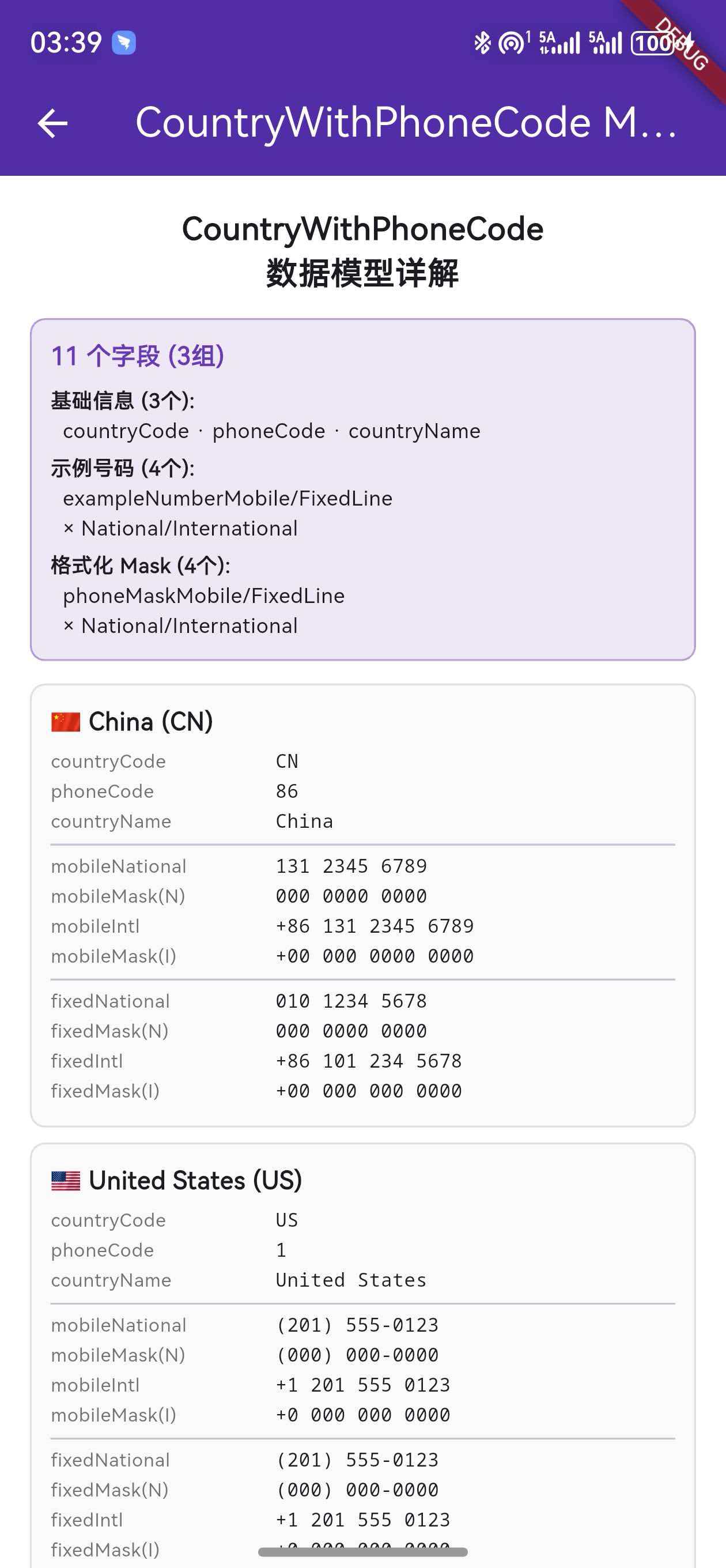
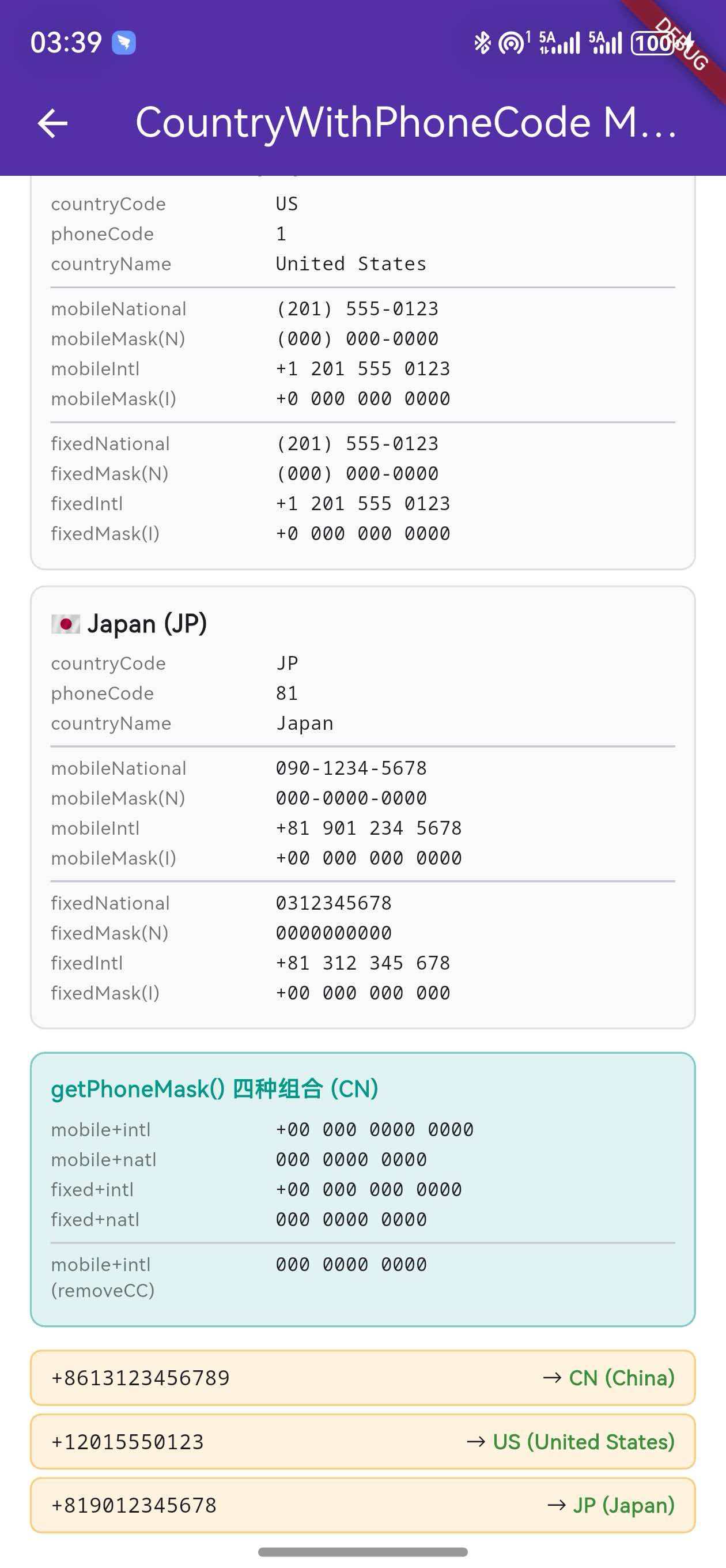
上一篇我们分析了 init() 的完整执行流程和国家数据加载机制。本篇将深入解析 CountryWithPhoneCode 这个 核心数据模型,它是整个库中最重要的数据结构——承载了每个国家的电话区号、示例号码、格式化 Mask 等 11 个字段,是同步格式化、实时输入格式化、国家匹配等功能的 数据基础。
CountryWithPhoneCode贯穿了整个库的所有功能。理解它的每个字段含义和使用方式,是掌握后续 API 的前提。
一、CountryWithPhoneCode 的定位
1.1 在架构中的位置
CountryWithPhoneCode 定义在 平台接口层(flutter_libphonenumber_platform_interface)中,被所有层级使用:
flutter_libphonenumber(主包)
    │ re-export CountryWithPhoneCode
    │
flutter_libphonenumber_platform_interface(接口层)
    │ 定义 CountryWithPhoneCode
    │
    ├── FlutterLibphonenumberPlatform  → 方法参数和返回值
    ├── CountryManager                 → 管理 List<CountryWithPhoneCode>
    ├── PhoneMask                      → 使用 country 字段
    ├── LibPhonenumberTextFormatter    → 使用 country 字段
    └── 各平台实现包                    → getAllSupportedRegions() 返回值
1.2 使用场景
| 使用场景 | 涉及的字段 |
|---|---|
同步格式化 formatNumberSync() |
phoneMask*(4 种 Mask) |
实时输入格式化 LibPhonenumberTextFormatter |
phoneMask* + phoneCode |
| 国家选择器 UI | countryName + phoneCode + countryCode |
| 输入框 placeholder | exampleNumber*(4 种示例) |
按号码匹配国家 getCountryDataByPhone() |
phoneCode |
| init() 数据加载 | 全部 11 个字段 |
二、11 个字段详解
2.1 字段一览表
CountryWithPhoneCode 包含 11 个字段,分为三组:
| 分组 | 字段名 | 类型 | 说明 |
|---|---|---|---|
| 基础信息 | countryCode |
String |
国家/地区代码(ISO 3166-1 alpha-2) |
| 基础信息 | phoneCode |
String |
国际电话区号(不含 +) |
| 基础信息 | countryName |
String? |
国家名称(英文) |
| 示例号码 | exampleNumberMobileNational |
String |
手机号示例(国内格式) |
| 示例号码 | exampleNumberFixedLineNational |
String |
固话示例(国内格式) |
| 示例号码 | exampleNumberMobileInternational |
String |
手机号示例(国际格式) |
| 示例号码 | exampleNumberFixedLineInternational |
String |
固话示例(国际格式) |
| 格式化 Mask | phoneMaskMobileNational |
String |
手机号 Mask(国内格式) |
| 格式化 Mask | phoneMaskFixedLineNational |
String |
固话 Mask(国内格式) |
| 格式化 Mask | phoneMaskMobileInternational |
String |
手机号 Mask(国际格式) |
| 格式化 Mask | phoneMaskFixedLineInternational |
String |
固话 Mask(国际格式) |
2.2 基础信息字段
countryCode — 国家/地区代码
final String countryCode; // 'CN', 'US', 'GB', 'JP' ...
遵循 ISO 3166-1 alpha-2 标准的两字母国家代码。这是每个国家的 唯一标识符,在 getAllSupportedRegions() 返回的 Map 中作为 key 使用。
常见值:
| countryCode | 国家 | countryCode | 国家 |
|---|---|---|---|
| CN | 中国 | US | 美国 |
| GB | 英国 | JP | 日本 |
| DE | 德国 | FR | 法国 |
| AU | 澳大利亚 | BR | 巴西 |
| IN | 印度 | RU | 俄罗斯 |
phoneCode — 国际电话区号
final String phoneCode; // '86', '1', '44', '81' ...
国际电话区号,不含前导 + 号。注意以下特殊情况:
| 情况 | 说明 | 示例 |
|---|---|---|
| 单位数区号 | 北美编号计划(NANP) | 1(美国、加拿大) |
| 两位数区号 | 大部分国家 | 86(中国)、44(英国) |
| 三位数区号 | 部分国家 | 351(葡萄牙)、353(爱尔兰) |
| 共享区号 | 多国共享同一区号 | 1(美国和加拿大共享) |
注意:美国和加拿大共享
+1区号,通过后续的区域号码(Area Code)来区分。在getCountryDataByPhone()匹配时,默认会返回第一个匹配的国家。
countryName — 国家名称
final String? countryName; // 'China', 'United States', 'United Kingdom' ...
国家的英文名称,类型为 String?(可空)。主要用于 UI 显示,如国家选择器中的列表项。
2.3 示例号码字段(4 个)
示例号码字段提供了每个国家的 标准格式化示例,主要用于:
- 输入框的
placeholder/hintText - 开发者参考正确的格式
- 测试格式化功能
四个示例号码字段按 号码类型 × 格式风格 组合:
| National(国内格式) | International(国际格式) | |
|---|---|---|
| Mobile(手机) | exampleNumberMobileNational |
exampleNumberMobileInternational |
| FixedLine(固话) | exampleNumberFixedLineNational |
exampleNumberFixedLineInternational |
以中国为例:
exampleNumberMobileNational:          131 2345 6789
exampleNumberMobileInternational:     +86 131 2345 6789
exampleNumberFixedLineNational:       010 1234 5678
exampleNumberFixedLineInternational:  +86 10 1234 5678
以美国为例:
exampleNumberMobileNational:          (201) 555-0123
exampleNumberMobileInternational:     +1 201-555-0123
exampleNumberFixedLineNational:       (201) 555-0123
exampleNumberFixedLineInternational:  +1 201-555-0123
美国特点:美国的手机号和固话号码格式完全相同(都是 10 位),因此 Mobile 和 FixedLine 的示例号码一致。
以日本为例:
exampleNumberMobileNational:          090-1234-5678
exampleNumberMobileInternational:     +81 90-1234-5678
exampleNumberFixedLineNational:       03-1234-5678
exampleNumberFixedLineInternational:  +81 3-1234-5678
日本特点:日本手机号以 090/080/070 开头,固话以区号开头(东京 03、大阪 06 等)。国际格式中去掉了前导 0。
2.4 格式化 Mask 字段(4 个)
Mask 字段是 CountryWithPhoneCode 中 最核心 的数据,它们定义了号码的格式模板,是 formatNumberSync() 和 LibPhonenumberTextFormatter 的格式化依据。
四个 Mask 字段同样按 号码类型 × 格式风格 组合:
| National(国内格式) | International(国际格式) | |
|---|---|---|
| Mobile(手机) | phoneMaskMobileNational |
phoneMaskMobileInternational |
| FixedLine(固话) | phoneMaskFixedLineNational |
phoneMaskFixedLineInternational |
Mask 语法规则
| 字符 | 含义 | 示例 |
|---|---|---|
0 |
数字占位符,匹配一个数字 | 000 → 三个数字 |
+ |
加号字面量 | +00 → +区号 |
(空格) |
空格分隔符 | 000 0000 → 空格分隔 |
- |
连字符分隔符 | 000-0000 → 连字符分隔 |
( ) |
括号字面量 | (000) → 括号包裹 |
以中国为例:
phoneMaskMobileNational:          000 0000 0000
phoneMaskMobileInternational:     +00 000 0000 0000
phoneMaskFixedLineNational:       000 0000 0000
phoneMaskFixedLineInternational:  +00 00 0000 0000
Mask 应用过程:
Mask:    +00 000 0000 0000
Input:   8613123456789
         ↓↓ ↓↓↓ ↓↓↓↓ ↓↓↓↓
Result:  +86 131 2345 6789
以美国为例:
phoneMaskMobileNational:          (000) 000-0000
phoneMaskMobileInternational:     +0 000-000-0000
Mask 应用过程:
Mask:    (000) 000-0000
Input:   2015550123
         ↓↓↓  ↓↓↓ ↓↓↓↓
Result:  (201) 555-0123
关键区别:National Mask 不含
+和区号部分,International Mask 以+开头并包含区号占位符。
三、构造函数
3.1 标准构造函数
CountryWithPhoneCode({
  required this.phoneCode,
  required this.countryCode,
  required this.exampleNumberMobileNational,
  required this.exampleNumberFixedLineNational,
  required this.phoneMaskMobileNational,
  required this.phoneMaskFixedLineNational,
  required this.exampleNumberMobileInternational,
  required this.exampleNumberFixedLineInternational,
  required this.phoneMaskMobileInternational,
  required this.phoneMaskFixedLineInternational,
  required this.countryName,
});
所有 11 个字段都是 required,创建实例时必须提供完整数据。这确保了每个国家对象都包含完整的格式化信息。
3.2 命名构造函数(预设值)
库提供了两个 命名构造函数,用于快速创建常用国家的实例:
/// 英国预设
const CountryWithPhoneCode.gb()
    : phoneCode = '44',
      countryCode = 'GB',
      countryName = 'United Kingdom',
      exampleNumberMobileNational = '07400 123456',
      // ... 其他字段
      ;

/// 美国预设
const CountryWithPhoneCode.us()
    : phoneCode = '1',
      countryCode = 'US',
      countryName = 'United States',
      exampleNumberMobileNational = '(201) 555-0123',
      // ... 其他字段
      ;
使用场景:
// 作为默认值
var _currentCountry = const CountryWithPhoneCode.us();

// 在 LibPhonenumberTextFormatter 中使用
LibPhonenumberTextFormatter(
  country: const CountryWithPhoneCode.us(),
  // ...
)
const 构造函数:命名构造函数使用
const,意味着它们是编译时常量,可以在const上下文中使用,性能更优。
四、getPhoneMask() 方法
4.1 方法签名
String getPhoneMask({
  required final PhoneNumberFormat format,
  required final PhoneNumberType type,
  final bool removeCountryCodeFromMask = false,
})
4.2 参数说明
| 参数 | 类型 | 说明 |
|---|---|---|
format |
PhoneNumberFormat |
national 或 international |
type |
PhoneNumberType |
mobile 或 fixedLine |
removeCountryCodeFromMask |
bool |
是否从 Mask 中移除国家区号部分 |
4.3 四种组合的返回值
以中国(CN)为例:
| format | type | removeCountryCode | 返回值 |
|---|---|---|---|
| international | mobile | false | +00 000 0000 0000 |
| international | mobile | true | 000 0000 0000 |
| national | mobile | false | 000 0000 0000 |
| international | fixedLine | false | +00 00 0000 0000 |
4.4 removeCountryCodeFromMask 的作用
当 removeCountryCodeFromMask = true 时,方法会从 International Mask 中 去掉区号部分:
if (removeCountryCodeFromMask && returnMask.startsWith('+')) {
  returnMask = returnMask.substring(phoneCode.length + 2);
}
去除逻辑:
原始 Mask:  +00 000 0000 0000
phoneCode:  86(长度 2)
截取位置:   phoneCode.length + 2 = 4(+号1 + 区号2 + 空格1)
结果 Mask:  000 0000 0000
使用场景:当用户在输入框中 不输入国家区号 时(inputContainsCountryCode = false),需要使用去掉区号的 Mask 来格式化:
// 用户输入不含区号:13123456789
// 需要用不含区号的 Mask:000 0000 0000
// 格式化结果:131 2345 6789
五、getCountryDataByPhone() 静态方法
5.1 方法签名
static CountryWithPhoneCode? getCountryDataByPhone(
  final String phone, {
  int? subscringLength,
})
5.2 匹配算法
该方法使用 递归缩短匹配 算法,从输入号码中自动识别国家:
static CountryWithPhoneCode? getCountryDataByPhone(
  final String phone, {
  int? subscringLength,
}) {
  if (phone.isEmpty) return null;

  subscringLength = subscringLength ?? phone.length;
  if (subscringLength < 1) return null;

  // 取输入的前 N 个字符
  final phoneCode = phone.substring(0, subscringLength);

  try {
    // 在所有国家中查找匹配的区号
    final retCountry = CountryManager().countries.firstWhere(
      (data) => _toNumericString(data.phoneCode) == _toNumericString(phoneCode),
    );
    return retCountry;
  } catch (_) {
    // 没找到,缩短一个字符继续尝试
    return getCountryDataByPhone(phone, subscringLength: subscringLength - 1);
  }
}
5.3 匹配过程示例
以输入 +8613123456789 为例:
第 1 次:phoneCode = "+8613123456789" → 提取数字 "8613123456789" → 无匹配
第 2 次:phoneCode = "+861312345678"  → 提取数字 "861312345678"  → 无匹配
...
第 12 次:phoneCode = "+86"           → 提取数字 "86"            → 匹配 CN ✅
以输入 +12015550123 为例:
第 1 次:phoneCode = "+12015550123" → 提取数字 "12015550123" → 无匹配
...
第 11 次:phoneCode = "+1"          → 提取数字 "1"           → 匹配 US ✅
性能说明:该算法最坏情况下需要递归 N 次(N 为输入长度),但由于国际电话区号最多 3 位数字,实际上通常在 输入长度 - 1 到 3 次 递归内就能匹配成功。
5.4 _toNumericString 辅助方法
static String _toNumericString(final String inputString, {
  final bool allowPeriod = false,
}) {
  final regExp = allowPeriod ? _digitWithPeriodRegex : _digitRegex;
  return inputString.splitMapJoin(
    regExp,
    onMatch: (final m) => m.group(0)!,
    onNonMatch: (final nm) => '',
  );
}
该方法从字符串中 提取所有数字,去掉 +、空格、连字符等非数字字符:
"+86"           → "86"
"+1 201-555"    → "1201555"
"(201) 555"     → "201555"
六、toString() 方法
String toString() =>
'[CountryWithPhoneCode(countryName: $countryName, '
'regionCode: $countryCode, phoneCode: $phoneCode, '
'exampleNumberMobileNational: $exampleNumberMobileNational, '
'exampleNumberFixedLineNational: $exampleNumberFixedLineNational, '
'phoneMaskMobileNational: $phoneMaskMobileNational, '
'phoneMaskFixedLineNational: $phoneMaskFixedLineNational, '
'exampleNumberMobileInternational: $exampleNumberMobileInternational, '
'exampleNumberFixedLineInternational: $exampleNumberFixedLineInternational, '
'phoneMaskMobileInternational: $phoneMaskMobileInternational, '
'phoneMaskFixedLineInternational: $phoneMaskFixedLineInternational)]';
toString() 输出所有 11 个字段,方便调试时查看完整数据。在 example 工程中点击 “Print all region data” 按钮时,控制台输出的就是这个格式。
七、与 ArkTS 侧 CountryData 的对应关系
7.1 ArkTS 侧的 CountryData
在 ArkTS 侧,每个国家用 CountryData 类表示,字段更偏向 原始数据:
export class CountryData {
  name: string = '';            // 国家名称
  code: string = '';            // 电话区号
  mobileExample: string = '';   // 手机号示例(纯数字)
  fixedLineExample: string = '';// 固话示例(纯数字)
  mobilePattern: string = '';   // 手机号正则
  fixedLinePattern: string = '';// 固话正则
  nationalPrefix: string = '';  // 国内拨号前缀
}
7.2 数据转换过程
ArkTS 侧的 CountryData 经过 PhoneNumberUtil.getAllRegionInfo() 处理后,转换为包含 格式化信息 的 RegionInfo,再通过 MethodChannel 传递到 Dart 侧构建 CountryWithPhoneCode:
ArkTS: CountryData(原始数据)
    │
    │ PhoneNumberUtil.getAllRegionInfo()
    │ 格式化示例号码 + 生成 Mask
    │
    ▼
ArkTS: RegionInfo(格式化数据)
    │
    │ MethodChannel 传输
    │
    ▼
Dart: Map<String, dynamic>(原始 Map)
    │
    │ getAllSupportedRegions() 转换
    │
    ▼
Dart: CountryWithPhoneCode(数据模型)
7.3 字段映射关系
| ArkTS CountryData | → | Dart CountryWithPhoneCode |
|---|---|---|
name |
→ | countryName |
code |
→ | phoneCode |
| regionCode(Map key) | → | countryCode |
mobileExample(格式化后) |
→ | exampleNumberMobileNational / International |
fixedLineExample(格式化后) |
→ | exampleNumberFixedLineNational / International |
| (由格式化结果推导) | → | phoneMaskMobileNational / International |
| (由格式化结果推导) | → | phoneMaskFixedLineNational / International |
关键转换:ArkTS 侧的
mobileExample是纯数字(如13123456789),经过格式化后变成带空格的格式(如131 2345 6789),同时根据格式化结果推导出对应的 Mask(如000 0000 0000)。
八、Mask 与示例号码的对应关系
8.1 Mask 是示例号码的"骨架"
每个 Mask 都与对应的示例号码 结构完全一致——将示例号码中的数字替换为 0,就得到了 Mask:
| 示例号码 | Mask |
|---|---|
131 2345 6789 |
000 0000 0000 |
+86 131 2345 6789 |
+00 000 0000 0000 |
(201) 555-0123 |
(000) 000-0000 |
+1 201-555-0123 |
+0 000-000-0000 |
07400 123456 |
00000 000000 |
+44 7400 123456 |
+00 0000 000000 |
8.2 验证一致性
可以通过以下方式验证 Mask 和示例号码的一致性:
final cn = CountryManager().countries.firstWhere((c) => c.countryCode == 'CN');

// 用 Mask 格式化示例号码的纯数字版本
final formatted = PhoneMask(
  mask: cn.phoneMaskMobileInternational,
  country: cn,
).apply('+8613123456789');

// formatted 应该等于 exampleNumberMobileInternational
assert(formatted == cn.exampleNumberMobileInternational);
// '+86 131 2345 6789' == '+86 131 2345 6789' ✅
九、不同国家的数据差异分析
9.1 手机号与固话格式相同的国家
部分国家的手机号和固话号码使用 相同的格式:
| 国家 | Mobile Mask | FixedLine Mask | 是否相同 |
|---|---|---|---|
| 美国(US) | (000) 000-0000 |
(000) 000-0000 |
✅ |
| 加拿大(CA) | (000) 000-0000 |
(000) 000-0000 |
✅ |
| 中国(CN) | 000 0000 0000 |
000 0000 0000 |
✅ |
9.2 手机号与固话格式不同的国家
大部分国家的手机号和固话号码格式 不同:
| 国家 | Mobile National | FixedLine National |
|---|---|---|
| 英国(GB) | 07400 123456 |
0121 234 5678 |
| 日本(JP) | 090-1234-5678 |
03-1234-5678 |
| 德国(DE) | 0151 2345 6789 |
030 1234567 |
| 法国(FR) | 06 12 34 56 78 |
01 23 45 67 89 |
| 澳大利亚(AU) | 0412 345 678 |
02 1234 5678 |
9.3 National 与 International 的差异规律
| 差异点 | National 格式 | International 格式 |
|---|---|---|
| 前缀 | 无 + 号 |
以 +区号 开头 |
| 国内前缀 | 保留(如日本的 0) |
去掉(如日本 090 → 90) |
| 区号 | 不含国际区号 | 含国际区号 |
| 总长度 | 较短 | 较长(多了区号部分) |
以日本为例:
National:      090-1234-5678     (保留前导 0)
International: +81 90-1234-5678  (去掉前导 0,加上 +81)
以英国为例:
National:      07400 123456      (保留前导 0)
International: +44 7400 123456   (去掉前导 0,加上 +44)
十、在 UI 中的实际应用
10.1 输入框 Placeholder
void updatePlaceholderHint() {
  late String newPlaceholder;
  if (_globalPhoneType == PhoneNumberType.mobile) {
    newPlaceholder = _globalPhoneFormat == PhoneNumberFormat.international
        ? _currentSelectedCountry.exampleNumberMobileInternational
        : _currentSelectedCountry.exampleNumberMobileNational;
  } else {
    newPlaceholder = _globalPhoneFormat == PhoneNumberFormat.international
        ? _currentSelectedCountry.exampleNumberFixedLineInternational
        : _currentSelectedCountry.exampleNumberFixedLineNational;
  }
  setState(() => _placeholderHint = newPlaceholder);
}
10.2 国家选择器
ListView.builder(
  itemCount: countries.length,
  itemBuilder: (context, index) {
    final item = countries[index];
    return ListTile(
      leading: Text('+${item.phoneCode}'),    // +86
      title: Text(item.countryName ?? ''),     // China
      subtitle: Text(item.countryCode),        // CN
      onTap: () => Navigator.pop(context, item),
    );
  },
)
10.3 实时格式化
LibPhonenumberTextFormatter(
  country: _currentSelectedCountry,  // CountryWithPhoneCode 实例
  phoneNumberType: PhoneNumberType.mobile,
  phoneNumberFormat: PhoneNumberFormat.international,
  inputContainsCountryCode: true,
)
LibPhonenumberTextFormatter 内部通过 country.getPhoneMask() 获取对应的 Mask,然后用 PhoneMask.apply() 格式化用户输入。
十一、与 PhoneNumberFormat 和 PhoneNumberType 的配合
11.1 PhoneNumberFormat 枚举
enum PhoneNumberFormat { national, international }
| 值 | 含义 | 示例(CN) |
|---|---|---|
national |
国内格式,不含国际区号 | 131 2345 6789 |
international |
国际格式,含 + 和区号 |
+86 131 2345 6789 |
11.2 PhoneNumberType 枚举
enum PhoneNumberType { mobile, fixedLine }
| 值 | 含义 | 示例(CN) |
|---|---|---|
mobile |
手机号码 | 131 2345 6789 |
fixedLine |
固定电话 | 010 1234 5678 |
11.3 四种组合
PhoneNumberFormat × PhoneNumberType 产生 4 种组合,对应 CountryWithPhoneCode 中的 4 对字段(示例 + Mask):
| 组合 | 示例字段 | Mask 字段 |
|---|---|---|
| mobile + international | exampleNumberMobileInternational |
phoneMaskMobileInternational |
| mobile + national | exampleNumberMobileNational |
phoneMaskMobileNational |
| fixedLine + international | exampleNumberFixedLineInternational |
phoneMaskFixedLineInternational |
| fixedLine + national | exampleNumberFixedLineNational |
phoneMaskFixedLineNational |
十二、完整源码结构
12.1 类的完整结构
class CountryWithPhoneCode {
  // ===== 构造函数 =====
  CountryWithPhoneCode({required ...});     // 标准构造
  const CountryWithPhoneCode.gb();          // 英国预设
  const CountryWithPhoneCode.us();          // 美国预设

  // ===== 11 个字段 =====
  final String countryCode;                 // 'CN'
  final String phoneCode;                   // '86'
  final String? countryName;                // 'China'
  final String exampleNumberMobileNational;
  final String exampleNumberFixedLineNational;
  final String phoneMaskMobileNational;
  final String phoneMaskFixedLineNational;
  final String exampleNumberMobileInternational;
  final String exampleNumberFixedLineInternational;
  final String phoneMaskMobileInternational;
  final String phoneMaskFixedLineInternational;

  // ===== 实例方法 =====
  String getPhoneMask({...});               // 获取指定类型和格式的 Mask
  String toString();                        // 调试输出

  // ===== 静态方法 =====
  static CountryWithPhoneCode? getCountryDataByPhone(String phone);
  static String _toNumericString(String input);

  // ===== 静态正则 =====
  static final RegExp _digitRegex;
  static final RegExp _digitWithPeriodRegex;
}
12.2 文件位置
flutter_libphonenumber_platform_interface/
└── lib/src/types/
    └── country_with_phone_code.dart    ← 本文分析的文件
总结
本文详细解析了 CountryWithPhoneCode 数据模型的每个字段和方法。关键要点回顾:
CountryWithPhoneCode包含 11 个字段,分为基础信息(3 个)、示例号码(4 个)、格式化 Mask(4 个)三组- Mask 字段 是同步格式化的核心,用
0作为数字占位符,其他字符作为格式字符 getPhoneMask()方法根据PhoneNumberFormat×PhoneNumberType返回对应的 Mask,支持removeCountryCodeFromMask去掉区号部分getCountryDataByPhone()使用 递归缩短匹配 算法,从输入号码中自动识别国家- 示例号码和 Mask 是 一一对应 的——将示例号码中的数字替换为
0就得到 Mask - 不同国家的手机号和固话格式可能相同(如美国)也可能不同(如英国、日本)
下一篇我们将分析 CountryManager 的国家列表管理与缓存机制,看看它是如何高效管理 57 个国家数据的。
如果这篇文章对你有帮助,欢迎点赞👍、收藏⭐、关注🔔,你的支持是我持续创作的动力!
相关资源:
- OpenHarmony 适配仓库:gitcode.com/oh-flutter/flutter_libphonenumber
- 开源鸿蒙跨平台社区:openharmonycrossplatform.csdn.net
- ISO 3166-1 alpha-2 国家代码:wikipedia.org - ISO 3166-1 alpha-2
- E.164 国际电话号码标准:itu.int - E.164
- Flutter 联合插件官方文档:docs.flutter.dev - Federated plugins
- Flutter MethodChannel 文档:docs.flutter.dev - Platform channels
- Google libphonenumber:github.com/google/libphonenumber
- Flutter-OHOS 项目:gitee.com/openharmony-sig/flutter_flutter
- plugin_platform_interface:pub.dev/packages/plugin_platform_interface
- Dart 正则表达式文档:api.dart.dev - RegExp

开源鸿蒙跨平台开发社区汇聚开发者与厂商,共建“一次开发,多端部署”的开源生态,致力于降低跨端开发门槛,推动万物智联创新。
更多推荐



 6
6 0
0- 0


 已为社区贡献19条内容

所有评论(0)