Flutter三方库适配OpenHarmony【flutter_libphonenumber】——init() 初始化流程与国家数据加载机制
本文深入分析了Flutter三方库flutter_libphonenumber适配OpenHarmony平台时init()方法的完整执行流程。init()作为库的启动入口,负责预加载57个国家的电话号码格式化数据,为后续同步API提供零延迟访问支持。文章详细解析了从Dart侧调用到ArkTS侧构建数据,再到Dart侧缓存的10步执行链路,并对比了调用前后的功能差异。同时介绍了init()的可选参数
前言
欢迎来到 Flutter三方库适配OpenHarmony 系列文章!本系列围绕 flutter_libphonenumber 这个 电话号码处理库 的鸿蒙平台适配,进行全面深入的技术分享。
欢迎加入开源鸿蒙跨平台社区:https://openharmonycrossplatform.csdn.net
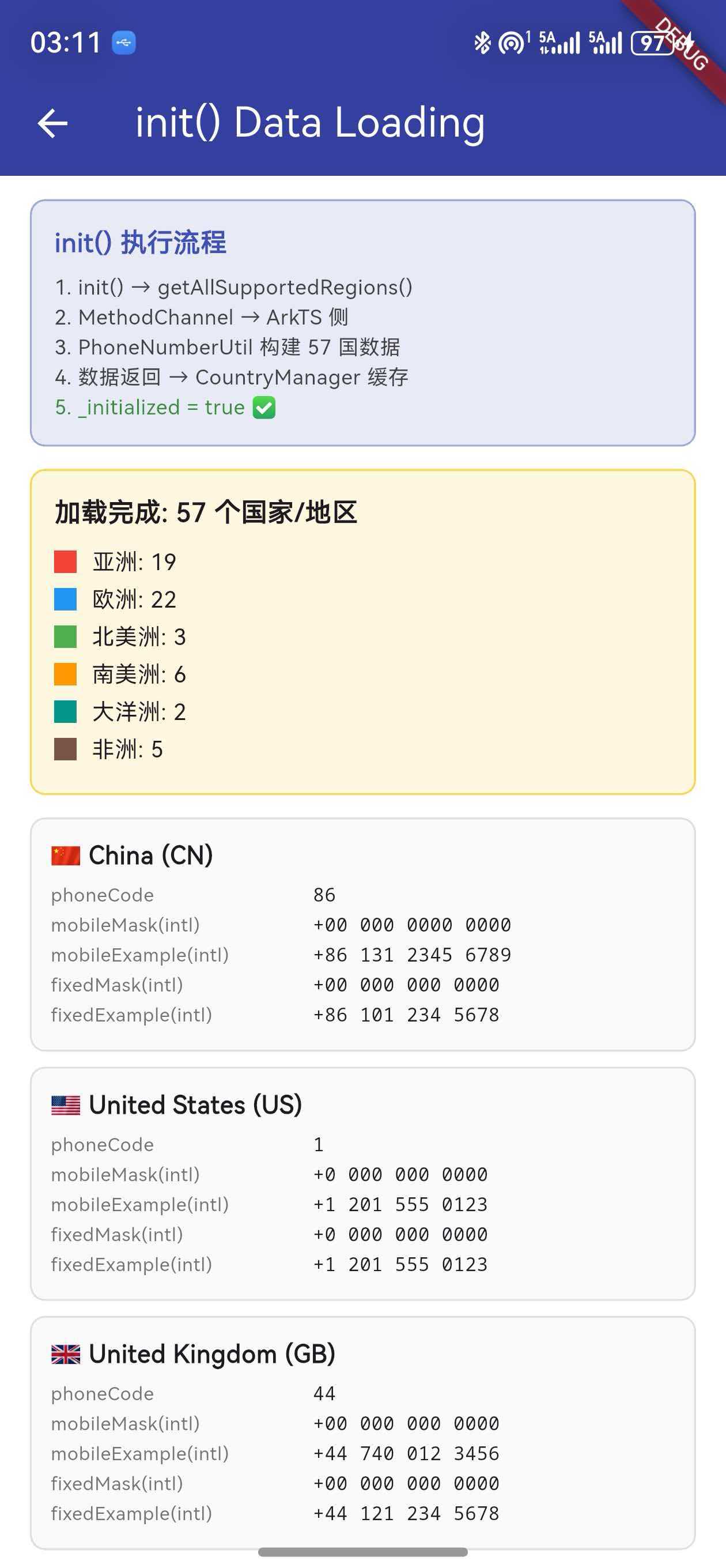
上一篇我们讲解了鸿蒙平台插件包的创建与注册。本篇将深入分析 init() 方法的 完整执行流程,从 Dart 侧发起调用,到 ArkTS 侧构建 57 个国家的数据,再到 Dart 侧的 CountryManager 缓存数据,最终为后续的同步格式化提供零延迟的数据访问。
init()是整个库的 启动入口,理解它的执行流程是掌握后续所有 API 的基础。没有init(),formatNumberSync()和LibPhonenumberTextFormatter都无法正常工作。
一、init() 的调用入口
1.1 开发者如何调用
在应用代码中,init() 通常在 main() 或 initState() 中调用:
import 'package:flutter_libphonenumber/flutter_libphonenumber.dart';

void main() async {
  WidgetsFlutterBinding.ensureInitialized();
  await init();  // 必须在使用其他 API 之前调用
  runApp(MyApp());
}
或者在 StatefulWidget 中:
class _MyAppState extends State<MyApp> {
bool _isInitialized = false;
void initState() {
super.initState();
_initPlugin();
}
Future<void> _initPlugin() async {
await FlutterLibphonenumberPlatform.instance.init();
setState(() => _isInitialized = true);
}
}
1.2 为什么 init() 是必须的
init() 的核心作用是 预加载所有国家的格式化数据。如果不调用 init():
| 功能 | 不调用 init() | 调用 init() 后 |
|---|---|---|
format() 异步格式化 |
✅ 可用(直接调原生) | ✅ 可用 |
parse() 号码解析 |
✅ 可用(直接调原生) | ✅ 可用 |
formatNumberSync() 同步格式化 |
❌ 返回原始输入 | ✅ 正常格式化 |
LibPhonenumberTextFormatter |
❌ 无法格式化 | ✅ 实时格式化 |
CountryManager().countries |
❌ 空列表 | ✅ 57 个国家数据 |
CountryWithPhoneCode.getCountryDataByPhone() |
❌ 返回 null | ✅ 正确匹配国家 |
关键:异步 API(
format()、parse())不依赖init(),因为它们每次都直接调用原生侧。但同步 API 和CountryManager完全依赖init()预加载的数据。
1.3 init() 的可选参数 overrides
Future<void> init({
  Map<String, CountryWithPhoneCode> overrides = const {},
}) async { ... }
overrides 参数允许开发者 自定义覆盖 某些国家的数据:
await init(overrides: {
  'CN': CountryWithPhoneCode(
    phoneCode: '86',
    countryCode: 'CN',
    countryName: 'China',
    exampleNumberMobileNational: '138 0000 0000',
    // 自定义 mask 格式...
  ),
});
二、init() 的完整执行流程
2.1 十步执行链路
init() 的执行涉及 Dart 侧 和 ArkTS 侧 的协作,完整流程分为十个步骤:
步骤 1: App 调用 init()
    │
步骤 2: 主包转发 → FlutterLibphonenumberPlatform.instance.init()
    │
步骤 3: FlutterLibphonenumberOhos.init() 开始执行
    │   内部调用 getAllSupportedRegions()
    │
步骤 4: MethodChannel 发送 'get_all_supported_regions'
    │   ──────── 跨越平台边界 ────────
    │
步骤 5: FlutterLibphonenumberPlugin.ets 接收消息
    │   调用 handleGetAllSupportedRegions(result)
    │
步骤 6: PhoneNumberUtil.getAllRegionInfo() 遍历 57 国数据
    │   为每个国家构建 10 个字段的 Map
    │
步骤 7: result.success(regionsMap) 返回数据
    │   ──────── 跨越平台边界 ────────
    │
步骤 8: Dart 侧接收 Map<String, dynamic>
    │   转换为 Map<String, CountryWithPhoneCode>
    │
步骤 9: CountryManager().loadCountries(phoneCodesMap, overrides)
    │   应用 overrides → 保存到 _countries 列表
    │
步骤 10: init() 完成,_initialized = true
2.2 时间消耗分析
| 步骤 | 耗时级别 | 说明 |
|---|---|---|
| 步骤 1-3 | 微秒级 | Dart 侧函数调用,几乎无开销 |
| 步骤 4 | 毫秒级 | MethodChannel 序列化和跨平台传输 |
| 步骤 5-6 | 毫秒级 | ArkTS 侧遍历 57 国数据,构建 Map |
| 步骤 7 | 毫秒级 | 数据序列化和跨平台传输(数据量较大) |
| 步骤 8 | 毫秒级 | Dart 侧反序列化和对象构建 |
| 步骤 9-10 | 微秒级 | 内存操作,几乎无开销 |
性能提示:整个
init()过程通常在 50-200 毫秒 内完成。虽然不算慢,但建议在应用启动时尽早调用,避免用户操作时才触发初始化导致的延迟。
三、Dart 侧 init() 源码分析
3.1 FlutterLibphonenumberOhos.init()
鸿蒙平台的 init() 实现:
Future<void> init({
final Map<String, CountryWithPhoneCode> overrides = const {},
}) async {
return CountryManager().loadCountries(
phoneCodesMap: await getAllSupportedRegions(),
overrides: overrides,
);
}
这段代码只有三行,但做了两件重要的事:
- 调用
getAllSupportedRegions()— 通过 MethodChannel 从 ArkTS 侧获取全量国家数据 - 调用
CountryManager().loadCountries()— 将数据缓存到单例中
3.2 getAllSupportedRegions() 的数据转换
Future<Map<String, CountryWithPhoneCode>> getAllSupportedRegions() async {
// 1. 通过 MethodChannel 调用 ArkTS 侧
final result = await _channel
.invokeMapMethod<String, dynamic>('get_all_supported_regions') ?? {};
// 2. 将原始 Map 转换为 CountryWithPhoneCode 对象
final returnMap = <String, CountryWithPhoneCode>{};
result.forEach((k, v) => returnMap[k] = CountryWithPhoneCode(
countryName: v['countryName'] ?? '',
phoneCode: v['phoneCode'] ?? '',
countryCode: k,
exampleNumberMobileNational: v['exampleNumberMobileNational'] ?? '',
exampleNumberFixedLineNational: v['exampleNumberFixedLineNational'] ?? '',
phoneMaskMobileNational: v['phoneMaskMobileNational'] ?? '',
phoneMaskFixedLineNational: v['phoneMaskFixedLineNational'] ?? '',
exampleNumberMobileInternational: v['exampleNumberMobileInternational'] ?? '',
exampleNumberFixedLineInternational: v['exampleNumberFixedLineInternational'] ?? '',
phoneMaskMobileInternational: v['phoneMaskMobileInternational'] ?? '',
phoneMaskFixedLineInternational: v['phoneMaskFixedLineInternational'] ?? '',
));
return returnMap;
}
容错设计:每个字段都使用
?? ''提供默认空字符串。即使 ArkTS 侧某个字段缺失,也不会导致空指针异常,保证了数据转换的健壮性。
3.3 数据转换的字段映射
| ArkTS 侧 key | Dart 侧字段 | 示例值(CN) |
|---|---|---|
phoneCode |
phoneCode |
86 |
countryName |
countryName |
China |
exampleNumberMobileNational |
exampleNumberMobileNational |
131 2345 6789 |
exampleNumberFixedLineNational |
exampleNumberFixedLineNational |
010 1234 5678 |
phoneMaskMobileNational |
phoneMaskMobileNational |
000 0000 0000 |
phoneMaskFixedLineNational |
phoneMaskFixedLineNational |
000 0000 0000 |
exampleNumberMobileInternational |
exampleNumberMobileInternational |
+86 131 2345 6789 |
exampleNumberFixedLineInternational |
exampleNumberFixedLineInternational |
+86 10 1234 5678 |
phoneMaskMobileInternational |
phoneMaskMobileInternational |
+00 000 0000 0000 |
phoneMaskFixedLineInternational |
phoneMaskFixedLineInternational |
+00 00 0000 0000 |
注意:
countryCode(如CN、US)不是从 value 中取的,而是 Map 的 key,即result.forEach((k, v) => ...)中的k。
四、ArkTS 侧数据构建
4.1 handleGetAllSupportedRegions 方法
ArkTS 侧的 FlutterLibphonenumberPlugin.ets 中处理 get_all_supported_regions 请求:
private handleGetAllSupportedRegions(result: MethodResult): void {
  try {
    let regionsInfo: Map<string, RegionInfo> =
      this.phoneUtil.getAllRegionInfo();

    let regionsMap: Map<string, Record<string, string>> = new Map();

    regionsInfo.forEach((info: RegionInfo, region: string) => {
      let itemMap: Map<string, string> = new Map();
      itemMap.set('phoneCode', info.phoneCode);
      itemMap.set('countryName', info.countryName);
      itemMap.set('exampleNumberMobileNational',
        info.exampleNumberMobileNational);
      itemMap.set('exampleNumberFixedLineNational',
        info.exampleNumberFixedLineNational);
      itemMap.set('phoneMaskMobileNational',
        info.phoneMaskMobileNational);
      itemMap.set('phoneMaskFixedLineNational',
        info.phoneMaskFixedLineNational);
      itemMap.set('exampleNumberMobileInternational',
        info.exampleNumberMobileInternational);
      itemMap.set('exampleNumberFixedLineInternational',
        info.exampleNumberFixedLineInternational);
      itemMap.set('phoneMaskMobileInternational',
        info.phoneMaskMobileInternational);
      itemMap.set('phoneMaskFixedLineInternational',
        info.phoneMaskFixedLineInternational);

      regionsMap.set(region, this.convertMapToRecord(itemMap));
    });

    result.success(this.convertRegionsMapToRecord(regionsMap));
  } catch (e) {
    result.error('REGIONS_ERROR', 'Failed to get supported regions', null);
  }
}
4.2 Map 到 Record 的转换
ArkTS 的 MethodChannel 要求返回 Record 类型而非 Map 类型,因此需要转换:
private convertMapToRecord(
  map: Map<string, string>
): Record<string, string> {
  let record: Record<string, string> = {} as Record<string, string>;
  map.forEach((value: string, key: string) => {
    record[key] = value;
  });
  return record;
}

private convertRegionsMapToRecord(
  map: Map<string, Record<string, string>>
): Record<string, Record<string, string>> {
  let record = {} as Record<string, Record<string, string>>;
  map.forEach((value: Record<string, string>, key: string) => {
    record[key] = value;
  });
  return record;
}
ArkTS 特性:在 ArkTS 中,
Record<K, V>是一种键值对类型,类似于 TypeScript 的Record。MethodChannel 的result.success()接受Record类型,而不是Map类型,这是鸿蒙 Flutter 框架的要求。
4.3 返回数据的嵌套结构
最终返回给 Dart 侧的数据是一个 两层嵌套 的 Record:
// 外层:国家代码 → 国家数据
Record<string, Record<string, string>> = {
  "CN": {
    "phoneCode": "86",
    "countryName": "China",
    "exampleNumberMobileNational": "131 2345 6789",
    // ... 其他 7 个字段
  },
  "US": {
    "phoneCode": "1",
    "countryName": "United States",
    "exampleNumberMobileNational": "(201) 555-0123",
    // ... 其他 7 个字段
  },
  // ... 其他 55 个国家
}
五、CountryManager 单例缓存机制
5.1 单例模式实现
CountryManager 使用 Dart 的 工厂构造函数 实现单例:
class CountryManager {
  factory CountryManager() => _instance;
  CountryManager._internal();
  static final CountryManager _instance = CountryManager._internal();

  var _countries = <CountryWithPhoneCode>[];
  var _initialized = false;

  List<CountryWithPhoneCode> get countries => _countries;
}
单例模式的三个关键点:
factory CountryManager()— 每次CountryManager()返回同一个实例CountryManager._internal()— 私有构造函数,防止外部创建新实例static final _instance— 静态常量,全局唯一
5.2 loadCountries() 详细分析
Future<void> loadCountries({
  required final Map<String, CountryWithPhoneCode> phoneCodesMap,
  final Map<String, CountryWithPhoneCode> overrides = const {},
}) async {
  // 1. 防止重复初始化
  if (_initialized) {
    return;
  }

  try {
    // 2. 应用用户自定义覆盖
    overrides.forEach((final key, final value) {
      phoneCodesMap[key] = value;
    });

    // 3. 保存国家列表
    _countries = phoneCodesMap.values.toList();

    // 4. 标记已初始化
    _initialized = true;
  } catch (err) {
    // 5. 出错时使用 overrides 作为兜底数据
    _countries = overrides.values.toList();
  }
}
5.3 执行步骤详解
| 步骤 | 代码 | 说明 |
|---|---|---|
| 1 | if (_initialized) return |
防止重复加载,保证只初始化一次 |
| 2 | overrides.forEach(...) |
用用户自定义数据覆盖原生侧返回的数据 |
| 3 | _countries = phoneCodesMap.values.toList() |
将 Map 的 values 转为 List 保存 |
| 4 | _initialized = true |
标记完成,后续调用直接返回 |
| 5 | catch 兜底 |
出错时使用 overrides 数据,不至于完全无数据 |
防重复机制:
_initialized标志确保loadCountries()只执行一次。即使开发者多次调用init(),也不会重复加载数据或覆盖已有数据。
六、Mask 数据的生成原理
6.1 什么是 Phone Mask
Phone Mask 是电话号码的格式模板,用 0 表示数字占位符,其他字符保持原样:
Mask:    +00 000 0000 0000
Input:   8613123456789
Result:  +86 131 2345 6789
6.2 Mask 的四种类型
每个国家有 4 种 Mask,对应不同的号码类型和格式:
| Mask 类型 | 字段名 | 示例(CN) |
|---|---|---|
| 手机号 + 国际格式 | phoneMaskMobileInternational |
+00 000 0000 0000 |
| 手机号 + 国内格式 | phoneMaskMobileNational |
000 0000 0000 |
| 固话 + 国际格式 | phoneMaskFixedLineInternational |
+00 00 0000 0000 |
| 固话 + 国内格式 | phoneMaskFixedLineNational |
000 0000 0000 |
6.3 Mask 在 ArkTS 侧的生成
ArkTS 侧的 PhoneNumberUtil 为每个国家预定义了 Mask 数据。以中国为例:
// PhoneNumberUtil.ets 中的中国数据
{
  name: 'China',
  code: '86',
  regionCode: 'CN',
  mobileExample: '13123456789',
  fixedLineExample: '1012345678',
  // Mask 由示例号码的格式化结果推导
  phoneMaskMobileNational: '000 0000 0000',
  phoneMaskMobileInternational: '+00 000 0000 0000',
  phoneMaskFixedLineNational: '000 0000 0000',
  phoneMaskFixedLineInternational: '+00 00 0000 0000',
}
6.4 Mask 的匹配规则
PhoneMask.apply() 方法使用 Mask 格式化输入号码:
class PhoneMask {
  final String mask;
  final CountryWithPhoneCode country;

  String apply(String inputString) {
    if (mask.isEmpty) return inputString;

    // 1. 清除输入中的非数字字符
    var cleanedInput = inputString.replaceAll(RegExp(r'\D'), '');

    // 2. 如果 mask 不含 + 但输入含 +,去掉国家区号
    if (!mask.startsWith('+') && inputString.startsWith('+')) {
      cleanedInput = cleanedInput.replaceFirst(
        RegExp('^${country.phoneCode}'), ''
      );
    }

    // 3. 逐字符匹配 mask
    final chars = cleanedInput.split('');
    final result = <String>[];
    var index = 0;
    for (var i = 0; i < mask.length; i++) {
      if (index >= chars.length) break;
      if (mask[i] == '0') {
        // mask 中的 0 → 填入输入数字
        result.add(chars[index]);
        index++;
      } else {
        // mask 中的其他字符 → 直接添加(空格、+、-、括号等)
        result.add(mask[i]);
      }
    }
    return result.join();
  }
}
核心算法:Mask 中的
0是数字占位符,其他字符(空格、+、-、(、))是格式字符。算法逐字符扫描 Mask,遇到0就从输入中取一个数字,遇到格式字符就直接添加到结果中。
七、57 个国家的数据分布
7.1 六大洲分布
init() 完成后,CountryManager().countries 包含 57 个国家 的数据:
| 洲 | 国家数量 | 国家代码列表 |
|---|---|---|
| 亚洲 | 19 | CN, HK, MO, TW, JP, KR, IN, SG, MY, TH, VN, PH, ID, PK, BD, AE, SA, IL, TR |
| 欧洲 | 22 | GB, DE, FR, IT, ES, PT, NL, BE, AT, CH, SE, NO, DK, FI, PL, RU, UA, CZ, GR, HU, RO, IE |
| 北美洲 | 3 | US, CA, MX |
| 南美洲 | 6 | BR, AR, CL, CO, PE, VE |
| 大洋洲 | 2 | AU, NZ |
| 非洲 | 5 | ZA, EG, NG, KE, MA |
7.2 各国数据示例
以下是三个代表性国家的完整数据:
中国(CN):
{
  "countryCode": "CN",
  "phoneCode": "86",
  "countryName": "China",
  "exampleNumberMobileNational": "131 2345 6789",
  "exampleNumberFixedLineNational": "010 1234 5678",
  "phoneMaskMobileNational": "000 0000 0000",
  "phoneMaskFixedLineNational": "000 0000 0000",
  "exampleNumberMobileInternational": "+86 131 2345 6789",
  "exampleNumberFixedLineInternational": "+86 10 1234 5678",
  "phoneMaskMobileInternational": "+00 000 0000 0000",
  "phoneMaskFixedLineInternational": "+00 00 0000 0000"
}
美国(US):
{
  "countryCode": "US",
  "phoneCode": "1",
  "countryName": "United States",
  "exampleNumberMobileNational": "(201) 555-0123",
  "exampleNumberFixedLineNational": "(201) 555-0123",
  "phoneMaskMobileNational": "(000) 000-0000",
  "phoneMaskFixedLineNational": "(000) 000-0000",
  "exampleNumberMobileInternational": "+1 201-555-0123",
  "exampleNumberFixedLineInternational": "+1 201-555-0123",
  "phoneMaskMobileInternational": "+0 000-000-0000",
  "phoneMaskFixedLineInternational": "+0 000-000-0000"
}
英国(GB):
{
  "countryCode": "GB",
  "phoneCode": "44",
  "countryName": "United Kingdom",
  "exampleNumberMobileNational": "07400 123456",
  "exampleNumberFixedLineNational": "0121 234 5678",
  "phoneMaskMobileNational": "00000 000000",
  "phoneMaskFixedLineNational": "0000 000 0000",
  "exampleNumberMobileInternational": "+44 7400 123456",
  "exampleNumberFixedLineInternational": "+44 121 234 5678",
  "phoneMaskMobileInternational": "+00 0000 000000",
  "phoneMaskFixedLineInternational": "+00 000 000 0000"
}
八、init() 后的数据访问方式
8.1 获取所有国家列表
final countries = CountryManager().countries;
print('Total countries: ${countries.length}');  // 57
8.2 按国家代码查找
final china = CountryManager().countries
    .firstWhere((c) => c.countryCode == 'CN');
print(china.countryName);  // China
print(china.phoneCode);    // 86
8.3 按电话区号自动匹配
final country = CountryWithPhoneCode.getCountryDataByPhone('+8613123456789');
print(country?.countryCode);  // CN
print(country?.countryName);  // China
8.4 获取特定 Mask
final china = CountryManager().countries
    .firstWhere((c) => c.countryCode == 'CN');

// 获取手机号国际格式 mask
final mask = china.getPhoneMask(
  format: PhoneNumberFormat.international,
  type: PhoneNumberType.mobile,
);
print(mask);  // +00 000 0000 0000

// 获取不含国家区号的 mask
final maskNoCC = china.getPhoneMask(
  format: PhoneNumberFormat.international,
  type: PhoneNumberType.mobile,
  removeCountryCodeFromMask: true,
);
print(maskNoCC);  // 000 0000 0000
8.5 使用 Mask 格式化号码
final formatted = PhoneMask(
  mask: '+00 000 0000 0000',
  country: china,
).apply('+8613123456789');
print(formatted);  // +86 131 2345 6789
九、overrides 参数的使用场景
9.1 自定义国家 Mask
如果默认的 Mask 不满足需求,可以通过 overrides 覆盖:
await init(overrides: {
  'CN': CountryWithPhoneCode(
    phoneCode: '86',
    countryCode: 'CN',
    countryName: 'China',
    exampleNumberMobileNational: '138 0000 0000',
    exampleNumberFixedLineNational: '010 0000 0000',
    phoneMaskMobileNational: '000 0000 0000',
    phoneMaskFixedLineNational: '000 0000 0000',
    exampleNumberMobileInternational: '+86 138 0000 0000',
    exampleNumberFixedLineInternational: '+86 10 0000 0000',
    phoneMaskMobileInternational: '+00 000 0000 0000',
    phoneMaskFixedLineInternational: '+00 00 0000 0000',
  ),
});
9.2 添加未支持的国家
如果需要支持 57 国之外的国家,也可以通过 overrides 添加:
await init(overrides: {
  'LK': CountryWithPhoneCode(
    phoneCode: '94',
    countryCode: 'LK',
    countryName: 'Sri Lanka',
    exampleNumberMobileNational: '071 234 5678',
    exampleNumberFixedLineNational: '011 234 5678',
    phoneMaskMobileNational: '000 000 0000',
    phoneMaskFixedLineNational: '000 000 0000',
    exampleNumberMobileInternational: '+94 71 234 5678',
    exampleNumberFixedLineInternational: '+94 11 234 5678',
    phoneMaskMobileInternational: '+00 00 000 0000',
    phoneMaskFixedLineInternational: '+00 00 000 0000',
  ),
});
9.3 overrides 的执行时机
loadCountries() 执行顺序:
    │
    ├── 1. 接收 phoneCodesMap(57 国原生数据)
    │
    ├── 2. 遍历 overrides
    │       phoneCodesMap['CN'] = overrides['CN']  // 覆盖已有
    │       phoneCodesMap['LK'] = overrides['LK']  // 添加新国家
    │
    ├── 3. _countries = phoneCodesMap.values.toList()
    │       此时包含 57 + 新增 = 58 个国家
    │
    └── 4. _initialized = true
覆盖优先级:
overrides中的数据会 覆盖 原生侧返回的同名国家数据。如果overrides中包含CN,则原生侧返回的CN数据会被完全替换。
十、init() 的错误处理
10.1 ArkTS 侧错误
如果 ArkTS 侧构建数据时出错:
private handleGetAllSupportedRegions(result: MethodResult): void {
  try {
    // ... 构建数据
    result.success(regionsMap);
  } catch (e) {
    result.error('REGIONS_ERROR', 'Failed to get supported regions', null);
  }
}
10.2 Dart 侧错误处理
getAllSupportedRegions() 使用 ?? {} 处理空返回:
final result = await _channel
    .invokeMapMethod<String, dynamic>('get_all_supported_regions') ?? {};
CountryManager.loadCountries() 使用 try-catch 兜底:
try {
  _countries = phoneCodesMap.values.toList();
  _initialized = true;
} catch (err) {
  _countries = overrides.values.toList();  // 兜底:使用 overrides 数据
}
10.3 错误场景与应对
| 错误场景 | 表现 | 应对策略 |
|---|---|---|
| ArkTS 侧抛出异常 | getAllSupportedRegions() 返回空 Map |
CountryManager 使用 overrides 兜底 |
| MethodChannel 未连接 | 抛出 MissingPluginException |
应用层 try-catch 捕获 |
| 数据字段缺失 | 某些字段为空字符串 | ?? '' 默认值保证不崩溃 |
| 重复调用 init() | 第二次调用直接返回 | _initialized 标志防重复 |
十一、init() 与其他 API 的关系
11.1 依赖关系图
init()
  │
  ├── getAllSupportedRegions() ──→ ArkTS 侧
  │
  └── CountryManager().loadCountries()
        │
        └── _countries 列表填充
              │
              ├── formatNumberSync() 使用 _countries 查找国家
              │     └── PhoneMask.apply() 使用 mask 格式化
              │
              ├── LibPhonenumberTextFormatter 使用 _countries
              │     └── formatEditUpdate() 实时格式化
              │
              ├── CountryWithPhoneCode.getCountryDataByPhone()
              │     └── 从 _countries 中按区号匹配
              │
              └── getFormattedParseResult()
                    └── 组合 parse() + 格式化
11.2 API 分类
| API | 是否依赖 init() | 原因 |
|---|---|---|
init() |
- | 自身 |
format() |
❌ | 每次直接调用 ArkTS 侧 |
parse() |
❌ | 每次直接调用 ArkTS 侧 |
getAllSupportedRegions() |
❌ | 每次直接调用 ArkTS 侧 |
formatNumberSync() |
✅ | 需要 CountryManager 中的 mask 数据 |
LibPhonenumberTextFormatter |
✅ | 需要 CountryWithPhoneCode 对象 |
getFormattedParseResult() |
❌ | 内部调用 parse(),不依赖缓存 |
CountryManager().countries |
✅ | init() 填充数据 |
十二、性能优化建议
12.1 尽早调用 init()
void main() async {
  WidgetsFlutterBinding.ensureInitialized();
  // 在 runApp 之前调用,确保数据就绪
  await init();
  runApp(MyApp());
}
12.2 避免重复调用
CountryManager 内部已有防重复机制,但建议在应用层也做一次判断:
bool _initialized = false;

Future<void> ensureInit() async {
  if (_initialized) return;
  await init();
  _initialized = true;
}
12.3 使用 overrides 减少原生调用
如果你只需要少数几个国家的数据,可以完全通过 overrides 提供,跳过原生调用:
// 注意:getAllSupportedRegions() 仍然会被调用
// 但 overrides 会覆盖其中的数据
await init(overrides: {
  'CN': CountryWithPhoneCode(...),
  'US': CountryWithPhoneCode(...),
});
提示:即使提供了
overrides,init()仍然会调用getAllSupportedRegions()获取全量数据。overrides只是在获取数据之后进行覆盖,不会跳过原生调用。
总结
本文深入分析了 init() 方法的完整执行流程。关键要点回顾:
init()是整个库的 启动入口,必须在使用同步 API 之前调用- 执行流程经过 十个步骤:Dart 调用 → MethodChannel → ArkTS 构建数据 → 返回 → CountryManager 缓存
- ArkTS 侧为 57 个国家 构建包含 10 个字段的完整数据,通过
Record类型返回 CountryManager使用 单例模式 缓存数据,_initialized标志防止重复加载- Mask 数据 是同步格式化的核心,每个国家有 4 种 Mask(手机/固话 × 国际/国内)
overrides参数支持 自定义覆盖 和 添加新国家,灵活性高
下一篇我们将详细解析 CountryWithPhoneCode 数据模型的每个字段含义和使用方式。
如果这篇文章对你有帮助,欢迎点赞👍、收藏⭐、关注🔔,你的支持是我持续创作的动力!
相关资源:
- OpenHarmony 适配仓库:gitcode.com/oh-flutter/flutter_libphonenumber
- 开源鸿蒙跨平台社区:openharmonycrossplatform.csdn.net
- Flutter 联合插件官方文档:docs.flutter.dev - Federated plugins
- Flutter MethodChannel 文档:docs.flutter.dev - Platform channels
- Dart 工厂构造函数:dart.dev - Factory constructors
- Dart 单例模式:dart.dev - Singleton pattern
- Flutter-OHOS 项目:gitee.com/openharmony-sig/flutter_flutter
- Google libphonenumber:github.com/google/libphonenumber
- E.164 国际标准:itu.int - E.164
- plugin_platform_interface:pub.dev/packages/plugin_platform_interface

开源鸿蒙跨平台开发社区汇聚开发者与厂商,共建“一次开发,多端部署”的开源生态,致力于降低跨端开发门槛,推动万物智联创新。
更多推荐
 26
26 0
0- 0


 已为社区贡献24条内容

所有评论(0)