Flutter for Harmony 跨平台开发实战:流场与矢量可视化——不可见力量的轨迹追踪
·
欢迎加入开源鸿蒙跨平台社区:https://openharmonycrossplatform.csdn.net
🌊 一、流场可视化:数学之美
📚 1.1 矢量场基础
矢量场是空间中每一点都关联一个矢量的数学对象。在物理学中,矢量场用于描述流体流动、电磁场、引力场等不可见的力量。
矢量场定义:
二维矢量场:
V(x, y) = (Vx(x, y), Vy(x, y))

其中 Vx, Vy 是空间坐标的函数

三维矢量场:
V(x, y, z) = (Vx, Vy, Vz)

物理实例:
- 速度场:流体中每点的速度
- 电场:电荷周围的电场强度
- 磁场:磁体周围的磁场方向
- 引力场:质量周围的引力
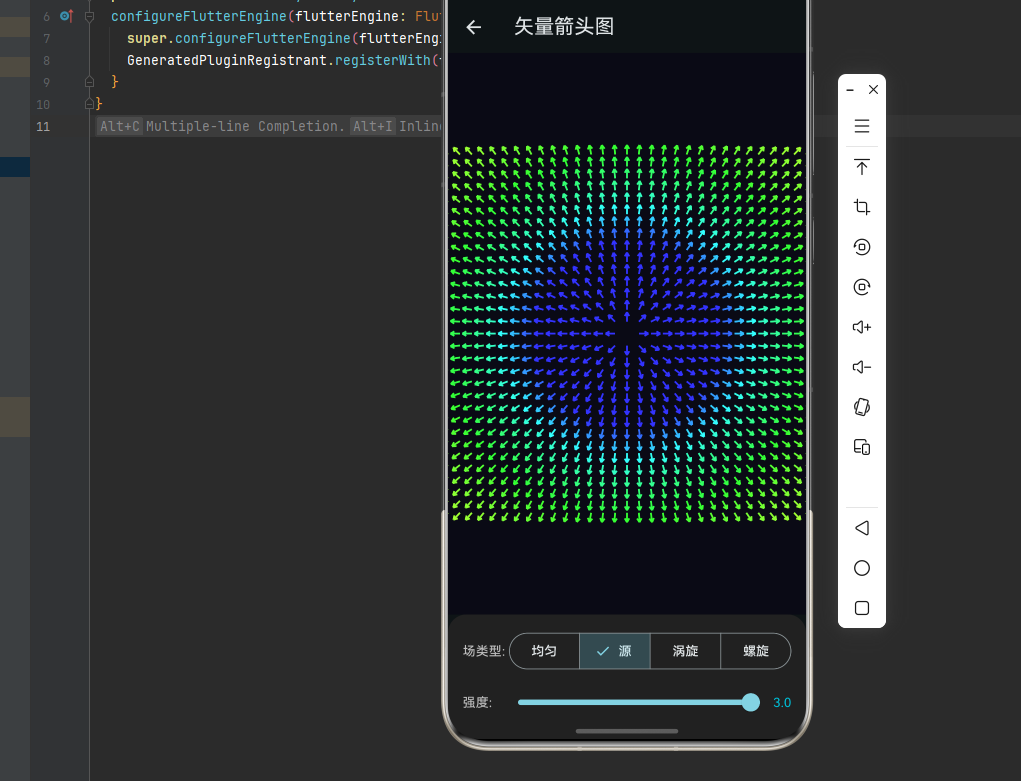
矢量场示意:
均匀场:            涡旋场:            源场:
→ → → →            ↗ ↑ ↖              ↑ ↑ ↑
→ → → →            → ● ←              ↑ ● ↑
→ → → →            ↘ ↓ ↙              ↑ ↑ ↑

每点的箭头表示该点的矢量方向和大小
📐 1.2 流线与轨迹
流线是矢量场中的曲线,其切线方向处处与场矢量方向一致。
流线方程:
流线满足:
dy/dx = Vy(x, y) / Vx(x, y)

参数形式:
dx/dt = Vx(x, y)
dy/dt = Vy(x, y)

解这个微分方程组得到流线

流线性质:
- 流线不相交(除奇点外)
- 流线密度表示场强
- 流线方向表示流向
轨迹与流线:
轨迹(Pathline):
单个粒子随时间运动的路径

流线(Streamline):
某一时刻与速度场相切的曲线

区别:
- 定常场:轨迹 = 流线
- 非定常场:轨迹 ≠ 流线

其他相关概念:
- 条纹线(Streakline):某点释放的所有粒子的连线
- 时间线(Timeline):同时释放的一排粒子的连线
🔬 1.3 典型流场类型
基本流场:
| 类型 | 表达式 | 特点 |
|---|---|---|
| 均匀流 | V = (U, 0) | 平行直线 |
| 源/汇 | V = (Q/r)·r̂ | 径向发散/汇聚 |
| 涡旋 | V = (Γ/2πr)·θ̂ | 环形旋转 |
| 偶极子 | V = (m/r²)·(2cosθ, sinθ) | 源汇组合 |
组合流场:
源 + 涡旋 = 螺旋流:
V = (Q/r)·r̂ + (Γ/2πr)·θ̂

均匀流 + 源 = 绕流:
V = (U, 0) + (Q/r)·r̂

偶极子 + 均匀流 = 圆柱绕流:
V = (U, 0) + (m/r²)·(2cosθ, sinθ)
流场示意:
源场:              涡旋场:           偶极子场:
      ↑              ↗ → ↖            → → →
    ↑   ↑            ↑   ↓            → ● →
  ↑       ↑          ← ● →            → → →
    ↑   ↑            ↓   ↑
      ↓              ↙ ← ↘

源:向外发散        涡旋:环形旋转      偶极子:源汇组合
🎯 1.4 流场可视化方法
主要可视化技术:
1. 箭头图(Vector Glyphs):
   在采样点绘制箭头
   优点:直观
   缺点:采样点有限时信息丢失

2. 流线图(Streamlines):
   绘制与场相切的曲线
   优点:显示流向
   缺点:可能遗漏区域

3. 流带图(Stream Ribbons):
   宽度表示散度的流线
   优点:显示旋转
   缺点:计算复杂

4. 流管图(Stream Tubes):
   三维流线的管道表示
   优点:显示强度
   缺点:遮挡问题

5. 线积分卷积(LIC):
   基于纹理的方法
   优点:连续表示
   缺点:计算量大
🔧 二、流场可视化的 Dart 实现
🧮 2.1 矢量场类
import 'dart:math';
/// 二维矢量
class Vector2D {
final double x;
final double y;
const Vector2D(this.x, this.y);
factory Vector2D.zero() => const Vector2D(0, 0);
factory Vector2D.fromAngle(double angle, double magnitude) =>
Vector2D(magnitude * cos(angle), magnitude * sin(angle));
double get magnitude => sqrt(x * x + y * y);
double get angle => atan2(y, x);
double get squaredMagnitude => x * x + y * y;
Vector2D get normalized {
final mag = magnitude;
if (mag < 1e-10) return Vector2D.zero();
return Vector2D(x / mag, y / mag);
}
Vector2D get perpendicular => Vector2D(-y, x);
Vector2D operator +(Vector2D other) => Vector2D(x + other.x, y + other.y);
Vector2D operator -(Vector2D other) => Vector2D(x - other.x, y - other.y);
Vector2D operator *(double scalar) => Vector2D(x * scalar, y * scalar);
Vector2D operator /(double scalar) => Vector2D(x / scalar, y / scalar);
double dot(Vector2D other) => x * other.x + y * other.y;
double cross(Vector2D other) => x * other.y - y * other.x;
Offset toOffset() => Offset(x, y);
}
/// 矢量场
abstract class VectorField {
Vector2D at(double x, double y);
Vector2D atOffset(Offset p) => at(p.dx, p.dy);
double divergence(double x, double y) {
const h = 0.001;
final dVx = (at(x + h, y).x - at(x - h, y).x) / (2 * h);
final dVy = (at(x, y + h).y - at(x, y - h).y) / (2 * h);
return dVx + dVy;
}
double curl(double x, double y) {
const h = 0.001;
final dVx = (at(x, y + h).x - at(x, y - h).x) / (2 * h);
final dVy = (at(x + h, y).y - at(x - h, y).y) / (2 * h);
return dVy - dVx;
}
List<Vector2D> sampleGrid(double xMin, double xMax, double yMin, double yMax, int nx, int ny) {
final result = <Vector2D>[];
final dx = (xMax - xMin) / (nx - 1);
final dy = (yMax - yMin) / (ny - 1);
for (int j = 0; j < ny; j++) {
for (int i = 0; i < nx; i++) {
final x = xMin + i * dx;
final y = yMin + j * dy;
result.add(at(x, y));
}
}
return result;
}
}
/// 均匀流场
class UniformField extends VectorField {
final Vector2D velocity;
UniformField(this.velocity);
Vector2D at(double x, double y) => velocity;
}
/// 源/汇场
class SourceField extends VectorField {
final double strength;
final Offset center;
SourceField({required this.strength, this.center = Offset.zero});
Vector2D at(double x, double y) {
final dx = x - center.dx;
final dy = y - center.dy;
final r = sqrt(dx * dx + dy * dy);
if (r < 1e-10) return Vector2D.zero();
return Vector2D(strength * dx / (r * r), strength * dy / (r * r));
}
}
/// 涡旋场
class VortexField extends VectorField {
final double circulation;
final Offset center;
VortexField({required this.circulation, this.center = Offset.zero});
Vector2D at(double x, double y) {
final dx = x - center.dx;
final dy = y - center.dy;
final r = sqrt(dx * dx + dy * dy);
if (r < 1e-10) return Vector2D.zero();
return Vector2D(-circulation * dy / (r * r), circulation * dx / (r * r));
}
}
/// 组合场
class CompositeField extends VectorField {
final List<VectorField> fields;
CompositeField(this.fields);
Vector2D at(double x, double y) {
var result = Vector2D.zero();
for (final field in fields) {
result = result + field.at(x, y);
}
return result;
}
void addField(VectorField field) {
fields.add(field);
}
}
⚡ 2.2 流线追踪算法
/// 流线追踪器
class StreamlineTracer {
final VectorField field;
final double stepSize;
final int maxSteps;
final double tolerance;
StreamlineTracer({
required this.field,
this.stepSize = 0.5,
this.maxSteps = 1000,
this.tolerance = 1e-6,
});
List<Offset> traceForward(Offset start, double xMin, double xMax, double yMin, double yMax) {
return _trace(start, 1, xMin, xMax, yMin, yMax);
}
List<Offset> traceBackward(Offset start, double xMin, double xMax, double yMin, double yMax) {
return _trace(start, -1, xMin, xMax, yMin, yMax);
}
List<Offset> traceBidirectional(Offset start, double xMin, double xMax, double yMin, double yMax) {
final forward = traceForward(start, xMin, xMax, yMin, yMax);
final backward = traceBackward(start, xMin, xMax, yMin, yMax);
return [...backward.reversed.skip(1), ...forward];
}
List<Offset> _trace(Offset start, int direction, double xMin, double xMax, double yMin, double yMax) {
final points = <Offset>[start];
var current = start;
for (int i = 0; i < maxSteps; i++) {
final v = field.at(current.dx, current.dy);
final mag = v.magnitude;
if (mag < tolerance) break;
final next = current + (v.normalized * stepSize * direction).toOffset();
if (next.dx < xMin || next.dx > xMax || next.dy < yMin || next.dy > yMax) {
break;
}
points.add(next);
current = next;
}
return points;
}
List<List<Offset>> traceMultiple(List<Offset> seeds, double xMin, double xMax, double yMin, double yMax) {
return seeds.map((seed) => traceBidirectional(seed, xMin, xMax, yMin, yMax)).toList();
}
}
/// RK4 积分器
class RK4Tracer extends StreamlineTracer {
RK4Tracer({
required super.field,
super.stepSize,
super.maxSteps,
super.tolerance,
});
List<Offset> _trace(Offset start, int direction, double xMin, double xMax, double yMin, double yMax) {
final points = <Offset>[start];
var current = start;
final h = stepSize * direction;
for (int i = 0; i < maxSteps; i++) {
final k1 = field.at(current.dx, current.dy);
final k2 = field.at(current.dx + h * k1.x / 2, current.dy + h * k1.y / 2);
final k3 = field.at(current.dx + h * k2.x / 2, current.dy + h * k2.y / 2);
final k4 = field.at(current.dx + h * k3.x, current.dy + h * k3.y);
final dx = h * (k1.x + 2 * k2.x + 2 * k3.x + k4.x) / 6;
final dy = h * (k1.y + 2 * k2.y + 2 * k3.y + k4.y) / 6;
final next = Offset(current.dx + dx, current.dy + dy);
if (next.dx < xMin || next.dx > xMax || next.dy < yMin || next.dy > yMax) {
break;
}
final v = field.at(next.dx, next.dy);
if (v.magnitude < tolerance) break;
points.add(next);
current = next;
}
return points;
}
}
🎨 2.3 可视化组件
import 'package:flutter/material.dart';
/// 流场可视化绘制器
class FlowFieldPainter extends CustomPainter {
final VectorField field;
final double xMin, xMax, yMin, yMax;
final int gridX, gridY;
final double arrowScale;
final Color arrowColor;
FlowFieldPainter({
required this.field,
required this.xMin,
required this.xMax,
required this.yMin,
required this.yMax,
this.gridX = 20,
this.gridY = 20,
this.arrowScale = 15,
this.arrowColor = Colors.cyan,
});
void paint(Canvas canvas, Size size) {
final dx = (xMax - xMin) / gridX;
final dy = (yMax - yMin) / gridY;
final scaleX = size.width / (xMax - xMin);
final scaleY = size.height / (yMax - yMin);
for (int i = 0; i <= gridX; i++) {
for (int j = 0; j <= gridY; j++) {
final x = xMin + i * dx;
final y = yMin + j * dy;
final v = field.at(x, y);
final mag = v.magnitude;
if (mag < 1e-10) continue;
final screenX = (x - xMin) * scaleX;
final screenY = (y - yMin) * scaleY;
final arrowLength = min(mag * arrowScale, dx * scaleX * 0.8);
final endX = screenX + v.x / mag * arrowLength;
final endY = screenY + v.y / mag * arrowLength;
_drawArrow(canvas, Offset(screenX, screenY), Offset(endX, endY), mag);
}
}
}
void _drawArrow(Canvas canvas, Offset start, Offset end, double magnitude) {
final paint = Paint()
..color = Color.lerp(Colors.blue, Colors.red, min(magnitude / 5, 1))!
..strokeWidth = 2
..style = PaintingStyle.stroke;
canvas.drawLine(start, end, paint);
final angle = atan2(end.dy - start.dy, end.dx - start.dx);
final arrowSize = 6.0;
final path = Path();
path.moveTo(end.dx, end.dy);
path.lineTo(
end.dx - arrowSize * cos(angle - pi / 6),
end.dy - arrowSize * sin(angle - pi / 6),
);
path.moveTo(end.dx, end.dy);
path.lineTo(
end.dx - arrowSize * cos(angle + pi / 6),
end.dy - arrowSize * sin(angle + pi / 6),
);
canvas.drawPath(path, paint);
}
bool shouldRepaint(covariant FlowFieldPainter old) => field != old.field;
}
/// 流线绘制器
class StreamlinePainter extends CustomPainter {
final List<List<Offset>> streamlines;
final List<Color> colors;
final double lineWidth;
StreamlinePainter({
required this.streamlines,
required this.colors,
this.lineWidth = 1.5,
});
void paint(Canvas canvas, Size size) {
for (int i = 0; i < streamlines.length; i++) {
final line = streamlines[i];
if (line.length < 2) continue;
final path = Path();
path.moveTo(line[0].dx, line[0].dy);
for (int j = 1; j < line.length; j++) {
path.lineTo(line[j].dx, line[j].dy);
}
final paint = Paint()
..color = colors[i % colors.length]
..strokeWidth = lineWidth
..style = PaintingStyle.stroke
..strokeCap = StrokeCap.round;
canvas.drawPath(path, paint);
}
}
bool shouldRepaint(covariant StreamlinePainter old) =>
streamlines.length != old.streamlines.length;
}
📦 三、完整示例代码
以下是完整的流场可视化示例代码:
import 'package:flutter/material.dart';
import 'dart:math';
void main() {
runApp(const FlowFieldApp());
}
class FlowFieldApp extends StatelessWidget {
const FlowFieldApp({super.key});
Widget build(BuildContext context) {
return MaterialApp(
title: '流场可视化',
theme: ThemeData(
colorScheme: ColorScheme.fromSeed(seedColor: Colors.cyan, brightness: Brightness.dark),
useMaterial3: true,
),
home: const FlowFieldHomePage(),
debugShowCheckedModeBanner: false,
);
}
}
class FlowFieldHomePage extends StatelessWidget {
const FlowFieldHomePage({super.key});
Widget build(BuildContext context) {
return Scaffold(
appBar: AppBar(
title: const Text('🌊 流场可视化'),
backgroundColor: Theme.of(context).colorScheme.inversePrimary,
),
body: ListView(
padding: const EdgeInsets.all(16),
children: [
_buildCard(context, title: '矢量箭头图', description: '网格采样显示场方向', icon: Icons.arrow_forward, color: Colors.cyan,
onTap: () => Navigator.push(context, MaterialPageRoute(builder: (_) => const VectorGlyphDemo()))),
_buildCard(context, title: '流线追踪', description: '追踪粒子运动轨迹', icon: Icons.show_chart, color: Colors.blue,
onTap: () => Navigator.push(context, MaterialPageRoute(builder: (_) => const StreamlineDemo()))),
_buildCard(context, title: '粒子系统', description: '动态粒子流动效果', icon: Icons.grain, color: Colors.purple,
onTap: () => Navigator.push(context, MaterialPageRoute(builder: (_) => const ParticleDemo()))),
_buildCard(context, title: '典型流场', description: '源、汇、涡旋组合', icon: Icons.bubble_chart, color: Colors.teal,
onTap: () => Navigator.push(context, MaterialPageRoute(builder: (_) => const FlowTypesDemo()))),
],
),
);
}
Widget _buildCard(BuildContext context, {required String title, required String description, required IconData icon, required Color color, required VoidCallback onTap}) {
return Card(
margin: const EdgeInsets.only(bottom: 12),
shape: RoundedRectangleBorder(borderRadius: BorderRadius.circular(16)),
child: InkWell(
onTap: onTap,
borderRadius: BorderRadius.circular(16),
child: Padding(
padding: const EdgeInsets.all(16),
child: Row(children: [
Container(width: 56, height: 56, decoration: BoxDecoration(color: color.withOpacity(0.1), borderRadius: BorderRadius.circular(12)),
child: Icon(icon, color: color, size: 28)),
const SizedBox(width: 16),
Expanded(child: Column(crossAxisAlignment: CrossAxisAlignment.start, children: [
Text(title, style: const TextStyle(fontSize: 16, fontWeight: FontWeight.bold)),
const SizedBox(height: 4),
Text(description, style: TextStyle(color: Colors.grey[600], fontSize: 14)),
])),
Icon(Icons.chevron_right, color: Colors.grey[400]),
]),
),
),
);
}
}
/// 矢量类
class V {
final double x, y;
const V(this.x, this.y);
double get mag => sqrt(x * x + y * y);
double get ang => atan2(y, x);
V get norm => mag < 1e-10 ? V(0, 0) : V(x / mag, y / mag);
V operator +(V o) => V(x + o.x, y + o.y);
V operator *(double s) => V(x * s, y * s);
}
/// 流场类型
typedef FlowField = V Function(double x, double y);
V uniformField(double x, double y) => V(1, 0);
V sourceField(double x, double y, double cx, double cy, double strength) {
final dx = x - cx, dy = y - cy;
final r = sqrt(dx * dx + dy * dy);
return r < 0.1 ? V(0, 0) : V(strength * dx / (r * r), strength * dy / (r * r));
}
V vortexField(double x, double y, double cx, double cy, double strength) {
final dx = x - cx, dy = y - cy;
final r = sqrt(dx * dx + dy * dy);
return r < 0.1 ? V(0, 0) : V(-strength * dy / (r * r), strength * dx / (r * r));
}
V spiralField(double x, double y, double cx, double cy, double source, double vortex) {
final s = sourceField(x, y, cx, cy, source);
final v = vortexField(x, y, cx, cy, vortex);
return s + v;
}
/// 矢量箭头图演示
class VectorGlyphDemo extends StatefulWidget {
const VectorGlyphDemo({super.key});
State<VectorGlyphDemo> createState() => _VectorGlyphDemoState();
}
class _VectorGlyphDemoState extends State<VectorGlyphDemo> {
int _fieldType = 0;
double _strength = 1.0;
final double _cx = 0, _cy = 0;
Widget build(BuildContext context) {
return Scaffold(
appBar: AppBar(title: const Text('矢量箭头图')),
body: Column(children: [
Expanded(child: CustomPaint(painter: GlyphPainter(_getField(), _strength), size: Size.infinite)),
_buildControls(),
]),
);
}
FlowField _getField() {
switch (_fieldType) {
case 0: return uniformField;
case 1: return (x, y) => sourceField(x, y, _cx, _cy, _strength);
case 2: return (x, y) => vortexField(x, y, _cx, _cy, _strength);
case 3: return (x, y) => spiralField(x, y, _cx, _cy, _strength, _strength);
default: return uniformField;
}
}
Widget _buildControls() {
return Container(
padding: const EdgeInsets.all(16),
decoration: BoxDecoration(color: Colors.grey[900], borderRadius: const BorderRadius.vertical(top: Radius.circular(20))),
child: Column(mainAxisSize: MainAxisSize.min, children: [
Row(children: [
const Text('场类型: ', style: TextStyle(color: Colors.white70)),
Expanded(child: SegmentedButton(selected: {_fieldType}, segments: const [
ButtonSegment(value: 0, label: Text('均匀')),
ButtonSegment(value: 1, label: Text('源')),
ButtonSegment(value: 2, label: Text('涡旋')),
ButtonSegment(value: 3, label: Text('螺旋')),
], onSelectionChanged: (s) => setState(() => _fieldType = s.first))),
]),
const SizedBox(height: 8),
Row(children: [
const Text('强度: ', style: TextStyle(color: Colors.white70)),
Expanded(child: Slider(value: _strength, min: 0.1, max: 3, onChanged: (v) => setState(() => _strength = v))),
Text(_strength.toStringAsFixed(1), style: const TextStyle(color: Colors.cyan)),
]),
]),
);
}
}
class GlyphPainter extends CustomPainter {
final FlowField field;
final double strength;
GlyphPainter(this.field, this.strength);
void paint(Canvas canvas, Size size) {
canvas.drawRect(Rect.fromLTWH(0, 0, size.width, size.height), Paint()..color = const Color(0xFF0a0a15));
final cx = size.width / 2, cy = size.height / 2;
final scale = min(size.width, size.height) / 4;
final gridN = 15;
final step = scale * 2 / gridN;
for (int i = -gridN; i <= gridN; i++) {
for (int j = -gridN; j <= gridN; j++) {
final x = i * step / scale;
final y = j * step / scale;
final v = field(x, y);
final mag = v.mag;
if (mag < 0.01) continue;
final screenX = cx + i * step;
final screenY = cy + j * step;
final arrowLen = min(mag * 15, step * 0.8);
final endX = screenX + v.norm.x * arrowLen;
final endY = screenY + v.norm.y * arrowLen;
final hue = (min(mag / 3, 1) * 240).toDouble();
final paint = Paint()..color = HSVColor.fromAHSV(1, hue, 0.8, 1).toColor()..strokeWidth = 2..style = PaintingStyle.stroke;
canvas.drawLine(Offset(screenX, screenY), Offset(endX, endY), paint);
final angle = v.ang;
final arrowSize = 5.0;
final path = Path()
..moveTo(endX, endY)
..lineTo(endX - arrowSize * cos(angle - pi / 6), endY - arrowSize * sin(angle - pi / 6))
..moveTo(endX, endY)
..lineTo(endX - arrowSize * cos(angle + pi / 6), endY - arrowSize * sin(angle + pi / 6));
canvas.drawPath(path, paint);
}
}
}
bool shouldRepaint(covariant GlyphPainter old) => true;
}
/// 流线追踪演示
class StreamlineDemo extends StatefulWidget {
const StreamlineDemo({super.key});
State<StreamlineDemo> createState() => _StreamlineDemoState();
}
class _StreamlineDemoState extends State<StreamlineDemo> {
int _fieldType = 3;
double _strength = 1.0;
int _lineCount = 20;
List<List<Offset>> _streamlines = [];
void initState() {
super.initState();
_computeStreamlines();
}
void _computeStreamlines() {
_streamlines.clear();
final field = _getField();
for (int i = 0; i < _lineCount; i++) {
final angle = 2 * pi * i / _lineCount;
final startR = 0.5;
final start = Offset(cos(angle) * startR, sin(angle) * startR);
final line = _traceStreamline(start, field);
if (line.length > 1) _streamlines.add(line);
}
}
List<Offset> _traceStreamline(Offset start, FlowField field) {
final points = <Offset>[start];
var current = start;
const stepSize = 0.02;
const maxSteps = 500;
for (int i = 0; i < maxSteps; i++) {
final v = field(current.dx, current.dy);
if (v.mag < 0.01) break;
current = Offset(current.dx + v.norm.x * stepSize, current.dy + v.norm.y * stepSize);
if (current.dx.abs() > 2 || current.dy.abs() > 2) break;
points.add(current);
}
return points;
}
FlowField _getField() {
switch (_fieldType) {
case 0: return uniformField;
case 1: return (x, y) => sourceField(x, y, 0, 0, _strength);
case 2: return (x, y) => vortexField(x, y, 0, 0, _strength);
case 3: return (x, y) => spiralField(x, y, 0, 0, _strength, _strength);
default: return uniformField;
}
}
Widget build(BuildContext context) {
return Scaffold(
appBar: AppBar(title: const Text('流线追踪')),
body: Column(children: [
Expanded(child: CustomPaint(painter: StreamPainter(_streamlines), size: Size.infinite)),
_buildControls(),
]),
);
}
Widget _buildControls() {
return Container(
padding: const EdgeInsets.all(16),
decoration: BoxDecoration(color: Colors.grey[900], borderRadius: const BorderRadius.vertical(top: Radius.circular(20))),
child: Column(mainAxisSize: MainAxisSize.min, children: [
Row(children: [
const Text('场类型: ', style: TextStyle(color: Colors.white70)),
Expanded(child: SegmentedButton(selected: {_fieldType}, segments: const [
ButtonSegment(value: 0, label: Text('均匀')),
ButtonSegment(value: 1, label: Text('源')),
ButtonSegment(value: 2, label: Text('涡旋')),
ButtonSegment(value: 3, label: Text('螺旋')),
], onSelectionChanged: (s) => setState(() { _fieldType = s.first; _computeStreamlines(); }))),
]),
Row(children: [
const Text('流线数: ', style: TextStyle(color: Colors.white70)),
Expanded(child: Slider(value: _lineCount.toDouble(), min: 5, max: 50, divisions: 45, onChanged: (v) => setState(() { _lineCount = v.toInt(); _computeStreamlines(); }))),
Text('$_lineCount', style: const TextStyle(color: Colors.blue)),
]),
]),
);
}
}
class StreamPainter extends CustomPainter {
final List<List<Offset>> lines;
StreamPainter(this.lines);
void paint(Canvas canvas, Size size) {
final cx = size.width / 2, cy = size.height / 2;
final scale = min(size.width, size.height) / 4;
canvas.drawRect(Rect.fromLTWH(0, 0, size.width, size.height), Paint()..color = const Color(0xFF0a0a15));
final colors = [Colors.cyan, Colors.blue, Colors.purple, Colors.pink, Colors.teal];
for (int i = 0; i < lines.length; i++) {
final line = lines[i];
if (line.length < 2) continue;
final path = Path();
for (int j = 0; j < line.length; j++) {
final x = cx + line[j].dx * scale;
final y = cy + line[j].dy * scale;
if (j == 0) path.moveTo(x, y);
else path.lineTo(x, y);
}
canvas.drawPath(path, Paint()..color = colors[i % colors.length]..style = PaintingStyle.stroke..strokeWidth = 2..strokeCap = StrokeCap.round);
}
}
bool shouldRepaint(covariant StreamPainter old) => true;
}
/// 粒子系统演示
class ParticleDemo extends StatefulWidget {
const ParticleDemo({super.key});
State<ParticleDemo> createState() => _ParticleDemoState();
}
class _ParticleDemoState extends State<ParticleDemo> with SingleTickerProviderStateMixin {
late AnimationController _ctrl;
final List<_Particle> _particles = [];
int _fieldType = 3;
double _strength = 1.0;
double _time = 0;
void initState() {
super.initState();
for (int i = 0; i < 200; i++) {
_particles.add(_Particle(Random().nextDouble() * 4 - 2, Random().nextDouble() * 4 - 2));
}
_ctrl = AnimationController(vsync: this, duration: const Duration(milliseconds: 16))..repeat();
_ctrl.addListener(_update);
}
void _update() {
_time += 0.016;
final field = _getField();
for (final p in _particles) {
final v = field(p.x, p.y);
p.x += v.norm.x * 0.02;
p.y += v.norm.y * 0.02;
p.age += 0.005;
if (p.x.abs() > 2 || p.y.abs() > 2 || p.age > 1) {
p.x = Random().nextDouble() * 4 - 2;
p.y = Random().nextDouble() * 4 - 2;
p.age = 0;
}
}
setState(() {});
}
FlowField _getField() {
switch (_fieldType) {
case 0: return uniformField;
case 1: return (x, y) => sourceField(x, y, 0, 0, _strength);
case 2: return (x, y) => vortexField(x, y, 0, 0, _strength);
case 3: return (x, y) => spiralField(x, y, 0, 0, _strength, _strength);
default: return uniformField;
}
}
void dispose() { _ctrl.removeListener(_update); _ctrl.dispose(); super.dispose(); }
Widget build(BuildContext context) {
return Scaffold(
appBar: AppBar(title: const Text('粒子系统')),
body: Column(children: [
Expanded(child: CustomPaint(painter: ParticlePainter(_particles), size: Size.infinite)),
_buildControls(),
]),
);
}
Widget _buildControls() {
return Container(
padding: const EdgeInsets.all(16),
decoration: BoxDecoration(color: Colors.grey[900], borderRadius: const BorderRadius.vertical(top: Radius.circular(20))),
child: Row(children: [
const Text('场类型: ', style: TextStyle(color: Colors.white70)),
Expanded(child: SegmentedButton(selected: {_fieldType}, segments: const [
ButtonSegment(value: 0, label: Text('均匀')),
ButtonSegment(value: 1, label: Text('源')),
ButtonSegment(value: 2, label: Text('涡旋')),
ButtonSegment(value: 3, label: Text('螺旋')),
], onSelectionChanged: (s) => setState(() => _fieldType = s.first))),
]),
);
}
}
class _Particle {
double x, y, age;
_Particle(this.x, this.y) : age = 0;
}
class ParticlePainter extends CustomPainter {
final List<_Particle> particles;
ParticlePainter(this.particles);
void paint(Canvas canvas, Size size) {
final cx = size.width / 2, cy = size.height / 2;
final scale = min(size.width, size.height) / 4;
canvas.drawRect(Rect.fromLTWH(0, 0, size.width, size.height), Paint()..color = const Color(0xFF0a0a15));
for (final p in particles) {
final x = cx + p.x * scale;
final y = cy + p.y * scale;
final alpha = 1 - p.age;
final hue = (p.age * 360) % 360;
canvas.drawCircle(Offset(x, y), 3, Paint()..color = HSVColor.fromAHSV(alpha, hue, 0.8, 1).toColor());
}
}
bool shouldRepaint(covariant ParticlePainter old) => true;
}
/// 典型流场演示
class FlowTypesDemo extends StatelessWidget {
const FlowTypesDemo({super.key});
Widget build(BuildContext context) {
return Scaffold(
appBar: AppBar(title: const Text('典型流场')),
body: GridView.count(
crossAxisCount: 2,
padding: const EdgeInsets.all(8),
children: [
_buildFlowCard(context, '均匀流', (x, y) => V(1, 0)),
_buildFlowCard(context, '源', (x, y) => sourceField(x, y, 0, 0, 1)),
_buildFlowCard(context, '汇', (x, y) => sourceField(x, y, 0, 0, -1)),
_buildFlowCard(context, '涡旋', (x, y) => vortexField(x, y, 0, 0, 1)),
_buildFlowCard(context, '螺旋', (x, y) => spiralField(x, y, 0, 0, 1, 1)),
_buildFlowCard(context, '偶极子', (x, y) {
final s1 = sourceField(x, y, -0.3, 0, 1);
final s2 = sourceField(x, y, 0.3, 0, -1);
return s1 + s2;
}),
],
),
);
}
Widget _buildFlowCard(BuildContext context, String name, FlowField field) {
return Card(
child: Column(children: [
Expanded(child: CustomPaint(painter: MiniFlowPainter(field), size: Size.infinite)),
Padding(padding: const EdgeInsets.all(8), child: Text(name, style: const TextStyle(fontWeight: FontWeight.bold))),
]),
);
}
}
class MiniFlowPainter extends CustomPainter {
final FlowField field;
MiniFlowPainter(this.field);
void paint(Canvas canvas, Size size) {
canvas.drawRect(Rect.fromLTWH(0, 0, size.width, size.height), Paint()..color = const Color(0xFF0a0a15));
final cx = size.width / 2, cy = size.height / 2;
final scale = min(size.width, size.height) / 2;
final gridN = 8;
final step = scale / gridN;
for (int i = -gridN; i <= gridN; i++) {
for (int j = -gridN; j <= gridN; j++) {
final x = i.toDouble() / gridN;
final y = j.toDouble() / gridN;
final v = field(x, y);
final mag = v.mag;
if (mag < 0.01) continue;
final screenX = cx + i * step;
final screenY = cy + j * step;
final arrowLen = min(mag * 8, step * 0.7);
final endX = screenX + v.norm.x * arrowLen;
final endY = screenY + v.norm.y * arrowLen;
canvas.drawLine(Offset(screenX, screenY), Offset(endX, endY), Paint()..color = Colors.cyan..strokeWidth = 1);
}
}
}
bool shouldRepaint(covariant MiniFlowPainter old) => false;
}
📝 四、数学原理深入解析
📐 4.1 散度与旋度
散度(Divergence):
散度定义:
div V = ∂Vx/∂x + ∂Vy/∂y

物理意义:
- 正散度:源(向外发散)
- 负散度:汇(向内汇聚)
- 零散度:不可压缩

散度定理:
∫∫_S div V dA = ∮_C V · n ds

高斯定理在二维的推广
旋度(Curl):
二维旋度:
curl V = ∂Vy/∂x - ∂Vx/∂y

物理意义:
- 正旋度:逆时针旋转
- 负旋度:顺时针旋转
- 零旋度:无旋场

斯托克斯定理:
∫∫_S curl V dA = ∮_C V · dr
🔄 4.2 势函数与流函数
势函数:
对于无旋场(curl V = 0):
存在势函数 φ 使得:
V = ∇φ

即:
Vx = ∂φ/∂x
Vy = ∂φ/∂y

等势线:φ = 常数
等势线与流线正交
流函数:
对于不可压缩场(div V = 0):
存在流函数 ψ 使得:
Vx = ∂ψ/∂y
Vy = -∂ψ/∂x

流线:ψ = 常数
流线切线方向 = 速度方向
🌸 4.3 数值积分方法
欧拉法:
一阶欧拉法:
x_{n+1} = x_n + h · Vx(x_n, y_n)
y_{n+1} = y_n + h · Vy(x_n, y_n)

优点:简单快速
缺点:精度低,误差累积
龙格-库塔法(RK4):
四阶龙格-库塔:
k1 = V(x_n, y_n)
k2 = V(x_n + h·k1_x/2, y_n + h·k1_y/2)
k3 = V(x_n + h·k2_x/2, y_n + h·k2_y/2)
k4 = V(x_n + h·k3_x, y_n + h·k3_y)

x_{n+1} = x_n + h·(k1_x + 2k2_x + 2k3_x + k4_x)/6
y_{n+1} = y_n + h·(k1_y + 2k2_y + 2k3_y + k4_y)/6

优点:精度高
缺点:计算量大
🎯 4.4 奇点分析
奇点类型:
奇点:V = 0 的点

分类:
1. 节点(Node):
   特征值同号
   流线汇聚或发散

2. 鞍点(Saddle):
   特征值异号
   流线呈双曲形状

3. 焦点(Focus):
   复特征值
   流线螺旋

4. 中心(Center):
   纯虚特征值
   流线闭合

雅可比矩阵分析:
J = [∂Vx/∂x  ∂Vx/∂y]
    [∂Vy/∂x  ∂Vy/∂y]

特征值决定奇点类型
🔬 五、高级应用场景
🎨 5.1 流体模拟
Navier-Stokes 简化:
class FluidSimulation {
  final int gridSize;
  late List<List<double>> velocityX;
  late List<List<double>> velocityY;
  late List<List<double>> pressure;

  double viscosity = 0.1;
  double dt = 0.01;

  FluidSimulation(this.gridSize) {
    velocityX = List.generate(gridSize, (_) => List.filled(gridSize, 0.0));
    velocityY = List.generate(gridSize, (_) => List.filled(gridSize, 0.0));
    pressure = List.generate(gridSize, (_) => List.filled(gridSize, 0.0));
  }

  void step() {
    diffuse();
    project();
    advect();
    project();
  }

  void diffuse() {
    // 扩散步骤
  }

  void project() {
    // 投影步骤(保持不可压缩)
  }

  void advect() {
    // 平流步骤
  }
}
🌐 5.2 气象数据可视化
风场可视化:
class WindFieldVisualizer {
  final List<WindData> data;

  WindFieldVisualizer(this.data);

  Vector2D interpolate(double lat, double lon) {
    // 空间插值
    return Vector2D(0, 0);
  }

  List<List<Offset>> generateStreamlines() {
    // 生成风场流线
    return [];
  }
}
📱 5.3 鸿蒙多端适配
性能优化配置:
class FlowFieldConfig {
  static int getOptimalGridSize(BuildContext context) {
    final performance = DevicePerformance.getLevel();
    switch (performance) {
      case PerformanceLevel.high: return 30;
      case PerformanceLevel.medium: return 20;
      case PerformanceLevel.low: return 10;
    }
  }

  static int getOptimalParticleCount(BuildContext context) {
    final performance = DevicePerformance.getLevel();
    switch (performance) {
      case PerformanceLevel.high: return 500;
      case PerformanceLevel.medium: return 200;
      case PerformanceLevel.low: return 100;
    }
  }
}
📊 六、性能优化策略
⚡ 6.1 空间索引
网格索引:
class SpatialGrid {
  final double cellSize;
  final Map<(int, int), List<Vector2D>> grid = {};

  void insert(Vector2D v, double x, double y) {
    final key = (x ~/ cellSize, y ~/ cellSize);
    grid.putIfAbsent(key, () => []).add(v);
  }

  List<Vector2D> query(double x, double y, double radius) {
    // 范围查询
    return [];
  }
}
💾 6.2 流线缓存
预计算优化:
class StreamlineCache {
  static final Map<String, List<List<Offset>>> _cache = {};

  static List<List<Offset>> getStreamlines(String key, FlowField field, int count) {
    return _cache.putIfAbsent(key, () {
      // 计算流线
      return [];
    });
  }
}
🎓 七、学习资源与拓展
📚 推荐阅读
| 主题 | 资源 | 难度 |
|---|---|---|
| 流体力学 | 《流体力学基础》 | ⭐⭐ |
| 矢量分析 | 《矢量分析》 | ⭐⭐ |
| 可视化 | 《科学可视化》 | ⭐⭐⭐ |
| 数值方法 | 《数值分析》 | ⭐⭐⭐ |
🔗 相关项目
- D3.js:数据可视化库
- ParaView:科学可视化软件
- VisIt:并行可视化工具
📝 八、总结
本篇文章深入探讨了流场与矢量可视化的数学原理及其在 Flutter 中的实现。
✅ 核心知识点回顾
| 知识点 | 说明 |
|---|---|
| 🌊 矢量场 | 空间中矢量的分布 |
| 📈 流线追踪 | RK4 数值积分 |
| 🔍 散度与旋度 | 场的源与旋特性 |
| 🎨 可视化方法 | 箭头、流线、粒子 |
| ⚡ 性能优化 | 空间索引与缓存 |
⭐ 最佳实践要点
- ✅ 使用 RK4 提高追踪精度
- ✅ 合理设置网格密度
- ✅ 使用空间索引加速查询
- ✅ 缓存预计算结果
🚀 进阶方向
- 🔮 三维流场可视化
- ✨ 实时流体模拟
- 📊 大数据可视化
- 🎨 交互式探索
💡 提示:本文代码基于 Flutter for Harmony 开发,可在鸿蒙设备上流畅运行。

开源鸿蒙跨平台开发社区汇聚开发者与厂商,共建“一次开发,多端部署”的开源生态,致力于降低跨端开发门槛,推动万物智联创新。
更多推荐
 8
8 0
0- 0


 已为社区贡献55条内容

所有评论(0)