Flutter for Harmony 跨平台开发实战:反应扩散系统——图灵斑图的动态生成
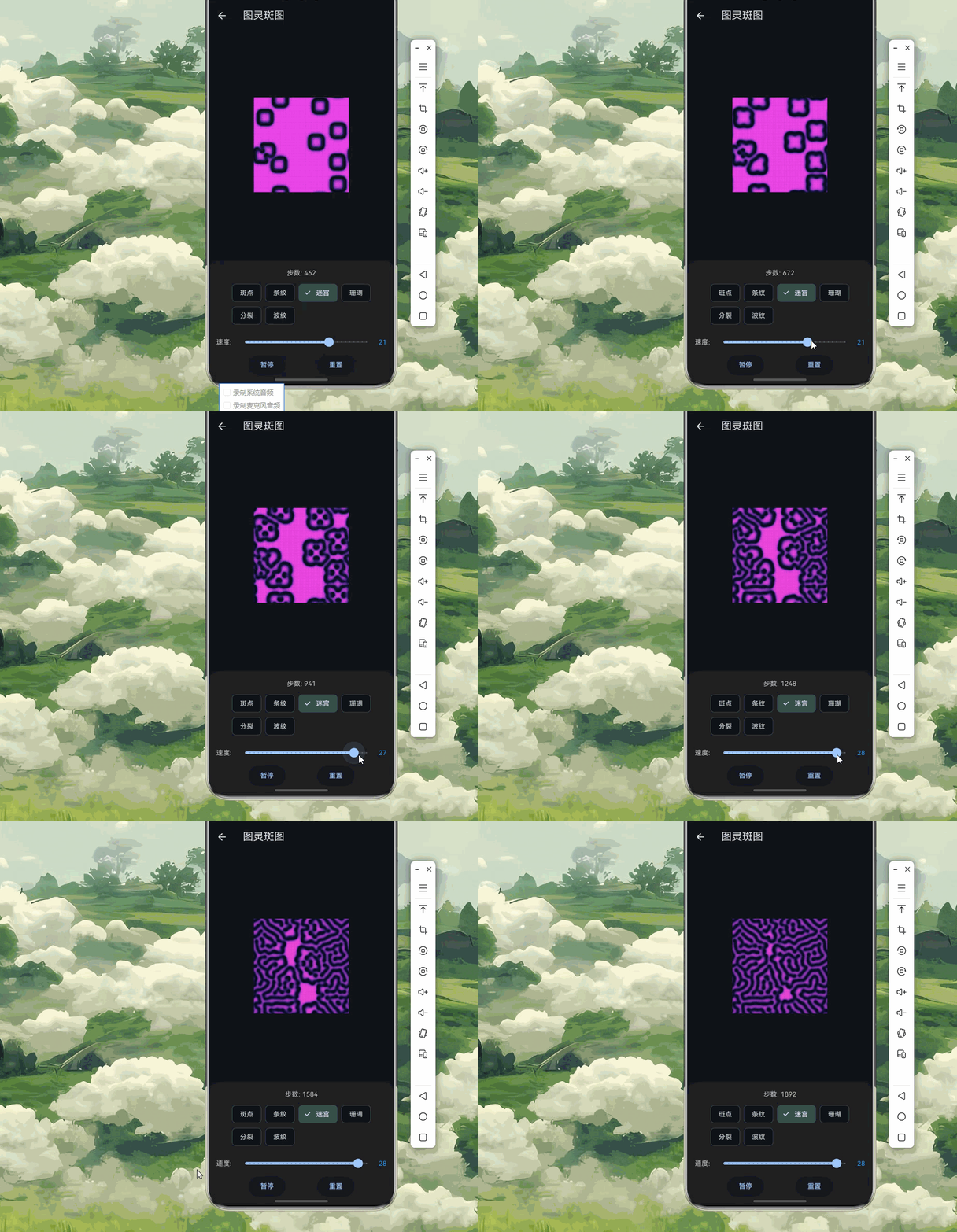
本篇文章深入探讨了反应扩散系统的数学原理及其在 Flutter 中的可视化实现。
·
欢迎加入开源鸿蒙跨平台社区:https://openharmonycrossplatform.csdn.net
🎨 一、反应扩散系统:数学之美
📚 1.1 图灵斑图的发现
1952年,数学家艾伦·图灵发表了一篇开创性论文《形态发生的化学基础》,提出了反应扩散系统的概念,解释了自然界中斑纹图案的形成机制。
图灵的核心洞察:
两种化学物质(形态因子)在组织中扩散并相互作用:
- 一种促进某种结构形成(激活子 Activator)
- 一种抑制该结构的扩展(抑制子 Inhibitor)

当扩散速率不同时,均匀分布会变得不稳定
最终形成稳定的空间图案——图灵斑图
历史意义:
1952年:图灵发表论文,奠定理论基础
1972年:Gierer 和 Meinhardt 提出具体模型
1980年代:Gray-Scott 模型成为经典
1990年代:计算机模拟验证理论
2012年:实验首次在化学反应中观察到图灵斑图
图灵斑图示意:
均匀初始状态          扰动后          最终稳定图案
┌─────────────┐    ┌─────────────┐    ┌─────────────┐
│ · · · · · · │    │ · · ◉ · · · │    │ ○ ○ ● ● ○ ○ │
│ · · · · · · │    │ · · · · ◉ · │    │ ● ● ● ● ● ● │
│ · · · · · · │ →  │ · ◉ · · · · │ →  │ ○ ● ● ● ● ○ │
│ · · · · · · │    │ · · · · · · │    │ ○ ○ ● ● ○ ○ │
│ · · · · · · │    │ · · · ◉ · · │    │ ○ ○ ○ ○ ○ ○ │
└─────────────┘    └─────────────┘    └─────────────┘
📐 1.2 反应扩散方程
反应扩散系统的数学模型由偏微分方程描述:
Gray-Scott 模型:
∂u/∂t = Du∇²u - uv² + f(1 - u)
∂v/∂t = Dv∇²v + uv² - (f + k)v

其中:
- u:激活子浓度
- v:抑制子浓度
- Du、Dv:扩散系数
- f:供给速率(Feed rate)
- k:衰减速率(Kill rate)
- ∇²:拉普拉斯算子(扩散项)
参数含义详解:
| 参数 | 作用 | 典型值范围 | 影响 |
|---|---|---|---|
| Du | 激活子扩散率 | 0.14 - 0.20 | 控制激活子扩散速度 |
| Dv | 抑制子扩散率 | 0.05 - 0.08 | 控制抑制子扩散速度 |
| f | 供给率 | 0.01 - 0.07 | 新激活子的补充速度 |
| k | 衰减率 | 0.03 - 0.07 | 抑制子的消耗速度 |
拉普拉斯算子离散化:
二维网格上的五点差分格式:

∇²u ≈ (u[i+1,j] + u[i-1,j] + u[i,j+1] + u[i,j-1] - 4u[i,j]) / h²

      u[i-1,j]
          ↓
u[i,j-1] ← u[i,j] → u[i,j+1]
          ↑
      u[i+1,j]

h 为网格间距,通常取 1
🔬 1.3 斑图类型与参数空间
不同的参数组合会产生不同类型的斑图:
斑图类型分类:
| 斑图类型 | 参数特征 | 自然界示例 | 视觉特点 |
|---|---|---|---|
| 🐆斑点图案 | f 较大,k 较小 | 豹纹、长颈鹿 | 离散圆形斑点 |
| 🦓条纹图案 | f 中等,k 中等 | 斑马、虎纹 | 平行条纹 |
| 🌊迷宫图案 | f 较小,k 较大 | 珊瑚、脑珊瑚 | 连通迷宫状 |
| 🌿分叉图案 | f 很小 | 树枝分叉 | 分形分支 |
| 🎯点阵图案 | 特定参数组合 | 热带鱼 | 规则点阵 |
| 🌀波纹图案 | f 很小,k 特定 | 化学波 | 脉冲波纹 |
斑图相图示意:
        k (衰减率)
        ↑
   0.07 │  迷宫  │  条纹  │  斑点
        │   🌀   │   ═══  │   ●●●
   0.05 │────────┼────────┼────────
        │  分叉  │  混合  │  规则
        │   ⑂    │  ●═●   │   ●●●
   0.03 │────────┼────────┼────────
        │  死亡  │  波纹  │  脉冲
        │   ○    │   〰   │   ◉◉◉
        └────────┴────────┴────────→ f (供给率)
              0.02     0.04     0.06

"死亡"区域:图案消失,趋于均匀
"脉冲"区域:动态振荡图案
🎯 1.4 自然界中的图灵斑图
生物斑图形成机制:
| 生物 | 斑图类型 | 形成机制 | 发育阶段 |
|---|---|---|---|
| 🐆 豹 | 斑点 | 激活子扩散慢,抑制子扩散快 | 胚胎期皮肤 |
| 🦓 斑马 | 条纹 | 扩散各向异性 | 胚胎期皮肤 |
| 🐠 热带鱼 | 点阵 | 多种形态因子相互作用 | 幼鱼期 |
| 🦎 蜥蜴 | 格子 | 皮肤拉伸影响 | 发育过程 |
| 🐚 贝壳 | 条纹/斑点 | 色素细胞分布 | 生长边缘 |
斑马条纹形成示意:
胚胎期(均匀)    发育中(条纹出现)    成熟期(清晰条纹)
┌─────────────┐    ┌─────────────┐    ┌─────────────┐
│             │    │  ═════════  │    │  ═════════  │
│             │    │  ═════════  │    │  ═════════  │
│             │ →  │  ═════════  │ →  │  ═════════  │
│             │    │  ═════════  │    │  ═════════  │
│             │    │  ═════════  │    │  ═════════  │
└─────────────┘    └─────────────┘    └─────────────┘

条纹宽度由胚胎大小决定
条纹方向由扩散各向异性决定
其他自然现象:
沙丘波纹:风沙运动的反应扩散
珊瑚纹理:钙化过程的形态发生
蝴蝶翅膀:色素细胞的空间分布
哺乳动物毛色:毛囊中的色素合成
🔧 二、反应扩散系统的 Dart 实现
🧮 2.1 核心数据结构
import 'dart:math';
import 'dart:typed_data';

/// 反应扩散网格
class ReactionDiffusionGrid {
  final int width;
  final int height;

  late Float32List _u;
  late Float32List _v;
  late Float32List _uNext;
  late Float32List _vNext;

  double du = 0.16;
  double dv = 0.08;
  double feed = 0.055;
  double kill = 0.062;
  double dt = 1.0;

  ReactionDiffusionGrid({
    required this.width,
    required this.height,
  }) {
    _u = Float32List(width * height);
    _v = Float32List(width * height);
    _uNext = Float32List(width * height);
    _vNext = Float32List(width * height);

    initialize();
  }

  /// 初始化网格
  void initialize() {
    for (int i = 0; i < _u.length; i++) {
      _u[i] = 1.0;
      _v[i] = 0.0;
    }
  }

  /// 添加扰动(种子)
  void addSeed(int cx, int cy, int radius) {
    for (int y = -radius; y <= radius; y++) {
      for (int x = -radius; x <= radius; x++) {
        if (x * x + y * y <= radius * radius) {
          final px = (cx + x + width) % width;
          final py = (cy + y + height) % height;
          final idx = py * width + px;

          _u[idx] = 0.5;
          _v[idx] = 0.25;
        }
      }
    }
  }

  /// 添加随机种子
  void addRandomSeeds(int count, int radius) {
    final random = Random();
    for (int i = 0; i < count; i++) {
      addSeed(random.nextInt(width), random.nextInt(height), radius);
    }
  }

  /// 添加线性种子(用于条纹)
  void addLinearSeeds() {
    final random = Random();
    for (int i = 0; i < 5; i++) {
      final y = random.nextInt(height);
      for (int x = 0; x < width; x++) {
        if (random.nextDouble() < 0.3) {
          final idx = y * width + x;
          _u[idx] = 0.5;
          _v[idx] = 0.25;
        }
      }
    }
  }

  /// 获取值
  double getU(int x, int y) => _u[(y % height) * width + (x % width)];
  double getV(int x, int y) => _v[(y % height) * width + (x % width)];

  /// 设置值
  void setU(int x, int y, double value) {
    _u[(y % height) * width + (x % width)] = value.clamp(0.0, 1.0);
  }

  void setV(int x, int y, double value) {
    _v[(y % height) * width + (x % width)] = value.clamp(0.0, 1.0);
  }

  /// 计算拉普拉斯算子(周期边界)
  double _laplacian(Float32List grid, int x, int y) {
    final left = grid[y * width + ((x - 1 + width) % width)];
    final right = grid[y * width + ((x + 1) % width)];
    final up = grid[((y - 1 + height) % height) * width + x];
    final down = grid[((y + 1) % height) * width + x];

    return left + right + up + down - 4 * grid[y * width + x];
  }

  /// 单步更新(Gray-Scott 模型)
  void step() {
    for (int y = 0; y < height; y++) {
      for (int x = 0; x < width; x++) {
        final idx = y * width + x;
        final u = _u[idx];
        final v = _v[idx];

        final lapU = _laplacian(_u, x, y);
        final lapV = _laplacian(_v, x, y);

        final uvv = u * v * v;

        _uNext[idx] = u + dt * (du * lapU - uvv + feed * (1 - u));
        _vNext[idx] = v + dt * (dv * lapV + uvv - (feed + kill) * v);

        _uNext[idx] = _uNext[idx].clamp(0.0, 1.0);
        _vNext[idx] = _vNext[idx].clamp(0.0, 1.0);
      }
    }

    // 交换缓冲区
    final tempU = _u;
    final tempV = _v;
    _u = _uNext;
    _v = _vNext;
    _uNext = tempU;
    _vNext = tempV;
  }

  /// 多步更新
  void update(int steps) {
    for (int i = 0; i < steps; i++) {
      step();
    }
  }

  /// 获取浓度数据
  Float32List get u => _u;
  Float32List get v => _v;

  /// 重置
  void reset() {
    initialize();
  }

  /// 设置参数预设
  void setPreset(ReactionDiffusionPreset preset) {
    du = preset.du;
    dv = preset.dv;
    feed = preset.feed;
    kill = preset.kill;
  }
}

/// 反应扩散参数预设
class ReactionDiffusionPreset {
  final String name;
  final double du;
  final double dv;
  final double feed;
  final double kill;

  const ReactionDiffusionPreset({
    required this.name,
    required this.du,
    required this.dv,
    required this.feed,
    required this.kill,
  });

  static const List<ReactionDiffusionPreset> presets = [
    ReactionDiffusionPreset(
      name: '斑点',
      du: 0.16,
      dv: 0.08,
      feed: 0.035,
      kill: 0.065,
    ),
    ReactionDiffusionPreset(
      name: '条纹',
      du: 0.16,
      dv: 0.08,
      feed: 0.035,
      kill: 0.060,
    ),
    ReactionDiffusionPreset(
      name: '迷宫',
      du: 0.16,
      dv: 0.08,
      feed: 0.029,
      kill: 0.057,
    ),
    ReactionDiffusionPreset(
      name: '珊瑚',
      du: 0.16,
      dv: 0.08,
      feed: 0.0545,
      kill: 0.062,
    ),
    ReactionDiffusionPreset(
      name: '波纹',
      du: 0.16,
      dv: 0.08,
      feed: 0.014,
      kill: 0.054,
    ),
    ReactionDiffusionPreset(
      name: '分裂',
      du: 0.16,
      dv: 0.08,
      feed: 0.039,
      kill: 0.058,
    ),
    ReactionDiffusionPreset(
      name: '脉冲',
      du: 0.16,
      dv: 0.08,
      feed: 0.025,
      kill: 0.060,
    ),
    ReactionDiffusionPreset(
      name: '虫洞',
      du: 0.16,
      dv: 0.08,
      feed: 0.078,
      kill: 0.061,
    ),
  ];
}
⚡ 2.2 高性能渲染器
import 'package:flutter/material.dart';

/// 反应扩散渲染器
class ReactionDiffusionRenderer {
  final ReactionDiffusionGrid grid;

  late Uint8List _pixels;
  late List<Color> _colorMap;

  ReactionDiffusionRenderer(this.grid) {
    _pixels = Uint8List(grid.width * grid.height * 4);
    _buildColorMap();
  }

  /// 构建颜色映射表
  void _buildColorMap() {
    _colorMap = List.generate(256, (i) {
      final t = i / 255.0;

      if (t < 0.5) {
        final s = t * 2;
        return Color.lerp(
          const Color(0xFF0a1628),
          const Color(0xFF1e90ff),
          s,
        )!;
      } else {
        final s = (t - 0.5) * 2;
        return Color.lerp(
          const Color(0xFF1e90ff),
          const Color(0xFFffffff),
          s,
        )!;
      }
    });
  }

  /// 设置颜色方案
  void setColorScheme(List<Color> colors) {
    _colorMap = [];
    for (int i = 0; i < 256; i++) {
      final t = i / 255.0;
      final idx = t * (colors.length - 1);
      final lower = idx.floor();
      final upper = (lower + 1).clamp(0, colors.length - 1);
      final frac = idx - lower;

      _colorMap.add(Color.lerp(colors[lower], colors[upper], frac)!);
    }
  }

  /// 设置热力图颜色方案
  void setHeatmapScheme() {
    _colorMap = List.generate(256, (i) {
      final t = i / 255.0;

      if (t < 0.25) {
        return Color.lerp(const Color(0xFF000033), const Color(0xFF0000ff), t * 4)!;
      } else if (t < 0.5) {
        return Color.lerp(const Color(0xFF0000ff), const Color(0xFF00ffff), (t - 0.25) * 4)!;
      } else if (t < 0.75) {
        return Color.lerp(const Color(0xFF00ffff), const Color(0xFFFFFF00), (t - 0.5) * 4)!;
      } else {
        return Color.lerp(const Color(0xFFFFFF00), const Color(0xFFFF0000), (t - 0.75) * 4)!;
      }
    });
  }

  /// 渲染到像素缓冲区
  Uint8List render() {
    final u = grid.u;
    final v = grid.v;

    for (int i = 0; i < u.length; i++) {
      final value = (u[i] - v[i]).clamp(0.0, 1.0);
      final colorIdx = (value * 255).round();
      final color = _colorMap[colorIdx];

      final pixelIdx = i * 4;
      _pixels[pixelIdx] = color.red;
      _pixels[pixelIdx + 1] = color.green;
      _pixels[pixelIdx + 2] = color.blue;
      _pixels[pixelIdx + 3] = 255;
    }

    return _pixels;
  }

  /// 渲染带动态颜色
  Uint8List renderWithTime(double time) {
    final u = grid.u;
    final v = grid.v;

    for (int i = 0; i < u.length; i++) {
      final value = (u[i] - v[i]).clamp(0.0, 1.0);
      final hue = (200 + value * 80 + time * 20) % 360;
      final color = HSVColor.fromAHSV(1, hue, 0.7, value * 0.9 + 0.1).toColor();

      final pixelIdx = i * 4;
      _pixels[pixelIdx] = color.red;
      _pixels[pixelIdx + 1] = color.green;
      _pixels[pixelIdx + 2] = color.blue;
      _pixels[pixelIdx + 3] = 255;
    }

    return _pixels;
  }

  /// 获取像素数据
  Uint8List get pixels => _pixels;
}

/// 斑图类型检测器
class PatternDetector {
  final ReactionDiffusionGrid grid;

  PatternDetector(this.grid);

  /// 计算平均浓度
  double averageConcentration() {
    final u = grid.u;
    var sum = 0.0;
    for (final value in u) {
      sum += value;
    }
    return sum / u.length;
  }

  /// 计算方差
  double variance() {
    final avg = averageConcentration();
    final u = grid.u;
    var sum = 0.0;
    for (final value in u) {
      sum += (value - avg) * (value - avg);
    }
    return sum / u.length;
  }

  /// 检测图案类型
  String detectPatternType() {
    final var = variance();

    if (var < 0.01) return '均匀';
    if (var < 0.05) return '弱图案';
    if (var < 0.1) return '中等图案';
    return '强图案';
  }

  /// 计算图案密度
  double patternDensity() {
    final u = grid.u;
    final v = grid.v;
    var count = 0;

    for (int i = 0; i < u.length; i++) {
      if (u[i] - v[i] > 0.5) count++;
    }

    return count / u.length;
  }
}
🎨 2.3 交互式控制器
import 'package:flutter/material.dart';

/// 反应扩散控制器
class ReactionDiffusionController extends ChangeNotifier {
  late ReactionDiffusionGrid _grid;
  late ReactionDiffusionRenderer _renderer;

  bool _isRunning = false;
  int _stepsPerFrame = 10;
  int _totalSteps = 0;
  int _selectedPreset = 0;
  double _time = 0;

  ReactionDiffusionController({
    required int width,
    required int height,
  }) {
    _grid = ReactionDiffusionGrid(width: width, height: height);
    _renderer = ReactionDiffusionRenderer(_grid);

    _grid.setPreset(ReactionDiffusionPreset.presets[0]);
    _grid.addRandomSeeds(10, 5);
  }

  ReactionDiffusionGrid get grid => _grid;
  ReactionDiffusionRenderer get renderer => _renderer;
  bool get isRunning => _isRunning;
  int get stepsPerFrame => _stepsPerFrame;
  int get totalSteps => _totalSteps;
  int get selectedPreset => _selectedPreset;
  double get time => _time;

  /// 更新
  void update() {
    if (_isRunning) {
      _grid.update(_stepsPerFrame);
      _totalSteps += _stepsPerFrame;
      _time += 0.016;
      notifyListeners();
    }
  }

  /// 开始/暂停
  void toggleRunning() {
    _isRunning = !_isRunning;
    notifyListeners();
  }

  /// 设置每帧步数
  void setStepsPerFrame(int steps) {
    _stepsPerFrame = steps.clamp(1, 50);
    notifyListeners();
  }

  /// 选择预设
  void selectPreset(int index) {
    if (index >= 0 && index < ReactionDiffusionPreset.presets.length) {
      _selectedPreset = index;
      _grid.setPreset(ReactionDiffusionPreset.presets[index]);
      notifyListeners();
    }
  }

  /// 添加种子
  void addSeedAt(int x, int y, {int radius = 5}) {
    _grid.addSeed(x, y, radius);
    notifyListeners();
  }

  /// 重置
  void reset() {
    _grid.reset();
    _grid.addRandomSeeds(10, 5);
    _totalSteps = 0;
    _time = 0;
    notifyListeners();
  }

  /// 设置参数
  void setParameters({
    double? du,
    double? dv,
    double? feed,
    double? kill,
  }) {
    if (du != null) _grid.du = du;
    if (dv != null) _grid.dv = dv;
    if (feed != null) _grid.feed = feed;
    if (kill != null) _grid.kill = kill;
    notifyListeners();
  }

  /// 渲染
  Uint8List render() {
    return _renderer.renderWithTime(_time);
  }
}
📦 三、完整示例代码
以下是完整的反应扩散系统可视化示例代码:
import 'package:flutter/material.dart';
import 'dart:math';
import 'dart:typed_data';
void main() {
runApp(const ReactionDiffusionApp());
}
class ReactionDiffusionApp extends StatelessWidget {
const ReactionDiffusionApp({super.key});
Widget build(BuildContext context) {
return MaterialApp(
title: '反应扩散系统',
theme: ThemeData(
colorScheme: ColorScheme.fromSeed(seedColor: Colors.blue, brightness: Brightness.dark),
useMaterial3: true,
),
home: const ReactionDiffusionHomePage(),
debugShowCheckedModeBanner: false,
);
}
}
class ReactionDiffusionHomePage extends StatelessWidget {
const ReactionDiffusionHomePage({super.key});
Widget build(BuildContext context) {
return Scaffold(
appBar: AppBar(
title: const Text('🎨 反应扩散系统'),
backgroundColor: Theme.of(context).colorScheme.inversePrimary,
),
body: ListView(
padding: const EdgeInsets.all(16),
children: [
_buildCard(
context,
title: '图灵斑图',
description: '经典 Gray-Scott 模型',
icon: Icons.blur_on,
color: Colors.blue,
onTap: () => Navigator.push(
context,
MaterialPageRoute(builder: (_) => const TuringPatternDemo()),
),
),
_buildCard(
context,
title: '斑图画廊',
description: '多种参数预设对比',
icon: Icons.grid_view,
color: Colors.purple,
onTap: () => Navigator.push(
context,
MaterialPageRoute(builder: (_) => const PatternGalleryDemo()),
),
),
_buildCard(
context,
title: '交互绘制',
description: '手动添加种子',
icon: Icons.draw,
color: Colors.orange,
onTap: () => Navigator.push(
context,
MaterialPageRoute(builder: (_) => const InteractivePatternDemo()),
),
),
_buildCard(
context,
title: '参数探索',
description: '实时调节参数',
icon: Icons.tune,
color: Colors.teal,
onTap: () => Navigator.push(
context,
MaterialPageRoute(builder: (_) => const ParameterExplorerDemo()),
),
),
],
),
);
}
Widget _buildCard(
BuildContext context, {
required String title,
required String description,
required IconData icon,
required Color color,
required VoidCallback onTap,
}) {
return Card(
margin: const EdgeInsets.only(bottom: 12),
shape: RoundedRectangleBorder(borderRadius: BorderRadius.circular(16)),
child: InkWell(
onTap: onTap,
borderRadius: BorderRadius.circular(16),
child: Padding(
padding: const EdgeInsets.all(16),
child: Row(
children: [
Container(
width: 56,
height: 56,
decoration: BoxDecoration(
color: color.withOpacity(0.1),
borderRadius: BorderRadius.circular(12),
),
child: Icon(icon, color: color, size: 28),
),
const SizedBox(width: 16),
Expanded(
child: Column(
crossAxisAlignment: CrossAxisAlignment.start,
children: [
Text(
title,
style: const TextStyle(
fontSize: 16,
fontWeight: FontWeight.bold,
),
),
const SizedBox(height: 4),
Text(
description,
style: TextStyle(color: Colors.grey[600], fontSize: 14),
),
],
),
),
Icon(Icons.chevron_right, color: Colors.grey[400]),
],
),
),
),
);
}
}
/// 反应扩散网格(简化版)
class RDGrid {
final int width, height;
late Float32List _u, _v, _uNext, _vNext;
double du = 0.16, dv = 0.08, feed = 0.055, kill = 0.062;
RDGrid({required this.width, required this.height}) {
_u = Float32List(width * height);
_v = Float32List(width * height);
_uNext = Float32List(width * height);
_vNext = Float32List(width * height);
for (int i = 0; i < _u.length; i++) { _u[i] = 1.0; _v[i] = 0.0; }
}
void addSeed(int cx, int cy, int r) {
for (int y = -r; y <= r; y++) {
for (int x = -r; x <= r; x++) {
if (x*x + y*y <= r*r) {
final idx = ((cy + y + height) % height) * width + ((cx + x + width) % width);
_u[idx] = 0.5; _v[idx] = 0.25;
}
}
}
}
void addRandomSeeds(int count, int radius) {
final rand = Random();
for (int i = 0; i < count; i++) addSeed(rand.nextInt(width), rand.nextInt(height), radius);
}
double _lap(Float32List g, int x, int y) {
return g[y * width + ((x-1+width)%width)] + g[y * width + ((x+1)%width)] +
g[((y-1+height)%height) * width + x] + g[((y+1)%height) * width + x] - 4 * g[y * width + x];
}
void step() {
for (int y = 0; y < height; y++) {
for (int x = 0; x < width; x++) {
final i = y * width + x;
final u = _u[i], v = _v[i];
final uvv = u * v * v;
_uNext[i] = (u + du * _lap(_u, x, y) - uvv + feed * (1 - u)).clamp(0.0, 1.0);
_vNext[i] = (v + dv * _lap(_v, x, y) + uvv - (feed + kill) * v).clamp(0.0, 1.0);
}
}
final t = _u; _u = _uNext; _uNext = t;
final s = _v; _v = _vNext; _vNext = s;
}
void update(int n) { for (int i = 0; i < n; i++) step(); }
Float32List get u => _u;
Float32List get v => _v;
void reset() { for (int i = 0; i < _u.length; i++) { _u[i] = 1.0; _v[i] = 0.0; } }
}
/// 参数预设
class Preset {
final String name;
final double feed, kill;
const Preset(this.name, this.feed, this.kill);
static const presets = [
Preset('斑点', 0.035, 0.065),
Preset('条纹', 0.035, 0.060),
Preset('迷宫', 0.029, 0.057),
Preset('珊瑚', 0.0545, 0.062),
Preset('分裂', 0.014, 0.054),
Preset('波纹', 0.039, 0.058),
];
}
/// 图灵斑图演示
class TuringPatternDemo extends StatefulWidget {
const TuringPatternDemo({super.key});
State<TuringPatternDemo> createState() => _TuringPatternDemoState();
}
class _TuringPatternDemoState extends State<TuringPatternDemo> with SingleTickerProviderStateMixin {
late AnimationController _ctrl;
late RDGrid _grid;
late Uint8List _pixels;
bool _running = true;
int _steps = 10, _total = 0, _preset = 0;
double _time = 0;
void initState() {
super.initState();
_grid = RDGrid(width: 200, height: 200);
_pixels = Uint8List(200 * 200 * 4);
_applyPreset(0);
_ctrl = AnimationController(vsync: this, duration: const Duration(milliseconds: 16))..repeat();
_ctrl.addListener(_update);
}
void _update() {
if (_running) {
_grid.update(_steps);
_total += _steps;
_time += 0.016;
_render();
setState(() {});
}
}
void _applyPreset(int i) {
final p = Preset.presets[i];
_grid.feed = p.feed;
_grid.kill = p.kill;
_preset = i;
}
void _render() {
final u = _grid.u, v = _grid.v;
for (int i = 0; i < u.length; i++) {
final val = (u[i] - v[i]).clamp(0.0, 1.0);
final hue = (200 + val * 80 + _time * 10) % 360;
final c = HSVColor.fromAHSV(1, hue, 0.7, val * 0.9 + 0.1).toColor();
final p = i * 4;
_pixels[p] = c.red; _pixels[p+1] = c.green; _pixels[p+2] = c.blue; _pixels[p+3] = 255;
}
}
void dispose() { _ctrl.removeListener(_update); _ctrl.dispose(); super.dispose(); }
Widget build(BuildContext context) {
return Scaffold(
appBar: AppBar(title: const Text('图灵斑图')),
body: Column(children: [
Expanded(child: Center(child: CustomPaint(painter: RDPainter(_pixels, 200, 200), size: const Size(200, 200)))),
_buildControls(),
]),
);
}
Widget _buildControls() {
return Container(
padding: const EdgeInsets.all(16),
decoration: BoxDecoration(color: Colors.grey[900], borderRadius: const BorderRadius.vertical(top: Radius.circular(20))),
child: Column(mainAxisSize: MainAxisSize.min, children: [
Text('步数: $_total', style: const TextStyle(color: Colors.white70)),
const SizedBox(height: 8),
Wrap(spacing: 8, children: List.generate(Preset.presets.length, (i) => ChoiceChip(
label: Text(Preset.presets[i].name),
selected: _preset == i,
onSelected: (s) { if (s) { _applyPreset(i); _grid.reset(); _grid.addRandomSeeds(10, 5); _total = 0; setState(() {}); } },
))),
const SizedBox(height: 8),
Row(children: [
const Text('速度: ', style: TextStyle(color: Colors.white70)),
Expanded(child: Slider(value: _steps.toDouble(), min: 1, max: 30, divisions: 29, onChanged: (v) => setState(() => _steps = v.toInt()))),
Text('$_steps', style: const TextStyle(color: Colors.blue)),
]),
Row(mainAxisAlignment: MainAxisAlignment.spaceEvenly, children: [
ElevatedButton(onPressed: () => setState(() => _running = !_running), child: Text(_running ? '暂停' : '继续')),
ElevatedButton(onPressed: () { _grid.reset(); _grid.addRandomSeeds(10, 5); _total = 0; setState(() {}); }, child: const Text('重置')),
]),
]),
);
}
}
class RDPainter extends CustomPainter {
final Uint8List pixels;
final int w, h;
RDPainter(this.pixels, this.w, this.h);
void paint(Canvas canvas, Size size) {
final paint = Paint();
for (int y = 0; y < h; y++) {
for (int x = 0; x < w; x++) {
final i = (y * w + x) * 4;
paint.color = Color.fromARGB(pixels[i+3], pixels[i], pixels[i+1], pixels[i+2]);
canvas.drawRect(Rect.fromLTWH(x.toDouble(), y.toDouble(), 1, 1), paint);
}
}
}
bool shouldRepaint(covariant RDPainter old) => true;
}
/// 斑图画廊演示
class PatternGalleryDemo extends StatefulWidget {
const PatternGalleryDemo({super.key});
State<PatternGalleryDemo> createState() => _PatternGalleryDemoState();
}
class _PatternGalleryDemoState extends State<PatternGalleryDemo> with TickerProviderStateMixin {
final List<RDGrid> _grids = [];
final List<Uint8List> _pixels = [];
late AnimationController _ctrl;
double _time = 0;
void initState() {
super.initState();
for (int i = 0; i < Preset.presets.length; i++) {
final p = Preset.presets[i];
final g = RDGrid(width: 100, height: 100);
g.feed = p.feed; g.kill = p.kill;
g.addRandomSeeds(5, 3);
_grids.add(g);
_pixels.add(Uint8List(100 * 100 * 4));
}
_ctrl = AnimationController(vsync: this, duration: const Duration(milliseconds: 16))..repeat();
_ctrl.addListener(_update);
}
void _update() {
_time += 0.016;
for (int i = 0; i < _grids.length; i++) {
_grids[i].update(5);
_renderIdx(i);
}
setState(() {});
}
void _renderIdx(int idx) {
final g = _grids[idx], u = g.u, v = g.v, p = _pixels[idx];
for (int i = 0; i < u.length; i++) {
final val = (u[i] - v[i]).clamp(0.0, 1.0);
final hue = (idx * 60 + val * 120) % 360;
final c = HSVColor.fromAHSV(1, hue, 0.8, val * 0.8 + 0.2).toColor();
final pi = i * 4;
p[pi] = c.red; p[pi+1] = c.green; p[pi+2] = c.blue; p[pi+3] = 255;
}
}
void dispose() { _ctrl.removeListener(_update); _ctrl.dispose(); super.dispose(); }
Widget build(BuildContext context) {
return Scaffold(
appBar: AppBar(title: const Text('斑图画廊')),
body: GridView.builder(
padding: const EdgeInsets.all(8),
gridDelegate: const SliverGridDelegateWithFixedCrossAxisCount(crossAxisCount: 2, crossAxisSpacing: 8, mainAxisSpacing: 8),
itemCount: Preset.presets.length,
itemBuilder: (ctx, i) => Column(children: [
Expanded(child: CustomPaint(painter: RDPainter(_pixels[i], 100, 100), size: Size.infinite)),
Padding(padding: const EdgeInsets.all(8), child: Text(Preset.presets[i].name, style: const TextStyle(fontWeight: FontWeight.bold))),
]),
),
);
}
}
/// 交互绘制演示
class InteractivePatternDemo extends StatefulWidget {
const InteractivePatternDemo({super.key});
State<InteractivePatternDemo> createState() => _InteractivePatternDemoState();
}
class _InteractivePatternDemoState extends State<InteractivePatternDemo> with SingleTickerProviderStateMixin {
late AnimationController _ctrl;
late RDGrid _grid;
late Uint8List _pixels;
bool _running = true;
int _brush = 5;
double _time = 0;
void initState() {
super.initState();
_grid = RDGrid(width: 200, height: 200);
_pixels = Uint8List(200 * 200 * 4);
_grid.feed = 0.0545; _grid.kill = 0.062;
_ctrl = AnimationController(vsync: this, duration: const Duration(milliseconds: 16))..repeat();
_ctrl.addListener(_update);
}
void _update() {
if (_running) {
_grid.update(10);
_time += 0.016;
_render();
setState(() {});
}
}
void _render() {
final u = _grid.u, v = _grid.v;
for (int i = 0; i < u.length; i++) {
final val = (u[i] - v[i]).clamp(0.0, 1.0);
final c = HSVColor.fromAHSV(1, 200 + val * 80, 0.7, val * 0.9 + 0.1).toColor();
final p = i * 4;
_pixels[p] = c.red; _pixels[p+1] = c.green; _pixels[p+2] = c.blue; _pixels[p+3] = 255;
}
}
void dispose() { _ctrl.removeListener(_update); _ctrl.dispose(); super.dispose(); }
Widget build(BuildContext context) {
return Scaffold(
appBar: AppBar(title: const Text('交互绘制')),
body: Column(children: [
Expanded(child: GestureDetector(
onPanStart: (d) => _addSeed(d.localPosition),
onPanUpdate: (d) => _addSeed(d.localPosition),
child: Center(child: CustomPaint(painter: RDPainter(_pixels, 200, 200), size: const Size(200, 200))),
)),
_buildControls(),
]),
);
}
void _addSeed(Offset pos) => _grid.addSeed(pos.dx.toInt(), pos.dy.toInt(), _brush);
Widget _buildControls() {
return Container(
padding: const EdgeInsets.all(16),
decoration: BoxDecoration(color: Colors.grey[900], borderRadius: const BorderRadius.vertical(top: Radius.circular(20))),
child: Column(mainAxisSize: MainAxisSize.min, children: [
const Text('触摸屏幕添加种子', style: TextStyle(color: Colors.white70)),
const SizedBox(height: 8),
Row(children: [
const Text('笔刷: ', style: TextStyle(color: Colors.white70)),
Expanded(child: Slider(value: _brush.toDouble(), min: 2, max: 20, divisions: 18, onChanged: (v) => setState(() => _brush = v.toInt()))),
Text('$_brush', style: const TextStyle(color: Colors.orange)),
]),
Row(mainAxisAlignment: MainAxisAlignment.spaceEvenly, children: [
ElevatedButton(onPressed: () => setState(() => _running = !_running), child: Text(_running ? '暂停' : '继续')),
ElevatedButton(onPressed: () { _grid.reset(); setState(() {}); }, child: const Text('清空')),
]),
]),
);
}
}
/// 参数探索演示
class ParameterExplorerDemo extends StatefulWidget {
const ParameterExplorerDemo({super.key});
State<ParameterExplorerDemo> createState() => _ParameterExplorerDemoState();
}
class _ParameterExplorerDemoState extends State<ParameterExplorerDemo> with SingleTickerProviderStateMixin {
late AnimationController _ctrl;
late RDGrid _grid;
late Uint8List _pixels;
double _feed = 0.055, _kill = 0.062, _du = 0.16, _dv = 0.08, _time = 0;
void initState() {
super.initState();
_grid = RDGrid(width: 150, height: 150);
_pixels = Uint8List(150 * 150 * 4);
_grid.addRandomSeeds(8, 4);
_ctrl = AnimationController(vsync: this, duration: const Duration(milliseconds: 16))..repeat();
_ctrl.addListener(_update);
}
void _update() {
_grid.update(8);
_time += 0.016;
_render();
setState(() {});
}
void _render() {
final u = _grid.u, v = _grid.v;
for (int i = 0; i < u.length; i++) {
final val = (u[i] - v[i]).clamp(0.0, 1.0);
final c = HSVColor.fromAHSV(1, 180 + val * 100, 0.8, val * 0.85 + 0.15).toColor();
final p = i * 4;
_pixels[p] = c.red; _pixels[p+1] = c.green; _pixels[p+2] = c.blue; _pixels[p+3] = 255;
}
}
void dispose() { _ctrl.removeListener(_update); _ctrl.dispose(); super.dispose(); }
Widget build(BuildContext context) {
return Scaffold(
appBar: AppBar(title: const Text('参数探索')),
body: Column(children: [
Expanded(child: Center(child: CustomPaint(painter: RDPainter(_pixels, 150, 150), size: const Size(150, 150)))),
_buildControls(),
]),
);
}
Widget _buildControls() {
return Container(
padding: const EdgeInsets.all(16),
decoration: BoxDecoration(color: Colors.grey[900], borderRadius: const BorderRadius.vertical(top: Radius.circular(20))),
child: Column(mainAxisSize: MainAxisSize.min, children: [
_slider('Feed (供给)', _feed, 0.01, 0.10, (v) { _feed = v; _grid.feed = v; }),
_slider('Kill (衰减)', _kill, 0.03, 0.07, (v) { _kill = v; _grid.kill = v; }),
_slider('Du (激活子扩散)', _du, 0.10, 0.25, (v) { _du = v; _grid.du = v; }),
_slider('Dv (抑制子扩散)', _dv, 0.04, 0.12, (v) { _dv = v; _grid.dv = v; }),
ElevatedButton(onPressed: () { _grid.reset(); _grid.addRandomSeeds(8, 4); setState(() {}); }, child: const Text('重置')),
]),
);
}
Widget _slider(String label, double val, double min, double max, Function(double) cb) {
return Row(children: [
SizedBox(width: 120, child: Text(label, style: const TextStyle(color: Colors.white70, fontSize: 12))),
Expanded(child: Slider(value: val, min: min, max: max, onChanged: (v) { cb(v); setState(() {}); })),
SizedBox(width: 50, child: Text(val.toStringAsFixed(3), style: const TextStyle(color: Colors.teal))),
]);
}
}
📝 四、数学原理深入解析
📐 4.1 稳定性分析
反应扩散系统的稳定性分析是理解斑图形成的关键:
线性稳定性分析:
考虑均匀稳态解 (u₀, v₀):
u₀ = 1, v₀ = 0(无图案状态)

引入小扰动:
u = u₀ + εu', v = v₀ + εv'

线性化方程:
∂u'/∂t = Du∇²u' - f·u' - 2u₀v₀·v'
∂v'/∂t = Dv∇²v' + f·v' + 2u₀v₀·u'

特征值分析:
J = | -f - k²Du    -2u₀v₀ |
    |   2u₀v₀    f-k - k²Dv |

图案形成条件:存在 k 使得 Re(λ) > 0
扩散不稳定性(Turing 不稳定性):
条件1:无扩散时稳定
∂f/∂u - ∂g/∂u < 0
∂f/∂v · ∂g/∂u - ∂f/∂u · ∂g/∂v > 0

条件2:有扩散时不稳定
Du · ∂g/∂v + Dv · ∂f/∂u > 0

关键洞察:
抑制子必须比激活子扩散更快
Dv > Du(通常 Dv/Du > 2)
🔄 4.2 斑图尺度与波长
特征波长计算:
最不稳定波数 k_c:
k_c² = √((∂g/∂v)·(∂f/∂u) / (Du·Dv))

特征波长 λ:
λ = 2π/k_c

影响波长的因素:
- 扩散系数比 Dv/Du
- 反应速率参数 f, k
- 网格尺寸和边界条件
尺度选择示意:
小尺度(高波数):        大尺度(低波数):
┌─────────────┐        ┌─────────────┐
│●●●●●●●●●●●●│        │     ●●●     │
│●●●●●●●●●●●●│        │   ●●●●●●●   │
│●●●●●●●●●●●●│        │  ●●●   ●●●  │
│●●●●●●●●●●●●│        │ ●●●     ●●● │
│●●●●●●●●●●●●│        │  ●●●   ●●●  │
└─────────────┘        └─────────────┘

斑点密集              斑点稀疏
🌸 4.3 其他反应扩散模型
Gierer-Meinhardt 模型:
∂u/∂t = Du∇²u + u²/v - u
∂v/∂t = Dv∇²v + u² - v

特点:
- 激活子自我催化
- 抑制子由激活子产生
- 适合模拟局部激活、长程抑制
Brusselator 模型:
∂u/∂t = Du∇²u + A - (B+1)u + u²v
∂v/∂t = Dv∇²v + Bu - u²v

特点:
- 开放系统模型
- 化学振荡
- Hopf 分岔
Oregonator 模型(BZ 反应):
∂u/∂t = Du∇²u + u(1-u) - f·v·(u-q)/(u+q)
∂v/∂t = Dv∇²v + u - v

特点:
- BZ 化学反应
- 螺旋波
- 时空混沌
🎯 4.4 边界条件与初始条件
边界条件类型:
| 类型 | 数学描述 | 物理意义 |
|---|---|---|
| 周期边界 | u(0) = u(N) | 环面拓扑 |
| 零通量边界 | ∂u/∂n = 0 | 无物质流出 |
| 固定边界 | u(边界) = 常数 | 浓度固定 |
| 反射边界 | u(-x) = u(x) | 镜像对称 |
初始条件的影响:
随机初始扰动:
- 产生自然、有机的图案
- 每次运行结果不同
- 适合模拟自然现象

规则初始扰动:
- 产生对称图案
- 可预测结果
- 适合艺术创作

条形初始扰动:
- 产生平行条纹
- 方向由扰动方向决定
- 模拟斑马条纹
🔬 五、高级应用场景
🎨 5.1 实时可视化
反应扩散系统在实时可视化中的独特优势:
性能优化策略:
class OptimizedRDSimulation {
  late Float32List _u, _v;
  final int _width, _height;
  bool _useSIMD = false;

  // 分块计算
  void updateChunked(int chunkSize) {
    for (int y0 = 0; y0 < _height; y0 += chunkSize) {
      for (int x0 = 0; x0 < _width; x0 += chunkSize) {
        _updateChunk(x0, y0, chunkSize, chunkSize);
      }
    }
  }

  // 多线程计算(使用 Isolate)
  Future<void> updateParallel() async {
    final results = await Future.wait([
      compute(_computeRegion, RegionParams(0, 0, _width ~/ 2, _height ~/ 2)),
      compute(_computeRegion, RegionParams(_width ~/ 2, 0, _width ~/ 2, _height ~/ 2)),
      compute(_computeRegion, RegionParams(0, _height ~/ 2, _width ~/ 2, _height ~/ 2)),
      compute(_computeRegion, RegionParams(_width ~/ 2, _height ~/ 2, _width ~/ 2, _height ~/ 2)),
    ]);
    // 合并结果
  }
}
🌐 5.2 生成艺术应用
参数化艺术生成:
class RDArtGenerator {
  final RDGrid grid;
  final ColorScheme colors;

  RDArtGenerator(this.grid, this.colors);

  /// 生成艺术作品
  Uint8List generateArtwork({
    required int steps,
    required double timeOffset,
  }) {
    grid.update(steps);

    final pixels = Uint8List(grid.width * grid.height * 4);
    final u = grid.u;
    final v = grid.v;

    for (int i = 0; i < u.length; i++) {
      final val = (u[i] - v[i]).clamp(0.0, 1.0);

      // 多层颜色映射
      final layer1 = colors.primary.withOpacity(val);
      final layer2 = colors.secondary.withOpacity(1 - val);
      final mixed = Color.alphaBlend(layer1, layer2);

      // 添加噪声纹理
      final noise = _noise(i, timeOffset);
      final finalColor = Color.lerp(mixed, colors.tertiary, noise * 0.2)!;

      final p = i * 4;
      pixels[p] = finalColor.red;
      pixels[p + 1] = finalColor.green;
      pixels[p + 2] = finalColor.blue;
      pixels[p + 3] = 255;
    }

    return pixels;
  }

  double _noise(int index, double time) {
    return (sin(index * 0.1 + time) + 1) / 2;
  }
}
📱 5.3 鸿蒙多端适配
设备性能适配:
class AdaptiveRDConfig {
  static RDConfig getConfig(BuildContext context) {
    final deviceInfo = DeviceInfo.get(context);

    switch (deviceInfo.type) {
      case DeviceType.phone:
        return RDConfig(
          width: 150,
          height: 150,
          stepsPerFrame: 5,
          colorDepth: ColorDepth.medium,
        );
      case DeviceType.tablet:
        return RDConfig(
          width: 250,
          height: 250,
          stepsPerFrame: 10,
          colorDepth: ColorDepth.high,
        );
      case DeviceType.tv:
        return RDConfig(
          width: 400,
          height: 400,
          stepsPerFrame: 15,
          colorDepth: ColorDepth.ultra,
        );
    }
  }
}
📊 六、性能优化策略
⚡ 6.1 计算优化
向量化计算:
// 使用 Float32List 批量操作
void vectorizedLaplacian(Float32List src, Float32List dst, int w, int h) {
  for (int y = 1; y < h - 1; y++) {
    for (int x = 1; x < w - 1; x++) {
      final i = y * w + x;
      dst[i] = src[i-1] + src[i+1] + src[i-w] + src[i+w] - 4 * src[i];
    }
  }
}
内存布局优化:
// 使用连续内存布局
class OptimizedGrid {
  // 交错存储 u 和 v
  late Float32List _data; // [u0, v0, u1, v1, ...]

  double getU(int i) => _data[i * 2];
  double getV(int i) => _data[i * 2 + 1];
  void setU(int i, double v) => _data[i * 2] = v;
  void setV(int i, double v) => _data[i * 2 + 1] = v;
}
💾 6.2 渲染优化
增量渲染:
class IncrementalRenderer {
  int _lastRenderStep = 0;

  Uint8List renderIfNeeded(RDGrid grid, int currentStep) {
    if (currentStep - _lastRenderStep < 5) {
      return _cachedPixels;
    }
    _lastRenderStep = currentStep;
    return _render(grid);
  }
}
GPU 加速(使用 Shader):
// 概念性代码,展示 GPU 加速思路
class GPURenderer {
  late FragmentShader _shader;

  void initialize() {
    _shader = FragmentShader('reaction_diffusion.glsl');
  }

  void render(Canvas canvas, RDGrid grid) {
    _shader.setFloat(0, grid.feed);
    _shader.setFloat(1, grid.kill);
    _shader.setFloat(2, grid.du);
    _shader.setFloat(3, grid.dv);

    canvas.drawRect(
      Rect.fromLTWH(0, 0, grid.width.toDouble(), grid.height.toDouble()),
      Paint()..shader = _shader,
    );
  }
}
🎓 七、学习资源与拓展
📚 推荐阅读
| 主题 | 资源 | 难度 |
|---|---|---|
| 图灵斑图理论 | 《形态发生的化学基础》- 图灵 | ⭐⭐⭐ |
| 反应扩散方程 | 《数学生物学》- Murray | ⭐⭐⭐ |
| Gray-Scott 模型 | Pearson 的在线教程 | ⭐⭐ |
| 偏微分方程 | 《偏微分方程数值解法》 | ⭐⭐⭐ |
| 生成艺术 | 《生成艺术》- Matt Pearson | ⭐⭐ |
🔗 相关项目
- Ready:反应扩散系统模拟器
- Gray-Scott Explorer:在线参数探索工具
- Processing RD Examples:创意编程示例
- Karl Sims 的 RD 教程:经典教程
🎯 练习建议
- 基础练习:实现简单的 Gray-Scott 模型
- 进阶练习:探索参数空间,发现新图案
- 挑战练习:实现 GPU 加速版本
📝 八、总结
本篇文章深入探讨了反应扩散系统的数学原理及其在 Flutter 中的可视化实现。
✅ 核心知识点回顾
| 知识点 | 说明 |
|---|---|
| 🎨图灵斑图 | 激活子-抑制子相互作用产生图案 |
| 📐Gray-Scott 模型 | 经典的反应扩散方程 |
| 🔬参数空间 | 不同参数产生不同图案类型 |
| 🌿自然界应用 | 豹纹、斑马条纹、珊瑚纹理 |
| ⚡性能优化 | 向量化计算、增量渲染 |
| 📱多端适配 | 根据设备性能调整网格大小 |
⭐ 最佳实践要点
- ✅ 使用周期边界条件避免边缘效应
- ✅ 预计算颜色映射提升渲染性能
- ✅ 根据设备性能调整网格分辨率
- ✅ 提供交互式参数调节功能
🚀 进阶方向
- 🔮 三维反应扩散系统
- ✨ 多种化学物质耦合
- 🎨 GPU 着色器加速
- 📊 实时参数空间探索
💡 提示:本文代码基于 Flutter for Harmony 开发,可在鸿蒙设备上流畅运行。

开源鸿蒙跨平台开发社区汇聚开发者与厂商,共建“一次开发,多端部署”的开源生态,致力于降低跨端开发门槛,推动万物智联创新。
更多推荐

 17
17 0
0- 0


 已为社区贡献11条内容

所有评论(0)