Flutter for OpenHarmony:flutter_platform_alert — 极简原生对话框与提示音
摘要:本文介绍了如何通过 flutter_platform_alert 插件在鸿蒙应用中调用原生系统弹窗和反馈音,实现轻量化交互。由于官方版本不支持OpenHarmony,需创建本地适配包,修改插件目录结构并配置平台声明。适配后可通过简单API调用系统弹窗和提示音,降低资源消耗,提升原生体验。文中详细说明了适配方案,包括创建插件目录、配置pubspec.yaml和构建文件等步骤,为鸿蒙开发者提供了
欢迎加入开源鸿蒙跨平台社区:https://openharmonycrossplatform.csdn.net。

前言
在追求轻量化的鸿蒙应用中,若仅需简单的删除确认等交互,无需渲染复杂的组件。flutter_platform_alert 允许开发者直接调用系统底层 Alert 弹窗与反馈音,在保障原生感的同时显著降低了资源占用的开销。
一、核心价值
1.1 基础概念
插件通过 MethodChannel 直接向操作系统发出指令。
1.2 进阶概念
- System Alert Sound:支持调用鸿蒙预设的几种声音类型(如
Success,Warning,Error),这在盲人辅助或视障友好的场景下极其关键。 - Hardware Interaction:弹窗时伴随系统的默认反馈逻辑,让应用感觉更像系统的一部分。
二、核心 API / 组件详解
2.1 依赖引入
⚠️ 官方
flutter_platform_alert(pub.dev 上的 0.8.0 版本)不支持 OpenHarmony 平台。直接引用会导致插件在鸿蒙设备上无法工作(MethodChannel 无原生端接收),表现为"点击按钮无响应"。因此需要创建一个本地适配包,在项目的
packages/目录中维护。
dependencies:
  # 使用本地适配了 ohos 的版本
  flutter_platform_alert:
    path: packages/flutter_platform_alert
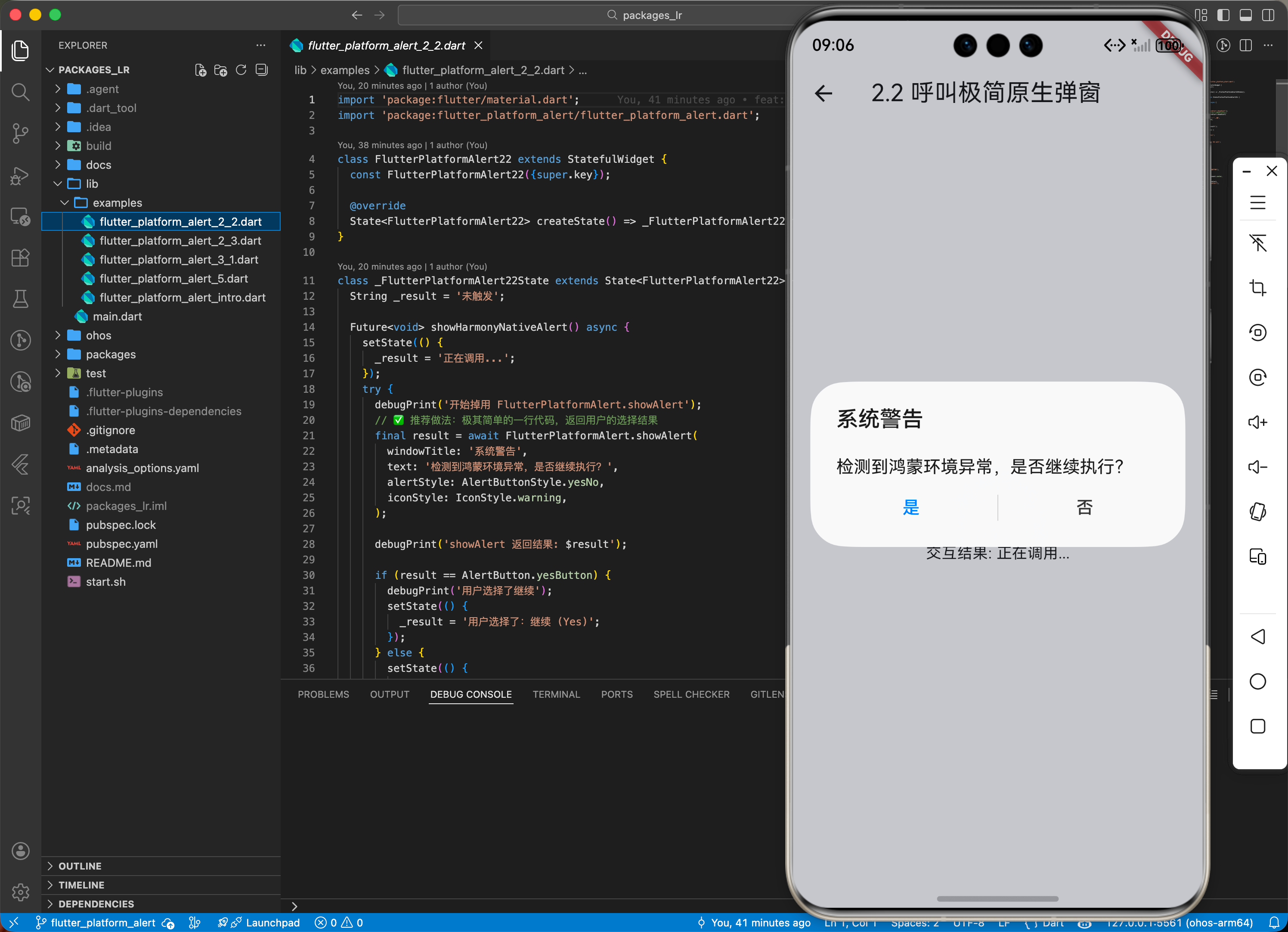
2.2 呼叫极简原生弹窗
import 'package:flutter_platform_alert/flutter_platform_alert.dart';

Future<void> showHarmonyNativeAlert() async {
  // ✅ 推荐做法:极其简单的一行代码,返回用户的选择结果
  final result = await FlutterPlatformAlert.showAlert(
    windowTitle: '系统警告',
    text: '检测到鸿蒙环境异常,是否继续执行?',
    alertStyle: AlertButtonStyle.yesNo,
    iconStyle: IconStyle.warning,
  );

  if (result == AlertButton.yesButton) {
    print('用户选择了继续');
  }
}
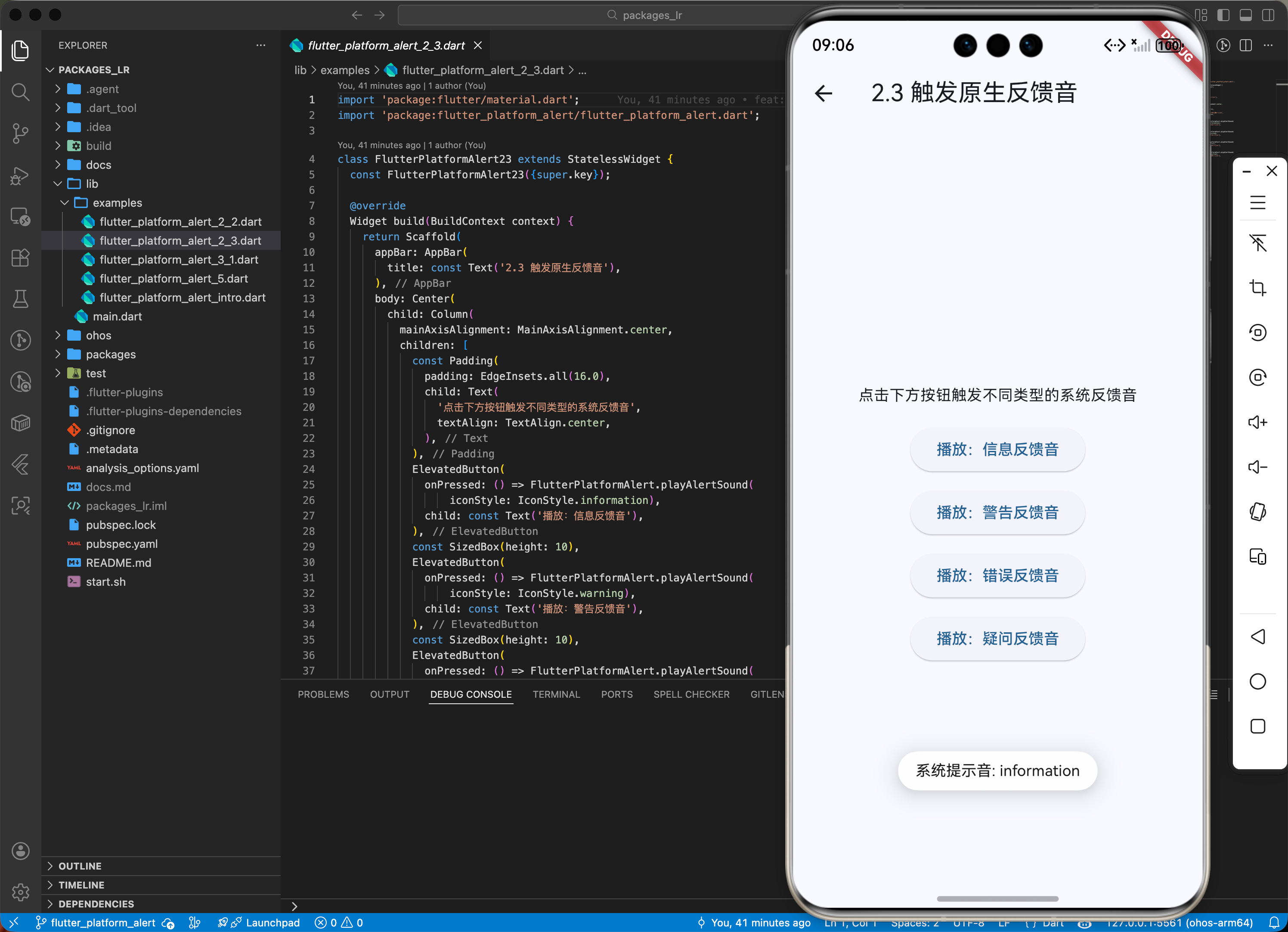
2.3 触发原生反馈音
FlutterPlatformAlert.playAlertSound(iconStyle: IconStyle.information);
三、场景示例
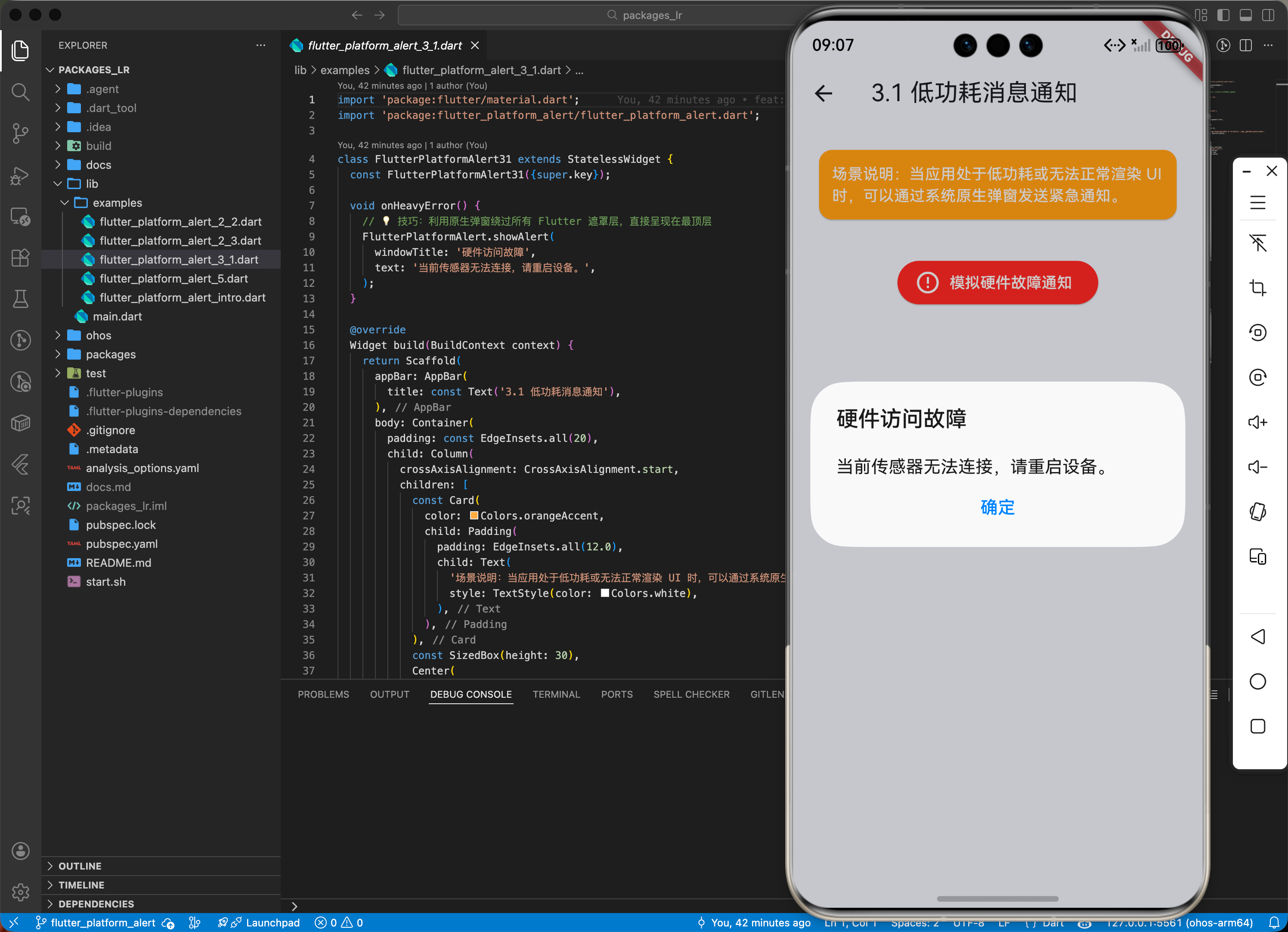
3.1 场景一:鸿蒙级应用的“低功耗”消息通知
当应用处于某些由于能效限制无法渲染复杂动画的状态下,直接通过原生弹窗确保用户能看到紧急消息。
import 'package:flutter_platform_alert/flutter_platform_alert.dart';

void onHeavyError() {
  // 💡 技巧:利用原生弹窗绕过所有 Flutter 遮罩层,直接呈现在最顶层
  FlutterPlatformAlert.showAlert(
    windowTitle: '硬件访问故障',
    text: '当前传感器无法连接,请重启设备。',
  );
}
四、OpenHarmony 平台适配实战
4.1 适配背景与问题分析
官方 flutter_platform_alert 0.8.0 版本的 pubspec.yaml 中仅声明了以下平台支持:
# 官方原始配置(不含 ohos)
flutter:
  plugin:
    platforms:
      android:
        pluginClass: FlutterPlatformAlertPlugin
      ios:
        pluginClass: FlutterPlatformAlertPlugin
      macos:
        pluginClass: FlutterPlatformAlertPlugin
      windows:
        pluginClass: FlutterPlatformAlertPlugin
      linux:
        pluginClass: FlutterPlatformAlertPlugin
当在鸿蒙设备上运行时,会出现以下现象:
.flutter-plugins-dependencies中"ohos":[]为空GeneratedPluginRegistrant.ets的registerWith方法体为空- Dart 端发出 MethodChannel 调用后,原生端无代码接收,
await永远挂起
4.2 适配方案:创建本地插件包
第一步:创建插件目录结构
在项目根目录下创建 packages/flutter_platform_alert/,目录结构如下:
packages/flutter_platform_alert/
├── lib/                          # Dart 层 API(复用官方源码)
│   ├── flutter_platform_alert.dart
│   └── src/
│       ├── flutter_platform_alert.dart
│       ├── alert_button.dart
│       ├── helpers.dart
│       ├── window_position.dart
│       ├── styles/
│       │   ├── alert_style.dart
│       │   ├── icon_style.dart
│       │   ├── ios_alert_style.dart
│       │   └── ios_button_style.dart
│       └── alert_options/
│           ├── platform_alert_options.dart
│           ├── android_alert_options.dart
│           ├── ios_alert_options.dart
│           ├── macos_alert_options.dart
│           └── windows_alert_options.dart
├── ohos/                         # OpenHarmony 原生实现(新增)
│   ├── index.ets
│   ├── oh-package.json5
│   ├── build-profile.json5
│   ├── hvigorfile.ts
│   └── src/main/
│       ├── module.json5
│       └── ets/components/plugin/
│           └── FlutterPlatformAlertPlugin.ets
└── pubspec.yaml                  # 新增 ohos 平台声明
第二步:配置 pubspec.yaml —— 注册 ohos 平台
name: flutter_platform_alert
description: A plugin helps to call native API to play alert sound and show alert dialogs. Adapted for OpenHarmony.
version: 0.8.0

environment:
  sdk: ">=2.17.0 <4.0.0"
  flutter: ">=1.20.0"

dependencies:
  path: ^1.8.0
  flutter:
    sdk: flutter

flutter:
  plugin:
    platforms:
      android:
        package: net.zonble.flutter_platform_alert
        pluginClass: FlutterPlatformAlertPlugin
      ios:
        pluginClass: FlutterPlatformAlertPlugin
      macos:
        pluginClass: FlutterPlatformAlertPlugin
      windows:
        pluginClass: FlutterPlatformAlertPlugin
      linux:
        pluginClass: FlutterPlatformAlertPlugin
      # ✅ 新增:OpenHarmony 平台支持
      ohos:
        package: com.flutter_platform_alert
        pluginClass: FlutterPlatformAlertPlugin
第三步:配置 ohos 构建文件
ohos/oh-package.json5:
{
  "name": "flutter_platform_alert",
  "version": "0.8.0",
  "description": "Flutter platform alert plugin for OpenHarmony.",
  "main": "index.ets",
  "dependencies": {
    "@ohos/flutter_ohos": "file:./har/flutter.har"
  }
}
ohos/index.ets(入口文件):
import FlutterPlatformAlertPlugin from './src/main/ets/components/plugin/FlutterPlatformAlertPlugin';
export default FlutterPlatformAlertPlugin;
ohos/src/main/module.json5:
{
  "module": {
    "name": "flutter_platform_alert",
    "type": "har",
    "deviceTypes": ["default", "tablet"]
  }
}
第四步:实现 ohos 原生插件(核心)
ohos/src/main/ets/components/plugin/FlutterPlatformAlertPlugin.ets:
import {
  FlutterPlugin,
  FlutterPluginBinding,
  MethodCall,
  MethodCallHandler,
  MethodChannel,
  MethodResult,
  Log,
} from '@ohos/flutter_ohos';
import { promptAction } from '@kit.ArkUI';

const CHANNEL: string = "flutter_platform_alert";
const TAG: string = "FlutterPlatformAlertPlugin";

export default class FlutterPlatformAlertPlugin implements FlutterPlugin, MethodCallHandler {
  private channel: MethodChannel | null = null;

  getUniqueClassName(): string {
    return "FlutterPlatformAlertPlugin";
  }

  onAttachedToEngine(binding: FlutterPluginBinding): void {
    this.channel = new MethodChannel(binding.getBinaryMessenger(), CHANNEL);
    this.channel.setMethodCallHandler(this);
  }

  onDetachedFromEngine(binding: FlutterPluginBinding): void {
    if (this.channel != null) {
      this.channel!.setMethodCallHandler(null);
      this.channel = null;
    }
  }

  onMethodCall(call: MethodCall, result: MethodResult): void {
    if (call.method == "playAlertSound") {
      this.handlePlayAlertSound(call, result);
    } else if (call.method == "showAlert") {
      this.handleShowAlert(call, result);
    } else if (call.method == "showCustomAlert") {
      this.handleShowCustomAlert(call, result);
    } else {
      result.notImplemented();
    }
  }

  // 播放提示音(使用 Toast 模拟反馈)
  private handlePlayAlertSound(call: MethodCall, result: MethodResult): void {
    let iconStyle: string = call.argument("iconStyle") as string;
    promptAction.showToast({ message: '系统提示音: ' + iconStyle, duration: 1500 });
    result.success(null);
  }

  // 显示标准弹窗(使用 promptAction.showDialog)
  private handleShowAlert(call: MethodCall, result: MethodResult): void {
    let windowTitle: string = call.argument("windowTitle") as string;
    let text: string = call.argument("text") as string;
    let alertStyle: string = call.argument("alertStyle") as string;
    let buttons: Array<promptAction.Button> = this.getButtonsForStyle(alertStyle);

    promptAction.showDialog({
      title: windowTitle,
      message: text,
      buttons: buttons,
    }).then((data: promptAction.ShowDialogSuccessResponse) => {
      result.success(this.mapButtonResult(alertStyle, data.index));
    }).catch((err: Error) => {
      result.success("cancel");
    });
  }

  // 根据 AlertButtonStyle 映射按钮配置
  private getButtonsForStyle(alertStyle: string): Array<promptAction.Button> {
    if (alertStyle == "yesNo") {
      return [{ text: '是', color: '#007DFF' }, { text: '否', color: '#333333' }];
    } else if (alertStyle == "okCancel") {
      return [{ text: '确定', color: '#007DFF' }, { text: '取消', color: '#333333' }];
    }
    // ... 其他按钮样式
    return [{ text: '确定', color: '#007DFF' }];
  }

  // 将按钮索引映射为 Dart 端的结果字符串
  private mapButtonResult(alertStyle: string, index: number): string {
    if (alertStyle == "yesNo") return index == 0 ? "yes" : "no";
    if (alertStyle == "okCancel") return index == 0 ? "ok" : "cancel";
    return "ok";
  }
}
💡 关键技术点:鸿蒙使用
promptAction.showDialog()实现原生弹窗,它返回Promise,通过.then()获取用户点击的按钮索引,再映射为 Dart 端AlertButton对应的字符串。
第五步:修改主项目依赖
将 pubspec.yaml 中的依赖从 pub.dev 改为本地路径:
dependencies:
  flutter_platform_alert:
    path: packages/flutter_platform_alert
执行 flutter pub get 后,可以验证适配是否生效:
# 检查 .flutter-plugins-dependencies 中 ohos 是否已注册
cat .flutter-plugins-dependencies | python3 -c \
  "import json,sys; d=json.load(sys.stdin); print(json.dumps(d['plugins']['ohos'], indent=2))"
预期输出:
[
  {
    "name": "flutter_platform_alert",
    "path": ".../packages/flutter_platform_alert/",
    "native_build": true,
    "dependencies": []
  }
]
同时 GeneratedPluginRegistrant.ets 会自动更新为:
import FlutterPlatformAlertPlugin from 'flutter_platform_alert';

export class GeneratedPluginRegistrant {
  static registerWith(flutterEngine: FlutterEngine) {
    try {
      flutterEngine.getPlugins()?.add(new FlutterPlatformAlertPlugin());
    } catch (e) { ... }
  }
}
4.3 适配注意事项
✅ 适配策略建议:
- 异步非阻塞:始终监听
showAlert返回的Future。不要试图在同步主线程中依赖其结果。 - 多语言对齐:原生弹窗的按钮文本(如 是/否)已在 ArkTS 插件中硬编码为中文。如需多语言支持,可在原生层读取系统 locale 动态切换。
- 提示音降级:鸿蒙端暂无与 iOS/Android 完全对等的系统提示音 API,当前使用
promptAction.showToast()作为视觉反馈的降级方案。 - 按钮样式映射:所有
AlertButtonStyle(ok、yesNo、okCancel、yesNoCancel、retryCancel、abortRetryIgnore、cancelTryContinue)均已完成鸿蒙端映射。
五、综合实战示例代码
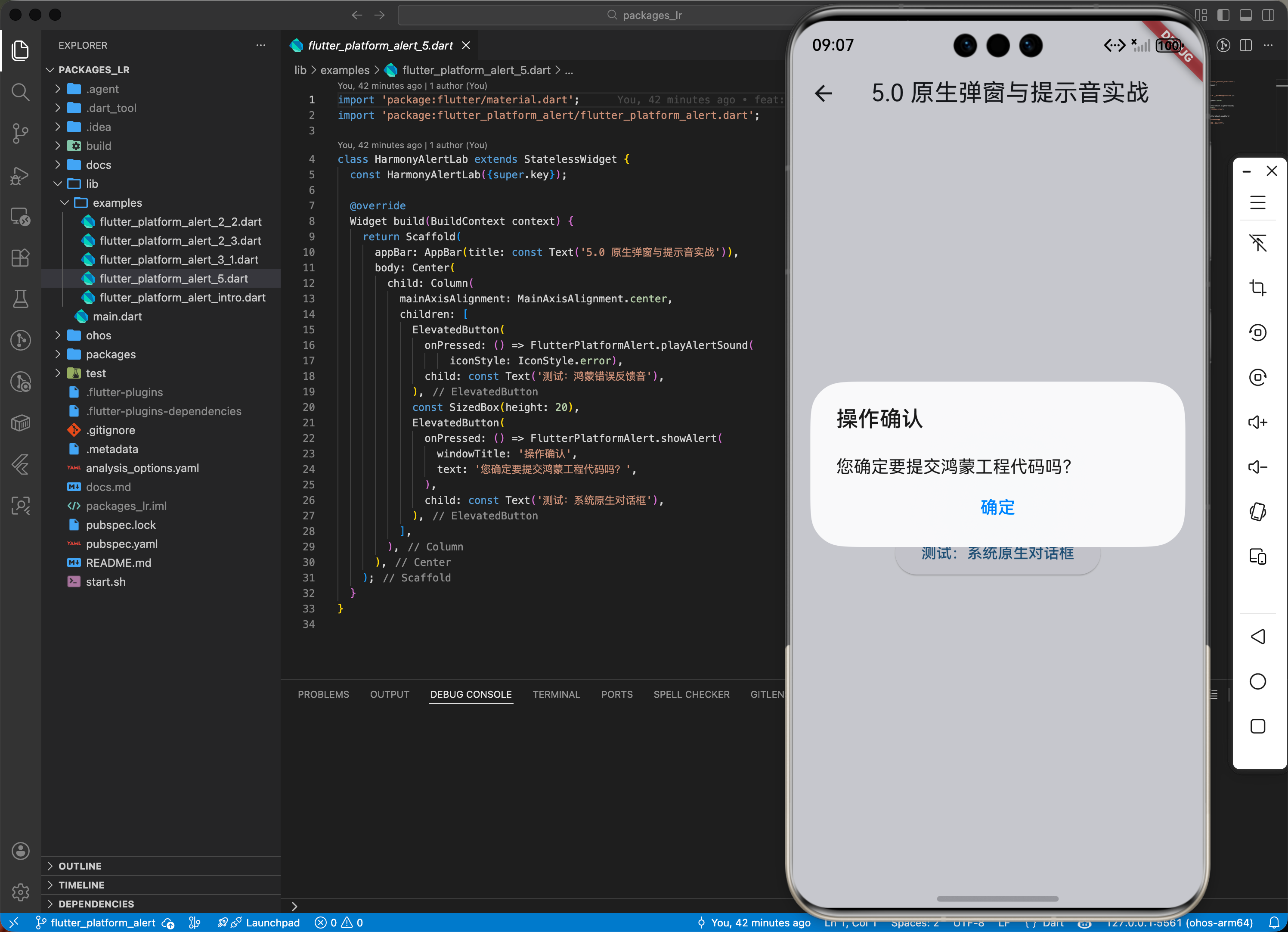
这是一个包含了声音与弹窗联动的鸿蒙实验室功能页面:
import 'package:flutter/material.dart';
import 'package:flutter_platform_alert/flutter_platform_alert.dart';
class HarmonyAlertLab extends StatelessWidget {
const HarmonyAlertLab({super.key});
Widget build(BuildContext context) {
return Scaffold(
appBar: AppBar(title: const Text('原生弹窗与提示音实战')),
body: Center(
child: Column(
mainAxisAlignment: MainAxisAlignment.center,
children: [
ElevatedButton(
onPressed: () => FlutterPlatformAlert.playAlertSound(iconStyle: IconStyle.error),
child: const Text('测试:鸿蒙错误反馈音'),
),
const SizedBox(height: 20),
ElevatedButton(
onPressed: () => FlutterPlatformAlert.showAlert(
windowTitle: '操作确认',
text: '您确定要提交鸿蒙工程代码吗?',
),
child: const Text('测试:系统原生对话框'),
),
],
),
),
);
}
}
六、总结
flutter_platform_alert 是一款追求极致执行效率的插件。它让你的应用在交互上能“借力”系统底层的设计语言,不仅能获得极佳的性能,还能获得系统级的稳定反馈。
✅ 核心建议:
- 官方版本无 ohos 支持,需通过创建本地
packages/插件包的方式手动适配,核心是添加ohos平台声明并实现 ArkTS 原生插件。 - 后台由于 Service 异常需要强制打断并通知用户时,它是最佳手段。
- 追求极致精简体积的项目,可以使用它代替复杂的 UI Dialog 库。

开源鸿蒙跨平台开发社区汇聚开发者与厂商,共建“一次开发,多端部署”的开源生态,致力于降低跨端开发门槛,推动万物智联创新。
更多推荐


 14
14 0
0- 0


 已为社区贡献97条内容

所有评论(0)