进阶实战 Flutter for OpenHarmony:PageView 无限轮播系统 - 轮播交互优化实现
自定义指示器可以创建独特的轮播指示效果。/// 自定义指示器示例@overridefinal List<String> _titles = ['推荐', '热门', '最新', '精选'];@override@overrideappBar: AppBar(title: const Text('自定义指示器')),Expanded(},),),),),},),),],),index,},),),),
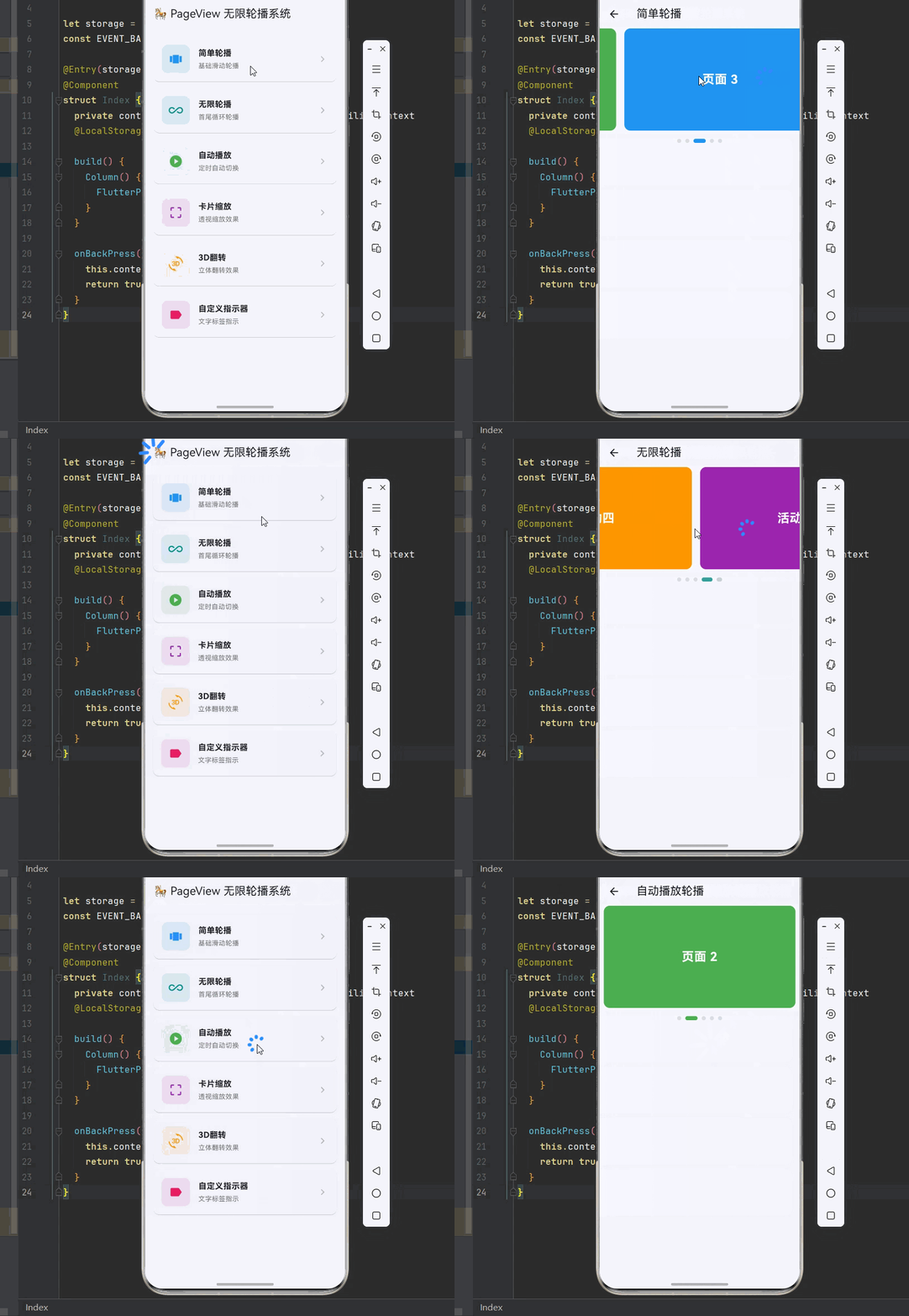
欢迎加入开源鸿蒙跨平台社区:https://openharmonycrossplatform.csdn.net
一、PageView 系统架构深度解析
在现代移动应用中,轮播图是展示内容的重要方式。从简单的图片轮播到复杂的 3D 效果,Flutter 提供了 PageView 组件来实现各种轮播效果。理解这套架构的底层原理,是构建高性能轮播系统的基础。
📱 1.1 Flutter PageView 架构
Flutter 的 PageView 系统由多个核心层次组成,每一层都有其特定的职责:
┌─────────────────────────────────────────────────────────────────┐
│                      应用层 (Application Layer)                  │
│  ┌─────────────────────────────────────────────────────────┐    │
│  │  PageView, PageView.builder, PageView.custom...         │    │
│  └─────────────────────────────────────────────────────────┘    │
│                              │                                   │
│                              ▼                                   │
│  ┌─────────────────────────────────────────────────────────┐    │
│  │              控制层 (Controller Layer)                    │    │
│  │  PageController, ScrollController, Viewport...          │    │
│  └─────────────────────────────────────────────────────────┘    │
│                              │                                   │
│                              ▼                                   │
│  ┌─────────────────────────────────────────────────────────┐    │
│  │              动画层 (Animation Layer)                     │    │
│  │  AnimationController, CurvedAnimation, Tween...         │    │
│  └─────────────────────────────────────────────────────────┘    │
│                              │                                   │
│                              ▼                                   │
│  ┌─────────────────────────────────────────────────────────┐    │
│  │              指示器层 (Indicator Layer)                   │    │
│  │  DotsIndicator, CustomIndicator, ProgressIndicator...   │    │
│  └─────────────────────────────────────────────────────────┘    │
└─────────────────────────────────────────────────────────────────┘
🔬 1.2 PageView 核心组件详解
Flutter PageView 系统的核心组件包括以下几个部分:
PageView(页面视图)
PageView 是显示可滑动页面的组件,支持水平和垂直滑动。
PageView(
  controller: pageController,
  scrollDirection: Axis.horizontal,
  pageSnapping: true,
  onPageChanged: (index) {
    print('当前页面: $index');
  },
  children: [
    Container(color: Colors.red),
    Container(color: Colors.green),
    Container(color: Colors.blue),
  ],
)
PageController(页面控制器)
PageController 用于控制页面切换和监听页面变化。
final pageController = PageController(
  initialPage: 0,
  viewportFraction: 0.8,
  keepPage: true,
);

pageController.animateToPage(
  1,
  duration: Duration(milliseconds: 300),
  curve: Curves.easeInOut,
);

pageController.nextPage(
  duration: Duration(milliseconds: 300),
  curve: Curves.easeInOut,
);
PageView.builder(构建器模式)
PageView.builder 适用于大量页面或动态内容的场景。
PageView.builder(
  controller: pageController,
  itemCount: items.length,
  itemBuilder: (context, index) {
    return ItemWidget(item: items[index]);
  },
)
🎯 1.3 轮播设计原则
设计优秀的轮播组件需要遵循以下原则:
┌─────────────────────────────────────────────────────────────┐
│                    轮播设计原则                              │
├─────────────────────────────────────────────────────────────┤
│  ┌─────────────────────────────────────────────────────┐   │
│  │  1. 视觉吸引力 - 图片清晰,动画流畅                  │   │
│  └─────────────────────────────────────────────────────┘   │
│  ┌─────────────────────────────────────────────────────┐   │
│  │  2. 交互友好 - 支持手势滑动,指示清晰                │   │
│  └─────────────────────────────────────────────────────┘   │
│  ┌─────────────────────────────────────────────────────┐   │
│  │  3. 性能优化 - 图片缓存,预加载                      │   │
│  └─────────────────────────────────────────────────────┘   │
│  ┌─────────────────────────────────────────────────────┐   │
│  │  4. 自动播放 - 可控制,可暂停                        │   │
│  └─────────────────────────────────────────────────────┘   │
│  ┌─────────────────────────────────────────────────────┐   │
│  │  5. 无限循环 - 首尾衔接自然                          │   │
│  └─────────────────────────────────────────────────────┘   │
└─────────────────────────────────────────────────────────────┘
轮播类型对比:
| 类型 | 特点 | 适用场景 |
|---|---|---|
| 基础轮播 | 简单滑动切换 | 图片展示 |
| 无限轮播 | 首尾循环 | 首页 Banner |
| 自动轮播 | 定时自动切换 | 广告展示 |
| 3D 轮播 | 立体翻转效果 | 特色展示 |
| 卡片轮播 | 缩放透视效果 | 商品展示 |
二、基础轮播实现
基础轮播包括简单轮播、无限轮播和自动播放轮播。这些是构建复杂轮播系统的基础。
👆 2.1 简单轮播
简单轮播是最基础的轮播形式,支持手势滑动切换。
import 'package:flutter/material.dart';
/// 简单轮播示例
class SimpleBannerDemo extends StatefulWidget {
const SimpleBannerDemo({super.key});
State<SimpleBannerDemo> createState() => _SimpleBannerDemoState();
}
class _SimpleBannerDemoState extends State<SimpleBannerDemo> {
final PageController _controller = PageController();
int _currentPage = 0;
final List<Color> _colors = [
Colors.red,
Colors.green,
Colors.blue,
Colors.orange,
Colors.purple,
];
void dispose() {
_controller.dispose();
super.dispose();
}
Widget build(BuildContext context) {
return Scaffold(
appBar: AppBar(title: const Text('简单轮播')),
body: Column(
children: [
SizedBox(
height: 200,
child: PageView.builder(
controller: _controller,
itemCount: _colors.length,
onPageChanged: (index) {
setState(() => _currentPage = index);
},
itemBuilder: (context, index) {
return Container(
margin: const EdgeInsets.symmetric(horizontal: 8),
decoration: BoxDecoration(
color: _colors[index],
borderRadius: BorderRadius.circular(12),
),
child: Center(
child: Text(
'页面 ${index + 1}',
style: const TextStyle(
color: Colors.white,
fontSize: 24,
fontWeight: FontWeight.bold,
),
),
),
);
},
),
),
const SizedBox(height: 16),
Row(
mainAxisAlignment: MainAxisAlignment.center,
children: List.generate(_colors.length, (index) {
return Container(
margin: const EdgeInsets.symmetric(horizontal: 4),
width: _currentPage == index ? 24 : 8,
height: 8,
decoration: BoxDecoration(
color: _currentPage == index
? _colors[index]
: Colors.grey.withOpacity(0.3),
borderRadius: BorderRadius.circular(4),
),
);
}),
),
],
),
);
}
}
🔄 2.2 无限轮播
无限轮播通过在首尾添加额外页面实现循环效果。
/// 无限轮播示例
class InfiniteBannerDemo extends StatefulWidget {
const InfiniteBannerDemo({super.key});
State<InfiniteBannerDemo> createState() => _InfiniteBannerDemoState();
}
class _InfiniteBannerDemoState extends State<InfiniteBannerDemo> {
final PageController _controller = PageController();
int _currentPage = 0;
final List<Map<String, dynamic>> _items = [
{'color': Colors.red, 'title': '活动一'},
{'color': Colors.green, 'title': '活动二'},
{'color': Colors.blue, 'title': '活动三'},
{'color': Colors.orange, 'title': '活动四'},
{'color': Colors.purple, 'title': '活动五'},
];
int get _realCount => _items.length;
int get _displayCount => _items.length + 2;
void initState() {
super.initState();
WidgetsBinding.instance.addPostFrameCallback((_) {
_controller.jumpToPage(1);
});
}
void dispose() {
_controller.dispose();
super.dispose();
}
void _onPageChanged(int index) {
if (index == 0) {
_controller.jumpToPage(_realCount);
setState(() => _currentPage = _realCount - 1);
} else if (index == _displayCount - 1) {
_controller.jumpToPage(1);
setState(() => _currentPage = 0);
} else {
setState(() => _currentPage = index - 1);
}
}
Widget build(BuildContext context) {
return Scaffold(
appBar: AppBar(title: const Text('无限轮播')),
body: Column(
children: [
SizedBox(
height: 200,
child: PageView.builder(
controller: _controller,
onPageChanged: _onPageChanged,
itemBuilder: (context, index) {
int realIndex;
if (index == 0) {
realIndex = _realCount - 1;
} else if (index == _displayCount - 1) {
realIndex = 0;
} else {
realIndex = index - 1;
}
return Container(
margin: const EdgeInsets.symmetric(horizontal: 8),
decoration: BoxDecoration(
color: _items[realIndex]['color'],
borderRadius: BorderRadius.circular(12),
),
child: Center(
child: Text(
_items[realIndex]['title'],
style: const TextStyle(
color: Colors.white,
fontSize: 24,
fontWeight: FontWeight.bold,
),
),
),
);
},
),
),
const SizedBox(height: 16),
Row(
mainAxisAlignment: MainAxisAlignment.center,
children: List.generate(_realCount, (index) {
return AnimatedContainer(
duration: const Duration(milliseconds: 200),
margin: const EdgeInsets.symmetric(horizontal: 4),
width: _currentPage == index ? 24 : 8,
height: 8,
decoration: BoxDecoration(
color: _currentPage == index
? Colors.blue
: Colors.grey.withOpacity(0.3),
borderRadius: BorderRadius.circular(4),
),
);
}),
),
],
),
);
}
}
🌊 2.3 自动播放轮播
自动播放轮播通过定时器实现自动切换。
import 'dart:async';
/// 自动播放轮播示例
class AutoPlayBannerDemo extends StatefulWidget {
const AutoPlayBannerDemo({super.key});
State<AutoPlayBannerDemo> createState() => _AutoPlayBannerDemoState();
}
class _AutoPlayBannerDemoState extends State<AutoPlayBannerDemo> {
final PageController _controller = PageController();
Timer? _timer;
int _currentPage = 0;
final List<Color> _colors = [
Colors.red,
Colors.green,
Colors.blue,
Colors.orange,
Colors.purple,
];
void initState() {
super.initState();
_startAutoPlay();
}
void _startAutoPlay() {
_timer?.cancel();
_timer = Timer.periodic(const Duration(seconds: 3), (timer) {
if (_controller.hasClients) {
_controller.nextPage(
duration: const Duration(milliseconds: 300),
curve: Curves.easeInOut,
);
}
});
}
void _stopAutoPlay() {
_timer?.cancel();
}
void dispose() {
_stopAutoPlay();
_controller.dispose();
super.dispose();
}
Widget build(BuildContext context) {
return Scaffold(
appBar: AppBar(title: const Text('自动播放轮播')),
body: Column(
children: [
GestureDetector(
onPanDown: (_) => _stopAutoPlay(),
onPanEnd: (_) => _startAutoPlay(),
child: SizedBox(
height: 200,
child: PageView.builder(
controller: _controller,
onPageChanged: (index) {
setState(() => _currentPage = index % _colors.length);
},
itemBuilder: (context, index) {
final colorIndex = index % _colors.length;
return Container(
margin: const EdgeInsets.symmetric(horizontal: 8),
decoration: BoxDecoration(
color: _colors[colorIndex],
borderRadius: BorderRadius.circular(12),
),
child: Center(
child: Text(
'页面 ${colorIndex + 1}',
style: const TextStyle(
color: Colors.white,
fontSize: 24,
fontWeight: FontWeight.bold,
),
),
),
);
},
),
),
),
const SizedBox(height: 16),
Row(
mainAxisAlignment: MainAxisAlignment.center,
children: List.generate(_colors.length, (index) {
return AnimatedContainer(
duration: const Duration(milliseconds: 200),
margin: const EdgeInsets.symmetric(horizontal: 4),
width: _currentPage == index ? 24 : 8,
height: 8,
decoration: BoxDecoration(
color: _currentPage == index
? _colors[index]
: Colors.grey.withOpacity(0.3),
borderRadius: BorderRadius.circular(4),
),
);
}),
),
],
),
);
}
}
三、高级轮播实现
高级轮播包括 3D 翻转效果、卡片缩放效果、自定义指示器和垂直轮播。
📊 3.1 卡片缩放轮播
卡片缩放轮播通过 viewportFraction 和 Transform 实现透视效果。
/// 卡片缩放轮播示例
class CardScaleBannerDemo extends StatefulWidget {
const CardScaleBannerDemo({super.key});
State<CardScaleBannerDemo> createState() => _CardScaleBannerDemoState();
}
class _CardScaleBannerDemoState extends State<CardScaleBannerDemo> {
final PageController _controller = PageController(viewportFraction: 0.8);
double _currentPage = 0;
final List<Map<String, dynamic>> _items = [
{'color': Colors.red, 'icon': Icons.star},
{'color': Colors.green, 'icon': Icons.favorite},
{'color': Colors.blue, 'icon': Icons.thumb_up},
{'color': Colors.orange, 'icon': Icons.lightbulb},
{'color': Colors.purple, 'icon': Icons.diamond},
];
void initState() {
super.initState();
_controller.addListener(() {
setState(() => _currentPage = _controller.page ?? 0);
});
}
void dispose() {
_controller.dispose();
super.dispose();
}
Widget build(BuildContext context) {
return Scaffold(
appBar: AppBar(title: const Text('卡片缩放轮播')),
body: SizedBox(
height: 250,
child: PageView.builder(
controller: _controller,
itemCount: _items.length,
itemBuilder: (context, index) {
final double scale = (1 - ((_currentPage - index).abs() * 0.2)).clamp(0.8, 1.0);
final double opacity = (1 - ((_currentPage - index).abs() * 0.3)).clamp(0.5, 1.0);
return Center(
child: SizedBox(
height: 200 * scale,
child: Opacity(
opacity: opacity,
child: Container(
margin: const EdgeInsets.symmetric(horizontal: 8),
decoration: BoxDecoration(
color: _items[index]['color'],
borderRadius: BorderRadius.circular(16),
boxShadow: [
BoxShadow(
color: _items[index]['color'].withOpacity(0.4),
blurRadius: 20,
offset: const Offset(0, 10),
),
],
),
child: Center(
child: Icon(
_items[index]['icon'],
size: 60,
color: Colors.white,
),
),
),
),
),
);
},
),
),
);
}
}
📝 3.2 3D 翻转轮播
3D 翻转轮播通过 Transform 实现立体翻转效果。
/// 3D 翻转轮播示例
class FlipBannerDemo extends StatefulWidget {
const FlipBannerDemo({super.key});
State<FlipBannerDemo> createState() => _FlipBannerDemoState();
}
class _FlipBannerDemoState extends State<FlipBannerDemo> {
final PageController _controller = PageController(viewportFraction: 0.7);
double _currentPage = 0;
final List<Color> _colors = [
Colors.red,
Colors.green,
Colors.blue,
Colors.orange,
Colors.purple,
];
void initState() {
super.initState();
_controller.addListener(() {
setState(() => _currentPage = _controller.page ?? 0);
});
}
void dispose() {
_controller.dispose();
super.dispose();
}
Matrix4 _getTransform(int index) {
final double diff = index - _currentPage;
final double angle = diff * 0.3;
return Matrix4.identity()
..setEntry(3, 2, 0.001)
..rotateY(angle);
}
Widget build(BuildContext context) {
return Scaffold(
appBar: AppBar(title: const Text('3D 翻转轮播')),
body: SizedBox(
height: 250,
child: PageView.builder(
controller: _controller,
itemCount: _colors.length,
itemBuilder: (context, index) {
return Center(
child: Transform(
transform: _getTransform(index),
alignment: Alignment.center,
child: Container(
margin: const EdgeInsets.symmetric(horizontal: 8),
decoration: BoxDecoration(
color: _colors[index],
borderRadius: BorderRadius.circular(16),
boxShadow: [
BoxShadow(
color: Colors.black.withOpacity(0.2),
blurRadius: 10,
offset: const Offset(0, 5),
),
],
),
child: Center(
child: Text(
'页面 ${index + 1}',
style: const TextStyle(
color: Colors.white,
fontSize: 24,
fontWeight: FontWeight.bold,
),
),
),
),
),
);
},
),
),
);
}
}
🔄 3.3 自定义指示器
自定义指示器可以创建独特的轮播指示效果。
/// 自定义指示器示例
class CustomIndicatorDemo extends StatefulWidget {
const CustomIndicatorDemo({super.key});
State<CustomIndicatorDemo> createState() => _CustomIndicatorDemoState();
}
class _CustomIndicatorDemoState extends State<CustomIndicatorDemo> {
final PageController _controller = PageController();
int _currentPage = 0;
final List<String> _titles = ['推荐', '热门', '最新', '精选'];
void dispose() {
_controller.dispose();
super.dispose();
}
Widget build(BuildContext context) {
return Scaffold(
appBar: AppBar(title: const Text('自定义指示器')),
body: Column(
children: [
_buildTextIndicator(),
Expanded(
child: PageView.builder(
controller: _controller,
itemCount: _titles.length,
onPageChanged: (index) {
setState(() => _currentPage = index);
},
itemBuilder: (context, index) {
return Container(
margin: const EdgeInsets.all(16),
decoration: BoxDecoration(
color: Colors.primaries[index % Colors.primaries.length],
borderRadius: BorderRadius.circular(16),
),
child: Center(
child: Text(
_titles[index],
style: const TextStyle(
color: Colors.white,
fontSize: 32,
fontWeight: FontWeight.bold,
),
),
),
);
},
),
),
],
),
);
}
Widget _buildTextIndicator() {
return Container(
height: 50,
padding: const EdgeInsets.symmetric(horizontal: 16),
child: Row(
mainAxisAlignment: MainAxisAlignment.center,
children: List.generate(_titles.length, (index) {
final isSelected = index == _currentPage;
return GestureDetector(
onTap: () {
_controller.animateToPage(
index,
duration: const Duration(milliseconds: 300),
curve: Curves.easeInOut,
);
},
child: AnimatedContainer(
duration: const Duration(milliseconds: 200),
margin: const EdgeInsets.symmetric(horizontal: 8),
padding: const EdgeInsets.symmetric(horizontal: 16, vertical: 8),
decoration: BoxDecoration(
color: isSelected ? Colors.blue : Colors.transparent,
borderRadius: BorderRadius.circular(20),
),
child: Text(
_titles[index],
style: TextStyle(
color: isSelected ? Colors.white : Colors.grey,
fontWeight: isSelected ? FontWeight.bold : FontWeight.normal,
),
),
),
);
}),
),
);
}
}
四、完整示例:PageView 无限轮播系统
下面是一个完整的 PageView 无限轮播系统示例:
import 'dart:async';
import 'package:flutter/material.dart';
void main() {
runApp(const MyApp());
}
class MyApp extends StatelessWidget {
const MyApp({super.key});
Widget build(BuildContext context) {
return MaterialApp(
debugShowCheckedModeBanner: false,
theme: ThemeData(
colorScheme: ColorScheme.fromSeed(seedColor: Colors.blue),
useMaterial3: true,
),
home: const PageViewHomePage(),
);
}
}
class PageViewHomePage extends StatelessWidget {
const PageViewHomePage({super.key});
Widget build(BuildContext context) {
return Scaffold(
appBar: AppBar(title: const Text('🎠 PageView 无限轮播系统')),
body: ListView(
padding: const EdgeInsets.all(16),
children: [
_buildSectionCard(context, title: '简单轮播', description: '基础滑动轮播', icon: Icons.view_carousel, color: Colors.blue, onTap: () => Navigator.push(context, MaterialPageRoute(builder: (_) => const SimpleBannerDemo()))),
_buildSectionCard(context, title: '无限轮播', description: '首尾循环轮播', icon: Icons.all_inclusive, color: Colors.teal, onTap: () => Navigator.push(context, MaterialPageRoute(builder: (_) => const InfiniteBannerDemo()))),
_buildSectionCard(context, title: '自动播放', description: '定时自动切换', icon: Icons.play_circle, color: Colors.green, onTap: () => Navigator.push(context, MaterialPageRoute(builder: (_) => const AutoPlayBannerDemo()))),
_buildSectionCard(context, title: '卡片缩放', description: '透视缩放效果', icon: Icons.crop_free, color: Colors.purple, onTap: () => Navigator.push(context, MaterialPageRoute(builder: (_) => const CardScaleBannerDemo()))),
_buildSectionCard(context, title: '3D翻转', description: '立体翻转效果', icon: Icons.threed_rotation, color: Colors.orange, onTap: () => Navigator.push(context, MaterialPageRoute(builder: (_) => const FlipBannerDemo()))),
_buildSectionCard(context, title: '自定义指示器', description: '文字标签指示', icon: Icons.label, color: Colors.pink, onTap: () => Navigator.push(context, MaterialPageRoute(builder: (_) => const CustomIndicatorDemo()))),
],
),
);
}
Widget _buildSectionCard(BuildContext context, {required String title, required String description, required IconData icon, required Color color, required VoidCallback onTap}) {
return Card(
margin: const EdgeInsets.only(bottom: 12),
child: InkWell(
onTap: onTap,
borderRadius: BorderRadius.circular(12),
child: Padding(
padding: const EdgeInsets.all(16),
child: Row(
children: [
Container(width: 56, height: 56, decoration: BoxDecoration(color: color.withOpacity(0.1), borderRadius: BorderRadius.circular(12)), child: Icon(icon, color: color, size: 28)),
const SizedBox(width: 16),
Expanded(child: Column(crossAxisAlignment: CrossAxisAlignment.start, children: [Text(title, style: const TextStyle(fontSize: 16, fontWeight: FontWeight.bold)), const SizedBox(height: 4), Text(description, style: TextStyle(fontSize: 13, color: Colors.grey[600]))])),
Icon(Icons.chevron_right, color: Colors.grey[400]),
],
),
),
),
);
}
}
class SimpleBannerDemo extends StatefulWidget {
const SimpleBannerDemo({super.key});
State<SimpleBannerDemo> createState() => _SimpleBannerDemoState();
}
class _SimpleBannerDemoState extends State<SimpleBannerDemo> {
final PageController _controller = PageController();
int _currentPage = 0;
final List<Color> _colors = [Colors.red, Colors.green, Colors.blue, Colors.orange, Colors.purple];
void dispose() { _controller.dispose(); super.dispose(); }
Widget build(BuildContext context) {
return Scaffold(
appBar: AppBar(title: const Text('简单轮播')),
body: Column(
children: [
SizedBox(
height: 200,
child: PageView.builder(
controller: _controller,
itemCount: _colors.length,
onPageChanged: (index) => setState(() => _currentPage = index),
itemBuilder: (context, index) => Container(
margin: const EdgeInsets.symmetric(horizontal: 8),
decoration: BoxDecoration(color: _colors[index], borderRadius: BorderRadius.circular(12)),
child: Center(child: Text('页面 ${index + 1}', style: const TextStyle(color: Colors.white, fontSize: 24, fontWeight: FontWeight.bold))),
),
),
),
const SizedBox(height: 16),
Row(
mainAxisAlignment: MainAxisAlignment.center,
children: List.generate(_colors.length, (index) => AnimatedContainer(
duration: const Duration(milliseconds: 200),
margin: const EdgeInsets.symmetric(horizontal: 4),
width: _currentPage == index ? 24 : 8,
height: 8,
decoration: BoxDecoration(color: _currentPage == index ? _colors[index] : Colors.grey.withOpacity(0.3), borderRadius: BorderRadius.circular(4)),
)),
),
],
),
);
}
}
class InfiniteBannerDemo extends StatefulWidget {
const InfiniteBannerDemo({super.key});
State<InfiniteBannerDemo> createState() => _InfiniteBannerDemoState();
}
class _InfiniteBannerDemoState extends State<InfiniteBannerDemo> {
final PageController _controller = PageController();
int _currentPage = 0;
final List<Map<String, dynamic>> _items = [
{'color': Colors.red, 'title': '活动一'},
{'color': Colors.green, 'title': '活动二'},
{'color': Colors.blue, 'title': '活动三'},
{'color': Colors.orange, 'title': '活动四'},
{'color': Colors.purple, 'title': '活动五'},
];
int get _realCount => _items.length;
int get _displayCount => _items.length + 2;
void initState() {
super.initState();
WidgetsBinding.instance.addPostFrameCallback((_) => _controller.jumpToPage(1));
}
void dispose() { _controller.dispose(); super.dispose(); }
void _onPageChanged(int index) {
if (index == 0) {
_controller.jumpToPage(_realCount);
setState(() => _currentPage = _realCount - 1);
} else if (index == _displayCount - 1) {
_controller.jumpToPage(1);
setState(() => _currentPage = 0);
} else {
setState(() => _currentPage = index - 1);
}
}
Widget build(BuildContext context) {
return Scaffold(
appBar: AppBar(title: const Text('无限轮播')),
body: Column(
children: [
SizedBox(
height: 200,
child: PageView.builder(
controller: _controller,
onPageChanged: _onPageChanged,
itemBuilder: (context, index) {
int realIndex;
if (index == 0) {
realIndex = _realCount - 1;
} else if (index == _displayCount - 1) {
realIndex = 0;
} else {
realIndex = index - 1;
}
return Container(
margin: const EdgeInsets.symmetric(horizontal: 8),
decoration: BoxDecoration(color: _items[realIndex]['color'], borderRadius: BorderRadius.circular(12)),
child: Center(child: Text(_items[realIndex]['title'], style: const TextStyle(color: Colors.white, fontSize: 24, fontWeight: FontWeight.bold))),
);
},
),
),
const SizedBox(height: 16),
Row(
mainAxisAlignment: MainAxisAlignment.center,
children: List.generate(_realCount, (index) => AnimatedContainer(
duration: const Duration(milliseconds: 200),
margin: const EdgeInsets.symmetric(horizontal: 4),
width: _currentPage == index ? 24 : 8,
height: 8,
decoration: BoxDecoration(color: _currentPage == index ? Colors.teal : Colors.grey.withOpacity(0.3), borderRadius: BorderRadius.circular(4)),
)),
),
],
),
);
}
}
class AutoPlayBannerDemo extends StatefulWidget {
const AutoPlayBannerDemo({super.key});
State<AutoPlayBannerDemo> createState() => _AutoPlayBannerDemoState();
}
class _AutoPlayBannerDemoState extends State<AutoPlayBannerDemo> {
final PageController _controller = PageController();
Timer? _timer;
int _currentPage = 0;
final List<Color> _colors = [Colors.red, Colors.green, Colors.blue, Colors.orange, Colors.purple];
void initState() {
super.initState();
_startAutoPlay();
}
void _startAutoPlay() {
_timer?.cancel();
_timer = Timer.periodic(const Duration(seconds: 3), (timer) {
if (_controller.hasClients) {
_controller.nextPage(duration: const Duration(milliseconds: 300), curve: Curves.easeInOut);
}
});
}
void _stopAutoPlay() => _timer?.cancel();
void dispose() { _stopAutoPlay(); _controller.dispose(); super.dispose(); }
Widget build(BuildContext context) {
return Scaffold(
appBar: AppBar(title: const Text('自动播放轮播')),
body: Column(
children: [
GestureDetector(
onPanDown: (_) => _stopAutoPlay(),
onPanEnd: (_) => _startAutoPlay(),
child: SizedBox(
height: 200,
child: PageView.builder(
controller: _controller,
onPageChanged: (index) => setState(() => _currentPage = index % _colors.length),
itemBuilder: (context, index) {
final colorIndex = index % _colors.length;
return Container(
margin: const EdgeInsets.symmetric(horizontal: 8),
decoration: BoxDecoration(color: _colors[colorIndex], borderRadius: BorderRadius.circular(12)),
child: Center(child: Text('页面 ${colorIndex + 1}', style: const TextStyle(color: Colors.white, fontSize: 24, fontWeight: FontWeight.bold))),
);
},
),
),
),
const SizedBox(height: 16),
Row(
mainAxisAlignment: MainAxisAlignment.center,
children: List.generate(_colors.length, (index) => AnimatedContainer(
duration: const Duration(milliseconds: 200),
margin: const EdgeInsets.symmetric(horizontal: 4),
width: _currentPage == index ? 24 : 8,
height: 8,
decoration: BoxDecoration(color: _currentPage == index ? _colors[index] : Colors.grey.withOpacity(0.3), borderRadius: BorderRadius.circular(4)),
)),
),
],
),
);
}
}
class CardScaleBannerDemo extends StatefulWidget {
const CardScaleBannerDemo({super.key});
State<CardScaleBannerDemo> createState() => _CardScaleBannerDemoState();
}
class _CardScaleBannerDemoState extends State<CardScaleBannerDemo> {
final PageController _controller = PageController(viewportFraction: 0.8);
double _currentPage = 0;
final List<Map<String, dynamic>> _items = [
{'color': Colors.red, 'icon': Icons.star},
{'color': Colors.green, 'icon': Icons.favorite},
{'color': Colors.blue, 'icon': Icons.thumb_up},
{'color': Colors.orange, 'icon': Icons.lightbulb},
{'color': Colors.purple, 'icon': Icons.diamond},
];
void initState() {
super.initState();
_controller.addListener(() => setState(() => _currentPage = _controller.page ?? 0));
}
void dispose() { _controller.dispose(); super.dispose(); }
Widget build(BuildContext context) {
return Scaffold(
appBar: AppBar(title: const Text('卡片缩放轮播')),
body: SizedBox(
height: 250,
child: PageView.builder(
controller: _controller,
itemCount: _items.length,
itemBuilder: (context, index) {
final double scale = (1 - ((_currentPage - index).abs() * 0.2)).clamp(0.8, 1.0);
final double opacity = (1 - ((_currentPage - index).abs() * 0.3)).clamp(0.5, 1.0);
return Center(
child: SizedBox(
height: 200 * scale,
child: Opacity(
opacity: opacity,
child: Container(
margin: const EdgeInsets.symmetric(horizontal: 8),
decoration: BoxDecoration(color: _items[index]['color'], borderRadius: BorderRadius.circular(16), boxShadow: [BoxShadow(color: _items[index]['color'].withOpacity(0.4), blurRadius: 20, offset: const Offset(0, 10))]),
child: Center(child: Icon(_items[index]['icon'], size: 60, color: Colors.white)),
),
),
),
);
},
),
),
);
}
}
class FlipBannerDemo extends StatefulWidget {
const FlipBannerDemo({super.key});
State<FlipBannerDemo> createState() => _FlipBannerDemoState();
}
class _FlipBannerDemoState extends State<FlipBannerDemo> {
final PageController _controller = PageController(viewportFraction: 0.7);
double _currentPage = 0;
final List<Color> _colors = [Colors.red, Colors.green, Colors.blue, Colors.orange, Colors.purple];
void initState() {
super.initState();
_controller.addListener(() => setState(() => _currentPage = _controller.page ?? 0));
}
void dispose() { _controller.dispose(); super.dispose(); }
Matrix4 _getTransform(int index) {
final double diff = index - _currentPage;
return Matrix4.identity()..setEntry(3, 2, 0.001)..rotateY(diff * 0.3);
}
Widget build(BuildContext context) {
return Scaffold(
appBar: AppBar(title: const Text('3D 翻转轮播')),
body: SizedBox(
height: 250,
child: PageView.builder(
controller: _controller,
itemCount: _colors.length,
itemBuilder: (context, index) => Center(
child: Transform(
transform: _getTransform(index),
alignment: Alignment.center,
child: Container(
margin: const EdgeInsets.symmetric(horizontal: 8),
decoration: BoxDecoration(color: _colors[index], borderRadius: BorderRadius.circular(16), boxShadow: [BoxShadow(color: Colors.black.withOpacity(0.2), blurRadius: 10, offset: const Offset(0, 5))]),
child: Center(child: Text('页面 ${index + 1}', style: const TextStyle(color: Colors.white, fontSize: 24, fontWeight: FontWeight.bold))),
),
),
),
),
),
);
}
}
class CustomIndicatorDemo extends StatefulWidget {
const CustomIndicatorDemo({super.key});
State<CustomIndicatorDemo> createState() => _CustomIndicatorDemoState();
}
class _CustomIndicatorDemoState extends State<CustomIndicatorDemo> {
final PageController _controller = PageController();
int _currentPage = 0;
final List<String> _titles = ['推荐', '热门', '最新', '精选'];
void dispose() { _controller.dispose(); super.dispose(); }
Widget build(BuildContext context) {
return Scaffold(
appBar: AppBar(title: const Text('自定义指示器')),
body: Column(
children: [
Container(
height: 50,
padding: const EdgeInsets.symmetric(horizontal: 16),
child: Row(
mainAxisAlignment: MainAxisAlignment.center,
children: List.generate(_titles.length, (index) {
final isSelected = index == _currentPage;
return GestureDetector(
onTap: () => _controller.animateToPage(index, duration: const Duration(milliseconds: 300), curve: Curves.easeInOut),
child: AnimatedContainer(
duration: const Duration(milliseconds: 200),
margin: const EdgeInsets.symmetric(horizontal: 8),
padding: const EdgeInsets.symmetric(horizontal: 16, vertical: 8),
decoration: BoxDecoration(color: isSelected ? Colors.pink : Colors.transparent, borderRadius: BorderRadius.circular(20)),
child: Text(_titles[index], style: TextStyle(color: isSelected ? Colors.white : Colors.grey, fontWeight: isSelected ? FontWeight.bold : FontWeight.normal)),
),
);
}),
),
),
Expanded(
child: PageView.builder(
controller: _controller,
itemCount: _titles.length,
onPageChanged: (index) => setState(() => _currentPage = index),
itemBuilder: (context, index) => Container(
margin: const EdgeInsets.all(16),
decoration: BoxDecoration(color: Colors.primaries[index % Colors.primaries.length], borderRadius: BorderRadius.circular(16)),
child: Center(child: Text(_titles[index], style: const TextStyle(color: Colors.white, fontSize: 32, fontWeight: FontWeight.bold))),
),
),
),
],
),
);
}
}
五、最佳实践与性能优化
🎨 5.1 性能优化建议
- 使用 PageView.builder:适用于大量页面
- 图片缓存:使用 CachedNetworkImage 缓存网络图片
- 预加载:设置适当的 cacheExtent
- 避免过度重建:使用 const 构造函数
🔧 5.2 自动播放优化
// 暂停自动播放当用户交互时
GestureDetector(
  onPanDown: (_) => _stopAutoPlay(),
  onPanEnd: (_) => _startAutoPlay(),
  child: PageView(...),
)
📱 5.3 OpenHarmony 适配
在 OpenHarmony 平台上,需要注意:
- 处理手势冲突
- 优化图片加载
- 适配不同屏幕尺寸
六、总结
本文详细介绍了 Flutter for OpenHarmony 的 PageView 无限轮播系统,包括:
| 组件类型 | 核心技术 | 应用场景 |
|---|---|---|
| 简单轮播 | PageView + PageController | 基础展示 |
| 无限轮播 | 首尾添加额外页面 | 首页 Banner |
| 自动播放 | Timer + PageController | 广告轮播 |
| 卡片缩放 | viewportFraction + Transform | 商品展示 |
| 3D 翻转 | Matrix4.rotateY | 特色展示 |
| 自定义指示器 | AnimatedContainer | 品牌定制 |
参考资料
💡 提示:轮播组件是移动应用的重要展示方式,合理设计可以显著提升用户体验。建议根据具体场景选择合适的轮播类型,并注意性能优化和自动播放控制。

开源鸿蒙跨平台开发社区汇聚开发者与厂商,共建“一次开发,多端部署”的开源生态,致力于降低跨端开发门槛,推动万物智联创新。
更多推荐

 8
8 0
0- 0


 已为社区贡献65条内容

所有评论(0)