进阶实战 Flutter for OpenHarmony:GestureDetector 高级手势系统 - 多点触控与手势竞争处理
在现代移动应用中,手势交互是用户体验的核心组成部分。从简单的点击到复杂的多指手势,Flutter 提供了一套完整的手势识别和处理机制。理解这套机制的底层原理,是构建复杂手势交互系统的基础。Flutter 的手势系统由三个核心层次组成:🔬 1.2 手势竞技场机制详解手势竞技场(Gesture Arena)是 Flutter 手势系统的核心机制,用于解决多个手势识别器竞争同一个触摸事件的问题:竞技场
欢迎加入开源鸿蒙跨平台社区:https://openharmonycrossplatform.csdn.net
一、手势系统架构深度解析
在现代移动应用中,手势交互是用户体验的核心组成部分。从简单的点击到复杂的多指手势,Flutter 提供了一套完整的手势识别和处理机制。理解这套机制的底层原理,是构建复杂手势交互系统的基础。
📱 1.1 Flutter 手势识别系统架构
Flutter 的手势系统由三个核心层次组成:
┌─────────────────────────────────────────────────────────────────┐
│                      应用层 (Application Layer)                  │
│  ┌─────────────────────────────────────────────────────────┐    │
│  │  GestureDetector, InkWell, Draggable, Dismissible...   │    │
│  └─────────────────────────────────────────────────────────┘    │
│                              │                                   │
│                              ▼                                   │
│  ┌─────────────────────────────────────────────────────────┐    │
│  │              手势识别器层 (GestureRecognizer Layer)       │    │
│  │  TapGestureRecognizer, PanGestureRecognizer,            │    │
│  │  ScaleGestureRecognizer, LongPressGestureRecognizer...  │    │
│  └─────────────────────────────────────────────────────────┘    │
│                              │                                   │
│                              ▼                                   │
│  ┌─────────────────────────────────────────────────────────┐    │
│  │              手势竞技场 (Gesture Arena)                   │    │
│  │  - 手势竞争与裁决                                         │    │
│  │  - 手势优先级管理                                         │    │
│  │  - 手势冲突解决                                           │    │
│  └─────────────────────────────────────────────────────────┘    │
│                              │                                   │
│                              ▼                                   │
│  ┌─────────────────────────────────────────────────────────┐    │
│  │              原始指针事件层 (Pointer Event Layer)          │    │
│  │  PointerDownEvent, PointerMoveEvent, PointerUpEvent...  │    │
│  └─────────────────────────────────────────────────────────┘    │
└─────────────────────────────────────────────────────────────────┘
🔬 1.2 手势竞技场机制详解
手势竞技场(Gesture Arena)是 Flutter 手势系统的核心机制,用于解决多个手势识别器竞争同一个触摸事件的问题:
竞技场工作流程:
用户触摸屏幕
      │
      ▼
PointerDownEvent 分发
      │
      ├──▶ 所有感兴趣的 GestureRecognizer 加入竞技场
      │
      ▼
竞技场开放 (Arena Open)
      │
      ├──▶ GestureRecognizer 分析手势
      │
      ├──▶ 某个识别器声明胜利 (Declare Victory)
      │     │
      │     └──▶ 竞技场关闭,获胜者处理手势
      │
      └──▶ 或者竞技场强制裁决 (Sweep)
            │
            └──▶ 剩余识别器中优先级最高者获胜
手势竞争规则:
| 手势类型 | 优先级 | 触发条件 | 竞争行为 |
|---|---|---|---|
| Tap | 低 | 短按后抬起 | 容易被其他手势抢占 |
| LongPress | 中 | 长按超过阈值 | 会阻止 Tap |
| Pan | 中 | 移动超过阈值 | 会阻止 Tap |
| Scale | 高 | 多指缩放/旋转 | 会阻止 Pan |
| VerticalDrag | 中 | 垂直移动 | 与 HorizontalDrag 竞争 |
| HorizontalDrag | 中 | 水平移动 | 与 VerticalDrag 竞争 |
🎯 1.3 手势识别器生命周期
每个手势识别器都遵循特定的生命周期:
创建识别器 (Create)
      │
      ▼
添加指针 (addPointer)
      │
      ├──▶ 接受指针 (acceptGesture)
      │     │
      │     └──▶ 处理手势事件
      │           │
      │           └──▶ 手势完成/取消
      │
      └──▶ 拒绝指针 (rejectGesture)
            │
            └──▶ 识别器退出竞技场
二、多点触控处理系统
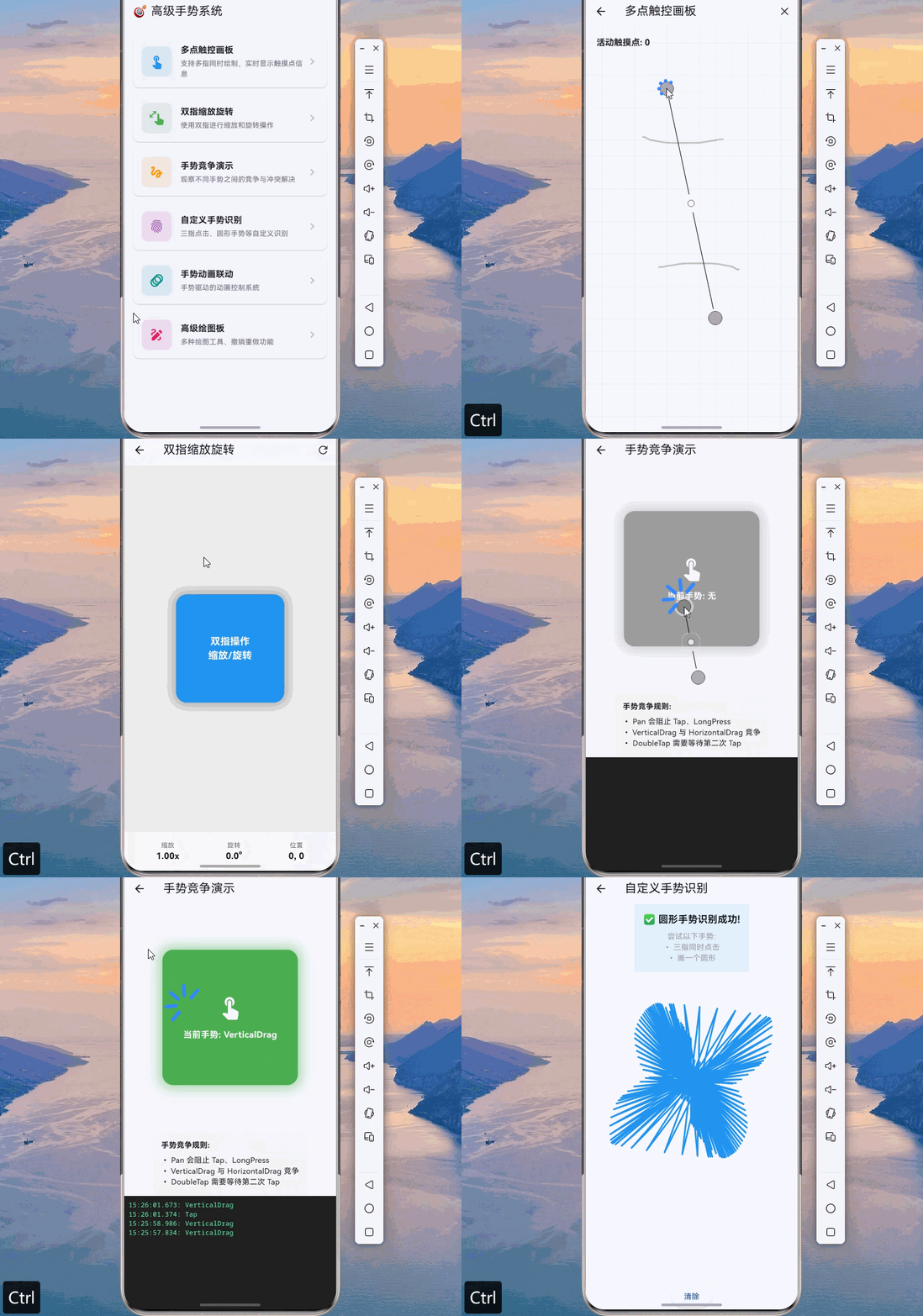
多点触控是现代移动应用的重要特性,支持用户使用多个手指同时进行操作。Flutter 提供了完善的多点触控支持,但需要正确处理指针事件的分发和管理。
👆 2.1 指针事件与多点触控
import 'package:flutter/material.dart';
import 'dart:math' as math;
/// 触摸点信息
class TouchPoint {
final int pointerId;
final Offset position;
final DateTime timestamp;
final Color color;
TouchPoint({
required this.pointerId,
required this.position,
required this.timestamp,
required this.color,
});
TouchPoint copyWith({
int? pointerId,
Offset? position,
DateTime? timestamp,
Color? color,
}) {
return TouchPoint(
pointerId: pointerId ?? this.pointerId,
position: position ?? this.position,
timestamp: timestamp ?? this.timestamp,
color: color ?? this.color,
);
}
}
/// 多点触控画板
class MultiTouchCanvas extends StatefulWidget {
const MultiTouchCanvas({super.key});
State<MultiTouchCanvas> createState() => _MultiTouchCanvasState();
}
class _MultiTouchCanvasState extends State<MultiTouchCanvas> {
final Map<int, TouchPoint> _activePointers = {};
final List<Offset> _allPoints = [];
final Map<int, List<Offset>> _pointerTrails = {};
final List<Color> _pointerColors = [
Colors.red,
Colors.blue,
Colors.green,
Colors.orange,
Colors.purple,
Colors.teal,
Colors.pink,
Colors.indigo,
];
int _colorIndex = 0;
Color _getNextColor() {
final color = _pointerColors[_colorIndex % _pointerColors.length];
_colorIndex++;
return color;
}
void _handlePointerDown(PointerDownEvent event) {
final color = _getNextColor();
_activePointers[event.pointer] = TouchPoint(
pointerId: event.pointer,
position: event.localPosition,
timestamp: DateTime.now(),
color: color,
);
_pointerTrails[event.pointer] = [event.localPosition];
setState(() {});
}
void _handlePointerMove(PointerMoveEvent event) {
if (_activePointers.containsKey(event.pointer)) {
_activePointers[event.pointer] = _activePointers[event.pointer]!.copyWith(
position: event.localPosition,
timestamp: DateTime.now(),
);
_pointerTrails[event.pointer]?.add(event.localPosition);
_allPoints.add(event.localPosition);
setState(() {});
}
}
void _handlePointerUp(PointerUpEvent event) {
_activePointers.remove(event.pointer);
setState(() {});
}
void _handlePointerCancel(PointerCancelEvent event) {
_activePointers.remove(event.pointer);
setState(() {});
}
void _clearCanvas() {
_activePointers.clear();
_allPoints.clear();
_pointerTrails.clear();
_colorIndex = 0;
setState(() {});
}
Widget build(BuildContext context) {
return Scaffold(
appBar: AppBar(
title: const Text('多点触控画板'),
actions: [
IconButton(
icon: const Icon(Icons.clear),
onPressed: _clearCanvas,
),
],
),
body: Listener(
onPointerDown: _handlePointerDown,
onPointerMove: _handlePointerMove,
onPointerUp: _handlePointerUp,
onPointerCancel: _handlePointerCancel,
child: CustomPaint(
painter: MultiTouchPainter(
activePointers: _activePointers,
allPoints: _allPoints,
pointerTrails: _pointerTrails,
),
size: Size.infinite,
),
),
);
}
}
/// 多点触控绘制器
class MultiTouchPainter extends CustomPainter {
final Map<int, TouchPoint> activePointers;
final List<Offset> allPoints;
final Map<int, List<Offset>> pointerTrails;
MultiTouchPainter({
required this.activePointers,
required this.allPoints,
required this.pointerTrails,
});
void paint(Canvas canvas, Size size) {
// 绘制背景网格
_drawGrid(canvas, size);
// 绘制所有轨迹
for (final entry in pointerTrails.entries) {
final points = entry.value;
if (points.length < 2) continue;
final color = activePointers[entry.key]?.color ?? Colors.grey;
final paint = Paint()
..color = color.withOpacity(0.6)
..strokeWidth = 3
..strokeCap = StrokeCap.round
..style = PaintingStyle.stroke;
final path = Path();
path.moveTo(points.first.dx, points.first.dy);
for (int i = 1; i < points.length; i++) {
path.lineTo(points[i].dx, points[i].dy);
}
canvas.drawPath(path, paint);
}
// 绘制活动触摸点
for (final point in activePointers.values) {
_drawTouchPoint(canvas, point);
}
// 绘制触摸点数量
_drawPointerCount(canvas, size);
}
void _drawGrid(Canvas canvas, Size size) {
final paint = Paint()
..color = Colors.grey.withOpacity(0.1)
..strokeWidth = 1;
const gridSize = 30.0;
for (double x = 0; x < size.width; x += gridSize) {
canvas.drawLine(Offset(x, 0), Offset(x, size.height), paint);
}
for (double y = 0; y < size.height; y += gridSize) {
canvas.drawLine(Offset(0, y), Offset(size.width, y), paint);
}
}
void _drawTouchPoint(Canvas canvas, TouchPoint point) {
// 外圈
final outerPaint = Paint()
..color = point.color.withOpacity(0.3)
..style = PaintingStyle.fill;
canvas.drawCircle(point.position, 40, outerPaint);
// 中圈
final middlePaint = Paint()
..color = point.color.withOpacity(0.5)
..style = PaintingStyle.fill;
canvas.drawCircle(point.position, 25, middlePaint);
// 内圈
final innerPaint = Paint()
..color = point.color
..style = PaintingStyle.fill;
canvas.drawCircle(point.position, 12, innerPaint);
// 中心点
final centerPaint = Paint()
..color = Colors.white
..style = PaintingStyle.fill;
canvas.drawCircle(point.position, 4, centerPaint);
// 绘制指针ID
final textPainter = TextPainter(
text: TextSpan(
text: '#${point.pointerId}',
style: TextStyle(
color: point.color,
fontSize: 12,
fontWeight: FontWeight.bold,
),
),
textDirection: TextDirection.ltr,
);
textPainter.layout();
textPainter.paint(
canvas,
Offset(point.position.dx + 45, point.position.dy - 10),
);
}
void _drawPointerCount(Canvas canvas, Size size) {
final textPainter = TextPainter(
text: TextSpan(
text: '活动触摸点: ${activePointers.length}',
style: const TextStyle(
color: Colors.black87,
fontSize: 16,
fontWeight: FontWeight.bold,
),
),
textDirection: TextDirection.ltr,
);
textPainter.layout();
textPainter.paint(canvas, const Offset(20, 20));
}
bool shouldRepaint(MultiTouchPainter oldDelegate) {
return true;
}
}
🤏 2.2 双指缩放与旋转手势
/// 双指手势信息
class ScaleGestureInfo {
final Offset focalPoint;
final double scale;
final double rotation;
final int pointerCount;
const ScaleGestureInfo({
this.focalPoint = Offset.zero,
this.scale = 1.0,
this.rotation = 0.0,
this.pointerCount = 0,
});
ScaleGestureInfo copyWith({
Offset? focalPoint,
double? scale,
double? rotation,
int? pointerCount,
}) {
return ScaleGestureInfo(
focalPoint: focalPoint ?? this.focalPoint,
scale: scale ?? this.scale,
rotation: rotation ?? this.rotation,
pointerCount: pointerCount ?? this.pointerCount,
);
}
}
/// 可缩放旋转的图片查看器
class ScaleRotateImageViewer extends StatefulWidget {
final String? imageUrl;
const ScaleRotateImageViewer({super.key, this.imageUrl});
State<ScaleRotateImageViewer> createState() => _ScaleRotateImageViewerState();
}
class _ScaleRotateImageViewerState extends State<ScaleRotateImageViewer> {
double _scale = 1.0;
double _rotation = 0.0;
Offset _position = Offset.zero;
Offset _normalizedOffset = Offset.zero;
double _previousScale = 1.0;
double _previousRotation = 0.0;
void _onScaleStart(ScaleStartDetails details) {
_previousScale = _scale;
_previousRotation = _rotation;
_normalizedOffset = details.localFocalPoint - _position;
}
void _onScaleUpdate(ScaleUpdateDetails details) {
setState(() {
_scale = (_previousScale * details.scale).clamp(0.5, 4.0);
_rotation = _previousRotation + details.rotation;
_position = details.localFocalPoint - _normalizedOffset * _scale;
});
}
void _resetTransform() {
setState(() {
_scale = 1.0;
_rotation = 0.0;
_position = Offset.zero;
});
}
Widget build(BuildContext context) {
return Scaffold(
appBar: AppBar(
title: const Text('双指缩放旋转'),
actions: [
IconButton(
icon: const Icon(Icons.refresh),
onPressed: _resetTransform,
),
],
),
body: GestureDetector(
onScaleStart: _onScaleStart,
onScaleUpdate: _onScaleUpdate,
onDoubleTap: _resetTransform,
child: Container(
color: Colors.grey[200],
child: Center(
child: Transform(
transform: Matrix4.identity()
..translate(_position.dx, _position.dy)
..rotateZ(_rotation)
..scale(_scale),
alignment: Alignment.center,
child: Container(
width: 200,
height: 200,
decoration: BoxDecoration(
color: Colors.blue,
borderRadius: BorderRadius.circular(20),
boxShadow: [
BoxShadow(
color: Colors.black.withOpacity(0.3),
blurRadius: 20,
spreadRadius: 5,
),
],
),
child: const Center(
child: Text(
'双指操作\n缩放/旋转',
textAlign: TextAlign.center,
style: TextStyle(
color: Colors.white,
fontSize: 18,
fontWeight: FontWeight.bold,
),
),
),
),
),
),
),
),
bottomNavigationBar: _buildInfoBar(),
);
}
Widget _buildInfoBar() {
return Container(
padding: const EdgeInsets.all(16),
color: Colors.grey[100],
child: Row(
mainAxisAlignment: MainAxisAlignment.spaceAround,
children: [
_buildInfoItem('缩放', '${_scale.toStringAsFixed(2)}x'),
_buildInfoItem('旋转', '${(_rotation * 180 / math.pi).toStringAsFixed(1)}°'),
_buildInfoItem('位置', '${_position.dx.toStringAsFixed(0)}, ${_position.dy.toStringAsFixed(0)}'),
],
),
);
}
Widget _buildInfoItem(String label, String value) {
return Column(
mainAxisSize: MainAxisSize.min,
children: [
Text(
label,
style: TextStyle(
fontSize: 12,
color: Colors.grey[600],
),
),
Text(
value,
style: const TextStyle(
fontSize: 16,
fontWeight: FontWeight.bold,
),
),
],
);
}
}
三、手势竞争与冲突解决
在实际应用中,多个手势识别器经常需要竞争同一个触摸事件。理解手势竞争机制并正确处理冲突,是构建复杂手势交互的关键。
⚔️ 3.1 手势竞争场景分析
/// 手势竞争演示页面
class GestureArenaDemo extends StatefulWidget {
const GestureArenaDemo({super.key});
State<GestureArenaDemo> createState() => _GestureArenaDemoState();
}
class _GestureArenaDemoState extends State<GestureArenaDemo> {
final List<String> _gestureLog = [];
Color _containerColor = Colors.grey;
String _currentGesture = '无';
void _addLog(String gesture) {
setState(() {
_gestureLog.insert(0, '${DateTime.now().toString().substring(11, 23)}: $gesture');
if (_gestureLog.length > 20) {
_gestureLog.removeLast();
}
_currentGesture = gesture;
});
}
void _changeColor(Color color) {
setState(() {
_containerColor = color;
});
}
Widget build(BuildContext context) {
return Scaffold(
appBar: AppBar(
title: const Text('手势竞争演示'),
),
body: Column(
children: [
// 手势竞争区域
Expanded(
flex: 2,
child: Center(
child: GestureDetector(
onTap: () {
_addLog('Tap');
_changeColor(Colors.blue);
},
onDoubleTap: () {
_addLog('DoubleTap');
_changeColor(Colors.purple);
},
onLongPress: () {
_addLog('LongPress');
_changeColor(Colors.orange);
},
onVerticalDragStart: (_) {
_addLog('VerticalDrag Start');
_changeColor(Colors.green);
},
onHorizontalDragStart: (_) {
_addLog('HorizontalDrag Start');
_changeColor(Colors.teal);
},
onPanStart: (_) {
_addLog('Pan Start');
_changeColor(Colors.red);
},
child: AnimatedContainer(
duration: const Duration(milliseconds: 200),
width: 250,
height: 250,
decoration: BoxDecoration(
color: _containerColor,
borderRadius: BorderRadius.circular(20),
boxShadow: [
BoxShadow(
color: _containerColor.withOpacity(0.5),
blurRadius: 20,
spreadRadius: 5,
),
],
),
child: Center(
child: Column(
mainAxisSize: MainAxisSize.min,
children: [
const Icon(
Icons.touch_app,
size: 48,
color: Colors.white,
),
const SizedBox(height: 16),
Text(
'当前手势: $_currentGesture',
style: const TextStyle(
color: Colors.white,
fontSize: 16,
fontWeight: FontWeight.bold,
),
),
const SizedBox(height: 8),
const Text(
'尝试不同手势\nTap / DoubleTap / LongPress\nDrag / Pan',
textAlign: TextAlign.center,
style: TextStyle(
color: Colors.white70,
fontSize: 12,
),
),
],
),
),
),
),
),
),
// 手势竞争说明
Container(
padding: const EdgeInsets.all(16),
color: Colors.grey[100],
child: const Column(
crossAxisAlignment: CrossAxisAlignment.start,
children: [
Text(
'手势竞争规则:',
style: TextStyle(fontWeight: FontWeight.bold),
),
SizedBox(height: 8),
Text('• Pan 会阻止 Tap、LongPress'),
Text('• VerticalDrag 与 HorizontalDrag 竞争'),
Text('• DoubleTap 需要等待第二次 Tap'),
Text('• LongPress 会阻止 Tap'),
],
),
),
// 日志区域
Expanded(
child: Container(
color: Colors.black87,
padding: const EdgeInsets.all(8),
child: ListView.builder(
itemCount: _gestureLog.length,
itemBuilder: (context, index) {
return Text(
_gestureLog[index],
style: const TextStyle(
color: Colors.greenAccent,
fontFamily: 'monospace',
fontSize: 12,
),
);
},
),
),
),
],
),
);
}
}
🎛️ 3.2 自定义手势识别器
/// 自定义手势识别器基类
abstract class CustomGestureRecognizer extends GestureRecognizer {
CustomGestureRecognizer({
super.debugOwner,
super.kind,
});
void acceptGesture(int pointer) {
super.acceptGesture(pointer);
onAccept?.call();
}
void rejectGesture(int pointer) {
super.rejectGesture(pointer);
onReject?.call();
}
VoidCallback? onAccept;
VoidCallback? onReject;
}
/// 三指点击识别器
class TripleTapGestureRecognizer extends GestureRecognizer {
TripleTapGestureRecognizer({
super.debugOwner,
super.kind,
});
GestureTapCallback? onTripleTap;
final Map<int, Offset> _pendingTaps = {};
DateTime? _firstTapTime;
static const Duration _tripleTapTimeout = Duration(milliseconds: 500);
static const double _maxTapDistance = 50.0;
void addPointer(PointerDownEvent event) {
_pendingTaps[event.pointer] = event.position;
if (_pendingTaps.length == 3) {
_checkTripleTap();
}
resolve(GestureDisposition.accepted);
}
void _checkTripleTap() {
if (_pendingTaps.length != 3) return;
final positions = _pendingTaps.values.toList();
final center = Offset(
(positions[0].dx + positions[1].dx + positions[2].dx) / 3,
(positions[0].dy + positions[1].dy + positions[2].dy) / 3,
);
bool allNearCenter = true;
for (final pos in positions) {
if ((pos - center).distance > _maxTapDistance) {
allNearCenter = false;
break;
}
}
if (allNearCenter) {
onTripleTap?.call();
}
_pendingTaps.clear();
}
String get debugDescription => 'triple tap';
Set<PointerDeviceKind> get supportedDevices => {
PointerDeviceKind.touch,
PointerDeviceKind.mouse,
};
}
/// 圆形手势识别器
class CircleGestureRecognizer extends GestureRecognizer {
CircleGestureRecognizer({
super.debugOwner,
super.kind,
});
GestureDragEndCallback? onCircleDetected;
final List<Offset> _points = [];
static const int _minPoints = 20;
static const double _circleThreshold = 0.7;
void addPointer(PointerDownEvent event) {
_points.clear();
_points.add(event.position);
resolve(GestureDisposition.accepted);
}
void addMove(PointerMoveEvent event) {
_points.add(event.position);
}
void checkCircle() {
if (_points.length < _minPoints) return;
final center = _calculateCenter();
final avgRadius = _calculateAverageRadius(center);
final variance = _calculateRadiusVariance(center, avgRadius);
if (variance < _circleThreshold) {
onCircleDetected?.call(
DragEndDetails(
velocity: Velocity.zero,
primaryVelocity: 0,
),
);
}
}
Offset _calculateCenter() {
double sumX = 0, sumY = 0;
for (final point in _points) {
sumX += point.dx;
sumY += point.dy;
}
return Offset(sumX / _points.length, sumY / _points.length);
}
double _calculateAverageRadius(Offset center) {
double sum = 0;
for (final point in _points) {
sum += (point - center).distance;
}
return sum / _points.length;
}
double _calculateRadiusVariance(Offset center, double avgRadius) {
double sumSquaredDiff = 0;
for (final point in _points) {
final radius = (point - center).distance;
sumSquaredDiff += (radius - avgRadius) * (radius - avgRadius);
}
return sumSquaredDiff / _points.length / (avgRadius * avgRadius);
}
String get debugDescription => 'circle gesture';
Set<PointerDeviceKind> get supportedDevices => {
PointerDeviceKind.touch,
};
}
/// 自定义手势演示
class CustomGestureDemo extends StatefulWidget {
const CustomGestureDemo({super.key});
State<CustomGestureDemo> createState() => _CustomGestureDemoState();
}
class _CustomGestureDemoState extends State<CustomGestureDemo> {
String _status = '等待手势...';
final List<Offset> _drawPoints = [];
Widget build(BuildContext context) {
return Scaffold(
appBar: AppBar(
title: const Text('自定义手势识别'),
),
body: Column(
children: [
Container(
padding: const EdgeInsets.all(16),
color: Colors.blue.shade50,
child: Column(
children: [
Text(
_status,
style: const TextStyle(
fontSize: 18,
fontWeight: FontWeight.bold,
),
),
const SizedBox(height: 8),
const Text(
'尝试以下手势:\n• 三指同时点击\n• 画一个圆形',
textAlign: TextAlign.center,
style: TextStyle(color: Colors.grey),
),
],
),
),
Expanded(
child: RawGestureDetector(
gestures: {
TripleTapGestureRecognizer: GestureRecognizerFactoryWithHandlers<TripleTapGestureRecognizer>(
() => TripleTapGestureRecognizer(),
(TripleTapGestureRecognizer instance) {
instance.onTripleTap = () {
setState(() {
_status = '✅ 三指点击识别成功!';
});
};
},
),
},
child: Listener(
onPointerDown: (event) {
_drawPoints.add(event.localPosition);
setState(() {});
},
onPointerMove: (event) {
_drawPoints.add(event.localPosition);
setState(() {});
},
onPointerUp: (event) {
_checkCircleGesture();
},
child: CustomPaint(
painter: DrawingPainter(points: _drawPoints),
size: Size.infinite,
),
),
),
),
ElevatedButton(
onPressed: () {
setState(() {
_drawPoints.clear();
_status = '等待手势...';
});
},
child: const Text('清除'),
),
],
),
);
}
void _checkCircleGesture() {
if (_drawPoints.length < 20) return;
final center = _calculateCenter();
final avgRadius = _calculateAverageRadius(center);
final variance = _calculateRadiusVariance(center, avgRadius);
if (variance < 0.3 && avgRadius > 50) {
setState(() {
_status = '✅ 圆形手势识别成功!';
});
}
}
Offset _calculateCenter() {
double sumX = 0, sumY = 0;
for (final point in _drawPoints) {
sumX += point.dx;
sumY += point.dy;
}
return Offset(sumX / _drawPoints.length, sumY / _drawPoints.length);
}
double _calculateAverageRadius(Offset center) {
double sum = 0;
for (final point in _drawPoints) {
sum += (point - center).distance;
}
return sum / _drawPoints.length;
}
double _calculateRadiusVariance(Offset center, double avgRadius) {
double sumSquaredDiff = 0;
for (final point in _drawPoints) {
final radius = (point - center).distance;
sumSquaredDiff += (radius - avgRadius) * (radius - avgRadius);
}
return sumSquaredDiff / _drawPoints.length / (avgRadius * avgRadius);
}
}
class DrawingPainter extends CustomPainter {
final List<Offset> points;
DrawingPainter({required this.points});
void paint(Canvas canvas, Size size) {
if (points.isEmpty) return;
final paint = Paint()
..color = Colors.blue
..strokeWidth = 3
..strokeCap = StrokeCap.round;
for (int i = 1; i < points.length; i++) {
canvas.drawLine(points[i - 1], points[i], paint);
}
}
bool shouldRepaint(DrawingPainter oldDelegate) => true;
}
四、复杂手势交互场景
🎮 4.1 手势动画联动系统
/// 手势驱动的动画控制器
class GestureAnimationController {
final AnimationController controller;
final double sensitivity;
final bool reverseOnRelease;
double _dragOffset = 0;
bool _isDragging = false;
GestureAnimationController({
required this.controller,
this.sensitivity = 1.0,
this.reverseOnRelease = false,
});
void onDragStart() {
_isDragging = true;
}
void onDragUpdate(double delta) {
if (!_isDragging) return;
_dragOffset += delta * sensitivity;
final newValue = controller.value + _dragOffset / 1000;
controller.value = newValue.clamp(0.0, 1.0);
_dragOffset = 0;
}
void onDragEnd() {
_isDragging = false;
if (reverseOnRelease) {
if (controller.value > 0.5) {
controller.forward();
} else {
controller.reverse();
}
}
}
void dispose() {
controller.dispose();
}
}
/// 卡片滑动删除与撤销
class SwipeableCard extends StatefulWidget {
final Widget child;
final VoidCallback? onDismissed;
final Color backgroundColor;
const SwipeableCard({
super.key,
required this.child,
this.onDismissed,
this.backgroundColor = Colors.white,
});
State<SwipeableCard> createState() => _SwipeableCardState();
}
class _SwipeableCardState extends State<SwipeableCard>
with SingleTickerProviderStateMixin {
late AnimationController _controller;
late Animation<double> _animation;
double _dragExtent = 0;
bool _isDismissed = false;
static const double _dismissThreshold = 150.0;
void initState() {
super.initState();
_controller = AnimationController(
duration: const Duration(milliseconds: 300),
vsync: this,
);
_animation = Tween<double>(begin: 0, end: 1).animate(
CurvedAnimation(parent: _controller, curve: Curves.easeOut),
);
}
void dispose() {
_controller.dispose();
super.dispose();
}
void _handleDragUpdate(DragUpdateDetails details) {
setState(() {
_dragExtent += details.delta.dx;
});
}
void _handleDragEnd(DragEndDetails details) {
if (_dragExtent.abs() > _dismissThreshold) {
_dismiss();
} else {
setState(() {
_dragExtent = 0;
});
}
}
void _dismiss() {
setState(() {
_isDismissed = true;
});
_controller.forward().then((_) {
widget.onDismissed?.call();
});
}
void _undo() {
_controller.reverse();
setState(() {
_isDismissed = false;
_dragExtent = 0;
});
}
Widget build(BuildContext context) {
if (_isDismissed) {
return AnimatedBuilder(
animation: _animation,
builder: (context, child) {
return Container(
height: 80,
margin: const EdgeInsets.symmetric(horizontal: 16, vertical: 8),
decoration: BoxDecoration(
color: Colors.green,
borderRadius: BorderRadius.circular(12),
),
child: Center(
child: TextButton.icon(
onPressed: _undo,
icon: const Icon(Icons.undo, color: Colors.white),
label: const Text(
'撤销删除',
style: TextStyle(color: Colors.white),
),
),
),
);
},
);
}
return GestureDetector(
onHorizontalDragUpdate: _handleDragUpdate,
onHorizontalDragEnd: _handleDragEnd,
child: AnimatedContainer(
duration: const Duration(milliseconds: 100),
transform: Matrix4.translationValues(_dragExtent, 0, 0),
margin: const EdgeInsets.symmetric(horizontal: 16, vertical: 8),
decoration: BoxDecoration(
color: widget.backgroundColor,
borderRadius: BorderRadius.circular(12),
boxShadow: [
BoxShadow(
color: Colors.black.withOpacity(0.1),
blurRadius: 8,
offset: const Offset(0, 2),
),
],
),
child: Stack(
children: [
// 删除指示器
Positioned.fill(
child: ClipRRect(
borderRadius: BorderRadius.circular(12),
child: Row(
children: [
Expanded(
child: Container(
color: Colors.red.withOpacity(
(_dragExtent.abs() / _dismissThreshold).clamp(0.0, 1.0),
),
child: const Icon(
Icons.delete,
color: Colors.white,
),
),
),
Expanded(child: Container()),
],
),
),
),
// 内容
widget.child,
],
),
),
);
}
}
/// 手势动画联动演示
class GestureAnimationDemo extends StatefulWidget {
const GestureAnimationDemo({super.key});
State<GestureAnimationDemo> createState() => _GestureAnimationDemoState();
}
class _GestureAnimationDemoState extends State<GestureAnimationDemo>
with TickerProviderStateMixin {
late AnimationController _rotationController;
late AnimationController _scaleController;
late AnimationController _slideController;
double _rotation = 0;
double _scale = 1.0;
double _slideX = 0;
void initState() {
super.initState();
_rotationController = AnimationController(
duration: const Duration(milliseconds: 200),
vsync: this,
);
_scaleController = AnimationController(
duration: const Duration(milliseconds: 200),
vsync: this,
);
_slideController = AnimationController(
duration: const Duration(milliseconds: 300),
vsync: this,
);
}
void dispose() {
_rotationController.dispose();
_scaleController.dispose();
_slideController.dispose();
super.dispose();
}
Widget build(BuildContext context) {
return Scaffold(
appBar: AppBar(
title: const Text('手势动画联动'),
),
body: Column(
children: [
// 旋转控制
_buildGestureCard(
title: '旋转',
icon: Icons.rotate_right,
color: Colors.blue,
child: GestureDetector(
onHorizontalDragUpdate: (details) {
setState(() {
_rotation += details.delta.dx * 0.01;
});
},
child: Transform.rotate(
angle: _rotation,
child: Container(
width: 100,
height: 100,
decoration: BoxDecoration(
color: Colors.blue,
borderRadius: BorderRadius.circular(16),
),
child: const Icon(
Icons.rotate_right,
color: Colors.white,
size: 48,
),
),
),
),
),
// 缩放控制
_buildGestureCard(
title: '缩放',
icon: Icons.zoom_in,
color: Colors.green,
child: GestureDetector(
onVerticalDragUpdate: (details) {
setState(() {
_scale -= details.delta.dy * 0.005;
_scale = _scale.clamp(0.5, 2.0);
});
},
child: Transform.scale(
scale: _scale,
child: Container(
width: 100,
height: 100,
decoration: BoxDecoration(
color: Colors.green,
borderRadius: BorderRadius.circular(16),
),
child: const Icon(
Icons.zoom_in,
color: Colors.white,
size: 48,
),
),
),
),
),
// 滑动控制
_buildGestureCard(
title: '滑动',
icon: Icons.swipe,
color: Colors.orange,
child: GestureDetector(
onHorizontalDragUpdate: (details) {
setState(() {
_slideX += details.delta.dx;
_slideX = _slideX.clamp(-100.0, 100.0);
});
},
onHorizontalDragEnd: (_) {
setState(() {
_slideX = 0;
});
},
child: Transform.translate(
offset: Offset(_slideX, 0),
child: Container(
width: 100,
height: 100,
decoration: BoxDecoration(
color: Colors.orange,
borderRadius: BorderRadius.circular(16),
),
child: const Icon(
Icons.swipe,
color: Colors.white,
size: 48,
),
),
),
),
),
],
),
);
}
Widget _buildGestureCard({
required String title,
required IconData icon,
required Color color,
required Widget child,
}) {
return Expanded(
child: Container(
margin: const EdgeInsets.all(16),
decoration: BoxDecoration(
color: Colors.grey[100],
borderRadius: BorderRadius.circular(16),
),
child: Column(
mainAxisAlignment: MainAxisAlignment.center,
children: [
Text(
title,
style: TextStyle(
fontSize: 18,
fontWeight: FontWeight.bold,
color: color,
),
),
const SizedBox(height: 16),
child,
],
),
),
);
}
}
🎨 4.2 手势绘图系统
/// 绘图路径
class DrawingPath {
final List<Offset> points;
final Color color;
final double strokeWidth;
final DrawingTool tool;
DrawingPath({
required this.points,
required this.color,
required this.strokeWidth,
required this.tool,
});
}
/// 绘图工具类型
enum DrawingTool {
pen,
highlighter,
eraser,
line,
rectangle,
circle,
arrow,
}
/// 高级绘图板
class AdvancedDrawingBoard extends StatefulWidget {
const AdvancedDrawingBoard({super.key});
State<AdvancedDrawingBoard> createState() => _AdvancedDrawingBoardState();
}
class _AdvancedDrawingBoardState extends State<AdvancedDrawingBoard> {
final List<DrawingPath> _paths = [];
final List<DrawingPath> _redoStack = [];
Color _selectedColor = Colors.black;
double _strokeWidth = 3.0;
DrawingTool _selectedTool = DrawingTool.pen;
List<Offset> _currentPath = [];
Offset? _startPoint;
void _onPanStart(DragStartDetails details) {
_currentPath = [details.localPosition];
_startPoint = details.localPosition;
}
void _onPanUpdate(DragUpdateDetails details) {
setState(() {
_currentPath.add(details.localPosition);
});
}
void _onPanEnd(DragEndDetails details) {
if (_currentPath.isEmpty) return;
setState(() {
_paths.add(DrawingPath(
points: List.from(_currentPath),
color: _selectedTool == DrawingTool.eraser
? Colors.white
: _selectedColor,
strokeWidth: _strokeWidth,
tool: _selectedTool,
));
_redoStack.clear();
_currentPath = [];
});
}
void _undo() {
if (_paths.isEmpty) return;
setState(() {
_redoStack.add(_paths.removeLast());
});
}
void _redo() {
if (_redoStack.isEmpty) return;
setState(() {
_paths.add(_redoStack.removeLast());
});
}
void _clear() {
setState(() {
_paths.clear();
_redoStack.clear();
});
}
Widget build(BuildContext context) {
return Scaffold(
appBar: AppBar(
title: const Text('高级绘图板'),
actions: [
IconButton(
icon: const Icon(Icons.undo),
onPressed: _paths.isEmpty ? null : _undo,
),
IconButton(
icon: const Icon(Icons.redo),
onPressed: _redoStack.isEmpty ? null : _redo,
),
IconButton(
icon: const Icon(Icons.clear),
onPressed: _clear,
),
],
),
body: Column(
children: [
// 工具栏
_buildToolbar(),
// 画布
Expanded(
child: GestureDetector(
onPanStart: _onPanStart,
onPanUpdate: _onPanUpdate,
onPanEnd: _onPanEnd,
child: CustomPaint(
painter: DrawingBoardPainter(
paths: _paths,
currentPath: _currentPath,
currentColor: _selectedColor,
currentStrokeWidth: _strokeWidth,
currentTool: _selectedTool,
),
size: Size.infinite,
),
),
),
],
),
);
}
Widget _buildToolbar() {
return Container(
padding: const EdgeInsets.all(8),
decoration: BoxDecoration(
color: Colors.grey[100],
boxShadow: [
BoxShadow(
color: Colors.black.withOpacity(0.1),
blurRadius: 4,
offset: const Offset(0, 2),
),
],
),
child: Column(
children: [
// 工具选择
Row(
mainAxisAlignment: MainAxisAlignment.spaceEvenly,
children: [
_buildToolButton(DrawingTool.pen, Icons.edit, '画笔'),
_buildToolButton(DrawingTool.highlighter, Icons.highlight, '荧光笔'),
_buildToolButton(DrawingTool.eraser, Icons.cleaning_services, '橡皮擦'),
_buildToolButton(DrawingTool.line, Icons.show_chart, '直线'),
_buildToolButton(DrawingTool.rectangle, Icons.rectangle_outlined, '矩形'),
_buildToolButton(DrawingTool.circle, Icons.circle_outlined, '圆形'),
],
),
const SizedBox(height: 8),
// 颜色选择
Row(
mainAxisAlignment: MainAxisAlignment.center,
children: [
Colors.black,
Colors.red,
Colors.blue,
Colors.green,
Colors.orange,
Colors.purple,
].map((color) => _buildColorButton(color)).toList(),
),
const SizedBox(height: 8),
// 笔触大小
Row(
children: [
const Text('笔触大小: '),
Expanded(
child: Slider(
value: _strokeWidth,
min: 1,
max: 20,
onChanged: (value) {
setState(() {
_strokeWidth = value;
});
},
),
),
Text('${_strokeWidth.toStringAsFixed(1)}px'),
],
),
],
),
);
}
Widget _buildToolButton(DrawingTool tool, IconData icon, String label) {
final isSelected = _selectedTool == tool;
return InkWell(
onTap: () {
setState(() {
_selectedTool = tool;
});
},
child: Container(
padding: const EdgeInsets.symmetric(horizontal: 12, vertical: 8),
decoration: BoxDecoration(
color: isSelected ? Colors.blue : Colors.transparent,
borderRadius: BorderRadius.circular(8),
),
child: Column(
mainAxisSize: MainAxisSize.min,
children: [
Icon(
icon,
color: isSelected ? Colors.white : Colors.grey,
size: 20,
),
Text(
label,
style: TextStyle(
fontSize: 10,
color: isSelected ? Colors.white : Colors.grey,
),
),
],
),
),
);
}
Widget _buildColorButton(Color color) {
final isSelected = _selectedColor == color;
return GestureDetector(
onTap: () {
setState(() {
_selectedColor = color;
});
},
child: Container(
width: 32,
height: 32,
margin: const EdgeInsets.symmetric(horizontal: 4),
decoration: BoxDecoration(
color: color,
shape: BoxShape.circle,
border: Border.all(
color: isSelected ? Colors.blue : Colors.transparent,
width: 3,
),
),
),
);
}
}
class DrawingBoardPainter extends CustomPainter {
final List<DrawingPath> paths;
final List<Offset> currentPath;
final Color currentColor;
final double currentStrokeWidth;
final DrawingTool currentTool;
DrawingBoardPainter({
required this.paths,
required this.currentPath,
required this.currentColor,
required this.currentStrokeWidth,
required this.currentTool,
});
void paint(Canvas canvas, Size size) {
// 绘制背景
canvas.drawRect(
Rect.fromLTWH(0, 0, size.width, size.height),
Paint()..color = Colors.white,
);
// 绘制已完成的路径
for (final path in paths) {
_drawPath(canvas, path);
}
// 绘制当前路径
if (currentPath.isNotEmpty) {
_drawCurrentPath(canvas);
}
}
void _drawPath(Canvas canvas, DrawingPath path) {
final paint = Paint()
..color = path.tool == DrawingTool.highlighter
? path.color.withOpacity(0.3)
: path.color
..strokeWidth = path.strokeWidth
..strokeCap = StrokeCap.round
..strokeJoin = StrokeJoin.round
..style = PaintingStyle.stroke;
switch (path.tool) {
case DrawingTool.pen:
case DrawingTool.highlighter:
case DrawingTool.eraser:
_drawFreehandPath(canvas, path.points, paint);
break;
case DrawingTool.line:
if (path.points.length >= 2) {
canvas.drawLine(path.points.first, path.points.last, paint);
}
break;
case DrawingTool.rectangle:
if (path.points.length >= 2) {
final rect = Rect.fromPoints(path.points.first, path.points.last);
canvas.drawRect(rect, paint);
}
break;
case DrawingTool.circle:
if (path.points.length >= 2) {
final center = Offset(
(path.points.first.dx + path.points.last.dx) / 2,
(path.points.first.dy + path.points.last.dy) / 2,
);
final radius = (path.points.first - path.points.last).distance / 2;
canvas.drawCircle(center, radius, paint);
}
break;
case DrawingTool.arrow:
if (path.points.length >= 2) {
_drawArrow(canvas, path.points.first, path.points.last, paint);
}
break;
}
}
void _drawCurrentPath(Canvas canvas) {
final paint = Paint()
..color = currentTool == DrawingTool.highlighter
? currentColor.withOpacity(0.3)
: currentColor
..strokeWidth = currentStrokeWidth
..strokeCap = StrokeCap.round
..strokeJoin = StrokeJoin.round
..style = PaintingStyle.stroke;
switch (currentTool) {
case DrawingTool.pen:
case DrawingTool.highlighter:
case DrawingTool.eraser:
_drawFreehandPath(canvas, currentPath, paint);
break;
case DrawingTool.line:
if (currentPath.length >= 2) {
canvas.drawLine(currentPath.first, currentPath.last, paint);
}
break;
case DrawingTool.rectangle:
if (currentPath.length >= 2) {
final rect = Rect.fromPoints(currentPath.first, currentPath.last);
canvas.drawRect(rect, paint);
}
break;
case DrawingTool.circle:
if (currentPath.length >= 2) {
final center = Offset(
(currentPath.first.dx + currentPath.last.dx) / 2,
(currentPath.first.dy + currentPath.last.dy) / 2,
);
final radius = (currentPath.first - currentPath.last).distance / 2;
canvas.drawCircle(center, radius, paint);
}
break;
case DrawingTool.arrow:
if (currentPath.length >= 2) {
_drawArrow(canvas, currentPath.first, currentPath.last, paint);
}
break;
}
}
void _drawFreehandPath(Canvas canvas, List<Offset> points, Paint paint) {
if (points.length < 2) return;
final path = Path();
path.moveTo(points.first.dx, points.first.dy);
for (int i = 1; i < points.length; i++) {
path.lineTo(points[i].dx, points[i].dy);
}
canvas.drawPath(path, paint);
}
void _drawArrow(Canvas canvas, Offset start, Offset end, Paint paint) {
canvas.drawLine(start, end, paint);
const arrowSize = 15.0;
final angle = (end - start).direction;
final arrowPath = Path();
arrowPath.moveTo(end.dx, end.dy);
arrowPath.lineTo(
end.dx - arrowSize * math.cos(angle - math.pi / 6),
end.dy - arrowSize * math.sin(angle - math.pi / 6),
);
arrowPath.moveTo(end.dx, end.dy);
arrowPath.lineTo(
end.dx - arrowSize * math.cos(angle + math.pi / 6),
end.dy - arrowSize * math.sin(angle + math.pi / 6),
);
canvas.drawPath(arrowPath, paint);
}
bool shouldRepaint(DrawingBoardPainter oldDelegate) => true;
}
五、完整代码示例
下面是一个整合了多点触控、手势竞争、自定义手势识别和手势动画联动的完整示例:
import 'package:flutter/material.dart';
import 'dart:math' as math;
void main() {
runApp(const MyApp());
}
class MyApp extends StatelessWidget {
const MyApp({super.key});
Widget build(BuildContext context) {
return MaterialApp(
debugShowCheckedModeBanner: false,
theme: ThemeData(
colorScheme: ColorScheme.fromSeed(seedColor: Colors.blue),
useMaterial3: true,
),
home: const GestureSystemHomePage(),
);
}
}
/// 手势系统主页
class GestureSystemHomePage extends StatelessWidget {
const GestureSystemHomePage({super.key});
Widget build(BuildContext context) {
return Scaffold(
appBar: AppBar(
title: const Text('🎯 高级手势系统'),
),
body: ListView(
padding: const EdgeInsets.all(16),
children: [
_buildSectionCard(
context,
title: '多点触控画板',
description: '支持多指同时绘制,实时显示触摸点信息',
icon: Icons.touch_app,
color: Colors.blue,
onTap: () => Navigator.push(
context,
MaterialPageRoute(builder: (_) => const MultiTouchCanvas()),
),
),
_buildSectionCard(
context,
title: '双指缩放旋转',
description: '使用双指进行缩放和旋转操作',
icon: Icons.pinch,
color: Colors.green,
onTap: () => Navigator.push(
context,
MaterialPageRoute(builder: (_) => const ScaleRotateImageViewer()),
),
),
_buildSectionCard(
context,
title: '手势竞争演示',
description: '观察不同手势之间的竞争与冲突解决',
icon: Icons.gesture,
color: Colors.orange,
onTap: () => Navigator.push(
context,
MaterialPageRoute(builder: (_) => const GestureArenaDemo()),
),
),
_buildSectionCard(
context,
title: '自定义手势识别',
description: '三指点击、圆形手势等自定义识别',
icon: Icons.fingerprint,
color: Colors.purple,
onTap: () => Navigator.push(
context,
MaterialPageRoute(builder: (_) => const CustomGestureDemo()),
),
),
_buildSectionCard(
context,
title: '手势动画联动',
description: '手势驱动的动画控制系统',
icon: Icons.animation,
color: Colors.teal,
onTap: () => Navigator.push(
context,
MaterialPageRoute(builder: (_) => const GestureAnimationDemo()),
),
),
_buildSectionCard(
context,
title: '高级绘图板',
description: '多种绘图工具、撤销重做功能',
icon: Icons.draw,
color: Colors.pink,
onTap: () => Navigator.push(
context,
MaterialPageRoute(builder: (_) => const AdvancedDrawingBoard()),
),
),
],
),
);
}
Widget _buildSectionCard(
BuildContext context, {
required String title,
required String description,
required IconData icon,
required Color color,
required VoidCallback onTap,
}) {
return Card(
margin: const EdgeInsets.only(bottom: 12),
child: InkWell(
onTap: onTap,
borderRadius: BorderRadius.circular(12),
child: Padding(
padding: const EdgeInsets.all(16),
child: Row(
children: [
Container(
width: 56,
height: 56,
decoration: BoxDecoration(
color: color.withOpacity(0.1),
borderRadius: BorderRadius.circular(12),
),
child: Icon(icon, color: color, size: 28),
),
const SizedBox(width: 16),
Expanded(
child: Column(
crossAxisAlignment: CrossAxisAlignment.start,
children: [
Text(
title,
style: const TextStyle(
fontSize: 16,
fontWeight: FontWeight.bold,
),
),
const SizedBox(height: 4),
Text(
description,
style: TextStyle(
fontSize: 13,
color: Colors.grey[600],
),
),
],
),
),
Icon(Icons.chevron_right, color: Colors.grey[400]),
],
),
),
),
);
}
}
/// 触摸点信息
class TouchPoint {
final int pointerId;
final Offset position;
final DateTime timestamp;
final Color color;
TouchPoint({
required this.pointerId,
required this.position,
required this.timestamp,
required this.color,
});
TouchPoint copyWith({
int? pointerId,
Offset? position,
DateTime? timestamp,
Color? color,
}) {
return TouchPoint(
pointerId: pointerId ?? this.pointerId,
position: position ?? this.position,
timestamp: timestamp ?? this.timestamp,
color: color ?? this.color,
);
}
}
/// 多点触控画板
class MultiTouchCanvas extends StatefulWidget {
const MultiTouchCanvas({super.key});
State<MultiTouchCanvas> createState() => _MultiTouchCanvasState();
}
class _MultiTouchCanvasState extends State<MultiTouchCanvas> {
final Map<int, TouchPoint> _activePointers = {};
final List<Offset> _allPoints = [];
final Map<int, List<Offset>> _pointerTrails = {};
final List<Color> _pointerColors = [
Colors.red, Colors.blue, Colors.green, Colors.orange,
Colors.purple, Colors.teal, Colors.pink, Colors.indigo,
];
int _colorIndex = 0;
Color _getNextColor() {
final color = _pointerColors[_colorIndex % _pointerColors.length];
_colorIndex++;
return color;
}
void _handlePointerDown(PointerDownEvent event) {
final color = _getNextColor();
_activePointers[event.pointer] = TouchPoint(
pointerId: event.pointer,
position: event.localPosition,
timestamp: DateTime.now(),
color: color,
);
_pointerTrails[event.pointer] = [event.localPosition];
setState(() {});
}
void _handlePointerMove(PointerMoveEvent event) {
if (_activePointers.containsKey(event.pointer)) {
_activePointers[event.pointer] = _activePointers[event.pointer]!.copyWith(
position: event.localPosition,
timestamp: DateTime.now(),
);
_pointerTrails[event.pointer]?.add(event.localPosition);
_allPoints.add(event.localPosition);
setState(() {});
}
}
void _handlePointerUp(PointerUpEvent event) {
_activePointers.remove(event.pointer);
setState(() {});
}
void _handlePointerCancel(PointerCancelEvent event) {
_activePointers.remove(event.pointer);
setState(() {});
}
void _clearCanvas() {
_activePointers.clear();
_allPoints.clear();
_pointerTrails.clear();
_colorIndex = 0;
setState(() {});
}
Widget build(BuildContext context) {
return Scaffold(
appBar: AppBar(
title: const Text('多点触控画板'),
actions: [
IconButton(icon: const Icon(Icons.clear), onPressed: _clearCanvas),
],
),
body: Listener(
onPointerDown: _handlePointerDown,
onPointerMove: _handlePointerMove,
onPointerUp: _handlePointerUp,
onPointerCancel: _handlePointerCancel,
child: CustomPaint(
painter: MultiTouchPainter(
activePointers: _activePointers,
allPoints: _allPoints,
pointerTrails: _pointerTrails,
),
size: Size.infinite,
),
),
);
}
}
class MultiTouchPainter extends CustomPainter {
final Map<int, TouchPoint> activePointers;
final List<Offset> allPoints;
final Map<int, List<Offset>> pointerTrails;
MultiTouchPainter({
required this.activePointers,
required this.allPoints,
required this.pointerTrails,
});
void paint(Canvas canvas, Size size) {
_drawGrid(canvas, size);
for (final entry in pointerTrails.entries) {
final points = entry.value;
if (points.length < 2) continue;
final color = activePointers[entry.key]?.color ?? Colors.grey;
final paint = Paint()
..color = color.withOpacity(0.6)
..strokeWidth = 3
..strokeCap = StrokeCap.round
..style = PaintingStyle.stroke;
final path = Path();
path.moveTo(points.first.dx, points.first.dy);
for (int i = 1; i < points.length; i++) {
path.lineTo(points[i].dx, points[i].dy);
}
canvas.drawPath(path, paint);
}
for (final point in activePointers.values) {
_drawTouchPoint(canvas, point);
}
_drawPointerCount(canvas, size);
}
void _drawGrid(Canvas canvas, Size size) {
final paint = Paint()
..color = Colors.grey.withOpacity(0.1)
..strokeWidth = 1;
const gridSize = 30.0;
for (double x = 0; x < size.width; x += gridSize) {
canvas.drawLine(Offset(x, 0), Offset(x, size.height), paint);
}
for (double y = 0; y < size.height; y += gridSize) {
canvas.drawLine(Offset(0, y), Offset(size.width, y), paint);
}
}
void _drawTouchPoint(Canvas canvas, TouchPoint point) {
final outerPaint = Paint()
..color = point.color.withOpacity(0.3)
..style = PaintingStyle.fill;
canvas.drawCircle(point.position, 40, outerPaint);
final middlePaint = Paint()
..color = point.color.withOpacity(0.5)
..style = PaintingStyle.fill;
canvas.drawCircle(point.position, 25, middlePaint);
final innerPaint = Paint()
..color = point.color
..style = PaintingStyle.fill;
canvas.drawCircle(point.position, 12, innerPaint);
final centerPaint = Paint()
..color = Colors.white
..style = PaintingStyle.fill;
canvas.drawCircle(point.position, 4, centerPaint);
final textPainter = TextPainter(
text: TextSpan(
text: '#${point.pointerId}',
style: TextStyle(color: point.color, fontSize: 12, fontWeight: FontWeight.bold),
),
textDirection: TextDirection.ltr,
);
textPainter.layout();
textPainter.paint(canvas, Offset(point.position.dx + 45, point.position.dy - 10));
}
void _drawPointerCount(Canvas canvas, Size size) {
final textPainter = TextPainter(
text: TextSpan(
text: '活动触摸点: ${activePointers.length}',
style: const TextStyle(color: Colors.black87, fontSize: 16, fontWeight: FontWeight.bold),
),
textDirection: TextDirection.ltr,
);
textPainter.layout();
textPainter.paint(canvas, const Offset(20, 20));
}
bool shouldRepaint(MultiTouchPainter oldDelegate) => true;
}
/// 双指缩放旋转查看器
class ScaleRotateImageViewer extends StatefulWidget {
const ScaleRotateImageViewer({super.key});
State<ScaleRotateImageViewer> createState() => _ScaleRotateImageViewerState();
}
class _ScaleRotateImageViewerState extends State<ScaleRotateImageViewer> {
double _scale = 1.0;
double _rotation = 0.0;
Offset _position = Offset.zero;
Offset _normalizedOffset = Offset.zero;
double _previousScale = 1.0;
double _previousRotation = 0.0;
void _onScaleStart(ScaleStartDetails details) {
_previousScale = _scale;
_previousRotation = _rotation;
_normalizedOffset = details.localFocalPoint - _position;
}
void _onScaleUpdate(ScaleUpdateDetails details) {
setState(() {
_scale = (_previousScale * details.scale).clamp(0.5, 4.0);
_rotation = _previousRotation + details.rotation;
_position = details.localFocalPoint - _normalizedOffset * _scale;
});
}
void _resetTransform() {
setState(() {
_scale = 1.0;
_rotation = 0.0;
_position = Offset.zero;
});
}
Widget build(BuildContext context) {
return Scaffold(
appBar: AppBar(
title: const Text('双指缩放旋转'),
actions: [
IconButton(icon: const Icon(Icons.refresh), onPressed: _resetTransform),
],
),
body: GestureDetector(
onScaleStart: _onScaleStart,
onScaleUpdate: _onScaleUpdate,
onDoubleTap: _resetTransform,
child: Container(
color: Colors.grey[200],
child: Center(
child: Transform(
transform: Matrix4.identity()
..translate(_position.dx, _position.dy)
..rotateZ(_rotation)
..scale(_scale),
alignment: Alignment.center,
child: Container(
width: 200,
height: 200,
decoration: BoxDecoration(
color: Colors.blue,
borderRadius: BorderRadius.circular(20),
boxShadow: [
BoxShadow(color: Colors.black.withOpacity(0.3), blurRadius: 20, spreadRadius: 5),
],
),
child: const Center(
child: Text(
'双指操作\n缩放/旋转',
textAlign: TextAlign.center,
style: TextStyle(color: Colors.white, fontSize: 18, fontWeight: FontWeight.bold),
),
),
),
),
),
),
),
bottomNavigationBar: _buildInfoBar(),
);
}
Widget _buildInfoBar() {
return Container(
padding: const EdgeInsets.all(16),
color: Colors.grey[100],
child: Row(
mainAxisAlignment: MainAxisAlignment.spaceAround,
children: [
_buildInfoItem('缩放', '${_scale.toStringAsFixed(2)}x'),
_buildInfoItem('旋转', '${(_rotation * 180 / math.pi).toStringAsFixed(1)}°'),
_buildInfoItem('位置', '${_position.dx.toStringAsFixed(0)}, ${_position.dy.toStringAsFixed(0)}'),
],
),
);
}
Widget _buildInfoItem(String label, String value) {
return Column(
mainAxisSize: MainAxisSize.min,
children: [
Text(label, style: TextStyle(fontSize: 12, color: Colors.grey[600])),
Text(value, style: const TextStyle(fontSize: 16, fontWeight: FontWeight.bold)),
],
);
}
}
/// 手势竞争演示
class GestureArenaDemo extends StatefulWidget {
const GestureArenaDemo({super.key});
State<GestureArenaDemo> createState() => _GestureArenaDemoState();
}
class _GestureArenaDemoState extends State<GestureArenaDemo> {
final List<String> _gestureLog = [];
Color _containerColor = Colors.grey;
String _currentGesture = '无';
void _addLog(String gesture) {
setState(() {
_gestureLog.insert(0, '${DateTime.now().toString().substring(11, 23)}: $gesture');
if (_gestureLog.length > 20) _gestureLog.removeLast();
_currentGesture = gesture;
});
}
void _changeColor(Color color) {
setState(() => _containerColor = color);
}
Widget build(BuildContext context) {
return Scaffold(
appBar: AppBar(title: const Text('手势竞争演示')),
body: Column(
children: [
Expanded(
flex: 2,
child: Center(
child: GestureDetector(
onTap: () { _addLog('Tap'); _changeColor(Colors.blue); },
onDoubleTap: () { _addLog('DoubleTap'); _changeColor(Colors.purple); },
onLongPress: () { _addLog('LongPress'); _changeColor(Colors.orange); },
onVerticalDragStart: (_) { _addLog('VerticalDrag'); _changeColor(Colors.green); },
onHorizontalDragStart: (_) { _addLog('HorizontalDrag'); _changeColor(Colors.teal); },
child: AnimatedContainer(
duration: const Duration(milliseconds: 200),
width: 250,
height: 250,
decoration: BoxDecoration(
color: _containerColor,
borderRadius: BorderRadius.circular(20),
boxShadow: [BoxShadow(color: _containerColor.withOpacity(0.5), blurRadius: 20, spreadRadius: 5)],
),
child: Center(
child: Column(
mainAxisSize: MainAxisSize.min,
children: [
const Icon(Icons.touch_app, size: 48, color: Colors.white),
const SizedBox(height: 16),
Text('当前手势: $_currentGesture', style: const TextStyle(color: Colors.white, fontSize: 16, fontWeight: FontWeight.bold)),
],
),
),
),
),
),
),
Container(
padding: const EdgeInsets.all(16),
color: Colors.grey[100],
child: const Column(
crossAxisAlignment: CrossAxisAlignment.start,
children: [
Text('手势竞争规则:', style: TextStyle(fontWeight: FontWeight.bold)),
SizedBox(height: 8),
Text('• Pan 会阻止 Tap、LongPress'),
Text('• VerticalDrag 与 HorizontalDrag 竞争'),
Text('• DoubleTap 需要等待第二次 Tap'),
],
),
),
Expanded(
child: Container(
color: Colors.black87,
padding: const EdgeInsets.all(8),
child: ListView.builder(
itemCount: _gestureLog.length,
itemBuilder: (context, index) => Text(
_gestureLog[index],
style: const TextStyle(color: Colors.greenAccent, fontFamily: 'monospace', fontSize: 12),
),
),
),
),
],
),
);
}
}
/// 自定义手势演示
class CustomGestureDemo extends StatefulWidget {
const CustomGestureDemo({super.key});
State<CustomGestureDemo> createState() => _CustomGestureDemoState();
}
class _CustomGestureDemoState extends State<CustomGestureDemo> {
String _status = '等待手势...';
final List<Offset> _drawPoints = [];
Widget build(BuildContext context) {
return Scaffold(
appBar: AppBar(title: const Text('自定义手势识别')),
body: Column(
children: [
Container(
padding: const EdgeInsets.all(16),
color: Colors.blue.shade50,
child: Column(
children: [
Text(_status, style: const TextStyle(fontSize: 18, fontWeight: FontWeight.bold)),
const SizedBox(height: 8),
const Text('尝试以下手势:\n• 三指同时点击\n• 画一个圆形', textAlign: TextAlign.center, style: TextStyle(color: Colors.grey)),
],
),
),
Expanded(
child: Listener(
onPointerDown: (event) { _drawPoints.add(event.localPosition); setState(() {}); },
onPointerMove: (event) { _drawPoints.add(event.localPosition); setState(() {}); },
onPointerUp: (event) { _checkCircleGesture(); },
child: CustomPaint(
painter: DrawingPainter(points: _drawPoints),
size: Size.infinite,
),
),
),
ElevatedButton(
onPressed: () { setState(() { _drawPoints.clear(); _status = '等待手势...'; }); },
child: const Text('清除'),
),
],
),
);
}
void _checkCircleGesture() {
if (_drawPoints.length < 20) return;
double sumX = 0, sumY = 0;
for (final point in _drawPoints) { sumX += point.dx; sumY += point.dy; }
final center = Offset(sumX / _drawPoints.length, sumY / _drawPoints.length);
double sumRadius = 0;
for (final point in _drawPoints) { sumRadius += (point - center).distance; }
final avgRadius = sumRadius / _drawPoints.length;
double sumSquaredDiff = 0;
for (final point in _drawPoints) {
final radius = (point - center).distance;
sumSquaredDiff += (radius - avgRadius) * (radius - avgRadius);
}
final variance = sumSquaredDiff / _drawPoints.length / (avgRadius * avgRadius);
if (variance < 0.3 && avgRadius > 50) {
setState(() => _status = '✅ 圆形手势识别成功!');
}
}
}
class DrawingPainter extends CustomPainter {
final List<Offset> points;
DrawingPainter({required this.points});
void paint(Canvas canvas, Size size) {
if (points.isEmpty) return;
final paint = Paint()..color = Colors.blue..strokeWidth = 3..strokeCap = StrokeCap.round;
for (int i = 1; i < points.length; i++) {
canvas.drawLine(points[i - 1], points[i], paint);
}
}
bool shouldRepaint(DrawingPainter oldDelegate) => true;
}
/// 手势动画联动演示
class GestureAnimationDemo extends StatefulWidget {
const GestureAnimationDemo({super.key});
State<GestureAnimationDemo> createState() => _GestureAnimationDemoState();
}
class _GestureAnimationDemoState extends State<GestureAnimationDemo>
with TickerProviderStateMixin {
double _rotation = 0;
double _scale = 1.0;
double _slideX = 0;
Widget build(BuildContext context) {
return Scaffold(
appBar: AppBar(title: const Text('手势动画联动')),
body: Column(
children: [
_buildGestureCard(
title: '旋转',
color: Colors.blue,
child: GestureDetector(
onHorizontalDragUpdate: (details) {
setState(() => _rotation += details.delta.dx * 0.01);
},
child: Transform.rotate(
angle: _rotation,
child: Container(
width: 100,
height: 100,
decoration: BoxDecoration(
color: Colors.blue,
borderRadius: BorderRadius.circular(16),
),
child: const Icon(Icons.rotate_right, color: Colors.white, size: 48),
),
),
),
),
_buildGestureCard(
title: '缩放',
color: Colors.green,
child: GestureDetector(
onVerticalDragUpdate: (details) {
setState(() {
_scale -= details.delta.dy * 0.005;
_scale = _scale.clamp(0.5, 2.0);
});
},
child: Transform.scale(
scale: _scale,
child: Container(
width: 100,
height: 100,
decoration: BoxDecoration(
color: Colors.green,
borderRadius: BorderRadius.circular(16),
),
child: const Icon(Icons.zoom_in, color: Colors.white, size: 48),
),
),
),
),
_buildGestureCard(
title: '滑动',
color: Colors.orange,
child: GestureDetector(
onHorizontalDragUpdate: (details) {
setState(() {
_slideX += details.delta.dx;
_slideX = _slideX.clamp(-100.0, 100.0);
});
},
onHorizontalDragEnd: (_) => setState(() => _slideX = 0),
child: Transform.translate(
offset: Offset(_slideX, 0),
child: Container(
width: 100,
height: 100,
decoration: BoxDecoration(
color: Colors.orange,
borderRadius: BorderRadius.circular(16),
),
child: const Icon(Icons.swipe, color: Colors.white, size: 48),
),
),
),
),
],
),
);
}
Widget _buildGestureCard({
required String title,
required Color color,
required Widget child,
}) {
return Expanded(
child: Container(
margin: const EdgeInsets.all(16),
decoration: BoxDecoration(
color: Colors.grey[100],
borderRadius: BorderRadius.circular(16),
),
child: Column(
mainAxisAlignment: MainAxisAlignment.center,
children: [
Text(title, style: TextStyle(fontSize: 18, fontWeight: FontWeight.bold, color: color)),
const SizedBox(height: 16),
child,
],
),
),
);
}
}
/// 绘图工具类型
enum DrawingTool { pen, highlighter, eraser, line, rectangle, circle }
/// 绘图路径
class DrawingPath {
final List<Offset> points;
final Color color;
final double strokeWidth;
final DrawingTool tool;
DrawingPath({
required this.points,
required this.color,
required this.strokeWidth,
required this.tool,
});
}
/// 高级绘图板
class AdvancedDrawingBoard extends StatefulWidget {
const AdvancedDrawingBoard({super.key});
State<AdvancedDrawingBoard> createState() => _AdvancedDrawingBoardState();
}
class _AdvancedDrawingBoardState extends State<AdvancedDrawingBoard> {
final List<DrawingPath> _paths = [];
final List<DrawingPath> _redoStack = [];
Color _selectedColor = Colors.black;
double _strokeWidth = 3.0;
DrawingTool _selectedTool = DrawingTool.pen;
List<Offset> _currentPath = [];
void _onPanStart(DragStartDetails details) {
_currentPath = [details.localPosition];
}
void _onPanUpdate(DragUpdateDetails details) {
setState(() => _currentPath.add(details.localPosition));
}
void _onPanEnd(DragEndDetails details) {
if (_currentPath.isEmpty) return;
setState(() {
_paths.add(DrawingPath(
points: List.from(_currentPath),
color: _selectedTool == DrawingTool.eraser ? Colors.white : _selectedColor,
strokeWidth: _strokeWidth,
tool: _selectedTool,
));
_redoStack.clear();
_currentPath = [];
});
}
void _undo() {
if (_paths.isEmpty) return;
setState(() => _redoStack.add(_paths.removeLast()));
}
void _redo() {
if (_redoStack.isEmpty) return;
setState(() => _paths.add(_redoStack.removeLast()));
}
void _clear() {
setState(() {
_paths.clear();
_redoStack.clear();
});
}
Widget build(BuildContext context) {
return Scaffold(
appBar: AppBar(
title: const Text('高级绘图板'),
actions: [
IconButton(icon: const Icon(Icons.undo), onPressed: _paths.isEmpty ? null : _undo),
IconButton(icon: const Icon(Icons.redo), onPressed: _redoStack.isEmpty ? null : _redo),
IconButton(icon: const Icon(Icons.clear), onPressed: _clear),
],
),
body: Column(
children: [
_buildToolbar(),
Expanded(
child: GestureDetector(
onPanStart: _onPanStart,
onPanUpdate: _onPanUpdate,
onPanEnd: _onPanEnd,
child: CustomPaint(
painter: _BoardPainter(
paths: _paths,
currentPath: _currentPath,
currentColor: _selectedColor,
currentStrokeWidth: _strokeWidth,
currentTool: _selectedTool,
),
size: Size.infinite,
),
),
),
],
),
);
}
Widget _buildToolbar() {
return Container(
padding: const EdgeInsets.all(8),
decoration: BoxDecoration(color: Colors.grey[100]),
child: Column(
children: [
Row(
mainAxisAlignment: MainAxisAlignment.spaceEvenly,
children: [
_toolBtn(DrawingTool.pen, Icons.edit, '画笔'),
_toolBtn(DrawingTool.highlighter, Icons.highlight, '荧光笔'),
_toolBtn(DrawingTool.eraser, Icons.cleaning_services, '橡皮擦'),
_toolBtn(DrawingTool.line, Icons.show_chart, '直线'),
_toolBtn(DrawingTool.rectangle, Icons.rectangle_outlined, '矩形'),
_toolBtn(DrawingTool.circle, Icons.circle_outlined, '圆形'),
],
),
const SizedBox(height: 8),
Row(
mainAxisAlignment: MainAxisAlignment.center,
children: [Colors.black, Colors.red, Colors.blue, Colors.green, Colors.orange, Colors.purple]
.map((c) => GestureDetector(
onTap: () => setState(() => _selectedColor = c),
child: Container(
width: 32,
height: 32,
margin: const EdgeInsets.symmetric(horizontal: 4),
decoration: BoxDecoration(
color: c,
shape: BoxShape.circle,
border: Border.all(color: _selectedColor == c ? Colors.blue : Colors.transparent, width: 3),
),
),
))
.toList(),
),
Row(
children: [
const Text('笔触: '),
Expanded(
child: Slider(
value: _strokeWidth,
min: 1,
max: 20,
onChanged: (v) => setState(() => _strokeWidth = v),
),
),
Text('${_strokeWidth.toStringAsFixed(1)}px'),
],
),
],
),
);
}
Widget _toolBtn(DrawingTool tool, IconData icon, String label) {
final selected = _selectedTool == tool;
return InkWell(
onTap: () => setState(() => _selectedTool = tool),
child: Container(
padding: const EdgeInsets.symmetric(horizontal: 12, vertical: 8),
decoration: BoxDecoration(
color: selected ? Colors.blue : Colors.transparent,
borderRadius: BorderRadius.circular(8),
),
child: Column(
mainAxisSize: MainAxisSize.min,
children: [
Icon(icon, color: selected ? Colors.white : Colors.grey, size: 20),
Text(label, style: TextStyle(fontSize: 10, color: selected ? Colors.white : Colors.grey)),
],
),
),
);
}
}
class _BoardPainter extends CustomPainter {
final List<DrawingPath> paths;
final List<Offset> currentPath;
final Color currentColor;
final double currentStrokeWidth;
final DrawingTool currentTool;
_BoardPainter({
required this.paths,
required this.currentPath,
required this.currentColor,
required this.currentStrokeWidth,
required this.currentTool,
});
void paint(Canvas canvas, Size size) {
canvas.drawRect(Rect.fromLTWH(0, 0, size.width, size.height), Paint()..color = Colors.white);
for (final path in paths) {
final paint = Paint()
..color = path.tool == DrawingTool.highlighter ? path.color.withOpacity(0.3) : path.color
..strokeWidth = path.strokeWidth
..strokeCap = StrokeCap.round
..style = PaintingStyle.stroke;
_drawPath(canvas, path.points, paint, path.tool);
}
if (currentPath.isNotEmpty) {
final paint = Paint()
..color = currentTool == DrawingTool.highlighter ? currentColor.withOpacity(0.3) : currentColor
..strokeWidth = currentStrokeWidth
..strokeCap = StrokeCap.round
..style = PaintingStyle.stroke;
_drawPath(canvas, currentPath, paint, currentTool);
}
}
void _drawPath(Canvas canvas, List<Offset> pts, Paint paint, DrawingTool tool) {
if (pts.isEmpty) return;
switch (tool) {
case DrawingTool.pen:
case DrawingTool.highlighter:
case DrawingTool.eraser:
if (pts.length < 2) return;
final p = Path()..moveTo(pts.first.dx, pts.first.dy);
for (int i = 1; i < pts.length; i++) p.lineTo(pts[i].dx, pts[i].dy);
canvas.drawPath(p, paint);
break;
case DrawingTool.line:
if (pts.length >= 2) canvas.drawLine(pts.first, pts.last, paint);
break;
case DrawingTool.rectangle:
if (pts.length >= 2) canvas.drawRect(Rect.fromPoints(pts.first, pts.last), paint);
break;
case DrawingTool.circle:
if (pts.length >= 2) {
final c = Offset((pts.first.dx + pts.last.dx) / 2, (pts.first.dy + pts.last.dy) / 2);
canvas.drawCircle(c, (pts.first - pts.last).distance / 2, paint);
}
break;
}
}
bool shouldRepaint(_BoardPainter old) => true;
}
六、最佳实践与注意事项
✅ 6.1 性能优化建议
-
避免过度重建:在手势回调中尽量减少
setState调用,使用ValueNotifier或AnimatedBuilder优化性能。 -
合理使用 Listener vs GestureDetector:
Listener:用于底层指针事件处理,性能更高GestureDetector:用于高级手势识别,功能更丰富
-
手势竞争处理:理解手势竞技场机制,合理设置手势优先级。
-
多点触控优化:使用
Map<int, TouchPoint>管理多个触摸点,避免内存泄漏。
⚠️ 6.2 常见问题与解决方案
| 问题 | 原因 | 解决方案 |
|---|---|---|
| 手势不响应 | 被其他识别器抢占 | 使用 RawGestureDetector 自定义行为 |
| 滑动卡顿 | 频繁 setState | 使用 RepaintBoundary 隔离重绘 |
| 多指手势冲突 | 手势竞争未正确处理 | 理解竞技场机制,合理设计交互 |
| 自定义手势不识别 | 算法阈值不合适 | 调整识别参数,增加容错范围 |
📝 6.3 代码规范建议
-
分离手势处理逻辑:将手势处理封装到独立的 Service 或 Controller 中。
-
使用状态管理:对于复杂手势交互,使用 Provider 或 BLoC 管理状态。
-
添加手势反馈:为用户提供清晰的视觉反馈,提升用户体验。
-
处理边界情况:考虑手势取消、中断等异常情况。
七、总结
本文深入探讨了 Flutter 的高级手势处理机制,从底层原理到实际应用,帮助你构建专业级的手势交互系统。
核心要点回顾:
📌 手势系统架构:理解指针事件、手势识别器、手势竞技场的三层架构
📌 多点触控处理:使用 Listener 处理原始指针事件,实现多指同时操作
📌 手势竞争机制:理解竞技场裁决规则,正确处理手势冲突
📌 自定义手势识别器:继承 GestureRecognizer 实现特殊手势识别
📌 手势动画联动:将手势与动画系统结合,创建流畅的交互体验
通过本文的学习,你应该能够处理复杂的手势交互场景,并理解 Flutter 手势系统的底层原理。
八、参考资料

开源鸿蒙跨平台开发社区汇聚开发者与厂商,共建“一次开发,多端部署”的开源生态,致力于降低跨端开发门槛,推动万物智联创新。
更多推荐
 26
26 0
0- 0


 已为社区贡献64条内容

所有评论(0)