进阶实战 Flutter for OpenHarmony:CustomScrollView 组件实战 - 复杂滚动布局系统
CustomScrollView 的强大之处在于它使用 Sliver(薄片)作为子组件。Sliver 组件功能描述典型用途SliverList列表布局显示同质列表项SliverGrid网格布局显示网格卡片应用栏折叠头部、吸顶导航持久头部自定义吸顶效果普通组件包装将普通组件转为 Sliver内边距为 Sliver 添加内边距填充剩余空间底部固定内容安全区域处理刘海屏等。
欢迎加入开源鸿蒙跨平台社区:https://openharmonycrossplatform.csdn.net
一、场景引入:为什么需要复杂滚动布局?
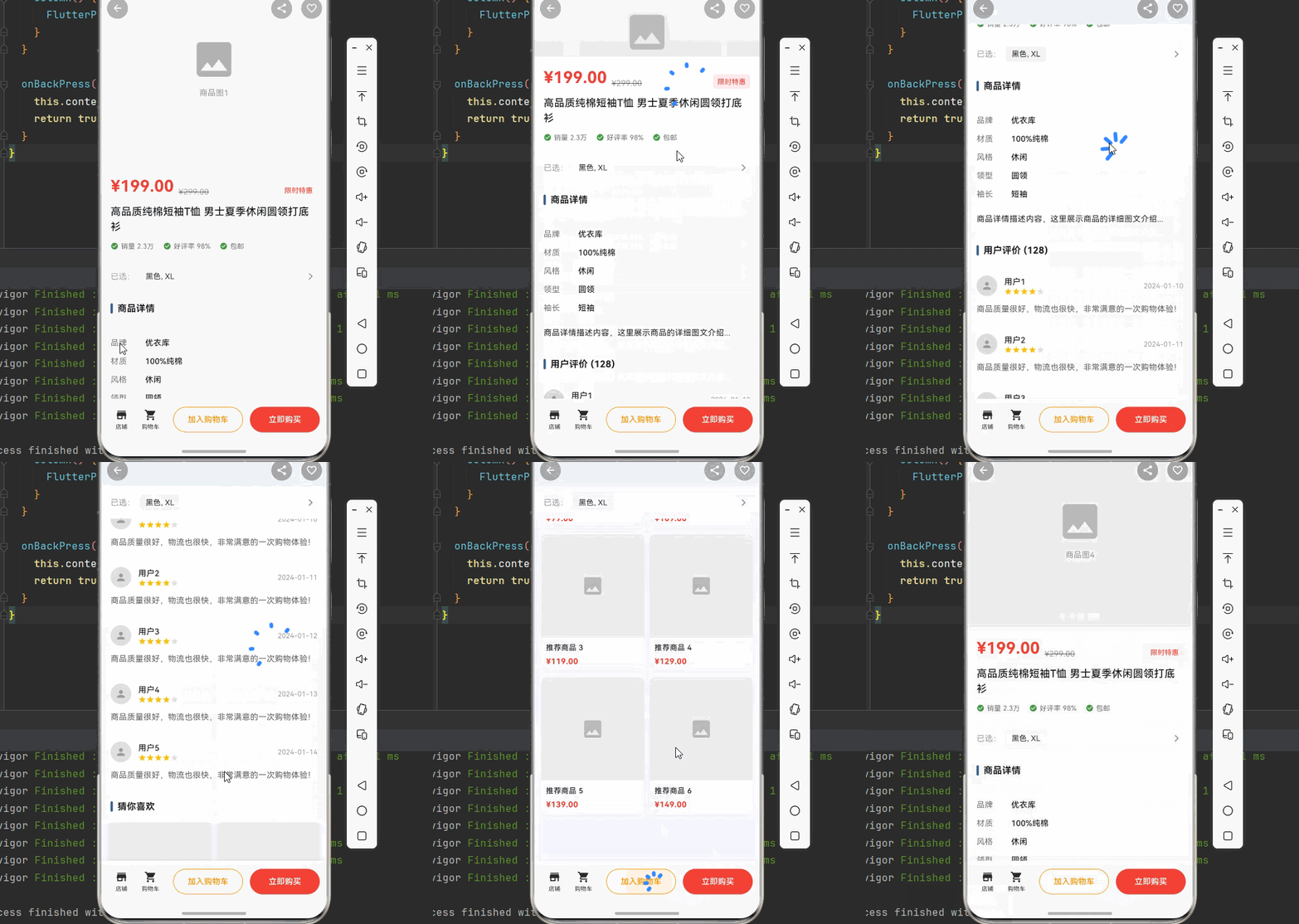
在移动应用开发中,滚动是最常见的交互方式之一。想象一下这样的场景:你需要开发一个电商商品详情页,页面顶部是商品图片轮播,接着是商品标题和价格,然后是商品规格选择,再往下是商品详情描述,最后还有用户评价和推荐商品。这些内容需要在一个页面中流畅滚动,而且某些部分(如购买按钮)需要在滚动到特定位置时固定显示。
这就是为什么我们需要 CustomScrollView。CustomScrollView 是 Flutter 提供的高级滚动组件,它允许我们将多种不同类型的滚动内容组合在一起,实现复杂的滚动效果,如折叠头部、吸顶导航、瀑布流布局等。
📱 1.1 复杂滚动布局的典型应用场景
在现代移动应用中,复杂滚动布局的需求非常广泛:
电商商品详情页:商品图片轮播、价格信息、规格选择、详情描述、用户评价等多个模块需要在一个页面中流畅滚动,同时购买按钮需要在底部固定显示。
社交动态信息流:顶部的状态栏、搜索框、标签导航,中间的动态列表,底部的加载更多提示,需要协调滚动,实现流畅的交互体验。
个人中心页面:用户头像和基本信息在顶部,下方是功能入口网格,再往下是动态列表,滚动时头部会折叠收起。
新闻资讯应用:顶部的频道导航可以吸顶,中间是新闻列表,滚动时导航栏固定,方便用户随时切换频道。
音乐播放器:顶部的专辑封面可以折叠,中间是歌曲列表,底部是播放控制栏,需要协调滚动和固定元素。
1.2 CustomScrollView 与其他滚动组件对比
Flutter 提供了多种滚动组件,每种都有其适用场景:
| 组件 | 适用场景 | 灵活度 | 性能 | 学习成本 |
|---|---|---|---|---|
| ListView | 简单列表、同质内容 | 中 | 高 | 低 |
| GridView | 网格布局、卡片展示 | 中 | 高 | 低 |
| SingleChildScrollView | 单一内容、表单页面 | 高 | 中 | 低 |
| CustomScrollView | 复杂布局、多类型内容 | 极高 | 高 | 中 |
| NestedScrollView | 嵌套滚动、折叠头部 | 高 | 中 | 高 |
对于复杂滚动布局场景,CustomScrollView 是最佳选择:
统一滚动控制:所有子组件共享同一个滚动控制器,实现统一的滚动行为和动画效果。
灵活组合:可以使用 Sliver 系列组件自由组合不同类型的内容,如列表、网格、头部等。
高性能:采用懒加载机制,只渲染可见区域的内容,即使有大量数据也能保持流畅。
丰富的交互效果:支持折叠、吸顶、视差滚动等高级交互效果。
1.3 Sliver 系列组件介绍
CustomScrollView 的强大之处在于它使用 Sliver(薄片)作为子组件。Sliver 是一种可滚动的组件片段,可以灵活组合:
| Sliver 组件 | 功能描述 | 典型用途 |
|---|---|---|
| SliverList | 列表布局 | 显示同质列表项 |
| SliverGrid | 网格布局 | 显示网格卡片 |
| SliverAppBar | 应用栏 | 折叠头部、吸顶导航 |
| SliverPersistentHeader | 持久头部 | 自定义吸顶效果 |
| SliverToBoxAdapter | 普通组件包装 | 将普通组件转为 Sliver |
| SliverPadding | 内边距 | 为 Sliver 添加内边距 |
| SliverFillRemaining | 填充剩余空间 | 底部固定内容 |
| SliverSafeArea | 安全区域 | 处理刘海屏等 |
二、技术架构设计
在正式编写代码之前,我们需要设计一个清晰的架构。良好的架构设计可以让代码更易于理解、维护和扩展。
🏛️ 2.1 页面结构设计
我们以电商商品详情页为例,设计页面结构:
┌─────────────────────────────────────────────────────────────┐
│                    CustomScrollView                          │
│                                                              │
│  ┌─────────────────────────────────────────────────────┐    │
│  │              SliverAppBar (可折叠头部)                │    │
│  │  - 商品图片轮播                                       │    │
│  │  - 滚动时折叠收起                                     │    │
│  └─────────────────────────────────────────────────────┘    │
│                                                              │
│  ┌─────────────────────────────────────────────────────┐    │
│  │           SliverToBoxAdapter (商品信息)               │    │
│  │  - 商品标题、价格、销量                               │    │
│  └─────────────────────────────────────────────────────┘    │
│                                                              │
│  ┌─────────────────────────────────────────────────────┐    │
│  │        SliverPersistentHeader (规格选择-吸顶)         │    │
│  │  - 颜色、尺寸选择                                     │    │
│  │  - 滚动时固定在顶部                                   │    │
│  └─────────────────────────────────────────────────────┘    │
│                                                              │
│  ┌─────────────────────────────────────────────────────┐    │
│  │           SliverToBoxAdapter (商品详情)               │    │
│  │  - 图文详情                                           │    │
│  └─────────────────────────────────────────────────────┘    │
│                                                              │
│  ┌─────────────────────────────────────────────────────┐    │
│  │              SliverList (用户评价)                    │    │
│  │  - 评价列表                                           │    │
│  └─────────────────────────────────────────────────────┘    │
│                                                              │
│  ┌─────────────────────────────────────────────────────┐    │
│  │              SliverGrid (推荐商品)                    │    │
│  │  - 推荐商品网格                                       │    │
│  └─────────────────────────────────────────────────────┘    │
│                                                              │
└─────────────────────────────────────────────────────────────┘
🎯 2.2 数据模型设计
/// 商品信息
class Product {
  final String id;
  final String name;
  final double price;
  final double originalPrice;
  final List<String> images;
  final String description;
  final List<String> specifications;
  final double rating;
  final int salesCount;

  const Product({
    required this.id,
    required this.name,
    required this.price,
    required this.originalPrice,
    required this.images,
    required this.description,
    required this.specifications,
    required this.rating,
    required this.salesCount,
  });
}

/// 用户评价
class Review {
  final String id;
  final String userName;
  final String avatar;
  final double rating;
  final String content;
  final List<String> images;
  final DateTime date;

  const Review({
    required this.id,
    required this.userName,
    required this.avatar,
    required this.rating,
    required this.content,
    required this.images,
    required this.date,
  });
}
📐 2.3 滚动交互设计
用户滚动屏幕
      │
      ▼
ScrollController 监听滚动位置
      │
      ├──▶ offset < 100: 头部完全展开
      │
      ├──▶ 100 <= offset < 300: 头部逐渐折叠
      │
      └──▶ offset >= 300: 头部完全折叠,规格栏吸顶
            │
            ▼
      SliverAppBar 自动调整高度
            │
            ▼
      SliverPersistentHeader 固定在顶部
三、核心功能实现
🔧 3.1 基础 CustomScrollView 结构
import 'package:flutter/material.dart';
class ProductDetailPage extends StatelessWidget {
const ProductDetailPage({super.key});
Widget build(BuildContext context) {
return Scaffold(
body: CustomScrollView(
slivers: [
// 可折叠头部
SliverAppBar(
expandedHeight: 300,
floating: false,
pinned: true,
flexibleSpace: FlexibleSpaceBar(
background: _buildImageCarousel(),
),
),
// 商品信息
SliverToBoxAdapter(
child: _buildProductInfo(),
),
// 吸顶规格选择
SliverPersistentHeader(
pinned: true,
delegate: _SpecificationHeaderDelegate(),
),
// 商品详情
SliverToBoxAdapter(
child: _buildProductDetail(),
),
// 用户评价列表
SliverList(
delegate: SliverChildBuilderDelegate(
(context, index) => _buildReviewItem(index),
childCount: 10,
),
),
// 推荐商品网格
SliverGrid(
gridDelegate: const SliverGridDelegateWithFixedCrossAxisCount(
crossAxisCount: 2,
mainAxisSpacing: 10,
crossAxisSpacing: 10,
childAspectRatio: 0.75,
),
delegate: SliverChildBuilderDelegate(
(context, index) => _buildRecommendItem(index),
childCount: 6,
),
),
// 底部安全区域
const SliverToBoxAdapter(
child: SizedBox(height: 80),
),
],
),
// 底部购买栏
bottomNavigationBar: _buildBottomBar(),
);
}
}
🖼️ 3.2 可折叠头部实现
/// 图片轮播组件
class ImageCarousel extends StatefulWidget {
final List<String> images;
const ImageCarousel({super.key, required this.images});
State<ImageCarousel> createState() => _ImageCarouselState();
}
class _ImageCarouselState extends State<ImageCarousel> {
final PageController _pageController = PageController();
int _currentIndex = 0;
void dispose() {
_pageController.dispose();
super.dispose();
}
Widget build(BuildContext context) {
return Stack(
children: [
PageView.builder(
controller: _pageController,
onPageChanged: (index) {
setState(() => _currentIndex = index);
},
itemCount: widget.images.length,
itemBuilder: (context, index) {
return Container(
color: Colors.grey.shade200,
child: Center(
child: Icon(
Icons.image,
size: 80,
color: Colors.grey.shade400,
),
),
);
},
),
// 页码指示器
Positioned(
bottom: 16,
left: 0,
right: 0,
child: Row(
mainAxisAlignment: MainAxisAlignment.center,
children: List.generate(
widget.images.length,
(index) => Container(
margin: const EdgeInsets.symmetric(horizontal: 4),
width: _currentIndex == index ? 20 : 8,
height: 8,
decoration: BoxDecoration(
color: _currentIndex == index
? Colors.white
: Colors.white.withOpacity(0.5),
borderRadius: BorderRadius.circular(4),
),
),
),
),
),
],
);
}
}
/// SliverAppBar 配置
Widget _buildSliverAppBar() {
return SliverAppBar(
expandedHeight: 300,
floating: false,
pinned: true,
snap: false,
stretch: true,
backgroundColor: Colors.white,
foregroundColor: Colors.black,
leading: IconButton(
icon: Container(
padding: const EdgeInsets.all(8),
decoration: BoxDecoration(
color: Colors.black.withOpacity(0.3),
shape: BoxShape.circle,
),
child: const Icon(Icons.arrow_back, color: Colors.white, size: 20),
),
onPressed: () {},
),
actions: [
IconButton(
icon: Container(
padding: const EdgeInsets.all(8),
decoration: BoxDecoration(
color: Colors.black.withOpacity(0.3),
shape: BoxShape.circle,
),
child: const Icon(Icons.share, color: Colors.white, size: 20),
),
onPressed: () {},
),
],
flexibleSpace: FlexibleSpaceBar(
background: ImageCarousel(
images: ['1', '2', '3', '4'],
),
),
);
}
📌 3.3 吸顶头部实现
/// 自定义吸顶头部代理
class SpecificationHeaderDelegate extends SliverPersistentHeaderDelegate {
double get minExtent => 60;
double get maxExtent => 60;
Widget build(
BuildContext context,
double shrinkOffset,
bool overlapsContent,
) {
return SizedBox(
height: 60,
child: Container(
color: Colors.white,
padding: const EdgeInsets.symmetric(horizontal: 16),
alignment: Alignment.centerLeft,
child: Row(
children: [
const Text(
'规格选择',
style: TextStyle(
fontSize: 16,
fontWeight: FontWeight.bold,
),
),
const SizedBox(width: 16),
_buildSpecChip('颜色', '黑色'),
const SizedBox(width: 8),
_buildSpecChip('尺寸', 'XL'),
const Spacer(),
const Icon(Icons.chevron_right, color: Colors.grey),
],
),
),
);
}
Widget _buildSpecChip(String label, String value) {
return Container(
padding: const EdgeInsets.symmetric(horizontal: 12, vertical: 6),
decoration: BoxDecoration(
color: Colors.grey.shade100,
borderRadius: BorderRadius.circular(16),
),
child: Text(
'$label: $value',
style: const TextStyle(fontSize: 13),
),
);
}
bool shouldRebuild(SpecificationHeaderDelegate oldDelegate) => false;
}
📋 3.4 列表与网格组合
/// 评价列表项
Widget _buildReviewItem(int index) {
  return Container(
    padding: const EdgeInsets.all(16),
    decoration: BoxDecoration(
      border: Border(
        bottom: BorderSide(color: Colors.grey.shade200),
      ),
    ),
    child: Column(
      crossAxisAlignment: CrossAxisAlignment.start,
      children: [
        Row(
          children: [
            CircleAvatar(
              radius: 20,
              backgroundColor: Colors.grey.shade300,
              child: const Icon(Icons.person, color: Colors.grey),
            ),
            const SizedBox(width: 12),
            Expanded(
              child: Column(
                crossAxisAlignment: CrossAxisAlignment.start,
                children: [
                  Text(
                    '用户${index + 1}',
                    style: const TextStyle(fontWeight: FontWeight.bold),
                  ),
                  Row(
                    children: List.generate(
                      5,
                      (i) => Icon(
                        Icons.star,
                        size: 14,
                        color: i < 4 ? Colors.amber : Colors.grey.shade300,
                      ),
                    ),
                  ),
                ],
              ),
            ),
            Text(
              '2024-01-${10 + index}',
              style: TextStyle(color: Colors.grey.shade500, fontSize: 12),
            ),
          ],
        ),
        const SizedBox(height: 12),
        const Text(
          '商品质量很好,物流也很快,非常满意的一次购物体验!',
          style: TextStyle(height: 1.5),
        ),
      ],
    ),
  );
}

/// 推荐商品网格项
Widget _buildRecommendItem(int index) {
  return Container(
    decoration: BoxDecoration(
      color: Colors.white,
      borderRadius: BorderRadius.circular(8),
      boxShadow: [
        BoxShadow(
          color: Colors.black.withOpacity(0.05),
          blurRadius: 4,
          offset: const Offset(0, 2),
        ),
      ],
    ),
    child: Column(
      crossAxisAlignment: CrossAxisAlignment.start,
      children: [
        Expanded(
          child: Container(
            decoration: BoxDecoration(
              color: Colors.grey.shade200,
              borderRadius: const BorderRadius.vertical(top: Radius.circular(8)),
            ),
            child: Center(
              child: Icon(
                Icons.image,
                size: 40,
                color: Colors.grey.shade400,
              ),
            ),
          ),
        ),
        Padding(
          padding: const EdgeInsets.all(8),
          child: Column(
            crossAxisAlignment: CrossAxisAlignment.start,
            children: [
              Text(
                '推荐商品 ${index + 1}',
                style: const TextStyle(
                  fontSize: 13,
                  fontWeight: FontWeight.w500,
                ),
                maxLines: 2,
                overflow: TextOverflow.ellipsis,
              ),
              const SizedBox(height: 4),
              Text(
                '¥${(99 + index * 10).toStringAsFixed(2)}',
                style: const TextStyle(
                  fontSize: 14,
                  color: Colors.red,
                  fontWeight: FontWeight.bold,
                ),
              ),
            ],
          ),
        ),
      ],
    ),
  );
}
四、完整应用示例
下面是一个完整的商品详情页示例:
import 'package:flutter/material.dart';
void main() {
runApp(const ProductDetailApp());
}
class ProductDetailApp extends StatelessWidget {
const ProductDetailApp({super.key});
Widget build(BuildContext context) {
return MaterialApp(
title: '商品详情',
debugShowCheckedModeBanner: false,
theme: ThemeData(
colorScheme: ColorScheme.fromSeed(seedColor: Colors.blue),
useMaterial3: true,
),
home: const ProductDetailPage(),
);
}
}
class ProductDetailPage extends StatefulWidget {
const ProductDetailPage({super.key});
State<ProductDetailPage> createState() => _ProductDetailPageState();
}
class _ProductDetailPageState extends State<ProductDetailPage> {
final ScrollController _scrollController = ScrollController();
int _currentImageIndex = 0;
final List<String> _images = ['商品图1', '商品图2', '商品图3', '商品图4'];
void dispose() {
_scrollController.dispose();
super.dispose();
}
Widget build(BuildContext context) {
return Scaffold(
body: CustomScrollView(
controller: _scrollController,
slivers: [
// 可折叠头部
SliverAppBar(
expandedHeight: 300,
floating: false,
pinned: true,
backgroundColor: Colors.white,
foregroundColor: Colors.black,
leading: _buildBackButton(),
actions: [
_buildActionButton(Icons.share),
_buildActionButton(Icons.favorite_border),
],
flexibleSpace: FlexibleSpaceBar(
background: _buildImageCarousel(),
),
),
// 商品信息
SliverToBoxAdapter(
child: _buildProductInfo(),
),
// 规格选择(吸顶)
SliverPersistentHeader(
pinned: true,
delegate: _SpecHeaderDelegate(),
),
// 商品详情标题
SliverToBoxAdapter(
child: _buildSectionTitle('商品详情'),
),
// 商品详情内容
SliverToBoxAdapter(
child: _buildProductDetail(),
),
// 用户评价标题
SliverToBoxAdapter(
child: _buildSectionTitle('用户评价 (128)'),
),
// 用户评价列表
SliverList(
delegate: SliverChildBuilderDelegate(
(context, index) => _buildReviewItem(index),
childCount: 5,
),
),
// 推荐商品标题
SliverToBoxAdapter(
child: _buildSectionTitle('猜你喜欢'),
),
// 推荐商品网格
SliverPadding(
padding: const EdgeInsets.symmetric(horizontal: 12),
sliver: SliverGrid(
gridDelegate: const SliverGridDelegateWithFixedCrossAxisCount(
crossAxisCount: 2,
mainAxisSpacing: 10,
crossAxisSpacing: 10,
childAspectRatio: 0.75,
),
delegate: SliverChildBuilderDelegate(
(context, index) => _buildRecommendItem(index),
childCount: 6,
),
),
),
// 底部间距
const SliverToBoxAdapter(
child: SizedBox(height: 80),
),
],
),
bottomNavigationBar: _buildBottomBar(),
);
}
Widget _buildBackButton() {
return IconButton(
icon: Container(
padding: const EdgeInsets.all(8),
decoration: BoxDecoration(
color: Colors.black.withOpacity(0.3),
shape: BoxShape.circle,
),
child: const Icon(Icons.arrow_back, color: Colors.white, size: 20),
),
onPressed: () => Navigator.pop(context),
);
}
Widget _buildActionButton(IconData icon) {
return IconButton(
icon: Container(
padding: const EdgeInsets.all(8),
decoration: BoxDecoration(
color: Colors.black.withOpacity(0.3),
shape: BoxShape.circle,
),
child: Icon(icon, color: Colors.white, size: 20),
),
onPressed: () {},
);
}
Widget _buildImageCarousel() {
return PageView.builder(
onPageChanged: (index) => setState(() => _currentImageIndex = index),
itemCount: _images.length,
itemBuilder: (context, index) {
return Stack(
alignment: Alignment.bottomCenter,
children: [
Container(
color: Colors.grey.shade200,
child: Center(
child: Column(
mainAxisAlignment: MainAxisAlignment.center,
children: [
Icon(Icons.image, size: 80, color: Colors.grey.shade400),
const SizedBox(height: 8),
Text(_images[index], style: TextStyle(color: Colors.grey.shade500)),
],
),
),
),
Positioned(
bottom: 16,
child: Row(
children: List.generate(
_images.length,
(i) => Container(
margin: const EdgeInsets.symmetric(horizontal: 4),
width: _currentImageIndex == i ? 20 : 8,
height: 8,
decoration: BoxDecoration(
color: _currentImageIndex == i
? Colors.white
: Colors.white.withOpacity(0.5),
borderRadius: BorderRadius.circular(4),
),
),
),
),
),
],
);
},
);
}
Widget _buildProductInfo() {
return Container(
color: Colors.white,
padding: const EdgeInsets.all(16),
child: Column(
crossAxisAlignment: CrossAxisAlignment.start,
children: [
Row(
crossAxisAlignment: CrossAxisAlignment.end,
children: [
const Text(
'¥199.00',
style: TextStyle(
fontSize: 28,
color: Colors.red,
fontWeight: FontWeight.bold,
),
),
const SizedBox(width: 8),
Text(
'¥299.00',
style: TextStyle(
fontSize: 14,
color: Colors.grey.shade500,
decoration: TextDecoration.lineThrough,
),
),
const Spacer(),
Container(
padding: const EdgeInsets.symmetric(horizontal: 8, vertical: 4),
decoration: BoxDecoration(
color: Colors.red.shade50,
borderRadius: BorderRadius.circular(4),
),
child: const Text(
'限时特惠',
style: TextStyle(color: Colors.red, fontSize: 12),
),
),
],
),
const SizedBox(height: 12),
const Text(
'高品质纯棉短袖T恤 男士夏季休闲圆领打底衫',
style: TextStyle(fontSize: 18, fontWeight: FontWeight.w500),
),
const SizedBox(height: 12),
Row(
children: [
_buildInfoTag('销量 2.3万'),
const SizedBox(width: 16),
_buildInfoTag('好评率 98%'),
const SizedBox(width: 16),
_buildInfoTag('包邮'),
],
),
],
),
);
}
Widget _buildInfoTag(String text) {
return Row(
children: [
Icon(Icons.check_circle, size: 14, color: Colors.green.shade600),
const SizedBox(width: 4),
Text(text, style: TextStyle(fontSize: 12, color: Colors.grey.shade600)),
],
);
}
Widget _buildSectionTitle(String title) {
return Container(
color: Colors.white,
padding: const EdgeInsets.all(16),
child: Row(
children: [
Container(
width: 4,
height: 18,
decoration: BoxDecoration(
color: Theme.of(context).colorScheme.primary,
borderRadius: BorderRadius.circular(2),
),
),
const SizedBox(width: 8),
Text(
title,
style: const TextStyle(fontSize: 16, fontWeight: FontWeight.bold),
),
],
),
);
}
Widget _buildProductDetail() {
return Container(
color: Colors.white,
padding: const EdgeInsets.all(16),
child: Column(
crossAxisAlignment: CrossAxisAlignment.start,
children: [
_buildDetailRow('品牌', '优衣库'),
_buildDetailRow('材质', '100%纯棉'),
_buildDetailRow('风格', '休闲'),
_buildDetailRow('领型', '圆领'),
_buildDetailRow('袖长', '短袖'),
const SizedBox(height: 16),
const Text(
'商品详情描述内容,这里展示商品的详细图文介绍...',
style: TextStyle(height: 1.6),
),
],
),
);
}
Widget _buildDetailRow(String label, String value) {
return Padding(
padding: const EdgeInsets.symmetric(vertical: 6),
child: Row(
children: [
SizedBox(
width: 60,
child: Text(label, style: TextStyle(color: Colors.grey.shade600)),
),
Text(value, style: const TextStyle(fontWeight: FontWeight.w500)),
],
),
);
}
Widget _buildReviewItem(int index) {
return Container(
color: Colors.white,
padding: const EdgeInsets.all(16),
child: Column(
crossAxisAlignment: CrossAxisAlignment.start,
children: [
Row(
children: [
CircleAvatar(
radius: 18,
backgroundColor: Colors.grey.shade300,
child: const Icon(Icons.person, size: 20, color: Colors.grey),
),
const SizedBox(width: 12),
Expanded(
child: Column(
crossAxisAlignment: CrossAxisAlignment.start,
children: [
Text('用户${index + 1}', style: const TextStyle(fontWeight: FontWeight.w500)),
Row(
children: List.generate(
5,
(i) => Icon(
Icons.star,
size: 14,
color: i < 4 ? Colors.amber : Colors.grey.shade300,
),
),
),
],
),
),
Text(
'2024-01-${10 + index}',
style: TextStyle(fontSize: 12, color: Colors.grey.shade500),
),
],
),
const SizedBox(height: 12),
Text(
'商品质量很好,物流也很快,非常满意的一次购物体验!',
style: TextStyle(height: 1.5, color: Colors.grey.shade700),
),
],
),
);
}
Widget _buildRecommendItem(int index) {
return Container(
decoration: BoxDecoration(
color: Colors.white,
borderRadius: BorderRadius.circular(8),
boxShadow: [
BoxShadow(
color: Colors.black.withOpacity(0.05),
blurRadius: 4,
offset: const Offset(0, 2),
),
],
),
child: Column(
crossAxisAlignment: CrossAxisAlignment.start,
children: [
Expanded(
child: Container(
decoration: BoxDecoration(
color: Colors.grey.shade200,
borderRadius: const BorderRadius.vertical(top: Radius.circular(8)),
),
child: Center(
child: Icon(Icons.image, size: 40, color: Colors.grey.shade400),
),
),
),
Padding(
padding: const EdgeInsets.all(8),
child: Column(
crossAxisAlignment: CrossAxisAlignment.start,
children: [
Text(
'推荐商品 ${index + 1}',
style: const TextStyle(fontSize: 13, fontWeight: FontWeight.w500),
maxLines: 2,
overflow: TextOverflow.ellipsis,
),
const SizedBox(height: 4),
Text(
'¥${(99 + index * 10).toStringAsFixed(2)}',
style: const TextStyle(
fontSize: 14,
color: Colors.red,
fontWeight: FontWeight.bold,
),
),
],
),
),
],
),
);
}
Widget _buildBottomBar() {
return Container(
padding: const EdgeInsets.all(12),
decoration: BoxDecoration(
color: Colors.white,
boxShadow: [
BoxShadow(
color: Colors.black.withOpacity(0.05),
blurRadius: 4,
offset: const Offset(0, -2),
),
],
),
child: SafeArea(
child: Row(
children: [
_buildBottomIcon(Icons.store, '店铺'),
_buildBottomIcon(Icons.shopping_cart, '购物车'),
const SizedBox(width: 12),
Expanded(
child: OutlinedButton(
onPressed: () {},
style: OutlinedButton.styleFrom(
foregroundColor: Colors.orange,
side: const BorderSide(color: Colors.orange),
padding: const EdgeInsets.symmetric(vertical: 12),
),
child: const Text('加入购物车'),
),
),
const SizedBox(width: 12),
Expanded(
child: ElevatedButton(
onPressed: () {},
style: ElevatedButton.styleFrom(
backgroundColor: Colors.red,
foregroundColor: Colors.white,
padding: const EdgeInsets.symmetric(vertical: 12),
),
child: const Text('立即购买'),
),
),
],
),
),
);
}
Widget _buildBottomIcon(IconData icon, String label) {
return InkWell(
onTap: () {},
child: Padding(
padding: const EdgeInsets.symmetric(horizontal: 12),
child: Column(
mainAxisSize: MainAxisSize.min,
children: [
Icon(icon, size: 22),
const SizedBox(height: 2),
Text(label, style: const TextStyle(fontSize: 10)),
],
),
),
);
}
}
class _SpecHeaderDelegate extends SliverPersistentHeaderDelegate {
double get minExtent => 56;
double get maxExtent => 56;
Widget build(BuildContext context, double shrinkOffset, bool overlapsContent) {
return SizedBox(
height: 56,
child: Container(
color: Colors.white,
padding: const EdgeInsets.symmetric(horizontal: 16),
alignment: Alignment.centerLeft,
child: Row(
children: [
const Text(
'已选:',
style: TextStyle(fontSize: 14, color: Colors.grey),
),
const SizedBox(width: 8),
Container(
padding: const EdgeInsets.symmetric(horizontal: 10, vertical: 4),
decoration: BoxDecoration(
color: Colors.grey.shade100,
borderRadius: BorderRadius.circular(4),
),
child: const Text('黑色, XL', style: TextStyle(fontSize: 13)),
),
const Spacer(),
const Icon(Icons.chevron_right, color: Colors.grey),
],
),
),
);
}
bool shouldRebuild(_SpecHeaderDelegate oldDelegate) => false;
}
五、进阶技巧
🌟 5.1 视差滚动效果
class ParallaxSliverAppBar extends StatelessWidget {
Widget build(BuildContext context) {
return SliverAppBar(
expandedHeight: 300,
floating: false,
pinned: true,
flexibleSpace: LayoutBuilder(
builder: (context, constraints) {
final expandRatio = (constraints.maxHeight - kToolbarHeight) /
(300 - kToolbarHeight);
return FlexibleSpaceBar(
background: Transform.scale(
scale: 1 + (1 - expandRatio) * 0.3,
child: Image.network(
'https://example.com/image.jpg',
fit: BoxFit.cover,
),
),
);
},
),
);
}
}
📌 5.2 多级吸顶效果
class MultiStickyHeader extends StatelessWidget {
Widget build(BuildContext context) {
return CustomScrollView(
slivers: [
// 第一级吸顶
SliverPersistentHeader(
pinned: true,
delegate: _StickyHeaderDelegate(
minHeight: 50,
maxHeight: 50,
child: Container(
color: Colors.blue,
child: const Center(
child: Text('一级导航', style: TextStyle(color: Colors.white)),
),
),
),
),
// 第二级吸顶
SliverPersistentHeader(
pinned: true,
delegate: _StickyHeaderDelegate(
minHeight: 40,
maxHeight: 40,
child: Container(
color: Colors.blue.shade200,
child: const Center(
child: Text('二级导航', style: TextStyle(color: Colors.white)),
),
),
),
),
// 内容
SliverList(
delegate: SliverChildBuilderDelegate(
(context, index) => ListTile(title: Text('Item $index')),
childCount: 20,
),
),
],
);
}
}
class _StickyHeaderDelegate extends SliverPersistentHeaderDelegate {
final double minHeight;
final double maxHeight;
final Widget child;
_StickyHeaderDelegate({
required this.minHeight,
required this.maxHeight,
required this.child,
});
double get minExtent => minHeight;
double get maxExtent => maxHeight;
Widget build(BuildContext context, double shrinkOffset, bool overlapsContent) {
return SizedBox.expand(child: child);
}
bool shouldRebuild(_StickyHeaderDelegate oldDelegate) {
return maxHeight != oldDelegate.maxHeight ||
minHeight != oldDelegate.minHeight ||
child != oldDelegate.child;
}
}
🔄 5.3 下拉刷新与上拉加载
class RefreshableScrollView extends StatefulWidget {
State<RefreshableScrollView> createState() => _RefreshableScrollViewState();
}
class _RefreshableScrollViewState extends State<RefreshableScrollView> {
final ScrollController _scrollController = ScrollController();
bool _isLoading = false;
void initState() {
super.initState();
_scrollController.addListener(_onScroll);
}
void _onScroll() {
if (_scrollController.position.pixels >=
_scrollController.position.maxScrollExtent - 100) {
_loadMore();
}
}
Future<void> _loadMore() async {
if (_isLoading) return;
setState(() => _isLoading = true);
await Future.delayed(const Duration(seconds: 1));
setState(() => _isLoading = false);
}
Widget build(BuildContext context) {
return RefreshIndicator(
onRefresh: () async {
await Future.delayed(const Duration(seconds: 1));
},
child: CustomScrollView(
controller: _scrollController,
slivers: [
// 内容...
const SliverToBoxAdapter(
child: SizedBox(height: 200, child: Center(child: Text('内容'))),
),
// 加载指示器
if (_isLoading)
const SliverToBoxAdapter(
child: Padding(
padding: EdgeInsets.all(16),
child: Center(child: CircularProgressIndicator()),
),
),
],
),
);
}
void dispose() {
_scrollController.dispose();
super.dispose();
}
}
六、最佳实践与注意事项
✅ 6.1 性能优化建议
-
使用 SliverChildBuilderDelegate:对于长列表,使用 builder 模式而非 SliverChildListDelegate,实现懒加载。
-
合理设置 cacheExtent:根据内容复杂度调整缓存区域大小,平衡性能和内存。
-
避免过度嵌套:CustomScrollView 内部尽量减少不必要的嵌套层级。
-
正确实现 shouldRebuild:对于自定义 SliverPersistentHeaderDelegate,正确实现 shouldRebuild 方法。
⚠️ 6.2 常见问题与解决方案
| 问题 | 原因 | 解决方案 |
|---|---|---|
| 滚动卡顿 | 列表项过于复杂 | 简化列表项布局,使用 const |
| 吸顶失效 | pinned 未设置 | 设置 pinned: true |
| 头部不折叠 | expandedHeight 未设置 | 设置合理的 expandedHeight |
| 刷新冲突 | RefreshIndicator 嵌套问题 | 确保物理滚动一致性 |
| 滚动监听失效 | 控制器未绑定 | 正确绑定 ScrollController |
📝 6.3 代码规范建议
-
分离 Sliver 组件:将复杂的 Sliver 组件拆分成独立的 Widget。
-
使用常量:对于固定的尺寸、颜色等,使用常量定义。
-
添加注释:复杂的滚动逻辑应该添加注释说明。
-
错误处理:处理边界情况,如空数据、网络错误等。
七、总结
本文详细介绍了 Flutter 中 CustomScrollView 组件的使用方法,从基础概念到高级技巧,帮助你掌握复杂滚动布局的核心能力。
核心要点回顾:
📌 CustomScrollView 基础:理解 Sliver 系列组件的概念和用法
📌 折叠头部:使用 SliverAppBar 实现可折叠的头部效果
📌 吸顶效果:使用 SliverPersistentHeader 实现自定义吸顶
📌 列表网格组合:灵活组合 SliverList 和 SliverGrid
📌 进阶技巧:视差滚动、多级吸顶、下拉刷新等
通过本文的学习,你应该能够独立开发一个功能完善的复杂滚动页面,并能够将 CustomScrollView 应用到更多场景中。
八、参考资料

开源鸿蒙跨平台开发社区汇聚开发者与厂商,共建“一次开发,多端部署”的开源生态,致力于降低跨端开发门槛,推动万物智联创新。
更多推荐
 13
13 0
0- 0


 已为社区贡献107条内容

所有评论(0)