进阶实战 Flutter for OpenHarmony:视频全屏播放系统 - 结合屏幕旋转
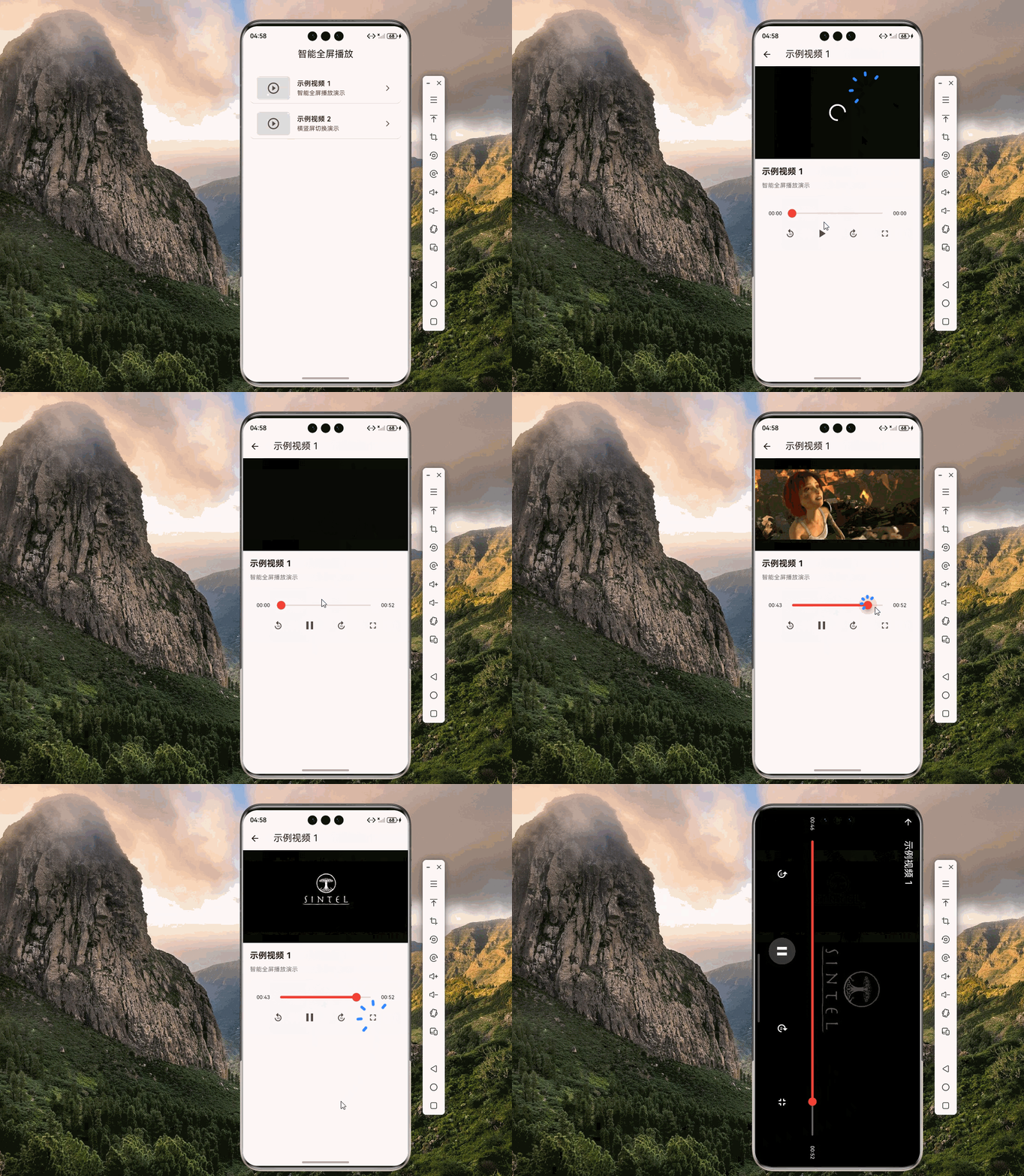
在移动视频应用中,用户对播放体验的要求越来越高。竖屏浏览时,用户希望看到视频列表和相关信息;而当用户想要沉浸式观看时,又希望能够快速切换到横屏全屏模式。这种智能的播放体验已经成为视频应用的标配功能。想象一下这样的场景:用户在视频列表页面浏览,点击一个视频后,视频以小窗口形式在竖屏模式下播放,用户可以看到视频标题、简介、相关推荐等信息。当用户点击全屏按钮或将手机旋转到横屏时,视频自动切换到横屏全屏模
欢迎加入开源鸿蒙跨平台社区:https://openharmonycrossplatform.csdn.net
🔍 一、功能概述与应用场景
📱 1.1 为什么需要智能全屏播放?
在移动视频应用中,用户对播放体验的要求越来越高。竖屏浏览时,用户希望看到视频列表和相关信息;而当用户想要沉浸式观看时,又希望能够快速切换到横屏全屏模式。这种智能的播放体验已经成为视频应用的标配功能。
想象一下这样的场景:用户在视频列表页面浏览,点击一个视频后,视频以小窗口形式在竖屏模式下播放,用户可以看到视频标题、简介、相关推荐等信息。当用户点击全屏按钮或将手机旋转到横屏时,视频自动切换到横屏全屏模式,隐藏所有干扰元素,提供沉浸式的观看体验。这就是智能全屏播放系统要实现的功能。
📋 1.2 核心功能特性
| 功能特性 | 详细说明 | OpenHarmony 支持 |
|---|---|---|
| 竖屏小窗口播放 | 在竖屏模式下以小窗口播放视频 | ✅ 完全支持 |
| 横屏全屏播放 | 在横屏模式下全屏播放视频 | ✅ 完全支持 |
| 自动旋转切换 | 根据设备方向自动切换播放模式 | ✅ 完全支持 |
| 手动全屏切换 | 点击按钮手动切换全屏模式 | ✅ 完全支持 |
| 沉浸式体验 | 全屏时隐藏系统UI | ✅ 完全支持 |
| 播放状态保持 | 切换模式时保持播放进度 | ✅ 完全支持 |
💡 1.3 典型应用场景
短视频应用:用户浏览视频列表,点击后小窗口播放,全屏时横屏观看。
在线教育平台:课程视频支持竖屏预览和横屏全屏学习。
视频会议应用:会议视频支持多种播放模式切换。
社交媒体应用:视频动态支持灵活的播放模式。
🏗️ 二、系统架构设计
📐 2.1 整体架构
为了构建一个可维护、可扩展的智能全屏播放系统,我们采用分层架构设计:
┌─────────────────────────────────────────────────────────┐
│                    UI 层 (展示层)                        │
│  ┌─────────────┐  ┌─────────────┐  ┌─────────────┐     │
│  │  竖屏播放器 │  │  横屏播放器 │  │  控制面板   │     │
│  └─────────────┘  └─────────────┘  └─────────────┘     │
├─────────────────────────────────────────────────────────┤
│                  服务层 (业务逻辑)                       │
│  ┌─────────────────────────────────────────────────┐   │
│  │         FullscreenVideoController                │   │
│  │  • 播放模式管理                                  │   │
│  │  • 屏幕方向控制                                  │   │
│  │  • 全屏状态管理                                  │   │
│  │  • 播放进度同步                                  │   │
│  └─────────────────────────────────────────────────┘   │
├─────────────────────────────────────────────────────────┤
│                  基础设施层 (底层实现)                   │
│  ┌───────────────────────┐  ┌───────────────────────┐  │
│  │    video_player       │  │     SystemChrome      │  │
│  │  • 视频播放控制       │  │  • 屏幕方向控制       │  │
│  │  • 播放状态监听       │  │  • 系统UI控制         │  │
│  └───────────────────────┘  └───────────────────────┘  │
└─────────────────────────────────────────────────────────┘
📊 2.2 数据模型设计
/// 播放模式枚举
enum PlayMode {
  inline,      // 内嵌模式(竖屏小窗口)
  fullscreen,  // 全屏模式(横屏全屏)
}

/// 全屏配置模型
class FullscreenConfig {
  /// 是否自动旋转
  final bool autoRotate;

  /// 全屏时是否隐藏系统UI
  final bool hideSystemUI;

  /// 全屏时的默认方向
  final DeviceOrientation defaultOrientation;

  /// 退出全屏时恢复的方向
  final DeviceOrientation exitOrientation;

  const FullscreenConfig({
    this.autoRotate = true,
    this.hideSystemUI = true,
    this.defaultOrientation = DeviceOrientation.landscapeLeft,
    this.exitOrientation = DeviceOrientation.portraitUp,
  });
}

/// 播放状态模型
class VideoPlayState {
  /// 当前播放模式
  final PlayMode playMode;

  /// 是否正在播放
  final bool isPlaying;

  /// 当前播放位置
  final Duration position;

  /// 视频总时长
  final Duration duration;

  /// 是否正在缓冲
  final bool isBuffering;

  const VideoPlayState({
    this.playMode = PlayMode.inline,
    this.isPlaying = false,
    this.position = Duration.zero,
    this.duration = Duration.zero,
    this.isBuffering = false,
  });
}
📦 三、项目配置与依赖安装
📥 3.1 添加依赖
打开项目根目录下的 pubspec.yaml 文件,添加以下配置:
dependencies:
  flutter:
    sdk: flutter

  # video_player - 视频播放插件
  video_player:
    git:
      url: "https://atomgit.com/openharmony-tpc/flutter_packages.git"
      path: "packages/video_player/video_player"
配置说明:
video_player:Flutter 官方视频播放插件,OpenHarmony 适配版本SystemChrome:Flutter 内置 API,无需额外依赖- 本项目基于 Flutter 3.27.5-ohos-1.0.4 开发
🔧 3.2 权限配置
在 ohos/entry/src/main/module.json5 文件中添加网络权限:
{
  "module": {
    "requestPermissions": [
      {
        "name": "ohos.permission.INTERNET",
        "reason": "$string:internet_reason",
        "usedScene": {
          "abilities": ["EntryAbility"],
          "when": "inuse"
        }
      }
    ]
  }
}
🛠️ 四、核心服务实现
🎬 4.1 全屏视频控制器
import 'dart:io';
import 'package:flutter/material.dart';
import 'package:flutter/services.dart';
import 'package:video_player/video_player.dart';

/// 播放模式枚举
enum PlayMode {
  inline,
  fullscreen,
}

/// 全屏视频控制器
///
/// 该控制器管理视频播放和全屏切换逻辑,
/// 结合 video_player 和 SystemChrome 实现智能全屏播放。
class FullscreenVideoController extends ChangeNotifier {
  /// 视频控制器
  VideoPlayerController? _videoController;

  /// 当前播放模式
  PlayMode _playMode = PlayMode.inline;

  /// 是否全屏
  bool _isFullscreen = false;

  /// 配置
  final FullscreenConfig _config;

  FullscreenVideoController({
    FullscreenConfig? config,
  }) : _config = config ?? const FullscreenConfig();

  /// 获取视频控制器
  VideoPlayerController? get videoController => _videoController;

  /// 获取当前播放模式
  PlayMode get playMode => _playMode;

  /// 是否全屏
  bool get isFullscreen => _isFullscreen;

  /// 是否已初始化
  bool get isInitialized => _videoController?.value.isInitialized ?? false;

  /// 是否正在播放
  bool get isPlaying => _videoController?.value.isPlaying ?? false;

  /// 是否正在缓冲
  bool get isBuffering => _videoController?.value.isBuffering ?? false;

  /// 获取视频时长
  Duration get duration => _videoController?.value.duration ?? Duration.zero;

  /// 获取当前播放位置
  Duration get position => _videoController?.value.position ?? Duration.zero;

  /// 获取视频宽高比
  double get aspectRatio => _videoController?.value.aspectRatio ?? 16 / 9;

  /// 初始化网络视频
  Future<void> initializeNetworkVideo(String url) async {
    await _disposeVideoController();

    _videoController = VideoPlayerController.networkUrl(Uri.parse(url));
    await _videoController!.initialize();
    _videoController!.addListener(_onVideoStateChanged);
    notifyListeners();
  }

  /// 初始化本地文件视频
  Future<void> initializeFileVideo(File file) async {
    await _disposeVideoController();

    _videoController = VideoPlayerController.file(file);
    await _videoController!.initialize();
    _videoController!.addListener(_onVideoStateChanged);
    notifyListeners();
  }

  /// 初始化 Asset 视频
  Future<void> initializeAssetVideo(String assetPath) async {
    await _disposeVideoController();

    _videoController = VideoPlayerController.asset(assetPath);
    await _videoController!.initialize();
    _videoController!.addListener(_onVideoStateChanged);
    notifyListeners();
  }

  /// 视频状态变化回调
  void _onVideoStateChanged() {
    notifyListeners();
  }

  /// 播放
  void play() {
    _videoController?.play();
  }

  /// 暂停
  void pause() {
    _videoController?.pause();
  }

  /// 切换播放/暂停
  void togglePlayPause() {
    if (isPlaying) {
      pause();
    } else {
      play();
    }
  }

  /// 跳转到指定位置
  void seekTo(Duration position) {
    _videoController?.seekTo(position);
  }

  /// 跳转到进度位置
  void seekToProgress(double progress) {
    final targetPosition = Duration(
      milliseconds: (duration.inMilliseconds * progress).round(),
    );
    seekTo(targetPosition);
  }

  /// 快进
  void fastForward(int seconds) {
    final newPosition = position + Duration(seconds: seconds);
    seekTo(newPosition < duration ? newPosition : duration);
  }

  /// 快退
  void rewind(int seconds) {
    final newPosition = position - Duration(seconds: seconds);
    seekTo(newPosition > Duration.zero ? newPosition : Duration.zero);
  }

  /// 设置播放速度
  void setPlaybackSpeed(double speed) {
    _videoController?.setPlaybackSpeed(speed);
  }

  /// 进入全屏模式
  Future<void> enterFullscreen() async {
    if (_isFullscreen) return;

    _isFullscreen = true;
    _playMode = PlayMode.fullscreen;

    // 设置横屏方向
    await SystemChrome.setPreferredOrientations([
      DeviceOrientation.landscapeLeft,
      DeviceOrientation.landscapeRight,
    ]);

    // 隐藏系统UI
    if (_config.hideSystemUI) {
      await SystemChrome.setEnabledSystemUIMode(SystemUiMode.immersive);
    }

    notifyListeners();
  }

  /// 退出全屏模式
  Future<void> exitFullscreen() async {
    if (!_isFullscreen) return;

    _isFullscreen = false;
    _playMode = PlayMode.inline;

    // 恢复竖屏方向
    await SystemChrome.setPreferredOrientations([
      _config.exitOrientation,
    ]);

    // 显示系统UI
    if (_config.hideSystemUI) {
      await SystemChrome.setEnabledSystemUIMode(
        SystemUiMode.manual,
        overlays: SystemUiOverlay.values,
      );
    }

    notifyListeners();
  }

  /// 切换全屏状态
  Future<void> toggleFullscreen() async {
    if (_isFullscreen) {
      await exitFullscreen();
    } else {
      await enterFullscreen();
    }
  }

  /// 释放资源
  Future<void> dispose() async {
    await exitFullscreen();
    await _disposeVideoController();
    super.dispose();
  }

  /// 释放视频控制器
  Future<void> _disposeVideoController() async {
    _videoController?.removeListener(_onVideoStateChanged);
    await _videoController?.dispose();
    _videoController = null;
  }
}

/// 全屏配置模型
class FullscreenConfig {
  final bool autoRotate;
  final bool hideSystemUI;
  final DeviceOrientation defaultOrientation;
  final DeviceOrientation exitOrientation;

  const FullscreenConfig({
    this.autoRotate = true,
    this.hideSystemUI = true,
    this.defaultOrientation = DeviceOrientation.landscapeLeft,
    this.exitOrientation = DeviceOrientation.portraitUp,
  });
}
📝 五、完整示例代码
下面是一个完整的智能视频全屏播放系统示例:
import 'dart:io';
import 'package:flutter/material.dart';
import 'package:flutter/services.dart';
import 'package:video_player/video_player.dart';
// ============ 枚举定义 ============
enum PlayMode {
inline,
fullscreen,
}
// ============ 数据模型 ============
class FullscreenConfig {
final bool autoRotate;
final bool hideSystemUI;
final DeviceOrientation defaultOrientation;
final DeviceOrientation exitOrientation;
const FullscreenConfig({
this.autoRotate = true,
this.hideSystemUI = true,
this.defaultOrientation = DeviceOrientation.landscapeLeft,
this.exitOrientation = DeviceOrientation.portraitUp,
});
}
class VideoInfo {
final String title;
final String? description;
final String source;
const VideoInfo({
required this.title,
this.description,
required this.source,
});
}
// ============ 控制器 ============
class FullscreenVideoController extends ChangeNotifier {
VideoPlayerController? _videoController;
PlayMode _playMode = PlayMode.inline;
bool _isFullscreen = false;
final FullscreenConfig _config;
FullscreenVideoController({
FullscreenConfig? config,
}) : _config = config ?? const FullscreenConfig();
VideoPlayerController? get videoController => _videoController;
PlayMode get playMode => _playMode;
bool get isFullscreen => _isFullscreen;
bool get isInitialized => _videoController?.value.isInitialized ?? false;
bool get isPlaying => _videoController?.value.isPlaying ?? false;
bool get isBuffering => _videoController?.value.isBuffering ?? false;
Duration get duration => _videoController?.value.duration ?? Duration.zero;
Duration get position => _videoController?.value.position ?? Duration.zero;
double get aspectRatio => _videoController?.value.aspectRatio ?? 16 / 9;
Future<void> initializeNetworkVideo(String url) async {
await _disposeVideoController();
_videoController = VideoPlayerController.networkUrl(Uri.parse(url));
await _videoController!.initialize();
_videoController!.addListener(_onVideoStateChanged);
notifyListeners();
}
void _onVideoStateChanged() {
notifyListeners();
}
void play() => _videoController?.play();
void pause() => _videoController?.pause();
void togglePlayPause() {
if (isPlaying) {
pause();
} else {
play();
}
}
void seekTo(Duration position) => _videoController?.seekTo(position);
void seekToProgress(double progress) {
final targetPosition = Duration(
milliseconds: (duration.inMilliseconds * progress).round(),
);
seekTo(targetPosition);
}
void fastForward(int seconds) {
final newPosition = position + Duration(seconds: seconds);
seekTo(newPosition < duration ? newPosition : duration);
}
void rewind(int seconds) {
final newPosition = position - Duration(seconds: seconds);
seekTo(newPosition > Duration.zero ? newPosition : Duration.zero);
}
void setPlaybackSpeed(double speed) {
_videoController?.setPlaybackSpeed(speed);
}
Future<void> enterFullscreen() async {
if (_isFullscreen) return;
_isFullscreen = true;
_playMode = PlayMode.fullscreen;
await SystemChrome.setPreferredOrientations([
DeviceOrientation.landscapeLeft,
DeviceOrientation.landscapeRight,
]);
if (_config.hideSystemUI) {
await SystemChrome.setEnabledSystemUIMode(SystemUiMode.immersive);
}
notifyListeners();
}
Future<void> exitFullscreen() async {
if (!_isFullscreen) return;
_isFullscreen = false;
_playMode = PlayMode.inline;
await SystemChrome.setPreferredOrientations([_config.exitOrientation]);
if (_config.hideSystemUI) {
await SystemChrome.setEnabledSystemUIMode(
SystemUiMode.manual,
overlays: SystemUiOverlay.values,
);
}
notifyListeners();
}
Future<void> toggleFullscreen() async {
if (_isFullscreen) {
await exitFullscreen();
} else {
await enterFullscreen();
}
}
Future<void> dispose() async {
await exitFullscreen();
await _disposeVideoController();
super.dispose();
}
Future<void> _disposeVideoController() async {
_videoController?.removeListener(_onVideoStateChanged);
await _videoController?.dispose();
_videoController = null;
}
}
// ============ 应用入口 ============
void main() {
WidgetsFlutterBinding.ensureInitialized();
SystemChrome.setPreferredOrientations([DeviceOrientation.portraitUp]);
runApp(const FullscreenVideoApp());
}
class FullscreenVideoApp extends StatelessWidget {
const FullscreenVideoApp({super.key});
Widget build(BuildContext context) {
return MaterialApp(
title: '智能全屏播放',
debugShowCheckedModeBanner: false,
theme: ThemeData(
colorScheme: ColorScheme.fromSeed(seedColor: Colors.red),
useMaterial3: true,
),
home: const VideoListPage(),
);
}
}
class VideoListPage extends StatelessWidget {
const VideoListPage({super.key});
static final List<VideoInfo> _videos = [
VideoInfo(
title: '示例视频 1',
description: '智能全屏播放演示',
source: 'https://media.w3.org/2010/05/sintel/trailer.mp4',
),
VideoInfo(
title: '示例视频 2',
description: '横竖屏切换演示',
source: 'https://media.w3.org/2010/05/bunny/trailer.mp4',
),
];
Widget build(BuildContext context) {
return Scaffold(
appBar: AppBar(
title: const Text('智能全屏播放'),
centerTitle: true,
),
body: ListView.builder(
padding: const EdgeInsets.all(16),
itemCount: _videos.length,
itemBuilder: (context, index) {
final video = _videos[index];
return Card(
margin: const EdgeInsets.only(bottom: 12),
child: ListTile(
leading: Container(
width: 80,
height: 60,
decoration: BoxDecoration(
color: Colors.grey.shade300,
borderRadius: BorderRadius.circular(8),
),
child: const Icon(Icons.play_circle_outline, size: 32),
),
title: Text(
video.title,
style: const TextStyle(fontWeight: FontWeight.w600),
),
subtitle: Text(
video.description ?? '',
maxLines: 2,
overflow: TextOverflow.ellipsis,
),
trailing: const Icon(Icons.arrow_forward_ios, size: 16),
onTap: () {
Navigator.push(
context,
MaterialPageRoute(
builder: (context) => InlineVideoPage(video: video),
),
);
},
),
);
},
),
);
}
}
class InlineVideoPage extends StatefulWidget {
final VideoInfo video;
const InlineVideoPage({super.key, required this.video});
State<InlineVideoPage> createState() => _InlineVideoPageState();
}
class _InlineVideoPageState extends State<InlineVideoPage> {
late FullscreenVideoController _controller;
bool _showControls = true;
bool _isLoading = true;
String? _error;
void initState() {
super.initState();
_controller = FullscreenVideoController();
_initializeVideo();
}
Future<void> _initializeVideo() async {
try {
await _controller.initializeNetworkVideo(widget.video.source);
setState(() {
_isLoading = false;
});
_controller.addListener(() => setState(() {}));
} catch (e) {
setState(() {
_isLoading = false;
_error = e.toString();
});
}
}
void dispose() {
_controller.dispose();
super.dispose();
}
void _toggleControls() {
setState(() => _showControls = !_showControls);
}
Future<void> _toggleFullscreen() async {
await _controller.toggleFullscreen();
}
String _formatDuration(Duration duration) {
final hours = duration.inHours;
final minutes = duration.inMinutes.remainder(60);
final seconds = duration.inSeconds.remainder(60);
if (hours > 0) {
return '${hours.toString().padLeft(2, '0')}:'
'${minutes.toString().padLeft(2, '0')}:'
'${seconds.toString().padLeft(2, '0')}';
}
return '${minutes.toString().padLeft(2, '0')}:'
'${seconds.toString().padLeft(2, '0')}';
}
Widget build(BuildContext context) {
if (_controller.isFullscreen) {
return _buildFullscreenPlayer();
}
return _buildInlinePlayer();
}
Widget _buildInlinePlayer() {
return Scaffold(
appBar: AppBar(
title: Text(widget.video.title),
),
body: SingleChildScrollView(
child: Column(
crossAxisAlignment: CrossAxisAlignment.start,
children: [
_buildVideoPlayer(isFullscreen: false),
Padding(
padding: const EdgeInsets.all(16),
child: Column(
crossAxisAlignment: CrossAxisAlignment.start,
children: [
Text(
widget.video.title,
style: const TextStyle(
fontSize: 20,
fontWeight: FontWeight.bold,
),
),
const SizedBox(height: 8),
Text(
widget.video.description ?? '',
style: TextStyle(color: Colors.grey.shade600),
),
const SizedBox(height: 16),
_buildControlPanel(),
],
),
),
],
),
),
);
}
Widget _buildFullscreenPlayer() {
return Scaffold(
backgroundColor: Colors.black,
body: Stack(
children: [
GestureDetector(
onTap: _toggleControls,
child: Container(
color: Colors.black,
child: Center(
child: _buildVideoPlayer(isFullscreen: true),
),
),
),
if (_showControls) _buildFullscreenControls(),
],
),
);
}
Widget _buildVideoPlayer({required bool isFullscreen}) {
if (_isLoading) {
return Container(
height: isFullscreen ? double.infinity : 220,
color: Colors.black,
child: const Center(
child: CircularProgressIndicator(color: Colors.white),
),
);
}
if (_error != null) {
return Container(
height: isFullscreen ? double.infinity : 220,
color: Colors.black,
child: Center(
child: Column(
mainAxisSize: MainAxisSize.min,
children: [
const Icon(Icons.error_outline, size: 48, color: Colors.red),
const SizedBox(height: 16),
Text(
'加载失败',
style: TextStyle(color: Colors.grey.shade400),
),
],
),
),
);
}
if (!_controller.isInitialized) {
return Container(
height: isFullscreen ? double.infinity : 220,
color: Colors.black,
);
}
return AspectRatio(
aspectRatio: _controller.aspectRatio,
child: VideoPlayer(_controller.videoController!),
);
}
Widget _buildControlPanel() {
final progress = _controller.position.inMilliseconds /
(_controller.duration.inMilliseconds > 0
? _controller.duration.inMilliseconds
: 1);
return Container(
padding: const EdgeInsets.all(16),
decoration: BoxDecoration(
color: Colors.grey.shade100,
borderRadius: BorderRadius.circular(12),
),
child: Column(
children: [
Row(
children: [
Text(
_formatDuration(_controller.position),
style: const TextStyle(fontSize: 12),
),
Expanded(
child: Slider(
value: progress.clamp(0.0, 1.0),
onChanged: (value) => _controller.seekToProgress(value),
activeColor: Colors.red,
),
),
Text(
_formatDuration(_controller.duration),
style: const TextStyle(fontSize: 12),
),
],
),
Row(
mainAxisAlignment: MainAxisAlignment.spaceEvenly,
children: [
IconButton(
icon: const Icon(Icons.replay_10),
onPressed: () => _controller.rewind(10),
),
IconButton(
icon: Icon(
_controller.isPlaying ? Icons.pause : Icons.play_arrow,
size: 32,
),
onPressed: _controller.togglePlayPause,
),
IconButton(
icon: const Icon(Icons.forward_10),
onPressed: () => _controller.fastForward(10),
),
IconButton(
icon: const Icon(Icons.fullscreen),
onPressed: _toggleFullscreen,
),
],
),
],
),
);
}
Widget _buildFullscreenControls() {
final progress = _controller.position.inMilliseconds /
(_controller.duration.inMilliseconds > 0
? _controller.duration.inMilliseconds
: 1);
return Container(
decoration: BoxDecoration(
gradient: LinearGradient(
begin: Alignment.topCenter,
end: Alignment.bottomCenter,
colors: [
Colors.black.withOpacity(0.7),
Colors.transparent,
Colors.black.withOpacity(0.7),
],
),
),
child: Column(
children: [
AppBar(
backgroundColor: Colors.transparent,
foregroundColor: Colors.white,
title: Text(widget.video.title),
leading: IconButton(
icon: const Icon(Icons.arrow_back),
onPressed: _toggleFullscreen,
),
),
const Spacer(),
Padding(
padding: const EdgeInsets.all(16),
child: Row(
children: [
Text(
_formatDuration(_controller.position),
style: const TextStyle(color: Colors.white, fontSize: 12),
),
Expanded(
child: Slider(
value: progress.clamp(0.0, 1.0),
onChanged: (value) => _controller.seekToProgress(value),
activeColor: Colors.red,
inactiveColor: Colors.grey.shade700,
),
),
Text(
_formatDuration(_controller.duration),
style: const TextStyle(color: Colors.white, fontSize: 12),
),
],
),
),
Padding(
padding: const EdgeInsets.only(bottom: 32),
child: Row(
mainAxisAlignment: MainAxisAlignment.spaceEvenly,
children: [
IconButton(
icon: const Icon(Icons.replay_10, color: Colors.white, size: 28),
onPressed: () => _controller.rewind(10),
),
GestureDetector(
onTap: _controller.togglePlayPause,
child: Container(
width: 64,
height: 64,
decoration: BoxDecoration(
color: Colors.white.withOpacity(0.2),
shape: BoxShape.circle,
),
child: Icon(
_controller.isPlaying ? Icons.pause : Icons.play_arrow,
size: 40,
color: Colors.white,
),
),
),
IconButton(
icon: const Icon(Icons.forward_10, color: Colors.white, size: 28),
onPressed: () => _controller.fastForward(10),
),
IconButton(
icon: const Icon(Icons.fullscreen_exit, color: Colors.white, size: 28),
onPressed: _toggleFullscreen,
),
],
),
),
],
),
);
}
}
🏆 六、最佳实践与注意事项
⚠️ 6.1 全屏切换最佳实践
状态保持:切换全屏模式时,保持视频播放进度和播放状态。
平滑过渡:使用动画实现平滑的全屏切换效果。
返回处理:正确处理系统返回键,退出全屏模式。
🔐 6.2 屏幕方向注意事项
方向恢复:退出页面时,务必恢复默认的屏幕方向。
异步操作:屏幕方向设置是异步操作,使用 await 确保完成。
状态同步:确保 UI 状态与屏幕方向同步更新。
📱 6.3 OpenHarmony 平台特殊说明
原生支持:OpenHarmony 原生支持 SystemChrome API。
全屏模式:使用 SystemUiMode.immersive 实现沉浸式全屏。
方向控制:使用 setPreferredOrientations 控制屏幕方向。
📌 七、总结
本文通过一个完整的智能视频全屏播放系统案例,深入讲解了如何结合 video_player 和 SystemChrome 实现智能全屏播放功能:
架构设计:采用控制器模式管理播放状态和全屏状态,让代码更清晰。
模式切换:实现竖屏小窗口和横屏全屏两种播放模式的平滑切换。
屏幕控制:结合 SystemChrome 实现屏幕方向和系统 UI 的智能控制。
用户体验:提供沉浸式的全屏观看体验,同时保持播放进度。
掌握这些技巧,你就能构建出专业级的视频全屏播放功能,为用户提供出色的观看体验。
参考资料

开源鸿蒙跨平台开发社区汇聚开发者与厂商,共建“一次开发,多端部署”的开源生态,致力于降低跨端开发门槛,推动万物智联创新。
更多推荐
 23
23 0
0- 0


 已为社区贡献65条内容

所有评论(0)