基础入门 Flutter for OpenHarmony:SearchAnchor 搜索锚点组件详解
在移动应用开发中,搜索是一种核心功能。用户需要快速找到想要的内容,而良好的搜索体验可以大大提升应用的易用性。Flutter 提供了 SearchAnchor 组件,专门用于实现带有搜索建议的搜索功能,支持 Material 3 设计规范。SearchAnchor 是 Flutter 中用于实现搜索功能的组件,提供了 Material 3 风格的搜索体验。SearchAnchor 的基本用法和核心概
欢迎加入开源鸿蒙跨平台社区:https://openharmonycrossplatform.csdn.net
🎯 欢迎来到 Flutter for OpenHarmony 社区!本文将深入讲解 Flutter 中 SearchAnchor 搜索锚点组件的使用方法,带你从基础到精通,掌握搜索框、搜索建议、搜索结果展示等常见交互模式。
一、SearchAnchor 组件概述
在移动应用开发中,搜索是一种核心功能。用户需要快速找到想要的内容,而良好的搜索体验可以大大提升应用的易用性。Flutter 提供了 SearchAnchor 组件,专门用于实现带有搜索建议的搜索功能,支持 Material 3 设计规范。
📋 SearchAnchor 组件特点
| 特点 | 说明 |
|---|---|
| 搜索建议 | 支持显示搜索建议列表 |
| Material 3 | 遵循 Material Design 3 设计规范 |
| 自动完成 | 支持输入时自动显示建议 |
| 自定义视图 | 支持自定义搜索栏和搜索视图 |
| 状态管理 | 内置搜索状态管理 |
| 键盘支持 | 支持键盘导航和选择 |
SearchAnchor 与其他搜索方案对比
| 方案 | 优点 | 缺点 |
|---|---|---|
| SearchAnchor | 功能全面、Material 3 | 需要 Flutter 3.10+ |
| SearchDelegate | 灵活度高 | 需要更多代码 |
| TextField + Overlay | 完全自定义 | 需要手动处理所有交互 |
💡 使用场景:SearchAnchor 适合需要搜索建议的应用场景,如商品搜索、用户搜索、文章搜索等。它提供了开箱即用的搜索体验。
二、SearchAnchor 基础用法
SearchAnchor 的使用需要定义搜索建议构建器。让我们从最基础的用法开始学习。
2.1 最简单的 SearchAnchor
最基础的 SearchAnchor 只需要提供 suggestionsBuilder 参数:
SearchAnchor(
  builder: (context, controller) {
    return SearchBar(
      controller: controller,
      onTap: () => controller.openView(),
      onChanged: (_) => controller.openView(),
      leading: const Icon(Icons.search),
    );
  },
  suggestionsBuilder: (context, controller) {
    return [
      ListTile(title: Text('建议 1')),
      ListTile(title: Text('建议 2')),
    ];
  },
)
代码解析:
builder:构建搜索栏的函数suggestionsBuilder:构建搜索建议的函数controller:搜索控制器,用于控制搜索视图的打开和关闭openView():打开搜索建议视图closeView():关闭搜索建议视图并设置选中值
2.2 搜索控制器
SearchController 用于控制搜索状态:
final SearchController _controller = SearchController();
void dispose() {
_controller.dispose();
super.dispose();
}
SearchAnchor(
searchController: _controller,
builder: (context, controller) => SearchBar(controller: controller),
suggestionsBuilder: (context, controller) => [],
)
2.3 position 参数详解
SearchAnchor 的搜索视图可以控制显示位置:
SearchAnchor(
  isFullScreen: true,
  builder: (context, controller) => SearchBar(controller: controller),
  suggestionsBuilder: (context, controller) => [],
)
三、SearchBar 搜索栏详解
SearchBar 是 Material 3 风格的搜索输入框,是 SearchAnchor 的核心组件。
3.1 基本用法
SearchBar(
  controller: _controller,
  hintText: '搜索...',
  leading: const Icon(Icons.search),
  trailing: [const Icon(Icons.mic)],
)
3.2 样式定制
SearchBar(
  controller: _controller,
  padding: const WidgetStatePropertyAll<EdgeInsets>(
    EdgeInsets.symmetric(horizontal: 16),
  ),
  backgroundColor: WidgetStatePropertyAll(Colors.grey[200]),
  elevation: const WidgetStatePropertyAll(0),
  shape: WidgetStatePropertyAll(
    RoundedRectangleBorder(
      borderRadius: BorderRadius.circular(12),
    ),
  ),
  leading: const Icon(Icons.search),
  trailing: [
    IconButton(
      icon: const Icon(Icons.clear),
      onPressed: () => _controller.clear(),
    ),
  ],
)
📊 SearchBar 属性速查表
| 属性 | 类型 | 说明 |
|---|---|---|
| controller | TextEditingController? | 文本控制器 |
| hintText | String? | 提示文本 |
| leading | Widget? | 左侧组件 |
| trailing | List? | 右侧组件列表 |
| padding | WidgetStateProperty? | 内边距 |
| backgroundColor | WidgetStateProperty? | 背景色 |
| elevation | WidgetStateProperty? | 阴影高度 |
| shape | WidgetStateProperty? | 形状 |
| onTap | VoidCallback? | 点击回调 |
| onChanged | ValueChanged? | 文本变化回调 |
| onSubmitted | ValueChanged? | 提交回调 |
四、SearchAnchor 核心属性详解
SearchAnchor 提供了丰富的属性来控制搜索行为。
4.1 搜索栏属性
| 属性 | 类型 | 说明 |
|---|---|---|
| builder | Widget Function(…) | 搜索栏构建器 |
| searchController | SearchController? | 搜索控制器 |
| headerHeight | double? | 搜索栏高度 |
| textInputAction | TextInputAction? | 键盘操作按钮 |
4.2 搜索建议属性
| 属性 | 说明 |
|---|---|
| suggestionsBuilder | 搜索建议构建器 |
| viewLeading | 搜索视图左侧组件 |
| viewTrailing | 搜索视图右侧组件 |
| viewHintText | 搜索视图提示文本 |
| viewBackgroundColor | 搜索视图背景色 |
| viewElevation | 搜索视图阴影 |
| viewShape | 搜索视图形状 |
| viewSide | 搜索视图边框 |
4.3 视图约束属性
| 属性 | 说明 |
|---|---|
| viewConstraints | 搜索视图约束 |
| isFullScreen | 是否全屏显示 |
五、SearchController 控制器详解
SearchController 用于控制搜索状态。
5.1 基本用法
final SearchController _controller = SearchController();

_controller.openView();
_controller.closeView('选中的值');
_controller.text = '搜索词';
_controller.clear();
5.2 监听文本变化
_controller.addListener(() {
  print('当前文本: ${_controller.text}');
  print('是否打开: ${_controller.isOpen}');
});
📊 SearchController 属性和方法
| 属性/方法 | 说明 |
|---|---|
| text | 当前搜索文本 |
| isOpen | 搜索视图是否打开 |
| openView() | 打开搜索视图 |
| closeView() | 关闭搜索视图 |
| clear() | 清空文本 |
六、SearchAnchor 实际应用场景
SearchAnchor 在实际开发中有着广泛的应用,让我们通过具体示例来学习。
6.1 商品搜索
使用 SearchAnchor 实现商品搜索,支持搜索历史和热门推荐:
class ProductSearchPage extends StatefulWidget {
const ProductSearchPage({super.key});
State<ProductSearchPage> createState() => _ProductSearchPageState();
}
class _ProductSearchPageState extends State<ProductSearchPage> {
final SearchController _searchController = SearchController();
final List<String> _searchHistory = ['iPhone', 'MacBook', '耳机'];
final List<Product> _allProducts = [
Product(id: '1', name: 'iPhone 15', category: '手机', price: 7999),
Product(id: '2', name: 'MacBook Pro', category: '电脑', price: 14999),
Product(id: '3', name: 'iPad Air', category: '平板', price: 4799),
Product(id: '4', name: 'AirPods Pro', category: '耳机', price: 1899),
];
void dispose() {
_searchController.dispose();
super.dispose();
}
Widget build(BuildContext context) {
return Scaffold(
appBar: AppBar(title: const Text('商品搜索')),
body: Padding(
padding: const EdgeInsets.all(16),
child: SearchAnchor(
searchController: _searchController,
builder: (context, controller) {
return SearchBar(
controller: controller,
hintText: '搜索商品',
onTap: () => controller.openView(),
onChanged: (_) => controller.openView(),
leading: const Icon(Icons.search),
);
},
suggestionsBuilder: (context, controller) {
final query = controller.text.toLowerCase();
if (query.isEmpty) {
return _searchHistory.map((h) => ListTile(
leading: const Icon(Icons.history),
title: Text(h),
onTap: () => controller.text = h,
)).toList();
}
return _allProducts
.where((p) => p.name.toLowerCase().contains(query))
.map((p) => ListTile(
title: Text(p.name),
subtitle: Text('¥${p.price}'),
onTap: () => controller.closeView(p.name),
)).toList();
},
),
),
);
}
}
6.2 用户搜索
使用 SearchAnchor 实现用户搜索,支持头像显示:
class UserSearchPage extends StatefulWidget {
const UserSearchPage({super.key});
State<UserSearchPage> createState() => _UserSearchPageState();
}
class _UserSearchPageState extends State<UserSearchPage> {
final SearchController _searchController = SearchController();
final List<User> _allUsers = [
User(id: '1', name: '张三', email: 'zhangsan@example.com'),
User(id: '2', name: '李四', email: 'lisi@example.com'),
User(id: '3', name: '王五', email: 'wangwu@example.com'),
];
void dispose() {
_searchController.dispose();
super.dispose();
}
Widget build(BuildContext context) {
return Scaffold(
appBar: AppBar(title: const Text('用户搜索')),
body: Padding(
padding: const EdgeInsets.all(16),
child: SearchAnchor(
searchController: _searchController,
builder: (context, controller) {
return SearchBar(
controller: controller,
hintText: '搜索用户',
onTap: () => controller.openView(),
onChanged: (_) => controller.openView(),
leading: const Icon(Icons.search),
);
},
suggestionsBuilder: (context, controller) {
final query = controller.text.toLowerCase();
return _allUsers
.where((u) => u.name.toLowerCase().contains(query) ||
u.email.toLowerCase().contains(query))
.map((u) => ListTile(
leading: CircleAvatar(child: Text(u.name[0])),
title: Text(u.name),
subtitle: Text(u.email),
onTap: () => controller.closeView(u.name),
)).toList();
},
),
),
);
}
}
6.3 城市选择器
使用 SearchAnchor 实现城市选择,支持热门城市:
class CitySelectorPage extends StatefulWidget {
const CitySelectorPage({super.key});
State<CitySelectorPage> createState() => _CitySelectorPageState();
}
class _CitySelectorPageState extends State<CitySelectorPage> {
final SearchController _searchController = SearchController();
final List<String> _hotCities = ['北京', '上海', '广州', '深圳', '杭州'];
final List<String> _allCities = [
'北京', '上海', '广州', '深圳', '杭州', '成都', '武汉', '南京',
'西安', '重庆', '苏州', '天津', '长沙', '郑州', '青岛',
];
void dispose() {
_searchController.dispose();
super.dispose();
}
Widget build(BuildContext context) {
return Scaffold(
appBar: AppBar(title: const Text('选择城市')),
body: Padding(
padding: const EdgeInsets.all(16),
child: SearchAnchor(
searchController: _searchController,
builder: (context, controller) {
return SearchBar(
controller: controller,
hintText: '搜索城市',
onTap: () => controller.openView(),
onChanged: (_) => controller.openView(),
leading: const Icon(Icons.location_city),
);
},
suggestionsBuilder: (context, controller) {
final query = controller.text;
if (query.isEmpty) {
return _allCities.map((city) => ListTile(
title: Text(city),
onTap: () => controller.closeView(city),
)).toList();
}
return _allCities
.where((city) => city.contains(query))
.map((city) => ListTile(
leading: const Icon(Icons.location_on),
title: Text(city),
onTap: () => controller.closeView(city),
)).toList();
},
),
),
);
}
}
七、最佳实践
7.1 性能优化
| 建议 | 说明 |
|---|---|
| 限制建议数量 | 显示有限数量的搜索建议 |
| 防抖处理 | 输入时进行防抖处理 |
| 缓存结果 | 缓存搜索结果避免重复计算 |
7.2 交互设计
| 建议 | 说明 |
|---|---|
| 搜索历史 | 记录并显示搜索历史 |
| 热门推荐 | 显示热门搜索或推荐项 |
| 空结果提示 | 搜索无结果时提供友好提示 |
7.3 样式设计
| 建议 | 说明 |
|---|---|
| 高亮匹配 | 高亮显示匹配的文本 |
| 合理分组 | 对搜索建议进行合理分组 |
| 清晰图标 | 使用清晰的图标表示不同类型 |
八、总结
SearchAnchor 是 Flutter 中用于实现搜索功能的组件,提供了 Material 3 风格的搜索体验。通过本文的学习,你应该已经掌握了:
- SearchAnchor 的基本用法和核心概念
- SearchBar 的样式定制
- SearchController 的使用方法
- 如何实现商品搜索、用户搜索、城市选择等实际应用
- 搜索功能的最佳实践
在实际开发中,SearchAnchor 常用于商品搜索、用户搜索、内容搜索等场景。结合搜索历史、热门推荐等功能,可以提供更好的用户体验。
九、完整示例代码
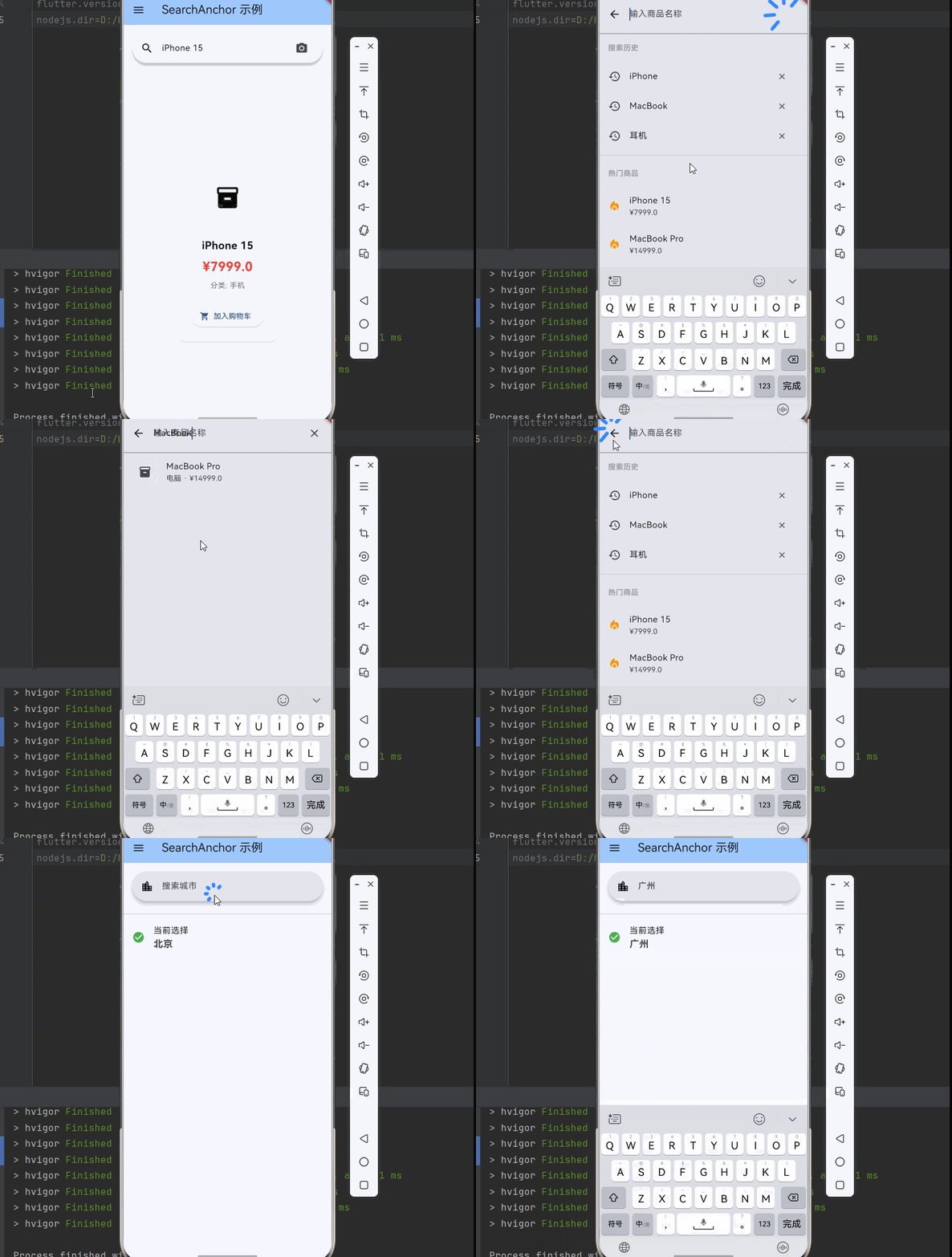
下面是一个完整的可运行示例,展示了 SearchAnchor 的各种用法:
import 'package:flutter/material.dart';
void main() {
runApp(const MyApp());
}
class MyApp extends StatelessWidget {
const MyApp({super.key});
Widget build(BuildContext context) {
return MaterialApp(
title: 'SearchAnchor 示例',
theme: ThemeData(
colorScheme: ColorScheme.fromSeed(seedColor: Colors.blue),
useMaterial3: true,
),
home: const SearchAnchorDemoPage(),
);
}
}
class SearchAnchorDemoPage extends StatefulWidget {
const SearchAnchorDemoPage({super.key});
State<SearchAnchorDemoPage> createState() => _SearchAnchorDemoPageState();
}
class _SearchAnchorDemoPageState extends State<SearchAnchorDemoPage> {
int _selectedIndex = 0;
Widget build(BuildContext context) {
return Scaffold(
appBar: AppBar(
title: const Text('SearchAnchor 示例'),
backgroundColor: Theme.of(context).colorScheme.inversePrimary,
),
drawer: Drawer(
child: ListView(
children: [
const DrawerHeader(
decoration: BoxDecoration(color: Colors.blue),
child: Text(
'SearchAnchor 示例',
style: TextStyle(color: Colors.white, fontSize: 24),
),
),
ListTile(
leading: const Icon(Icons.search),
title: const Text('基础搜索'),
selected: _selectedIndex == 0,
onTap: () {
setState(() => _selectedIndex = 0);
Navigator.pop(context);
},
),
ListTile(
leading: const Icon(Icons.shopping_cart),
title: const Text('商品搜索'),
selected: _selectedIndex == 1,
onTap: () {
setState(() => _selectedIndex = 1);
Navigator.pop(context);
},
),
ListTile(
leading: const Icon(Icons.person),
title: const Text('用户搜索'),
selected: _selectedIndex == 2,
onTap: () {
setState(() => _selectedIndex = 2);
Navigator.pop(context);
},
),
ListTile(
leading: const Icon(Icons.location_city),
title: const Text('城市选择'),
selected: _selectedIndex == 3,
onTap: () {
setState(() => _selectedIndex = 3);
Navigator.pop(context);
},
),
],
),
),
body: _buildPage(),
);
}
Widget _buildPage() {
switch (_selectedIndex) {
case 0:
return const BasicSearchPage();
case 1:
return const ProductSearchPage();
case 2:
return const UserSearchPage();
case 3:
return const CitySelectorPage();
default:
return const BasicSearchPage();
}
}
}
class BasicSearchPage extends StatefulWidget {
const BasicSearchPage({super.key});
State<BasicSearchPage> createState() => _BasicSearchPageState();
}
class _BasicSearchPageState extends State<BasicSearchPage> {
final SearchController _controller = SearchController();
final List<String> _allItems = [
'Apple', 'Banana', 'Cherry', 'Date', 'Elderberry',
'Fig', 'Grape', 'Honeydew', 'Kiwi', 'Lemon',
'Mango', 'Nectarine', 'Orange', 'Papaya', 'Quince',
];
String _selectedItem = '';
void dispose() {
_controller.dispose();
super.dispose();
}
Widget build(BuildContext context) {
return Padding(
padding: const EdgeInsets.all(16),
child: Column(
children: [
SearchAnchor(
searchController: _controller,
builder: (context, controller) {
return SearchBar(
controller: controller,
padding: const WidgetStatePropertyAll<EdgeInsets>(
EdgeInsets.symmetric(horizontal: 16),
),
onTap: () => controller.openView(),
onChanged: (_) => controller.openView(),
leading: const Icon(Icons.search),
trailing: [
if (controller.text.isNotEmpty)
IconButton(
icon: const Icon(Icons.clear),
onPressed: () => controller.clear(),
),
],
);
},
suggestionsBuilder: (context, controller) {
final query = controller.text.toLowerCase();
if (query.isEmpty) {
return _allItems.take(5).map((item) {
return ListTile(
leading: const Icon(Icons.history),
title: Text(item),
onTap: () {
controller.closeView(item);
setState(() => _selectedItem = item);
},
);
}).toList();
}
final filtered = _allItems
.where((item) => item.toLowerCase().contains(query))
.toList();
if (filtered.isEmpty) {
return [
const ListTile(
leading: Icon(Icons.search_off),
title: Text('未找到相关结果'),
),
];
}
return filtered.map((item) {
return ListTile(
leading: const Icon(Icons.search),
title: _highlightMatch(item, query),
onTap: () {
controller.closeView(item);
setState(() => _selectedItem = item);
},
);
}).toList();
},
),
const SizedBox(height: 24),
if (_selectedItem.isNotEmpty)
Card(
child: Padding(
padding: const EdgeInsets.all(16),
child: Row(
children: [
const Icon(Icons.check_circle, color: Colors.green),
const SizedBox(width: 8),
Text('已选择: $_selectedItem'),
],
),
),
),
],
),
);
}
Widget _highlightMatch(String text, String query) {
final lowerText = text.toLowerCase();
final lowerQuery = query.toLowerCase();
final index = lowerText.indexOf(lowerQuery);
if (index == -1) return Text(text);
return Text.rich(
TextSpan(
children: [
TextSpan(text: text.substring(0, index)),
TextSpan(
text: text.substring(index, index + query.length),
style: const TextStyle(
backgroundColor: Colors.yellow,
fontWeight: FontWeight.bold,
),
),
TextSpan(text: text.substring(index + query.length)),
],
),
);
}
}
class ProductSearchPage extends StatefulWidget {
const ProductSearchPage({super.key});
State<ProductSearchPage> createState() => _ProductSearchPageState();
}
class _ProductSearchPageState extends State<ProductSearchPage> {
final SearchController _searchController = SearchController();
final List<String> _searchHistory = ['iPhone', 'MacBook', '耳机'];
final List<Product> _allProducts = [
Product(id: '1', name: 'iPhone 15', category: '手机', price: 7999),
Product(id: '2', name: 'MacBook Pro', category: '电脑', price: 14999),
Product(id: '3', name: 'iPad Air', category: '平板', price: 4799),
Product(id: '4', name: 'AirPods Pro', category: '耳机', price: 1899),
Product(id: '5', name: 'Apple Watch', category: '手表', price: 2999),
Product(id: '6', name: '小米14', category: '手机', price: 3999),
Product(id: '7', name: 'ThinkPad X1', category: '电脑', price: 9999),
Product(id: '8', name: '华为MatePad', category: '平板', price: 3299),
];
Product? _selectedProduct;
void dispose() {
_searchController.dispose();
super.dispose();
}
Widget build(BuildContext context) {
return Column(
children: [
Padding(
padding: const EdgeInsets.all(16),
child: SearchAnchor(
searchController: _searchController,
viewHintText: '输入商品名称',
builder: (context, controller) {
return SearchBar(
controller: controller,
hintText: '搜索商品',
padding: const WidgetStatePropertyAll<EdgeInsets>(
EdgeInsets.symmetric(horizontal: 16),
),
onTap: () => controller.openView(),
onChanged: (_) => controller.openView(),
leading: const Icon(Icons.search),
trailing: [
IconButton(
icon: const Icon(Icons.camera_alt),
onPressed: () {
ScaffoldMessenger.of(context).showSnackBar(
const SnackBar(content: Text('拍照搜索功能')),
);
},
),
],
);
},
suggestionsBuilder: (context, controller) {
final query = controller.text.toLowerCase();
if (query.isEmpty) {
return [
const Padding(
padding: EdgeInsets.all(16),
child: Text(
'搜索历史',
style: TextStyle(
fontWeight: FontWeight.bold,
color: Colors.grey,
),
),
),
..._searchHistory.map((history) {
return ListTile(
leading: const Icon(Icons.history),
title: Text(history),
trailing: IconButton(
icon: const Icon(Icons.close, size: 18),
onPressed: () {
setState(() {
_searchHistory.remove(history);
});
},
),
onTap: () {
controller.text = history;
controller.openView();
},
);
}),
const Divider(),
const Padding(
padding: EdgeInsets.all(16),
child: Text(
'热门商品',
style: TextStyle(
fontWeight: FontWeight.bold,
color: Colors.grey,
),
),
),
..._allProducts.take(3).map((product) {
return ListTile(
leading: const Icon(Icons.local_fire_department, color: Colors.orange),
title: Text(product.name),
subtitle: Text('¥${product.price}'),
onTap: () {
controller.closeView(product.name);
setState(() {
_selectedProduct = product;
});
},
);
}),
];
}
final filtered = _allProducts
.where((p) => p.name.toLowerCase().contains(query))
.toList();
if (filtered.isEmpty) {
return [
const ListTile(
leading: Icon(Icons.search_off),
title: Text('未找到相关商品'),
subtitle: Text('试试其他关键词'),
),
];
}
return filtered.map((product) {
return ListTile(
leading: Container(
width: 48,
height: 48,
decoration: BoxDecoration(
color: Colors.grey[200],
borderRadius: BorderRadius.circular(8),
),
child: const Icon(Icons.inventory_2),
),
title: Text(product.name),
subtitle: Text('${product.category} · ¥${product.price}'),
onTap: () {
controller.closeView(product.name);
setState(() {
_selectedProduct = product;
if (!_searchHistory.contains(product.name)) {
_searchHistory.insert(0, product.name);
}
});
},
);
}).toList();
},
),
),
Expanded(
child: _selectedProduct != null
? _buildProductDetail()
: _buildEmptyState(),
),
],
);
}
Widget _buildProductDetail() {
return Center(
child: Card(
margin: const EdgeInsets.all(16),
child: Padding(
padding: const EdgeInsets.all(24),
child: Column(
mainAxisSize: MainAxisSize.min,
children: [
Container(
width: 120,
height: 120,
decoration: BoxDecoration(
color: Colors.grey[200],
borderRadius: BorderRadius.circular(12),
),
child: const Icon(Icons.inventory_2, size: 48),
),
const SizedBox(height: 16),
Text(
_selectedProduct!.name,
style: const TextStyle(
fontSize: 20,
fontWeight: FontWeight.bold,
),
),
const SizedBox(height: 8),
Text(
'¥${_selectedProduct!.price}',
style: const TextStyle(
fontSize: 24,
color: Colors.red,
fontWeight: FontWeight.bold,
),
),
const SizedBox(height: 8),
Text(
'分类: ${_selectedProduct!.category}',
style: TextStyle(color: Colors.grey[600]),
),
const SizedBox(height: 24),
ElevatedButton.icon(
onPressed: () {
ScaffoldMessenger.of(context).showSnackBar(
const SnackBar(content: Text('已加入购物车')),
);
},
icon: const Icon(Icons.shopping_cart),
label: const Text('加入购物车'),
),
],
),
),
),
);
}
Widget _buildEmptyState() {
return Center(
child: Column(
mainAxisAlignment: MainAxisAlignment.center,
children: [
Icon(Icons.search, size: 64, color: Colors.grey[400]),
const SizedBox(height: 16),
Text(
'搜索您想要的商品',
style: TextStyle(color: Colors.grey[600]),
),
],
),
);
}
}
class UserSearchPage extends StatefulWidget {
const UserSearchPage({super.key});
State<UserSearchPage> createState() => _UserSearchPageState();
}
class _UserSearchPageState extends State<UserSearchPage> {
final SearchController _searchController = SearchController();
final List<User> _allUsers = [
User(id: '1', name: '张三', email: 'zhangsan@example.com', color: Colors.red),
User(id: '2', name: '李四', email: 'lisi@example.com', color: Colors.blue),
User(id: '3', name: '王五', email: 'wangwu@example.com', color: Colors.green),
User(id: '4', name: '赵六', email: 'zhaoliu@example.com', color: Colors.orange),
User(id: '5', name: '钱七', email: 'qianqi@example.com', color: Colors.purple),
];
void dispose() {
_searchController.dispose();
super.dispose();
}
Widget build(BuildContext context) {
return Column(
children: [
Padding(
padding: const EdgeInsets.all(16),
child: SearchAnchor(
searchController: _searchController,
builder: (context, controller) {
return SearchBar(
controller: controller,
hintText: '搜索用户名或邮箱',
padding: const WidgetStatePropertyAll<EdgeInsets>(
EdgeInsets.symmetric(horizontal: 16),
),
onTap: () => controller.openView(),
onChanged: (_) => controller.openView(),
leading: const Icon(Icons.search),
);
},
suggestionsBuilder: (context, controller) {
final query = controller.text.toLowerCase();
if (query.isEmpty) {
return [
const ListTile(
leading: Icon(Icons.people),
title: Text('推荐好友'),
),
..._allUsers.take(3).map((user) => _buildUserTile(user, controller)),
];
}
final filtered = _allUsers
.where((u) =>
u.name.toLowerCase().contains(query) ||
u.email.toLowerCase().contains(query))
.toList();
if (filtered.isEmpty) {
return [
const ListTile(
leading: Icon(Icons.person_off),
title: Text('未找到用户'),
subtitle: Text('请尝试其他关键词'),
),
];
}
return filtered.map((user) => _buildUserTile(user, controller)).toList();
},
),
),
Expanded(
child: ListView(
padding: const EdgeInsets.all(16),
children: [
const Text(
'推荐好友',
style: TextStyle(
fontSize: 16,
fontWeight: FontWeight.bold,
),
),
const SizedBox(height: 8),
..._allUsers.map((user) => Card(
margin: const EdgeInsets.only(bottom: 8),
child: ListTile(
leading: CircleAvatar(
backgroundColor: user.color,
child: Text(
user.name[0],
style: const TextStyle(color: Colors.white),
),
),
title: Text(user.name),
subtitle: Text(user.email),
trailing: TextButton(
onPressed: () {
ScaffoldMessenger.of(context).showSnackBar(
SnackBar(content: Text('已发送好友请求给 ${user.name}')),
);
},
child: const Text('添加'),
),
),
)),
],
),
),
],
);
}
Widget _buildUserTile(User user, SearchController controller) {
return ListTile(
leading: CircleAvatar(
backgroundColor: user.color,
child: Text(
user.name[0],
style: const TextStyle(color: Colors.white),
),
),
title: Text(user.name),
subtitle: Text(user.email),
onTap: () {
controller.closeView(user.name);
_showUserProfile(user);
},
);
}
void _showUserProfile(User user) {
showModalBottomSheet(
context: context,
builder: (context) {
return Container(
padding: const EdgeInsets.all(24),
child: Column(
mainAxisSize: MainAxisSize.min,
children: [
CircleAvatar(
radius: 40,
backgroundColor: user.color,
child: Text(
user.name[0],
style: const TextStyle(color: Colors.white, fontSize: 32),
),
),
const SizedBox(height: 16),
Text(
user.name,
style: const TextStyle(
fontSize: 24,
fontWeight: FontWeight.bold,
),
),
const SizedBox(height: 8),
Text(user.email),
const SizedBox(height: 24),
Row(
mainAxisAlignment: MainAxisAlignment.spaceEvenly,
children: [
ElevatedButton.icon(
onPressed: () {
Navigator.pop(context);
ScaffoldMessenger.of(context).showSnackBar(
SnackBar(content: Text('已发送好友请求给 ${user.name}')),
);
},
icon: const Icon(Icons.person_add),
label: const Text('添加好友'),
),
OutlinedButton.icon(
onPressed: () {
Navigator.pop(context);
},
icon: const Icon(Icons.message),
label: const Text('发消息'),
),
],
),
],
),
);
},
);
}
}
class CitySelectorPage extends StatefulWidget {
const CitySelectorPage({super.key});
State<CitySelectorPage> createState() => _CitySelectorPageState();
}
class _CitySelectorPageState extends State<CitySelectorPage> {
final SearchController _searchController = SearchController();
String _selectedCity = '北京';
final List<String> _hotCities = ['北京', '上海', '广州', '深圳', '杭州', '成都'];
final List<String> _allCities = [
'北京', '上海', '广州', '深圳', '杭州', '成都', '武汉', '南京',
'西安', '重庆', '苏州', '天津', '长沙', '郑州', '青岛', '大连',
'宁波', '厦门', '福州', '哈尔滨', '沈阳', '长春', '济南', '合肥',
];
void dispose() {
_searchController.dispose();
super.dispose();
}
Widget build(BuildContext context) {
return Column(
children: [
Padding(
padding: const EdgeInsets.all(16),
child: SearchAnchor(
searchController: _searchController,
viewHintText: '输入城市名',
builder: (context, controller) {
return SearchBar(
controller: controller,
hintText: '搜索城市',
padding: const WidgetStatePropertyAll<EdgeInsets>(
EdgeInsets.symmetric(horizontal: 16),
),
onTap: () => controller.openView(),
onChanged: (_) => controller.openView(),
leading: const Icon(Icons.location_city),
);
},
suggestionsBuilder: (context, controller) {
final query = controller.text;
if (query.isEmpty) {
return [
const Padding(
padding: EdgeInsets.all(16),
child: Text(
'热门城市',
style: TextStyle(fontWeight: FontWeight.bold),
),
),
Padding(
padding: const EdgeInsets.symmetric(horizontal: 16),
child: Wrap(
spacing: 8,
runSpacing: 8,
children: _hotCities.map((city) {
return ActionChip(
label: Text(city),
onPressed: () {
controller.closeView(city);
setState(() {
_selectedCity = city;
});
},
);
}).toList(),
),
),
const Divider(),
..._allCities.map((city) {
return ListTile(
title: Text(city),
onTap: () {
controller.closeView(city);
setState(() {
_selectedCity = city;
});
},
);
}),
];
}
final filtered = _allCities
.where((city) => city.contains(query))
.toList();
if (filtered.isEmpty) {
return [
const ListTile(
leading: Icon(Icons.location_off),
title: Text('未找到该城市'),
),
];
}
return filtered.map((city) {
return ListTile(
leading: const Icon(Icons.location_on),
title: Text(city),
onTap: () {
controller.closeView(city);
setState(() {
_selectedCity = city;
});
},
);
}).toList();
},
),
),
const Divider(),
ListTile(
leading: const Icon(Icons.check_circle, color: Colors.green),
title: const Text('当前选择'),
subtitle: Text(
_selectedCity,
style: const TextStyle(fontSize: 18, fontWeight: FontWeight.bold),
),
),
],
);
}
}
class Product {
final String id;
final String name;
final String category;
final double price;
Product({
required this.id,
required this.name,
required this.category,
required this.price,
});
}
class User {
final String id;
final String name;
final String email;
final Color color;
User({
required this.id,
required this.name,
required this.email,
required this.color,
});
}
参考资料

开源鸿蒙跨平台开发社区汇聚开发者与厂商,共建“一次开发,多端部署”的开源生态,致力于降低跨端开发门槛,推动万物智联创新。
更多推荐
 3
3 0
0- 0


 已为社区贡献31条内容

所有评论(0)