Flutter三方库适配OpenHarmony【secure_application】— FlutterPlugin 接口实现与注册
欢迎加入开源鸿蒙跨平台社区:https://openharmonycrossplatform.csdn.net工程搭好了,接下来写代码。第一步是实现和接口——这是每个 Flutter-OHOS 原生插件的骨架。secure_application 的原生端不需要 AbilityAware 接口,这一点和 flutter_speech 不同,我们会详细分析原因。两个接口:FlutterPlugin
前言
欢迎加入开源鸿蒙跨平台社区:https://openharmonycrossplatform.csdn.net
工程搭好了,接下来写代码。第一步是实现 FlutterPlugin 和 MethodCallHandler 接口——这是每个 Flutter-OHOS 原生插件的骨架。secure_application 的原生端不需要 AbilityAware 接口,这一点和 flutter_speech 不同,我们会详细分析原因。
一、插件类声明
1.1 完整的类签名
import {
  FlutterPlugin,
  FlutterPluginBinding,
  MethodCall,
  MethodCallHandler,
  MethodChannel,
  MethodResult,
  Log,
} from '@ohos/flutter_ohos';
import { window } from '@kit.ArkUI';
import { common, ApplicationStateChangeCallback } from '@kit.AbilityKit';
import { BusinessError } from '@kit.BasicServicesKit';

const TAG = "SecureApplicationPlugin";

export default class SecureApplicationPlugin implements FlutterPlugin, MethodCallHandler {
  private channel: MethodChannel | null = null;
  private context: common.Context | null = null;
  private secured: boolean = false;
  private opacity: number = 0.2;
  private mainWindow: window.Window | null = null;
}
1.2 导入分析
| 导入来源 | 导入内容 | 用途 |
|---|---|---|
@ohos/flutter_ohos |
FlutterPlugin, MethodChannel 等 | Flutter 插件框架 |
@kit.ArkUI |
window | 窗口管理 API |
@kit.AbilityKit |
common, ApplicationStateChangeCallback | 应用上下文和生命周期 |
@kit.BasicServicesKit |
BusinessError | 错误类型 |
1.3 成员变量
| 变量 | 类型 | 初始值 | 用途 |
|---|---|---|---|
channel |
MethodChannel | null | null | 与 Dart 层通信的通道 |
context |
common.Context | null | null | 应用上下文 |
secured |
boolean | false | 是否开启保护 |
opacity |
number | 0.2 | 遮罩透明度 |
mainWindow |
window.Window | null | null | 主窗口引用 |
1.4 为什么只实现两个接口
// secure_application:两个接口
class SecureApplicationPlugin implements FlutterPlugin, MethodCallHandler

// flutter_speech:三个接口
class FlutterSpeechPlugin implements FlutterPlugin, MethodCallHandler, AbilityAware
| 接口 | secure_application | flutter_speech | 原因 |
|---|---|---|---|
| FlutterPlugin | ✅ | ✅ | 必须,插件生命周期 |
| MethodCallHandler | ✅ | ✅ | 必须,处理方法调用 |
| AbilityAware | ❌ | ✅ | secure_application 不需要 UIAbilityContext |
💡 关键区别:flutter_speech 需要
UIAbilityContext来申请麦克风权限(abilityAccessCtrl需要它)。而 secure_application 只需要ApplicationContext来获取窗口和注册生命周期回调,这个可以通过FlutterPluginBinding.getApplicationContext()直接获取。
二、onAttachedToEngine — 插件绑定
2.1 完整实现
onAttachedToEngine(binding: FlutterPluginBinding): void {
  this.channel = new MethodChannel(binding.getBinaryMessenger(), "secure_application");
  this.channel.setMethodCallHandler(this);
  this.context = binding.getApplicationContext();
  this.getMainWindow();
  this.registerLifecycleCallback();
}
2.2 逐行分析
| 行 | 操作 | 说明 |
|---|---|---|
| 1 | 创建 MethodChannel | 通道名 “secure_application” 必须与 Dart 层一致 |
| 2 | 设置方法处理器 | 将 this 注册为方法调用的处理者 |
| 3 | 获取应用上下文 | 用于后续获取窗口和注册生命周期 |
| 4 | 获取主窗口 | 异步获取,用于设置隐私模式 |
| 5 | 注册生命周期回调 | 监听前后台切换 |
2.3 通道名称的一致性
// OpenHarmony 原生端
new MethodChannel(binding.getBinaryMessenger(), "secure_application");
// Dart 层
static const MethodChannel _channel = const MethodChannel('secure_application');
两边的通道名称必须完全一致,包括大小写。如果不一致,Dart 层的方法调用会收到 MissingPluginException。
2.4 getApplicationContext vs getAbility
// secure_application 的方式:获取 ApplicationContext
this.context = binding.getApplicationContext();

// flutter_speech 的方式:通过 AbilityAware 获取 UIAbilityContext
onAttachedToAbility(binding: AbilityPluginBinding): void {
  this.abilityContext = binding.getAbility().context;
}
| 上下文类型 | 获取方式 | 能力 |
|---|---|---|
| ApplicationContext | FlutterPluginBinding | 窗口管理、生命周期回调 |
| UIAbilityContext | AbilityPluginBinding | 权限申请、UI 操作 |
secure_application 不需要申请权限(PRIVACY_WINDOW 是可选的),所以 ApplicationContext 就够了。
三、onDetachedFromEngine — 插件解绑
3.1 完整实现
onDetachedFromEngine(binding: FlutterPluginBinding): void {
  if (this.channel != null) {
    this.channel.setMethodCallHandler(null);
  }
  this.unregisterWindowEventCallback();
  this.unregisterLifecycleCallback();
  this.channel = null;
  this.context = null;
  this.mainWindow = null;
}
3.2 清理顺序
1. 移除方法处理器 → 不再接收 Dart 层调用
2. 注销窗口事件回调 → 不再监听窗口失焦
3. 注销生命周期回调 → 不再监听前后台切换
4. 置空所有引用 → 防止内存泄漏
3.3 清理的重要性
| 如果不清理 | 后果 |
|---|---|
| 不移除方法处理器 | 可能收到意外的方法调用 |
| 不注销窗口事件 | 窗口事件继续触发,但 channel 已为 null,导致崩溃 |
| 不注销生命周期 | 生命周期回调继续触发,同上 |
| 不置空引用 | 内存泄漏,Context 和 Window 对象无法被 GC 回收 |
📌 经验教训:在开发过程中,我曾经忘记注销窗口事件回调,导致热重载后插件崩溃。原因是旧的回调仍然在触发,但 channel 已经被新实例替换为 null。
四、getUniqueClassName 方法
4.1 实现
getUniqueClassName(): string {
  return "SecureApplicationPlugin"
}
4.2 作用
这个方法返回插件的唯一标识符,Flutter-OHOS 框架用它来:
- 防止重复注册:如果同一个插件被注册两次,框架会根据这个名称去重
- 日志标识:框架日志中用这个名称标识插件
- 插件查找:框架内部通过这个名称查找已注册的插件
4.3 命名规范
| 规范 | 说明 |
|---|---|
| 与类名一致 | 避免混淆 |
| 全局唯一 | 不同插件不能重名 |
| 不含特殊字符 | 只用字母和数字 |
五、与 flutter_speech 适配的对比
5.1 接口实现对比
// secure_application
export default class SecureApplicationPlugin
    implements FlutterPlugin, MethodCallHandler {
  // 不需要 AbilityAware
}

// flutter_speech
export default class FlutterSpeechPlugin
    implements FlutterPlugin, MethodCallHandler, AbilityAware {
  // 需要 AbilityAware 来获取 UIAbilityContext
  onAttachedToAbility(binding: AbilityPluginBinding): void { ... }
  onDetachedFromAbility(): void { ... }
}
5.2 生命周期对比
| 生命周期方法 | secure_application | flutter_speech |
|---|---|---|
| onAttachedToEngine | ✅ | ✅ |
| onDetachedFromEngine | ✅ | ✅ |
| onAttachedToAbility | ❌ 不需要 | ✅ |
| onDetachedFromAbility | ❌ 不需要 | ✅ |
5.3 上下文获取对比
| 维度 | secure_application | flutter_speech |
|---|---|---|
| 上下文类型 | ApplicationContext | UIAbilityContext |
| 获取时机 | onAttachedToEngine | onAttachedToAbility |
| 获取方式 | binding.getApplicationContext() | binding.getAbility().context |
| 用途 | 窗口管理、生命周期 | 权限申请、UI 操作 |
5.4 为什么不需要 AbilityAware
三个原因:
- 不需要权限申请:PRIVACY_WINDOW 权限是可选的,不需要动态申请
- 不需要 UI 操作:不需要弹出对话框或其他 UI
- ApplicationContext 足够:
window.getLastWindow和applicationContext.on都只需要 ApplicationContext
💡 设计原则:能用低级别的上下文就不要用高级别的。ApplicationContext 的生命周期比 UIAbilityContext 更长,更不容易出现空指针问题。
六、插件注册流程
6.1 自动注册
Flutter-OHOS 框架会在引擎启动时自动扫描 pubspec.yaml 中声明的插件,并调用注册流程:
Flutter 引擎启动
    │
    ├── 读取 pubspec.yaml 中的 ohos 插件声明
    ├── 根据 fileName 找到 index.ets
    ├── 导入默认导出的 SecureApplicationPlugin 类
    ├── 创建实例:new SecureApplicationPlugin()
    ├── 调用 onAttachedToEngine(binding)
    │       ├── 创建 MethodChannel
    │       ├── 获取 ApplicationContext
    │       ├── 获取主窗口
    │       └── 注册生命周期回调
    └── 插件就绪,可以接收方法调用
6.2 手动注册(不推荐)
如果自动注册不工作,可以在宿主应用中手动注册:
// 宿主应用的 EntryAbility.ets 中
import SecureApplicationPlugin from 'secure_application';

// 在 configureFlutterEngine 中
engine.getPlugins().add(new SecureApplicationPlugin());
但一般情况下不需要手动注册,自动注册就够了。
七、完整的插件骨架代码
7.1 最小可运行版本
import {
  FlutterPlugin,
  FlutterPluginBinding,
  MethodCall,
  MethodCallHandler,
  MethodChannel,
  MethodResult,
  Log,
} from '@ohos/flutter_ohos';

const TAG = "SecureApplicationPlugin";

export default class SecureApplicationPlugin implements FlutterPlugin, MethodCallHandler {
  private channel: MethodChannel | null = null;

  getUniqueClassName(): string {
    return "SecureApplicationPlugin"
  }

  onAttachedToEngine(binding: FlutterPluginBinding): void {
    this.channel = new MethodChannel(binding.getBinaryMessenger(), "secure_application");
    this.channel.setMethodCallHandler(this);
    Log.i(TAG, "Plugin attached to engine");
  }

  onDetachedFromEngine(binding: FlutterPluginBinding): void {
    if (this.channel != null) {
      this.channel.setMethodCallHandler(null);
    }
    this.channel = null;
    Log.i(TAG, "Plugin detached from engine");
  }

  onMethodCall(call: MethodCall, result: MethodResult): void {
    Log.i(TAG, "onMethodCall: " + call.method);
    result.success(true);
  }
}
这个骨架可以编译运行,所有方法调用都返回 true。后续文章会逐步填充具体逻辑。
总结
本文实现了 secure_application 的 FlutterPlugin 接口:
- 两个接口:FlutterPlugin + MethodCallHandler,不需要 AbilityAware
- onAttachedToEngine:创建通道、获取上下文、初始化窗口和生命周期
- onDetachedFromEngine:注销回调、置空引用、防止内存泄漏
- getUniqueClassName:插件唯一标识
- 与 flutter_speech 的差异:不需要 AbilityAware,使用 ApplicationContext
下一篇我们讲 Window 管理——如何获取主窗口引用并控制隐私模式。
如果这篇文章对你有帮助,欢迎点赞👍、收藏⭐、关注🔔,你的支持是我持续创作的动力!
相关资源:
- @ohos/flutter_ohos FlutterPlugin 接口
- OpenHarmony ApplicationContext
- MethodChannel 通信机制
- secure_application OpenHarmony 源码
- Flutter-OHOS 插件开发指南
- ArkTS 语言规范
- Stage 模型 Context
- 开源鸿蒙跨平台社区
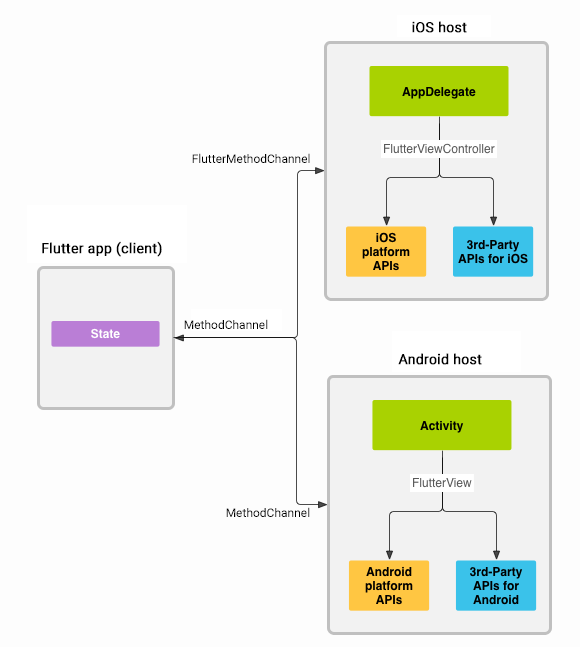
消息通过 platform channels 在客户端(UI)和主机(platform)之间传递

开源鸿蒙跨平台开发社区汇聚开发者与厂商,共建“一次开发,多端部署”的开源生态,致力于降低跨端开发门槛,推动万物智联创新。
更多推荐
 13
13 0
0- 0


 已为社区贡献36条内容

所有评论(0)