Flutter for OpenHarmony衣橱管家App实战:添加穿搭记录实现
本文介绍了一个穿搭记录功能的实现方案,主要包括以下内容: 记录内容设计:包含日期、衣物/搭配、天气、心情和备注等完整信息,形成穿搭日记。 技术实现要点: 使用Flutter框架开发移动端界面 接收日历页面传入的日期参数 采用UUID生成唯一记录ID 通过状态管理切换单件衣物/整套搭配模式 主要功能组件: 日期显示卡片(支持中文星期格式) 模式切换分段控件(单件/搭配) 横向滚动物品选择器 天气和心
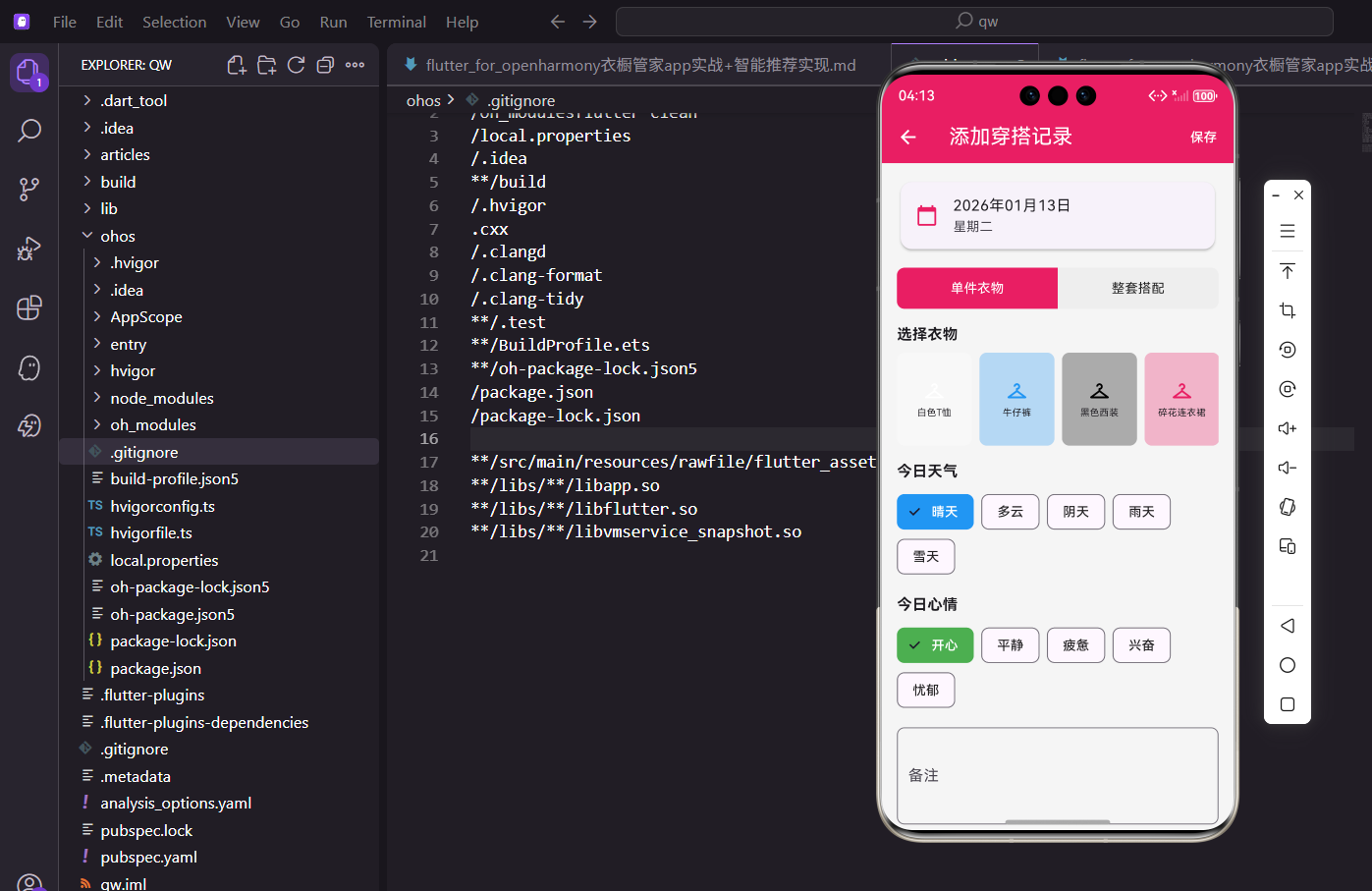
每天记录穿了什么,是衣橱管理的好习惯。今天来实现添加穿搭记录的功能,支持选择衣物或搭配,还能记录天气和心情。
记录的内容
一条穿搭记录包含这些信息:
- 日期:哪天穿的
- 衣物/搭配:穿了什么
- 天气:当天天气情况
- 心情:穿着时的心情
- 备注:额外的穿搭心得
这些信息组合起来,就是一份完整的穿搭日记。
页面结构
接收选中的日期作为参数:
import 'package:flutter/material.dart';
import 'package:provider/provider.dart';
import 'package:flutter_screenutil/flutter_screenutil.dart';
import 'package:uuid/uuid.dart';
import 'package:intl/intl.dart';
import '../../providers/wardrobe_provider.dart';
import '../../models/clothing_item.dart';
class AddWearRecordScreen extends StatefulWidget {
final DateTime selectedDate;
const AddWearRecordScreen({super.key, required this.selectedDate});
State<AddWearRecordScreen> createState() => _AddWearRecordScreenState();
}
从日历页面跳转时传入选中的日期。
uuid用于生成记录的唯一ID。
状态变量
管理表单的各项选择:
class _AddWearRecordScreenState extends State<AddWearRecordScreen> {
String? _selectedClothingId;
String? _selectedOutfitId;
String _selectedWeather = '晴天';
String _selectedMood = '开心';
final _notesController = TextEditingController();
bool _isClothingMode = true;
final List<String> _weathers = ['晴天', '多云', '阴天', '雨天', '雪天'];
final List<String> _moods = ['开心', '平静', '疲惫', '兴奋', '忧郁'];
void dispose() {
_notesController.dispose();
super.dispose();
}
_isClothingMode控制选择单件衣物还是整套搭配。
天气和心情有默认值,减少用户操作。
页面布局
AppBar带保存按钮,主体是滚动表单:
Widget build(BuildContext context) {
return Scaffold(
appBar: AppBar(
title: const Text('添加穿搭记录'),
actions: [
TextButton(
onPressed: _saveRecord,
child: const Text('保存', style: TextStyle(color: Colors.white)),
),
],
),
body: SingleChildScrollView(
padding: EdgeInsets.all(16.w),
child: Column(
crossAxisAlignment: CrossAxisAlignment.start,
children: [
Card(
child: ListTile(
leading: const Icon(Icons.calendar_today, color: Color(0xFFE91E63)),
title: Text(DateFormat('yyyy年MM月dd日').format(widget.selectedDate)),
subtitle: Text(DateFormat('EEEE', 'zh_CN').format(widget.selectedDate)),
),
),
顶部卡片显示选中的日期和星期几。
日期格式化为中文格式,更友好。
模式切换
在单件衣物和整套搭配之间切换:
            SizedBox(height: 16.h),
            _buildModeSwitch(),
            SizedBox(height: 16.h),
            _isClothingMode ? _buildClothingPicker() : _buildOutfitPicker(),
            SizedBox(height: 16.h),
            _buildWeatherPicker(),
            SizedBox(height: 16.h),
            _buildMoodPicker(),
            SizedBox(height: 16.h),
            TextField(
              controller: _notesController,
              maxLines: 3,
              decoration: InputDecoration(
                labelText: '备注',
                hintText: '记录今天的穿搭心得...',
                border: OutlineInputBorder(borderRadius: BorderRadius.circular(8.r)),
              ),
            ),
          ],
        ),
      ),
    );
  }
根据模式显示不同的选择器。
备注是可选的,用多行输入框。
模式切换组件
用分段按钮实现模式切换:
  Widget _buildModeSwitch() {
    return Row(
      children: [
        Expanded(
          child: GestureDetector(
            onTap: () => setState(() => _isClothingMode = true),
            child: Container(
              padding: EdgeInsets.symmetric(vertical: 12.h),
              decoration: BoxDecoration(
                color: _isClothingMode ? const Color(0xFFE91E63) : Colors.grey.shade200,
                borderRadius: BorderRadius.horizontal(left: Radius.circular(8.r)),
              ),
              child: Center(
                child: Text('单件衣物', style: TextStyle(color: _isClothingMode ? Colors.white : Colors.black87)),
              ),
            ),
          ),
        ),
        Expanded(
          child: GestureDetector(
            onTap: () => setState(() => _isClothingMode = false),
            child: Container(
              padding: EdgeInsets.symmetric(vertical: 12.h),
              decoration: BoxDecoration(
                color: !_isClothingMode ? const Color(0xFFE91E63) : Colors.grey.shade200,
                borderRadius: BorderRadius.horizontal(right: Radius.circular(8.r)),
              ),
              child: Center(
                child: Text('整套搭配', style: TextStyle(color: !_isClothingMode ? Colors.white : Colors.black87)),
              ),
            ),
          ),
        ),
      ],
    );
  }
两个按钮左右排列,选中的高亮显示。
圆角只在外侧,形成一个整体的分段控件。
衣物选择器
横向滚动展示所有衣物:
  Widget _buildClothingPicker() {
    return Consumer<WardrobeProvider>(
      builder: (context, provider, child) {
        return Column(
          crossAxisAlignment: CrossAxisAlignment.start,
          children: [
            Text('选择衣物', style: TextStyle(fontSize: 16.sp, fontWeight: FontWeight.bold)),
            SizedBox(height: 8.h),
            SizedBox(
              height: 100.h,
              child: ListView.builder(
                scrollDirection: Axis.horizontal,
                itemCount: provider.clothes.length,
                itemBuilder: (context, index) {
                  final item = provider.clothes[index];
                  final isSelected = _selectedClothingId == item.id;
横向ListView展示衣物,方便滑动选择。
选中状态通过ID比较判断。
衣物项样式
选中和未选中用边框区分:
                  return GestureDetector(
                    onTap: () => setState(() => _selectedClothingId = item.id),
                    child: Container(
                      width: 80.w,
                      margin: EdgeInsets.only(right: 8.w),
                      decoration: BoxDecoration(
                        color: ClothingItem.getColorFromName(item.color).withOpacity(0.3),
                        borderRadius: BorderRadius.circular(8.r),
                        border: Border.all(color: isSelected ? const Color(0xFFE91E63) : Colors.transparent, width: 2),
                      ),
                      child: Column(
                        mainAxisAlignment: MainAxisAlignment.center,
                        children: [
                          Icon(Icons.checkroom, color: ClothingItem.getColorFromName(item.color)),
                          SizedBox(height: 4.h),
                          Text(item.name, style: TextStyle(fontSize: 10.sp), maxLines: 2, textAlign: TextAlign.center),
                        ],
                      ),
                    ),
                  );
                },
              ),
            ),
          ],
        );
      },
    );
  }
选中时显示粉色边框,视觉反馈明确。
衣物名称最多两行,超出省略。
搭配选择器
用列表展示所有搭配:
  Widget _buildOutfitPicker() {
    return Consumer<WardrobeProvider>(
      builder: (context, provider, child) {
        return Column(
          crossAxisAlignment: CrossAxisAlignment.start,
          children: [
            Text('选择搭配', style: TextStyle(fontSize: 16.sp, fontWeight: FontWeight.bold)),
            SizedBox(height: 8.h),
            ...provider.outfits.map((outfit) {
              final isSelected = _selectedOutfitId == outfit.id;
              return Card(
                margin: EdgeInsets.only(bottom: 8.h),
                color: isSelected ? const Color(0xFFE91E63).withOpacity(0.1) : null,
                child: ListTile(
                  leading: Icon(Icons.style, color: isSelected ? const Color(0xFFE91E63) : Colors.grey),
                  title: Text(outfit.name),
                  subtitle: Text('${outfit.occasion} · ${outfit.season}'),
                  trailing: isSelected ? const Icon(Icons.check, color: Color(0xFFE91E63)) : null,
                  onTap: () => setState(() => _selectedOutfitId = outfit.id),
                ),
              );
            }),
          ],
        );
      },
    );
  }
搭配用卡片列表展示,信息更完整。
选中的卡片背景变色,右侧显示勾选图标。
天气选择
用ChoiceChip实现单选:
  Widget _buildWeatherPicker() {
    return Column(
      crossAxisAlignment: CrossAxisAlignment.start,
      children: [
        Text('今日天气', style: TextStyle(fontSize: 16.sp, fontWeight: FontWeight.bold)),
        SizedBox(height: 8.h),
        Wrap(
          spacing: 8.w,
          children: _weathers.map((w) {
            return ChoiceChip(
              label: Text(w),
              selected: _selectedWeather == w,
              selectedColor: Colors.blue,
              labelStyle: TextStyle(color: _selectedWeather == w ? Colors.white : Colors.black87),
              onSelected: (s) => setState(() => _selectedWeather = w),
            );
          }).toList(),
        ),
      ],
    );
  }
ChoiceChip是Material Design的单选芯片组件。
天气用蓝色主题,和心情区分开。
心情选择
同样用ChoiceChip,但用绿色主题:
  Widget _buildMoodPicker() {
    return Column(
      crossAxisAlignment: CrossAxisAlignment.start,
      children: [
        Text('今日心情', style: TextStyle(fontSize: 16.sp, fontWeight: FontWeight.bold)),
        SizedBox(height: 8.h),
        Wrap(
          spacing: 8.w,
          children: _moods.map((m) {
            return ChoiceChip(
              label: Text(m),
              selected: _selectedMood == m,
              selectedColor: Colors.green,
              labelStyle: TextStyle(color: _selectedMood == m ? Colors.white : Colors.black87),
              onSelected: (s) => setState(() => _selectedMood = m),
            );
          }).toList(),
        ),
      ],
    );
  }
心情用绿色主题,视觉上和天气区分。
五种心情覆盖常见的情绪状态。
保存逻辑
验证输入并创建记录:
  void _saveRecord() {
    if (_isClothingMode && _selectedClothingId == null) {
      ScaffoldMessenger.of(context).showSnackBar(const SnackBar(content: Text('请选择衣物')));
      return;
    }
    if (!_isClothingMode && _selectedOutfitId == null) {
      ScaffoldMessenger.of(context).showSnackBar(const SnackBar(content: Text('请选择搭配')));
      return;
    }

    final record = WearRecord(
      id: const Uuid().v4(),
      clothingId: _isClothingMode ? _selectedClothingId : null,
      outfitId: !_isClothingMode ? _selectedOutfitId : null,
      date: widget.selectedDate,
      weather: _selectedWeather,
      mood: _selectedMood,
      notes: _notesController.text.isEmpty ? null : _notesController.text,
    );

    Provider.of<WardrobeProvider>(context, listen: false).addWearRecord(record);
    Navigator.pop(context);
    ScaffoldMessenger.of(context).showSnackBar(const SnackBar(content: Text('记录添加成功')));
  }
}
根据模式验证对应的选择是否为空。
备注为空时存null,不存空字符串。
保存成功后返回上一页并显示提示。
小结
添加穿搭记录页面的核心是多种选择器的组合。模式切换、衣物选择、天气心情选择,每种都有合适的交互方式。
几个要点:
- 模式切换要直观
- 选中状态要有明确反馈
- 验证要覆盖所有必填项
- 保存后给用户确认提示
这套表单模式可以复用到其他记录场景。
欢迎加入开源鸿蒙跨平台社区:https://openharmonycrossplatform.csdn.net
天气关联
根据天气推荐合适的穿搭:
Widget _buildWeatherSection() {
  return Container(
    margin: EdgeInsets.all(16.w),
    padding: EdgeInsets.all(16.w),
    decoration: BoxDecoration(
      gradient: const LinearGradient(
        colors: [Color(0xFF2196F3), Color(0xFF64B5F6)],
        begin: Alignment.topLeft,
        end: Alignment.bottomRight,
      ),
      borderRadius: BorderRadius.circular(12.r),
    ),
    child: Row(
      children: [
        Icon(Icons.wb_sunny, color: Colors.white, size: 40.sp),
        SizedBox(width: 12.w),
        Expanded(
          child: Column(
            crossAxisAlignment: CrossAxisAlignment.start,
            children: [
              Text(
                '今日天气',
                style: TextStyle(
                  fontSize: 14.sp,
                  color: Colors.white.withOpacity(0.9),
                ),
              ),
              Text(
                '晴 25°C',
                style: TextStyle(
                  fontSize: 20.sp,
                  fontWeight: FontWeight.bold,
                  color: Colors.white,
                ),
              ),
            ],
          ),
        ),
        Container(
          padding: EdgeInsets.symmetric(horizontal: 12.w, vertical: 6.h),
          decoration: BoxDecoration(
            color: Colors.white.withOpacity(0.2),
            borderRadius: BorderRadius.circular(20.r),
          ),
          child: Text(
            '适合轻薄衣物',
            style: TextStyle(fontSize: 12.sp, color: Colors.white),
          ),
        ),
      ],
    ),
  );
}
天气卡片显示当前天气情况,并给出穿搭建议。使用蓝色渐变背景,白色文字清晰可读。这个功能帮助用户根据天气选择合适的穿搭。
场合选择
选择穿搭的适用场合:
String? _selectedOccasion;

Widget _buildOccasionSelector() {
  final occasions = ['上班', '约会', '运动', '休闲', '聚会', '旅行'];

  return Container(
    margin: EdgeInsets.all(16.w),
    child: Column(
      crossAxisAlignment: CrossAxisAlignment.start,
      children: [
        Text(
          '适用场合',
          style: TextStyle(fontSize: 16.sp, fontWeight: FontWeight.bold),
        ),
        SizedBox(height: 12.h),
        Wrap(
          spacing: 8.w,
          runSpacing: 8.h,
          children: occasions.map((occasion) {
            final isSelected = _selectedOccasion == occasion;
            return ChoiceChip(
              label: Text(occasion),
              selected: isSelected,
              onSelected: (selected) {
                setState(() => _selectedOccasion = selected ? occasion : null);
              },
              selectedColor: const Color(0xFFE91E63).withOpacity(0.2),
              labelStyle: TextStyle(
                color: isSelected ? const Color(0xFFE91E63) : Colors.grey[700],
                fontWeight: isSelected ? FontWeight.w600 : FontWeight.normal,
              ),
            );
          }).toList(),
        ),
      ],
    ),
  );
}
场合选择器提供常见场合选项,使用ChoiceChip组件实现单选。选中的场合高亮显示,帮助用户记录穿搭的使用场景。
心情记录
记录穿搭时的心情:
String? _selectedMood;

Widget _buildMoodSelector() {
  final moods = [
    {'emoji': '😊', 'label': '开心'},
    {'emoji': '😎', 'label': '自信'},
    {'emoji': '😌', 'label': '放松'},
    {'emoji': '🤩', 'label': '兴奋'},
    {'emoji': '😴', 'label': '慵懒'},
  ];

  return Container(
    margin: EdgeInsets.all(16.w),
    child: Column(
      crossAxisAlignment: CrossAxisAlignment.start,
      children: [
        Text(
          '今日心情',
          style: TextStyle(fontSize: 16.sp, fontWeight: FontWeight.bold),
        ),
        SizedBox(height: 12.h),
        Row(
          mainAxisAlignment: MainAxisAlignment.spaceAround,
          children: moods.map((mood) {
            final isSelected = _selectedMood == mood['label'];
            return GestureDetector(
              onTap: () {
                setState(() => _selectedMood = mood['label']);
              },
              child: Container(
                padding: EdgeInsets.all(12.w),
                decoration: BoxDecoration(
                  color: isSelected
                      ? const Color(0xFFE91E63).withOpacity(0.1)
                      : Colors.grey[100],
                  borderRadius: BorderRadius.circular(12.r),
                  border: Border.all(
                    color: isSelected
                        ? const Color(0xFFE91E63)
                        : Colors.transparent,
                    width: 2,
                  ),
                ),
                child: Column(
                  children: [
                    Text(mood['emoji']!, style: TextStyle(fontSize: 32.sp)),
                    SizedBox(height: 4.h),
                    Text(
                      mood['label']!,
                      style: TextStyle(
                        fontSize: 12.sp,
                        color: isSelected
                            ? const Color(0xFFE91E63)
                            : Colors.grey[700],
                      ),
                    ),
                  ],
                ),
              ),
            );
          }).toList(),
        ),
      ],
    ),
  );
}
心情选择器使用emoji表情和文字标签,让用户可以记录穿搭时的心情状态。选中的心情高亮显示,增加记录的趣味性。
照片拍摄
支持拍照记录穿搭效果:
List<String> _photos = [];

Widget _buildPhotoSection() {
  return Container(
    margin: EdgeInsets.all(16.w),
    child: Column(
      crossAxisAlignment: CrossAxisAlignment.start,
      children: [
        Text(
          '穿搭照片',
          style: TextStyle(fontSize: 16.sp, fontWeight: FontWeight.bold),
        ),
        SizedBox(height: 12.h),
        SizedBox(
          height: 100.h,
          child: ListView.builder(
            scrollDirection: Axis.horizontal,
            itemCount: _photos.length + 1,
            itemBuilder: (context, index) {
              if (index == _photos.length) {
                return GestureDetector(
                  onTap: _takePhoto,
                  child: Container(
                    width: 100.w,
                    decoration: BoxDecoration(
                      color: Colors.grey[200],
                      borderRadius: BorderRadius.circular(8.r),
                      border: Border.all(color: Colors.grey[300]!, style: BorderStyle.solid),
                    ),
                    child: Column(
                      mainAxisAlignment: MainAxisAlignment.center,
                      children: [
                        Icon(Icons.add_a_photo, size: 32.sp, color: Colors.grey[400]),
                        SizedBox(height: 4.h),
                        Text(
                          '添加照片',
                          style: TextStyle(fontSize: 12.sp, color: Colors.grey[500]),
                        ),
                      ],
                    ),
                  ),
                );
              }

              return Container(
                width: 100.w,
                margin: EdgeInsets.only(right: 8.w),
                decoration: BoxDecoration(
                  borderRadius: BorderRadius.circular(8.r),
                ),
                child: Stack(
                  children: [
                    ClipRRect(
                      borderRadius: BorderRadius.circular(8.r),
                      child: Image.file(
                        File(_photos[index]),
                        fit: BoxFit.cover,
                        width: 100.w,
                        height: 100.h,
                      ),
                    ),
                    Positioned(
                      top: 4.h,
                      right: 4.w,
                      child: GestureDetector(
                        onTap: () {
                          setState(() => _photos.removeAt(index));
                        },
                        child: Container(
                          padding: EdgeInsets.all(4.w),
                          decoration: const BoxDecoration(
                            color: Colors.black54,
                            shape: BoxShape.circle,
                          ),
                          child: Icon(
                            Icons.close,
                            size: 16.sp,
                            color: Colors.white,
                          ),
                        ),
                      ),
                    ),
                  ],
                ),
              );
            },
          ),
        ),
      ],
    ),
  );
}

Future<void> _takePhoto() async {
  final picker = ImagePicker();
  final image = await picker.pickImage(source: ImageSource.camera);

  if (image != null) {
    setState(() => _photos.add(image.path));
  }
}
照片功能支持拍照记录穿搭效果。照片列表横向滚动展示,每张照片右上角有删除按钮。点击添加按钮调用相机拍照。
评价反馈
对穿搭效果进行评价:
int _comfortRating = 0;
int _styleRating = 0;

Widget _buildRatingSection() {
  return Container(
    margin: EdgeInsets.all(16.w),
    padding: EdgeInsets.all(16.w),
    decoration: BoxDecoration(
      color: Colors.white,
      borderRadius: BorderRadius.circular(12.r),
      boxShadow: [
        BoxShadow(
          color: Colors.black.withOpacity(0.05),
          blurRadius: 10,
          offset: const Offset(0, 2),
        ),
      ],
    ),
    child: Column(
      crossAxisAlignment: CrossAxisAlignment.start,
      children: [
        Text(
          '穿搭评价',
          style: TextStyle(fontSize: 16.sp, fontWeight: FontWeight.bold),
        ),
        SizedBox(height: 16.h),
        _buildRatingItem(
          '舒适度',
          _comfortRating,
          (rating) => setState(() => _comfortRating = rating),
        ),
        SizedBox(height: 12.h),
        _buildRatingItem(
          '时尚度',
          _styleRating,
          (rating) => setState(() => _styleRating = rating),
        ),
      ],
    ),
  );
}

Widget _buildRatingItem(String label, int rating, Function(int) onRatingChanged) {
  return Column(
    crossAxisAlignment: CrossAxisAlignment.start,
    children: [
      Text(
        label,
        style: TextStyle(fontSize: 14.sp, color: Colors.grey[700]),
      ),
      SizedBox(height: 8.h),
      Row(
        children: List.generate(5, (index) {
          return GestureDetector(
            onTap: () => onRatingChanged(index + 1),
            child: Icon(
              index < rating ? Icons.star : Icons.star_border,
              size: 28.sp,
              color: Colors.amber,
            ),
          );
        }),
      ),
    ],
  );
}
评价功能包含舒适度和时尚度两个维度,使用星级评分。这些评价数据可以帮助用户总结穿搭经验,优化未来的搭配选择。
保存记录
保存穿搭记录:
Future<void> _saveRecord() async {
  if (_selectedOutfit == null) {
    Get.snackbar('提示', '请选择穿搭', snackPosition: SnackPosition.BOTTOM);
    return;
  }

  showDialog(
    context: context,
    barrierDismissible: false,
    builder: (context) => const Center(child: CircularProgressIndicator()),
  );

  try {
    final record = OutfitRecord(
      id: DateTime.now().millisecondsSinceEpoch.toString(),
      outfitId: _selectedOutfit!.id,
      date: _selectedDate,
      occasion: _selectedOccasion,
      mood: _selectedMood,
      photos: _photos,
      comfortRating: _comfortRating,
      styleRating: _styleRating,
      note: _noteController.text,
      weather: _currentWeather,
      createdAt: DateTime.now(),
    );

    await context.read<RecordProvider>().addRecord(record);

    Navigator.pop(context); // 关闭加载对话框
    Get.back(); // 返回上一页

    Get.snackbar(
      '保存成功',
      '穿搭记录已保存',
      snackPosition: SnackPosition.BOTTOM,
    );
  } catch (e) {
    Navigator.pop(context);
    Get.snackbar('保存失败', e.toString(), snackPosition: SnackPosition.BOTTOM);
  }
}
保存功能验证必填项后,创建OutfitRecord对象并保存。记录包含穿搭、日期、场合、心情、照片、评分等完整信息。
快速记录
提供快速记录模式:
Widget _buildQuickRecordButton() {
  return Container(
    margin: EdgeInsets.all(16.w),
    child: OutlinedButton.icon(
      onPressed: _quickRecord,
      icon: const Icon(Icons.flash_on),
      label: const Text('快速记录'),
      style: OutlinedButton.styleFrom(
        minimumSize: Size(double.infinity, 48.h),
        side: const BorderSide(color: Color(0xFFE91E63)),
        foregroundColor: const Color(0xFFE91E63),
      ),
    ),
  );
}

void _quickRecord() {
  if (_selectedOutfit == null) {
    Get.snackbar('提示', '请选择穿搭', snackPosition: SnackPosition.BOTTOM);
    return;
  }

  // 使用默认值快速保存
  final record = OutfitRecord(
    id: DateTime.now().millisecondsSinceEpoch.toString(),
    outfitId: _selectedOutfit!.id,
    date: DateTime.now(),
    createdAt: DateTime.now(),
  );

  context.read<RecordProvider>().addRecord(record);
  Get.back();

  Get.snackbar(
    '快速记录成功',
    '已记录今日穿搭',
    snackPosition: SnackPosition.BOTTOM,
  );
}
快速记录功能只需选择穿搭即可保存,其他信息使用默认值。这个功能适合用户快速记录日常穿搭,无需填写详细信息。
总结
添加穿搭记录页面通过天气关联、场合选择、心情记录、照片拍摄、评价反馈等功能,为用户提供了完整的穿搭记录工具。从基础信息到详细评价,从快速记录到完整记录,满足不同场景的需求。这些记录数据可以帮助用户分析穿搭习惯,优化衣橱管理。
欢迎加入开源鸿蒙跨平台社区:https://openharmonycrossplatform.csdn.net

开源鸿蒙跨平台开发社区汇聚开发者与厂商,共建“一次开发,多端部署”的开源生态,致力于降低跨端开发门槛,推动万物智联创新。
更多推荐
 10
10 0
0- 0


 已为社区贡献27条内容

所有评论(0)